How to Add Chat in Shopify: A 2025 Guide


You have two primary methods for how to add chat in Shopify. Your choice depends on your business goals. Adding chat is a smart move for your Shopify store. A high percentage of shoppers feel comfortable using it for support.
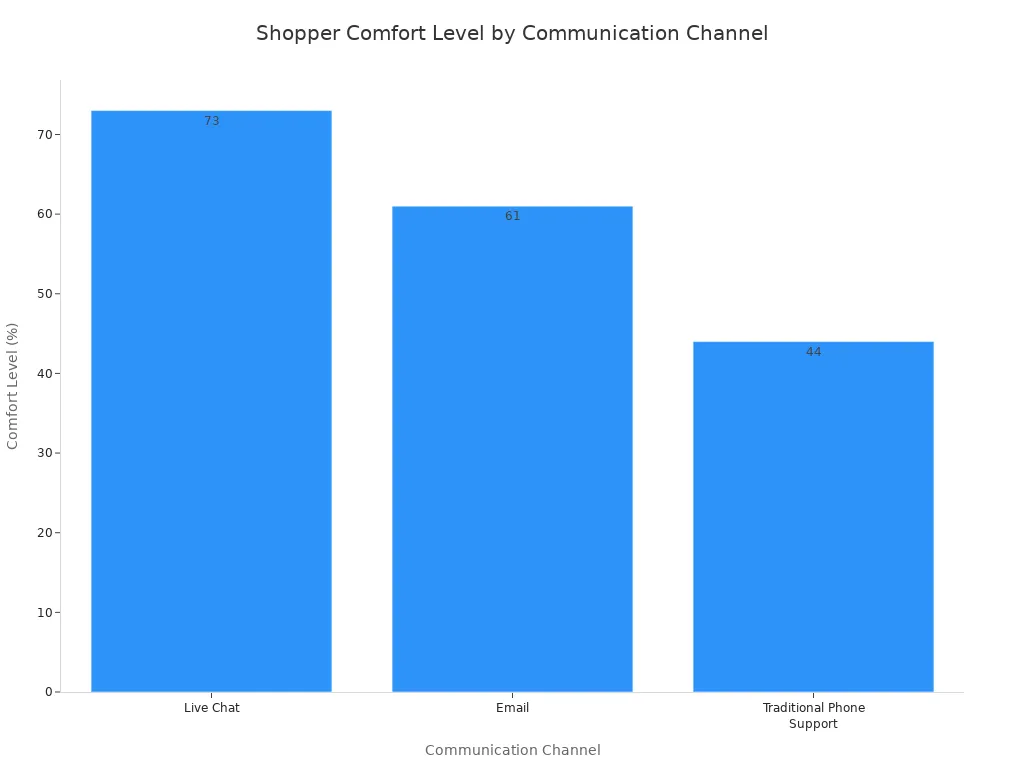
For New Stores: Your Shopify store comes with the free Shopify Inbox. We recommend you start with Shopify Inbox for simple customer chats and basic engagement.
For Growing Stores: Upgrade to an advanced solution like Sobot. It uses Sobot AI, powerful marketing tools, and full integration with services like the Sobot call center. This approach drives sales through enhanced marketing and customer engagement.
How to Add Chat in Shopify: Two Core Methods

You have two main paths for how to add chat in Shopify. You can use the built-in tool from Shopify or install a more powerful third-party app. Your choice will shape your customer service strategy.
The Native Option: Shopify Inbox
Your first option is Shopify Inbox. This is the free, native chat solution for your Shopify store. It integrates directly into your admin panel. Shopify Inbox is a great starting point for new businesses. It gives you essential tools to talk with customers.
Key features of Shopify Inbox include:
- Sending quick replies and sharing products or discounts in chat.
- Viewing items in a customer's cart during a conversation.
- Using basic automation for greetings and away messages.
While Shopify Inbox is easy to use, its features are limited. It works only within the Shopify ecosystem and lacks advanced visitor tracking.
The Advanced Option: Third-Party Apps
Your second option is installing an advanced third-party chat app. These apps offer powerful features that go far beyond basic chat. You gain access to tools designed for growing businesses that need to scale support and drive sales.
Advanced apps provide many capabilities that Shopify Inbox does not. These include:
- Omnichannel Support: Connect with customers on social media, WhatsApp, and email.
- Advanced Automation: Use comprehensive chatbot builders to handle complex queries 24/7.
- Deeper Integrations: Link your chat to CRM systems and other marketing tools.
These features help you create a unified and efficient customer support system across your entire business.
Making the Right Choice for Your Store
Choosing the right path depends on your store's size and goals. You need to compare cost, features, and your need for integration.
Consider Your Needs:
- New Stores: Start with the free Shopify Inbox. It provides core chat functions without any cost. You can engage customers and learn their common questions.
- Growing Stores: Upgrade to a third-party solution when you need more power. If you manage high chat volumes or want to use chat for marketing, an advanced app is the better choice for your Shopify store.
Ultimately, Shopify Inbox is a risk-free way to begin. You can always upgrade when your Shopify store's needs become more complex.
Method 1: Using Shopify Inbox
This section will guide you through the first method for how to add chat in Shopify. We will explore the native tool, Shopify Inbox. It is a great starting point for many stores.
What is Shopify Inbox?
Shopify Inbox is the free, built-in messaging tool from Shopify. Think of it as your central hub for customer communication. It is designed for merchants who are just starting out or have simple customer support needs. The tool unifies your customer interactions by bringing messages from your online store chat, Facebook Messenger, and email into a single dashboard within your Shopify admin. This integration helps you manage conversations without switching between different apps. Using Shopify Inbox allows you to keep your customer conversations organized and efficient from day one.
Key Features and Benefits
The features of Shopify Inbox are designed to help you sell more and build stronger customer relationships. You get a powerful set of tools at no cost.
- Unified Inbox: Manage messages from multiple channels in one place.
- Live Customer Insights: See what a customer has in their cart or has viewed on your Shopify store during a chat.
- Automated Messages: Set up instant answers, greetings, and away messages.
- Mobile App Support: Respond to any customer on the go from your phone.
- Order Lookup: Quickly find a customer's order details directly within the chat.
These features deliver real benefits. You can provide a personalized shopping experience, which helps build trust and boosts sales. By answering questions in real-time, you reduce customer uncertainty. This gives shoppers the confidence to make a purchase. Fast responses are critical for conversion.
Merchants that respond to a customer's chat within 5 minutes are 69% more likely to get a sale from the shopper.
Ultimately, Shopify Inbox helps you save time on customer support and turn conversations into conversions.
Setting Up Your Shopify Inbox
Getting started with Shopify Inbox is a straightforward process. You can have your chat widget live on your Shopify store in just a few minutes.
Here are the basic steps:
- Install the App: First, you will install the Shopify Inbox app from the Shopify App Store. It will automatically add the chat widget to your storefront.
- Customize Your Chat: Next, navigate to your Chat settings. Here, you can customize the chat button's color and position to match your brand. You can also write a friendly welcome message that every customer sees.
- Set Up Automated Messages: Finally, create instant answers for frequently asked questions. This allows your customers to get help 24/7, even when you are offline. Setting up Shopify Inbox is an easy win for your business.
Method 2: Advanced Chat on Shopify with Sobot

Shopify Inbox is a solid start. Your business may outgrow its basic functions. When you face high chat volumes or want to use chat for marketing, you need a more powerful solution. This is where an advanced chat app like Sobot comes in. It offers a robust feature set for scaling your Shopify store.
Why Upgrade to a Solution Like Sobot?
You might upgrade when you notice certain challenges. Basic chat tools often cannot provide 24/7 customer support. Your team may also feel overwhelmed by repetitive questions. An advanced solution solves these problems.
- AI chatbots can resolve up to 80% of common customer questions.
- Your team can focus on complex issues that require a human touch.
- You can scale instantly during peak sales periods without a drop in service quality.
Upgrading your customer communication tools helps you provide faster, more consistent answers. This directly improves customer satisfaction and supports your growing Shopify business.
Omnichannel Support and AI Features
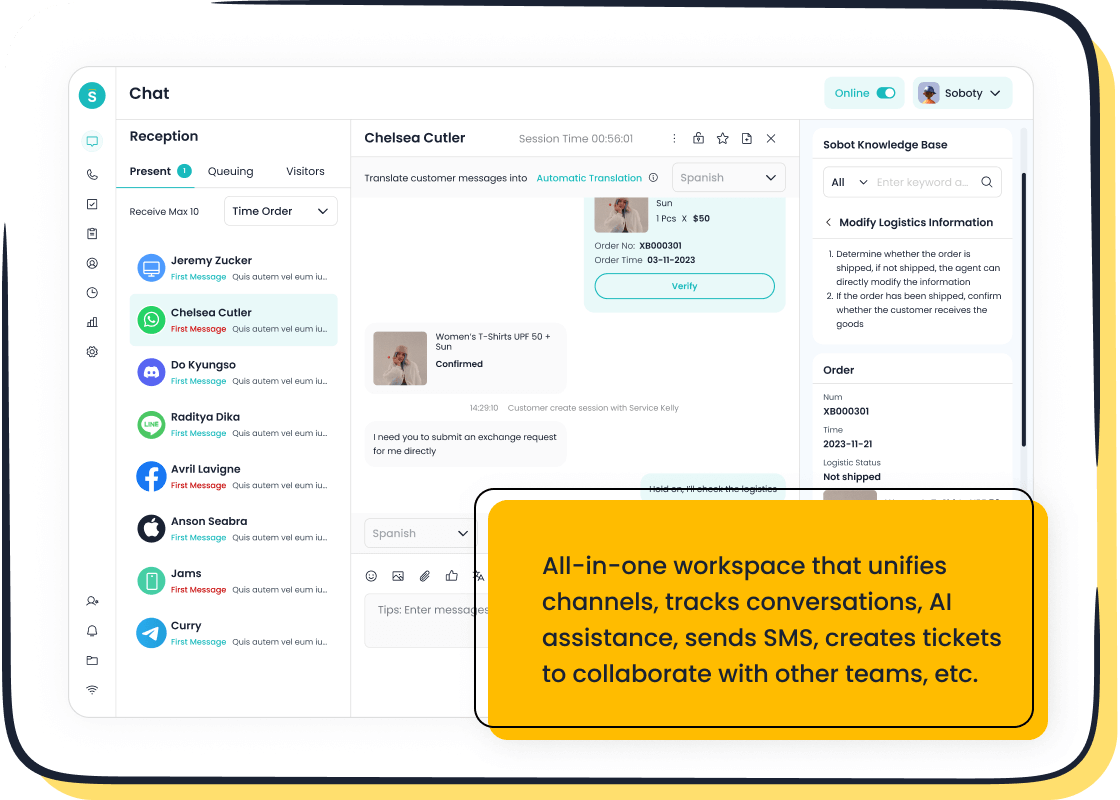
Sobot offers advanced features that transform your customer support. It provides a true omnichannel experience. You can manage customer interactions from your Shopify site, WhatsApp, and social media in one unified workspace. As an official WhatsApp Business Solution Provider (BSP), Sobot offers powerful integration for customer engagement.
This approach boosts your marketing efforts and drives sales. For example, luxury brand Michael Kors used Sobot to unify its customer service. They achieved a 95% customer satisfaction rate and saw a 20% increase in conversion rates. Sobot's AI-powered automation and analytics with over 150 indicators help your agents work more efficiently. This leads to better customer engagement and loyalty.
Pro Tip: Using AI-assisted tools can increase agent productivity by up to 70%. This frees up your team to focus on high-value customer interactions and marketing initiatives.
Installing a Third-Party App
Getting started with a powerful chat app on your Shopify store is simple. This is how to add chat in Shopify using a third-party solution.
- Go to the Shopify App Store.
- Search for "Sobot Live Chat".
- Click "Add app" to install it on your Shopify store.
- Follow the setup instructions to customize the widget and features.
You can start with a free trial to explore all the advanced features. This allows you to see the value before committing to a plan.
Key Comparison: Sobot vs. Native Shopify Chat
You need to choose the right chat tool for your Shopify store. The free Shopify Inbox offers a basic starting point. An advanced tool like Sobot provides a path to growth. This comparison will help you understand the key differences in cost, functionality, and integration.
Cost: Free vs. Value-Based Subscription
Your budget is a major factor in your decision. The two options have very different pricing models.
Shopify Inbox is completely free. It comes with your Shopify plan at no extra cost. This makes it an excellent choice if you have a limited budget or are just starting to explore customer communication. You get essential chat tools without any financial commitment.
Sobot uses a value-based subscription model. You pay a monthly fee that aligns with the features and power you receive. This investment is designed to generate a return through higher sales and better efficiency. Typical pricing plans for an advanced chat app often include:
- Basic Tier: A low-cost entry for essential features and a limited number of chats.
- Professional Tier: A mid-range plan with AI-powered responses, advanced analytics, and CRM integration for growing businesses.
- Enterprise Tier: A premium plan offering full functionality, unlimited conversations, and custom solutions for large-scale operations.
This structure allows you to choose a plan that matches your store's needs and scale up as your business grows.
Functionality: Basic Chat vs. AI-Powered Automation
Functionality is where you will see the biggest difference between the two tools. Your choice impacts your team's workload and your customer's experience.
Shopify Inbox provides manual chat. Your team must actively manage every conversation. Its automation is limited to basic auto-replies for greetings or away messages. The tool is reactive, meaning it can only respond after a customer sends a message. It cannot perform tasks like issuing discounts or proactively starting a conversation if a shopper is about to leave.
Sobot delivers AI-powered automation that transforms your customer engagement. Its AI is designed specifically for e-commerce. It can handle pre-sales questions 24/7, offer personalized product recommendations, and resolve post-sales issues. This frees up your team to focus on complex problems.
Did you know? 72% of shoppers expect instant service. AI chatbots meet this expectation by cutting down response times by up to 99%.
The impact on sales is significant. Stores using AI see much higher conversion rates than those without it.
| Scenario | Conversion Rate |
|---|---|
| E-commerce shoppers assisted by AI chatbots | 12.3% |
| E-commerce shoppers without AI chatbots | 3.1% |
This data shows that AI-driven engagement can lead to nearly four times more sales.
Integration: Shopify-Only vs. Full Martech Stack
A chat tool's ability to connect with your other software is crucial for creating a seamless operation. This is another area with major differences.
The Shopify Inbox integration is limited to the Shopify ecosystem. It works well within your Shopify admin but does not connect to external systems like a separate CRM or advanced marketing tools. It lacks a long-term memory of past customer interactions and cannot pull real-time data from your full product catalog or policies. This creates information silos.
Sobot offers deep integration and compatibility with your full marketing technology (martech) stack. You can connect it to your CRM, email marketing platform, and other systems. This creates a single, unified view of every customer. Better integration and compatibility allow you to:
- Personalize Marketing: Use chat data to send targeted emails and offers.
- Enhance Data Analysis: Extract deep insights from conversations to inform your business strategy.
- Automate Tasks: Let the system handle routine jobs like scheduling follow-ups.
This level of integration turns your chat app from a simple support tool into a central hub for customer engagement and business intelligence, improving your overall marketing efforts.
You now know how to add chat in Shopify using two methods. Your journey begins with Shopify Inbox. It is a no-risk starting point for your new Shopify store. Use the free Shopify Inbox to handle basic customer questions.
Upgrade your customer support when you see signs of growth, like more support tickets or new product features. A powerful tool turns your customer support into a sales engine, with some strategies boosting conversions by 3x. When you are ready to scale, explore Sobot's free trial to enhance your Shopify customer experience.
FAQ
Is Shopify Inbox really free?
Yes, Shopify Inbox is completely free. It comes included with your Shopify plan. You can install and use its core chat features without any extra cost. This makes it a great starting point for new stores.
How long does it take to set up a chat widget?
You can set up a basic chat widget in minutes. Both Shopify Inbox and third-party apps like Sobot have simple installation processes. You just add the app and customize a few settings to go live.
What does omnichannel support mean for my store?
Omnichannel support lets you talk to customers on many platforms from one place. You can manage chats from your website, WhatsApp, and social media in a single dashboard. This creates a unified experience for your team.
Can a chat app really increase my sales?
Yes, chat apps can boost sales. They let you answer customer questions instantly, reducing hesitation. Advanced tools like Sobot use AI to recommend products and recover abandoned carts, turning conversations into conversions.
See Also
Integrate Live Chat: A Comprehensive Guide to Website Communication
Boost Shopify Revenue: Leverage Live Chat for Customer Engagement
Mastering Shopify Live Chat: Ten Essential Steps for Support
Top 12 Live Chat Applications to Elevate Your Shopify Store
Optimizing Retail: Implementing Shopify Live Chat for Industry Growth

