Top Omnichannel Customer Service Tools for 2026

Here are top picks from the best tools for customer service:
- Best Overall: Zendesk
- Best All-in-One Contact Center: Sobot
- Best for CRM Integration: HubSpot Service Hub
Omnichannel customer service unifies channels into one conversation, creating a unified customer experience. This differs from multichannel, where the service experience is fragmented. A unified customer service platform is essential for a superior customer experience. The right customer service software with strong integration delivers true omnichannel support. This guide shows how to achieve omnichannel customer service. This approach boosts customer satisfaction. Excellent customer support and omnichannel support are vital. This is why omnichannel customer support is a top priority for any service. These omnichannel tools help deliver this critical customer service, a key service for success.
Top 10 Omnichannel Platforms: At a Glance

Choosing the right software is crucial for delivering exceptional omnichannel customer service. The best customer support platforms unify communications into a single, manageable view. This summary compares the leading customer service software options. It helps you quickly evaluate which service best aligns with your operational goals.
Tool
Best For
Key Features
Starting Price
| Tool | Best For | Key Features | Starting Price |
|---|---|---|---|
| Zendesk | All-around performance and scalability | • Open CRM platform (Sunshine) • Deep reporting on CSAT & FRT • Massive app ecosystem | Starts at $55/agent/month |
| HubSpot Service Hub | Teams using the HubSpot ecosystem | • Seamless marketing, sales & service integration • Real-time customer status sync • Proactive service tools | Starts at $45/month |
| Sobot | All-in-one contact center needs | • Official WhatsApp BSP • Powerful Voice/Call Center • AI-driven automation & unified workspace | Contact Sales |
| Freshdesk | SMBs needing an intuitive interface | • Intuitive UI • Gamification for agents • Strong knowledge base management | Free plan available |
| Zoho Desk | Businesses in the Zoho ecosystem | • High cost-efficiency • Contextual AI (Zia) for suggestions • Instant integration with other Zoho apps | Free plan available |
| Intercom | Conversational and proactive support | • Excellent chat widgets • Proactive in-app messaging • Strong focus on conversational support | Starts at $39/seat/month |
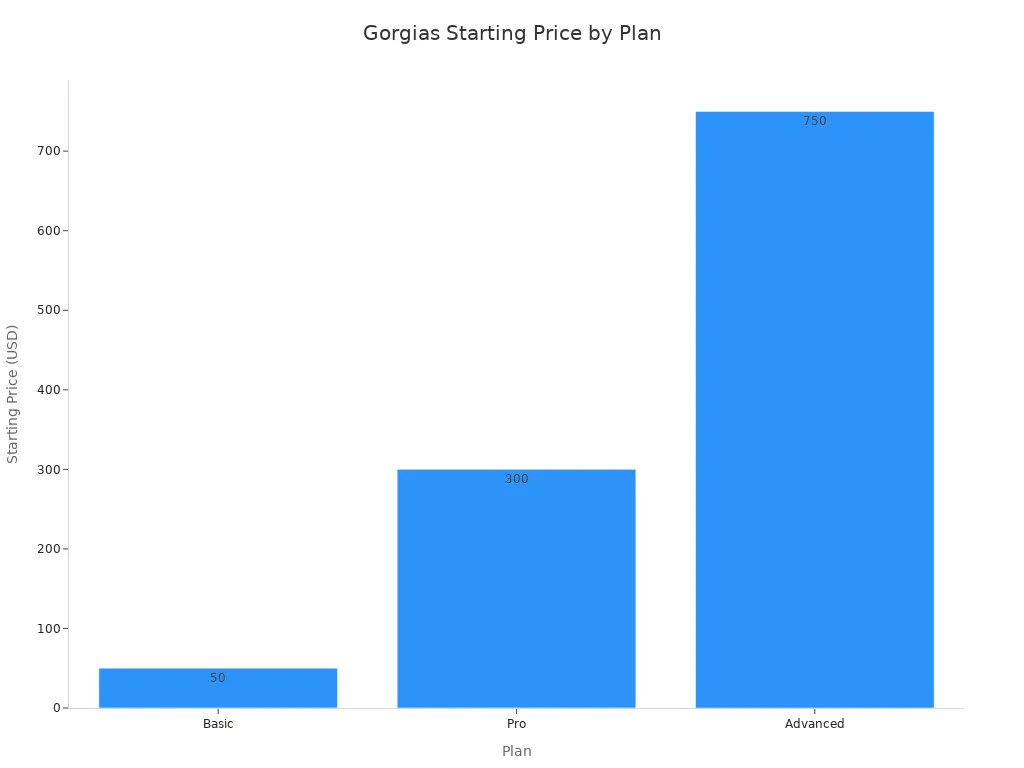
| Gorgias | E-commerce brands (especially Shopify) | • Deep Shopify integration • Social media comment management • Automation for e-commerce queries | Starts at $50/month |
| Salesforce Service Cloud | Large enterprises needing deep CRM | • Unified customer data (360-degree view) • Einstein AI for response recommendations • Native Salesforce CRM integration | Starts at $25/user/month |
| Jotform AI Agents | AI-powered automation | • No-code AI agent builder • Connects to your knowledge base • Handles customer queries 24/7 | Starts at $39/month |
| Kustomer | Businesses needing a customer-centric view | • Timeline view of customer history • Merges data from multiple systems • Focus on a single customer view | Starts at $89/user/month |
Note: Pricing models vary. Many platforms offer different tiers with advanced features. Always check the provider's official website for the most current information. This table provides a starting point for your omnichannel customer service journey.
The 10 Best Omnichannel Customer Service Tools for 2026
A deep dive into the top platforms reveals how each one addresses the unique challenges of modern customer support. The right customer service software can transform your operations. It turns every interaction into a seamless part of the customer journey. This section breaks down the best customer service platforms to help you find the perfect fit.
Zendesk
- Best For: Large businesses and enterprises needing a scalable, customizable, and powerful customer service management system.
- Key Features:
- Zendesk Sunshine: An open and flexible CRM platform built on AWS. It allows businesses to connect and understand all their customer data.
- Advanced Analytics: Provides deep reporting on key metrics like Customer Satisfaction (CSAT) and First Reply Time (FRT).
- Extensive App Marketplace: Offers a massive ecosystem of integrations to extend the platform's functionality.
- AI-Powered Tools: Utilizes AI for efficient ticket routing, macro suggestions, and powering self-service options.
- Pros:
- Zendesk is often seen as the gold standard in the helpdesk industry. It offers a mature and reliable product.
- Its platform is highly scalable. It supports agile teams and cross-team collaboration in large organizations.
- It ensures elevated data security and compliance, which is critical for enterprise-level operations.
- Cons:
- The pricing can become expensive, especially for smaller teams or when adding more advanced features.
- The sheer number of features and configuration options can be overwhelming for new users.
- Full omnichannel capabilities often require higher-tier plans.
- Pricing: Suite Team plan starts at $55 per agent per month (billed annually).
HubSpot Service Hub
- Best For: Businesses of all sizes already invested in the HubSpot ecosystem, seeking to unify their sales, marketing, and service data.
- Key Features:
- Unified CRM Platform: Seamlessly integrates with HubSpot's Marketing, Sales, and CMS Hubs for a complete view of the customer.
- Powerful Automation: Uses AI-powered ticket routing and pre-configured workflows to manage follow-ups, escalations, and SLAs.
- Omnichannel Communications: Combines channels like email, live chat, and social media into a shared inbox. It also includes AI chatbots and a customer portal for self-service.
- Service Analytics: Offers customizable reports and dashboards to gain insights into service performance.
- Pros:
- The native integration with HubSpot CRM provides agents with complete customer context for highly personalized support.
- A robust free plan offers significant functionality, including contact management, ticketing, and email integration.
- The platform is known for its intuitive interface, which requires minimal training for new team members.
- Cons:
- Paid plans can become costly as your team grows, particularly at the Professional and Enterprise levels.
- The extensive feature set can feel overwhelming for small teams without a dedicated administrator.
- Phone support and more advanced features often require higher-tier plans or additional integrations.
- Pricing: Starts at $45 per month for two users. A comprehensive free plan is also available.
Sobot
- Best For: Businesses seeking a true all-in-one contact center solution with powerful AI, voice, and global messaging capabilities.
- Key Features:
- Official WhatsApp BSP: As an official WhatsApp Business Solution Provider, Sobot enables scalable customer engagement and support on the world's most popular messaging app.
- Powerful Voice/Call Center: Features an intelligent IVR, AI-powered voicebot, smart call routing, and a unified workspace for agents to manage inbound and outbound calls globally.
- AI-Driven Automation: The AI Agent and chatbot handle customer queries across text and voice channels, reducing agent workload and providing 24/7 support.
- Unified Omnichannel Dashboard: Consolidates interactions from live chat, email, social media, voice, and WhatsApp into a single, cohesive view for agents.

A True All-in-One Solution Sobot stands out by integrating a complete suite of tools into one platform. This includes a sophisticated chatbot, an advanced AI Agent for humanlike conversation, live chat, a robust ticketing system, and a full-featured call center. This integrated approach eliminates the need for multiple disconnected systems, creating a truly seamless omnichannel customer support experience.
- Pros:
- Drives significant improvements in customer satisfaction. For example, client Opay increased its CSAT from 60% to 90% after implementing Sobot.
- Enhances operational efficiency and reduces costs through extensive automation and a unified agent workspace.
- Provides a stable and scalable infrastructure with 99.99% uptime, supporting global teams with reliable service.
- Pricing: Sobot's pricing is provided through a custom quote. You can contact their sales team for a detailed proposal tailored to your business needs.
Freshdesk
- Best For: Small to mid-sized businesses (SMBs) and enterprises looking for an intuitive, feature-rich customer service software that is easy to deploy.
- Key Features:
- Multi-Channel Support: Manages customer interactions from email, phone, live chat, social media, and messaging apps in one place.
- AI-Powered Features (Freddy AI): Offers chatbot automation, agent assists, and proactive support suggestions.
- Agent Productivity Tools: Includes features like gamification, canned responses, and scenario automation to boost agent efficiency.
- Knowledge Base Management: Allows for the creation of comprehensive self-service options for customers.
- Pros:
- The user interface is clean, modern, and highly intuitive, making it easy for teams to get started.
- Offers a generous free plan that is suitable for very small businesses or startups.
- Serves a wide variety of industries, from e-commerce and SaaS to healthcare and education.
- Cons:
- Accessing true omnichannel features requires a significant price jump from standard plans to the "Omnichannel" suite.
- Some users report that customer support can be slow to respond.
- Advanced customization can be limited compared to more enterprise-focused platforms.
- Pricing: A free plan is available. Paid plans start at $15/agent/month, with omnichannel plans starting at $29/agent/month.
Zoho Desk
- Best For: Businesses of any size that are already using or planning to use the Zoho suite of applications.
- Key Features:
- Deep Zoho Ecosystem Integration: Connects natively with over 50 other Zoho apps, including Zoho CRM, Books, and Projects, for a unified business operating system.
- Contextual AI (Zia): Zia, Zoho's AI assistant, provides agents with response suggestions, analyzes customer sentiment, and automates routine tasks.
- Multichannel Ticketing: Manages tickets from email, social media, live chat, web forms, and phone calls within a single customer service management system.
- Customizable Self-Service Portal: Empowers customers to find answers themselves through a knowledge base, community forums, and ticket tracking.
- Pros:
- Extremely cost-effective, offering powerful features at a very competitive price point.
- The integration with Zoho CRM provides a 360-degree view of the customer, blending sales and support data.
- Highly customizable, allowing businesses to tailor workflows, reports, and layouts to their specific needs.
- Cons:
- The user interface can feel dated and less intuitive compared to some modern competitors.
- The sheer number of settings and options can be complex to configure without dedicated resources.
- The best experience is achieved when deeply integrated into the Zoho ecosystem, which may not suit all businesses.
- Pricing: A free plan is available for up to 3 agents. Paid plans start at $14/agent/month.
Intercom
- Best For: SaaS and web-based businesses focused on proactive customer engagement and conversational support.
- Key Features:
- Proactive Messaging: Triggers targeted messages, product tours, and announcements based on user behavior.
- AI Chatbot (Fin): An advanced AI agent that can resolve up to 50% of common support questions instantly using your knowledge base.
- Business Messenger: A highly customizable chat widget for websites and apps that supports rich media and integrations.
- Shared Inbox: A collaborative inbox for teams to manage conversations from live chat, email, and social media.
- Pros:
- Excellent for real-time customer engagement and lead generation directly within your product or website.
- Powerful automation and AI capabilities help scale support and marketing efforts effectively.
- Features a clean, modern user interface that provides a great experience for both agents and customers.
- Cons:
- The pricing model is complex and can become very expensive, with charges per seat plus usage-based fees for messages and AI resolutions.
- Its traditional ticketing and reporting features are less robust than dedicated customer support platforms.
- The platform can have a steep learning curve for mastering its advanced workflow and automation features.
- Pricing: Starts at $39 per seat per month. Usage-based fees for AI and proactive messages apply.
Gorgias
- Best For: E-commerce brands, especially those built on Shopify, BigCommerce, and Magento.
- Key Features:
- Deep E-commerce Integration: Pulls customer order data, shipping information, and conversation history directly into the agent view.
- Social Media Management: Allows agents to respond to comments, mentions, and direct messages on platforms like Facebook, Instagram, and TikTok.
- Automation Rules: Uses macros and rules to automate responses to common questions like "Where is my order?".
- Revenue Generation Tools: Tracks revenue generated from customer support interactions through chat and SMS campaigns.
- Pros:
- Specifically designed to meet the unique needs of e-commerce businesses, streamlining common workflows.
- The ability to edit orders, issue refunds, and manage subscriptions directly from the helpdesk saves significant time.
- Centralizes all digital channels into one unified platform, increasing agent productivity.
- Cons:
- The pricing structure, based on ticket volume, can be expensive for small businesses or those with high inquiry rates.
- The initial setup process can be overwhelming for new users without technical assistance.
- Lacks some of the advanced reporting and analytics features found in more general-purpose customer support solutions.
- Pricing: Pricing is based on ticket volume. The Basic plan starts at $50/month for 300 tickets.
Salesforce Service Cloud
- Best For: Large enterprises and organizations that are already using the Salesforce CRM.
- Key Features:
- 360-Degree Customer View: Provides a complete, unified view of every customer by integrating seamlessly with Salesforce Sales Cloud and Marketing Cloud.
- Einstein AI: Leverages AI for case classification, response recommendations, and chatbot automation.
- Omni-Channel Routing: Intelligently routes cases from any channel to the right agent based on skills and availability.
- Field Service Management: Offers tools for managing mobile workers, appointments, and work orders in the field.
- Pros:
- Unmatched integration with the Salesforce ecosystem, creating a powerful, unified platform for customer data.
- Highly scalable and customizable to meet the complex needs of large, global enterprises.
- Robust reporting and analytics capabilities provide deep insights into every aspect of the service operation.
- Cons:
- Can be very expensive and complex to implement, often requiring certified consultants.
- The interface can feel cluttered and less intuitive than more modern solutions.
- Overkill for small and mid-sized businesses that do not need its extensive enterprise-grade features.
- Pricing: Starts at $25 per user per month (billed annually).
Jotform AI Agents
- Best For: Businesses looking for a no-code solution to build custom AI agents for automated customer service.
- Key Features:
- No-Code AI Builder: Allows anyone to create and deploy an AI chatbot without writing a single line of code.
- Knowledge Base Integration: Connects directly to your website, documents, or help guides to provide accurate, context-aware answers.
- 24/7 Availability: Handles customer queries around the clock, reducing the need for live agent intervention for common questions.
- Seamless Handoff: Can escalate complex conversations to human agents when necessary.
- Pros:
- Extremely easy to set up and deploy, making AI-powered support accessible to non-technical users.
- Cost-effective way to provide instant, 24/7 self-service options for customers.
- Integrates with Jotform's powerful form and data collection tools.
- Cons:
- Not a full omnichannel customer support platform; it focuses solely on AI chat automation.
- Lacks the deep ticketing, reporting, and agent management features of a complete helpdesk.
- Its capabilities are limited by the quality and scope of the knowledge base it is trained on.
- Pricing: Starts at $39 per month.
Kustomer
- Best For: Customer-centric businesses that want to move beyond traditional tickets and focus on a holistic view of the customer journey.
- Key Features:
- Customer Timeline View: Replaces isolated tickets with a single, unified timeline of every customer interaction, order, and event.
- Native CRM Foundation: Built on a data-first architecture that unifies customer data from multiple systems like Shopify and Salesforce.
- AI-Powered Resolution: Uses rich contextual data to autonomously resolve complex issues and provide proactive support.
- Open and Customizable: Offers over 60 plug-and-play apps and custom integration services to tailor the platform.
- Pros:
- The timeline view provides agents with a complete customer picture, enabling more personalized and efficient service.
- Excellent at consolidating data from disconnected systems into one central platform.
- Powerful reporting and analytics give full visibility into customer insights and agent performance.
- Cons:
- The pricing is on the higher end, making it less accessible for small businesses.
- Some users report that the platform can be slow to load at times.
- Implementation can be complex, especially when integrating multiple custom data sources.
- Pricing: Starts at $89 per user per month.
How to Achieve Omnichannel Customer Service With the Right Tool

Selecting the right tool is the foundation of a successful strategy. This process shows how to achieve omnichannel customer service effectively. It involves a careful evaluation of features, scalability, and cost. A methodical approach ensures your chosen software delivers a true unified customer experience.
Evaluate Core Features for Omnichannel Customer Support
The first step in how to achieve omnichannel customer service is to assess core platform features. Your chosen customer service software must provide a single, unified conversation timeline. This gives agents a complete history of every interaction. Intelligent routing is also essential. The system should direct conversations based on customer data and agent skills. This creates better cross-channel experiences. Look for robust self-service options to empower users. This is a key part of omnichannel customer support.
Consider Scalability and Integration
Your business will grow. Your customer support solutions must grow with it. Consider if the software can handle increasing interaction volumes. The ease of integration is another critical factor for the customer journey. A platform must connect seamlessly with your existing tools.
Key integrations include:
- CRM: Salesforce, HubSpot
- Payments: Stripe, PayPal
- Analytics: Google Analytics, Hotjar
- Marketing Automation: Klaviyo, Marketo
This level of integration is fundamental to how to achieve omnichannel customer service.
Assess AI's Impact on Customer Experience
AI is transforming customer service and customer engagement. AI chatbots can now handle a large volume of interactions. They provide 24/7 support and effective self-service options. This improves the overall customer experience. AI also performs sentiment analysis on support conversations. This provides valuable feedback for coaching your customer support team. This technology is a powerful component of how to achieve omnichannel customer service.
Analyze Reporting and Analytics
You cannot improve what you do not measure. Actionable analytics are crucial for omnichannel customer support. Your customer service platforms should track the entire customer journey. This provides a clear view of the service experience. Key metrics to monitor include:
- First Contact Resolution (FCR)
- Average Handle Time (AHT)
- Customer Satisfaction (CSAT) by channel
This data helps you refine your omnichannel support strategy and improve customer satisfaction. This analysis is how to achieve omnichannel customer service excellence.
Calculate the Total Cost of Ownership
The final step is to calculate the total cost of ownership (TCO). The price of the software is only one part of the equation. You must also account for other expenses. Hidden costs often include employee training, data migration, and integration fees. A comprehensive TCO analysis covers a 3-5 year period. This ensures your investment in an omnichannel customer service platform is sustainable. This financial planning completes your customer experience management strategy.
Choosing the right customer service software is crucial for your business. Your selection will define your omnichannel customer service capabilities. This decision directly impacts the customer experience and your team's efficiency.
- For an all-around powerful and scalable service, Zendesk remains a top contender.
- For a true all-in-one contact center with strong WhatsApp integration, Sobot provides a compelling omnichannel solution.
- For teams in the HubSpot ecosystem, Service Hub is the seamless choice.
Use the criteria from this guide to audit your needs. Select the customer service platform that will elevate your customer service experience. Contact sales for a demo to see the software in action.
FAQ
What is the main goal of omnichannel customer support?
The primary goal of omnichannel customer support is to create a single, unified customer experience. This service approach connects all touchpoints. It ensures a seamless conversation, regardless of the channel the customer uses. This consistent service improves satisfaction.
How does omnichannel support benefit my business?
Omnichannel support boosts agent efficiency and customer loyalty. This service model provides a complete customer history. Agents resolve issues faster. This improved experience leads to higher retention. Your customer service becomes a significant advantage.
Can small businesses implement an omnichannel strategy?
Yes, small businesses can adopt an omnichannel strategy. Many modern software platforms offer scalable plans. A good software choice makes this service accessible. Start by unifying your most popular channels to build a strong foundation for omnichannel customer support.
What is the first step to building an omnichannel service?
The first step is mapping your customer journey. Understand how customers interact with your brand across different channels. This analysis helps you choose the right customer service software. It ensures your new service strategy meets customer expectations effectively.
See Also
Your Essential Guide to Modern Omnichannel Call Center Platforms
Implementing Omnichannel Contact Centers: A 10-Step Success Blueprint
Reviewing the Best Contact Center Solutions Available in 2024

