Helpdesk Comparison Made Easy for Customer Contact Centers

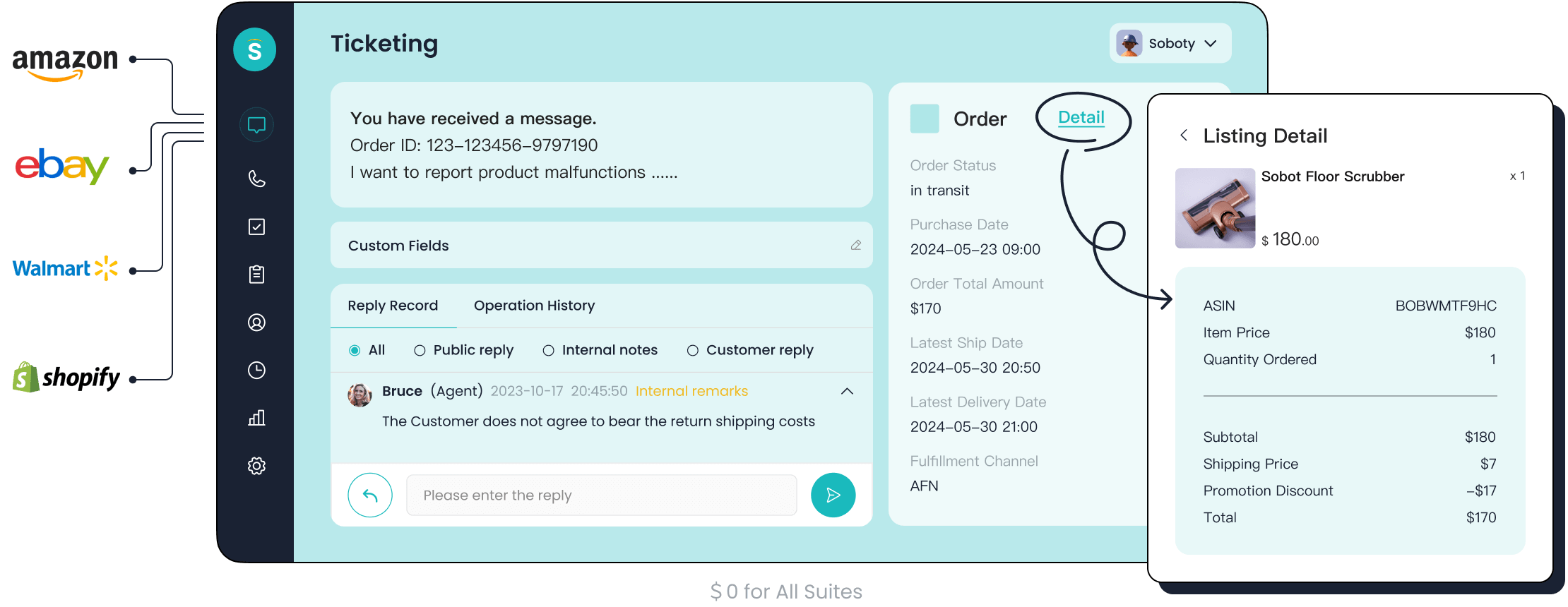
You can make helpdesk comparison easy by using a simple checklist or a table that lists the features you need. Help desk software manages customer inquiries and helps your team deliver high-quality customer service. When you choose the best help desk software, you see improved customer satisfaction and a better customer experience. The right help desk solution, like Sobot, gives you faster responses and smooth customer support. See the table below for real results:
| Metric | Improvement Description |
|---|---|
| Average Resolution Time (ART) | 24/7 service desk operations significantly reduce resolution times by eliminating overnight delays. |
| Customer Satisfaction Scores (CSAT) | Quick and consistent support leads to higher customer ratings, especially outside of regular hours. |
| First Call Resolution (FCR) | Increased availability allows for instant ticket resolution, minimizing repeat calls. |
Choosing wisely means you deliver improved customer satisfaction and a great customer experience every time.
What Is Help Desk Software
Definition And Purpose
Help desk software helps you manage customer inquiries and support requests in your contact center. You use it to resolve incidents and service requests quickly. This software organizes all customer questions from email, chat, phone, and social media in one place. You can track each issue, automate routine tasks, and improve your team’s productivity. Help desk software is different from service desk platforms. You focus on customer support, not advanced IT service management. You use help desk software to handle tickets, optimize workflows, and deliver better service. It supports your contact center by making it easier to respond to customers and solve problems.
Why Contact Centers Need It
You need help desk software in your contact center to keep everything running smoothly. It helps you manage inquiries, assign tickets, and automate workflows. You can work with your team to resolve issues faster. You use self-service portals to let customers find answers on their own. Help desk software connects with your IT support systems and gives you reporting tools to monitor performance. You build a knowledge base to store solutions for common problems. AI integration helps you categorize and prioritize tickets, reducing manual work.
| Function | Description |
|---|---|
| Managing inquiries | Organizes customer inquiries from all channels in one place. |
| Ticketing and tracking | Creates tickets for each request and tracks progress. |
| Automating workflows | Assigns and prioritizes tickets automatically. |
| Collaboration | Lets your team work together on tickets. |
| Self-service portals | Offers customers ways to solve issues themselves. |
| Integration | Connects with IT support systems for seamless operations. |
| Reporting and analytics | Monitors performance and finds areas to improve. |
| Knowledge base | Stores solutions for recurring problems. |
| AI integration | Uses AI to automate ticket categorization and prioritization. |
Sobot’s Role In Customer Service
Sobot gives you a complete help desk software solution for your contact center. You use Sobot’s chatbot, AI Agent, live chat, call center, voicebot, and integrated ticketing system to handle customer support. Sobot’s AI-powered chatbots automate responses, reducing wait times. You offer omnichannel support, so customers can reach you through email, chat, phone, or social media. Sobot uses data analysis to help you understand customer needs and improve interactions. You benefit from a unified workspace that brings all customer information together. Sobot’s help desk software helps you deliver fast, efficient, and reliable IT support every day.
- Sobot’s chatbots automate responses and reduce wait times.
- You use omnichannel support to connect with customers on any platform.
- Data analysis helps you improve customer interactions and satisfaction.
Key Features For Helpdesk Comparison
When you start a helpdesk comparison, you need to focus on the key features that matter most for your contact center. The right help desk software gives you tools to manage tickets, automate tasks, connect with other systems, and measure performance. Here are the main features you should compare:
Ticketing And Automation
You want help desk software that makes ticket management simple. Ticketing features let you track every customer request from start to finish. Automation helps you assign tickets to the right agent and close cases faster. With automation, you can save up to 30% on costs and handle 80% of routine questions without human help. Sobot’s Ticketing System uses smart rules to route tickets and send reminders, so your team can focus on complex issues. This means you give customers quicker answers and reduce wait times.
Integrations And Omnichannel
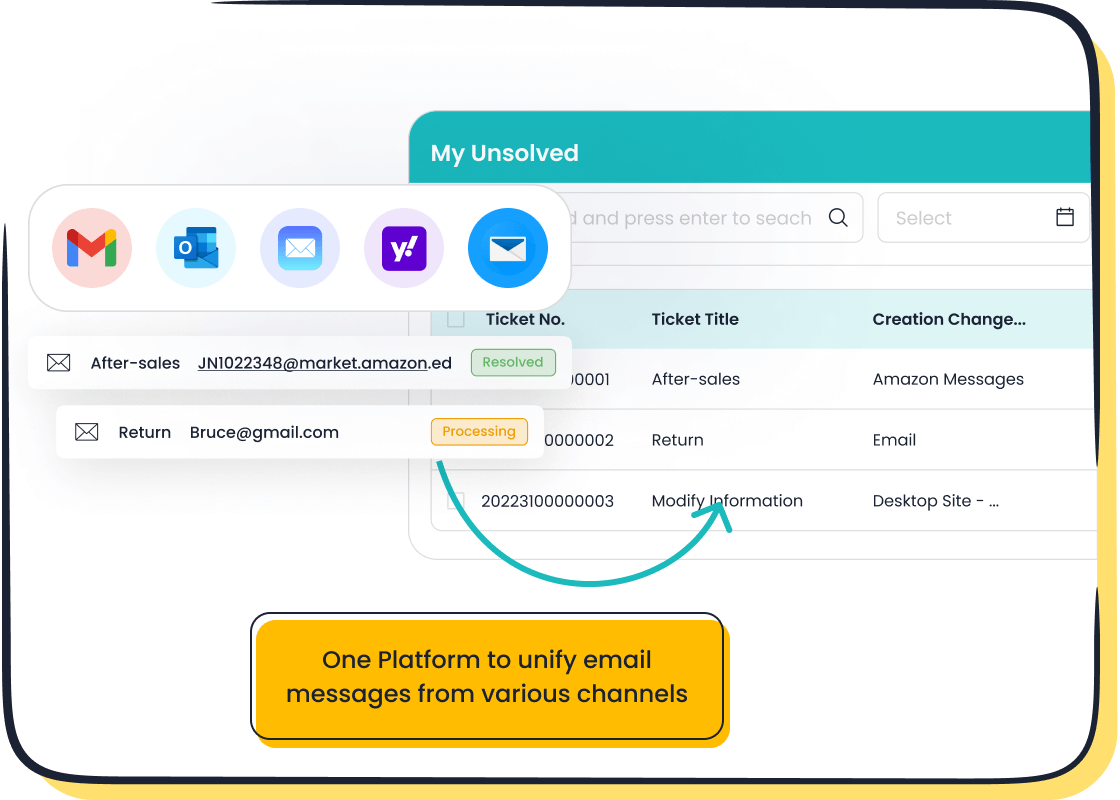
Integration is a must-have feature for any helpdesk comparison. You need your help desk software to connect with tools like CRM, e-commerce, and communication platforms. Omnichannel support lets you manage email, chat, phone, and social media in one place. Sobot’s platform brings all channels together, so you never miss a message. This unified approach helps you deliver a smooth customer experience and keeps your team organized.
| Feature | Description |
|---|---|
| Integrations | Connects with business apps like CRM, e-commerce, and communication tools. |
| Omnichannel | Handles all customer messages from different channels in one workspace. |
Analytics And Reporting
Analytics and reporting features help you see how your team is doing. You can track response times, resolution rates, and customer satisfaction. With good analytics, you spot trends and make better decisions. Sobot’s Ticketing System gives you real-time dashboards and custom reports. You use these tools to find areas for improvement and keep your service levels high.
AI And Self-Service
AI and self-service features make your help desk software smarter. AI chatbots answer common questions any time of day. Self-service options like a knowledge base let customers solve problems on their own. This reduces your team’s workload and boosts customer satisfaction. Sobot’s AI-powered chatbots and multilingual support help you serve a global audience. Companies like OPPO saw a 93% satisfaction score and faster resolutions after using these tools.
Sobot Ticketing System Highlights
Sobot’s Ticketing System stands out with its easy setup, point-and-click builder, and 24/7 support. You get proactive engagement, automated lead generation, and seamless handoff between AI and human agents. The system supports multiple languages and merges all customer info in one place. These features help you deliver fast, accurate, and friendly service every time.
Tip: When you do a helpdesk comparison, use a checklist to see which key features each solution offers. This makes it easy to find the best fit for your contact center.
Helpdesk Comparison Steps
Choosing the best help desk software for your contact center starts with a clear plan. You need to follow a step-by-step process to make your helpdesk comparison easy and effective. This section guides you through each step, helping you find a help desk solution that improves customer satisfaction, service desk operations, and scalability.
Assess Your Needs
You begin your helpdesk comparison by understanding what your team needs. You look at your current service desk processes and identify gaps. You gather feedback from your team to see where improvements are needed. You measure your resources, including your team’s capacity and budget. You collect internal information by asking specific questions about issue resolution and customer inquiries. You also gather external information using customer questionnaires and focus groups. You use this data to create a report and action plan.
Step-by-step needs assessment:
- Identify your team’s needs. Ask your team about the gaps between current and ideal service desk processes.
- Measure and allocate resources. Check your team’s capacity and budget for new help desk software.
- Collect internal information. Gather data on how to address gaps in issue resolution and customer satisfaction.
- Gather external information. Use customer questionnaires and focus groups to get a broader view of customer inquiries.
- Use your data. Compile insights into a report and action plan for your helpdesk comparison.
Before you select a help desk solution, you must assess operational requirements and customer support dynamics. You look at the nature of support requests and make sure the software can handle current and future demands. Sobot makes this step easy by offering consultation and needs analysis for contact centers. You can visit Sobot’s official website for more details.
Tip: Involve your team and customers in the assessment process. Their feedback helps you find the best help desk software for your contact center.
Create A Feature Checklist
You create a feature checklist to guide your helpdesk comparison. You analyze your business and customer service needs. You identify which features are essential and which can be omitted to avoid unnecessary costs. Essential features include SLA management, ticket management, and a knowledge base. These features help you deliver effective customer support and improve customer satisfaction.
| Feature Category | Example Criteria |
|---|---|
| Analytics & Reporting | Reporting tools to track metrics |
| Alerts | Notifications for important events |
| Customer Review | Feedback and rating systems |
| Customization | Ability to tailor the software |
| Dashboards | Visual summary of key data |
| Document Storage | Repository for files and docs |
| Email Integration | Handling support emails |
| Escalation | Automatic ticket escalation |
| Interaction Tracking | Monitoring customer interactions |
| Knowledge Base | Self-service information portal |
| Live Chat | Real-time customer chat support |
| Multi-Channel | Support across various platforms |
| Multilingual | Support for multiple languages |
| Response Template | Predefined reply formats |
| SLA | Service level agreement tracking |
| Ticketing Management | Organizing and managing tickets |
You use this checklist to compare features across different service desk platforms. Sobot’s Ticketing System includes all these features, plus advanced automation, multilingual support, and seamless integration with e-commerce platforms. You can find more information about Sobot’s features at Sobot Ticketing System.
Note: A feature checklist helps you focus on what matters most. You avoid paying for unnecessary features and ensure your help desk software meets your criteria.
Shortlist And Compare
You start your helpdesk comparison by creating an initial list of help desk software providers. You check each provider’s features, pricing, and scalability. You evaluate each help desk solution based on your specific requirements. You narrow your shortlist to the platforms that meet all your criteria.
Steps to shortlist and compare:
- Create a list of help desk software providers.
- Check features, pricing, and scalability for each service desk platform.
- Evaluate providers based on your needs and criteria.
- Narrow your shortlist to the best help desk software options.
You look for user-friendly solutions that are quick to set up. You consider the type of customer experience you want to provide. You test integrations with your existing systems. You clarify your operating model to find suitable platforms. You measure quality metrics like time-to-resolution and user sentiment. Sobot stands out for easy implementation, fast onboarding, and strong support. You can see how Sobot compares to other platforms by using a comparison table or checklist.
| Provider | Features | Pricing | Scalability | Customer Satisfaction | Service Desk Setup |
|---|---|---|---|---|---|
| Sobot | All-in-one, AI, omnichannel | Flexible plans | High | 94%+ satisfaction | Easy, fast |
| Zendesk | Omnichannel, analytics | Tiered plans | High | 90% satisfaction | Moderate |
| Intercom | Chat, automation | Custom plans | Medium | 88% satisfaction | Moderate |
Tip: Use a comparison table to see differences in features, pricing, scalability, and customer satisfaction. This makes your helpdesk comparison clear and actionable.
Evaluate Usability And Cost
You evaluate usability and cost to make your helpdesk comparison complete. You check if the help desk software is easy to use and quick to set up. You look at the pricing model to see if it fits your budget and business needs. You consider hidden costs like setup fees, training, and data migration. You check if the software supports scalability for future growth.
| Pricing Model | Description |
|---|---|
| Per Agent / Per User Pricing | Charges per active user or agent each month. Good for small to medium-sized businesses. |
| Usage-Based (Pay-As-You-Go) | Charges based on actual usage. Suitable for businesses with fluctuating call volumes. |
| Concurrent Agent Licensing | Charges based on agents logged in at the same time. Perfect for shift-based operations. |
| Enterprise Custom Plans | Tailored packages for large-scale operations. Includes advanced integrations and custom SLAs. |
| Hidden Costs | Setup fees, training, and data migration. These can impact overall pricing. |
You check if the help desk software offers flexible pricing and supports scalability. Sobot provides transparent pricing with no hidden fees. You can choose from per agent, usage-based, or custom enterprise plans. Sobot’s service desk platform supports easy scaling as your business grows. You can learn more about Sobot’s pricing at Sobot Pricing.
Callout: Always check for hidden costs. Transparent pricing helps you avoid surprises and plan your budget.
Trial And Implementation
You test the help desk software before making a final decision. You start with a pilot to prove value and ensure safety in every rollout. You score candidates using a rubric that considers frequency, cost per contact, integration effort, and customer risk. You treat each rollout like a controlled release with defined SLO bands and automated alerts for monitoring. You design a 30-day training path for agents, focusing on shadowing, coaching, and live handling. You map the problem, data, and people involved. You move in staged waves: assess, prioritize, pilot, harden, scale, and govern.
Best practices for trial and implementation:
- Start small with a pilot. Prove value and ensure safety.
- Score candidates quantitatively using a rubric.
- Treat rollout as a controlled release with monitoring.
- Train agents with a 30-day micro-credential path.
- Map the problem, data, and people involved.
- Move in staged waves: assess, prioritize, pilot, harden, scale, and govern.
Sobot makes implementation easy with fast onboarding, training, and ongoing support. You get technical support, agent training, and regular updates. Sobot’s service desk platform offers resources like FAQs and self-service options. You can scale your help desk solution as your business grows. You can read more about Sobot’s implementation process at Sobot Omnichannel Solution.
Tip: Always test the help desk software with a pilot. Training and support help your team adapt quickly and improve customer satisfaction.
Summary Table for Helpdesk Comparison Steps
| Step | Action | Sobot’s Approach |
|---|---|---|
| Assess Your Needs | Identify gaps, gather feedback, analyze resources | Consultation and needs analysis |
| Create Feature Checklist | List essential features, compare across platforms | All-in-one features, advanced automation |
| Shortlist And Compare | Evaluate providers, narrow shortlist | Easy setup, strong support, high satisfaction |
| Evaluate Usability & Cost | Check usability, pricing, scalability, hidden costs | Transparent pricing, scalable plans |
| Trial And Implementation | Pilot, score candidates, train agents, monitor rollout | Fast onboarding, ongoing support, training |
Note: Following these steps ensures your helpdesk comparison is thorough and effective. You find the best help desk software for your contact center, improve customer satisfaction, and support scalability.
Types Of Help Desk Software
When you compare help desk software, you find several types that fit different business needs. Each type offers unique benefits for your contact center. Knowing these types helps you make a smart helpdesk comparison and choose the right solution.
All-In-One Platforms
All-in-one platforms give you a complete package. You get ticket management, live chat, phone support, and automation in one system. These platforms work well for businesses that want everything in a single place. You save time because you do not need to switch between tools. All-in-one platforms often include affordable helpdesk tools, making them a good choice for growing companies. Sobot is an example of an all-in-one platform. You use Sobot to manage tickets, automate tasks, and connect with customers on any channel. This approach helps you keep costs affordable and operations simple.
Specialized Solutions
Specialized solutions focus on one area, like advanced AI or industry-specific needs. You choose a dedicated help desk if you want high-accuracy AI that handles most tickets automatically. These solutions work best for companies with unique requirements, such as financial services or gaming. Specialized help desk software can supercharge agent efficiency and handle simple queries fast. You may need to integrate these tools with other systems, but they offer deep features for specific tasks.
Here is a table to help you compare all-in-one platforms and specialized solutions:
| Feature/Goal | All-in-One Help Desk Platforms | Specialized Contact Center Solutions |
|---|---|---|
| Strategic Goal | General customer support | Supercharge agent efficiency |
| Key Capability | Basic ticket management | High-accuracy AI handling 60%+ tickets |
| Example Use Case | Various industries | Financial services handling simple queries efficiently |
Tip: Use this table during your helpdesk comparison to see which type matches your business goals.
Industry Use Cases
You find help desk software in many industries. Retailers use it to answer customer questions quickly. Financial services need secure and fast ticket handling. Gaming companies use AI to resolve player issues. Education providers use help desk software to support students and staff. Sobot adapts to each industry by offering multilingual support, integration with e-commerce, and AI-powered automation. You get a flexible solution that fits your business, no matter your field.
Sobot Customer Story: OPPO
OPPO, a global smart device brand, improved its customer service with Sobot. During busy shopping seasons, OPPO faced a surge in customer inquiries. Sobot’s chatbot and ticketing system helped OPPO handle repetitive questions with AI. Human agents focused on complex issues. Sobot also optimized OPPO’s knowledge base, reducing maintenance by 90%. OPPO saw an 83% chatbot resolution rate and a 94% positive feedback rate. The company increased its repurchase rate by 57%. This story shows how Sobot adapts to high-volume, fast-paced industries and delivers affordable, effective solutions. You can read more about OPPO’s results on Sobot’s website.
Note: Sobot’s flexibility means you can use it in retail, finance, gaming, education, and more. You get an affordable help desk software that grows with your business.
How To Implement Help Desk Software
Shortlisting Solutions
You start by shortlisting solutions that match your contact center’s needs. Look for help desk software that offers customization, user-friendliness, and strong reporting. Make sure the software connects with your CRM and other systems. Check if it has a knowledge base for self-service and automation to handle repetitive tasks. These features help your team deliver better support and improve customer satisfaction. Sobot provides all these features, making it a strong choice for your helpdesk comparison.
Setting Up A Pilot
Next, set up a pilot program to test your chosen solution. Begin with clear objectives and a plan. Select a group of agents to try the new system. Use the table below to guide your pilot setup:
| Key Consideration | Description |
|---|---|
| Planning and Design | Define goals and resources for the pilot. |
| Execution | Make sure agents know the objectives and have what they need. |
| Evaluation and Adjustment | Review feedback and adjust the process as needed. |
| Setting Clear Objectives | Track progress with measurable goals. |
| Identifying Target Audience | Choose a group that represents your contact center. |
| Developing Timeline | Create a schedule for each step of the pilot. |
A pilot helps you see how the software fits your workflow and support needs before a full rollout.
Involving Stakeholders
Involve key stakeholders early in the process. Ask for input from team leaders, agents, and IT staff. Their feedback helps you spot challenges and improve the setup. When everyone understands the goals, you get better support and smoother adoption. Sobot’s team works with your stakeholders to ensure a successful launch.
Ensuring Ongoing Support
Ongoing support is vital for long-term success. Provide agents with on-demand training so they can learn at their own pace. Use real-time feedback to coach your team and improve performance. Sobot offers continuous support, regular updates, and training resources. You can reach out for help any time. This approach keeps your help desk running smoothly and your support team ready for any challenge.
Tip: When you implement help desk software, focus on support, training, and feedback. This ensures your contact center delivers excellent service every day.
You can make your helpdesk comparison successful by following clear steps. Use the checklist and comparison guide to evaluate features, usability, and integration. Shortlist top solutions, run a pilot, and involve your team. The table below shows how the right help desk software improves customer communication and experience:
| Benefit | Result |
|---|---|
| Efficient workflows and ticket management | Faster, clearer customer support |
| Centralized multi-channel support | Consistent experience across all channels |
| Self-service knowledge base | Higher satisfaction, fewer tickets |
Stay focused on your goals and keep tracking your progress for the best results.
FAQ
What is the most important factor in a helpdesk comparison?
You should focus on features that match your business needs. Look for ticketing, automation, and omnichannel support. A good helpdesk comparison checks if the software improves customer satisfaction and fits your workflow.
How does Sobot make helpdesk comparison easier?
Sobot provides a unified platform with ticketing, AI, and analytics. You can use a checklist to compare features. Sobot’s clear pricing and fast onboarding help you make a quick and confident helpdesk comparison.
Can I integrate Sobot with my existing systems during a helpdesk comparison?
Yes! Sobot connects with CRM, e-commerce, and communication tools. You can test integrations during your helpdesk comparison to see if Sobot fits your current setup.
Why should I run a pilot before choosing a help desk solution?
A pilot lets you test features, train your team, and measure results. You see how the software works in real situations. This step makes your helpdesk comparison more accurate and reliable.
How does helpdesk comparison impact customer satisfaction?
A thorough helpdesk comparison helps you pick software that reduces wait times and improves service quality. For example, Sobot’s clients report up to 94% customer satisfaction after switching.
Tip: Always use a feature checklist and run a pilot to get the best results from your helpdesk comparison.
See Also
Best Reviewed Contact Center Solutions for the Year 2024
Comprehensive Guide to Omnichannel Call Center Solutions
Leading Cloud Contact Center Services Reviewed for 2024

