Help Desk vs CRM for Customer Service


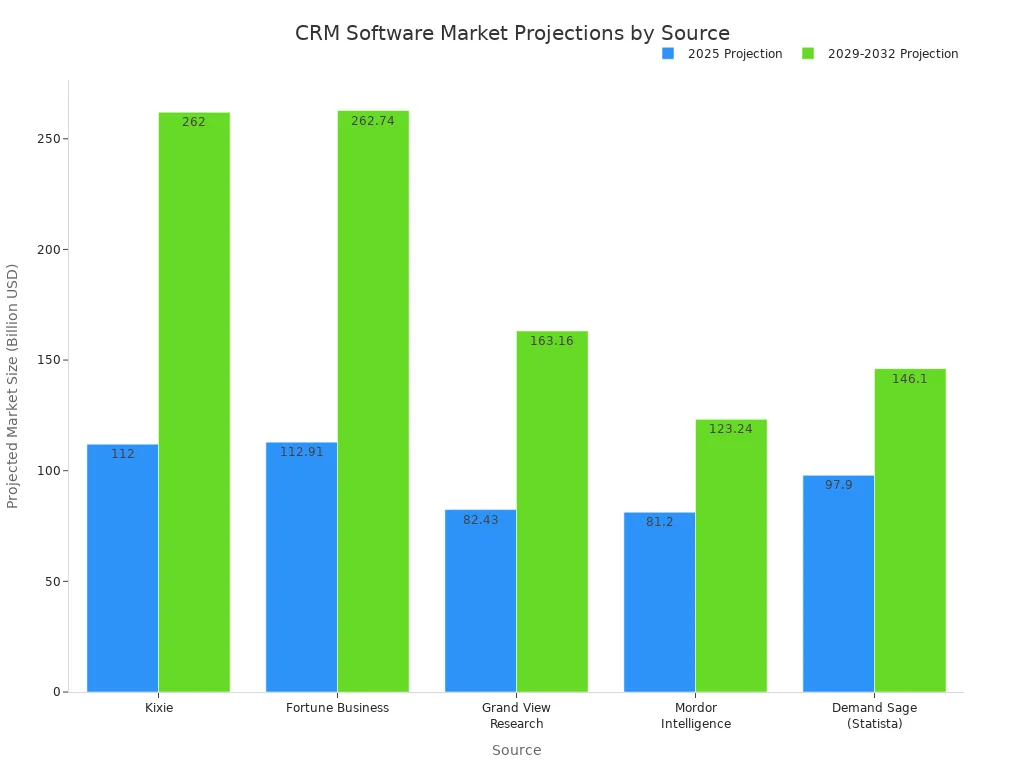
A help desk handles reactive problem-solving. A CRM focuses on proactive relationship management. Are you facing too many customer inquiries? Your choice between these tools shapes your entire customer service approach. The market for these solutions is growing fast, with a projected 12.8% annual growth rate. This shows their importance. Choosing the right helpdesk is crucial. A modern helpdesk like the one from Sobot can transform your support. A powerful helpdesk streamlines your work. Your helpdesk strategy defines your success.
The Core Question: Is your main goal to fix customer issues efficiently, or is it to nurture long-term customer relationships for growth?
Overwhelmed by Too Many Customer Inquiries?
Are you struggling with a flood of messages from email, social media, and phone calls? If you feel like you have too many customer inquiries to handle, you are not alone. The modern customer uses many different ways to contact you.
The Challenge of Scattered Communication
Your customers expect to reach you on their favorite channels. This creates a complex web of communication.
| Channel | Usage/Preference |
|---|---|
| Critical for most generations; over 4 billion users. | |
| Phone | Preferred by 59% of customers for speaking to an agent. |
| Mobile Messaging | A direct and immediate channel for nearly all US adults. |
| Live Chat | Used by 72% of customers who encounter it. |
| Chatbots | Interactions receive an 80% positive feedback rate. |
When you have too many customer inquiries coming from all these places without a central system, chaos follows. Customers hate repeating their problems to different agents. This fragmented experience leads to frustration and damages their trust in your brand. Your team wastes time trying to piece together conversations, which hurts your customer service quality. Managing these scattered customer inquiries is a major challenge.
Reactive vs. Proactive Service Models
Your approach to handling customer inquiries falls into one of two models.
- Reactive Model: You respond to issues as they happen. Think of it like firefighting. Your main goal is to solve problems quickly and efficiently. A
help deskis the essential tool for this model. A goodhelpdeskorganizes the chaos. - Proactive Model: You work to prevent issues before they start. This involves nurturing customer relationships to build loyalty and anticipate needs.
If you have too many customer inquiries, a reactive model with a strong helpdesk is your first priority. You need a system to manage the volume. A helpdesk provides that structure.
Identifying Your Primary Business Need
What is your number one goal right now? If you are dealing with too many customer inquiries, your priority is likely better inquiry management. A help desk helps you gain control. Businesses often adopt a helpdesk to improve their customer support operations. A helpdesk can transform your customer support team's workflow.
Tip: A great
help deskhelps you achieve key business goals. Many companies choose ahelpdeskto:
- Provide quick and effective resolution of requests.
- Automate routine tasks to free up agents.
- Ensure a positive
customer supportexperience.- Use key metrics to make informed decisions.
Understanding this primary need is the first step. It clarifies whether a problem-solving tool is your immediate requirement.
What is a Help Desk?

A help desk is a centralized platform for managing and resolving customer issues. You can think of it as your command center for customer support. It organizes all incoming inquiries into one place. This approach is perfect for businesses aiming to improve support efficiency. The debate of Help Desk vs CRM for Customer Service often starts here, with the need for organized problem-solving. A modern helpdesk system, like the one offered by Sobot, transforms this process.
Core Purpose: Efficient Problem Resolution
The main goal of a help desk is to solve customer problems quickly and effectively. It is a reactive tool designed to manage a high volume of requests. A helpdesk ensures no customer inquiry gets lost. Sobot's Ticketing System is a leading example of a modern helpdesk system. It provides a unified platform for all your channels, including email, chat, and social media. This ticketing system is a core part of any great help desk. The right helpdesk system makes resolution your top priority.
Key Features of Help Desk Software
Modern help desk software comes with powerful tools. These key features help your team deliver excellent service.
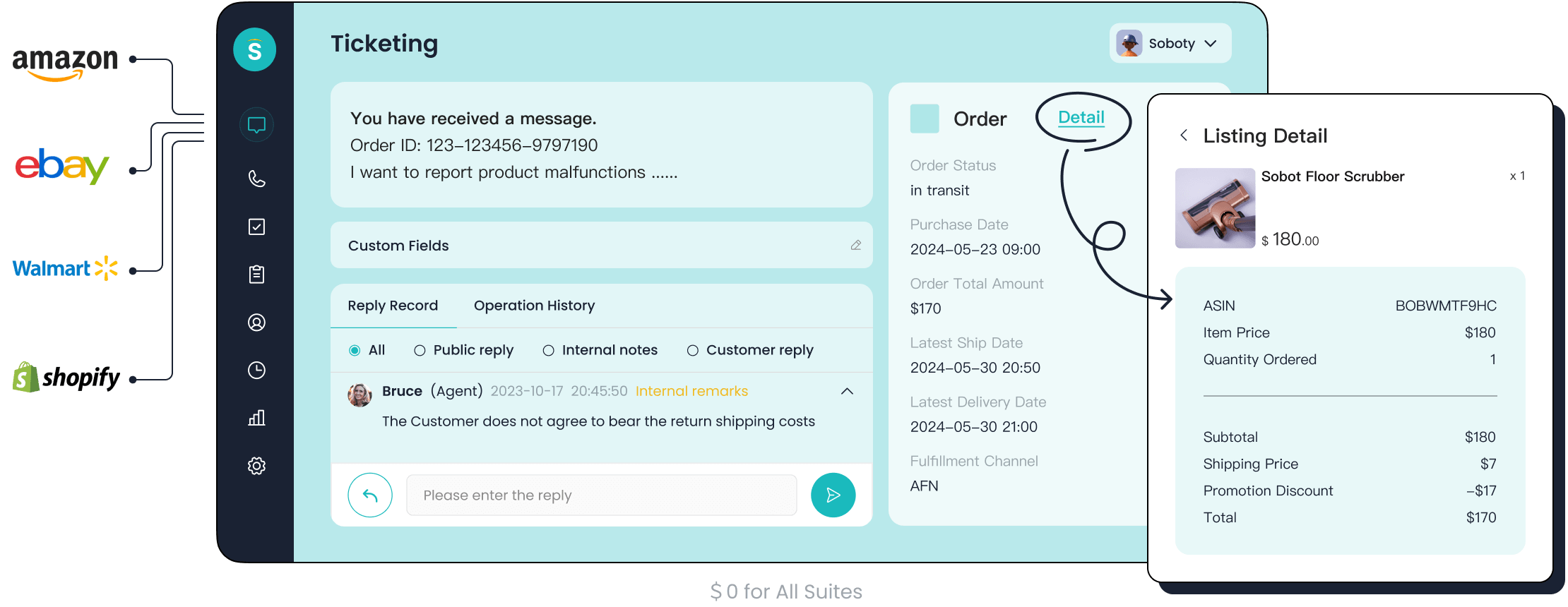
- A Powerful Ticketing System: This is the heart of any help desk software. A ticketing system captures requests and turns them into organized tickets. It intelligently routes tickets to the right agents.
- AI and Automation: Artificial intelligence revolutionizes help desk operations. AI can summarize tickets, draft responses, and automate replies to common questions. This frees up your agents for more complex issues.
Who Uses a Help Desk?
Customer support teams are the primary users of a help desk. Any company that needs to manage customer inquiries can see huge benefits. For example, the global tech company OPPO used Sobot's chatbot and ticketing system to improve its service.
By implementing this helpdesk, OPPO achieved an 83% chatbot resolution rate. They also saw a 94% positive feedback rate from customers. This shows how a help desk improves both efficiency and customer satisfaction, one of the main benefits of a helpdesk system.
When to Choose a Help Desk
You know you need a help desk when your team feels overwhelmed. The choice in the Help Desk vs CRM for Customer Service question becomes clear with certain challenges. Consider a helpdesk system if you experience these issues:
Your team faces urgent software problems or security concerns like phishing emails. Employees report password issues or malfunctioning hardware. You receive multiple bug reports about your software. A helpdesk system is essential in these scenarios. A good help desk software helps you track and solve these problems efficiently. The ticketing system within the help desk software ensures every issue is logged. This makes the help desk an invaluable tool.
What is a CRM?
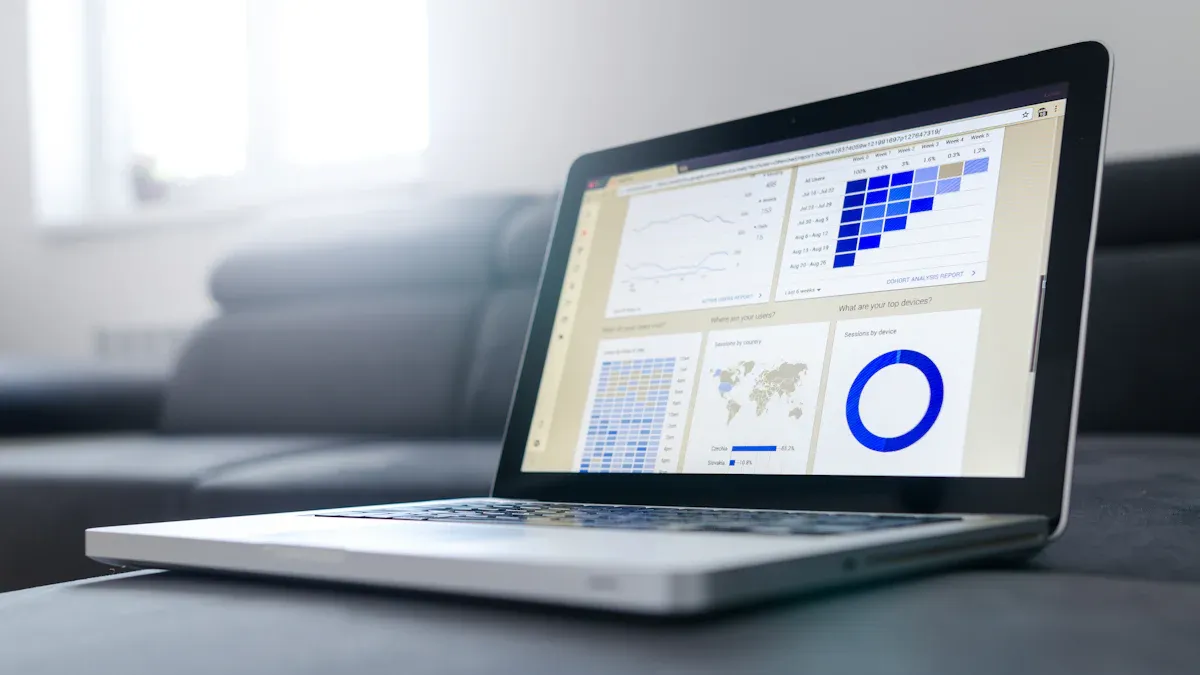
While a helpdesk focuses on solving problems, a Customer Relationship Management (CRM) system focuses on people. You can think of a CRM as a digital address book for your entire business. It stores every piece of information about your customers. This tool helps you build and maintain strong, long-term connections.
Core Purpose: Managing Customer Relationships
The primary goal of CRM software is proactive relationship management. It helps you understand the entire customer journey, from the first marketing email to their most recent purchase. Instead of just reacting to issues, you can anticipate customer needs. This approach builds loyalty and drives growth for your business.
Key Features of CRM Software
Modern CRM software offers powerful tools to help you manage customer data. Understanding these key features shows the main benefits of this system.
- Contact Management: This is the core of any CRM. It gives you a single place to track customer details, purchase history, and every past interaction.
- Collaboration Tools: Features like internal notes and shared tasks align your teams. Everyone from sales to support can see the same information, creating a smooth customer experience.
- Customer Self-Service: Many CRMs include options for knowledge bases or chatbots. These tools give customers 24/7 access to information.
- Artificial Intelligence (AI): AI can analyze customer data to predict future behavior. It helps you identify sales opportunities and understand customer sentiment.
- Reporting and Analytics: These tools provide deep insights into your customer data. You can track sales trends and measure the success of marketing campaigns.
Who Uses a CRM?
A CRM is not just for the sales team. Many departments use it to improve their work.
- Marketing teams use CRM data to create targeted campaigns.
- Customer service teams access customer history to provide personalized support.
- Retail businesses track order history to understand buying trends.
- Manufacturing companies manage communication with suppliers and partners.
When to Choose a CRM
The choice between a helpdesk and a CRM becomes clear when you look at your goals. You need CRM software if your main objective is to grow your business by nurturing customer relationships. Consider a CRM if you want to:
Track leads through your sales pipeline. Understand customer lifetime value. Personalize marketing efforts at scale. Improve collaboration between your sales, marketing, and support teams.
If your focus is on sales growth and long-term loyalty, CRM software is the right tool for the job.
Helpdesk vs. CRM: Key Differences
You now understand what a help desk and a CRM do separately. The real question in the Help Desk vs CRM for Customer Service debate is how their differences impact your business. Choosing the right tool depends entirely on your primary goals, the data you value most, and the metrics you use to measure success. A helpdesk is built for speed and resolution. A CRM is built for growth and relationships.
Primary Goal: Support vs. Sales
The most significant difference between a helpdesk and a CRM is their core purpose. A helpdesk is fundamentally a tool for your support team, while a CRM is traditionally a tool for your sales and marketing teams. This creates different priorities.
A help desk has one main job: solve customer problems. Its goal is reactive support. You use a helpdesk to manage, track, and resolve issues efficiently. This focus on customer service builds trust through reliability. When you need to organize chaos, a helpdesk is your best friend.
A CRM, on the other hand, focuses on proactive relationship management. Its goal is to drive revenue. You use it to track leads, manage the sales pipeline, and understand customer behavior to increase sales.
This table breaks down the difference in their aims:
| Feature | Support-Focused Goals (Helpdesk) | Sales-Focused Goals (CRM) |
|---|---|---|
| Primary Aim | Building long-term trust and loyalty through problem-solving. | Closing deals, generating revenue, and immediate conversions. |
| Key Metrics | Net Promoter Score (NPS), Customer Satisfaction (CSAT). | Conversion rates, qualified leads, average deal size. |
| Focus | Ensuring customer retention by solving issues effectively. | Turning prospects into buyers quickly to generate income. |
| Scope | Spans the entire customer journey, focusing on post-purchase support. | Focuses on the pre-purchase and purchase stages of the journey. |
The Payoff: A sales-focused approach using a CRM can deliver a massive return on investment (ROI). Research shows this clearly:
- In 2014, Nucleus Research found that CRM returned $8.71 for every dollar spent.
- By 2021, some estimates suggested the ROI could be as high as $30.48 for every dollar invested.
This shows why the Help Desk vs CRM for Customer Service decision is so important. One tool secures your current customer base, while the other actively grows it. A helpdesk protects revenue, while a CRM generates it.
Data Focus: Tickets vs. Profiles
A helpdesk and a CRM collect and organize data differently because their goals are different. This data focus is a key factor in the Help Desk vs CRM for Customer Service comparison.
A help desk is ticket-centric. Every customer interaction—an email, a phone call, a chat message—becomes a ticket. This ticket contains the history of a specific problem. The data helps your team answer questions like:
- What is the customer's current issue?
- How long has this ticket been open?
- Which agent is working on this problem?
The entire system revolves around the lifecycle of a support ticket. A good helpdesk makes this process seamless.
A CRM is profile-centric. It creates a rich, detailed profile for every single contact. This profile is a 360-degree view of the customer's entire relationship with your company. It helps your teams answer questions like:
- What is this customer's purchase history?
- Have they opened any marketing emails?
- What is their potential lifetime value?
While a helpdesk tracks problems, a CRM tracks people and potential revenue. The helpdesk gives you a snapshot of a current issue; the CRM gives you the full story of a customer's journey. This distinction is central to the Help Desk vs CRM for Customer Service choice.
Key Metrics: Resolution Time vs. Lifetime Value
You measure what you value. The key performance indicators (KPIs) for a helpdesk and a CRM are completely different. They reflect each tool's primary goal.
A help desk measures efficiency and satisfaction. The most important metrics for a helpdesk include:
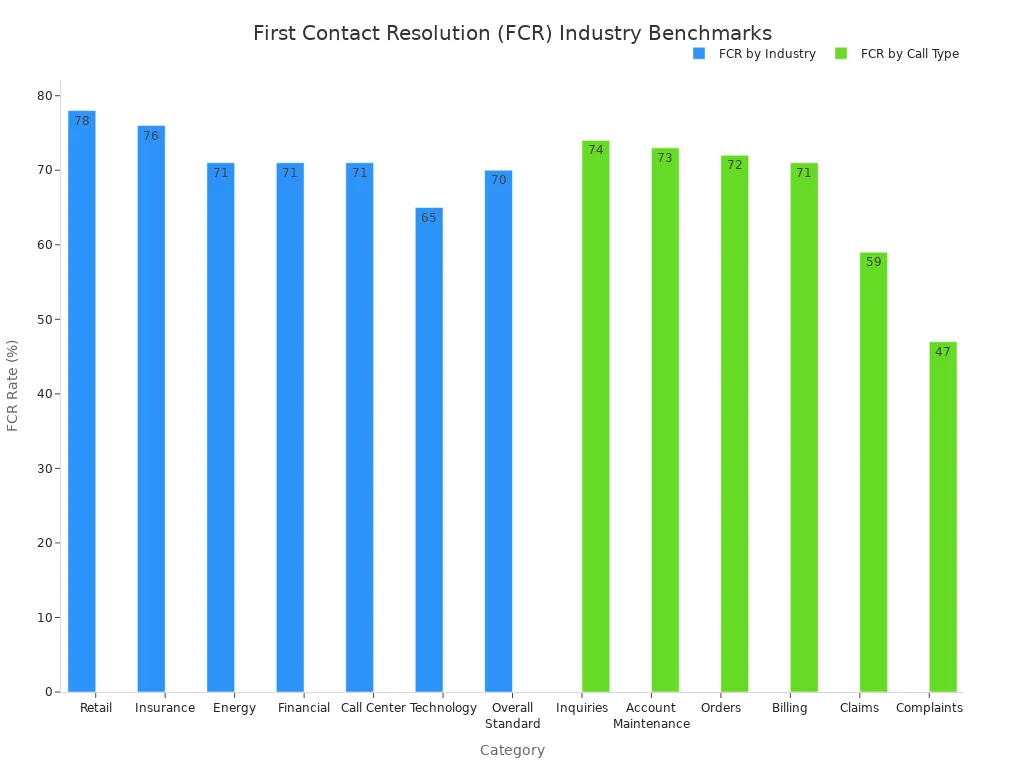
- First Contact Resolution (FCR): Did you solve the customer's issue on the first try? The industry benchmark for FCR is around 70%. A higher FCR means a more efficient helpdesk and happier customers.
- Average Resolution Time: How long does it take your team to solve a ticket from start to finish? Faster resolution times lead directly to higher customer retention.
A CRM measures growth and profitability. The most important metrics for a CRM include:
- Customer Lifetime Value (LTV): This is the total revenue you can expect from a single customer over their entire relationship with you. A high LTV justifies spending more on marketing and sales.
- Customer Churn Rate: This is the percentage of customers who stop doing business with you over a certain period. A low churn rate is critical for sustainable growth.
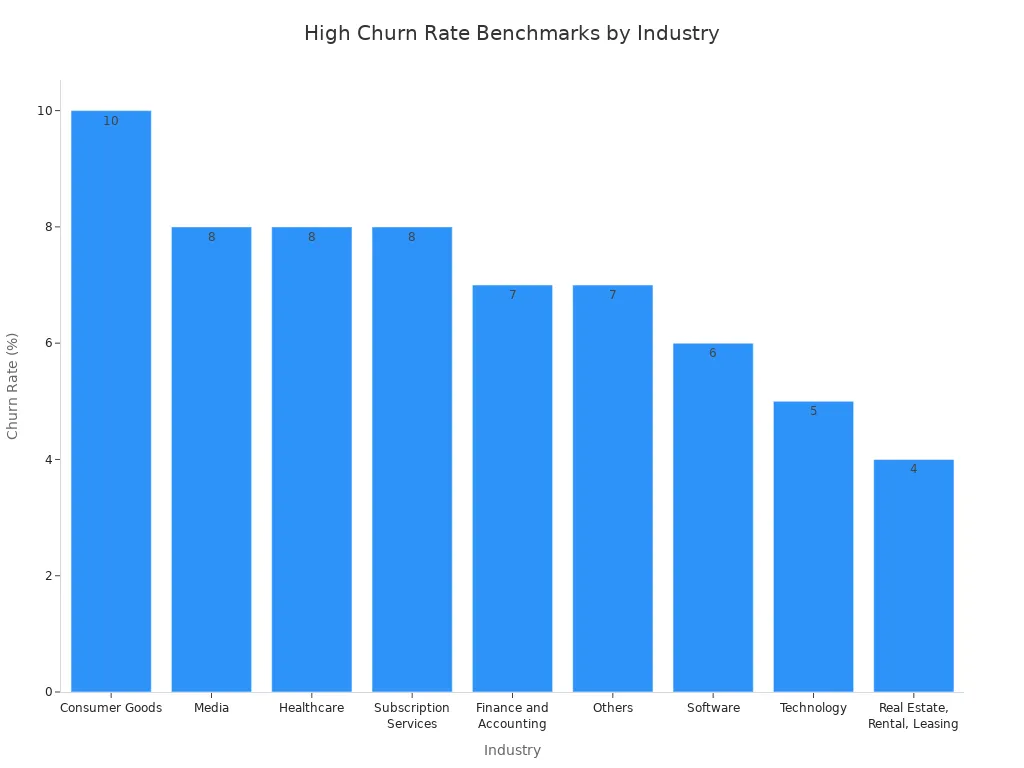
Ultimately, the Help Desk vs CRM for Customer Service discussion comes down to this: a helpdesk helps you keep the customers you have by providing excellent service, while a CRM helps you find new customers and maximize the value of existing ones. A great helpdesk excels at managing tickets, and a great CRM excels at managing relationships.
The Power of Integration: Using Both for a 360° View
The debate of Help Desk vs CRM for Customer Service often presents a false choice. The ultimate solution is not choosing one over the other. You gain the most power by integrating both systems. This approach creates a complete 360-degree view of your customer. For example, Whirlpool Corporation integrated its helpdesk and saw a 15-20% drop in email volume by improving communication. A modern helpdesk with strong integration capabilities is key. The Sobot Omnichannel Solution exemplifies this, connecting with systems like Salesforce. This allows your support agents to see the full customer journey while resolving issues in the ticketing system.
Creating a Unified Customer Profile
Integrating a helpdesk and CRM breaks down information barriers. Without integration, you face major challenges.
- Data Silos: Customer information stays trapped in separate systems.
- Inconsistent Formats: Data from your helpdesk and CRM may not match.
- Poor Quality Information: Inaccurate data leads to an unreliable customer experience.
A unified profile combines the ticket-based data from your helpdesk with the relationship data from your CRM. This gives every team a single source of truth. Your helpdesk ticketing system becomes even more powerful.
Empowering Support Teams with Context
When your help desk connects to your CRM, your agents gain superpowers. They no longer see just a ticket; they see a person with a full history. This context is a game-changer for any helpdesk. Agents can access past purchases and previous tickets from the ticketing system. This information allows them to resolve problems faster and deliver a better customer experience. The benefits are clear. Your helpdesk team sees improvements in key metrics like first-call resolution and average handle time. A smart helpdesk ticketing system uses this data to provide a personalized customer experience.
The Result: An integrated helpdesk ticketing system means agents spend less time asking repetitive questions. They have all the information they need right in the helpdesk interface, leading to quicker resolutions and happier customers. This makes your helpdesk a hub of efficiency.
Informing Sales and Marketing Efforts
The data from your helpdesk ticketing system is a goldmine for other teams. Every interaction is an opportunity. When a customer frequently asks about a specific feature, your helpdesk can flag this. This signals a potential sales opportunity for more training or an upgraded service. Your marketing team also wins. They can use feedback from the helpdesk ticketing system to create more accurate buyer personas and adjust their messaging. This creates a feedback loop that strengthens your entire business, improving the overall customer experience.
The right tool aligns with your main goal. Choose a help desk if you need to solve problems efficiently. Pick a CRM if you want to drive sales. For a truly great customer experience, the ultimate solution is not an "either/or" choice.
Most growing businesses will see the most benefits from an integrated solution. A modern helpdesk like Sobot combines a powerful helpdesk ticketing system with omnichannel capabilities. This approach delivers exceptional customer service and drives business growth, making your helpdesk a strategic asset. An integrated helpdesk is the future.
FAQ
Can a small business use a CRM as a help desk?
Yes, you can use a CRM for basic support. However, it lacks specialized tools. A dedicated help desk offers a powerful ticketing system and automation. This makes it better for managing many customer inquiries efficiently. The choice depends on your volume and needs in the Help Desk vs CRM for Customer Service debate.
What is the main takeaway in the Help Desk vs CRM for Customer Service discussion?
Your primary business goal determines the right tool.
- Choose a help desk for efficient problem-solving and support.
- Choose a CRM for managing customer data to drive sales and growth.
Do I need both a help desk and a CRM?
Growing businesses often benefit from both. Integrating them provides a complete customer view. For example, Sobot's Omnichannel Solution connects with CRMs like Salesforce. This empowers your support team with full customer context, blending the strengths of each system.
How does a ticketing system improve customer service?
A ticketing system organizes all customer requests into one place. It ensures no inquiry is lost. Features like automatic routing and SLA reminders help your team resolve issues faster. Sobot's Ticketing System, for instance, unifies channels and automates workflows to boost efficiency.
See Also
Discover The 10 Leading Customer Service Software Solutions For 2024
Essential Features To Look For In CRM Call Center Software
Exploring The Best Free Call Center CRM Software Options For 2024
Achieving Excellence In Customer Support Through Live Chat Implementation
Optimizing Retail Customer Engagement By Mastering Live Chat Strategies

