Help Desk Remote Software Benefits and Drawbacks for IT Teams

Help desk remote software gives your IT team clear benefits, but you also face some drawbacks. You can solve problems faster, reduce costs, and improve efficiency. Many IT teams use tools like Sobot to support users from anywhere. Security remains strong with encrypted connections, but you need to consider privacy and internet limits. The table below shows how remote software impacts your IT support:
| Impact Area | How It Helps IT Teams |
|---|---|
| IT Team Efficiency | Connects directly with users for real-time troubleshooting. |
| Cost | Removes the need for on-site visits and supports multiple users at once. |
| Security | Uses encrypted connections to protect sensitive information. |
| Problem Resolution | Resolves technical issues quickly and reduces downtime. |
You need to weigh these factors to see if remote support fits your IT needs as more teams adopt these solutions for flexible, secure support.
Help Desk Remote Software Overview

Core Features and Functions
Help desk remote software gives you the tools to solve user problems from anywhere. You can use it to manage support tickets, access devices, and communicate with users in real time. This software helps your IT team work faster and keeps users happy. You get a robust ticketing system that lets you track, prioritize, and resolve issues. Remote access tools allow you to troubleshoot devices without being in the same room. You can share screens, transfer files, and chat with users to fix problems quickly.
Here are some key features you will find in most remote support solutions:
- Ticketing systems for tracking and managing user requests.
- Remote access for troubleshooting devices without user interaction.
- Screen sharing and file transfer for real-time help.
- Communication tools like chat and voice for direct support.
These features make remote it support essential for modern IT teams.
How Remote IT Support Works
Remote it support uses different technologies to help you solve problems quickly. You can see how these tools work together in the table below:
| Technology/Component | Description |
|---|---|
| Ticketing systems | Manage support requests and incidents. |
| Automation | Handle repetitive tasks to save time. |
| Monitoring | Track system health and alert you to issues. |
| Remote collaboration | Let teams work together from different locations. |
| Communication | Provide channels for support teams and users to interact. |
| L1, L2, L3 support | Offer different levels of technical help. |
| Cloud services | Manage resources and support users online. |
You use these tools to deliver remote support, making your IT team more efficient and responsive.
Sobot Ticketing System Integration
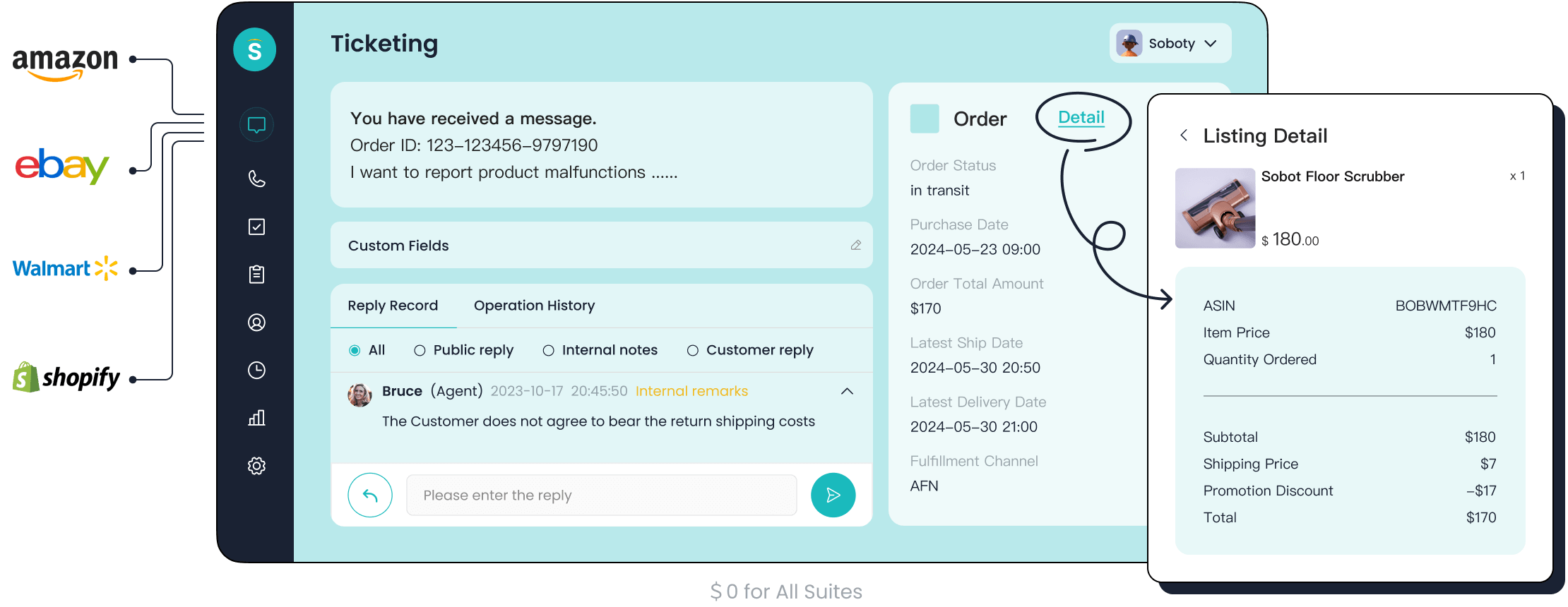
Sobot gives you a powerful platform for remote it support. The Sobot Ticketing System integrates with many IT management tools, including Amazon, Shopify, and Salesforce. You can connect your existing systems using APIs for smooth operations. Sobot also offers live chat, chatbot, AI Agent, call center, voicebot, and a unified customer contact center. These tools help you manage all support channels in one place. You can automate ticket routing, set priorities, and track performance with trusted analytics. Sobot’s integration makes remote support simple and effective for your IT team.
Benefits of Help Desk Remote Software
Cost Savings and Efficiency
You can lower your IT costs by using help desk remote software. This software lets your team solve problems without traveling to different locations. You do not need to send technicians on-site, which saves money on travel and reduces downtime. Remote access tools allow you to help many users at the same time. This increases efficiency and lets your team handle more requests each day.
For example, Sobot’s Ticketing System automates ticket creation and routing. You do not have to spend time sorting requests by hand. The system assigns tickets to the right agent, which speeds up the process and cuts operational costs. Businesses of all sizes see savings because they do not need as many on-site visits. Multi-device support and unattended access also help you serve more users with fewer resources.
Tip: Operating remote help desk services usually costs less than keeping a large in-house team. You can use your budget for other IT services or upgrades.
Faster Response and Resolution
Help desk remote software helps you respond to problems quickly. You can connect to a user’s device in seconds using remote access. This means you fix issues before they cause long downtime. AI tools in remote IT support analyze data in real time and guide you through solutions step by step. Automation handles simple tasks, so your team can focus on complex problems.
You can measure your team’s speed by tracking key performance indicators like first response time and resolution speed. Sobot’s Ticketing System provides trusted analytics, so you always know how fast your team works. You can see improvements in customer satisfaction and agent efficiency. Many companies report that they resolve tickets in under one minute with the right mix of AI and human support.
- AI-powered solutions predict issues before they happen.
- Automation reduces wait times for users.
- You can offer 24/7 remote support, helping users in any time zone.
Scalability and Flexibility
Remote IT support grows with your business. You can add new users or agents without buying extra hardware. Cloud-based help desk remote software lets you scale up or down as needed. You can support more devices and users during busy times, then adjust when things slow down.
Sobot’s omnichannel platform supports many communication channels, including email, chat, and voice. You can manage all requests from one dashboard. This makes it easy to handle growth or changes in your team. Flexible pricing models help you control costs as your needs change.
Here are some ways remote support gives you flexibility:
- Cloud-based systems let you scale quickly.
- Multi-device support means you can help users on any device.
- Centralized management tools make it easy to add or remove users.
- You only pay for what you use, which keeps costs low.
Access to Expertise
Help desk remote software connects you with IT experts from anywhere. You do not need all your specialists in one office. Cloud-based tools let your team share knowledge and solve problems together. Integration with other IT services keeps your team agile and ready for any challenge.
Sobot’s platform supports collaboration across distributed teams. You can bring in the right expert for each problem, no matter where they are. This improves the quality of support and helps you solve issues faster.
| Evidence Type | Description |
|---|---|
| Cloud-based help desk tools | Enable IT teams to provide consistent support across distributed teams. |
| Integration with other software | Ensures IT teams remain agile while solving problems, enhancing their ability to access expertise. |
| Proactive IT strategies | Supports communication and collaboration among distributed teams, facilitating access to expertise. |
Proactive Monitoring and Automation
You can prevent problems before they start with proactive monitoring and automation. Help desk remote software tracks system health and alerts you to issues early. Automation handles routine tasks like patching and updates, which reduces operational downtime.
Sobot’s Ticketing System uses AI to automate ticket management and send smart notifications. You can set rules for ticket routing and SLA reminders. This keeps your team focused on important tasks and reduces downtime.
| Metric | Description |
|---|---|
| Incident prevention rate | Identifies and resolves issues before they impact users. |
| Mean Time Between Failures (MTBF) | Increases the time between failures with proactive strategies. |
| Patch coverage and deployment speed | Ensures systems stay updated and secure. |
| Downtime reduction | Lowers the frequency and duration of unplanned downtime. |
| User satisfaction scores | Shows improvements in IT service quality and user experience. |
Note: Proactive monitoring means you spend less time fixing problems and more time improving IT services.
Enhanced Customer Experience with Sobot
Sobot’s Ticketing System improves customer communication and operational efficiency. You can route users to the right agent for one-on-one help. Automated booking management reduces missed appointments and filters leads. AI Copilot lowers agent workload by 60%, so your team can focus on complex issues.
Sobot’s platform boosts customer loyalty with timely updates and targeted offers. You can resolve tickets in under one minute using AI and human collaboration. The system supports multiple languages, so you can help users in their preferred language. Sobot’s competitive pricing means you get more value without hidden charges.
| Feature | Benefit |
|---|---|
| Personalized Communication | Routes customers to suitable sales for 1:1 consultations based on needs. |
| Automated Booking Management | Reduces missed appointments and automates lead filtering. |
| AI Copilot | Reduces agent workload by 60%, enhancing overall efficiency. |
| Resolution Time | Achieves resolution in under 1 minute using AI and human collaboration. |
| NPS Improvement | Enhances customer experience by 35% through personalized interactions. |
After switching to Sobot, many businesses see higher customer satisfaction scores. Automation provides instant answers to common questions, which reduces wait times. Teams can handle more requests without increasing headcount. This means you can grow your business while keeping costs low and service quality high.
Sobot’s omnichannel solution lets you manage all customer interactions in one place. You can deliver fast, accurate, and personalized support every time.
Drawbacks of Remote Support Solutions
When you use help desk remote software, you gain many advantages, but you also face some challenges. Understanding these drawbacks helps you make better decisions for your IT team. Let’s look at the most common issues and how you can address them.
Security and Privacy Concerns
Security and privacy remain top concerns for any IT team using remote it support. When you connect to devices over the internet, you open new doors for cyber threats. Sensitive data can travel across networks, and unauthorized access becomes a risk if you do not use strong protections. Some industries, like finance and healthcare, have strict rules about data privacy. You must follow these rules to avoid fines and protect your reputation.
You can reduce these risks by following best practices. Many organizations use strong security measures, such as multi-factor authentication and encryption. These tools help keep your data safe during remote sessions. Regular audits and clear communication channels also play a big role in protecting information.
| Best Practice | Description |
|---|---|
| Implementing Robust Security Measures | Use strong security measures like multi-factor authentication and encryption to protect data. |
| Develop a Strategy to Mitigate IT Risks | Have a plan in place to minimize risks and ensure IT teams can operate without interruptions. |
You should also:
- Establish clear communication channels for effective support.
- Ensure data protection and compliance through regular audits and encryption.
Many IT teams set up unified security policies. You can strengthen authentication with single sign-on or two-factor authentication. Monitoring tools help you watch over remote endpoints and spot threats early. Leading solutions, such as Sobot, offer encrypted connections and advanced access controls to help you meet these needs.
Regulatory requirements add another layer of complexity. You may need to keep audit trails, encrypt data, and follow data residency rules. Some organizations choose self-hosted solutions to keep sensitive data on-site, while others use cloud-hosted options for easier management. Your choice depends on your industry and compliance needs.
Internet and Technical Limitations
Remote it support depends on reliable internet connections. If your network is slow or unstable, you may struggle to deliver fast and effective support. In some regions, poor connectivity can stop you from using advanced tools or even connecting to users at all. This can lead to longer wait times and frustrated users.
| Impact of Unreliable Connectivity | Description |
|---|---|
| Reduced productivity | Slow or unstable Internet hampers communication and task completion, leading to inefficiencies. |
| Increased downtime | Unplanned outages disrupt operations, particularly in time-sensitive industries. |
| Inability to leverage technology | Poor connectivity limits access to modern tools and applications, stifling innovation. |
| Compromised data security | Interruptions can lead to incomplete data transfers and increased vulnerability to cyber threats. |
| Barriers to expansion | Lack of reliable Internet access hinders business growth in remote areas. |
You may find that on-site it support works better in areas with weak internet. When you cannot connect remotely, you must send technicians to the location. This increases costs and slows down problem resolution. Some companies use a managed service provider to fill gaps in coverage, but this adds another layer to manage.
Technical limitations also affect your ability to use help desk remote software. Some devices or systems may not support remote access. You may need to update hardware or software to use all features. Leading solutions, like Sobot, offer multi-channel support and work across many platforms, but you still need a stable connection for the best results.
Limited Physical Access
Remote it support cannot replace every task that requires hands-on work. Some problems need physical access to devices. For example, you may need to replace hardware, check cables, or reset equipment. In these cases, on-site it support remains essential.
You may also face challenges when users cannot follow instructions or when devices are offline. If a computer will not turn on, you cannot connect remotely. You must send someone to the site to fix the issue. This adds time and cost to your support process.
Many IT teams use a mix of remote support and on-site it support to cover all needs. You can solve most software problems remotely, but you must plan for situations that need a physical presence. A managed service provider can help by offering local technicians when needed.
Control and User Resistance
Some users worry about losing control when you use remote it support. They may fear that IT teams can access their devices without permission. Others worry about privacy or job security. These concerns can lead to resistance and slow adoption of new tools.
| Strategy | Description |
|---|---|
| Interactive Training | Providing hands-on training to help employees adapt to new processes. |
| Involving Workforce Early | Engaging employees in the implementation process to reduce resistance. |
| Clear Communication of Benefits | Explaining how remote monitoring can enhance daily work to alleviate concerns. |
You may notice that employees need extra training to use help desk remote software. Some people struggle with new processes or fear job loss. You can address these concerns by:
- Offering interactive training sessions.
- Involving users early in the rollout process.
- Explaining the benefits of remote support, such as faster help and less downtime.
Clear communication helps users feel comfortable. When you show how remote it support improves their work, you build trust and reduce resistance. Leading solutions, like Sobot, provide user-friendly interfaces and clear permission controls, making it easier for users to accept remote access.
Balancing Remote and On-Site IT Support
You must balance remote support with on-site it support to meet all your needs. Remote it support works well for most software issues and routine maintenance. On-site it support is still necessary for hardware repairs, network setup, and other physical tasks. Many organizations use a hybrid approach, combining both methods for the best results.
Help desk remote software gives you flexibility, but you must plan for its limits. You need strong security, reliable internet, and user buy-in. You also need a plan for tasks that require on-site it support. By understanding these drawbacks and using best practices, you can build a strong IT support system that meets your goals.
Tip: Review your support strategy often. Make sure you have the right mix of remote it support and on-site it support for your business. This helps you stay efficient and ready for any challenge.
Choosing the Right Remote IT Support Solution
Evaluating IT Needs
You need to start by understanding what your team requires from help desk remote software. Every IT team has different needs. Some focus on speed, while others need strong security or easy integration. You should look at the features that matter most for your business. The table below shows important criteria to consider when you choose a remote IT support service:
| Criteria | Description |
|---|---|
| Essential Features | Look for ticket categorization, SLA tracking, and multi-channel intake. |
| Automation | Choose tools that reduce manual work with auto-assignment and notifications. |
| Security | Make sure the software uses secure authentication and audit logs. |
| Support for Remote Work | Pick web-based access and cloud deployment for distributed teams. |
| Integration Capabilities | Connect with monitoring and collaboration tools for better efficiency. |
| User Experience | Use self-service features like knowledge bases and automated FAQs. |
| Reporting and Analytics | Track response times, ticket volume, and SLA compliance. |
| Scalability | Find flexible licensing and customizable workflows. |
| Compliance | Ensure support for ticket history and policy enforcement. |
| Best Practices | Define SLAs, review metrics, and gather feedback often. |
You should match these criteria to your team’s daily challenges. This helps you pick the right help desk remote software for your IT support service.
Sobot for Omnichannel Support
Sobot stands out with its omnichannel and automation capabilities. You can manage all support channels—like email, chat, and voice—in one place. This makes it easy for your team to help users, no matter where they are. Sobot’s Ticketing System automates ticket routing and sends smart notifications. You save time and reduce errors.
The Weee! customer story shows how Sobot improves remote support. Weee! used Sobot to handle a high volume of customer requests. After switching, agent efficiency increased by 20%, and resolution time dropped by 50%. Customer satisfaction reached 96%. You can read more about this success here.
Sobot’s platform supports multiple languages and integrates with tools like Shopify and Salesforce. This helps your IT team deliver fast, accurate support across all channels.
Best Practices for Implementation
You can get the most from help desk remote software by following best practices. Start with proactive measures. Use digital solutions to speed up maintenance and reduce disruptions. Train your IT team often. This keeps skills sharp and reduces stress.
A disaster recovery plan helps you recover quickly from downtime. Learn from past experiences to improve your process. The table below lists best practices for a smooth rollout:
| Best Practice | Description |
|---|---|
| Proactive measures | Use digital tools to prevent problems and keep systems running. |
| Team training | Provide ongoing training for technical and stress management skills. |
| Disaster recovery plan | Prepare for unplanned downtime with a clear recovery plan. |
| Learning from experiences | Review past issues to improve future responses and update training materials. |
Tip: Involve your team early and communicate clearly. This helps everyone adapt to new remote support tools and keeps your IT support service running smoothly.
Help desk remote software gives you faster support, lower costs, and better efficiency. You face challenges like device security and user resistance. You should match your business needs, IT complexity, and budget to the right solution. Sobot works best in industries like retail, finance, healthcare, and logistics:
| Industry | Scenario |
|---|---|
| Retail & E-commerce | Real-time support, ticket management |
| Financial Services | Secure communication, AI for inquiries |
| Healthcare | Appointment scheduling, patient communication |
| Logistics | Improved delivery rates with automation |
You should choose software that streamlines IT tasks, offers self-service, and fits your users’ needs.
FAQ
What is help desk remote software?
Help desk remote software lets you support users from anywhere. You can solve problems, manage tickets, and communicate with users in real time. This tool helps your IT team work faster and keeps users happy.
How does Sobot improve help desk remote software?
Sobot gives you an all-in-one platform. You can manage tickets, chat, and voice calls in one place. The system automates ticket routing and supports multiple languages. You get trusted analytics to track your team’s performance.
Is help desk remote software secure?
Yes, most help desk remote software uses strong security. You get encrypted connections and access controls. Sobot, for example, uses advanced security to protect your data and keep your support sessions safe.
Can help desk remote software handle many support channels?
You can manage email, chat, and voice with help desk remote software. Sobot’s omnichannel solution lets you handle all channels in one dashboard. This makes your support process smooth and efficient.
What should you consider before choosing help desk remote software?
You should check for features like ticket automation, security, and integration options. Look for tools that fit your team’s size and needs. Sobot offers flexible solutions for different industries and team sizes.
See Also
Advantages and Disadvantages of Working Remotely in Call Centers
Best 10 Live Chat Support Tools to Use in 2024
Enhancing Efficiency with AI-Powered Customer Service Solutions

