Shopify Chatbot Setup A Step-by-Step Guide

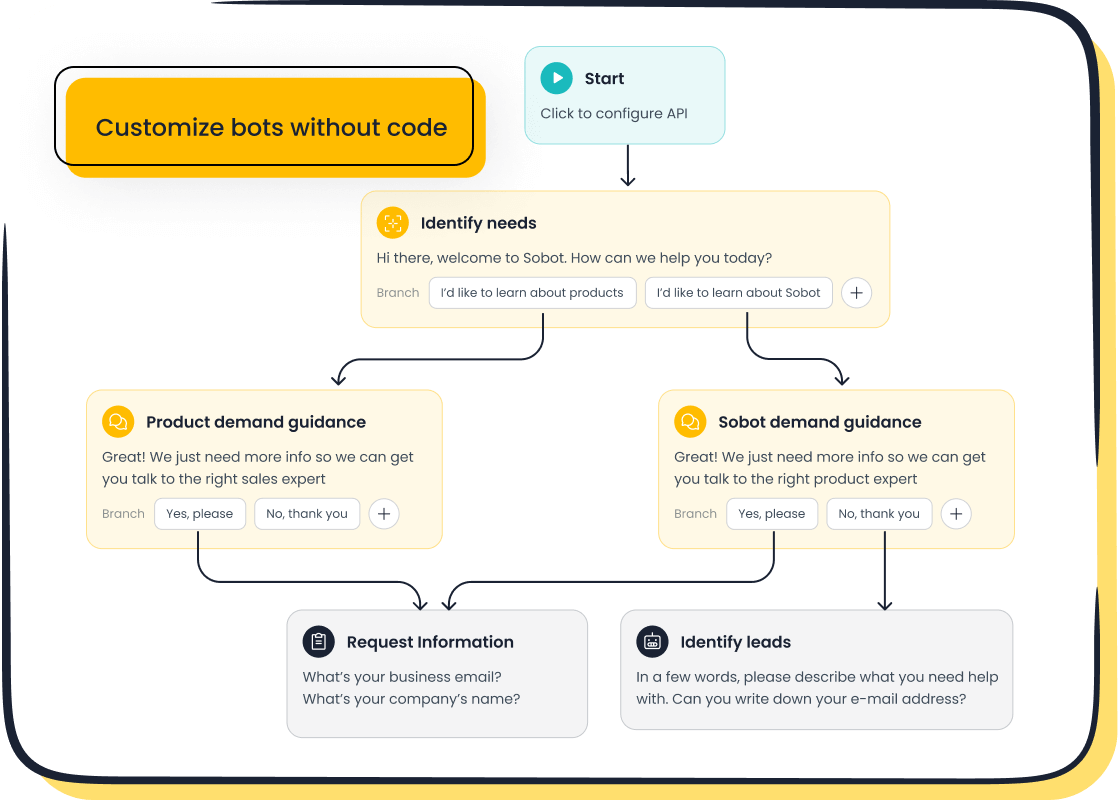
You work hard to bring customers to your store. Yet, you may still face high cart abandonment rates, which average over 70%. Many shoppers leave your site when they cannot get instant answers to their questions. A Shopify AI chatbot solves this problem directly.
The growing use of chatbots in ecommerce helps you provide the 24/7 support that 52% of shoppers now expect. This guide provides a simple, no-code walkthrough to get a powerful Shopify AI chatbot from Sobot running on your store, helping you capture more sales.
This setup transforms your customer service and boosts your bottom line.
The Growing Use of Chatbots in Ecommerce
The use of chatbots in ecommerce is no longer a trend; it is a fundamental shift in how you connect with customers. Shoppers want fast answers, and you want to provide excellent service without overwhelming your team. This is where the strategic use of chatbots in ecommerce becomes a powerful advantage for your store.
Enhancing Customer Experience 24/7
You can significantly improve your store's customer experience by offering support around the clock. Many shoppers browse late at night or from different time zones. An AI chatbot provides instant support 24/7, ensuring no question goes unanswered.
Did you know? A remarkable 74% of internet users prefer using chatbots to get answers to simple questions. This highlights the growing consumer comfort with automated assistance and the importance of the use of chatbots in ecommerce.
By providing immediate responses, you meet customer expectations and create a smoother shopping journey, which boosts satisfaction and loyalty.
Reducing Customer Service Costs
Implementing a chatbot is a smart financial decision. These digital assistants handle common questions about shipping, returns, and product details automatically. This automation frees up your human agents to focus on more complex issues. Businesses often see support costs drop by about 30% after adopting chatbots. This efficiency means your team can save 5–10 hours per week, making the use of chatbots in ecommerce a direct path to better resource management.
Boosting Sales and Lead Generation
The use of chatbots in ecommerce directly impacts your revenue. By engaging visitors proactively, chatbots can guide them to products, offer recommendations, and capture leads. E-commerce sites that integrate chatbot technology have seen conversion rates improve by over 20%. The market reflects this value, with significant growth projected in the coming years.
| Metric | Value |
|---|---|
| Global Chatbot Market Value (2023) | $5.4 billion |
| Projected Global Chatbot Market Value (2028) | $15.5 billion |
| Compound Annual Growth Rate (CAGR) | 23.3% |
This growth shows that more businesses are successfully turning conversations into conversions.
Choosing Your Shopify Chatbot Platform
Selecting the right platform is the most important step in your Shopify chatbot setup. You need a tool that is powerful yet easy to use. A no-code, omnichannel solution like Sobot allows you to manage conversations from your website, social media, and messaging apps in one place. This creates a consistent experience for your customers.
Key Features of a High-Performing Chatbot
A high-performing Shopify AI chatbot does more than just answer questions. It acts as a sales and support assistant. Look for these essential features:
- Seamless Shopify Integration: Your chatbot should sync with your store to track orders, check product availability, and process returns.
- Intelligent Recommendations: The bot can upsell products and suggest items based on a customer's browsing history.
- AI-Powered Knowledge Base: A great chatbot learns from your website content and documents to provide accurate answers instantly.
- Multilingual Support: You can serve a global audience by communicating with customers in their preferred language.
- Human Agent Handoff: The chatbot should smoothly transfer complex conversations to a live agent without losing context.
Comparing No-Code Chatbot Builders
Many popular Shopify AI chatbot solutions are available. Tools like Shopify Inbox offer basic chat functions for free, which is a good starting point. Other platforms like Gorgias integrate helpdesk features. However, for a truly comprehensive approach, you need a platform built for powerful conversational AI.
Sobot stands out by offering an all-in-one contact center. It combines a no-code chatbot with live chat, a ticketing system, and even a voice call center. Its point-and-click setup makes advanced conversational AI accessible to everyone. While Shopify Inbox is useful, Sobot provides a more robust and scalable solution for growing stores.
Creating Your Account with Sobot
Getting started with a powerful Shopify AI chatbot is simple. The first step is to create your account. With Sobot, you can quickly design automated workflows that handle common inquiries, freeing up your team and improving customer satisfaction. This prepares you to connect the platform directly to your Shopify store.
A Guide to Implementing Chatbots on Shopify

You have chosen your platform and created your account. Now, you are ready for the most exciting part of your Shopify chatbot setup: the integration. This section provides a clear walkthrough for implementing chatbots on your store. You will connect Sobot to Shopify, add a simple code snippet, and launch your new digital assistant.
Connecting Sobot to Your Shopify Store
The first step is to establish a connection between your Sobot account and your Shopify store. This integration is crucial. It allows your Shopify AI chatbot to access real-time data like order information and product details. A strong connection empowers the bot to handle customer inquiries accurately and efficiently. Most modern platforms, including Sobot, make this process straightforward, often requiring just a few clicks to authorize the connection.
Getting Your JavaScript Snippet
After connecting your accounts, you need to get a unique piece of code. This is called a JavaScript snippet. This snippet acts as the bridge that places the chatbot widget onto your website.
Note: You do not need to know how to code to do this! Your chatbot platform generates this snippet for you. Your only job is to copy it. Think of it as a key that unlocks the chatbot's features for your customers.
In your Sobot dashboard, you will find a dedicated section for installation or channel integration. Here, you can easily locate and copy the JavaScript code provided for your Shopify AI chatbot.
Adding the Snippet to Your Theme Code
With the snippet copied, you will now add it to your Shopify theme. This step ensures your Shopify AI chatbot appears on every page of your store. The best place to add this code is in a core file that controls your site's overall structure.
Follow these steps to add the code:
- From your Shopify admin panel, navigate to Online Store > Themes.
- Find your current theme, click the Actions button (three dots), and select Edit code.
- In the file editor, look for the Layout section and click on the
theme.liquidfile to open it. - Scroll to the bottom of the
theme.liquidfile and find the closing</body>tag. - Paste your copied JavaScript snippet on a new line just before the
</body>tag. - Click Save.
The
theme.liquidfile is the recommended location for this snippet. Once you save the change, the chatbot widget will appear on your Shopify site immediately. This is a key moment in implementing chatbots successfully.
Testing the Chatbot Widget
The final step is to test your work. Go to your live Shopify store and refresh the page. You should see the new chatbot widget appear, usually in the bottom-right corner.
Here’s a quick checklist for testing:
- Visibility: Does the chatbot icon appear correctly on different pages, like the homepage, product pages, and your cart?
- Opening and Closing: Can you click the widget to open the chat window and close it easily?
- Initial Greeting: Does the Shopify AI chatbot display the welcome message you configured?
- Basic Questions: Try asking a simple question, such as "What is your shipping policy?" to see if it responds correctly.
This initial test confirms that the technical part of your Shopify chatbot setup is complete. You are now ready to configure the automated conversations that will help you boost sales and support customers.
Configuring Your Shopify AI Chatbot for Success
With your chatbot live on your store, you can now configure the automated flows that will transform your customer service. This is where you unlock the true power of your investment. By setting up smart automations, you improve efficiency, boost conversions, and create a superior customer experience.
Luxury brands like Michael Kors have seen incredible results by implementing a unified contact solution. They achieved an 83% reduction in response time and a 95% customer satisfaction rate. You can achieve similar success by configuring your chatbot to handle key customer interactions.
Automating Order Status Inquiries
"Where is my order?" is one of the most common questions you will receive. Answering it manually consumes significant time. Your Shopify AI chatbot can automate this entire process. By connecting to your Shopify data, the bot can instantly provide real-time updates.
When a customer asks about their order, the bot can:
- Ask for an order number or email address to identify the customer.
- Access your store's backend to retrieve the current order status.
- Inform the customer if the order is processing, shipped, or delivered.
- Provide the tracking number and a link to the carrier's website.
This automation offers customers immediate answers 24/7 and frees your team to handle more complex issues. It is a simple yet powerful way to improve operational efficiency.
Handling Product and Shipping FAQs
Your customers have questions about your products and policies. You can train your Shopify AI chatbot to answer them instantly. Sobot's AI-powered knowledge base can learn from your existing content, like PDFs, articles, and text snippets. This gives you a high degree of customization and control over the information provided.
First, you need to collect and organize your store's knowledge. This includes:
- Organized Content: Help articles and FAQs.
- Messy Content: Past support tickets and agent conversations.
- Undocumented Knowledge: Information from your most experienced team members.
Once collected, you clean this data by removing duplicates and outdated information. Then, you can train your bot to recognize customer intent. This allows it to understand the many ways a customer might ask about topics like:
- Production times
- Shipping methods
- Shipping fees
This level of customization ensures your bot provides accurate, helpful answers every time, building trust with your customers.
Guiding Users Through Returns
Returns are a critical part of the ecommerce experience. A smooth returns process can turn a potentially negative situation into a positive one. You can configure your Shopify AI chatbot to guide customers through this journey, offering personalized shopping help even when a purchase doesn't work out.
Here is how the automated flow works:
- Initiate Request: A customer starts a chat to request a return.
- Gather Details: The bot uses natural language processing to understand the request and asks for the order number. It can even ask for photos of damaged items directly in the chat.
- Apply Policy: The bot checks your store's return policy to see if the item is eligible.
- Automate Outcome: If eligible, the bot can automatically generate a shipping label and provide instructions, creating a seamless experience.
This process gives you complete customization and control over your returns workflow, reducing manual work and ensuring your policies are enforced consistently.
Setting Up a Human Agent Handoff
While automation is powerful, some situations require a human touch. A seamless handoff to a live agent is a key feature of a high-performing unified Shopify AI chatbot. You can set specific triggers to escalate a conversation automatically.
Tip: Modern AI platforms can use sentiment analysis to detect customer frustration. This allows you to intervene proactively before a situation worsens.
Common triggers for a human handoff include:
- When a customer directly asks to speak with a person (e.g., "talk to an agent").
- When the bot fails to answer a question after two attempts.
- When the conversation involves a sensitive issue like potential fraud.
- When the customer is identified as a high-value shopper.
Setting up these rules ensures your customers always receive the best possible support, whether from your bot or your team.
You have now learned the key steps to launch your Shopify AI chatbot. You chose a powerful platform, integrated it with your store, and configured essential automations. This setup immediately enhances your store's efficiency and improves customer satisfaction. By automating common inquiries, your Shopify AI chatbot can help you save up to 50% on agent costs. Your new Shopify AI chatbot is ready to deliver exceptional service 24/7.
Now you are prepared to take the next step. Embark on Your Contact Journey and start building these core features today! 🚀
FAQ
Do I need coding skills for this Shopify chatbot setup?
No, you do not need coding skills. Sobot provides a simple point-and-click interface. You can design and deploy automated workflows for your Shopify chatbot setup without writing any code. This makes the process simple for everyone.
How does a chatbot reduce my store's costs?
Your chatbot operates 24/7 to answer common customer questions. This automation handles repetitive tasks. Your team can then focus on more complex issues. This efficiency can save you up to 50% on additional agent costs.
Can the chatbot talk to customers in different languages?
Yes, it can. A powerful Shopify AI chatbot like Sobot is multilingual. You can communicate with your global customers in their preferred language. This feature helps you provide a better experience for international shoppers.
Tip: Use this feature to expand your reach and build stronger relationships with customers worldwide. 🌎
What is the main benefit of a good Shopify chatbot setup?
A successful Shopify chatbot setup automates customer support and engages shoppers proactively. It boosts your store's efficiency, increases conversions by up to 20%, and improves overall customer satisfaction by providing instant, 24/7 answers.
See Also
Mastering Shopify Live Chat: A 10-Step Guide for Seamless Support
Effortlessly Integrate a Chatbot: Simple Steps for Your Website
Shopify Live Chat Success: Authentic Experiences from Real Users
Boost Your Shopify Sales: Leverage Live Chat for Increased Conversions
Quick Solutions: Resolve Shopify Live Chat Problems Swiftly and Effectively

