Guide to Setting Up Ticketing Workflow Rules

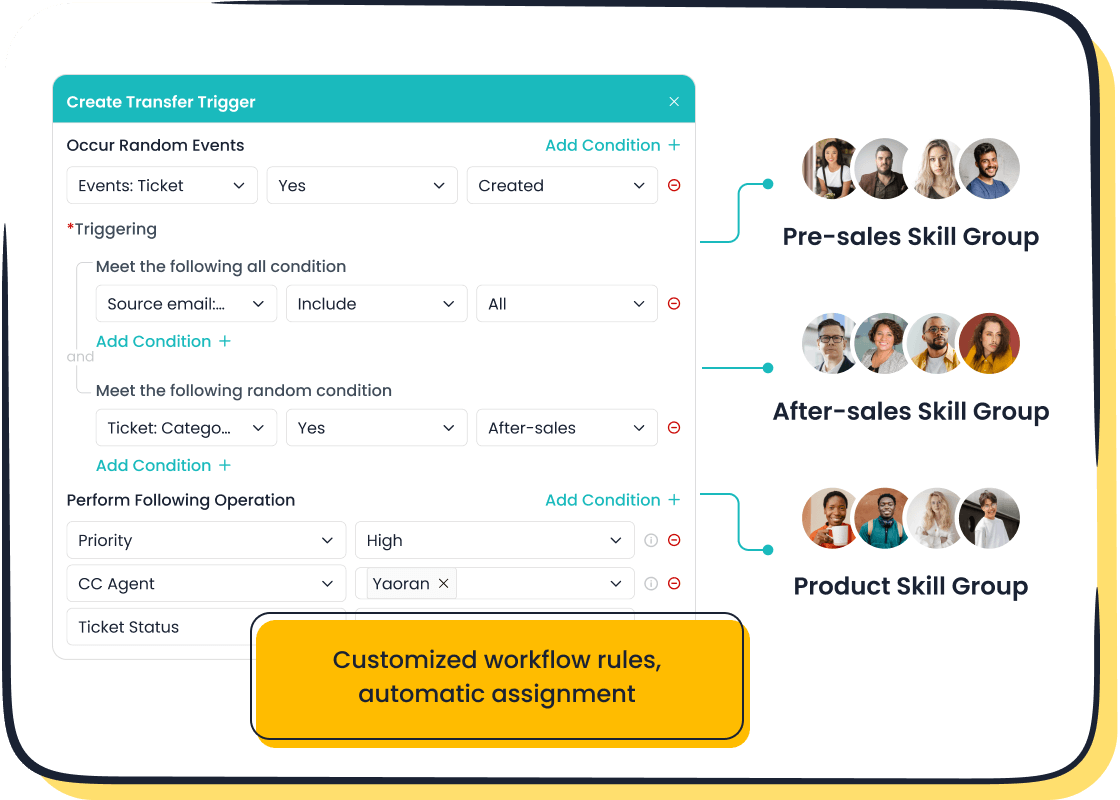
Ticketing workflow rules are essential for managing customer support operations efficiently. These rules automate repetitive tasks like ticket routing and prioritization, ensuring faster resolutions and consistent service. Automation has transformed customer service, as shown in a recent study where resolution times dropped by 52%, and first response times improved by 37%.

Sobot's Ticketing System takes workflow management to the next level. It centralizes communication channels, automates ticket assignments, and tracks SLAs. This ensures your team delivers timely and accurate support, enhancing customer satisfaction and operational efficiency.
Understanding Ticketing Workflow Rules
What Are Ticketing Workflow Rules?
Definition and purpose of ticketing workflow rules.
Ticketing workflow rules are predefined guidelines that automate the handling of customer support tickets. These rules govern key processes such as ticket creation, categorization, prioritization, assignment, resolution, and follow-up. By implementing these rules, you can ensure that every support ticket follows a structured path, reducing the chances of errors or delays.
The primary purpose of ticketing workflow rules is to streamline customer support operations. They help you manage high volumes of tickets efficiently while maintaining consistency in service quality. For instance, when a ticket is created, the system can automatically assign it to the right agent based on predefined criteria like expertise or urgency. This ensures that no ticket gets overlooked and that customers receive timely assistance.
How they streamline customer support operations.
Ticketing workflow rules simplify complex support processes by automating repetitive tasks. For example, they can route tickets to specific departments, prioritize urgent issues, and trigger follow-ups for unresolved cases. This automation reduces manual effort, allowing your team to focus on resolving issues rather than managing workflows.
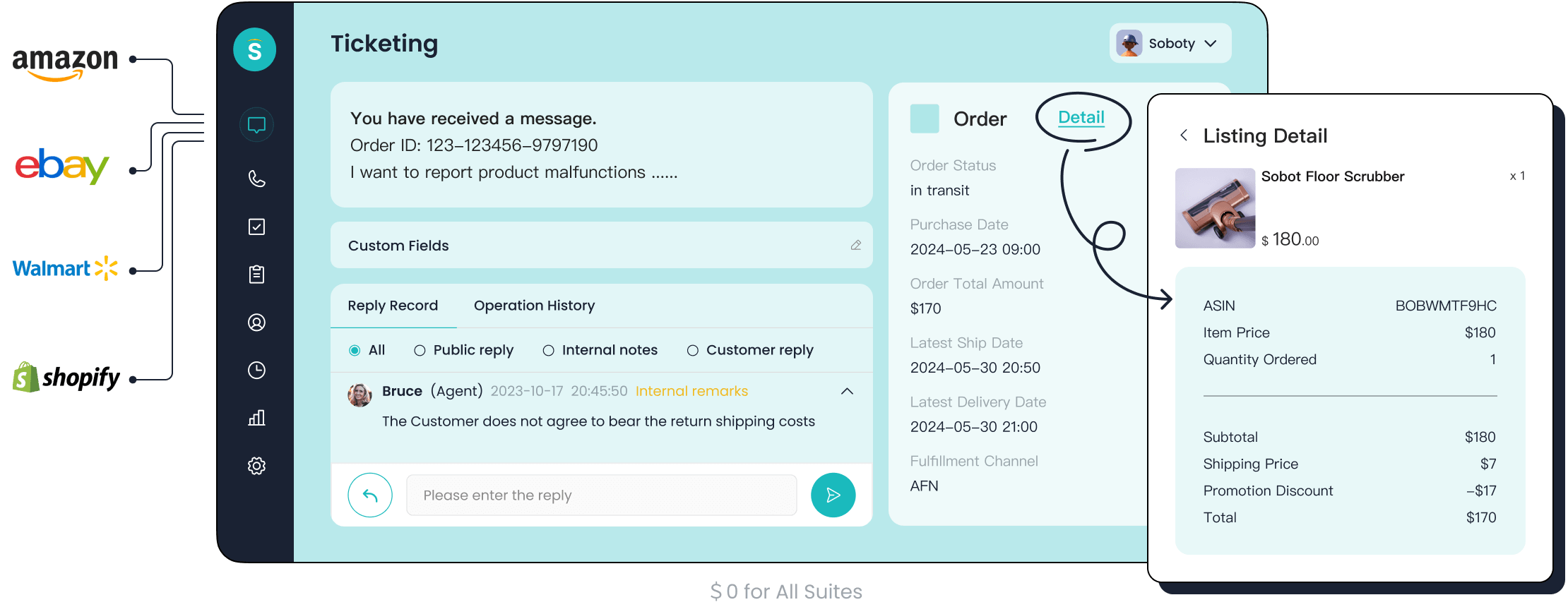
Sobot's Ticketing System exemplifies this efficiency. It integrates all communication channels into a single platform, automates ticket assignments, and tracks SLAs. These features ensure that your support ticket workflow operates smoothly, leading to faster resolutions and higher customer satisfaction.
Benefits of Ticketing Workflow Rules
Enhanced efficiency and reduced manual effort.
Ticketing workflow rules significantly improve operational efficiency. By automating tasks like ticket routing and prioritization, they reduce the time spent on each ticket. This streamlined process not only boosts productivity but also minimizes the risk of human error. For example, Sobot's system uses custom trigger rules to assign tickets automatically, ensuring that the right agent handles each issue.
Improved customer satisfaction through faster resolutions.
Efficient workflows lead to quicker response times and higher resolution rates. Customers appreciate timely assistance, which enhances their overall experience. Studies show that faster resolutions directly impact customer loyalty. With Sobot's SLA management feature, you can set response and resolution times, ensuring that your team meets customer expectations consistently.
Consistency in handling support tickets.
A well-defined support ticket workflow ensures uniformity in how tickets are managed. This consistency builds trust with your customers, as they know what to expect from your service. Additionally, centralized ticket management prevents issues like lost emails or miscommunications. Sobot's unified platform displays all customer interactions in one place, making it easier for agents to provide accurate and consistent support.
Tip: Regularly review and update your ticketing workflow rules to adapt to changing customer needs and business goals.
Why Ticketing Workflow Rules Are Essential for Customer Support
Ensuring Efficient Ticket Management
Automating ticket routing and prioritization.
Automating ticket routing and prioritization is crucial for managing customer support tickets effectively. Without automation, your team may face inefficiencies, increased backlogs, and difficulties in prioritizing urgent issues. These challenges can lead to slower response times and employee burnout, as shown in the table below:
| Challenge | Implication |
|---|---|
| Inefficiencies in managing inquiries | Leads to slower response times and employee burnout due to overwhelming workloads. |
| Increased ticket backlogs | Causes customer dissatisfaction as their issues remain unaddressed for too long. |
| Difficulties in prioritizing urgent issues | Results in longer resolution times and potential mistakes by agents. |

Sobot's Ticketing System addresses these challenges by automating ticket routing based on predefined rules. For example, it can assign tickets to agents with specific expertise or route them to the appropriate department. This ensures that every ticket is handled efficiently, reducing delays and improving customer satisfaction.
Reducing response times with predefined rules.
Predefined rules play a vital role in reducing response times. They allow you to streamline your support ticket workflow by automating repetitive tasks. Some examples of predefined rules include:
- Prioritize Tickets: Assign urgency levels based on complexity or customer impact.
- Use Automated Ticket Routing: Route tickets automatically using keywords or triggers.
- Implement Ticket Templates: Use pre-designed templates for common inquiries.
By implementing these rules, you can ensure faster resolutions and consistent service quality. Sobot's SLA management feature further enhances this process by setting response and resolution times, ensuring your team meets customer expectations.
Supporting Team Collaboration
Facilitating seamless communication among agents.
Effective collaboration among agents is essential for resolving complex customer support tickets. A centralized platform like Sobot's Ticketing System facilitates seamless communication by integrating internal tools and discussion features. This allows agents to share knowledge, discuss specific tickets, and align on resolution strategies. The table below highlights how ticketing workflow rules enhance collaboration:
| Evidence | Description |
|---|---|
| Internal communication tools | Facilitate direct collaboration between agents or teams without leaving the platform. |
| Discussion on tickets | Agents can discuss specific tickets and share relevant information. |
| Centralized platform | Facilitates effective collaboration among team members involved in resolving a ticket. |
| Transparency | Enhances communication and ensures alignment on the resolution process. |
Examples of workflows that enhance teamwork.
Workflows designed to enhance teamwork often resemble an assembly line. Breaking tasks into manageable steps ensures clarity and actionability. For instance:
- Workflow automation structures escalations and decisions.
- Historical customer data enables personalized resolutions.
- Streamlined communication improves compliance and efficiency.
Sobot's unified platform supports these workflows by providing tools for collaboration and transparency, ensuring your team works cohesively to resolve tickets.
Meeting SLAs and Customer Expectations
Automating SLA compliance tracking.
Meeting SLAs (Service Level Agreements) is critical for maintaining customer trust. Automating SLA compliance tracking ensures that your team adheres to predefined response and resolution times. Sobot's Ticketing System simplifies this process by monitoring SLA metrics and sending reminders for pending tickets. This automation reduces the risk of SLA breaches and helps you maintain high service standards.
Ensuring timely responses and resolutions.
Timely responses are key to customer satisfaction. By automating ticket prioritization and follow-ups, you can ensure that no ticket is overlooked. Sobot's smart notifications and SLA reminders keep your team on track, enabling faster resolutions. This not only improves customer loyalty but also enhances your team's efficiency in managing the support ticket workflow.
Step-by-Step Guide to Setting Up Ticketing Workflow Rules
Choosing the Right Ticketing System
Key features to look for in a ticketing system.
Selecting the right ticketing management system is crucial for creating a support ticket workflow that enhances efficiency. A robust system should support multiple communication channels, ensuring all customer inquiries are captured and managed effectively. This is essential for maintaining customer satisfaction.
Key features to prioritize include:
- Automation capabilities to handle repetitive tasks, allowing agents to focus on complex issues.
- Scalability to adapt to growing ticket volumes as your business expands.
- Security features to protect sensitive customer data and ensure compliance with regulations.
Workflow automation is another critical feature. It streamlines repetitive tasks, such as assigning tickets based on type or automatically updating customers, which significantly improves operational efficiency.
How Sobot's Ticketing System supports workflow automation.

Sobot's Ticketing System excels in workflow automation. It integrates communication channels like email, voicemail, and chat into a unified platform, ensuring seamless ticket management. The system automates ticket routing, prioritization, and SLA tracking, reducing manual effort and improving response times. With features like custom trigger rules and multilingual support, Sobot ensures your team delivers consistent and efficient service, even during peak periods.
Defining Your Support Ticket Workflow
Mapping out your customer support process.
Mapping your support ticket workflow begins with understanding your customer and team needs. Start by researching customer motivations and pain points. Define customer personas to tailor workflows to different segments. Collaborate across departments to gather diverse insights and ensure a holistic view of the customer journey.
Follow these steps to map your process effectively:
- Identify the steps in your workflow, from ticket creation to resolution.
- Highlight key touchpoints and decision points.
- Determine areas of friction and prioritize improvements.
- Iterate continuously to adapt workflows to changing needs.
This approach ensures your workflow aligns with both customer expectations and business goals.
Identifying key stages and decision points.
A well-defined support ticket workflow includes clear stages and decision points. For example, the process might start with ticket creation, followed by categorization, prioritization, and assignment. Decision points, such as when to escalate a ticket, should be based on predefined criteria like urgency or complexity. Sobot's system simplifies this by automating these stages, ensuring no ticket gets overlooked.
Configuring Ticketing Workflow Rules
Setting up ticket routing and escalation rules.
Effective ticket routing and escalation rules ensure tickets reach the right agents promptly. Use criteria like keywords, customer type, or issue complexity to automate routing. For instance, a high-priority customer support ticket can be escalated to a senior agent automatically. Sobot's custom trigger rules make this process seamless, reducing delays and improving resolution times.
Automating ticket prioritization and follow-ups.
Automating prioritization ensures urgent tickets receive immediate attention. Assign priority levels based on factors like customer impact or SLA requirements. Additionally, automate follow-ups for unresolved tickets to maintain accountability. Sobot's smart notifications and time-triggered actions keep your team on track, ensuring timely responses and resolutions.
Testing and Implementing the Workflow
Testing rules for accuracy and efficiency.
Testing your workflow rules ensures they function as intended and meet your team's needs. Start by simulating real-life scenarios to evaluate how the rules handle different types of customer support tickets. For example, test whether high-priority tickets are routed to the correct agents or if follow-up reminders are triggered for unresolved cases. This step helps identify gaps or inefficiencies in the support ticket process.
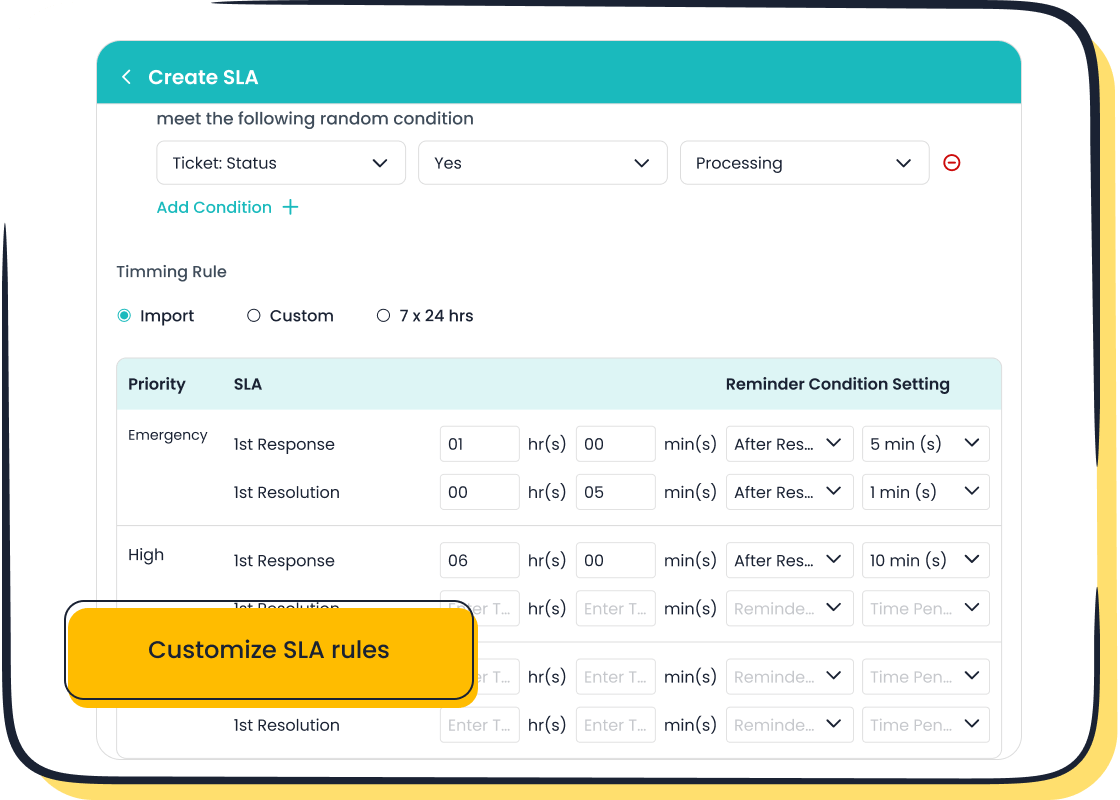
Use a small batch of tickets to test the workflow in a controlled environment. Monitor how the system performs under various conditions, such as peak inquiry times or complex ticket escalations. Sobot's Ticketing System simplifies this process with its custom trigger rules and SLA tracking. These features allow you to test and refine workflows without disrupting ongoing operations. Regular testing ensures your workflow remains accurate and efficient, even as customer needs evolve.
Tip: Document any issues during testing and adjust the rules accordingly to avoid similar problems in the future.
Rolling out the workflow to your team.
Rolling out a new workflow requires careful planning to ensure a smooth transition. Follow these steps to implement the workflow effectively:
- Understand customer and team needs by identifying pain points and areas for improvement.
- Define the steps in the process, breaking down tasks into manageable parts.
- Involve multiple departments to gather diverse insights and ensure buy-in.
- Iterate on the workflow continuously to adapt and improve based on feedback.
Before full implementation, train your team on the new workflow. Use role-playing exercises or mock scenarios to familiarize them with the updated support ticket process. Sobot's unified platform makes this easier by providing a centralized system where agents can practice handling tickets. Once the team feels confident, roll out the workflow gradually, starting with a small group before expanding to the entire team. This phased approach minimizes disruptions and allows you to address any issues early.
Note: Encourage your team to provide feedback during the rollout. Their insights can help refine the workflow for better efficiency and customer satisfaction.
Best Practices for Optimizing Ticketing Workflow Rules
Regular Testing and Updates
Importance of periodic testing and feedback.
Regular testing ensures your ticketing workflow rules remain effective and aligned with your business needs. Over time, customer expectations and support processes evolve. Testing your workflows periodically helps identify inefficiencies, such as delays in ticket routing or unresolved escalations. For example, simulate real-world scenarios to evaluate how well your rules handle peak ticket volumes or complex queries.
Feedback from your support team is equally important. Agents often encounter challenges that automated workflows may not address. By gathering their insights, you can refine your rules to improve efficiency and accuracy. Sobot's Ticketing System simplifies this process with its custom trigger rules and SLA tracking, allowing you to test and adjust workflows without disrupting operations.
Updating rules to adapt to changing needs.
Customer needs and business priorities change frequently. Updating your ticketing workflow rules ensures they stay relevant. For instance, if your company launches a new product, you may need to create rules for routing tickets related to that product to specialized agents. Similarly, as your team grows, you might need to adjust escalation paths or redefine priority levels.
Sobot's system supports these updates with features like time-triggered actions and customizable templates. These tools make it easy to adapt your workflows to new challenges, ensuring your support ticket workflow remains efficient and customer-focused.
Monitoring Performance Metrics
Key metrics to track, such as resolution time and customer satisfaction.
Tracking performance metrics helps you measure the effectiveness of your ticketing workflow rules. Below is a table of key metrics to monitor:
| Metric | Description |
|---|---|
| First Response Time | Average time taken for an agent's first response to a ticket. |
| Average Resolution Time | Total time taken to resolve a ticket, including wait times. |
| First Contact Resolution Rate | Percentage of tickets resolved in the first interaction. |
| CSAT | Customer satisfaction score based on feedback. |
| SLA Compliance Rate | Percentage of tickets resolved within agreed SLA timeframes. |
| Reopened Ticket Rate | Percentage of resolved tickets reopened later. |
Monitoring these metrics provides actionable insights. For example, a high reopened ticket rate may indicate incomplete resolutions, while low SLA compliance could signal bottlenecks in your workflow.
Using analytics to refine workflows.
Analytics play a crucial role in optimizing your support ticket workflow. Use data to identify patterns, such as peak ticket volumes or common delays. For example:
- Analyze ticket data to uncover trends.
- Identify bottlenecks, such as delays in escalation.
- Adjust workflows based on KPI reviews, like improving response times or reducing ticket backlogs.
Sobot's trusted analytics tools simplify this process. They provide real-time insights into metrics like resolution time and customer satisfaction, helping you make informed decisions to enhance your ticketing workflow rules.
Training and Supporting Your Team
Ensuring agents understand the workflow rules.
Your team must fully understand the ticketing workflow rules to execute them effectively. Start by providing clear documentation that outlines each rule and its purpose. Use role-playing exercises to simulate real-life scenarios, helping agents practice applying the rules. For example, train agents on how to handle escalations or prioritize high-impact tickets.
Sobot's unified platform makes this easier by centralizing all ticket-related information. Agents can access customer data, ticket history, and workflow guidelines in one place, ensuring they follow the rules consistently.
Providing ongoing training and resources.
Ongoing training is essential for keeping your team updated on evolving workflows and customer expectations. Challenges like employee burnout or high turnover can disrupt your support operations. To address this, invest in continuous professional development. Offer resources like webinars, knowledge bases, and refresher courses to help agents stay sharp.
Sobot supports this with features like multilingual support and categorized templates, which simplify ticket handling and reduce agent workload. By equipping your team with the right tools and training, you can maintain high service standards and adapt to changing customer needs.
Tip: Regularly review your team's performance and provide constructive feedback to help them improve.
Overcoming Common Challenges in Ticketing Workflow Rules
Simplifying Complex Workflows
Avoiding overly complicated rules.
Overly complex ticketing workflows can create confusion and inefficiencies. A lack of planning often results in unclear processes, leaving stakeholders unsure of their roles. Poor data migration strategies may lead to lost or improperly formatted information, further complicating workflows. Limited training can also leave your team unprepared to navigate the system, increasing resistance to change. To avoid these pitfalls, focus on simplicity. Start by identifying the most critical steps in your workflow and eliminate unnecessary layers. Clear, concise rules ensure your team can handle tickets efficiently without feeling overwhelmed.
Using templates for common scenarios.
Templates are a powerful tool for simplifying workflows. They reduce repetitive tasks and improve consistency. For example:
- Use AI to suggest pre-written responses for common inquiries.
- Customize templates to align with your brand voice and enhance customer relationships.
- Build a knowledge base of templates targeting frequently asked questions.
- Set up autoresponders to keep customers informed about their requests.
Sobot’s Ticketing System supports these strategies by offering categorized templates and canned responses, helping you streamline ticket management while maintaining a professional tone.
Adapting to Business Growth
Scaling workflows as your team grows.
As your business expands, scaling workflows becomes essential. Bottlenecks, manual tasks, and costly workarounds can slow down operations. To address these challenges:
- Focus on automation and technology to handle increased ticket volumes.
- Enhance team communication to ensure smooth collaboration.
- Implement scalable solutions like cloud-based platforms for flexibility.
- Foster a culture of continuous improvement to adapt to evolving needs.
Sobot’s unified platform integrates automation and analytics, making it easier to scale your ticketing workflow rules as your team grows.
Adjusting workflows for new products or services.
Introducing new products or services requires flexible workflows. Cloud-based solutions, like Sobot’s Ticketing System, offer scalability and accessibility, allowing you to accommodate increased workloads and additional users. Regular training sessions ensure your team stays proficient in new tools and processes. By staying agile, you can quickly adapt to market changes and customer demands, maintaining efficiency and competitiveness.
Maintaining Consistency Across Teams
Standardizing rules for multi-location teams.
Standardizing ticketing workflow rules across locations ensures uniformity and reduces confusion. Effective strategies include:
- Defining clear communication protocols.
- Utilizing workplace technology to streamline processes.
- Encouraging collaboration and inclusion to align team efforts.
Sobot’s multilingual support and centralized platform make it easier to implement standardized workflows, even for global teams.
Using documentation to ensure uniformity.
Comprehensive documentation is key to maintaining consistency. It helps onboard new agents and ensures everyone follows the same procedures. Include details like Service Level Agreements (SLAs) to clarify response and resolution timelines. Documenting best practices and workflows ensures your team delivers consistent, high-quality support.
Ticketing workflow rules play a vital role in enhancing customer service efficiency and satisfaction. They streamline processes, reduce manual effort, and ensure faster resolutions. For instance, 79% of consumers expect quick responses when contacting a brand, making optimized workflows essential for meeting customer expectations. By automating tasks like ticket routing and prioritization, you can improve productivity and reduce employee burnout.
Sobot's Ticketing System offers a unified platform to manage these workflows effectively. Its automation features, SLA tracking, and multilingual support ensure consistent and efficient service delivery. Maintaining and optimizing these rules provides long-term benefits, such as enhanced reporting, increased customer loyalty, and balanced workloads. Explore Sobot's solutions to transform your customer support operations and achieve lasting success.
Tip: Regularly update your ticketing workflow rules to adapt to evolving customer needs and business growth.
FAQ
What are ticketing workflow rules, and why do they matter?
Ticketing workflow rules are automated guidelines that manage support tickets. They streamline processes like routing, prioritization, and follow-ups. These rules reduce manual effort and improve response times. For example, Sobot's Ticketing System automates ticket assignments, ensuring faster resolutions and consistent customer service.
Tip: Use workflow rules to handle high ticket volumes efficiently.
How can I automate ticket prioritization effectively?
You can automate ticket prioritization by setting predefined criteria like urgency, customer type, or issue complexity. Sobot's Ticketing System allows you to assign priority levels automatically. For instance, high-priority tickets can be routed to senior agents immediately, ensuring critical issues receive prompt attention.
Can ticketing workflow rules help meet SLAs?
Yes, ticketing workflow rules ensure SLA compliance by automating response and resolution tracking. Sobot's SLA management feature monitors deadlines and sends reminders for pending tickets. This helps your team stay on track and meet customer expectations consistently.
Example: Automating SLA tracking reduces the risk of missed deadlines.
How do I test my support ticket workflow rules?
Test your workflow rules by simulating real-life scenarios. For example, check if high-priority tickets route correctly or if follow-up reminders trigger as expected. Sobot's custom trigger rules make testing easy, allowing you to refine workflows without disrupting operations.
What makes Sobot's Ticketing System unique?
Sobot's Ticketing System integrates communication channels into one platform. It automates ticket routing, prioritization, and SLA tracking. Features like multilingual support and trusted analytics enhance efficiency. This unified approach ensures your support ticket workflow operates smoothly, even during peak periods.
Note: Explore Sobot's Ticketing System here for more details.
See Also
A Comprehensive Guide to Utilizing Shopify Live Chat
Effective Strategies for Managing Your Live Chat Team
Achieving Excellence in Customer Support Through Live Chat

