The Ultimate Guide to Your Live Chat Dashboard

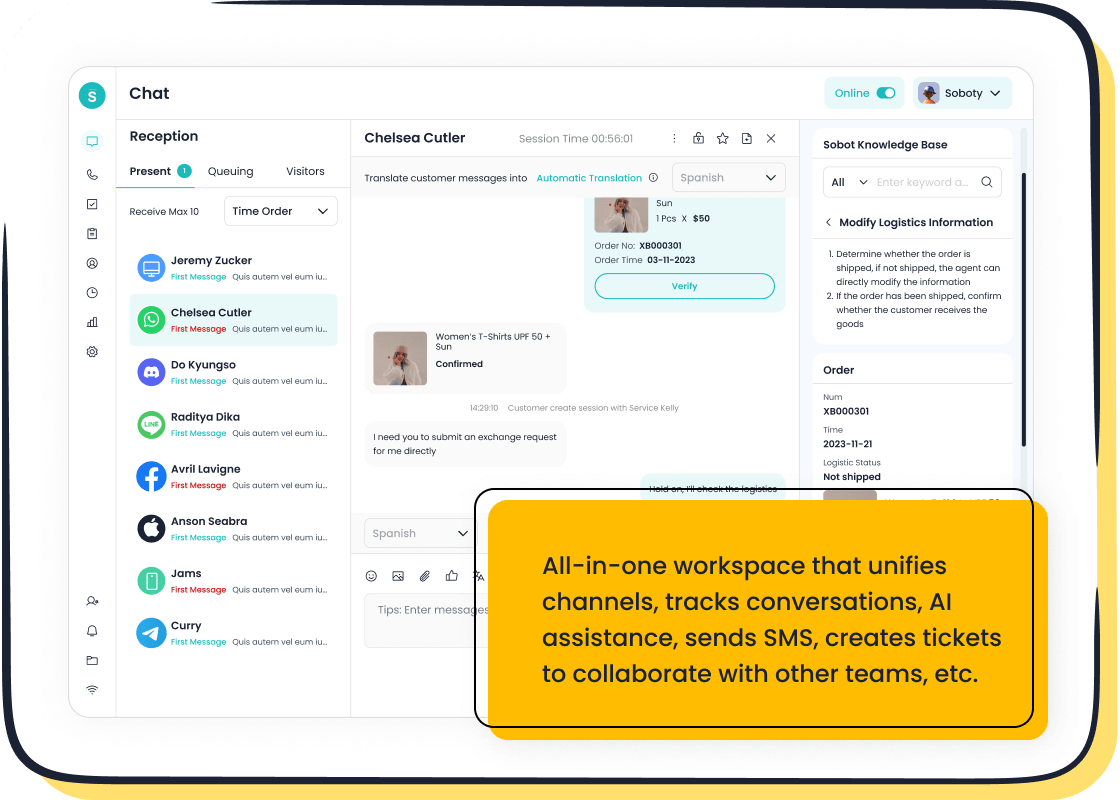
A new live chat dashboard can look complex. Mastering it is key to excellent customer support. This beginner guide is your tour of the Sobot platform. You will learn the core components for every customer interaction.
You will learn to use:
- The Chat Inbox
- The Conversation Window
- Agent Status Controls
- Key Analytics
This guide will help you feel confident providing great customer support. You will see how tools from Sobot AI to the Sobot call center help you serve each customer effectively.
Navigating Your Live Chat Dashboard
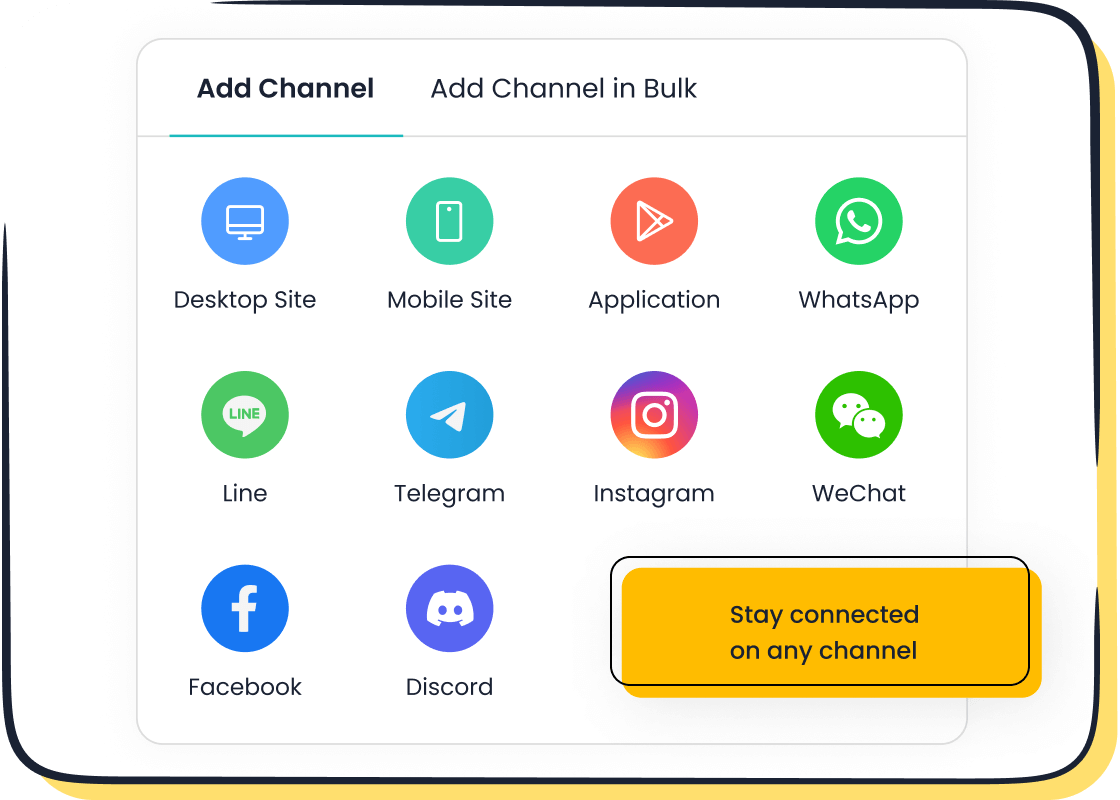
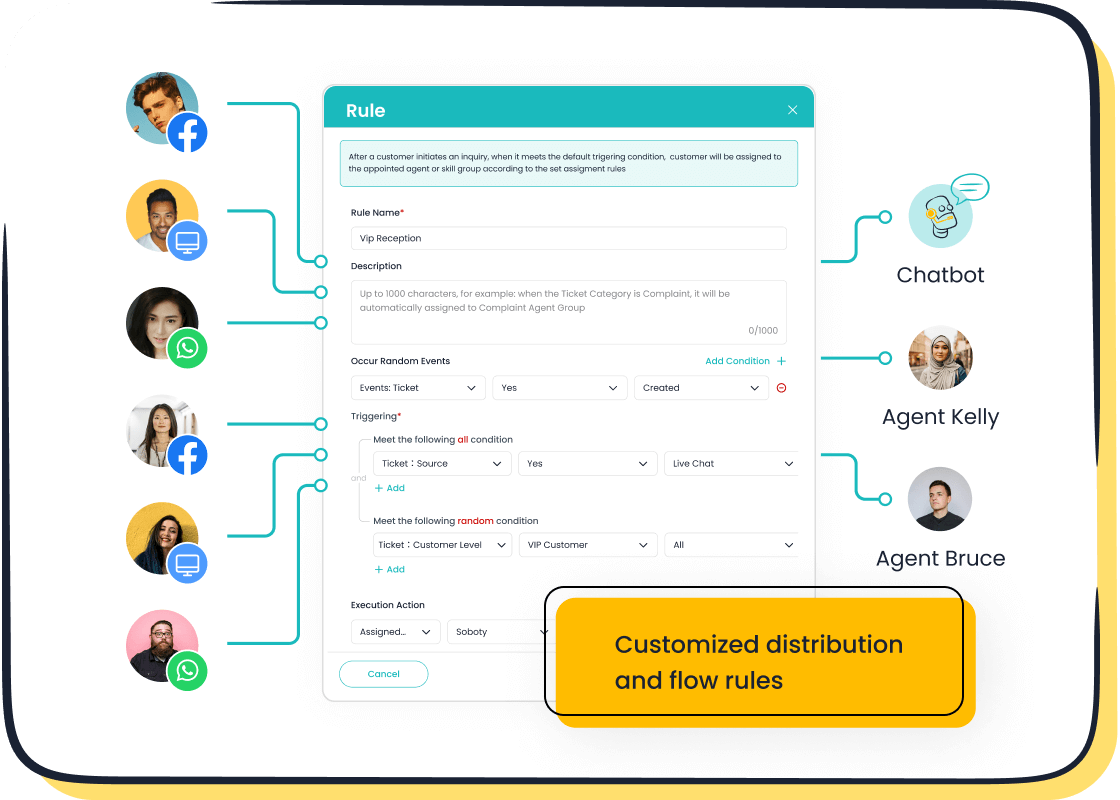
Your Sobot live chat dashboard is more than just a list of messages. It is a unified workspace. This central hub connects you to every customer interaction across your entire business. A modern dashboard breaks down the walls between departments. It allows your team to collaborate in real time for faster, more personal service.
Sobot provides a single, integrated platform. You can manage conversations from every channel without switching between different tools. This includes:
- Live Chat from your website or mobile app.
- Chatbot and AI Agent conversations that need a human touch.
- Voice Call Center interactions.
- Ticketing System updates and follow-ups.
- Social Media messages from platforms like WhatsApp and Facebook.
This unified approach streamlines your workflow. It gives you a complete view of the customer journey. You can provide a seamless experience that builds loyalty and trust.
Understanding the Chat Queue
The chat queue is your virtual waiting line. It organizes incoming chats from every channel and holds them until an agent is available. Managing this queue effectively is crucial for providing excellent live chat support and a positive customer experience.
Sobot's live chat software uses intelligent assignment to manage your queue automatically. This ensures each customer connects with the right agent quickly. Common routing methods include:
- Round-Robin: Distributes new chats evenly among available agents.
- Least Busy: Assigns the next chat to the agent with the fewest active conversations.
- Skill-Based: Routes chats to agents with specific expertise, like technical support or sales.
Pro Tip: Best Practices for Queue Management To minimize wait times and keep customers happy, you can apply several strategies. These practices help you deliver a better service experience.
- Show Queue Position: Tell a customer their place in line. This manages expectations better than a fluctuating wait time.
- Set Queue Caps: Limit the number of people who can wait. This prevents the queue from becoming too long and frustrating for everyone.
- Manage Staffing: Analyze your chat data to see your busiest hours. Staffing your team for these peak times ensures you have the right live chat support available when needed.
- Empower Experienced Agents: During a sudden rush, you can allow your veteran agents to handle more concurrent chats. Their skill helps clear the queue faster.
Using the Live Visitor List
The Live Visitor List transforms your live chat support from reactive to proactive. This feature shows you everyone who is currently browsing your website in real time. You can see their location, the page they are on, and how long they have been there. This information is key for precise profiling that helps you turn visitors into qualified leads.
Instead of waiting for a customer to start a chat, you can initiate the conversation. This proactive engagement is a powerful way to build customer relationships and guide visitors toward a purchase. You can set up triggers to automatically send a message based on visitor behavior.
Here are a few ways you can use the Live Visitor List to generate leads and boost user engagement:
| Trigger Type | How It Works | Example Message |
|---|---|---|
| Returning Visitors | Acknowledge a visitor who has been to your site before. This personal touch makes them feel valued and builds strong customer relationships. | "Welcome back! It's great to see you again. Can I help you find anything today?" |
| Page-Specific | Engage a visitor who spends time on a key page, like your pricing or product page. This shows you are ready to answer their questions. | "I see you're looking at our premium plan. Do you have any questions about its features?" |
| Abandoned Carts | Send a helpful reminder to a customer who has items in their cart but hasn't checked out. This can recover potential leads. | "It looks like you left a few items in your cart. Can I help you complete your purchase?" |
| Exit Intent | Offer last-minute help or a special deal when a visitor moves their mouse to close the page. This can turn a lost visitor into a sale. | "Before you go, can I answer any questions? We have a special offer for new customers today!" |
Using these proactive strategies provides a personalized experience. It shows you understand the customer's needs, which is essential for building lasting customer relationships and turning initial interest into loyal patronage. This level of targeted engagement is a key advantage of the Sobot platform.
The Anatomy of the Conversation Window
The conversation window is your command center for every customer interaction. This is where you will spend most of your time providing live chat support. A well-designed window gives you the tools and context needed to resolve issues quickly and create a positive customer experience. The Sobot live chat dashboard puts everything you need right at your fingertips.
Core Chatting Tools
Your effectiveness as an agent depends on the tools available to you. The Sobot conversation window is equipped with powerful features designed to boost your efficiency. Many of these tools are enhanced by AI to help you provide faster, more accurate customer support.
You have access to several key tools:
- AI-Powered Canned Responses: These are more than just pre-written templates. Sobot's AI customizes replies based on keywords and customer history. This creates a personalized experience for each user. While a standard canned response is generic, Sobot's AI can handle a large portion of interactions independently, ensuring a unique and meaningful conversation.
| Feature | Sobot's AI-Powered Canned Responses | Standard Canned Responses |
|---|---|---|
| Personalization | The AI Agent customizes replies using language and keywords. This enables a unique experience for each customer. | Replies are generic and do not adapt to the individual customer. |
| Efficiency | AI can manage a significant number of interactions, freeing you to focus on complex problems. | Requires manual selection and offers limited efficiency gains. |
- Auto-Translation: You can serve customers from around the world without a language barrier. Sobot’s auto-translation feature detects the customer's language and translates the conversation for both of you in real time. This allows you to provide excellent live chat support to a global audience.
- File Attachments: You can easily send and receive files. This is perfect for sharing screenshots, user guides, or invoices to resolve issues faster.
- Co-browsing: With the customer's permission, you can view their screen to guide them through complex steps. This is extremely helpful for technical support and troubleshooting.
Sobot AI: Your Smart Assistant Think of Sobot's AI as your copilot. It works behind the scenes to make your job easier. It can suggest responses, find relevant articles from your knowledge base, and summarize long conversations. This support helps you resolve issues on the first contact and deliver a better experience.
Key Actions for Live Chat Support
Beyond typing messages, the conversation window gives you several actions to manage the flow of a chat. These functions help you collaborate with your team and keep conversations organized.
Here are some key actions you will use daily:
- Add Internal Notes: You can leave private comments inside a conversation that only your team can see. Use these notes to provide context for a teammate, ask for help, or record important details about the customer's issue. This ensures a smooth handover if another agent takes over.
- Transfer a Chat: Sometimes, a customer needs help from another person or department. You can easily transfer the chat to the right agent or group. It is good practice to inform the customer before you transfer them. A simple message like, "I'm connecting you with our technical specialist, who can better answer your question," creates a seamless experience.
- Tag Conversations: Tags are labels you can add to a chat to categorize it. This is a powerful tool for organizing your work and identifying trends. You can use tags to:
- Prioritize urgent issues.
- Track requests for new features.
- Identify common problems or bugs.
- Segment leads for your sales team.
Tagging conversations helps your entire team understand customer needs and improve your products and services over time.
Accessing Customer History
Context is everything in great customer support. You can avoid asking a customer to repeat themselves by accessing their complete history directly within the conversation window. This single feature dramatically improves the quality and speed of your live chat support.
When a customer starts a chat, you instantly see:
- Contact Information: Their name, email, and location.
- Past Conversations: A full transcript of their previous chats with your team.
- Website Activity: Which pages they have viewed and for how long.
- Order History: Previous purchases or account details from integrated systems like your CRM.
Having this information allows you to provide a truly personalized experience. You can greet a returning customer by name, understand their past issues without asking, and offer relevant solutions quickly. Companies that give their agents immediate access to customer data can improve First Contact Resolution by up to 30%. This is how you turn a simple interaction into a lasting relationship. It is also how leading brands like OPPO use Sobot's tools to achieve a 94% positive feedback rate from their customers.
Managing Availability with Agent Status Controls
Your availability directly impacts the customer experience. Managing your status in the live chat dashboard tells the system whether you are ready to accept new chats. This simple action ensures that customers are not left waiting for a reply from an agent who is not there. Proper status management is a cornerstone of effective live chat support.
Setting Your Agent Status
You can set your status with a single click. This control is usually located in the header or your profile menu. You should update your status whenever you step away from your computer, go on a break, or finish your shift. Keeping your status accurate helps your team manage the queue and provides better customer support. It is a small habit that makes a big difference in team efficiency.
A Note on Automatic Status Changes The Sobot system is smart. It helps you manage your availability automatically. If your workload reaches 90% of its maximum, the system will change your status to prevent you from receiving more chats. This ensures you can focus on your current customers without feeling overwhelmed.
How Status Affects Your Queue
Your status tells the routing system what to do. Each status has a specific rule that affects how new chats are assigned. This is crucial for providing timely live chat support. Understanding these statuses helps you see why you are, or are not, receiving new conversations.
Here is how each status impacts your queue for live chat support:
- Available: You are ready to receive new chats. The system will add you to the pool of agents for new conversations.
- Busy: You are currently handling your maximum number of chats. You will not receive new ones.
- Away: You are not at your desk. You will not get new chats, but a teammate can still transfer a conversation to you.
- Offline: You are signed out. You cannot receive any chats.
Using these controls correctly is essential for good customer support. It ensures the system routes customers to agents who can help them immediately, improving the quality of your live chat support.
Understanding Performance with Sobot Analytics
Data is your guide to providing better live chat support. The Sobot platform evaluates over 150 indicators, but you do not need to track them all at once. You can start with a few key metrics to understand your performance and improve customer satisfaction. This data helps you see what is working and where you can grow.
Key Metrics and KPIs
Key Performance Indicators (KPIs) are the numbers that show how well your team is doing. Focusing on a few essential metrics will help you make meaningful improvements. For beginners, the most important ones measure speed and availability.
Start with these core metrics:
- Total Chats: This is the total number of conversations your team handles.
- Missed Chats: This shows how many customers left because no agent was available. A high number may mean you need more staff at certain times.
- First Response Time: This is how long a customer waits for your first reply. Top-performing companies respond in under 30 seconds. A fast response is crucial for a positive customer experience.
Tracking Customer Satisfaction and Ratings
The ultimate goal of live chat support is happy customers. The best way to measure this is to ask them directly. Post-chat surveys are a simple tool for gathering instant feedback on customer satisfaction.
After a chat ends, the customer receives a short survey. They can rate their experience and leave comments. This feedback helps you:
- Calculate your Customer Satisfaction (CSAT) score.
- Identify areas where your service can improve.
- Monitor agent performance to provide better coaching.
This direct feedback is powerful. It shows you the real impact of your work on customer satisfaction. Leading brands like OPPO use Sobot's tools to listen to their customers, achieving a 94% positive feedback rate. This high level of satisfaction shows the value of a great support experience and boosts customer loyalty. Your goal is to increase this satisfaction score with every interaction.
Filtering Your Reports
Your analytics dashboard contains a lot of information. Filters help you focus on the data that matters most. You can customize reports to analyze performance from different angles. This helps you understand the story behind the numbers.
You can filter your data by:
- Date Range: See performance during a specific week or month.
- Agent or Team: Compare individual performance or see how different teams are doing.
- Channel: Understand which channels (website, WhatsApp, etc.) generate the most chats.
Using filters helps you spot trends and identify coaching opportunities. For example, you can see if a specific agent needs help or if your whole team struggles during peak hours. This insight allows you to make smart decisions that improve your live chat support and overall customer satisfaction. A better experience for each customer leads to higher satisfaction.
Customizing Your Sobot Workspace
Making your workspace your own helps you work faster and feel more comfortable. The Sobot dashboard lets you change settings to fit your personal style. Customizing your space allows you to focus on what matters most: providing excellent live chat support.
Personalizing Notifications and Profile
Notifications keep you informed about important events without overwhelming you. You can choose which alerts you receive and how you get them. This helps you stay on top of your work and respond to customers quickly. A personalized notification system streamlines your workflow.
You can set up alerts to:
- Stay informed about new chats or updates to your conversations.
- Receive immediate on-screen alerts for critical events.
- Get contextual information that is relevant to your current task.
You decide what you want to be notified about. You can get an alert when a conversation is assigned to you or when a teammate mentions you in an internal note. You can also choose to receive these alerts through different channels, such as in-app pop-ups or emails.
Creating Personal Canned Responses
Canned responses save you time by letting you use pre-written answers for common questions. Sobot allows you to create your own personal canned responses. These are different from the public responses shared with your whole team. Personal responses let you add your own touch to conversations.
This table shows the difference between private and public canned responses:
| Feature | Private Canned Responses | Public Canned Responses |
|---|---|---|
| Accessibility | Created for and accessible by you only | Shared among all team members |
| Purpose | Tailored to your individual needs and style | Ensures consistent answers across the team |
| Use Case | Adds a personal touch while staying efficient | Maintains brand voice and accuracy |
Using personal canned responses helps you provide fast and effective live chat support. It gives you the freedom to communicate in a way that feels natural to you while still meeting your team's goals.
Your Sobot live chat dashboard is a powerful tool. It improves every customer interaction and boosts customer satisfaction. Each feature helps you provide better service to every customer, leading to greater satisfaction.
Quick-Reference Checklist
- Monitor the unified queue to accept chats from any channel.
- Use conversation tools to assist each customer efficiently.
- Set your status to manage availability for better customer satisfaction.
- Review analytics to track performance and customer satisfaction.
- Customize settings for a personalized workflow and higher customer satisfaction.
You are now ready to embark on your contact journey.
FAQ
What channels does the Sobot dashboard support?
Your dashboard unifies many channels. You can manage conversations from your website, mobile app, and social media. This includes platforms like WhatsApp, Facebook, and Instagram. This provides a single space for all your live chat support needs.
Can I try the dashboard before I commit?
Yes, you can. Sobot offers a free trial for its Live Chat platform. This lets you explore the dashboard and its features. You can see how it fits your team's workflow before making a decision.
How does the dashboard help me support global customers?
The platform includes an auto-translation feature. It translates conversations in real time for you and your customer. This tool removes language barriers. You can provide excellent live chat support to a worldwide audience without needing a multilingual team.
Can I connect Sobot with other tools my team uses?
Yes, system integration is a key feature. Sobot connects with other business systems like your CRM. This gives you a complete view of the customer's history. It helps you provide faster and more personalized service.
See Also
Discovering the Top Live Chat Software: An Essential Selection Guide
Optimizing Your Live Chat Team: A Comprehensive Management Handbook
Achieving Excellence in Customer Support Through Live Chat Mastery
Enhancing Your Around-the-Clock Live Chat Operations for Peak Efficiency
Ten Expert Strategies to Elevate Live Chat Customer Satisfaction Levels

