Your Guide to Omni Channel Support Software

Omni channel support software centralizes your customer communication channels into one coherent view. Your challenge is selecting a solution like Sobot that not only unifies interactions but also delivers actionable data and scales with your business. With the market for this technology projected to grow at 8.2% annually, mastering omnichannel customer support is no longer optional.
Note: A strong omnichannel customer service strategy can dramatically improve results. Businesses see customer satisfaction jump to 67% with seamless omnichannel customer support, far above the 28% for disconnected systems.
This guide provides a framework for choosing the right customer support software, like an omnichannel platform powered by Sobot AI and the Sobot call center, to elevate your omnichannel customer support for superior omnichannel customer service and omnichannel customer support.
Why Your Business Needs Omni Channel Support Software

Adopting the right technology is crucial for your customer service strategy. An omni channel support software platform transforms how you interact with customers. It elevates your omnichannel customer service, boosts team efficiency, and provides valuable data. This leads to better omnichannel customer support and business growth.
Elevating Omnichannel Customer Service
Create Seamless Conversations
Your customers expect a connected experience. In fact, 73% of them anticipate a seamless experience when they switch between communication channels. They might start a chat on your website and later follow up via email. A disconnected system forces them to repeat information. This creates frustration and damages their perception of your brand. Effective omnichannel customer support eliminates this problem. It unifies conversations into a single thread, providing seamless support across channels. This continuity is key to exceptional support and strong omnichannel customer engagement.
Reduce Customer Effort
A smooth customer journey is an easy one. When you reduce the effort customers expend to get help, you improve their overall customer experience. Omnichannel customer support allows customers to use their preferred channel without friction. This approach to omnichannel customer service makes your business more accessible. It shows you value their time, which is a cornerstone of robust customer support and effective customer journey management.
Boosting Agent Efficiency
Unify Tools in One Workspace
Your support agents need the right tools to deliver personalized support. Switching between multiple applications for different channels wastes time and creates confusion. A unified workspace brings all communications and customer data into one place. This single view empowers agents to provide faster, more informed omnichannel customer support. This consolidation directly impacts your bottom line.
| Metric | Value |
|---|---|
| Companies reporting significant business value from digital omnichannel integration platforms | 71% |
| Average drop in cost per assisted contact | 9% |
Automate Repetitive Tasks
Many customer service tasks are repetitive. Answering common questions or routing tickets manually consumes valuable agent time. Omnichannel customer support platforms automate these workflows. This frees your team to focus on complex issues that require a human touch. Automation enhances your omnichannel customer service by ensuring quick responses and efficient handling of every inquiry.
Centralizing Data for Business Insights
Gain a 360-Degree Customer View
Understanding your customers is essential for personalized customer service. Centralizing data from every interaction gives you a complete picture of each customer's journey. This 360-degree view is vital for effective omnichannel customer engagement.
Key Benefits of Centralized Data:
- Improved Data Quality: A single source of truth prevents errors and ensures accuracy for better decision-making.
- Enhanced Customer Experience: A full view of the customer allows for personalized support and tailored omnichannel customer engagement.
- Better Decisions: Consistent, high-quality information fosters a data-driven culture for your omnichannel customer support team.
Identify Service Trends and Gaps
Centralized data does more than track individual interactions. It helps you see the bigger picture. You can analyze trends to understand common issues and identify gaps in your omnichannel customer service. These customer insights allow you to proactively improve your processes, update your knowledge base, and train your team more effectively. This data-driven approach turns your customer support from a cost center into a strategic asset for growth.
Driving Revenue and Growth
Excellent omnichannel customer support does more than solve problems; it actively grows your revenue. When you transform your support from a cost center into a growth engine, you unlock new opportunities and build lasting customer relationships. This strategic shift is a core benefit of a unified omnichannel customer service platform.
Find Upsell Opportunities
Every support interaction is a chance to strengthen your customer relationship. With a complete history of a customer's purchases and inquiries, your agents can identify relevant upsell or cross-sell opportunities. This turns your omnichannel customer support team into a proactive part of your sales process. A deep understanding of the customer journey allows for personalized recommendations that feel helpful, not pushy. This level of tailored omnichannel customer engagement directly boosts your bottom line.
Case studies show how this integration drives real results:
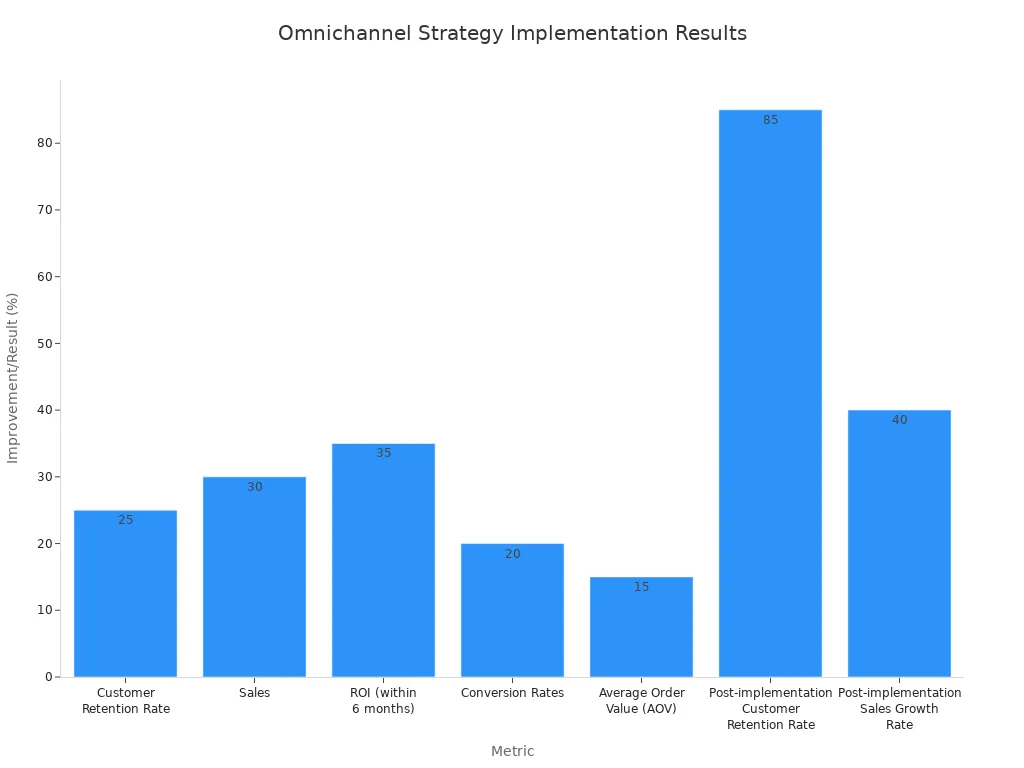
- A retail company increased sales by 30% after integrating its online and in-store operations.
- A health and wellness brand achieved a 50% increase in online sales by using integrated data for tailored marketing.
- A leading retail chain saw 30% of its online orders picked up in-store, driving foot traffic and additional purchases.
These improvements in key business metrics highlight the revenue potential of a strong omnichannel customer support system.
Improve Customer Loyalty
Happy customers are loyal customers. A seamless omnichannel customer support experience is fundamental to building that loyalty and improving customer retention. When you make it easy for customers to get help on their terms, they have no reason to look elsewhere. Your investment in a better omnichannel customer service experience pays off through repeat business. The right omni channel support software is a cornerstone of a modern customer service strategy.
The data on this is compelling. Businesses with a strong omnichannel customer support strategy see significantly higher customer retention than those with a weak one.
| Omnichannel Strategy | Customer Retention Rate |
|---|---|
| Strong | 89% |
| Weak | 33% |
This massive difference shows that a unified approach to omnichannel customer support is not just a nice-to-have; it is essential for long-term success. Furthermore, marketers who use three or more channels in their campaigns see a 494% higher order rate. This proves that effective omnichannel customer engagement across a quality omnichannel customer support platform keeps customers coming back and spending more. Superior omnichannel customer service directly translates to a stronger, more profitable business.
Key Features of Omnichannel Customer Service Software

Choosing the right omni channel support software means looking closely at its features. The best platforms do more than just connect channels; they unify conversations, automate tasks, and integrate with your existing tools. This creates a powerful engine for exceptional omnichannel customer service and sustainable growth.
Unified View and Channel Integration
A unified view is the foundation of effective omnichannel customer support. It brings all customer interactions and data into a single interface. This eliminates the need for your agents to switch between different applications, saving time and reducing errors.
Native Channel Support
Your customers want to connect with you on their terms. A powerful platform provides native support for all the channels they use. This ensures a consistent and high-quality experience everywhere. Key channels to integrate include:
- Voice calls
- Emails
- Live chats
- Text messages
- Social media messages
Integrating these channels gives your team a complete history of every customer interaction in one place.
Social Media and WhatsApp Integration
Modern omnichannel customer support must include social media and popular messaging apps. Customers increasingly turn to platforms like WhatsApp for quick questions and support. As an official WhatsApp Business Solution Provider (BSP), Sobot enables you to manage these conversations alongside traditional channels. This integration is crucial for modern omnichannel customer engagement.
Persistent Conversation Threads
A persistent conversation thread means your agents see the entire history of a customer's interactions, no matter the channel. If a customer starts with a chatbot, sends an email, and then calls, your agent sees it all as one continuous conversation. This 360-degree view is vital for providing personalized support.
Pro Tip: Solutions like Sobot consolidate customer data from all channels into a single, AI-enhanced interface. This gives agents the context they need to resolve issues faster, reducing average handling time and improving the quality of your omnichannel customer support.
AI and Automation Capabilities
AI and automation transform your support operations from reactive to proactive. They handle repetitive tasks, provide intelligent insights, and empower your team to focus on high-value interactions. This is a core component of modern omnichannel customer service software.
Intelligent Ticket and Call Routing
Manual routing is slow and prone to error. AI-powered routing automatically analyzes incoming tickets and calls. It directs them to the best-qualified agent or department based on skill, language, or availability. This smart routing reduces wait times and ensures customers connect with the right person on the first try, accelerating resolution for better omnichannel customer support.
AI-Powered Chatbots and Voicebots
- Chatbots: Leading solutions offer multilingual chatbots that can resolve issues faster than a human agent, providing accurate and empathetic responses around the clock.
- Voicebots: An AI-powered Voicebot, like the one offered by Sobot, uses intelligent intent recognition to understand and manage voice inquiries, freeing up your human agents for more complex problems.
Automated and Suggested Agent Responses
AI also acts as a co-pilot for your support agents. During a live chat or call, AI can analyze the conversation and suggest relevant answers or knowledge base articles in real-time. This real-time guidance helps agents provide faster, more consistent answers. It reduces the need to put customers on hold, improving the efficiency and quality of your omnichannel customer support. This feature is key to delivering excellent omnichannel customer service.
Seamless Integration with Your Tech Stack
Your omnichannel customer service software should not exist in a silo. It must connect seamlessly with the other tools you use to run your business. This creates a truly unified data ecosystem for superior omnichannel customer support and omnichannel customer engagement.
CRM and E-commerce Connectivity
Integrating your support platform with your other systems is essential. A strong platform offers pre-built connectors for popular tools. For example, leading solutions like Sobot connect seamlessly with CRMs like Salesforce and e-commerce platforms like Shopify. This crm integration ensures that your agents have access to purchase history and customer data directly within their workspace, enabling truly personalized support.
Open API for Custom Connections
Every business has unique needs. An open Application Programming Interface (API) gives you the flexibility to build custom connections. You can integrate with industry-specific software, internal databases, or region-specific messaging channels like LINE and WeChat. This allows you to tailor your omnichannel customer support platform to your exact workflows, ensuring it scales with your business.
Reporting and Analytics
Data is the engine of modern omnichannel customer support. The right platform gives you the tools to measure performance, uncover insights, and make informed decisions. This transforms your support operations from a cost center into a strategic asset.
Real-Time Performance Dashboards
You need to see what is happening right now, not just what happened yesterday. Real-time dashboards provide a live view of your support operations. Managers can monitor key metrics like call volumes, queue lengths, and wait times as they happen. This allows you to make immediate adjustments. You can re-route interactions or re-allocate agents to prevent service level agreement (SLA) breaches and resolve emerging issues before they escalate. This proactive approach is essential for efficient omnichannel customer support.
Core Metrics Tracking
You cannot improve what you do not measure. A robust omnichannel customer service software tracks the metrics that matter most. These Key Performance Indicators (KPIs) help you understand both customer happiness and operational efficiency.
Essential KPIs for Omnichannel Customer Support:
- Customer Satisfaction (CSAT): Measures customer happiness with a specific interaction.
- Net Promoter Score (NPS): Gauges overall customer loyalty and their likelihood to recommend your brand.
- First Contact Resolution (FCR): Tracks the percentage of issues resolved in the first interaction, a key driver of excellent omnichannel customer support.
- Customer Lifetime Value (CLV): Helps you understand the long-term value of customers acquired through different channels.
Tracking these metrics across all channels gives you a complete picture of your omnichannel customer service performance.
Agent Performance Analytics
Your agents are the heart of your omnichannel customer support. Analytics help you understand their performance and provide targeted coaching. You can track metrics like average handle time, resolution rates, and customer feedback for each agent. This data allows you to identify top performers and find coaching opportunities for the rest of the team. It ensures consistent, high-quality omnichannel customer service across the board.
Scalability and Customization
Your business is not static, and your support platform should not be either. The right solution grows with you. It offers the flexibility to adapt to new channels, changing workflows, and increasing customer volume. This ensures your investment in omnichannel customer support pays off for years to come.
Flexible Workflow Automation
Automation should make your team more effective, not more rigid. Flexible workflow automation allows you to design processes that fit your unique needs. You can start by mapping your current operations to find repetitive tasks perfect for automation. A good system lets you create custom rules for routing tickets, sending follow-ups, and escalating issues. These workflows must be easy to refine as your business evolves, ensuring your omnichannel customer support remains efficient.
Customizable Interfaces
Your agents need a workspace that works for them. A customizable interface allows you to tailor the agent desktop to show the most relevant information. You can arrange panels, create custom views, and integrate data from other systems. This puts everything an agent needs at their fingertips, reducing clicks and improving focus. A well-designed interface is a simple but powerful way to boost the productivity of your omnichannel customer support team.
Growth-Oriented Architecture
A platform's underlying architecture determines its ability to scale. A growth-oriented architecture is built for expansion. Look for solutions that use a microservices architecture, which breaks down features into independent services. This allows the platform to scale specific components, like a chat function, without affecting the entire system. Cloud-based deployment also provides the flexibility to handle sudden spikes in demand, ensuring your omnichannel customer support is always available.
Security and Compliance
Protecting customer data is not optional; it is a fundamental responsibility. Strong security and compliance measures build trust and protect your business from risk. Your chosen platform must have robust features to safeguard sensitive information across all channels.
Data Encryption and Access Control
Your first line of defense is strong data protection. All customer data, whether at rest in a database or in transit over a network, should be protected with advanced encryption like 256-bit AES. Equally important are strict access controls. You should be able to define who can see and do what within the system. This principle of least privilege limits access to sensitive data, reducing your vulnerability to both internal and external threats. This is a cornerstone of security and compliance.
Key Compliance Certifications
Independent certifications prove a vendor's commitment to security. Look for platforms that comply with internationally recognized standards.
| Standard | What It Means for You |
|---|---|
| SOC 2 | Verifies that the provider securely manages your data to protect your organization's interests and your clients' privacy. |
| ISO 27001 | Confirms the provider has a comprehensive information security management system in place. |
These certifications give you confidence that the platform meets high standards for security and compliance.
Adherence to GDPR and CCPA
Data privacy regulations like the General Data Protection Regulation (GDPR) in Europe and the California Consumer Privacy Act (CCPA) carry significant penalties for non-compliance. A compliant omnichannel customer service software helps you meet these obligations. It should provide tools for managing data subject requests, ensuring data transparency, and upholding customer privacy rights. This is a non-negotiable feature for any business that handles customer data and is vital for your omnichannel customer support strategy.
Choosing the Right Customer Support Software: A Checklist
Selecting the right customer support software is a strategic decision that impacts your entire business. This three-phase checklist will guide you from initial assessment to final selection. It ensures you choose a platform that elevates your omnichannel customer support and aligns with your long-term goals.
Phase 1: Internal Assessment
Before you look at any vendors, you must first understand your own needs. This internal assessment creates a solid foundation for your search. It helps you define what success looks like for your team and your customers.
Define Business Pain Points
You need to identify the specific problems you want to solve. Are your customers frustrated? Are your agents overwhelmed? Recognizing these issues will clarify why you need a new customer service tool. Common pain points often signal the need for better omnichannel customer support.
Key Problems to Look For:
- Inaccessible customer support channels.
- Delayed replies to user queries.
- Generic support without any personalization.
- Support agents unable to answer queries.
- Users stuck in frustrating AI response loops.
- Users unaware of important product updates.
If you see these issues, it is a clear sign that your current system is failing. Remember, 9 out of 10 consumers want seamless integrations between communication channels. A new platform should directly address these challenges.
Map the Ideal Customer Journey
You must understand how customers interact with your brand. Mapping the customer journey helps you see your business from their perspective. This process is essential for effective customer journey management. Start by focusing on one customer persona and outline every touchpoint, from initial contact to post-purchase support.
This map reveals friction points and opportunities for improvement. You can use customer feedback and analytics to build a map based on real data, not assumptions. This exercise helps you design a better customer journey and provides a clear vision for your ideal omnichannel customer support experience.
Set Your Budget and Timeline
You need a realistic budget and timeline before you start evaluating vendors. Your budget should cover more than just the license fee. Consider the total cost of ownership, which includes:
- Implementation and setup fees
- Data migration costs
- Agent training expenses
- Ongoing maintenance and support
Your timeline should outline key milestones, from vendor research to full implementation. A clear plan keeps your project on track and helps manage expectations across your organization.
Phase 2: Vendor Evaluation
With your internal assessment complete, you are ready to evaluate potential vendors. This phase focuses on finding a partner whose technology and vision align with your business needs.
Involve Key Stakeholders
Choosing a customer support software affects multiple departments. You should involve key stakeholders from the beginning. This includes representatives from your support, sales, marketing, and IT teams. Their input ensures the chosen solution meets everyone's needs and encourages company-wide adoption.
Research and Shortlist Vendors
Now you can start researching vendors. Create a shortlist of 3-5 providers that appear to meet your core requirements. Use a scorecard to compare them against a consistent set of criteria.
| Evaluation Criteria | What to Look For |
|---|---|
| Functional Requirements | Does it support all your required channels and integrations? |
| Vendor Reputation | Is the vendor financially stable with positive industry reviews? |
| Scalability & Flexibility | Can the solution grow with your business? |
| Security & Compliance | Does it meet key standards like SOC 2 and GDPR? |
A thorough evaluation at this stage saves you time later. Look for red flags like unclear pricing, slow support responses, or a history of breaking changes in their updates.
Request Use-Case-Specific Demos
A generic demo will not tell you what you need to know. You should request a demo tailored to your specific business challenges and workflows. Provide the vendor with your key pain points and ask them to show you exactly how their platform solves them.
Key Questions to Ask During a Demo:
- Can you clarify how this feature meets my specific requirements?
- How often do you release platform updates?
- What are the long-term maintenance costs?
- Can you provide specifics about your customer support?
- What does your product roadmap look like for the next year?
This approach forces vendors to prove their value in the context of your business. It helps you see beyond the sales pitch and evaluate the true capabilities of the customer support software.
Phase 3: Final Decision
You have done your research and seen the demos. Now it is time to make a final decision. This phase is about validating your top choice and ensuring it is the right long-term partner for your customer service strategy.
Assess Your Omnichannel Customer Support Needs
Review your initial assessment and compare it against your top-ranked vendor. Does the platform truly provide the unified experience you need for excellent omnichannel customer service? Ensure it can handle your specific customer journey and provides the tools for effective customer journey management. This final check confirms that the software aligns with your core goals for omnichannel customer support.
Conduct a Free Trial or PoC
Never sign a contract without testing the software yourself. A free trial or a structured Proof of Concept (PoC) is essential. A PoC allows you to test the platform's core features in a controlled environment with your own data.
To run an effective PoC, you should:
- Define clear success criteria: Set measurable goals, like reducing response time by 15%.
- Create a timeline: Outline key phases and deadlines to keep the project on track.
- Build and test a prototype: Have a small group of agents use the software for real-world scenarios.
- Review and present findings: Compare the results against your success criteria and present them to stakeholders.
This hands-on experience is the best way to validate a vendor's claims and ensure the platform is a good fit for your team.
Verify Support, Onboarding, and Pricing
The software is only part of the solution. The vendor's support and onboarding process are just as important. Verify the level of support you will receive during and after implementation. Ask for references from companies similar to yours. Finally, review the pricing one last time. Make sure there are no hidden fees and that the contract terms are clear. Choosing the right partner is crucial for a successful omnichannel customer service platform.
Implementation and Success with Your Omnichannel Platform
Choosing your software is just the beginning. A successful launch requires careful planning, clear communication, and thorough training. This ensures your team and customers get the full benefit of your new omnichannel platform.
Preparing for a Smooth Transition
A smooth transition minimizes disruption and sets your team up for success. You should focus on a clear plan for rollout, data, and communication.
Develop a Phased Rollout Plan
You should avoid launching the new system to everyone at once. A phased rollout reduces risk. You can start with a small pilot group to test the new workflows. This allows you to gather feedback and make adjustments before the company-wide launch. This incremental approach helps your team adapt without feeling overwhelmed.
Cleanse and Migrate Customer Data
Your customer data is a valuable asset. You must prepare it carefully before moving it to the new system. A clean and accurate migration is critical for your new omnichannel platform.
Data Migration Checklist:
- Audit Your Data: Before you move anything, review your current data to find inconsistencies or duplicate records.
- Remove Outdated Information: Clean up your database by removing old or irrelevant records to simplify the process.
- Run a Test Migration: Always perform a test run with a small data sample. This helps you find and fix any issues before the final migration.
Communicate Changes Internally
Your team needs to understand why this change is happening. You must communicate a clear vision. Explain how the new software will help them and benefit the company. When you listen to feedback and address concerns, you build trust and reduce resistance to the new system.
A Success Story: Opay and Sobot
Real-world results show the power of a well-implemented omnichannel platform. Opay, a leading financial services company, transformed its customer service by partnering with Sobot.
The Challenge: Fragmented Communication
Opay faced a high volume of customer inquiries across many different communication channels. Their support teams struggled to manage conversations on social media, email, and phone calls. This fragmented approach made it difficult to provide fast and consistent service.
The Solution: A Unified Sobot Platform
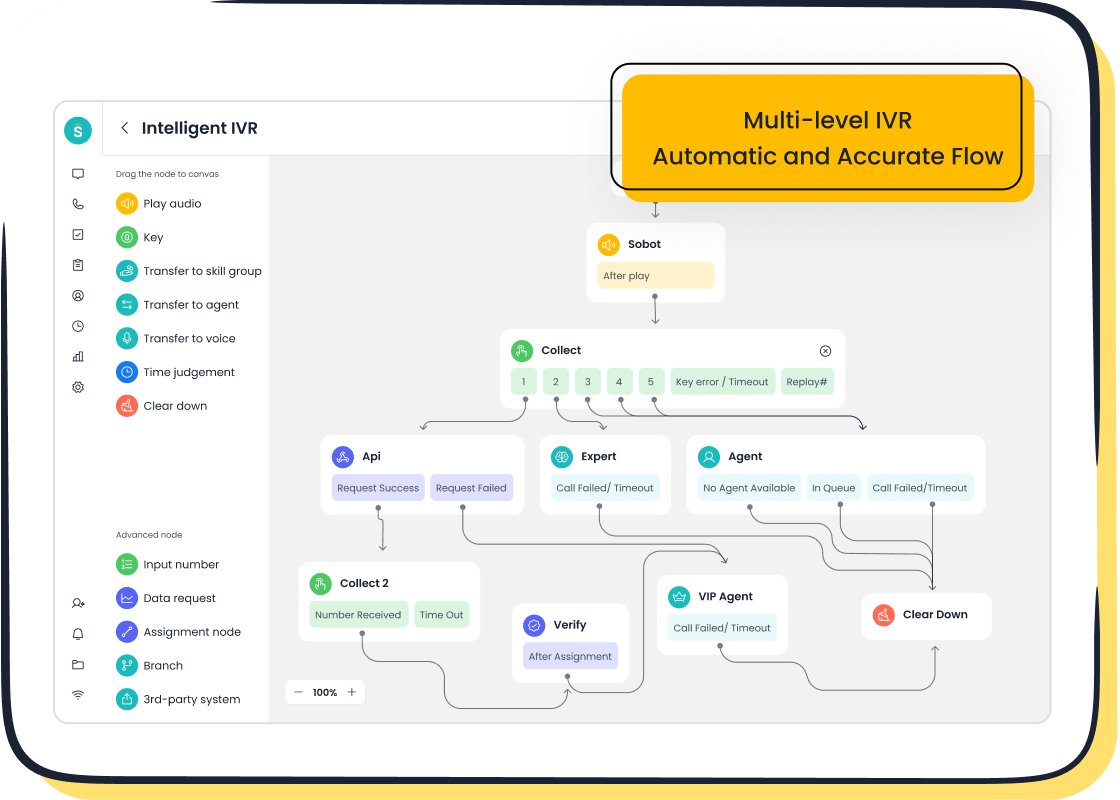
Opay implemented Sobot’s omnichannel platform to unify its customer service operations. Sobot’s email ticketing system turned customer emails into organized tickets for easy tracking. The intelligent IVR in the voice call center allowed customers to find answers themselves. This integration brought all conversations into a single, manageable system.
The Results: Higher CSAT and Lower Costs
The results were remarkable.
- Customer satisfaction (CSAT) soared from 60% to 90%.
- Overall operational costs were reduced by over 20%.
- The intelligent IVR was so effective that 60% of customers resolved their issues through self-service.
Training and Empowering Your Team
Your agents need confidence to use the new tools effectively. A strong training program is essential for empowering your team.
Conduct Comprehensive Platform Training
You should provide training that goes beyond basic features. Use interactive modules and simulation environments where agents can practice without risk. This hands-on experience helps them build confidence and master the new workflows quickly.
Document New Workflows
Create clear, step-by-step guides for all new processes. A centralized knowledge base gives agents a reliable resource to turn to when they have questions. This documentation ensures everyone follows the same procedures for consistent service.
Appoint Platform Champions
You can identify enthusiastic team members who are quick to learn the new system. Appoint them as platform champions. These champions can provide peer-to-peer support and encourage positive adoption across the team.
Measuring Success and Optimizing
Selecting the right omni channel support software is a strategic move. A great customer support software unifies conversations and unlocks data insights. You can use this guide's checklist to choose a customer support software that delivers a superior customer experience. This will help you find the right omnichannel platform. Now you can confidently choose an omnichannel platform. Embark on your contact journey and transform your customer service into a competitive advantage.
FAQ
What is omnichannel support software?
Omnichannel support software unifies all your customer communication channels. It brings email, chat, social media, and phone calls into one single platform. This gives your team a complete view of every customer conversation.
How does it improve customer service?
This software creates a seamless experience for your customers. They can switch channels without repeating information. Your agents get the full context to solve problems faster. This approach boosts customer satisfaction and loyalty.
Is omnichannel software difficult to implement?
Implementation can be straightforward with a clear plan. You should choose a vendor that offers strong support and onboarding. A phased rollout helps your team adapt smoothly to the new system without major disruptions.
Can this software integrate with my existing tools?
Yes. Leading platforms offer pre-built integrations for popular CRM and e-commerce systems. Many also provide an open API. This allows you to create custom connections to your unique business tools for a fully unified tech stack.
How does AI help in an omnichannel platform?
AI automates many repetitive tasks for your team. It powers chatbots for 24/7 support and intelligently routes inquiries to the right agent. AI also suggests responses, helping your agents work more efficiently.
See Also
Your Essential Handbook for Omnichannel Call Center Software Solutions
A 10-Step Blueprint for Omnichannel Contact Center Implementation Success
Top 10 Tips for Selecting Social Media Customer Service Software
Mastering Shopify Live Chat Support: A 10-Step Implementation Guide
Elevate SaaS Customer Support Through Effective Live Chat Strategies

