Getting Started with AI Chatbots for Ecommerce

You work hard to drive traffic to your ecommerce website. Yet, you lose sales when your team is offline because a modern customer expects immediate answers. Your online store operates 24/7, and your customer service should too.
What if you could provide an instant, 24/7 support experience to every visitor on your website, guiding them from browsing to buying?
This is where an AI chatbot helps. AI-powered chatbots are the solution. They provide instant support, answer questions, and guide users. Using an accessible ecommerce chatbot from a provider like Sobot transforms your ecommerce operations. Good ai chatbots ecommerce tools are essential. These ai chatbots improve your whole business. This chatbot technology gives your AI a powerful boost.
Why You Need AI Chatbots for Ecommerce
An ecommerce chatbot is more than a simple tool; it is a strategic asset for growth. Integrating AI chatbots into your ecommerce website drives sales, enhances customer care, and streamlines your operations. You can transform your customer interaction and see measurable results.
Boost Sales and Conversions
You can turn more website visitors into buyers with an AI-powered chatbot. Studies show that shoppers who use a chatbot have conversion rates up to four times higher. An effective chatbot acts as a personal shopping assistant, offering smart product recommendation options to guide a customer. This proactive engagement boosts sales.
For example, electronics leader OPPO implemented a Sobot chatbot on its website. They achieved an incredible 83% chatbot resolution rate and saw a 57% increase in their repurchase rate. This shows how a great chatbot experience leads to higher conversion and loyalty.
Provide 24/7 Instant Customer Support
Your online store never closes, and your customer support shouldn't either. AI chatbots provide immediate answers to customer questions around the clock. Whether a visitor on your website has a question at 3 AM or during a holiday, the chatbot is there to help. This instant support builds trust and improves the overall customer experience.
Reduce Cart Abandonment
Nearly 75% of online shopping carts are left behind. This is a huge loss of potential revenue for your ecommerce business. An ecommerce chatbot can actively reduce cart abandonment. It can engage a customer who is about to leave your website. The chatbot can ask if they need help, clarify shipping costs, or even offer a one-time discount to prevent abandonment and secure the sale. This single interaction can recover a sale you would have otherwise lost.
Automate Tasks and Improve Efficiency
Repetitive questions can overwhelm your customer service team. AI chatbots ecommerce solutions automate these routine tasks. They can handle order tracking, answer FAQs, and process returns. Sobot's AI chatbots, for instance, improve agent productivity by 70% by resolving common queries. This allows your human agents to focus on complex problems that require a personal touch. This combination of AI and human expertise creates a highly efficient customer service system.
Choosing the Right Ecommerce Chatbot
Selecting the right chatbot platform is a critical step for your ecommerce business. The ideal tool should not only solve immediate problems but also grow with you. You need a solution that is powerful, easy to use, and integrates smoothly with your existing setup.
Key Features to Look For
When you evaluate a chatbot platform, certain features are non-negotiable for success in ecommerce.
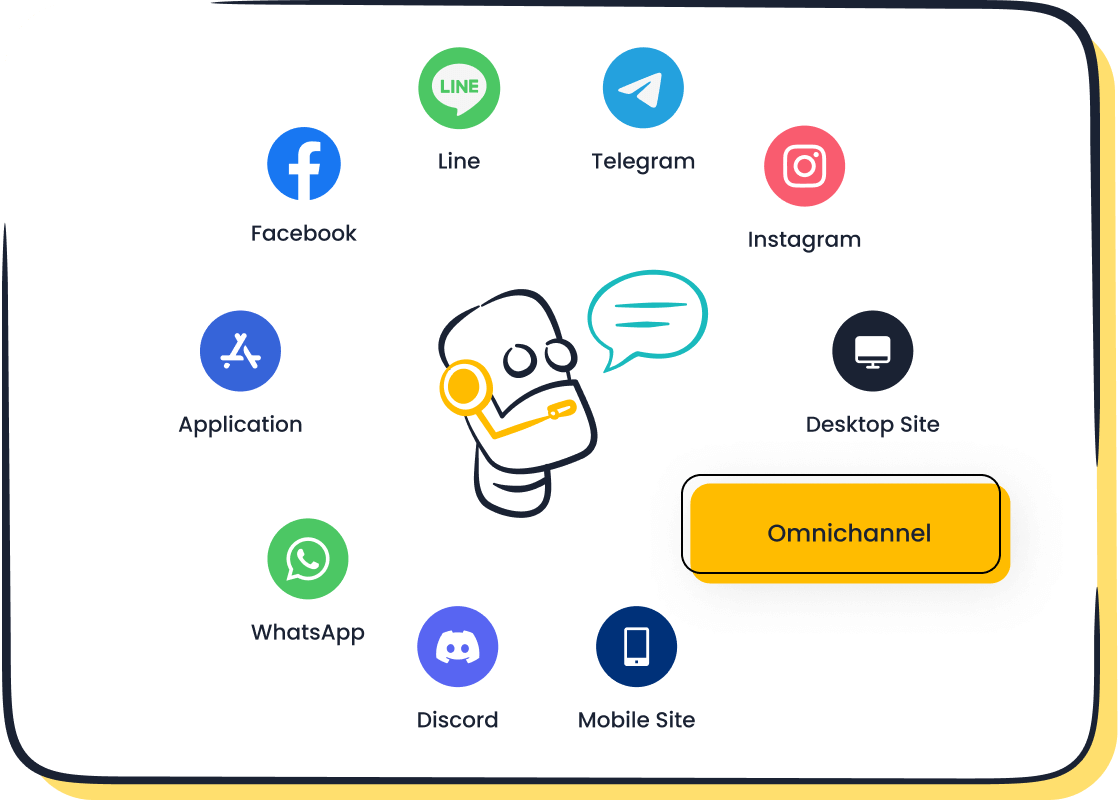
- Omnichannel Support: Your customers interact with you on your website, WhatsApp, SMS, and social media. Your chatbot should be present on all these channels. This provides a consistent experience wherever customers shop.
- Multilingual Capabilities: To serve a global audience, you need a chatbot that speaks your customers' language. This expands your market reach without needing a large, multilingual support team.
- Robust Reporting: Good ai chatbots ecommerce tools provide detailed analytics. You can track metrics like customer satisfaction and resolution rates to understand performance and make data-driven decisions.
A great chatbot platform, like Sobot, combines its chatbot and live chat products into a unified customer contact center. This ensures a smooth handoff to human agents when needed, creating a complete support system for your website.
The Importance of a No-Code Platform
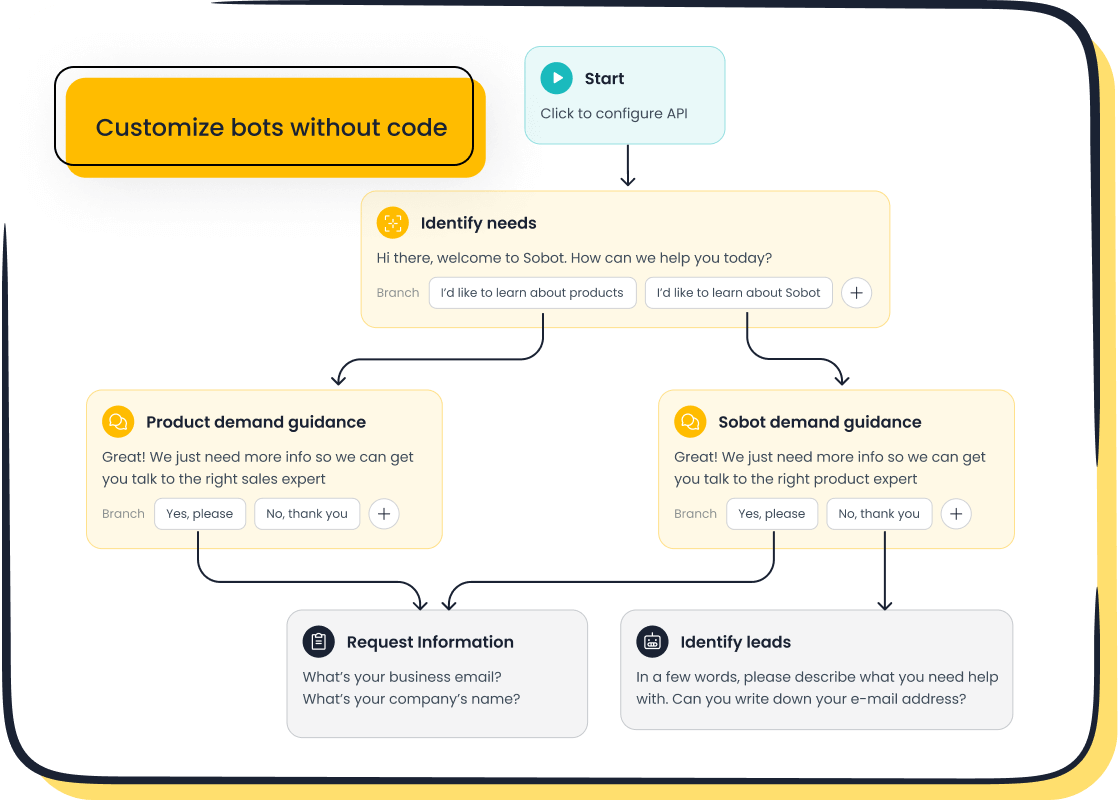
You do not need to be a developer to build a powerful ecommerce chatbot. A no-code chatbot platform allows you to create and manage conversation flows using a simple visual interface. Sobot, for example, offers a point-and-click builder. This makes it easy for anyone on your team to design and launch a chatbot in minutes, not weeks. This approach saves you significant time and money on development costs.
Seamless Platform Integration
Your chatbot needs to connect with the tools you already use. A seamless integration with ecommerce platforms like Shopify or WooCommerce is essential. This connection gives your AI chatbot access to your product catalog and customer data. With this information, the chatbot can offer personalized recommendations and check order statuses. This seamless integration turns your chatbot from a simple Q&A tool into a smart shopping assistant on your website. This level of integration is key to improving the customer journey.
Scalable Pricing for Your Business
Your business needs will change as you grow. Look for a chatbot provider that offers flexible and scalable pricing. Many platforms offer tiered subscription plans. This allows you to start with a basic plan and upgrade as your traffic and needs increase. This ensures you only pay for what you need, making AI an affordable asset for any size of ecommerce business.
Your Beginner's Guide to Chatbot Implementation
Launching an AI chatbot on your ecommerce website is easier than you think. You do not need a team of developers or a massive budget. This beginner's guide breaks down the process into five simple steps. Following these steps will help you start implementing chatbots successfully and transform your customer interactions.
Step 1: Define Goals for Your Ecommerce Chatbot
Before you build anything, you must know what you want your chatbot to achieve. Clear goals will guide your design and help you measure success. Your ecommerce business can set several goals for its chatbot.
Common objectives include:
- Automating FAQs: Instantly answer common questions about shipping, returns, and product details to reduce support tickets.
- Generating Leads: Greet visitors on your website, identify their needs, and capture contact information for your sales team.
- Boosting Conversions: Guide shoppers with product recommendations and recover abandoning carts with timely offers.
- Providing 24/7 Support: Offer continuous assistance to customers around the clock, improving satisfaction.
- Handling Post-Purchase Tasks: Automate order tracking and returns to streamline the customer experience after a sale.
Once you set your goals, you need a way to track them. Key Performance Indicators (KPIs) show you how well your chatbot is working.
How to Measure Success You can measure your chatbot's return on investment (ROI) by tracking a few key metrics. Focus on these to avoid getting overwhelmed:
- Containment Rate: The percentage of conversations your chatbot resolves without needing a human agent.
- Customer Satisfaction (CSAT): A simple rating from customers after they interact with the chatbot.
- Conversion Rate: The percentage of chatbot conversations that lead to a sale or a qualified lead.
Tracking these numbers will prove the value of implementing chatbots and show you where to make improvements.
Step 2: Select and Set Up Your Sobot Chatbot
Choosing the right platform is your next move. You need a tool that is powerful yet simple. Sobot offers an AI-powered ecommerce chatbot designed for users without any coding experience.
Getting started is straightforward. You can sign up and access the dashboard immediately. The platform uses a point-and-click interface. This means you can build, test, and launch your chatbot using simple visual tools. You do not need to write a single line of code. This accessibility empowers your marketing or support teams to manage the chatbot directly, saving you time and development costs.
Step 3: Design Basic Conversation Flows
A conversation flow is a script your chatbot follows. You should start with one or two simple flows that align with your goals. A welcome message and an FAQ flow are excellent starting points.
A great welcome message engages visitors the moment they land on your website. It should be short, personalized, and helpful. Studies show that proactive outreach is something 87% of customers now expect. A well-designed welcome can make a huge impact. For example, one fashion brand saw a 28% rise in conversions from chat-initiated sessions after creating a behavior-triggered welcome flow.
Here is an example of an effective welcome message for a visitor who is about to leave your website with items in their cart:
"Wait! Before you go, get 10% off your first order. Complete your purchase in the next 30 minutes to claim your discount."
Another essential flow handles frequently asked questions. This flow provides instant answers to repetitive queries, which frees up your support team. Design the path to be clear and simple. Use Natural Language Processing (NLP) to help the chatbot understand what the user is asking, even if the phrasing is unusual. This ensures customers find answers easily and reduces frustration.
Step 4: Train Your Chatbot with a Knowledge Base
Your chatbot needs information to answer questions accurately. This information lives in a knowledge base, which acts as the chatbot's brain. A powerful AI chatbot like Sobot can build this knowledge base from many sources.
You can upload existing documents to train your chatbot, including:
- Product manuals and guides (PDFs)
- Frequently asked questions (FAQs)
- Spreadsheets with product data (Excels)
- Transcripts from past customer chats
The quality of this information is critical. A well-structured knowledge base with clean data leads to accurate answers and higher resolution rates. For instance, structured data is much easier for a chatbot to understand.
| Unstructured Data | Structured Data |
|---|---|
| "If the customer bought Product X and they’re within 24 months; it’s likely still under warranty." | "Product X – Warranty = 2 years from purchase date." |
Clean, organized data ensures your chatbot provides helpful and consistent support. This improves customer satisfaction and strengthens their trust in your ecommerce brand.
Step 5: Integrate and Go Live on Your Site
The final step is to add the chatbot to your ecommerce website. This part sounds technical, but platforms like Sobot make the integration process very simple. You do not need to be a developer.
The process generally involves these steps:
- Generate the Code: Your chatbot platform will provide a small piece of JavaScript code.
- Copy the Code: You just need to copy this code snippet.
- Paste the Code: You then paste this snippet into the theme file of your ecommerce platform, such as Shopify or WooCommerce.
Once you save the changes, the chatbot widget will appear on your website, ready to engage with visitors. Congratulations! You have successfully launched your first chatbot. Now you can start gathering data, helping customers, and growing your sales.
Best Practices for Successful AI Chatbots
Launching your chatbot is the first step. You must follow best practices to ensure it delivers real value for your ecommerce business. These strategies will help you maximize your chatbot's impact on sales and customer satisfaction.
Ensure Chatbot Visibility and Accessibility
Your chatbot must be easy for every visitor to find on your website. A powerful chatbot is useless if customers cannot see it. Place the chat widget in a consistent, visible location, such as the bottom-right corner of your website. This ensures that help is always just one click away, no matter what page a customer is browsing on your ecommerce website.
Create a Smooth Handoff to Human Agents
Sometimes, a customer needs to speak with a person. Your chatbot should make this transition seamless. A handoff is a key feature, not a failure. The chatbot must clearly inform the user that it is connecting them to an agent.
Principle 1: Full Context Transfer is Non-Negotiable The human agent must receive the full chat history. This prevents the customer from repeating their issue. Sobot's platform integrates its AI chatbots with a live chat and ticketing system to make this interaction smooth.
Personalize the Customer Experience
You can create a unique shopping experience for every person on your website. AI-powered chatbots use customer data, like browsing history, to offer personalized product recommendations. This makes the interaction feel more human and helpful. Your chatbot acts like a personal shopping assistant, guiding each customer to products they will love. This level of personalization builds loyalty for your ecommerce brand.
Monitor and Optimize Performance
Your work is not done after you launch your chatbot. You must continuously monitor its performance to improve it. AI chatbots provide valuable data.
Key metrics to track include:
- Resolution Rate: The percentage of queries your chatbot solves without human help.
- Customer Satisfaction (CSAT): Feedback from users about their chatbot interaction.
Sobot’s robust reporting and analytics features help you analyze this data. You can easily identify knowledge gaps where your chatbot struggles. This is how OPPO used Sobot to improve its resolution rates. By regularly optimizing your chatbot, you improve your customer service and boost your ecommerce success.
You can transform your online store with AI chatbots. They boost sales, improve your customer service, and save you valuable time. Getting started is easier than you think. A no-code tool like Sobot lets you launch a chatbot without any technical skills.
Take the first small step today. Set up a simple welcome message to greet your visitors. It is a simple action with a big impact. Start your journey with us today.
FAQ
What is the main purpose of an AI chatbot?
An AI chatbot automates your customer conversations. It solves common questions on its own. It also helps your support agents work faster. This improves your team's overall productivity and efficiency.
How does a chatbot help you save money?
A chatbot works 24/7 without needing extra staff. It handles many customer questions at once. This can save you up to 50% on agent costs. You can then invest that money back into your business.
Does the chatbot work in different languages?
Yes, a powerful AI chatbot is multilingual. You can talk to customers in their preferred language. This helps you expand your ecommerce business to a global audience without hiring a large, multilingual support team.
Do you need coding skills to set up a chatbot?
No, you do not need to code. Modern platforms like Sobot use a point-and-click interface. You can design and launch your chatbot using simple visual tools. Anyone on your team can build a chatbot in minutes.
See Also
Elevating E-commerce Customer Happiness Through Intelligent Chatbot Interactions
Building an Effective Chatbot for Optimal Website Performance and Growth
Simple Steps to Deploying Effective Chatbot Solutions on Your Website
Effortlessly Developing a Powerful Chatbot to Enhance Your Website Experience
Driving E-commerce Revenue with Dynamic Live Chat Software Solutions

