Choosing Customer Service Software A Guide

This customer service software buyer guide simplifies choosing the best customer service software for small business. With 86% of customers willing to leave a brand after just two poor experiences, selecting the right customer service software is vital for your business. This buyer guide frames the selection process as a clear journey for your business, from defining needs to evaluating vendors like Sobot. Follow this software guide to confidently boost efficiency and customer satisfaction, setting your business up for growth.
Your Customer Service Software Buyer Guide: Assess Needs
Before you can find the right tools, you must first understand your own needs. This first step is the most important part of this customer service software buyer guide. It ensures you choose a solution that solves your actual problems. Taking the time to assess your business will give you a clear roadmap for your search.
Define Goals for Your Small Business
What do you want to achieve with new customer service software? Vague goals like "improve service" are not enough. You need specific, measurable targets. Clear goals help you measure success and prove the software's return on investment.
Many businesses focus on key performance indicators (KPIs). You can use these to set your own targets.
- Increase Customer Satisfaction (CSAT): This score shows how happy customers are with a specific interaction. A high CSAT score often leads to more loyal customers.
- Improve Net Promoter Score (NPS): This metric measures long-term customer loyalty. It asks customers how likely they are to recommend your business to others. Improving your NPS is directly linked to business growth. Research from Bain & Company shows that industry leaders in NPS often outgrow their competitors by more than double. A small 7% increase in your NPS can lead to a 1% rise in revenue.
Tip: Think about your main challenges. Are customers waiting too long for a response? Are your agents overwhelmed? Your goals should address these pain points.
Here are some common goals for a small business to consider:
- Accelerate initial response times
- Streamline resolution processes
- Expand self-service options for customers
- Lower the average cost per interaction
- Aggregate all customer interactions in one place
- Utilize customer feedback to improve products or services
Setting clear goals is the foundation of this buyer guide. It turns your software search from a guess into a strategic business decision.
Identify Your Customer Channels
Where do your customers contact you? You need a complete picture of your communication channels to choose the right software. Make a list of every way customers interact with your business right now.
Your list might look something like this:
| Channel | Currently Used? | Plan to Use in Future? |
|---|---|---|
| ✅ | ✅ | |
| Phone Calls | ✅ | ✅ |
| Website Live Chat | ❌ | ✅ |
| Social Media (Facebook, X) | ✅ | ✅ |
| Messaging Apps (WhatsApp) | ❌ | ✅ |
Thinking about future channels is just as important as listing current ones. Your business will grow. Your customers' preferences will change. The best customer service software for small business will support the channels you use today and the ones you will need tomorrow. A scattered approach across many platforms can lead to lost messages and frustrated customers. This part of the guide helps you prepare for a unified solution.
Evaluate Your Team's Structure
Next, look at your customer service team. The right software should support your team's workflow, not complicate it. Consider these questions about your team:
- How many people handle customer support? A single person has different needs than a team of ten.
- What are their technical skills? Choose software that is easy for your team to learn and use.
- How do they currently manage requests? Do they use a shared email inbox? Do they manually assign tasks?
- Do you have agents working in different time zones or remotely?
Your answers will help you understand what features are essential. For example, if you have multiple agents, you will need software with features for assigning conversations and collaborating. If your team is struggling with high volume, you may need automation tools. This customer service software for small business must fit your team's unique structure.
Determine Budget and Scalability
Your budget is a key factor in any business decision. However, do not just look at the price tag. Think about the value the software provides. A cheap solution that doesn't meet your goals will cost your business more in the long run through lost customers and inefficiency.
More importantly, you must think about scalability. Scalability is the software's ability to grow with your small business. As you get more customers and hire more agents, your customer service software must handle the increased workload without slowing down. A non-scalable system will create problems as your business expands.
A scalable system avoids overload and supports your growth. It adapts to larger data volumes and more users without hurting performance.
Look for these key scalability features in this buyer guide:
- Omnichannel Support: A system that brings all your channels (email, chat, phone) into one unified workspace. This allows your team to manage conversations efficiently as you add more channels.
- Automation and AI: Tools that handle repetitive tasks automatically. For example, AI-powered chatbots can answer common questions 24/7, freeing up your agents for more complex issues.
- Easy Integrations: The software should connect smoothly with other tools you use, like your e-commerce platform or CRM. This creates a unified data environment.
Choosing a scalable platform is one of the most important lessons in this customer service software buyer guide. It ensures your investment supports your business for years to come.
Key Features in Customer Service Software

After you assess your needs, the next step is to understand the features that make customer service software powerful. The right combination of tools will empower your team, delight your customers, and streamline your entire operation. These features are the building blocks of excellent customer service management.
Unified Ticketing System
A unified ticketing system is the heart of organized customer support. It converts every customer request—whether from email, a web form, or another channel—into a numbered ticket. This process of ticketing transforms chaos into order. You can track each issue from the moment it arrives until it is resolved. This ensures no customer query gets lost.
Modern ticketing tools do more than just track issues. They actively improve your team's efficiency.
- Intelligent Routing: A smart ticketing system automatically sends new tickets to the right agent or team. It can route based on agent skills, urgency, or customer history. This reduces transfers and gets customers to the right person faster.
- AI Assistance: Some platforms use AI to analyze incoming tickets. The AI can suggest solutions from your knowledge base or even predict the customer's needs. This helps agents resolve issues on the first contact.
- Centralized History: All interactions related to a ticket are stored in one place. This gives agents a complete view of the customer's journey, improving the quality of support.
A strong support ticketing system like the one offered by Sobot is essential for effective customer service management. It provides the structure needed to handle inquiries efficiently and professionally, making it a core component of any customer service software. This organized approach to ticketing is fundamental for any growing business.
Omnichannel Communication Hub
Your customers contact you through many channels. An omnichannel hub unifies them all. It brings email, phone calls, live chat, and social media messages into a single, shared workspace. This is different from a multichannel approach, where channels exist but are not connected. An omnichannel strategy creates a seamless customer experience.
The impact on customer loyalty is significant. Businesses that use omnichannel strategies retain an average of 89% of their customers, compared to just 33% for companies with weak strategies. When customers feel understood across every channel, they develop a stronger connection to your brand.
Note: A key channel for modern businesses is WhatsApp. To use it effectively, you need an official WhatsApp Business Solution Provider (BSP). Providers like Sobot are certified BSPs, enabling you to manage powerful customer engagement on the world's most popular messaging app directly within your customer service platform.
Consolidating your communication tools into one hub allows your team to switch between conversations on different channels without losing context. This creates a fluid and positive customer experience, which is a cornerstone of modern customer service management. A good hub should support both text-based chat and voice calls.
Automation and AI Workflows
Automation tools handle repetitive tasks so your human agents can focus on complex problems. AI-powered workflows can manage a surprising amount of customer interactions, providing instant support 24/7. This is one of the most valuable features in modern customer service software.
The most common automation tool is the AI chatbot. A well-implemented chatbot can resolve a high percentage of common questions without any human help. Industry data shows that chatbots can often achieve a containment rate of 70% to 90%. This frees up your team to handle high-value interactions.
A real-world example shows the power of these tools.
Case Study: Global tech brand OPPO implemented Sobot's chatbot to manage high volumes of customer inquiries. The chatbot achieved an 83% resolution rate, handling the majority of questions on its own. This success contributed to a 94% positive feedback rate and a 57% increase in customer repurchases.
Beyond chatbots, AI can also power voicebots in a call center or assist agents with real-time suggestions during a live chat. These automation tools are critical for scaling your support operations efficiently.
Customer Self-Service Portals
Today's customers often prefer to find answers on their own. A customer self-service portal gives them the tools to do just that. The most important part of a self-service portal is a comprehensive, easy-to-search self-service knowledge base.
A self-service knowledge base is a library of articles, how-to guides, and frequently asked questions (FAQs). It empowers customers to resolve their own issues anytime, day or night. This has two major benefits:
- It improves the customer experience. Customers get instant answers without having to wait for an agent.
- It reduces your team's workload. With a strong self-service knowledge base, fewer tickets are created for common questions.
Building a great self-service knowledge base is an ongoing process. You should regularly update it with new information and use customer feedback to identify gaps. Strong self-service capabilities are a sign of mature customer service solutions. Investing in self-service is investing in both customer satisfaction and operational efficiency.
Reporting and Performance Analytics
You cannot improve what you do not measure. Reporting and analytics tools give you the data you need to understand and optimize your customer service performance. This feature turns raw data into actionable insights, helping you make strategic decisions for your customer service management.
Your customer service software should allow you to track key performance indicators (KPIs). Some of the most important metrics include:
| KPI | What It Measures | Why It Matters |
|---|---|---|
| First Contact Resolution (FCR) | Percentage of issues solved in one interaction. | A high FCR means your team is efficient and customers are happy. |
| Average Handle Time (AHT) | Average time an agent spends on a ticket. | Helps you understand agent workload and identify training needs. |
| Customer Satisfaction (CSAT) | Customer happiness with a specific interaction. | Provides direct customer feedback on your service quality. |
| Net Promoter Score (NPS) | Likelihood a customer will recommend you. | Measures long-term loyalty and predicts business growth. |
These tools help you spot trends, monitor agent performance, and understand customer feedback. By analyzing this data, you can refine your processes, improve training, and ultimately enhance the overall customer experience.
Key Software Integrations
Your customer service software does not exist in a vacuum. It needs to connect with the other tools you use to run your business. Key software integrations create a unified data environment, giving your agents a complete 360-degree view of the customer.
When evaluating customer service management software, you must check for compatibility with your existing systems. Some of the most critical integrations include:
- CRM (e.g., Salesforce): Syncs customer data, purchase history, and past interactions, giving agents full context for every conversation.
- E-commerce Platforms (e.g., Shopify): Provides agents with order details, shipping status, and return information directly within the ticketing system.
- Social Media: Allows you to manage comments and direct messages from platforms like Facebook and X (formerly Twitter) as tickets.
Seamless integrations are non-negotiable for efficient customer experience management. Platforms like Sobot are designed to connect smoothly with essential business tools, ensuring your customer support tools work in harmony with your entire tech stack. This creates a single source of truth for all customer information.
Types of Customer Service Management Software
Understanding the different types of customer service management software helps you select the right tools for your business. Each type offers unique strengths. Your choice depends on your goals, team size, and the channels your customers use. Let's explore the main categories.
Help Desk and Ticketing Systems
A help desk is the foundation of organized customer service management. These tools turn every customer request into a trackable ticket. This ticketing process ensures nothing gets lost. A good support ticketing system will:
- Consolidate requests from channels like email into one place.
- Automate routine tasks like assigning tickets to the right agent.
- Document all conversations to give your team full context.
These tools are excellent for bringing order to your support. However, a standalone ticketing system may not be enough as your business grows and adds more communication channels.
Live Chat Software
Live chat software adds real-time conversation to your website. It allows you to engage with visitors instantly, answer questions, and guide them toward a purchase. Businesses that use live chat tools often report an average 20% increase in website conversions. This makes chat a powerful tool for both support and sales. Effective chat tools can transform your website from a static page into an interactive experience.
Call Center Solutions
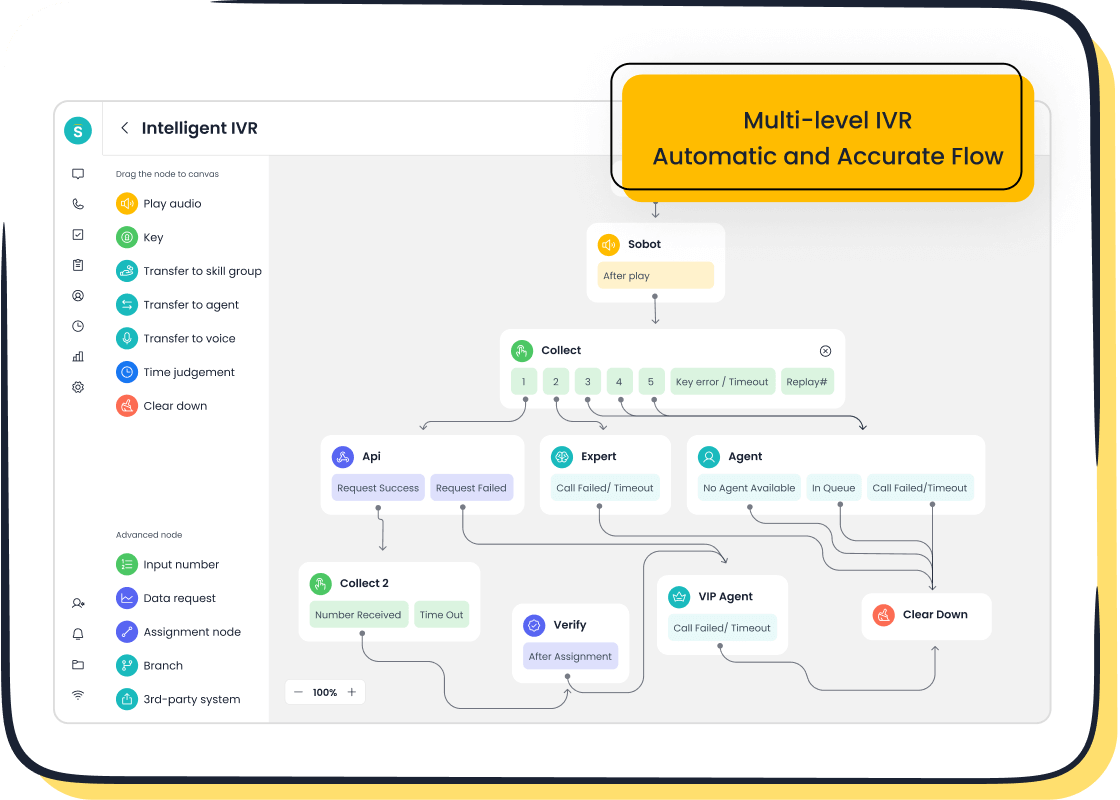
Call center solutions are designed for managing phone support. Modern customer service solutions go far beyond simple phone lines. They use advanced technology for better customer service management. For example, Sobot's Voice/Call Center product includes features like:
- Intelligent IVR: This tool guides callers with smart menus, routing them to the right person without a complex phone tree.
- Smart Call Routing: It directs calls based on agent skills or customer value, improving first-call resolution.
- A 99.99% Uptime SLA: This guarantees your phone lines are almost always available.
These tools make your voice support more efficient and reliable.
All-in-One Omnichannel Platforms
All-in-one omnichannel platforms are the most comprehensive type of customer service management software. They combine a support ticketing system, live chat, call center tools, self-service portals, and more into a single, unified workspace. This approach creates a truly seamless customer experience.
Sobot's Omnichannel Solution is a prime example. It unifies all customer interactions, giving your team a complete view of every customer's journey.
For businesses aiming to deliver consistent, high-quality customer service management across every channel, an all-in-one platform is the ideal choice. It provides all the tools you need for excellent customer experience management.
Finding the Best Customer Service Software for Small Business
You have defined your needs and know what features to look for. Now you can start evaluating vendors. This final checklist helps you find the best customer service software for small business. It ensures you choose a partner that supports your business growth.
Compare Vendor Pricing and Value
Understanding vendor pricing is crucial for your small business. Do not just look at the cost. Consider the value each pricing model offers. Common pricing structures include:
- Per-User Pricing: You pay for each agent "seat." This pricing is predictable but can get expensive as your team grows.
- Tiered Pricing: Plans are based on feature bundles. A basic tier has essential tools, while premium tiers unlock advanced features. This pricing lets you pay only for what you need.
- Usage-Based Pricing: The cost depends on your volume, like the number of tickets or calls. This pricing is flexible for a new business.
The right pricing model depends on your business. The best customer service software for small business offers transparent pricing and clear value. Your goal is to find a plan that fits your budget and scales with your business.
Evaluate Ease of Use and Setup
The best customer service software for small business is one your team will actually use. Complex software can slow down your customer service management. Look for an intuitive interface and a simple setup process. For a small business, a basic setup should take between one to four weeks. A quick implementation means your team can start improving customer service management faster. Ask vendors for a free trial or demo. This lets you test the software and see how it fits your team's workflow.
Check for Security and Reliability
You handle sensitive customer data. Your customer service software must be secure and reliable. Look for vendors that demonstrate a commitment to security with certifications like ISO 27001 or SOC 2. These show the vendor follows strict security standards.
Reliability is just as important. Your software must be available when your customers need you.
A key benchmark for reliability is system uptime. For example, Sobot guarantees 99.99% system stability and uses encrypted data transfer to protect your information. This level of dependability is what you should expect from a top-tier customer service management software.
Assess Vendor Support and Training
A great software vendor is a partner in your success. Their support goes beyond fixing technical problems. Comprehensive providers offer ongoing services to ensure your business thrives. This includes personalized onboarding, training materials, and access to a self-service knowledge base. Good support helps you get the most out of your investment in customer service management.
A successful partnership directly impacts your business results. For instance, after implementing Sobot's solution, global brand OPPO saw powerful benefits.
With Sobot’s solution, OPPO has witnessed a 83% chatbot resolution rate, a 94% positive feedback rate and a 57% increase in repurchase rate.
This shows how the right customer service software and vendor support can boost customer satisfaction and drive business growth. Look for a vendor that values your success and provides excellent customer service management.
This customer service software buyer guide has shown you the path to finding the right solutions for your small business. You learned to assess your business needs, identify essential features, and evaluate vendors. The best customer service software for small business is the one that fits your unique goals and improves customer satisfaction. Use this guide to confidently begin your journey. Solutions from partners like Sobot are designed to support your business and enhance your customer experience, ensuring your small business achieves lasting satisfaction. This buyer guide empowers your business.
FAQ
What is the first step in choosing software?
You should first assess your business needs. Define your specific goals, identify all customer communication channels, and evaluate your team's structure. This creates a clear roadmap for your search and ensures you choose a tool that solves your actual problems.
Why is an omnichannel platform a good choice?
An omnichannel platform unifies all your customer channels like email, chat, and phone into one workspace. This creates a seamless experience for your customers. It also makes your team more efficient by providing a complete view of every customer interaction.
How do I know if a software is reliable?
You should check for security certifications and uptime guarantees. A reliable vendor will be transparent about its system stability.
For example, a strong benchmark is a 99.99% uptime SLA, which ensures your service is almost always available for customers. This is a key feature of dependable software.
Can customer service software grow with my business?
Yes, you should choose a scalable solution. The best customer service software for small business will support you as you add more agents, customers, and communication channels. Look for features like automation and easy integrations that adapt to your growth.
See Also
Selecting Top Social Media Customer Service Software: 10 Essential Tips
Your Ultimate Guide To Selecting The Best Chatbot Software
Discovering The Top 10 Customer Service Software Solutions For 2024
An Essential Guide To Omnichannel Call Center Software Selection
How To Choose The Best Chat Software For Your Business In 2024

