Gorgias Alternative Migration for Customer Communication Tools

You may consider migrating from Gorgias because fragmented tools slow your team, clunky integrations cause delays, and repetitive inquiries drain resources. Customer communication matters during migration, so you need a plan to keep operations running smoothly. Choosing the right gorgias alternative helps you avoid long onboarding times and boosts efficiency. With sobot, you can prepare for a seamless transition and enjoy practical benefits that support your business goals.
Migrate from Gorgias: Key Steps
Migrating from Gorgias to a new help desk platform requires careful planning and attention to detail. You need to follow a structured migration process to protect your data and maintain operational continuity. The following steps will guide you through a successful migration.
Migration Planning
You start migration planning by evaluating your current system. You identify the applications and data you use every day. You select the right tools for migration based on ease of use and scalability. You implement a solid data backup system before migration begins. You consider a staged migration approach to reduce risks. You communicate with stakeholders about the migration timeline. You provide training to users so they are ready for the new system.
Here are the essential steps for migration planning:
- Recreate custom fields on your new platform that match those in Gorgias.
- Add saved replies or macros to your new help desk.
- Create agent profiles that mirror your Gorgias team.
- Activate the Help Center to migrate knowledge base records.
- Turn off triggers and automation in your new platform before migration.
- Disable ticket conditions to prevent conflicts.
You define the target architecture and determine the hardware and software components you need. You plan the migration strategy with specific tasks, timelines, and resources. You assess potential risks and develop mitigation strategies. You create a communication plan to keep everyone informed. You establish user support systems and develop a strategy for change awareness. You identify power users who can assist during migration.
Tip: Continuous monitoring and testing after migration helps you catch issues early. Invest in a rollback plan to manage potential problems. Prioritize post-migration support to address user concerns.
Data Mapping & Security
Data migration is a critical part of the migration process. You must ensure data integrity and security. Effective data mapping aligns records between the source and target systems. You use customization features or discuss tailored adjustments to transmit data accurately.
You clean your data before migration to fix errors and remove duplicates. You identify and migrate only useful data, leaving outdated information behind. You carefully map old and new fields to ensure data is placed correctly. You conduct early and frequent testing with small batches to identify issues. You document all decisions and processes to maintain clarity.
You automate migration tasks to save time and reduce errors. You plan for potential downtime or find ways to avoid it. You use tools for validation and reconciliation to ensure data integrity. You involve your team early to ensure alignment and readiness. You may bring in experienced partners to avoid mistakes.
Security protocols protect customer data during migration. You use two-factor authentication to ensure only authorized company representatives with admin rights can migrate data. You implement three-layer data safety, covering physical, network, and application layers to protect data from threats. You comply with regulations such as GDPR, CCPA, HIPAA, and PCI (Level 1) to meet data protection principles.
| Security Protocol | Description |
|---|---|
| Two-Factor Authentication | Only authorized company representatives with admin rights can migrate data. |
| Three-Layer Data Safety | Physical, network, and application layers protect data from threats. |
| Compliance with Regulations | GDPR, CCPA, HIPAA, PCI (Level 1) ensure data protection principles are met. |
Note: Backup your data before migration to protect against data loss. Avoid changes during migration to prevent disruptions. You can use both platforms during migration, depending on your workflow.
Migration Execution
You execute the migration process by following your plan step by step. You start with a demo migration to test the workflow and identify potential issues. You monitor the migration closely and address any problems immediately. You move to full migration once you confirm everything works as expected.
The migration process can handle about 2,000 tickets per hour. The total migration time depends on the number of records you need to migrate. You minimize downtime by backing up data and avoiding changes during migration. You continue using both platforms if your team needs to maintain operations.
You conduct continuous monitoring and testing after migration. You invest in a rollback plan to manage unexpected issues. You prioritize post-migration support to help users adapt to the new system. You provide training and resources to ensure everyone understands the new platform.
You document every step of the migration process. You review the results and validate data migration accuracy. You address any gaps or errors quickly. You update your workflows and automation rules to match the new platform.
Callout: Involve your team early in the migration process. Their feedback and readiness will help you avoid mistakes and ensure a smooth transition.
You follow these steps to migrate from Gorgias successfully. You protect your data, minimize downtime, and maintain operational continuity. You ensure your team is ready for the new platform and support them throughout the migration process.
Gorgias Alternative: Why Switch
Customer Experience Improvements
You want your customers to have a smooth and positive experience. Many users switch to a gorgias alternative because they find the interface easier to use and more intuitive. You can respond to customers faster and solve their problems more efficiently. The following table shows how customer experience metrics compare:
| Aspect | Gorgias | Alternatives |
|---|---|---|
| User-friendliness | Complicated interface | More intuitive interfaces |
| Customer service | Slow response times | Faster response times |
| Feature limitations | Basic features lacking | More robust features |
| Onboarding experience | Requires upgrade | Better onboarding |
| Reporting insights | Not as insightful | More detailed reporting |
| Pricing clarity | Multiple tiers, add-ons | Straightforward pricing |
You can see that a gorgias alternative often provides better onboarding and more helpful reporting tools. This helps you make smarter decisions and keep your customers happy.
Feature Gaps & Support
You may notice some important features missing in Gorgias. Many businesses choose a gorgias alternative for these reasons:
- You need better scalability as your business grows.
- You want advanced reporting and analytics.
- You look for more customization options in your agent workspace.
- You prefer a platform that supports multichannel communication and automation.
Other help desks offer stronger support. For example, some alternatives adapt to your team’s workflow, while others focus on proactive engagement or provide better e-commerce integration. You get more flexibility and faster help when you need it.
Business Benefits
Switching to a gorgias alternative gives you clear business advantages:
- You avoid hidden fees and confusing pricing.
- You improve security and compliance for your customer data.
- You boost team productivity with easier tools and better automation.
- You gain access to more integrations, which helps your business run smoothly.
You can choose a platform that grows with your company and supports your goals. A gorgias alternative helps you deliver better service, save money, and stay ahead in a competitive market.
Help Desk Migration: Data & Challenges
Data Migration Types
When you start a help desk migration, you need to know the types of data you will move. You may transfer tickets, customer profiles, chat logs, emails, and knowledge base articles. You can choose a full help desk migration, where you move all records at once. You can also select a phased help desk migration, where you move data in stages. Some teams use a selective help desk migration, moving only important or recent data. You should decide which help desk migration type fits your business needs. You must check if your new system supports the data formats from your old platform. You should always test your help desk migration with a small batch before moving everything.
Common Migration Issues
You may face challenges during help desk migration. These problems can slow your project or cause data loss. The table below shows the most common issues you might see in help desk migration:
| Challenge | Description |
|---|---|
| Data Loss | Risk of losing critical information during the migration process. |
| Compatibility Issues | Problems from differences between old and new systems, leading to integration failures. |
| Downtime and Business Disruption | Migration can cause interruptions in business operations, affecting productivity and service. |
| Data Security Concerns | Increased risk of unauthorized access or data breaches during the transfer process. |
| Inaccurate or Incomplete Transfer | Potential for errors in data transfer, leading to flawed analysis and reporting. |
| Data Quality and Cleansing | Low-quality data can hurt system performance and accuracy if not fixed before migration. |
| Integration Challenges | Issues with ensuring new systems work with existing applications. |
| User Training Needs | Staff may need training to adapt to new systems, which can lead to errors if not managed. |
| Cost Overruns and Timeline Issues | Projects may exceed budgets and timelines due to unforeseen complexities. |
You can avoid many of these help desk migration issues by planning ahead. You should clean your data, test your help desk migration, and train your team.
Ensuring Compliance
You must follow rules when you do a help desk migration. These rules protect your customers and your business. Here are some key compliance steps for help desk migration:
- You must get all needed consents and permissions under data protection laws.
- You cannot upload unlawful content or data that breaks third-party rights.
- You must not send data that infringes on intellectual property or contains protected health information.
You should check your help desk migration plan for compliance before you start. You need to keep records of your help desk migration steps. You should work with your legal team to make sure your help desk migration meets all rules. This will help you avoid fines and keep your customers’ trust.
Sobot Ticketing System as a Gorgias Alternative

Sobot Overview
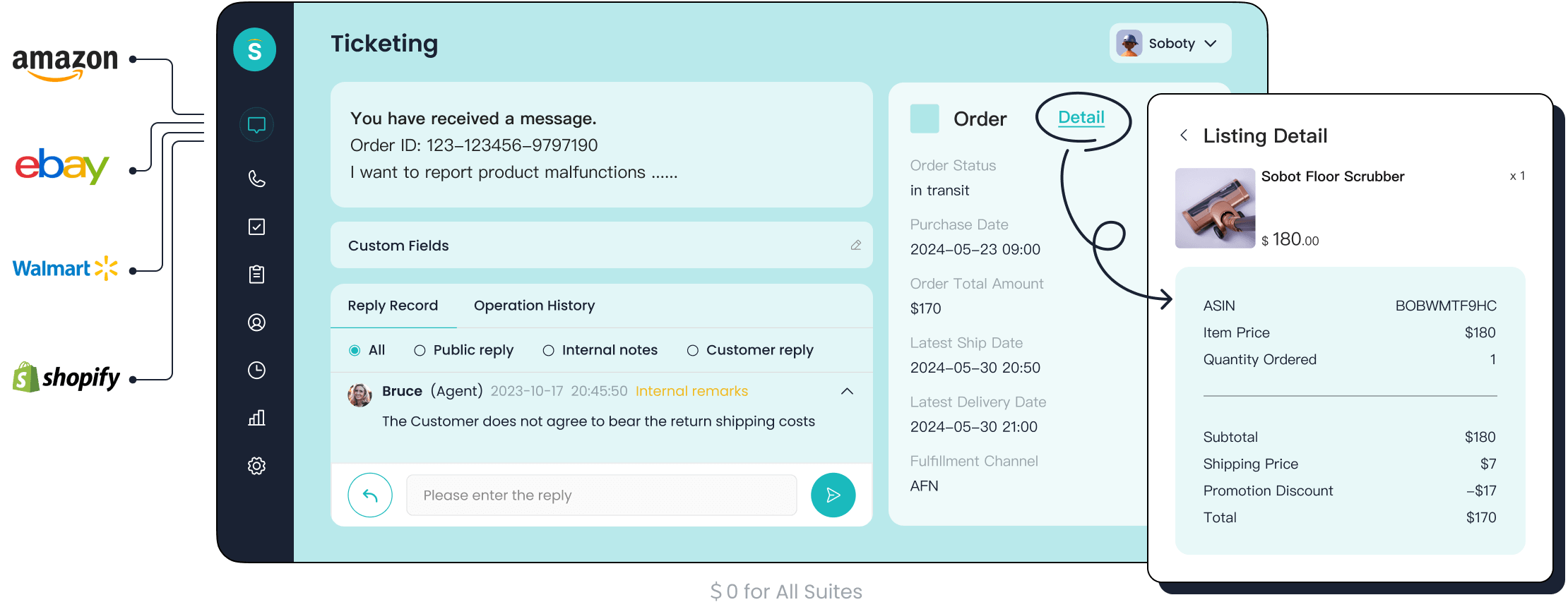
You want a Gorgias alternative that gives you more than just ticketing. Sobot offers an all-in-one customer contact center. You get live chat, chatbot, AI agent, voice call center, voicebot, and a powerful ticketing system. Sobot started in Singapore and now supports over 10,000 brands worldwide. You can trust Sobot’s stability, with 99.99% uptime and over 6 million online communications every day. Sobot’s mission is to help you improve customer satisfaction and efficiency with smart, unified tools.
| Feature | Sobot | Gorgias |
|---|---|---|
| Customer Contact Solution | All-in-one, integrates many channels | Focused on eCommerce |
| AI Capabilities | Advanced AI across 5 areas | Limited AI |
| Pricing | Lower, cost-effective | Higher |
| Omnichannel Support | Yes | Limited |
| Customer Engagement | Full process, from first contact onward | Ticketing and support |
Ticketing System Features
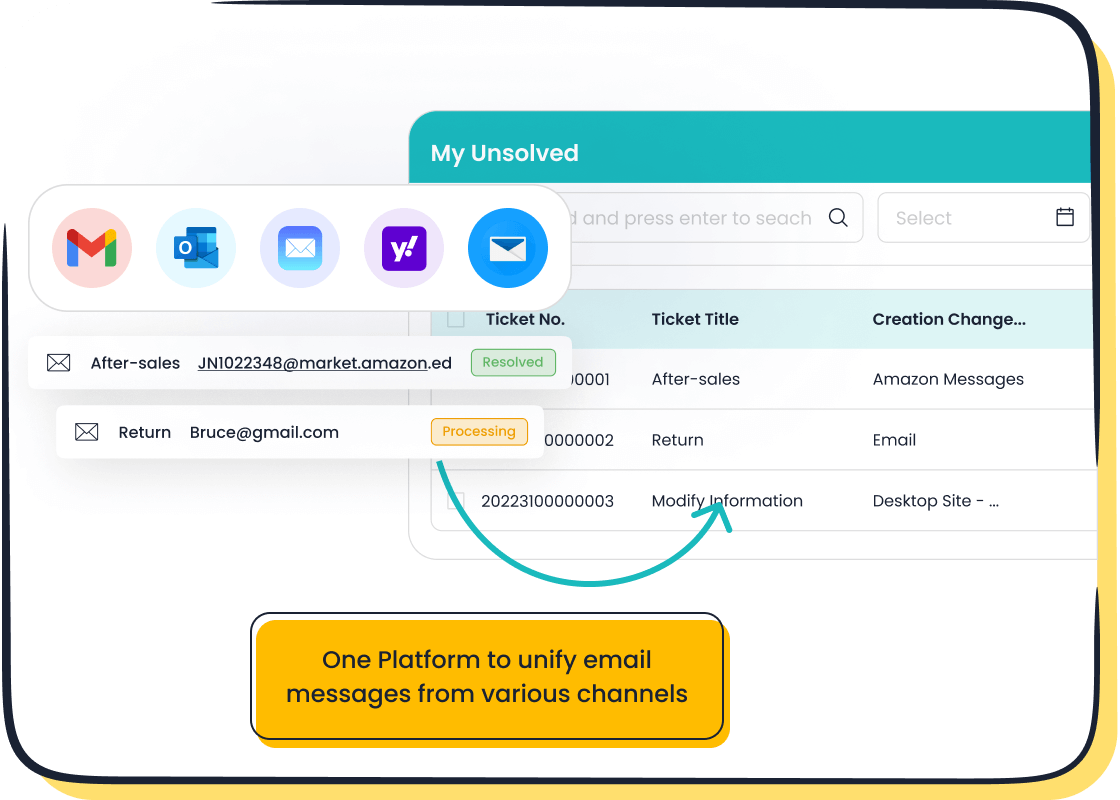
You need a Gorgias alternative that handles every customer request with ease. Sobot’s Ticketing System unifies all your channels—email, voicemail, chat—into one platform. You can automate ticket assignment, set priorities, and use AI to speed up responses. Sobot helps you scale from one seat to thousands without switching platforms. You get trusted analytics, SLA reminders, and multilingual support. This makes your team more productive and your customers happier.
| Feature | Description |
|---|---|
| Omnichannel Integration | All customer channels in one place |
| AI Capabilities | Automation and smart assistance |
| Scalability | Grows with your business, no need for future migrations |
Omnichannel Solution
You want to reach customers wherever they are. Sobot’s omnichannel solution brings together live chat, voice, ticketing, and automation. You can answer questions faster and give 24/7 support. Sobot’s platform lets you manage all conversations in one workspace. This means you respond quickly and keep customers satisfied.
| Feature | Sobot's Omnichannel Solution |
|---|---|
| Consolidation of Channels | Yes |
| Automation of Inquiries | Yes |
| Live Chat | Yes |
| Voice Center | Yes |
| Ticketing Tools | Yes |
| 24/7 Support | Yes |
| Faster Response Times | Yes |
| Improved Customer Satisfaction | Yes |
Tip: With Sobot, you can boost productivity by 30% and improve customer loyalty.
Customer Story: OPPO
You can see the real impact of switching to a Gorgias alternative with OPPO. OPPO, a global smart device leader, chose Sobot to handle high volumes of customer inquiries. By using Sobot’s chatbot and ticketing system, OPPO automated repetitive questions and let agents focus on complex issues. OPPO improved its chatbot resolution rate to 83% and saw a 94% positive feedback rate. Repurchase rates jumped by 57%. Sobot helped OPPO connect all customer channels and business systems, making service faster and more accurate. You can read more about OPPO’s success on Sobot’s website.
Migration Benefits & Action Steps
Improved Features
You gain advanced features when you use a migration solution like Sobot. You import all communication channels into one workspace. You automate ticket assignment and set priorities with ease. You manage full data migration and scale your team without switching platforms. You use trusted analytics to monitor performance. You import templates and canned responses to speed up your process. You merge tickets and filter lists for quick review. You check your migration checklist to ensure you import every important item. You use data import tools to transfer customer profiles, chat logs, and emails. You verify data integrity with data verification steps. You import multilingual support to serve global customers.
Enhanced Support
You receive strong support during the migration process. You access customer support for every step. You use a migration checklist to track your progress. You import training resources for your team. You transfer workflows and automation rules to match your new platform. You use migration service experts to guide you. You check security requirements to protect your data. You import smart notifications to keep your team informed. You transfer agent profiles and import knowledge base records. You use data import tools for verification and reconciliation. You rely on customer support to answer questions and solve issues.
Cost Efficiency
You save money when you migrate your data to Sobot. You reduce overall costs by 25%. You decrease staffing needs by 68% during peak seasons. You import automation tools to handle repetitive tasks. You transfer workload management to optimize resources. You export unnecessary data to streamline operations. You use migration service tools to avoid hidden fees. You check your migration checklist to prevent cost overruns. You import analytics to monitor spending. You transfer processes to improve efficiency.
| Metric | Result |
|---|---|
| Reduction in overall costs | 25% |
| Decrease in staffing needs | 68% during peak seasons |
- Agilent reported a 25% reduction in overall costs after adopting Sobot's AI solution.
- Companies have noted a 68% decrease in staffing needs during peak seasons due to automation.
Tip: You can use Sobot’s migration service to optimize your process and save money.
Next Steps
You start your migration by creating a migration checklist. You import your data and verify accuracy. You transfer workflows and automation rules. You check security requirements and ensure compliance. You use migration service experts for guidance. You export outdated records and focus on important data. You monitor your process with analytics. You rely on customer support for help. You complete full data migration and review your results. You update your process and prepare for future growth.
Callout: You can migrate your data with confidence when you follow a clear migration checklist and use a trusted migration service.
Migrating from Gorgias to a new help desk platform can feel overwhelming. You handle customer data, retrain your team, and rebuild workflows. You gain better features and support when you plan carefully and choose the right Gorgias alternative.
- You access integrations like REVIEWS.io for feedback and Influence for loyalty insights.
- You use Rich Returns for transparent processes.
You receive guidance and support throughout your migration. Start your journey today and improve your customer communication tools.
FAQ
How do you start a migration from Gorgias to Sobot?
You begin migration by creating a checklist. You review your current system. You back up your data. You plan migration steps. You select the right tools. You communicate with your team. You prepare for migration. You test migration with a small batch. You monitor migration progress.
What data can you move during migration?
You can move tickets, customer profiles, chat logs, emails, and knowledge base articles during migration. You decide which records to include in migration. You check compatibility. You clean your data before migration. You test migration with sample data. You verify migration accuracy.
How does Sobot ensure data security during migration?
Sobot uses three-layer data safety during migration. You get protection at physical, network, and application levels. You use two-factor authentication for migration. You comply with regulations like GDPR and CCPA. You monitor migration for threats. You back up data before migration. You validate migration steps.
What support do you receive during migration?
You access migration experts. You use migration checklists. You get training resources. You receive guidance for migration. You contact customer support for migration questions. You monitor migration progress. You review migration results. You update workflows after migration. You get post-migration support.
How do you verify migration success?
You check migration accuracy. You review migrated data. You test workflows after migration. You validate ticket assignments. You monitor analytics after migration. You confirm customer profiles. You check knowledge base records. You update automation rules. You document migration steps. You address migration gaps.
See Also
Best 10 Chat Solutions for Businesses in 2024
Three Leading Website Chat Software Choices
Best Live Chat Solutions for Ecommerce in 2024

