Free Email Ticketing System Migration Made Easy


Switching to a free email ticketing system can transform how you handle customer support. It’s essential for keeping up with modern demands, especially when customers expect quick and efficient responses. Sobot makes this migration process simple and stress-free. Its ticketing system automates tasks like ticket routing and response tracking, saving your team time. Plus, it integrates multiple communication channels into one platform, making it easier to manage everything in one place. This not only boosts your team’s productivity but also improves customer satisfaction by resolving issues faster.
Why Migrate to a Free Email Ticketing System?
Cost-Effective Customer Support Solutions
Switching to a free email ticketing system can save you money while improving your customer support. Traditional helpdesk solutions often come with hefty subscription fees, which can strain your budget, especially if you're a small business or startup. A free system eliminates these costs while still offering essential features to manage customer inquiries effectively.

Sobot's ticketing system is a great example. It provides tools like automated ticket routing and SLA management without charging you a dime. These features reduce the time your team spends on repetitive tasks, allowing them to focus on solving customer issues. Plus, with its ability to integrate with platforms like Shopify, you can streamline operations without investing in additional software.
By choosing a free support ticket system, you’re not just cutting costs—you’re also investing in a solution that grows with your business. As your customer base expands, Sobot’s scalable platform ensures you can handle increased demand without breaking the bank.
Enhanced Efficiency with Sobot's Ticketing System
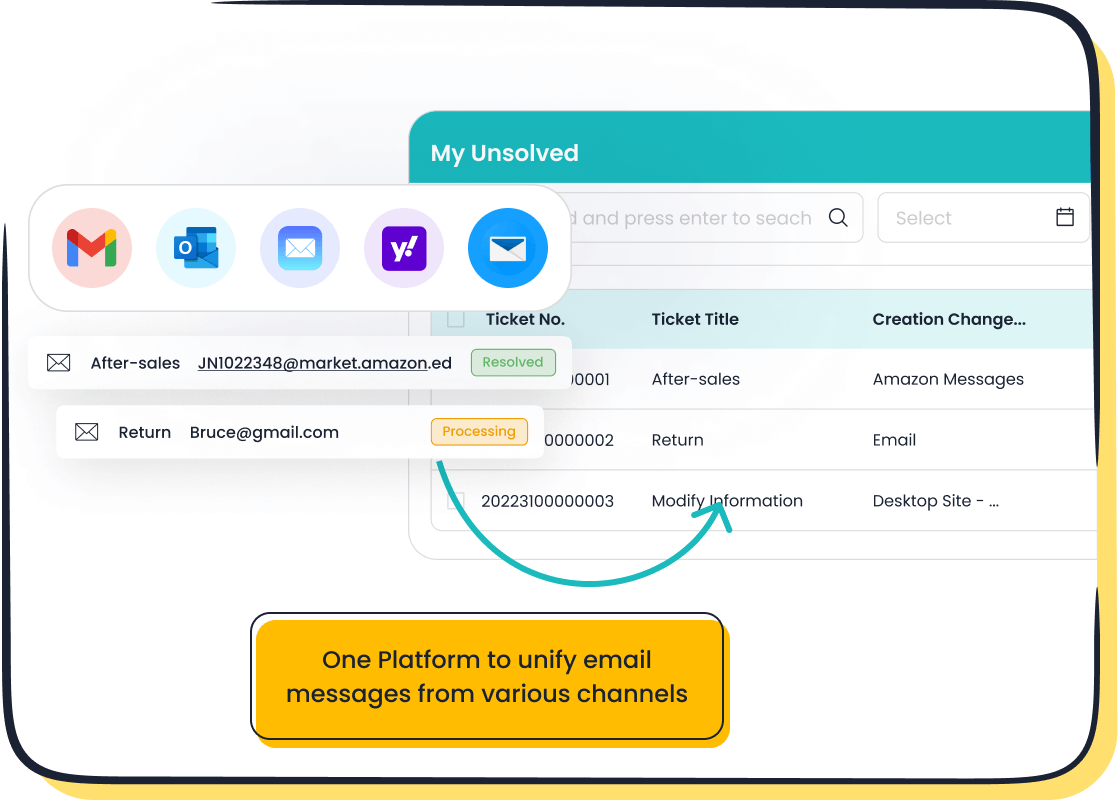
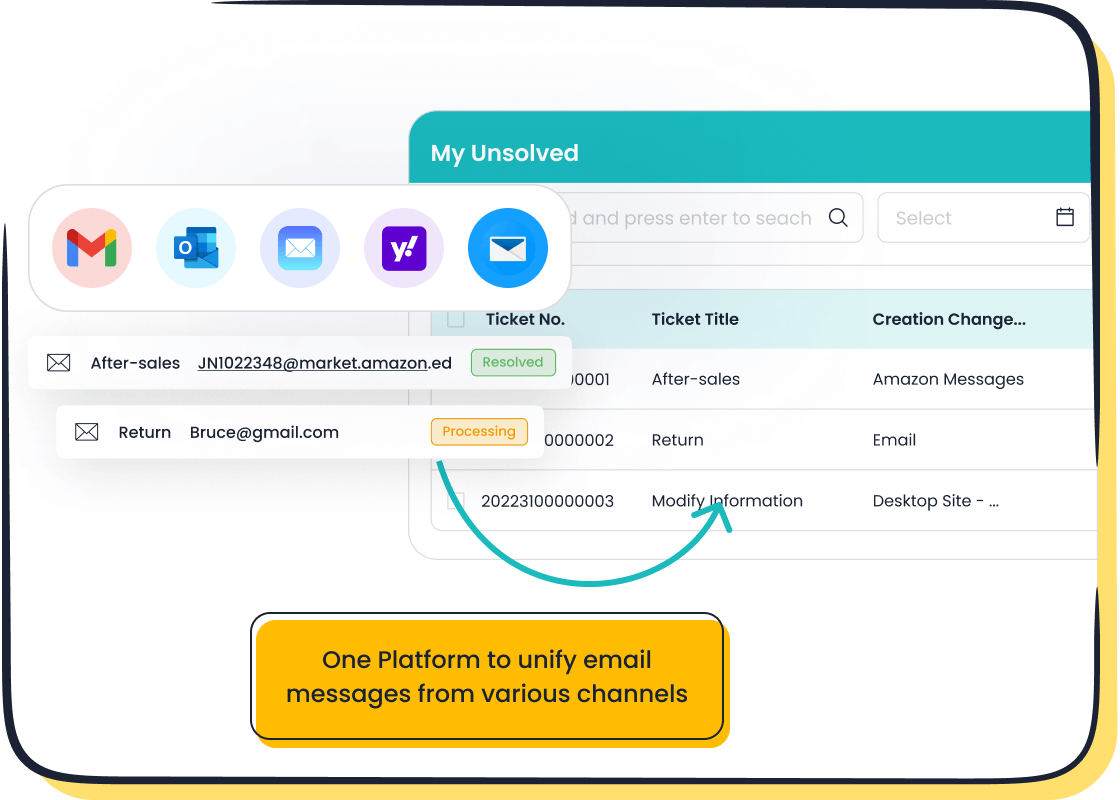
Managing customer inquiries across multiple channels can feel overwhelming. That’s where Sobot’s ticketing system shines. It consolidates emails, voicemails, and chats into one unified platform, making it easier for your team to stay organized. No more juggling between tools or losing track of customer requests.
The system’s automation features are a game-changer. For instance, tickets are automatically assigned to the right agent based on custom rules. This ensures faster response times and fewer delays. You can also use canned responses for common issues, saving even more time.
Imagine this: A customer submits a support ticket form about a delayed order. With Sobot, the ticket is instantly routed to the right department, and the agent has all the customer’s details at their fingertips. This level of efficiency not only boosts your team’s productivity but also leaves your customers impressed.
Improved Customer Experience and Satisfaction
Happy customers are loyal customers. A free email ticketing system like Sobot’s helps you deliver the kind of service that keeps people coming back. By centralizing all communication channels, you can respond to inquiries faster and more accurately.
Sobot’s multilingual support is another standout feature. Whether your customers speak English, Spanish, or French, they can submit tickets in their preferred language. This makes your business more accessible and inclusive.
Take Opay, for example. After implementing Sobot’s helpdesk solutions, they saw their customer satisfaction rate jump from 60% to 90%. That’s the power of a system designed to enhance the customer experience. When you prioritize fast, efficient, and personalized support, your customers notice—and they reward you with their loyalty.
Scalability for Growing Businesses
As your business grows, so do your customer support needs. A free email ticketing system like Sobot’s ensures you’re ready to handle that growth without breaking a sweat. Whether you’re managing a small team or scaling up to support thousands of customers, Sobot’s ticketing system adapts to your needs effortlessly.

One of the biggest challenges for growing businesses is managing an increasing volume of customer inquiries. With Sobot, you don’t have to worry about being overwhelmed. Its automated ticket routing ensures every inquiry lands in the right hands. This means your team can focus on resolving issues instead of sorting through emails. Plus, features like time-triggered actions and SLA management keep everything running smoothly, even during peak times.
Let’s say your e-commerce store experiences a surge in orders during the holiday season. With Sobot’s scalable platform, you can handle the influx of support tickets without delays. The system’s ability to integrate with platforms like Shopify ensures seamless operations, even as your workload increases. You’ll keep your customers happy and your team stress-free.
Pro Tip: Use Sobot’s analytics tools to monitor performance as your business grows. You’ll gain insights into response times, ticket volumes, and customer satisfaction, helping you make data-driven decisions.
Scalability isn’t just about handling more tickets. It’s about maintaining quality service as you grow. Sobot’s multilingual support and unified platform ensure you can serve a global audience without missing a beat. Whether you’re expanding into new markets or launching new products, Sobot’s ticketing system grows with you, making it the perfect partner for your journey.
Ready to scale your customer support? Explore Sobot’s ticketing system here and see how it can transform your operations.
Preparing for Helpdesk Migration
Assessing Your Current System and Identifying Needs
Before diving into a new helpdesk system, it’s crucial to evaluate your current setup. This step helps you identify what’s working, what’s not, and what features you need in your next system. Start by analyzing key performance indicators (KPIs) to pinpoint areas for improvement. Here’s a quick breakdown of the most important metrics to review:
| KPI | Description |
|---|---|
| Customer Satisfaction | Measures how happy customers are with the service, impacting overall business success. |
| Ticket Volume | Tracks the number of tickets to assess customer needs and potential issues with products/services. |
| Number of Outstanding Issues | Indicates unresolved tickets, highlighting staffing needs or service quality issues. |
| Average Agent Interaction Time | Evaluates the time agents spend with customers, helping identify training or efficiency needs. |
| First Response Time | Measures the time taken for initial customer responses, affecting customer satisfaction. |
| Resolution Time | Tracks the time from ticket opening to closing, impacting customer experience and satisfaction. |
These metrics reveal the strengths and weaknesses of your current helpdesk. For example, if your first response time is lagging, it might be time to consider a system like Sobot’s ticketing solution, which automates ticket routing and prioritization. This ensures faster responses and happier customers.
Tip: Involve your team in this assessment. They’re on the front lines and can provide valuable insights into what’s slowing them down.
Researching Free Support Ticket System Options
Once you’ve identified your needs, it’s time to explore free support ticket system options. The goal is to find a solution that aligns with your business requirements while improving efficiency and customer satisfaction. Here are some key statistics to keep in mind as you research:
- Nearly 40% of support agents handle 10 or fewer tickets daily, showing the need for streamlined processes.
- Companies using canned replies and set workflows have reported up to a 50% reduction in response times.
- The average ticket response time across the industry is 12 hours and 10 minutes, but effective systems can cut this dramatically.
When evaluating options, look for features like automation, SLA management, and integration capabilities. Sobot’s ticketing system, for instance, stands out with its ability to unify communication channels and automate repetitive tasks. It also supports multilingual tickets, making it ideal for businesses with a global audience.
Pro Tip: Don’t just focus on features. Consider the user experience too. A system that’s easy to navigate will save your team time and reduce training costs.
Evaluating Sobot's Ticketing System Features
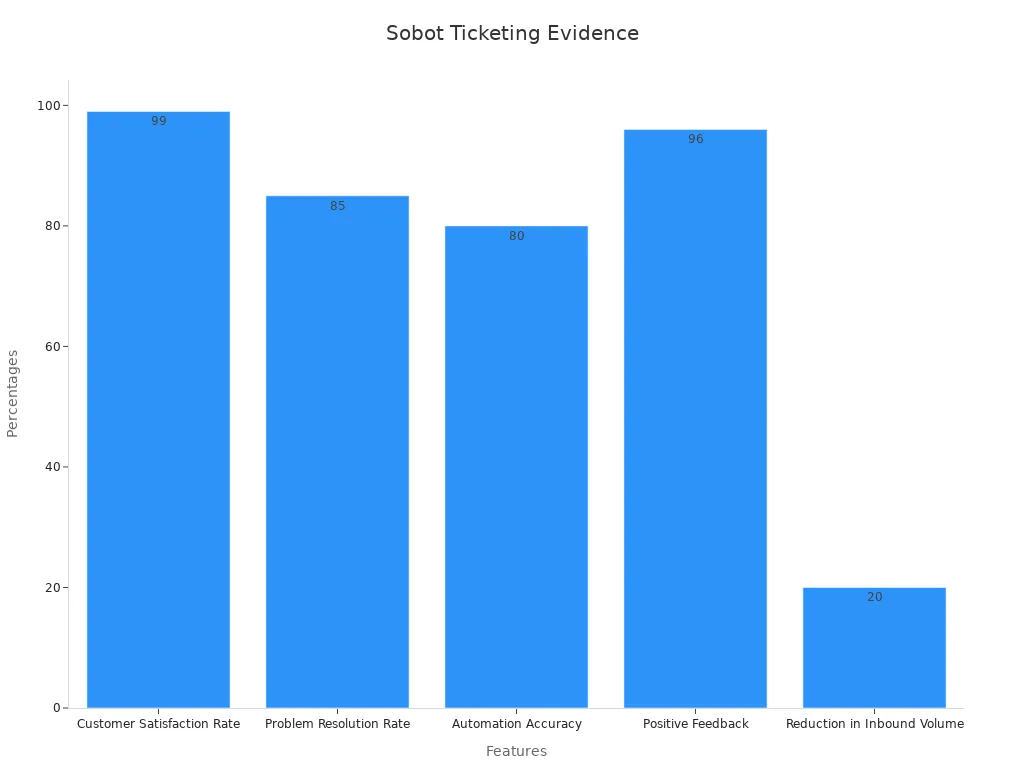
Sobot’s ticketing system offers a robust set of features designed to outperform competitors in reliability and efficiency. Here’s how it stacks up:
| Feature | Evidence |
|---|---|
| Customer Satisfaction Rate | 99% of customers are happy with Sobot's solutions. |
| Problem Resolution Rate | 85% of problems are solved effectively. |
| Automation Accuracy | Over 80% of answers provided by the AI platform are correct. |
| Positive Feedback | Positive feedback increased to over 96% after using the platform. |
| Reduction in Inbound Volume | Inbound discussion volume reduced by 20% over two years. |
Sobot’s system doesn’t just handle tickets—it transforms your entire support process. Features like automated ticket routing, SLA reminders, and trusted analytics ensure your team stays on top of every inquiry. Plus, its integration with platforms like Shopify makes it a seamless addition to your existing tools.
Imagine this: A customer submits a support ticket form about a billing issue. Sobot’s system instantly routes the ticket to the right agent, who has all the customer’s details at their fingertips. The result? Faster resolutions and happier customers.
Note: Sobot’s multilingual support and AI-driven automation make it a standout choice for businesses looking to scale globally.
Engaging Stakeholders in the Migration Plan
When it comes to helpdesk migration, getting your stakeholders on board is a critical step. After all, they’re the ones who’ll use the system daily or benefit from its improved efficiency. By involving them early, you can ensure a smoother transition and avoid unnecessary roadblocks.
Why Stakeholder Engagement Matters
Stakeholders—whether they’re your customer support agents, IT team, or department heads—play a vital role in the success of your migration plan. Their input helps you identify potential challenges and tailor the system to meet your team’s needs. Plus, when stakeholders feel heard, they’re more likely to embrace the new helpdesk system enthusiastically.
For example, imagine your support agents are frustrated with slow ticket routing in your current setup. By involving them in the planning phase, you can highlight how Sobot’s automated ticket routing will save them time and reduce stress. This not only builds trust but also ensures the system addresses real pain points.
Steps to Engage Stakeholders Effectively
-
Identify Key Stakeholders
Start by listing everyone who’ll interact with the new system. This includes your support team, IT staff, and even upper management. Each group will have unique concerns and priorities, so it’s essential to consider their perspectives. -
Communicate the Benefits
Explain how the migration will improve their day-to-day tasks. For instance, let your agents know that Sobot’s unified platform will eliminate the need to juggle multiple tools. Highlight the free features like SLA management and canned responses that simplify their workflow. -
Involve Them in Decision-Making
Ask for feedback on what they’d like to see in the new helpdesk system. You could conduct surveys or hold brainstorming sessions. This collaborative approach ensures the migration plan aligns with their needs. -
Provide Regular Updates
Keep stakeholders informed throughout the process. Share milestones, address concerns, and celebrate small wins. Transparency fosters trust and keeps everyone motivated. -
Offer Training and Support
Once the system is ready, provide hands-on training to help your team get comfortable. Sobot’s intuitive interface makes this process easier, but offering additional resources like guides or Q&A sessions can boost confidence.
Real-Life Example: Opay’s Success Story
Take Opay, a financial service platform that partnered with Sobot for their helpdesk migration. By involving their team early and addressing their concerns, they achieved a 90% customer satisfaction rate—up from 60%. Their agents appreciated the streamlined ticketing process, which reduced response times and improved efficiency. This success underscores the importance of stakeholder engagement in any migration plan.
Pro Tip: Use Sobot’s analytics tools to track how the new system impacts performance. Share these insights with your stakeholders to demonstrate the value of their input.
By engaging your stakeholders, you’re not just implementing a new system—you’re building a foundation for long-term success. Ready to start your helpdesk migration? Explore Sobot’s free ticketing system and see how it can transform your operations.
Step-by-Step Guide to Migrating to a Free Email Ticketing System
Backing Up Existing Data and Ensuring Data Security
Before starting your helpdesk migration, backing up your existing data is a must. Think of it as creating a safety net. If something goes wrong during the process, you’ll have a secure copy to fall back on. Data loss can happen for many reasons—hardware failures, natural disasters, or even human error. But here’s the good news: most of it is preventable with the right steps.
Start by creating a comprehensive inventory of your data. This helps you understand what you have, its value, and any vulnerabilities. For example, if you’re migrating customer emails, make sure you know which ones are critical for ongoing support. Tools like cloud storage or external hard drives can help you store this backup securely.
Sobot’s ticketing system makes this step easier. It integrates seamlessly with platforms like Shopify, so you can back up and organize your data efficiently. Plus, its trusted analytics feature ensures you don’t miss any important details. By taking these precautions, you’ll protect your business and ensure a smoother transition.
Tip: Schedule regular backups even after the migration. This keeps your data safe and ready for any future updates.
Configuring and Testing the New System
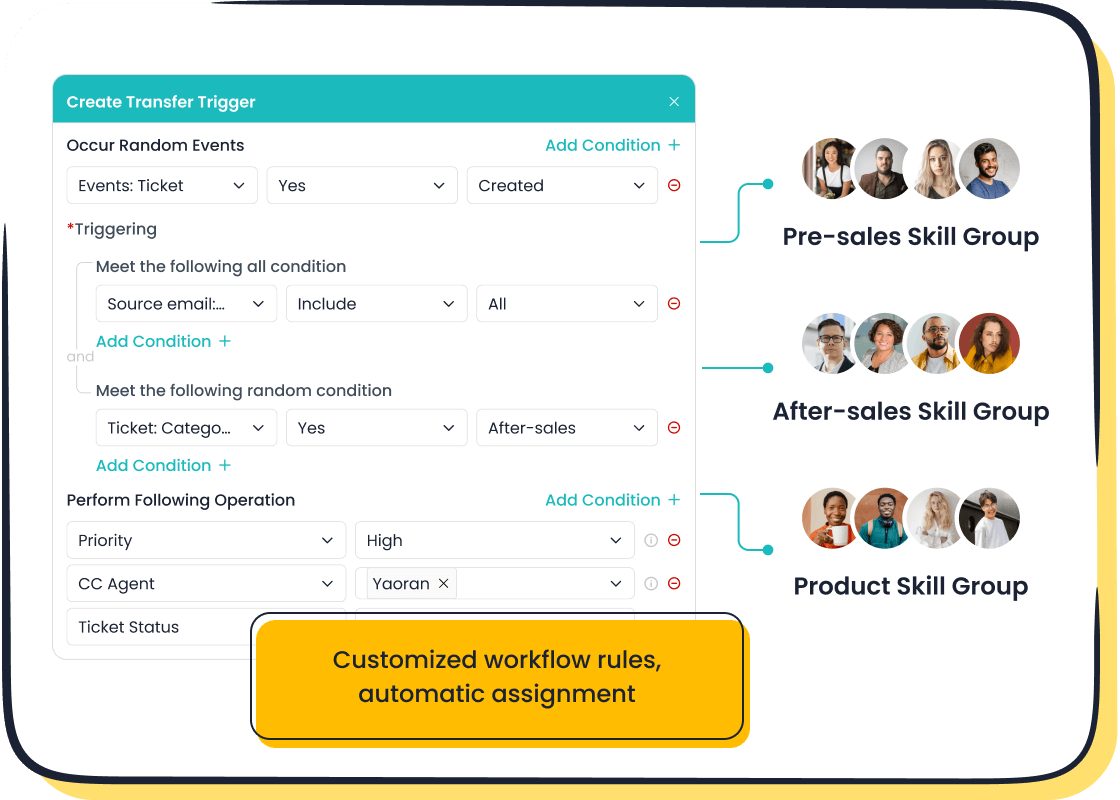
Once your data is backed up, it’s time to set up your new helpdesk system. This step is all about tailoring the system to fit your needs. Start by configuring essential features like ticket routing, SLA management, and canned responses. With Sobot’s ticketing system, you can automate these processes, saving your team valuable time.
Testing is just as important as configuration. Think of it as a dress rehearsal before the big show. Run a few test tickets through the system to see how it handles them. Does it route tickets to the right agents? Are response times improving? These tests help you identify and fix any issues before going live.
For example, let’s say you’re testing Sobot’s multilingual support. Submit a ticket in Spanish and check if the system translates it correctly. This ensures your global customers get the same high-quality support as everyone else.
Pro Tip: Involve your team in the testing phase. Their feedback can help you fine-tune the system for better performance.
Importing Data into Sobot's Ticketing System
Now comes the exciting part—data migration. This step involves transferring your backed-up data into Sobot’s ticketing system. The goal is to ensure all your customer information, past tickets, and communication history are available in the new system.
Sobot simplifies this process with its user-friendly interface and automation tools. For instance, you can use its custom trigger rules to categorize and prioritize tickets as they’re imported. This keeps everything organized from day one. Plus, Sobot’s ability to integrate with multiple channels means you can import data from email, voicemail, and chat without any hassle.
Here’s a quick example: Imagine you’re importing a batch of unresolved tickets. Sobot’s system automatically assigns them to the right agents based on priority and customer type. This ensures no ticket gets lost in the shuffle, and your team can start resolving issues immediately.
Note: Always double-check the imported data for accuracy. Conduct a test migration first to catch any errors before the final transfer.
By following these steps, you’ll set up a free email ticketing system that’s efficient, secure, and ready to support your growing business. Sobot’s robust features make the entire process seamless, so you can focus on what matters most—delivering exceptional customer service.
Conducting a Test Migration for Accuracy
Before fully committing to a new system, running a test migration is essential. Think of it as a trial run to ensure everything works as expected. This step helps you catch potential issues early, saving you from headaches later. It’s like testing a recipe before serving it at a big dinner—you want to make sure it’s perfect.
Start by selecting a small batch of data for the test. This could include a mix of customer tickets, emails, and workflows. Import this data into Sobot’s ticketing system and observe how it performs. Are tickets routed to the right agents? Do workflows trigger correctly? These are the questions you’ll want to answer during this phase.
Testing also gives you a chance to evaluate data accuracy. For example, Sobot’s system ensures that imported data remains intact, with no missing or corrupted information. This level of precision is crucial for maintaining customer trust and operational efficiency.
Here’s a snapshot of the metrics you can use to measure the success of your test migration:
| KPI Description | Value |
|---|---|
| Completion of pilot testing with issues resolved | 95% |
| Data accuracy achieved | 99% |
| Critical workflows operational post-migration | 100% |
| User satisfaction scores | Above 90% |
These numbers highlight the importance of conducting a thorough test. By addressing any issues during this phase, you’ll set the stage for a smooth transition to your new helpdesk system.
Tip: Involve your team in the testing process. Their feedback can help you fine-tune the system and ensure it meets everyone’s needs.
Finalizing the Migration and Going Live
Once your test migration is complete and you’ve ironed out any kinks, it’s time to finalize the process and go live. This is the moment when all your planning and preparation come together. But don’t rush—taking a methodical approach ensures a seamless transition.
Start by importing the rest of your data into Sobot’s ticketing system. Use the insights from your test migration to guide this step. For example, if you noticed certain workflows needed adjustment, make those changes before proceeding. Sobot’s automation tools, like custom triggers and SLA management, make this process straightforward.
After the data is in place, conduct a final round of testing. This ensures everything is functioning as it should. Once you’re confident in the system’s performance, it’s time to flip the switch and go live.
Here’s what you can expect after finalizing your migration:
- Infrastructure efficiency improves with tools like Infrastructure-as-Code and containerization.
- High-performance computing becomes more reliable, thanks to solutions like HashiCorp Nomad.
- Vendor flexibility increases, allowing you to avoid being locked into third-party integrations.
The benefits don’t stop there. Post-migration, your team will enjoy greater flexibility to work from anywhere, boosting productivity. Employees will also appreciate the improved technology experience, leading to higher satisfaction levels. Plus, by migrating to a cloud-based system like Sobot’s, you can save significant costs. For instance, some organizations have saved up to $200,000 by avoiding hardware and software purchases.
Pro Tip: Monitor your system’s performance closely during the first few weeks after going live. Use Sobot’s analytics tools to track metrics like response times and ticket volumes. This data will help you identify areas for further optimization.
Finalizing your migration and going live is a big step, but with the right preparation, it doesn’t have to be stressful. Sobot’s intuitive platform and robust features make the process as smooth as possible, so you can focus on delivering exceptional customer support.
Training and Onboarding Your Team
Comprehensive Training on Sobot's Ticketing System
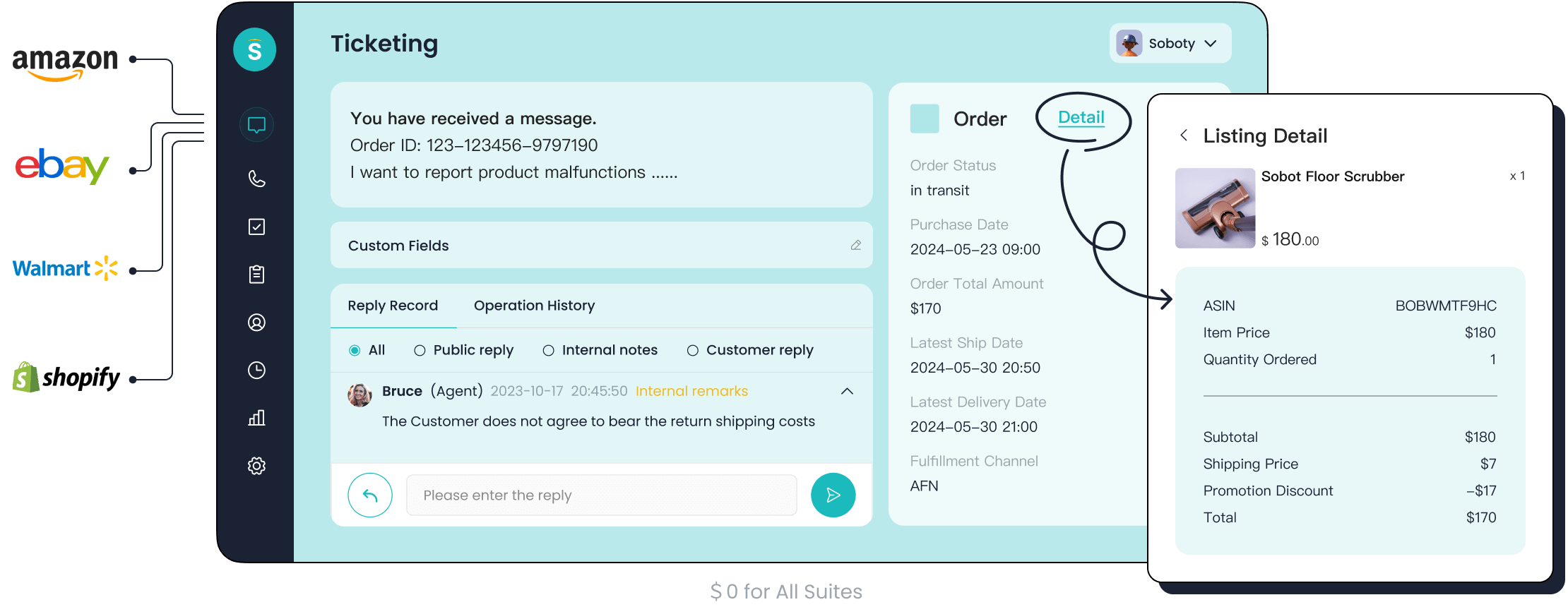
Training your team is the first step to ensuring a smooth transition to Sobot's ticketing system. A well-trained team can maximize the system's potential and deliver exceptional customer support. Start by introducing the platform's key features, like automated ticket routing, SLA management, and multilingual support. These tools simplify workflows and improve efficiency.
Hands-on training sessions work best. Let your team explore the system by creating and resolving test tickets. This approach helps them understand how features like canned responses and custom triggers save time. For example, agents can practice using the ticket filter to prioritize urgent issues. This ensures they’re ready to handle real customer inquiries from day one.
Tip: Use Sobot’s built-in analytics to track your team’s progress during training. Metrics like response times and ticket resolution rates can highlight areas for improvement.
Addressing Common Questions and Concerns
During onboarding, your team will likely have questions. Addressing these early can boost confidence and adoption. Common concerns might include navigating the system, understanding automation rules, or managing multilingual tickets. Encourage open communication and provide clear answers.
Here’s how you can tackle this effectively:
- Launch surveys to gather feedback on the onboarding process.
- Identify pain points, like unclear workflows or confusing features.
- Ask specific questions, such as, “What did you find most challenging during setup?”
Targeted onboarding strategies, like personalized user flows, can also help. For instance, Sobot’s intuitive interface reduces the learning curve, while its automated workflows showcase the system’s value. By addressing concerns upfront, you’ll create a more engaged and confident team.
Did you know? Structured onboarding improves engagement and retention. Teams that feel supported during training are more likely to embrace new tools.
Establishing Clear Processes for Using the System
Clear processes are essential for consistent and efficient support operations. Define how your team will use Sobot’s ticketing system daily. For example, outline steps for creating, assigning, and resolving tickets. This ensures everyone follows the same workflow, reducing confusion.
Here’s a quick look at performance metrics that validate the importance of clear processes:
| Metric | Description |
|---|---|
| Cycle time | Time required to complete a ticket from start to finish. |
| On Time Delivery (OTD) | Percentage of tickets resolved within SLA timelines. |
| Resource utilization rate | Efficiency with which agents handle tickets. |
| Defect rate | Percentage of tickets with errors or incomplete resolutions. |
By monitoring these metrics, you can identify areas for improvement. For instance, if cycle times are high, review your workflows to eliminate bottlenecks. Sobot’s automation tools, like time-triggered actions, can help streamline processes and improve these metrics.
Pro Tip: Document your workflows and share them with your team. A quick-reference guide can save time and ensure consistency.
Clear processes, combined with comprehensive training and open communication, set your team up for success. With Sobot’s ticketing system, you’ll not only enhance efficiency but also deliver a seamless customer experience.
Encouraging Team Feedback for Continuous Improvement
Your team’s feedback is a goldmine for improving your helpdesk system. They’re the ones using it daily, so their insights can help you identify what’s working and what needs tweaking. Encouraging open communication not only boosts morale but also ensures your system evolves to meet real-world challenges.
Start by creating a simple feedback loop. Regularly ask your team for their thoughts on the system. What features do they love? What’s slowing them down? Use surveys, one-on-one meetings, or even casual chats to gather this information. For example, Sobot’s ticketing system offers analytics tools that can help you track how changes based on feedback impact performance.
Here’s why feedback matters. It directly influences key metrics that drive success:
| Metric | Description |
|---|---|
| Client Satisfaction Scores | Track changes in client satisfaction ratings over time. |
| Employee Engagement Metrics | Monitor indicators of team morale and engagement. |
| Operational Efficiency | Measure improvements in key performance indicators. |
| Financial Performance | Analyze the impact on revenue, profitability, and client acquisition. |
| Innovation Metrics | Track the number of new ideas generated from feedback. |
Imagine this: Your agents suggest adding more canned responses for common issues. You implement their idea, and response times drop by 20%. Customers notice the faster service, and satisfaction scores climb. That’s the power of listening to your team.
Pro Tip: Use Sobot’s trusted analytics to measure the impact of team-driven changes. Metrics like ticket resolution time and customer satisfaction can show you what’s working.
By fostering a culture of feedback, you empower your team to take ownership of the system. This not only improves efficiency but also creates a happier, more engaged workforce. After all, when your team feels heard, they’re more likely to go above and beyond for your customers.
Post-Migration Optimization and Best Practices

Monitoring System Performance and Gathering Feedback
Once your new helpdesk system is live, monitoring its performance becomes essential. You want to ensure everything runs smoothly and meets your expectations. Start by tracking key metrics like response times, system uptime, and resource usage. Tools that monitor CPU and memory usage can help you spot potential issues before they escalate. For example, if response times increase, it might indicate a need to optimize database queries or adjust workflows.
Gathering feedback from your team and customers is equally important. Create a feedback loop where users can share their experiences with the system. Did the support ticket form make it easier for customers to reach you? Are agents finding the automated workflows helpful? These insights can guide you in fine-tuning the system for better results.
Regular performance testing also plays a big role. Stress tests ensure your system can handle peak loads, especially during busy seasons. By combining monitoring tools and user feedback, you’ll maintain a reliable and efficient helpdesk.
Regular Updates and Maintenance with Sobot
Keeping your system updated is crucial for long-term success. Sobot’s free support ticket system simplifies this process by offering regular updates that enhance functionality and security. These updates ensure your system stays compatible with the latest technologies and continues to meet your business needs.
Routine maintenance is just as important. Schedule periodic checks to identify and resolve minor issues before they grow. For instance, reviewing ticket routing rules can help you maintain fast response times. Sobot’s analytics tools make it easy to track performance metrics and identify areas for improvement.
Think of updates and maintenance as an investment in your system’s future. They not only improve efficiency but also ensure your team can provide top-notch support without interruptions.
Communicating Changes to Stakeholders
When you make changes to your helpdesk, keeping stakeholders informed is key. Whether it’s your support team, IT staff, or upper management, everyone should understand how the new system benefits them. Clear communication builds trust and ensures a smoother transition.
Start by explaining the reasons behind the changes. For example, highlight how Sobot’s automation features reduce manual tasks, freeing up agents to focus on complex issues. Share performance data to show the system’s impact, like faster ticket resolution times or improved customer satisfaction.
Regular updates keep everyone on the same page. Use team meetings, emails, or dashboards to share progress and address concerns. When stakeholders feel involved, they’re more likely to embrace the system and contribute to its success.
Pro Tip: Use Sobot’s analytics to create visual reports. These make it easier to communicate the system’s benefits to non-technical stakeholders.
Creating a Customer Support Ticket Form for Efficiency
An efficient support ticket form can transform your customer service experience. It’s the first step in ensuring inquiries are handled quickly and accurately. When you create a customer support ticket form, you simplify the process for your customers and your team. A well-designed form collects all the necessary information upfront, reducing back-and-forth communication and speeding up resolutions.
Here’s what an effective support ticket submission form should include:
- Clear Fields: Ask for essential details like name, email, and issue description.
- Categorization Options: Let customers select the type of issue, such as billing or technical support.
- Priority Levels: Allow users to mark the urgency of their request.
- Multilingual Support: Ensure customers can submit tickets in their preferred language.
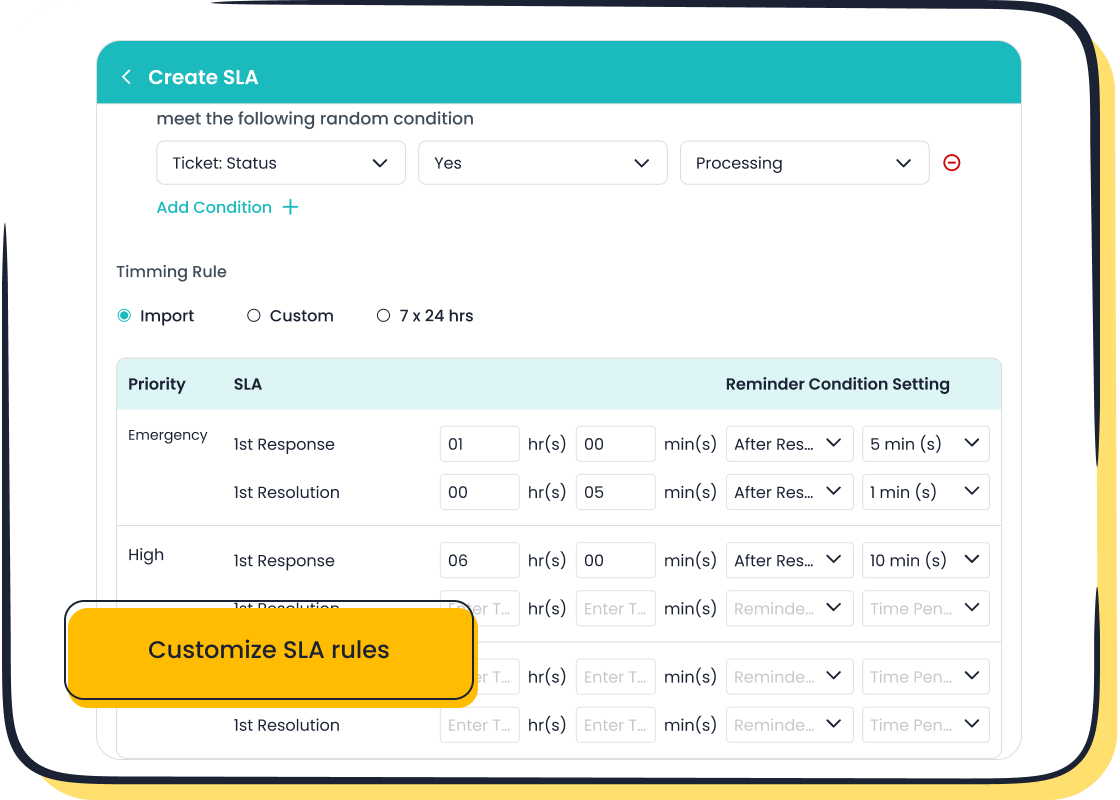
Sobot’s free support ticket system makes this process seamless. It integrates features like automated ticket routing and SLA management, ensuring every ticket lands in the right hands. For example, if a customer submits a ticket about a delayed order, Sobot’s system categorizes it and routes it to the appropriate department instantly. This reduces response times and improves customer satisfaction.
Optimized ticket forms also boost efficiency. Metrics like customer satisfaction scores and average resolution times show how impactful they can be. Take a look at these benchmarks:
| Metric | Description | Example Calculation |
|---|---|---|
| Customer Satisfaction Score | Measures customer happiness and satisfaction with support services. | CSAT (%) = (Positive Responses / Total Responses) × 100 = 75% |
| Net Promoter Score | Indicates customer loyalty and likelihood to recommend the service. | NPS = Promoters - Detractors = 70 - 10 = 60% |
| First Contact Resolution | Percentage of tickets resolved on the first contact with support. | If 80 out of 100 tickets are resolved in the first contact, FCR = 80% |
| Average Resolution Time | Average time taken to resolve customer issues. | If total resolution time for 10 tickets is 50 hours, Average Resolution Time = 5 hours |
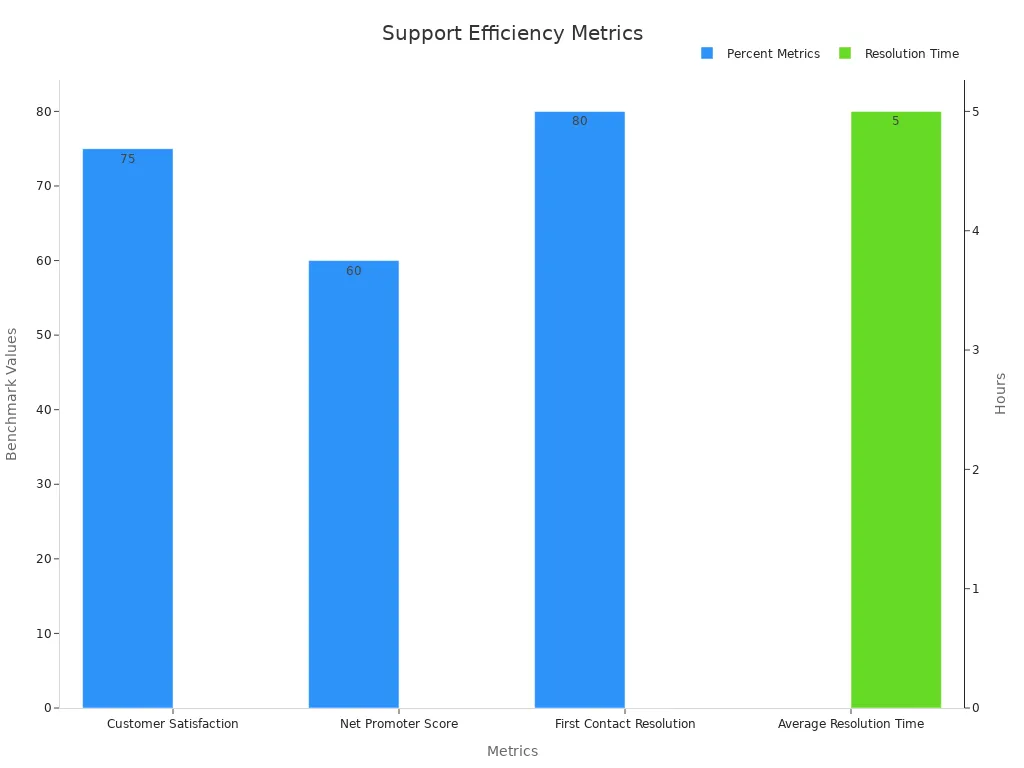
By using Sobot’s tools to create a customer support ticket form, you can achieve these benchmarks effortlessly. The system’s multilingual support and automation features ensure your team stays organized and productive. Customers will appreciate the simplicity of the form, while your agents will benefit from streamlined workflows.
Pro Tip: Regularly review your support ticket form to ensure it collects the right information. Small tweaks can make a big difference in efficiency.
An optimized support ticket form isn’t just a tool—it’s a strategy for delivering exceptional service. With Sobot’s free support ticket system, you can create forms that enhance customer satisfaction and operational efficiency.
Best Practices for a Smooth Helpdesk Migration
Strategic Planning and Timeline Management
Planning is the backbone of a successful helpdesk migration. Without a clear strategy, things can quickly go off track. Start by aligning your migration goals with your business needs. This ensures the new system supports your long-term objectives. For example, if faster response times are a priority, focus on features like automated ticket routing.
A detailed timeline is just as important. Break the migration into smaller tasks, each with its own deadline. This keeps the project organized and helps you spot delays early. Include milestones like data backup, system testing, and final deployment. If unexpected issues arise, having a timeline allows you to adjust without derailing the entire plan.
Testing is another critical step. Run tests before, during, and after the migration to catch potential problems early. For instance, test how the system handles ticket routing or multilingual support. This proactive approach minimizes risks like data loss or downtime, ensuring a smoother transition.
Tip: Anticipate challenges like system downtime and prepare a risk management plan. This keeps your team ready to tackle issues quickly.
Ensuring Data Integrity and Security
Your data is the heart of your helpdesk. Protecting it during migration is non-negotiable. Start by establishing clear data governance policies. These outline how data should be handled, ensuring it remains secure and accurate. For example, encrypt sensitive customer information to prevent unauthorized access.
Monitoring data quality is equally important. Use tools to track metrics like accuracy and completeness. If you spot errors, address them immediately to avoid future problems. Accurate data not only supports better decision-making but also ensures compliance with regulations, reducing the risk of penalties.
Imagine this: You’re migrating customer tickets to Sobot’s system. By continuously monitoring the data, you ensure every ticket is transferred correctly. This attention to detail builds trust with your customers and sets the stage for effective support.
Pro Tip: Schedule regular audits post-migration to maintain data integrity. This keeps your helpdesk running smoothly in the long term.
Developing a Fallback Plan for Unexpected Issues
Even the best migration plan can hit a snag. That’s why having a fallback plan is essential. Think of it as your safety net. If something goes wrong, you’ll have a strategy to minimize disruptions.
Start by creating backup systems. For example, store a copy of your data in a secure location. If the migration faces delays, you can still access critical information. Contingency plans are another must-have. Outline steps to handle common issues like system errors or data mismatches.
Measurement frameworks can also help. Use them to track how well your fallback plan works. For instance, monitor how quickly your team resolves issues during the migration. This data helps you refine your strategy for future projects.
Did you know? Companies with strong contingency plans maintain service availability even during unexpected disruptions. This keeps operations running smoothly and customers happy.
Documenting the Migration Process for Future Reference
Documenting your migration process is like creating a roadmap for future success. It helps you track what worked, what didn’t, and how to improve next time. Plus, it’s a lifesaver if you ever need to revisit or replicate the process.
Start by keeping a detailed record of every step. Write down how you backed up your data, tested the system, and imported everything into Sobot’s ticketing platform. Include screenshots or videos if possible. These visuals make it easier for others to understand the process later.
Next, create a checklist of lessons learned. Did a particular step take longer than expected? Was there a feature in Sobot’s system that made things easier? For example, many businesses find Sobot’s automated ticket routing a game-changer during migration. It ensures tickets go to the right agents without delays, saving time and reducing stress.
Don’t forget to gather feedback from your team. Ask them what they liked about the process and what could improve. Their insights can help you refine your documentation. You can even use Sobot’s analytics tools to track how the new system is performing. Metrics like ticket resolution times and customer satisfaction scores can highlight areas for further optimization.
Finally, store your documentation in a shared, secure location. This ensures everyone on your team can access it when needed. Whether you’re scaling your business or onboarding new team members, having a well-documented migration process saves time and effort.
Pro Tip: Update your documentation regularly. As your business grows and your needs evolve, your processes might change. Keeping your records current ensures they remain useful.
Migrating to a free email ticketing system like Sobot’s can transform your customer support. It simplifies workflows, boosts efficiency, and enhances the overall helpdesk experience. By preparing thoroughly, training your team, and optimizing the system post-migration, you’ll set yourself up for long-term success. Sobot’s intuitive features, like automated ticket routing and multilingual support, make it a standout choice. Ready to elevate your customer service? Explore Sobot’s Ticketing System today and see how it can streamline your operations effortlessly.
FAQ
What is an email ticketing system, and how does it help with customer support inquiries?
An email ticketing system converts customer emails into manageable tickets. It organizes inquiries, tracks progress, and ensures timely responses. Sobot’s system automates ticket routing and prioritization, helping you resolve issues faster and improve customer satisfaction.
Can I integrate Sobot’s ticketing system with other platforms?
Yes, Sobot integrates seamlessly with platforms like Shopify and Salesforce. This makes it easy to manage customer support inquiries across multiple channels, ensuring a unified and efficient workflow.
How does Sobot’s ticketing system handle multilingual support?
Sobot’s system supports multiple languages, allowing customers to submit tickets in their preferred language. It automatically translates inquiries, ensuring accurate communication and a better customer experience.
Is Sobot’s ticketing system suitable for small businesses?
Absolutely! Sobot’s scalable platform adapts to your needs, whether you’re a startup or a growing business. Its automation features save time and reduce costs, making it ideal for small teams handling customer support inquiries.
How can I measure the success of my helpdesk migration?
Track metrics like response times, resolution rates, and customer satisfaction scores. Sobot’s analytics tools provide detailed insights, helping you optimize your system and deliver exceptional support.
See Also
Effective Strategies for Live Chat in Customer Service
Enhancing Sales Through Ecommerce Live Chat Solutions
Improving SaaS Customer Support Using Live Chat Techniques

