Effortless Ways to Migrate from Kustomer


Companies planning to migrate from Kustomer often use specialized data migration tools. An automated migration service like Help Desk Migration or Import2 streamlines the entire data migration process. This data migration software automates the transfer of tickets and contacts, minimizing errors. A common path is moving from Kustomer to Zendesk. This article reviews data migration tools for this switch and other customer support platforms. While Zendesk is a popular choice for data migration from Kustomer, and Sobot holds under 0.1% market share, its powerful features present a strong alternative to options like Zendesk.
Why Automate Your Kustomer Data Migration?

Manually moving data from Kustomer is a high-risk task. This process often leads to data corruption, extended service disruptions, and high labor costs. An automated data migration, however, offers superior data integrity, speed, and resource efficiency. Using a dedicated data migration software is the professional standard for a successful transition.
Ensure Data Integrity and Accuracy
Protecting your data's integrity is the top priority during any data migration. Manual methods expose your valuable customer information to significant risks. These risks can corrupt your data and undermine its reliability.
Common Manual Data Migration Errors
- Data Corruption: Format conversions and transformation errors can distort critical information from your Kustomer account.
- Hidden Errors: Subtle issues like duplicate records or rounding inconsistencies can corrupt reports without immediate detection.
- Inconsistent Data: Migrating data in batches can create duplicate customer records or varied date formats.
Automated tools for data migration preserve data integrity. They use built-in validation and quality checks to identify and fix issues before the final transfer. This ensures your data remains consistent and accurate in the new system.
Reduce Downtime and Accelerate Transition
A lengthy data migration process disrupts your customer service operations. Teams that migrate from Kustomer want to minimize this downtime. Manual data migration from Kustomer is slow and requires significant team focus. Automation, on the other hand, greatly accelerates the entire process. An automated data migration connects data fields between systems much faster than a person can. This speed reduces service interruptions and allows your support team to adapt to the new platform quickly.
Minimize Manual Work and Human Error
Manual data entry is prone to human error. Simple mistakes can create major problems for your business. Common errors include:
- Typographical mistakes in names or numbers.
- Inconsistent formatting for dates and addresses.
- Duplicate or missing data fields.
These errors compromise data security and create inefficiencies. Automated data migration eliminates these risks by removing manual data entry from the process. This approach is also more cost-effective. An automatic migration can save up to 80% compared to a manual rewrite.
| Aspect | Manual Migration | Automated Migration |
|---|---|---|
| Cost | Developers manually handle the Kustomer data migration, which is time-consuming and results in very high costs. | Does not require manual work for each record, leading to a more efficient job and lower costs. |
Choosing automation for your Kustomer data migration protects your data, saves time, and reduces costs significantly.
Top Data Migration Tools Reviewed
Choosing the right data migration tools is a critical step. A successful data migration depends on a tool’s ability to handle your specific data objects, ensure security, and fit your budget. Many companies moving to a platform like Zendesk rely on these services. Below, we review two leading options for your Kustomer data migration.
Review: Help Desk Migration Software
Help Desk Migration is a specialized data migration software designed for moving customer service data between platforms. It provides a secure and automated way to transfer your help desk records from Kustomer to a new system, such as Zendesk. The service focuses on preserving data relationships and integrity throughout the data migration process.
Key Features
This tool automates the transfer of a wide range of Kustomer data objects. This comprehensive coverage ensures that no critical information is left behind. The data migration software handles:
- Help Desk Objects:
- Users, Customers, and Companies
- Conversations with all related details, including comments, attachments, and custom fields
- Agent mapping to reassign tickets from inactive agents
- Knowledge Base Objects:
- Categories, Subcategories, and Articles
- Full translation support for multilingual content
- Custom Objects:
- Migration of non-standard data while maintaining structure
Expert Support You Can Trust 🤝 Dima Lazarchuk, Co-founder at Help Desk Migration, states that providing "actually helpful customer support" is a key reason for their positive customer reviews. This focus on service ensures users have expert guidance during the data migration.
Pros and Cons
The platform has earned a strong reputation for reliability. With over 100 reviews on G2, it stands among trusted and technologically advanced companies. Users often praise its robust performance and the quality of its customer support. The primary advantage is its comprehensive data mapping, which reduces manual configuration. This is especially useful for businesses moving from Kustomer to Zendesk. Since the tool is highly specialized, its main purpose is data migration, not ongoing data synchronization.
Pricing Model
The pricing for Help Desk Migration depends on the number of records you need to transfer. This model allows businesses to pay only for what they need, making it a scalable option for teams of all sizes. You can get a precise quote by running a free demo data migration to see how the tool works with your Kustomer data before committing. This is a common pricing structure for data migration tools.
Review: Import2 Data Migration Service
Import2 is another one of the top-tier data migration tools available. It offers a fast and simple process for moving data between cloud applications. The service supports Kustomer as a source platform, enabling migrations to destinations like HubSpot Service Hub and Zendesk. Many users choose Import2 when they need to migrate from Kustomer to a new help desk like Zendesk.
Key Features
Import2 gives users significant control over the data migration process. Its features are designed for flexibility and security.
- Migration Scheduling: You can choose the exact date and time for your data migration, including weekends, to minimize business disruption.
- Object Selection: Users can select which Kustomer record types to import and exclude any unnecessary data.
- Data Security: Data is processed in real-time on temporary machines and is never stored. The service uses secure OAuth connections and deletes all credentials after the migration.
- Money-Back Guarantee: If you are not satisfied with the results, Import2 offers a full refund and will clean all imported records from your Zendesk account.
Pros and Cons
User testimonials for Import2 are overwhelmingly positive. Customers consistently highlight the service's speed, reliability, and excellent support. Many reviews mention that the service saved them hundreds of hours of manual work. Users moving to Zendesk found the process to be "flawless" and "like magic." The support team is frequently described as knowledgeable, friendly, and quick to respond. The service is highly recommended for any cloud-to-cloud data migration. Based on user feedback, there are no significant cons reported.
Pricing Model
Import2 offers a transparent, tiered pricing model based on the number of records. This makes it easy to find a plan that fits your budget. The pricing for moving from Kustomer to Zendesk falls under their Helpdesk tiers.
| Service Type | Tier | Price | Record Limit | Additional Features |
|---|---|---|---|---|
| Helpdesk | Basic | $99 | < 1,000 records | Real-time support, All features |
| Helpdesk | Plus | $199 | < 5,000 records | Real-time support, All features |
| Helpdesk | Premium | $299 | < 50,000 records | Real-time support, All features |
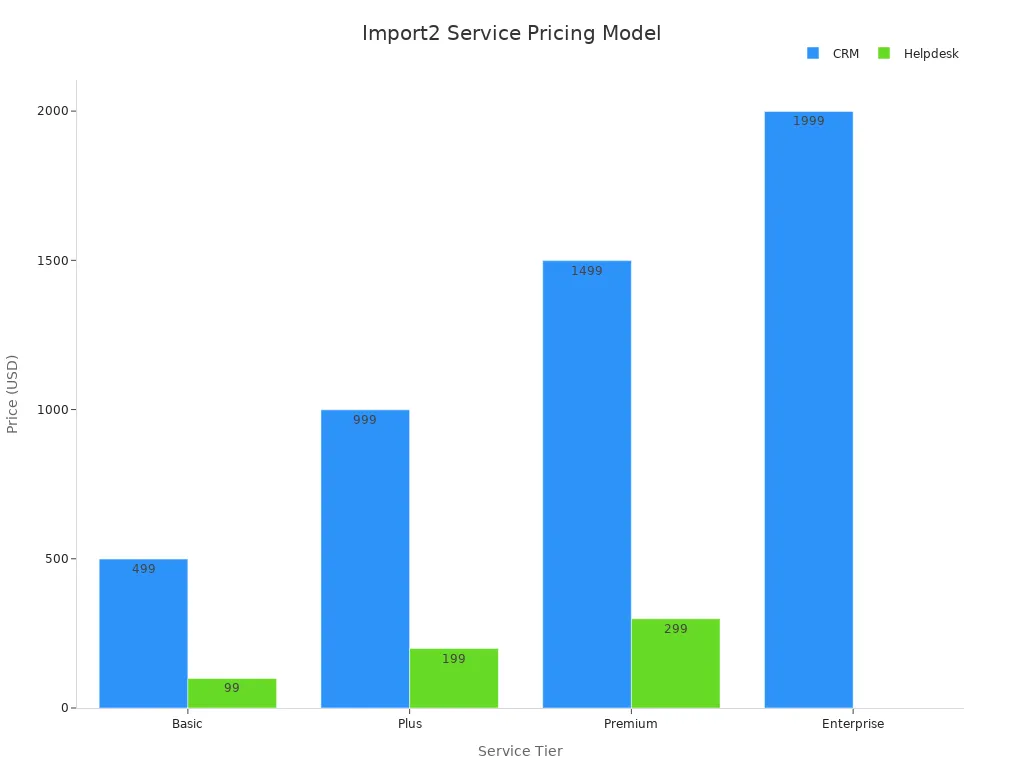
In addition to these plans, Import2 provides:
- Free trial migrations for all tiers
- A money-back guarantee
- Price-matching against competitors
This flexible pricing makes it an attractive option for companies looking for a cost-effective data migration to a platform like Zendesk.
Considering Your Next Platform? Migrate to Sobot
After you migrate from Kustomer, selecting the right platform is crucial for future growth. Sobot presents a premier, all-in-one contact center solution. It moves beyond the limitations of Kustomer by offering a truly integrated omnichannel environment. A successful data migration is just the first step; empowering your team with a superior platform is the goal.
Sobot's Unified Ticketing System
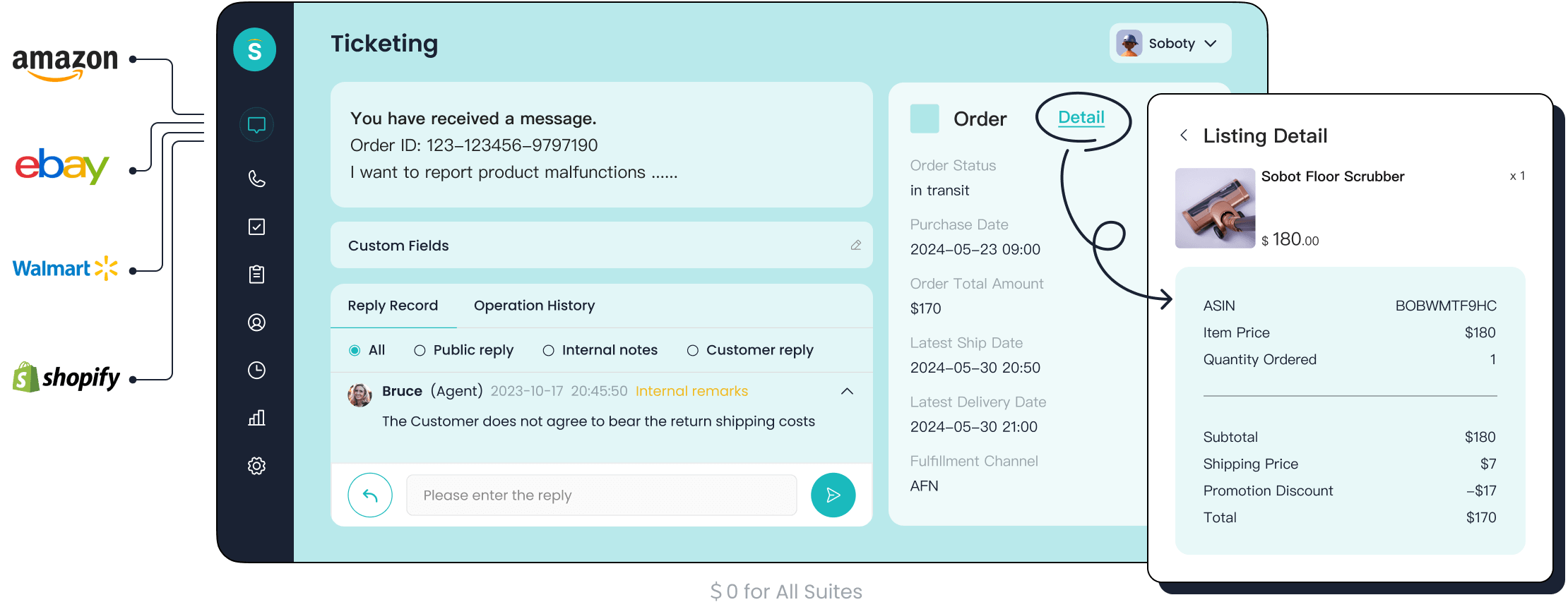
Sobot excels at unifying customer conversations. The platform consolidates interactions from social media, messaging apps, email, and phone into a single dashboard. This omnichannel approach eliminates the need for agents to switch between different systems.
A Truly Unified Experience 🌐 Sobot’s omnichannel solution brings every customer channel into one workspace. This gives agents a complete view of the customer journey, a significant advantage over the fragmented experience in Kustomer. This unified data migration target simplifies agent training and boosts efficiency.
This system ensures a seamless workflow from the moment a ticket is created. It provides a powerful foundation for any team that has completed its data migration from Kustomer.
AI-Powered and Automated Workflows
Sobot leverages artificial intelligence to enhance productivity. Its suite includes AI-powered chatbots and voicebots that handle customer inquiries 24/7. These tools can achieve a chatbot resolution rate of up to 85%. This level of automation significantly reduces the support team's workload.
The platform enables powerful automated workflows. For example, AI can qualify leads, answer common questions, and seamlessly hand off complex issues to human agents. This intelligent workflow improves response times and cuts customer service costs. This is a major upgrade for any team leaving Kustomer.
Advanced SLA and Analytics Features
Meeting performance targets is simple with Sobot. The system helps teams keep Service Level Agreements (SLAs) on track through automated ticket creation and intelligent routing. This ensures every ticket from any omnichannel source is handled efficiently according to predefined rules. This feature is essential after a data migration to maintain service quality. Sobot's reporting dashboard also provides administrators with the analytics needed to monitor performance and optimize team configurations. This makes it a robust alternative to Kustomer for data-driven teams.
Comparative Analysis: Which Tool is Right for You?

Choosing between leading data migration tools requires a close look at features, pricing, and specific use cases. Both Help Desk Migration and Import2 offer robust solutions for moving your data out of Kustomer. However, their approaches differ in key areas. This analysis will help you determine which service best aligns with your business needs, particularly for the common Kustomer vs Zendesk transition.
Feature Breakdown: Data Migration Tools
The best data migration software provides more than a simple data transfer. It offers customization to ensure the data fits perfectly into your new system, such as Zendesk. Advanced data migration tools allow for significant control over the process.
Key Customization Features to Look For ⚙️ Powerful tools give you the ability to refine your data migration. This ensures a clean and organized setup in your new help desk. Essential features include options to:
- Filter records based on specific criteria before migration.
- Remove duplicate data during the import process.
- Map data fields creatively, such as moving Kustomer objects as tickets or contacts.
- Transfer specific ticket events as private notes in Zendesk.
Help Desk Migration excels in this area, offering deep customization for complex data structures. Import2 provides a more streamlined, user-driven selection process, which is ideal for standard migrations.
Pricing and Budget-Friendliness
Cost is a major factor in any data migration project. The pricing models for these tools reflect their different service philosophies.
Help Desk Migration does not use a fixed price list. Its costs are calculated based on the unique details of your project. The final price depends on the number of records, the complexity of your Kustomer setup, and any custom requirements. For example, a basic data migration of 1,000 records might cost $100, while 10,000 records cost around $514. The cost per record decreases as the data volume grows. The service offers several packages to match different needs:
- Standard: A free option for simple, one-time migrations with standard support.
- Premium: A paid tier for medium-sized projects needing priority support and one data re-migration.
- Signature: A comprehensive package for large, complex migrations that includes the highest level of support and advanced features like Delta Migration.
Import2 uses a transparent, tiered pricing model based on record volume. While this seems straightforward, businesses should consider the Total Cost of Ownership (TCO). Hidden costs can arise from the time your team spends learning the tool, mapping fields, and manually verifying data. Any data that cannot be migrated due to a lack of custom field support also represents a hidden cost.
Kustomer vs Zendesk: A Common Switch
The Kustomer vs Zendesk comparison highlights a fundamental difference in customer service philosophy. Kustomer organizes all data around the customer, creating a single, chronological timeline of every interaction. In contrast, Zendesk organizes its platform around individual tickets. This ticket-centric model is a primary reason many teams consider the Kustomer vs Zendesk switch. They often seek the structured, ticket-based workflows that Zendesk provides.
Teams leaving Kustomer for Zendesk are often looking for:
- A more traditional ticketing system.
- Potentially lower costs, as Zendesk's pricing can be more predictable for certain team sizes.
- A different user interface, as some find Zendesk more familiar.
The Kustomer vs Zendesk debate is not just about features; it is about workflow. A migration to Zendesk means adapting to a new way of managing support inquiries. The Kustomer vs Zendesk choice impacts how agents view customer history and resolve issues. For teams committed to moving to Zendesk, a successful data migration is critical. The Kustomer vs Zendesk transition requires a tool that can accurately map Kustomer's customer-centric data into Zendesk's ticket-based structure. This makes the Kustomer vs Zendesk migration a unique challenge. A platform like Zendesk remains a top choice for many businesses.
Use-Case Recommendations
The right tool depends entirely on your company's size, budget, and data complexity.
For Small Businesses with Limited Budgets
Small businesses need a cost-effective and straightforward solution. For a simple migration to a platform like Zendesk, Import2's tiered pricing is very appealing. Its lower-tier plans are affordable and provide all the necessary features for a clean transfer. The process is fast and requires minimal technical expertise, which saves valuable time and resources.
For Enterprises with Complex Data and Security Needs
Enterprises have much stricter requirements. A complex data migration from Kustomer demands a tool with advanced security, scalability, and customization. For these organizations, a service like Help Desk Migration's Signature package is a better fit. Enterprises should look for a solution that offers:
- Security and Compliance: Features like encryption, role-based access controls, and compliance with standards like GDPR and SOC 2 are non-negotiable.
- Automation and Orchestration: The tool must handle job scheduling, workflow management, and dependency mapping to reduce manual effort.
- Advanced Monitoring: Built-in alerts for data quality issues and anomaly detection ensure data integrity.
- Legacy and Custom Support: The ability to handle unique data formats and custom fields from the source system without manual work is essential.
These features ensure that a large-scale migration to a new platform like Zendesk is secure, accurate, and efficient.
Automated data migration tools ensure a smooth data migration from Kustomer. These tools protect data security. After leaving Kustomer, choosing a powerful platform is the next step. For example, Samsung used Sobot's all-in-one solution to achieve a 97% customer satisfaction rate. To learn how an integrated contact center can elevate your team, explore a free demo or contact Sobot at marketing@sobot.io.
FAQ
How much does a Kustomer to Zendesk migration cost?
The cost of migrating to Zendesk varies. It depends on the number of records and the complexity of the data. Automated tools offer tiered pricing. A basic migration to Zendesk can start under $100, providing a cost-effective solution for small teams moving to Zendesk.
How long does a data migration to Zendesk take?
An automated data migration to Zendesk is very fast. A standard migration can finish in a few hours. The exact time depends on the data volume. This speed minimizes service disruption when switching to Zendesk.
Plan Ahead for Your Zendesk Migration 🗓️ Schedule your final data transfer to Zendesk during off-peak hours or on a weekend. This simple step ensures a seamless transition for your support team and customers.
Why do companies switch from Kustomer to Zendesk?
Companies often switch to Zendesk for its structured, ticket-based workflow. Many teams find the Zendesk interface more familiar and its pricing more predictable. The robust features of Zendesk make it a popular choice for businesses seeking a traditional help desk system.
Can I migrate only specific data to Zendesk?
Yes. Most data migration tools allow users to select which data objects to move to Zendesk. You can choose to transfer only active tickets or specific customer segments. This flexibility ensures a clean and organized setup in your new Zendesk account.
See Also
Achieve Depop Live Chat Success With These Quick, Actionable Tips
Implementing Omnichannel Contact Center Solutions: A 10-Step Guide for Businesses
Authentic Shopify Live Chat Experiences: Uncovering Real User Success Stories
Mastering Depop's Live Chat: Get Instant Support and Boost Your Sales
Effectively Using Shopify Live Chat Support: A Comprehensive 10-Step Guide

