Top Customer Service Monitoring Tools for Call Centers

This 2026 guide presents top tools for your small business. Effective customer service monitoring is a necessity for any small business. It helps small teams improve performance and drives small business growth. You need a simple way to compare call monitoring software. This resource helps your small teams make a choice. A modern Sobot call center with Sobot AI is built for a small business like yours. Sobot empowers small teams, a key advantage for any small business with growing small teams.
1. Sobot: All-in-One Contact Center Software
Sobot offers a powerful contact center software designed for a growing small business. It unifies all your customer interactions into one platform. This approach helps your small teams work more efficiently. You no longer need multiple tools for different channels. This makes Sobot an excellent choice for any small business looking to scale its support operations without complexity. The platform provides a complete cloud-based call center solution for your small teams.
Best For: Businesses needing a unified omnichannel solution.
Key Features:

Sobot's contact center software gives your small teams the tools they need for success. It helps you manage customer interactions effectively. Key features include:
- Intelligent IVR: You can build a custom IVR system with a simple drag-and-drop interface. This feature includes automated call routing to get customers to the right agent quickly.
- AI-Powered Voicebot: An intelligent voicebot handles common questions. This frees up your agents for more complex issues.
- Unified Workspace: This is a core strength of the call center software. It provides true multi-channel support.
- It brings together conversations from phone, email, social media, and live chat.
- Your agents get a single view of the customer's entire journey.
- This eliminates the need to switch between different applications.
- Guaranteed Uptime: The platform promises 99.99% SLA, ensuring your call center software is always available for your customers.
- Official WhatsApp BSP: As an official WhatsApp Business Solution Provider, Sobot enables direct and reliable communication on a globally popular channel.
Pricing:
Sobot provides custom pricing based on your business needs. You can contact their team for a quote tailored to your small business.
Pros & Cons:
Proven Success for Small Teams
Sobot delivers measurable results. For example, the online supermarket Weee! needed to improve its support for its diverse customer base. After implementing Sobot's contact center software, they saw incredible gains. Agent efficiency increased by 20%, and their customer satisfaction score soared to 96%. This shows how the right tools can empower small teams and delight customers.
2. Zendesk: Best for Integrated Customer Support
Zendesk is a well-known contact center software that offers a suite of tools to manage customer service. It helps you bring all your customer interactions into a unified agent workspace. While powerful, it can sometimes feel complex for very small teams just starting out. You can use it to build a support system that grows with your business.
Best For: Organizations wanting a powerful, all-in-one platform.
Key Features:
Zendesk provides a wide range of features to help your small teams manage support requests. You can customize the platform to fit your specific workflow.
- Centralized Ticketing System: This feature gathers all customer questions from email, chat, and social media into one place. It helps your small teams track and manage every issue without losing context.
- Multi-channel Support: You can connect with customers on their preferred channels. This ensures a consistent experience whether they reach out by phone, email, or social media.
- Self-Service Options: You can build a knowledge base or community forum. This empowers customers to find answers on their own, which frees up your small teams to handle more complex customer interactions.
- Automation and Workflows: You can use triggers and macros to automate repetitive tasks. This feature routes tickets to the right agent based on skill, saving time for your small teams.
Pricing:
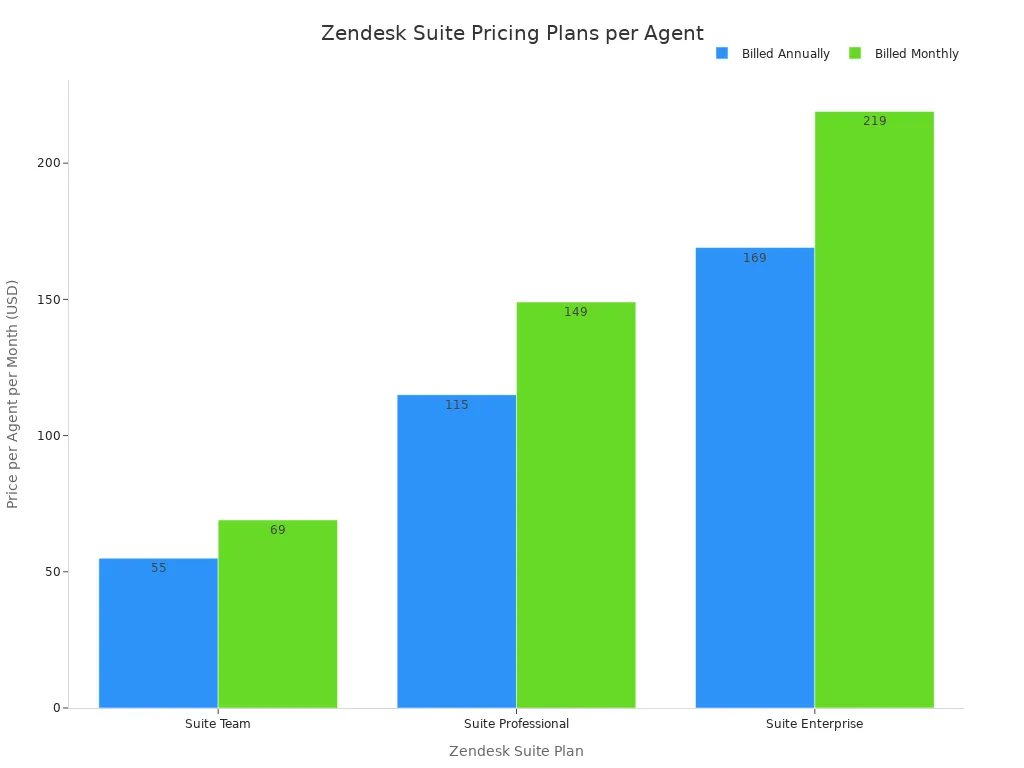
Zendesk offers several pricing tiers for its Suite plans. The cost depends on the features you need for your cloud-based call center. Prices shown are for annual billing.
| Plan | Price (per agent/month) | Key Features |
|---|---|---|
| Suite Team | $55 | Ticketing, messaging, 1 help center, basic bots. |
| Suite Professional | $115 | Team features + skills-based routing, HIPAA compliance. |
| Suite Enterprise | $169 | Professional features + custom roles, sandbox testing. |
Pros & Cons:
Pros:
- Highly Scalable: The platform can grow with your business, from small teams to large enterprises.
- Extensive Integrations: It connects with hundreds of third-party apps like Slack and Salesforce.
Cons:
- Potential Complexity: The vast number of features can be overwhelming for new users.
- Higher Cost: Pricing can become expensive as you add more agents or need advanced features.
3. Talkdesk: Top for Quality Assurance
Talkdesk provides contact center software with a strong focus on quality management. You can use its tools to analyze agent performance and improve customer interactions. This makes it a great option if your main goal is detailed quality monitoring. The platform helps your small teams deliver consistent service.
Best For: Teams focused on agent monitoring and QA.
Key Features:
Talkdesk gives your small teams advanced tools for call quality monitoring. This call center software helps you understand every part of the customer conversation. Effective quality monitoring is built into its core.
- Talkdesk Quality Management (QM): You can create custom evaluation forms to score agent interactions. Managers can review call recordings and transcripts to provide direct feedback.
- Interaction Analytics: This feature monitors conversations across all channels. It helps you spot trends in customer sentiment and intent.
- Real-time Agent Assist: Supervisors can use several tools for live coaching. You can listen to calls silently, "whisper" advice only the agent can hear, or "barge in" to assist on a difficult call.
- QM Assist: This add-on automates parts of your quality monitoring. It provides real-time transcriptions and scores performance automatically.
Pricing:
Talkdesk includes its quality management software features within its broader CX Cloud plans. You cannot purchase them separately. This means you get a full call center software package.
| Plan Name | Pricing (per user/month) | Key Quality Management Features |
|---|---|---|
| CX Cloud Digital Essentials | $85 | Contextualized feedback and evaluation forms |
| CX Cloud Elevate | $115 | Quality management, Talkdesk Screen Recording |
| Talkdesk Workforce Management | Quote-based (add-on) | Agent evaluations and live coaching |
Pros & Cons:
Pros:
- Deep QA Tools: Offers excellent features for detailed call quality monitoring and agent coaching.
- AI-Powered Insights: Uses AI to automate quality monitoring and provide performance data.
Cons:
- High Cost for Small Teams: The features are part of expensive plans, which may not fit the budget for all small teams.
- Focused Niche: While strong in quality assurance monitoring, it may be more than what small teams need if they are looking for a simpler, all-in-one contact center software. This call monitoring software is best for those prioritizing call quality management.
4. JustCall: Best for Call Center Support
JustCall is a cloud-based call center built for sales and support communication. You can use this call center software if your primary need is a robust phone system. It helps your small teams manage calls, texts, and WhatsApp messages from a single dashboard. This focus makes it a strong choice for small teams that rely heavily on voice communication to connect with customers.
Best For: Teams needing dedicated call center software.
Key Features:
This contact center software provides your small teams with a range of tools to improve calling efficiency. You can manage all voice-related tasks without switching applications.
- Omnichannel Inbox: Your small teams can handle calls, SMS, and WhatsApp messages from one place.
- Global Phone Numbers: You can get local and toll-free numbers in over 70 countries, helping you establish a local presence.
- Call Recording and Routing: The system automatically records calls for quality checks. You can also set up an IVR to direct callers to the right agent.
- AI-Powered Intelligence: JustCall uses AI to help your small teams perform better. It offers real-time sentiment analysis and scores agent skills to identify coaching opportunities.
- CRM Integration: It connects smoothly with popular tools like HubSpot, Salesforce, and Zendesk.
Pricing:
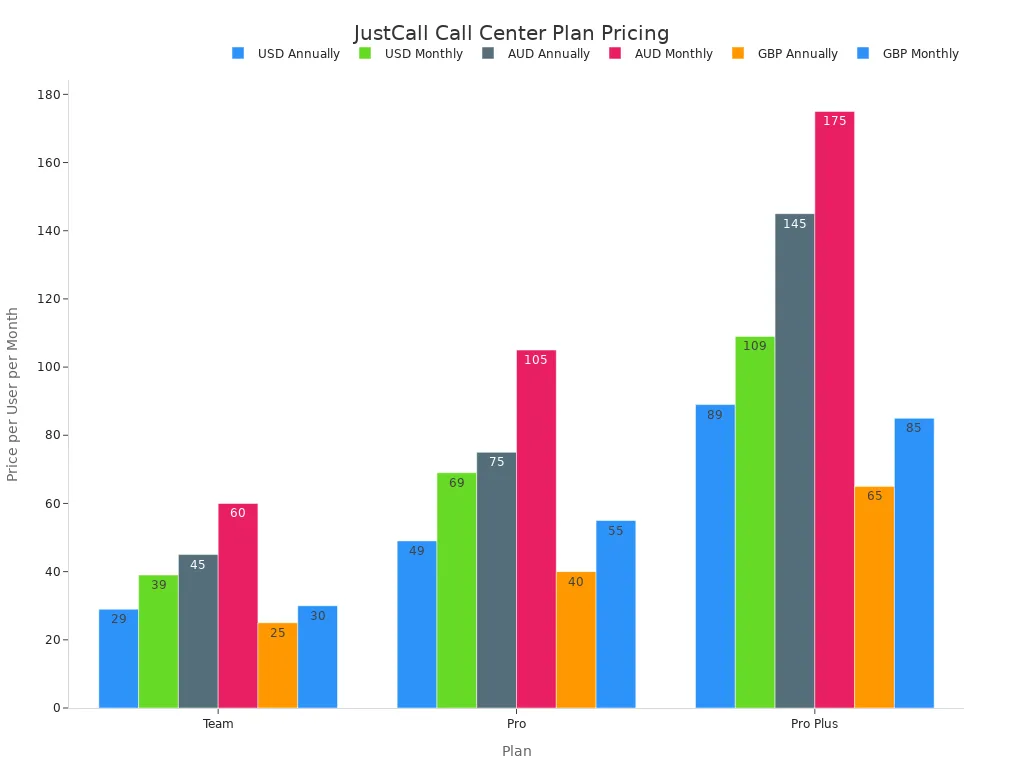
JustCall offers several plans, with discounts for annual billing. The prices below are shown in USD per user.
| Plan | Price (Annually) | Price (Monthly) |
|---|---|---|
| Team | $29 | $39 |
| Pro | $49 | $69 |
| Pro Plus | $89 | $109 |
Note: Your subscription includes a set number of calls and messages. You will face extra charges for usage beyond your bundle, additional phone numbers, and certain add-on features.
Pros & Cons:
Pros:
- Strong Calling Features: This call center software excels at voice communication with reliable quality and extensive global number options.
- Excellent Integrations: It connects seamlessly with a wide variety of CRM and helpdesk platforms.
Cons:
- Complex Pricing: The cost can increase with add-ons and overages, which can be difficult for small teams to budget for.
- Voice-Centric: It is heavily focused on calling, so it may not be the best fit if you need a fully balanced omnichannel solution from the start.
5. Gorgias: Leading E-commerce Customer Service Tool
Gorgias is a customer service helpdesk built specifically for e-commerce stores. If you run your business on a platform like Shopify, BigCommerce, or Magento, this tool is designed for you. It pulls all your customer data directly into the helpdesk, so your agents can see order histories and customer details without switching tabs. This makes it a powerful choice for online retailers who want to provide fast, personalized support and even drive sales through customer conversations.
Best For: E-commerce stores on platforms like Shopify.
Key Features:
Gorgias equips your support agents with tools tailored for online retail. You can manage all customer communications from one dashboard, making your workflow much more efficient.
- Deep E-commerce Integration: It connects directly with Shopify and over 100 e-commerce apps. This allows you to see customer order data right next to their support ticket.
- Unified Support Channels: You can manage conversations from email, live chat, social media, voice, and SMS in one place, providing true multi-channel support.
- Automation with Macros: You can use templates called "Macros" to automatically populate replies with customer information like their name or order number. This saves time while keeping responses personal.
- Revenue Generation Tools: Agents can recommend products in chat and track sales that result from their support interactions.
Pricing:
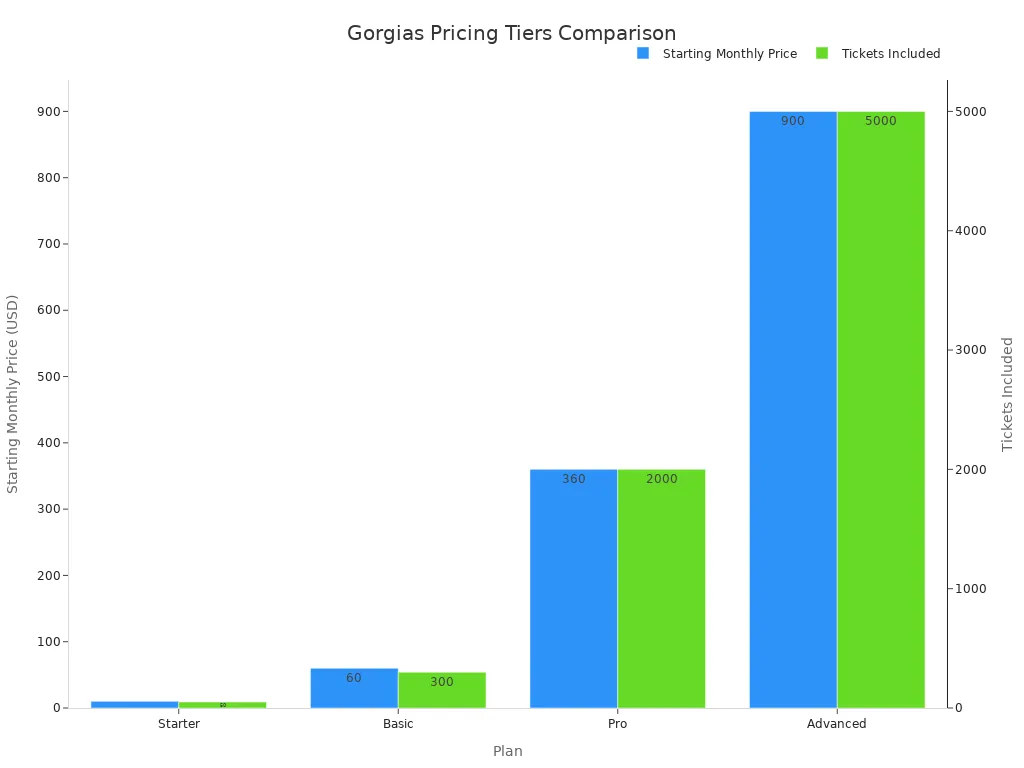
Gorgias's pricing is based on the number of tickets your store handles per month. This model can be great for small teams just starting out.
| Plan | Starting Monthly Price | Tickets Included |
|---|---|---|
| Starter | $10 | 50 |
| Basic | $60 | 300 |
| Pro | $360 | 2000 |
| Advanced | $900 | 5000 |
Pros & Cons:
Pros:
- Built for E-commerce: Its deep integration with Shopify helps your small teams be more efficient and accurate. As one manager noted, "The Gorgias integration makes it so easy to answer customer questions quickly, instead of having to go from one platform to another."
- Drives Revenue: It helps turn your support team into a sales channel by tracking revenue from agent interactions.
Cons:
- Ticket-Based Pricing: Costs can increase quickly if you have a busy month. This can make budgeting difficult for growing small teams.
- Niche Focus: It is heavily focused on e-commerce and may not be the best fit for businesses outside of the retail sector.
6. Tidio: Best for Very Small Businesses
Tidio offers a straightforward solution for customer communication. You can use it if you are just starting and need basic live chat and chatbot tools. It is designed for a small business that wants to engage website visitors without a complex setup. The platform helps your small teams manage conversations easily. This makes it a good entry point for a new small business looking to offer instant support.
Best For: Startups needing simple live chat and chatbot tools.
Key Features:
Tidio provides essential tools to help your small teams connect with customers in real time. You can get started quickly with its user-friendly interface.
- Live Chat: You can add a customizable chat widget to your website. This lets you talk directly with visitors and answer their questions instantly.
- AI Chatbots (Lyro): Tidio's AI chatbot, Lyro, can handle common customer queries. It learns from your FAQ content to provide answers, freeing up your agents.
- Shared Inbox: Your team can manage all conversations from live chat, email, and Messenger in one place.
- Simple Automation: You can build automated chatbot flows to welcome visitors, capture leads, or offer discounts.
Pricing:
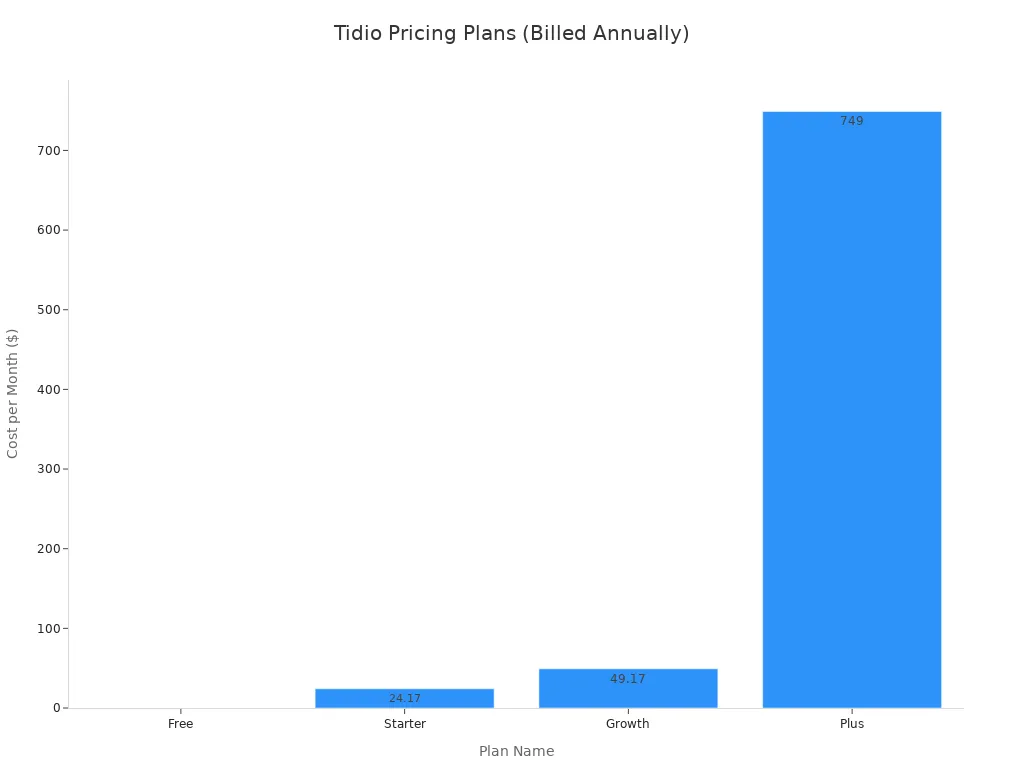
Tidio has a generous free plan, making it accessible for any small business on a tight budget. Paid plans offer more features and higher limits.
| Plan Name | Cost (billed annually) | Lyro AI Conversations | Flows Visitors Monthly | Operator Seats | Live Chat Conversations |
|---|---|---|---|---|---|
| Free | N/A | 50 (one-time) | Up to 100 | Up to 10 | Up to 50 |
| Starter | $24.17/month | 50 (one-time) | Up to 100 | Up to 10 | Up to 100 |
| Growth | $49.17/month | 50 | Up to 100 | Up to 10 | 250 to 2000 |
| Plus | $749/month | Up to 5000 | Custom | Custom | Custom |
| Premium | Upon request | Up to 10,000 | Unlimited | Unlimited | Unlimited |
Pros & Cons:
Pros:
- Excellent Free Plan: The free tier is very capable for a new small business, offering live chat and basic chatbot features.
- Easy to Use: The platform is intuitive, allowing small teams to set it up and start chatting with customers in minutes.
Cons:
- Limited Channels: It focuses mainly on website chat and lacks the deep, native voice and omnichannel features of more advanced platforms.
- Usage-Based Pricing: Tidio uses a 'Flows visitor' model. Your costs can rise as more people interact with your chat, which can be a challenge for a growing small business.
7. Enthu.AI: Top for AI-Powered Conversation Intelligence
Enthu.AI is a specialized call center software that uses artificial intelligence to automate your quality assurance process. You can use this tool if your main goal is to move away from manual call reviews. It helps you analyze 100% of your customer conversations automatically. This provides deep insights without requiring your managers to listen to every single call. The platform focuses heavily on conversation analysis to improve agent performance.
Best For: Call centers wanting to automate quality assurance.
Key Features:
This contact center software offers powerful tools for automated quality monitoring. You can get a complete picture of your team's performance through detailed analysis.
- Automated Conversation Analysis: The AI listens to and transcribes all calls. It then performs analysis to identify key moments, agent mistakes, and customer sentiment.
- Custom Scorecards: You can build your own evaluation criteria. The system automatically scores every agent interaction based on your rules for quality monitoring.
- Moment-Based Coaching: The platform pinpoints specific parts of a call that need attention. This allows for targeted agent coaching and better call quality monitoring.
- Trend Analysis: You get dashboards that show performance trends over time. This analysis helps you understand team-wide strengths and weaknesses in your quality monitoring efforts.
Pricing:
Enthu.AI offers custom pricing based on your team's size and needs. You should contact their sales team for a detailed quote.
💡 Special Offer Tip
You can get two months of your subscription for free. This offer applies when you pay for a full year upfront. To get this deal, you need to book a free demo and mention the Close integration during your call.
Pros & Cons:
Pros:
- Saves Time: It automates the entire call quality monitoring process, freeing up managers for coaching.
- Deep Analysis: The AI provides a level of analysis that is difficult to achieve with manual quality monitoring.
Cons:
- Niche Focus: This call center software is excellent for quality monitoring but is not a complete, all-in-one solution for managing all customer channels.
- Potential for Over-Analysis: The depth of data might be more than what a small team needs, making a simpler call center software a better fit.
Key Benefits of Call Monitoring Software

You can gain significant advantages by using call monitoring software in your call center. This technology provides the tools you need for consistent improvement and growth. It transforms raw data from customer interactions into actionable strategies for your team.
Enhance Agent Performance and Training
You can use call monitoring software to give agents clear, constructive feedback. This direct feedback helps them understand their strengths and areas for improvement. Performance tracking becomes a tool for growth, not just for scoring. A great training method involves creating a library of recorded calls.
Training Tip: Learn from Real Examples
New agents learn effectively by listening to good and bad calls. This practice shows them:
- How to calm upset customers.
- What words to avoid.
- When to pause and when to speak.
This approach provides realistic training and helps improve call center performance. This targeted feedback leads to faster skill development.
Improve Customer Satisfaction and Loyalty
Better call center performance leads directly to happier customers. When you use call center software for quality monitoring, you can focus on key metrics. Improving First Call Resolution (FCR) means customers get answers on their first attempt, which boosts satisfaction. You can also use AI for a deep analysis of customer feedback. This analysis helps you identify recurring pain points from customer interactions. Resolving these issues shows customers you are listening, which builds loyalty and encourages positive feedback.
Ensure Quality and Compliance
Consistent service quality is essential. Call quality monitoring helps you maintain high standards across your team. You can use checklists to guide your quality monitoring process, focusing on areas like communication skills and problem-solving. This ensures every agent provides a great experience. This type of call quality management also helps you follow important rules. For example, call center software can help you ensure your team protects sensitive data according to regulations like HIPAA. This systematic tracking and analysis supports your compliance efforts.
Boost Operational Efficiency
Effective contact center software does more than just monitor calls. It provides data for operational improvement. You can conduct an analysis of your IVR system to see where customers drop off. This information helps you simplify menus and place common queries at the beginning. Optimizing your call routing with this data reduces wait times. This improvement in call center efficiency saves time for both your customers and your agents. The right call quality monitoring gives you the insights needed for smart, data-driven decisions.
How to Choose the Right Customer Service Monitoring Tool

Choosing the right customer service monitoring tool is a critical decision for your small business. You need a solution that fits your budget, is easy for your team to use, and can grow with you. This simple guide helps you focus on what matters most.
Define Your Primary Monitoring Goals
Before you look at any software, you must first define what you want to achieve. Clear goals will guide your entire selection process. For a small business, your quality monitoring goals likely fall into a few key areas:
- Improve Customer Experience: Your goal is to build customer loyalty. You can track metrics like First Call Resolution (FCR) and Customer Satisfaction (CSAT) to see if customers are happy with your service.
- Boost Operational Efficiency: You want to make the most of your resources. Monitoring metrics like call volume and wait times helps you schedule agents effectively and reduce customer frustration.
- Enhance Agent Performance: You need to help your team succeed. Tracking Average Handle Time (AHT) and using quality monitoring scorecards can identify coaching opportunities and improve skills.
- Manage Costs: Every small business needs to watch its budget. Focusing on cost per call helps you understand your return on investment and keep expenses low.
Identify Essential Features
Once you have your goals, you can identify the essential features you need. The right call center software should directly support your objectives. For example, if your main goal is better agent performance, you need a tool with strong features for call quality monitoring. If you want to improve efficiency, look for a platform with automation and smart call routing. Good customer service monitoring is about having the right tools for your specific needs.
Evaluate Integration Capabilities
Your call monitoring software should not operate in a silo. For a small business, it is vital that your new tool connects with the systems you already use, like your CRM or helpdesk. Seamless integration with platforms like Salesforce or Freshdesk creates a single source of truth for all customer data. This prevents your team from switching between different apps to find information, saving time and reducing errors.
Compare Pricing and Total Cost
The monthly price is not the full story. Many call center software providers have additional costs that can impact a small business budget. When you compare options, be sure to ask about the total cost of ownership.
Watch for Hidden Costs
To avoid surprises, ask vendors about these common extra fees:
- Setup or implementation fees for initial configuration.
- Training and onboarding costs for getting your team up to speed.
- Fees for premium support or a dedicated account manager.
A thorough review of all potential costs ensures the call monitoring software you choose is truly affordable.
Best Practices for Implementation
You can get the most from your new call center software by following a clear plan. These practices help you turn data into real improvement for your team and customers. A structured approach ensures your quality monitoring efforts lead to better call center performance.
Establish Clear Key Performance Indicators (KPIs)
You must first define what success looks like. Clear KPIs give your quality monitoring a purpose. Your analysis should focus on metrics that directly impact your goals for improvement.
Key Metrics for Your Analysis
- First-Call Resolution (FCR): This shows how often agents solve issues on the first try.
- Customer Satisfaction (CSAT): This measures customer happiness after an interaction.
- Average Handle Time (AHT): This tracks agent efficiency.
- Quality Assurance (QA) Scores: This evaluates agent adherence to standards.
Train Your Managers and Agents
Your team needs to understand how the call center software works. Train managers on how to use its analysis tools for call quality monitoring. You should also show agents how their performance is measured. This transparency builds trust and helps everyone focus on improvement. Proper training ensures the team uses the software effectively for quality monitoring.
Use Monitoring Data for Coaching
You can use data to provide specific, helpful feedback. Instead of general comments, your analysis from call monitoring software allows you to pinpoint exact moments in a call that need improvement. Regular coaching sessions that use this targeted feedback are essential. This consistent feedback loop helps agents understand where to focus their efforts for improvement. This process turns quality monitoring into a powerful tool for boosting call center performance. This feedback is crucial for skill development.
Use Monitoring Data for Coaching
You can use data to provide specific, helpful feedback. Instead of general comments, your analysis from call monitoring software allows you to pinpoint exact moments in a call that need improvement. Regular coaching sessions that use this targeted feedback are essential. This consistent feedback loop helps agents understand where to focus their efforts for improvement. This process turns quality monitoring into a powerful tool for boosting call center performance. This feedback is crucial for skill development.
Regularly Review Your Strategy
Your business needs will change over time. You should regularly review your call quality monitoring strategy. Look at your KPI analysis to see what is working and what is not. This review process ensures your quality monitoring remains effective and drives continuous improvement. Adjust your approach based on this feedback to keep getting better.
You must choose a tool that fits your specific needs. Your small business may need an all-in-one solution like Sobot or a specialized tool. The right customer service monitoring is a smart investment for your small business. It boosts customer satisfaction and operational efficiency. Your small business can start its customer service monitoring journey today. Explore the call monitoring software options that fit your small business goals.
FAQ
What is the main purpose of call monitoring?
You use call monitoring to improve service quality and agent performance. It helps you understand customer interactions. This process allows you to provide targeted coaching, which leads to better customer satisfaction and a more efficient team.
How do I start with call monitoring?
You can begin by defining your goals. Decide what you want to improve, like agent skills or customer happiness. Then, choose a call center monitoring software that has the features you need to track those specific goals.
Is call monitoring software difficult to use?
Most modern tools are designed for ease of use. Many platforms offer simple interfaces, drag-and-drop builders, and clear dashboards. You can often find a solution that your team can learn quickly without extensive technical knowledge.
Can monitoring software really improve my business?
Yes, it provides valuable data on your operations. You can use these insights to train agents more effectively, resolve customer issues faster, and make smarter business decisions. This leads to increased customer loyalty and operational efficiency.
See Also
Elevate Call Center Performance: The Power of Effective Monitoring Strategies
Discover the Leading 10 Customer Service Software Solutions for 2024
Unveiling the Premier 10 Call Center Analytics Platforms for 2024
Implementing Superior Quality Management Practices in Your Call Center
Your Essential Guide to Call Center Quality Assurance Software Solutions

