Customer Relationship Management Chart Definition and Key Uses


A customer relationship management chart is a visual tool that helps you manage all interactions with current and potential customers. You use a customer relationship management chart to track communication and improve relationships, which helps your business grow. Studies show that when you use a customer relationship management chart, you can boost customer loyalty and employee satisfaction. Sobot stands out as a leader in this area, serving over 10,000 brands and earning high customer satisfaction. With a customer relationship management chart, you make customer contact simple and effective.
Customer Relationship Management Chart Overview
CRM Chart Definition
You use a customer relationship management chart to organize and visualize every interaction with your customers. This chart acts as a central hub for tracking communication, sales opportunities, and support requests. You can see the entire journey of each customer, from first contact to ongoing engagement. When you use a customer relationship management chart, you make it easier to understand who your customers are and how you interact with them.
A customer relationship management chart includes several main elements. You find contact management, deal pipeline, activity tracking, and analytics & reporting. These components help you store detailed profiles, visualize sales stages, log communication, and generate real-time insights. You can see these elements in the table below:
| Component | Description |
|---|---|
| Contact Management | Store detailed profiles of every lead, prospect, and customer with their complete interaction history |
| Deal Pipeline | Visualize and track sales opportunities through customizable stages from initial contact to closed deal |
| Activity Tracking | Automatically log emails, calls, meetings, and notes to maintain comprehensive communication records |
| Analytics & Reporting | Generate real-time insights on sales performance, team productivity, and revenue forecasts |
You use customer relationship management software to build and maintain these charts. Sobot provides a full suite of tools, including chatbot, AI Agent, live chat, call center/voice, voicebot, ticketing system, and customer contact center. These tools help you manage customer data, automate tasks, and improve communication. Sobot’s platform supports over 10,000 brands and handles millions of interactions daily. You benefit from high system stability and global reach.
Purpose and Value
You use a customer relationship management chart for several core purposes. CRM experts identify these main goals:
- Generate more revenue from existing clients
- Win new clients
- Protect existing clients
- Smoothly onboard new team members
When you focus on these purposes, you improve your business outcomes. You can see measurable value from using a customer relationship management chart. The chart helps you make decisions quickly, increase efficiency, boost customer satisfaction, control costs, support collaboration, and provide transparency. The table below shows these values:
| Measurable Value | Description |
|---|---|
| Decision-Making | CRM dashboards enable quick actions based on real-time data, improving lead conversion and sales. |
| Efficiency | They help maintain focus on target areas, increasing overall operational efficiency. |
| Customer Satisfaction | By monitoring KPIs related to customer interactions, organizations can enhance customer satisfaction. |
| Cost Control | Dashboards reduce manual reporting, allowing companies to identify and minimize wasteful spending. |
| Collaboration | They support teamwork by allowing sales teams to concentrate on closing deals rather than follow-ups. |
| Transparency | Instant visibility into business activities helps identify areas for improvement. |
You see these benefits in real-world examples. Samsung, a global leader in technology, used Sobot’s customer relationship management chart to unify communication channels and improve agent efficiency by 30%. Samsung achieved a 97% customer satisfaction rate after integrating Sobot’s contact center solution. You can read more about Samsung’s story here.
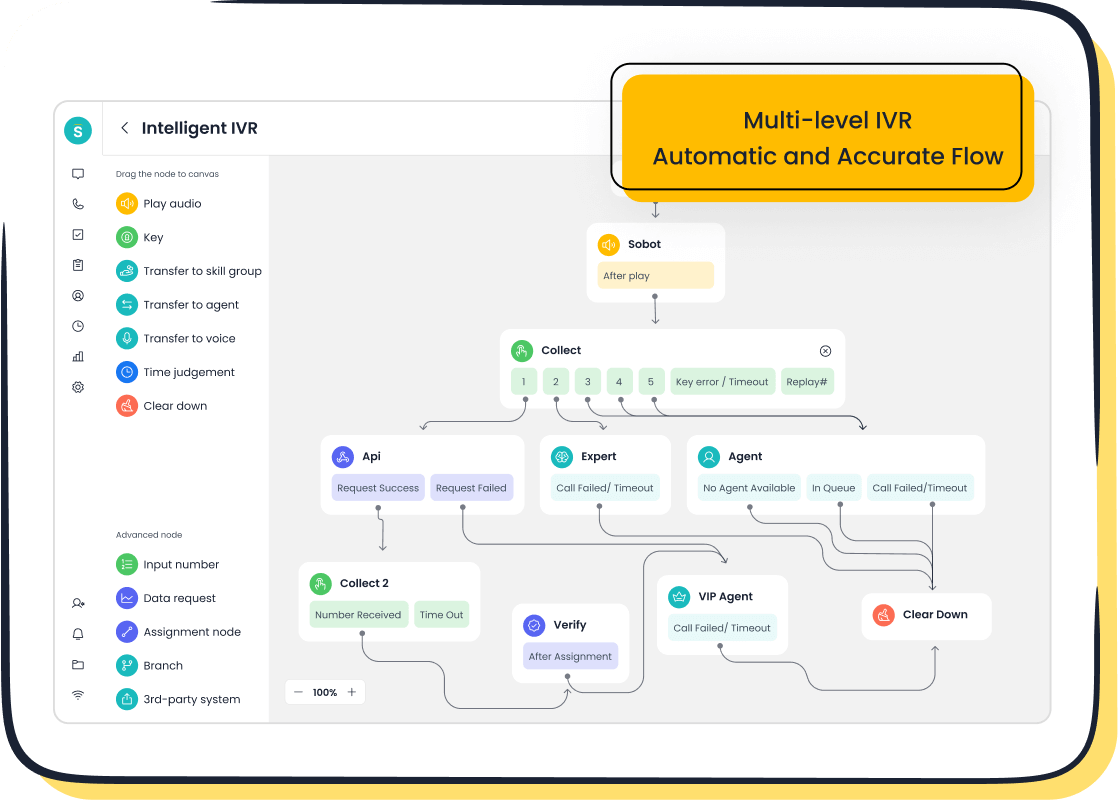
Sobot’s customer relationship management software gives you access to advanced features. You use intelligent IVR, unified workspace, real-time monitoring, bulk outbound tasks, call tracking, and AI-powered voicebot. These features help you automate workflows, manage customer contact, and analyze performance. You can integrate Sobot’s CRM software with your existing systems, making adoption simple and seamless.
Customer Relationship Mapping
You use customer relationship mapping to visualize and analyze every connection with your customers. Mapping helps you understand customer behavior, spot trends, and identify opportunities for growth. You create a clear picture of how each customer interacts with your business. You can use mapping to improve sales, support, and marketing strategies.
Customer relationship mapping transforms complex data into user-friendly visuals. You see customer dynamics, track interactions, and find areas for improvement. The table below shows how mapping works in a customer relationship management chart:
| Aspect | Description |
|---|---|
| Visual Storytelling | CRM charts transform data into user-friendly visuals, making complex information easier to grasp. |
| Customer Dynamics | They help in understanding customer behavior and interactions through visual analysis. |
| Opportunity Identification | Visuals assist in spotting trends and opportunities for engagement and sales growth. |
| Decision-Making Improvement | By providing clear insights, CRM charts enhance the decision-making process for businesses. |
You use mapping to connect every touchpoint, from initial contact to ongoing support. Sobot’s customer relationship management chart lets you map interactions across channels like chat, email, voice, and social media. You track calls, messages, tickets, and chatbot conversations in one unified workspace. Sobot’s AI Agent and voicebot help you automate responses and provide 24/7 support. You use mapping to improve customer experience and increase loyalty.
You can onboard new team members smoothly with customer relationship mapping. The chart gives you instant access to customer histories, communication records, and sales pipelines. You use mapping to train agents, assign tasks, and monitor performance. Sobot’s ticketing system automates workflows and manages SLAs, making mapping efficient and reliable.
You use mapping to protect existing clients and win new ones. You analyze customer feedback, monitor KPIs, and identify areas for improvement. Sobot’s analytics and reporting tools give you real-time insights into customer satisfaction, agent productivity, and revenue forecasts. You use mapping to make informed decisions and drive business growth.
You use customer relationship mapping to collaborate across teams. Sales, support, and marketing work together using the same chart. You share information, track progress, and close deals faster. Sobot’s customer contact center supports global telephony contacts, unified inbox, and encrypted data transfer. You use mapping to ensure transparency and maintain high service quality.
You use mapping to visualize the entire customer journey. You see every interaction, from first inquiry to repeat purchase. Sobot’s customer relationship management chart helps you build strong relationships and deliver personalized service. You use mapping to optimize processes and achieve measurable results.
You use mapping to integrate AI and automation into your customer relationship management chart. Sobot’s AI Solution provides omnichannel support, scenario-based AI, and real-time insights. You use mapping to handle inquiries, automate marketing, and improve operational efficiency. You can read more about Sobot’s AI Solution here.
You use mapping to enhance customer relationship management and drive business success. Sobot’s platform gives you the tools to visualize, analyze, and optimize every customer interaction. You use mapping to achieve higher satisfaction, increased revenue, and improved efficiency.
CRM Chart Structure and Key Elements
Components of Customer Relationship Maps
You need to understand the main parts of a customer relationship map to get the most from your crm system. The map helps you see who matters in your business and how you connect with them. You start by listing all the important people, like the CEO, CFO, and COO. This step is called stakeholder identification. Next, you look at how these people relate to each other. You can group relationships as friendly, influential, or challenging. This is relationship definition. Then, you decide how to work with each person. You might use strategies like bootstrapping, backward mapping, or pyramiding. These steps help you use your crm system to build strong connections.
| Component | Description |
|---|---|
| Stakeholder Identification | List all key people, such as CEO, CFO, and COO. |
| Relationship Definition | Group relationships as friendly, influential, or challenging. |
| Strategy Development | Choose how to engage with each person using different strategies. |
Visual Layout and Organization
A clear layout makes your crm system easy to use. You see all the important parts, like customers, interactions, sales opportunities, products, and support tickets. This setup helps you manage information and spot patterns. You can work with your team to improve the crm system. You also get to change the system to fit your needs.
| Component | Description |
|---|---|
| Entities | Shows customers, interactions, sales, products, and support tickets. |
| Purpose | Helps you manage customer information and actions. |
| Clarity | Makes complex data simple to understand. |
| Collaboration | Lets your team work together to improve the crm system. |
| Customization | Allows you to adjust the crm system for your business. |
- You get interactive access to tracking data.
- You see key goals and performance numbers at a glance.
- The crm system brings together data from sales, marketing, and service.
- You focus on clear visuals for better use.
Standards and Best Practices
You should follow some rules to make your crm system work well. These best practices help you create charts that are easy to read and use.
- Pick the right chart type for your data.
- Keep your design simple and neat.
- Use clear fonts and sizes for easy reading.
- Label everything and give your chart a good title.
- Highlight important data points.
- Make sure everyone can use the chart, including people with special needs.
- Add a short story or note to explain the chart.
Tip: When you follow these steps, your crm system becomes a powerful tool for your team.
You use these ideas to make your crm system clear, helpful, and easy for everyone.
Practical Uses and Benefits for Businesses
Enhancing Customer Experience with Sobot
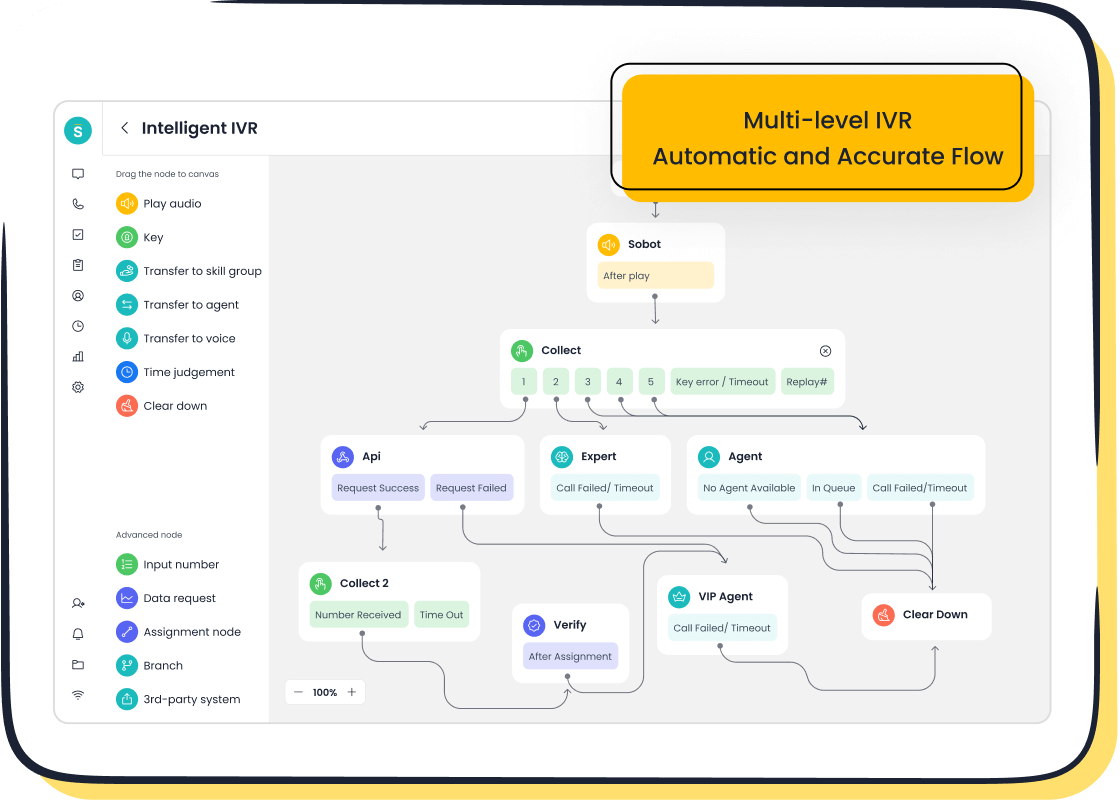
You want your clients to feel valued every time they reach out. A customer relationship map helps you see every touchpoint, so you never miss a chance to connect. When you use Sobot’s Voice/Call Center, you get tools that make every conversation smoother. You can set up intelligent IVR menus, route calls to the right agent, and track every interaction. This means your clients do not have to repeat themselves. You see their history and respond faster.
Samsung used Sobot’s customer relationship management chart to bring all their channels together. Their agents could see every message, call, and ticket in one place. This made it easy to give personal service. After using Sobot, Samsung saw a 30% jump in agent efficiency and reached a 97% customer satisfaction rate. You can read about their success here.
You can also use Sobot’s AI-powered voicebot to answer common questions. This gives your clients quick help, even outside business hours. You save time and keep your clients happy. Many companies using Sobot’s AI tools have seen big improvements in customer satisfaction scores. They also report better efficiency and lower costs.
When you use a customer relationship management chart, you make every client feel important. You answer faster, solve problems quickly, and build trust.
Improving Sales and Support Processes
You want your sales and support teams to work smarter, not harder. A customer relationship map gives you a clear view of every deal and support case. You can track leads, follow up on tasks, and see where each client stands. Sobot’s crm software lets you automate routine jobs, like sending reminders or logging calls. This means your team spends less time on paperwork and more time helping clients.
With Sobot’s unified workspace, you see all client data in one place. You can check call logs, chat history, and support tickets without switching screens. This helps you close deals faster and solve problems on the first call. You also get real-time reports, so you know which sales strategies work best.
Here is how crm software improves your sales process:
- You centralize client data, which helps you make better decisions.
- You streamline interactions, so clients get answers faster.
- You automate tasks, which reduces manual work for your team.
- You track leads and deals in real time, so you never miss an opportunity.
- You close deals faster and shorten your sales cycle.
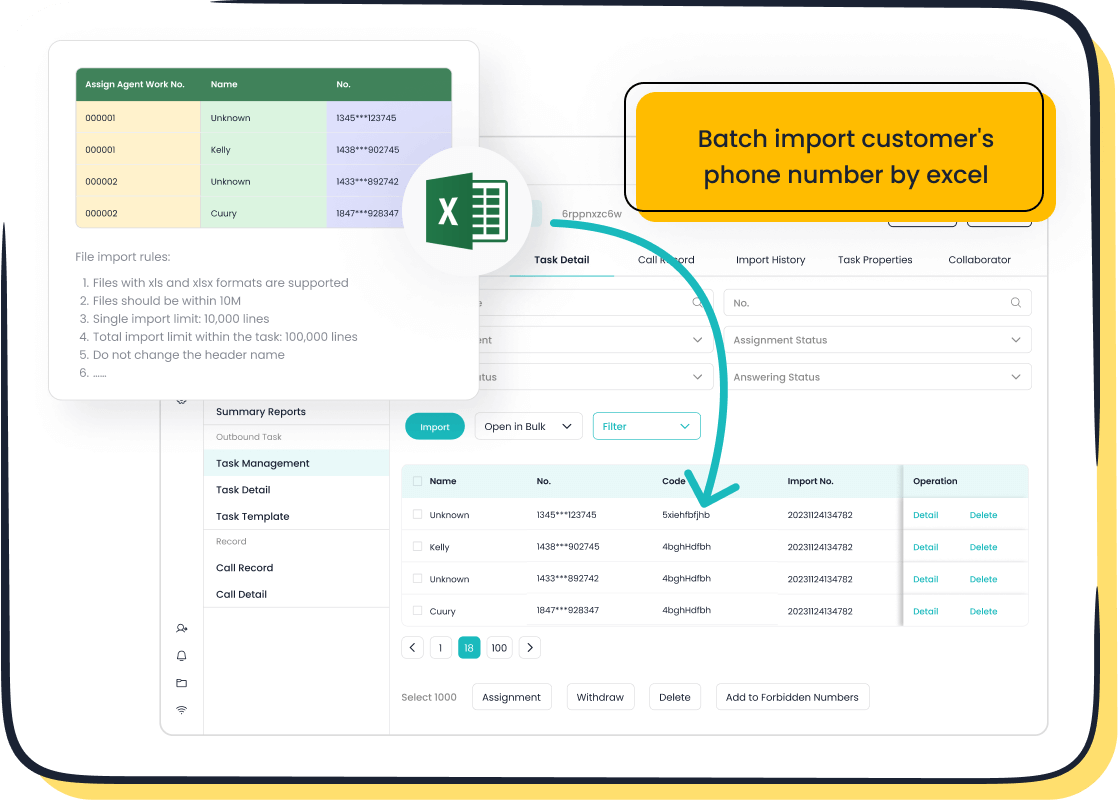
Sobot’s Voice/Call Center gives you tools like call tracking, bulk outbound tasks, and smart call routing. You can reach clients anywhere in the world and keep records of every call. This helps you follow up and build strong relationships. You also get AI-powered insights to spot trends and improve your approach.
Data shows that companies using crm software see higher productivity and better results. You can read more about the impact of data visualization on business here.
Customer Relationship Map Applications
You use a customer relationship map in many ways across your business. Account managers use it to keep track of key clients and their needs. Customer success managers use it to spot problems before they grow. Marketers use it to plan campaigns that match client interests. Support teams use it to give fast, personal help.
A customer relationship map helps you build strategies that match your business goals. You can protect your clients by finding pain points early and fixing them. You also use the map to train new team members. They can see client histories and learn how to give great service.
Here are common ways you use a customer relationship map:
- Account managers track client needs and build strong ties.
- Customer success teams find and fix issues before clients leave.
- Marketers plan campaigns that fit client interests.
- Support teams give fast, personal help using client history.
- You develop strategies that help you reach your business goals.
- You protect clients by spotting and solving problems early.
- You train new team members with real client examples.
A customer relationship management chart also boosts your operational efficiency. You see all your data in clear visuals, which helps you act faster. The human brain can process an image in just 13 milliseconds, so you understand your data quickly. Meetings become shorter when you use data visualization, saving you time. Companies that use data analytics are twice as likely to be top performers. Many people spend almost half their day looking for information, but a good crm software helps you find what you need fast.
| Benefit Type | Fact or Statistic | Source |
|---|---|---|
| Speed of Communication | The human brain can process an image in just 13 milliseconds. | MIT |
| Productivity & Efficiency | Data visualization can shorten meetings by 24%. | Wharton School of Business |
| Financial Impact | Companies using data analytics are twice as likely to be top performers. | Bain |
| Resource Optimization | People spend 44% of their workday on unsuccessful data activities. | IDC report |
You use crm software to make your business run better. You help your teams work together, share information, and reach more clients. You also use the customer relationship management chart to measure success and find new ways to grow.
Tip: When you use effective customer relationship management, you keep your clients happy and your business strong.
Who Should Use CRM Charts and Typical Scenarios
Industry Applications
You can use customer relationship maps in many industries. Healthcare organizations, like UChicago Medicine, have used CRM charts to improve patient interactions. They created 100 unique marketing segments in four months and reached a 60% campaign conversion rate. This shows how CRM charts help you tailor communication and boost results. Retail, finance, gaming, and education also benefit from CRM charts. You can track customer journeys, manage support requests, and personalize marketing. Each industry finds unique ways to use CRM charts for better outcomes.
Business Roles and Teams
You see sales teams rely on CRM charts every day. These charts help you visualize customer interactions and track sales performance. You can spot trends, identify issues, and make quick decisions. Support teams use CRM charts to manage tickets and solve problems faster. Marketing teams use them to plan campaigns and measure success. Managers use CRM charts to monitor team productivity and set goals. When you use customer relationship maps, you help every team stay focused and accountable.
Tip: CRM charts simplify complex data, so your team understands key metrics and tracks progress easily.
| Component | Description |
|---|---|
| Interaction Management | You manage communication between departments and handle customer interactions effectively. |
| Channel Management | You share customer data across channels, which improves collaboration. |
| Data Sharing | You access the same customer information, which promotes a unified approach. |
- You get an overview of business ties.
- You find cross-sell and upsell opportunities.
- You maximize customer retention.
- You nurture relationships through proactive actions.
Customer Relationship Management in Action
You see CRM charts at work in real-world scenarios. Here are some examples:
- You track customer behavior to improve products.
- You collect feedback automatically to enhance offerings.
- You use customer data to identify trends and boost performance.
- You personalize customer experiences to meet individual needs.
- You automate support to provide fast, 24/7 assistance.
Customer relationship maps help you achieve measurable outcomes. You build stronger relationships, increase satisfaction, and drive growth.
Implementing CRM Charts with Sobot Solutions
Steps for Adoption
You can implement a customer relationship management chart in your business by following clear steps. Start by defining your CRM strategy. Set project goals and outline what you want to achieve. Select the right CRM software that fits your needs. Sobot offers solutions like chatbot, AI Agent, live chat, call center/voice, voicebot, ticketing system, and customer contact center. Plan your data migration carefully. Move important customer information and check for accuracy. Customize the system to match your workflows. Integrate with existing tools and platforms. Train your team so everyone knows how to use the new system. Provide post-launch support to solve any issues.
Adoption Steps:
- Define your CRM strategy and project goals.
- Select the best CRM software for your business.
- Plan and execute data migration.
- Customize the system for your needs.
- Integrate with current tools.
- Train users and manage change.
- Support users after launch.
Tip: Clear planning and training help your team use the customer relationship management chart effectively.
Integration with Voice/Call Center
You can connect your customer relationship management chart with Sobot’s Voice/Call Center for seamless communication. Set clear goals for integration. Map out the process and anticipate challenges. Choose compatible systems. Sobot’s platform integrates easily with CRM charts and supports global telephony. Adjust workflows and reports to fit your business. Transfer data accurately. Test the system to ensure smooth operation. Gather feedback from users to improve performance.
Integration Checklist:
- Set clear goals for integration.
- Choose compatible CRM and contact center solutions.
- Customize workflows and reports.
- Migrate data with accuracy.
- Test system functions and performance.
- Collect user feedback for improvements.
Note: Sobot’s Voice/Call Center offers smart call routing, unified workspace, and AI-powered voicebot for efficient customer contact.
Tips for Success
You can avoid common pitfalls by following best practices. Communicate benefits to your team and involve them in decisions. Clean your data before migration. Focus on user-friendly interfaces. Provide ongoing training. Set SMART goals and track progress. Avoid over-customization. Address integration needs early. Use encryption and access controls for security.
Success Tips Table:
| Tip | Action |
|---|---|
| Communicate Benefits | Share advantages with your team |
| Clean Data | Remove errors before migration |
| User-Friendly Design | Make the system easy to use |
| Ongoing Training | Teach users regularly |
| Set SMART Goals | Track progress with clear metrics |
| Avoid Over-Customization | Keep the system simple |
| Early Integration Planning | Prepare for system connections |
| Security Measures | Use encryption and access controls |
When you follow these steps, your customer relationship management chart will help you build strong customer relationships and improve business results.
You use a customer relationship management chart to turn complex data into clear insights. This tool helps you visualize sales pipelines, customer behaviors, and trends. Sobot’s CRM solution unifies communication and boosts efficiency with intelligent routing and automation. You can transform raw data into visual insights, customize charts for your business, and analyze interactions to improve service. Start by mapping your customer journey, tailoring charts to your needs, and using Sobot’s platform to optimize your processes and build stronger relationships.
FAQ
What is a customer relationship management chart?
A customer relationship management chart is a visual tool that helps you track and manage every customer interaction. You use it to organize data, spot trends, and improve communication. This chart makes it easy to see your sales pipeline and support activities.
How does a customer relationship management chart improve team efficiency?
You boost team efficiency with a customer relationship management chart. It centralizes all customer data, so your team finds information quickly. You reduce time spent searching for details and focus more on helping customers.
Can you integrate a customer relationship management chart with other business tools?
Yes, you can integrate a customer relationship management chart with tools like email, call centers, and ticketing systems. Integration helps you keep all customer information in one place and streamlines your workflow.
Who should use a customer relationship management chart?
Sales, support, and marketing teams should use a customer relationship management chart. You benefit if you want to improve customer service, track leads, or measure team performance. Many industries, like retail and finance, use these charts daily.
What features should you look for in a customer relationship management chart?
You should look for features like contact management, activity tracking, analytics, and integration options. A good customer relationship management chart gives you real-time insights and helps you automate routine tasks.
See Also
Essential Attributes of Call Center CRM Solutions
Effective Strategies for Managing Live Chat Representatives
Best No-Cost Call Center CRM Tools for 2024

