Top Tools for Mapping Customer Journey and Improving Service

You want to deliver great service, but customer expectations change fast. In fact, 70% of executives say they struggle to keep up. Many brands lose customers because the experience falls short. Tools like Sobot, Miro, Lucidchart, FigJam, ClickUp, and UXpressia help you map the customer journey and unify contact across channels. With the right tool, you can spot gaps and improve every interaction. Choosing wisely makes a big difference in the customer journey vs customer experience debate.
Customer Journey Mapping Explained
What Is Customer Journey Mapping?
You want to know what your customers experience at every step. Customer journey mapping helps you do that. It’s a way to create a visual story of how people interact with your brand. You use a customer journey map to see each touchpoint, from first hearing about your business to becoming a loyal fan. This journey visualization lets you step into your customer’s shoes and spot what works and what doesn’t.
Many top companies use journey mapping to improve service. In fact, 46% of SQM clients have used journey maps to boost customer experience through contact channel touchpoints. You start with clear goals, use real customer data, and build out detailed personas. You include emotions, pain points, and actions. You keep the customer journey map visual and easy to understand.
Customer journey management means you keep researching, measuring, designing, and improving the end-to-end client experience.
Why Journey Mapping Matters for Service
Journey mapping matters because it helps you see the big picture. You don’t just guess what customers want—you use data and feedback. When you build journey maps, you find gaps in service and fix them. This leads to happier customers and better results.
Here’s what happens when you use journey mapping:
- You spot where customers get stuck.
- You improve service delivery.
- You use journey visualization to make changes that matter.
- You keep your journey maps up to date, so they stay useful.
Companies that use customer journey mapping tools see less customer churn and more referrals. They also make more money from happy customers.
Key Elements of a Journey Map
A strong customer journey map has a few key parts. You want to include:
- Personas (who your customers are)
- Scenarios and goals (what they want to do)
- Actions and emotions (what they do and feel)
- Touchpoints (where they interact with you)
- Pain points and opportunities for improvement
Here’s a quick look at the main steps for building journey maps:
| Step Number | Step Description |
|---|---|
| 1 | Defining the scope |
| 2 | Constructing user personas |
| 3 | Identifying touchpoints |
| 4 | Mapping the journey stages |
| 5 | Validating and refining the map |
When you use customer journey mapping tools, you make these steps easier and more accurate. You get a clear view of the customer journey and can improve every part of the experience.
Customer Journey vs Customer Experience
Definitions and Differences
You might wonder about the difference between customer journey vs customer experience. These terms sound similar, but they mean different things. The customer journey is the full set of steps a person takes when they interact with your brand. It starts when someone first hears about you and continues through every touchpoint, like buying, asking for help, or sharing feedback.
Customer journey management means you keep working to make these steps better. You look for ways to improve each interaction, not just once, but all the time. On the other hand, customer experience is how your customer feels about all those steps. It’s the overall impression they get from every moment with your business.
Here’s a quick table to help you see the main differences:
| Aspect | Customer Journey Mapping | Customer Journey Management |
|---|---|---|
| Nature | One-time project | Ongoing practice |
| Output | Visual diagram or workshop | Operational framework with KPIs |
| Data | Assumptions, qualitative | Real-time feedback, analytics |
| Ownership | CX team or marketing | Cross-functional teams |
| Outcome | Insight into gaps | Action that closes gaps |
So, when you think about customer journey vs customer experience, remember: the journey is the path, and the experience is how the path feels.
How Both Impact Service Quality
You want to give great service. Understanding customer journey vs customer experience helps you do that. If you focus only on the journey, you might miss how people feel. If you focus only on experience, you might not see where things go wrong.
Here are some facts to show why both matter:
- Over half of customers (52%) stop buying from a brand after a bad experience. Service quality drops when you ignore the customer experience.
- It costs five times more to get a new customer than to keep one. Managing the customer journey helps you keep people happy and loyal.
- Companies that manage journeys well get 2.5 times more revenue from referrals. That means better service leads to more fans.
When you balance customer journey vs customer experience, you spot problems and fix them. You make every step smoother and every moment better. That’s how you build loyalty and stand out.
Top Customer Journey Mapping Tools
You want to make your customer journey map clear and actionable. The right customer journey mapping tools help you visualize every step, spot pain points, and improve service. Let’s look at the best journey mapping tools you can use to build strong journey maps and boost customer experience.
Sobot Omnichannel Solution
Sobot stands out as a leader in customer journey mapping tools. You get a true omnichannel platform that brings together every conversation from chat, email, social media, voice, and WhatsApp into one workspace. This means you see the full customer journey and never miss a touchpoint.
Here’s what you get with Sobot:
- Consolidate all customer interactions in a single interface. You see the complete journey map for each customer.
- Use AI-powered chatbots and autonomous agents to handle routine questions. Your team can focus on complex issues.

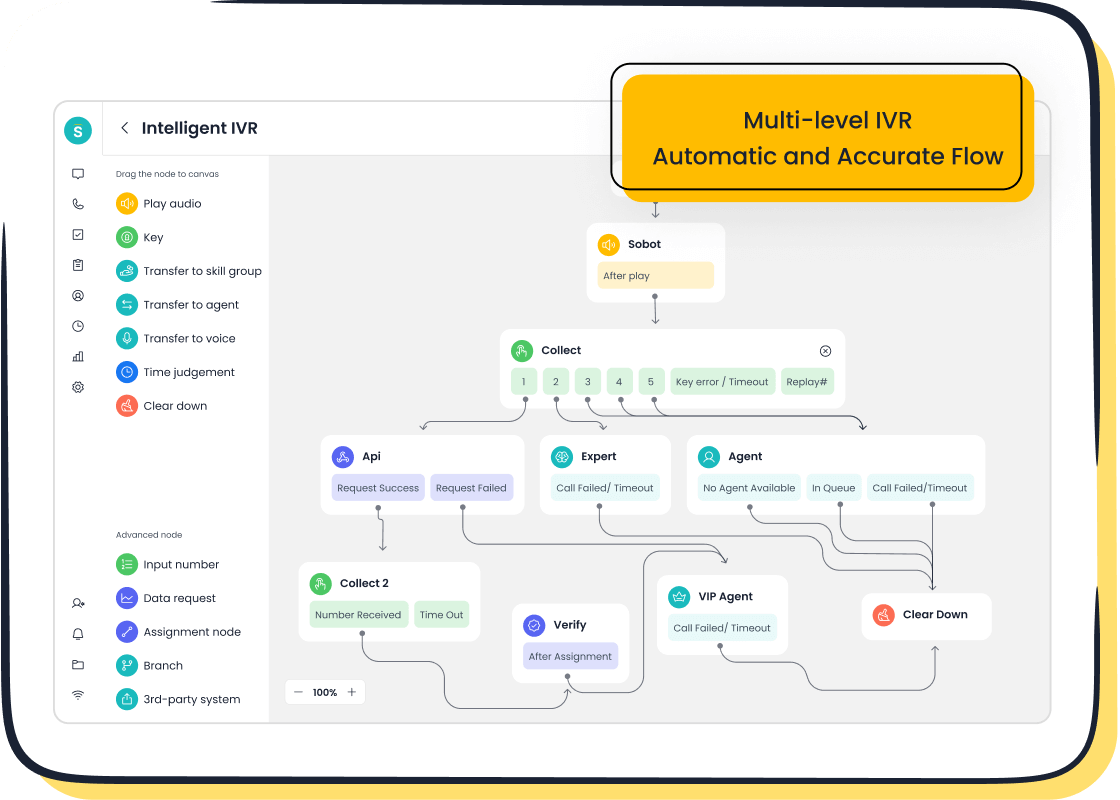
- Manage calls with intelligent IVR, global number availability, and real-time monitoring. The Voice/Call Center lets you track and analyze calls for better service.
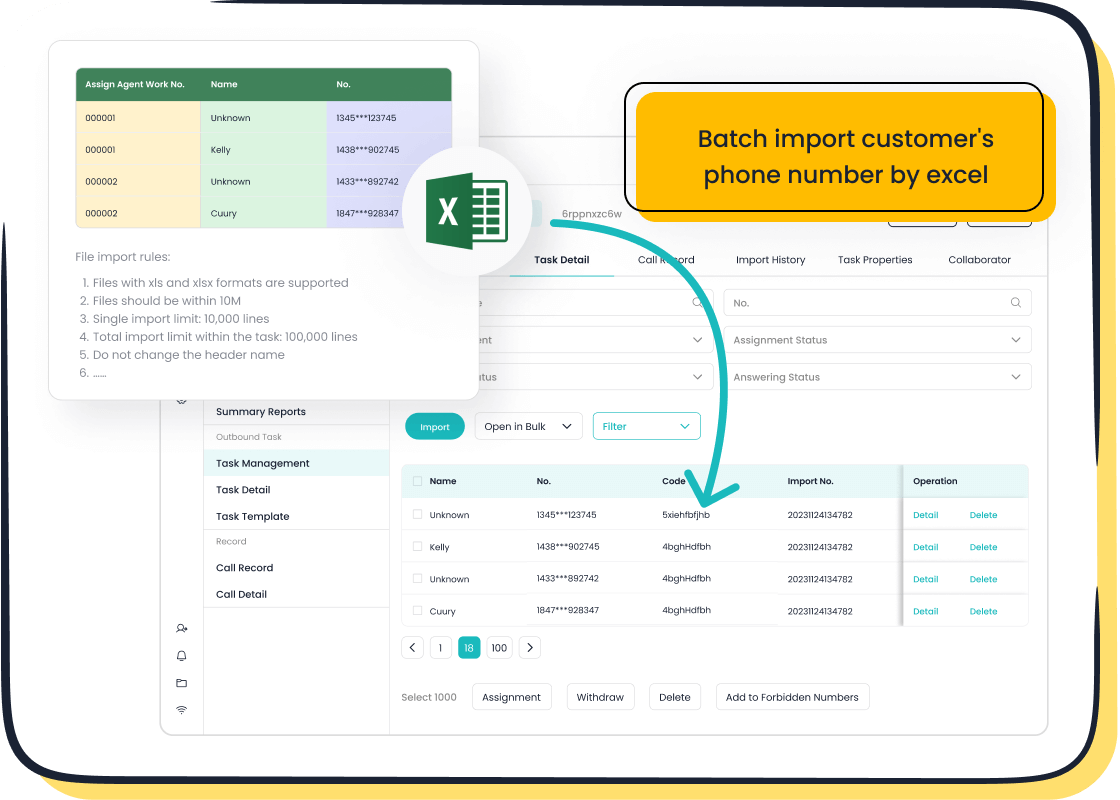
- Automate ticketing and workflows. You turn emails and messages into tickets, so nothing slips through the cracks.
- Access a unified workspace. Your agents see customer history, tickets, and live chats in one place.
- Integrate with CRM, Shopify, Salesforce, and more. You connect your tools and keep data flowing.
- Get analytics and performance insights. You measure customer satisfaction and optimize your team.
Sobot’s Five-AI System combines chatbots, AI agents, and analytics to make every customer journey map smarter and more efficient.
You can see real-world results with Sobot. Opay, a financial service platform, used Sobot to unify customer contact across channels. They raised customer satisfaction from 60% to 90%, cut costs by 20%, and boosted conversion rates by 17%. Sobot helped Opay manage high volumes of inquiries, automate self-service, and send targeted WhatsApp messages with an 85% read rate.
Here’s a quick look at how Sobot helped other industries:
| Industry | Business Example | Result Description |
|---|---|---|
| Courier Services | J&T Express | Increased sign-off rate by 35% and COD collection rate by 40%. Automated notifications reduced inquiries. |
| Technology Companies | Samsung | Achieved a 30% boost in agent efficiency by using Sobot AI for technical support across multiple languages. |
| Gaming Companies | Lilith Games | Managed large player bases with real-time chat support during gameplay issues and community engagement. |
| Retail and E-commerce | Online Boutiques | Reported a 15% reduction in abandoned carts due to AI reassurance on sizing and shipping. |
| Financial Services | Banks and Investment Firms | Enabled secure communication and instant answers to common queries, improving customer service efficiency. |
You can explore Sobot’s full suite of customer contact center solutions, including chatbot, live chat, call center, voicebot, ticketing system, and WhatsApp API, at Sobot’s official website.
Smaply
Smaply makes customer journey mapping easy for teams. You can visualize interactions, build detailed personas, and create stakeholder maps. Smaply offers role-based access control, flexible export options, and version control for tracking changes.
| Strengths | Pricing Details |
|---|---|
| Simplifies visualization of customer interactions | Starts at $25 per user per month (billed annually) |
| Offers detailed personas and stakeholder maps | Enterprise plans include extras like SSO integration and dedicated support |
| Role-based access control for secure collaboration | |
| Flexible export options (PDF, PNG, PowerPoint) | |
| Version control system for tracking changes | |
| Interactive presentation mode for sharing insights |
You can use Smaply to share journey maps with stakeholders and keep everyone on the same page. It’s great for teams that want secure collaboration and easy presentation.
UXPressia
UXPressia gives you a platform to link personas, track version history, and keep journey maps consistent across teams. You can connect journey maps with impact maps and touchpoint analysis in one workspace.
| Feature/Use Case | Description |
|---|---|
| Linking Personas | Visualizes how different customer segments experience the brand without recreating maps. |
| Version History | Keeps track of previous iterations, ensuring no loss of data during testing. |
| Consistency | Shared templates maintain a uniform structure and visual language across teams. |
| Comprehensive Platform | Combines journey mapping with impact assessment, presentation tools, and collaboration features. |
| Team Management | Designed for teams managing multiple customer journeys across various products and services. |
| Holistic Approach | Connects journey maps with personas, impact maps, and touchpoint analysis in one workspace. |
| Real-time Collaboration | Supports asynchronous collaboration for distributed teams, allowing comments and task assignments. |
| Template Library | Ensures consistency across organizations with shared templates for journey maps. |
You can use UXPressia if you’re a marketing team, product manager, UX designer, or CX professional. It’s ideal for tracking customer journey mapping strategies and making user-centric designs.
Miro
Miro is a collaborative whiteboard platform that helps you build journey maps with your team. You get an infinite digital canvas, template libraries, and video conferencing for real-time collaboration.
- Miro integrates with feedback platforms, project management software, analytics tools, and CRMs.
- You can customize journey maps with templates and work together live.
- Miro supports strategic activities and lets you visualize the customer journey from start to finish.
You can use Miro for brainstorming, mapping customer journeys, and running workshops. It’s flexible and works well for remote teams.
Lucidchart
Lucidchart lets you create interactive journey maps with clickable hotspots and master shapes. You get real-time collaboration, intelligent diagramming, and deep integration with Google Workspace, Microsoft Office, Atlassian, Slack, and more.
| Pricing Plan | Price |
|---|---|
| Free plan | N/A |
| Individual plan | $7.95 per month |
| Team plan | $9 per user/month |
| Main Features |
|---|
| Real-time collaboration with commenting, chat, and simultaneous editing. |
| Intelligent diagramming features for shape alignment and layout suggestions. |
| Creation of interactive journey maps with clickable hotspots. |
| Master shapes and templates for consistency across journey maps. |
| Deep integration with Google Workspace, Microsoft Office, Atlassian, Slack, and more. |
Lucidchart is perfect for teams that want to build journey maps and diagrams together. You can use it for customer journey mapping, process mapping, and workflow design.
Microsoft Visio
Microsoft Visio is a classic diagramming tool. You can create customer journey maps, flowcharts, and process diagrams. Visio integrates with Microsoft 365, making it easy to share journey maps with your team.
You get a library of shapes and templates. Visio works well for businesses that already use Microsoft tools. You can use it for journey mapping, organizational charts, and technical diagrams.
Mural
Mural gives you collaborative features for customer journey mapping. You can create and share items, keep stakeholders informed, and use built-in templates and frameworks for quick insights. Mural supports visual communication with sticky notes, flowcharts, and drawings. You can access it from any device.
You can use Mural for workshops, brainstorming, and mapping customer journeys. It’s great for teams that want to work together and share ideas visually.
Figma
Figma is a design tool that supports real-time collaboration. You can build customer journey maps, sketch wireframes, and create prototypes. Figjam, Figma’s whiteboarding feature, lets you start journey maps from scratch and sketch ideas freely.
- Figma is ideal for remote teams. You can collaborate live and share feedback.
- Recent updates improve prototyping, making the design process smoother.
- Figma integrates with other tools to boost workflow efficiency.
You can use Figma for journey mapping, design sprints, and UX workshops.
Canvanizer
Canvanizer offers pre-built templates for customer journey mapping. You can edit canvases in real time, invite collaborators, and export maps in PDF, PNG, or CSV formats.
| Feature/Strength | Description |
|---|---|
| Pre-built Templates | Canvanizer offers pre-built Customer Journey templates for easy use. |
| Real-time Collaboration | Teams can edit the same canvas simultaneously and invite collaborators. |
| Export Options | Canvases can be exported in various formats like PDF, PNG, and CSV. |
| Customization | Paid plans allow for image uploads, font changes, and color labels. |
| Pricing | Classic: Free, Startup/Standard: $25-$75/year, Business/Enterprise: $250/year. |
| Quick Setup | Focuses on quick canvases for fast mapping and brainstorming. |
You can use Canvanizer for fast journey mapping and brainstorming sessions. It’s simple and works well for small teams.
FullStory
FullStory helps you map the customer journey by integrating session replay, real-time analytics, and journey mapping tools. You can visualize user paths, spot friction points, and share insights with your team. FullStory lets you prioritize improvements based on real user behavior.
You can use FullStory for journey mapping, UX research, and optimizing digital experiences.
Contentsquare
Contentsquare gives you comprehensive customer journey analysis. You use 100% user data to identify common journeys and looping behaviors. Contentsquare lets you segment customers, get insights from feedback tools, and visualize user data.
| Key Features | Ideal Use Cases |
|---|---|
| Comprehensive customer journey analysis | Understanding user paths and behaviors |
| 100% user data utilization | Identifying common journeys and looping behaviors |
| Customer segmentation | Drilling down into specific audience cohorts |
| Insights from feedback tools | Enhancing customer experience through surveys and tests |
| Visualizations of user data | Replicating successful customer journeys for better outcomes |
You can use Contentsquare for journey mapping, customer segmentation, and improving customer experience.
Tip: Try different customer journey mapping tools to see which fits your business best. Each tool helps you build journey maps, spot gaps, and improve service in its own way.
You want to choose journey mapping tools that make your customer journey map easy to build, share, and update. The right tool helps you visualize every touchpoint, track customer emotions, and improve service quality. With these customer journey mapping tools, you can create journey maps that drive better results and happier customers.
Comparing Journey Mapping Tools
Features and Integrations
When you compare customer journey mapping tools, you want to know what makes each one special. Some tools focus on analytics, while others help you design and share your customer journey map with your team. Here’s a quick look at what you get:
- FullStory gives you deep analytics and connects with Jira and Miro for easy workflow.
- Miro lets you brainstorm and build journey maps together in real time.
- Smaply helps you create persona-driven customer journey maps and stakeholder maps.
- TheyDo works well for end-to-end journey management and links with Jira and Miro.
- Heap tracks events automatically and helps you segment your customer journey.
- Glassbox shows you real-time insights and session replays.
- Figma is great for collaborative design and has many plugins.
- Sketch offers strong vector editing, especially for Mac users.
You can pick journey mapping tools that fit your team’s style and needs. Some focus on mapping, others on analytics, and some do both.
Pricing Overview
You want to know how much these customer journey mapping tools cost. Here’s a table to help you compare:
| Tool Name | Pricing Options |
|---|---|
| Smaply | Free plan, Team: $199/month, Enterprise: on request |
| Milkymap | Free plan, Pro: €9/month, Galaxy Business: €39/user/month, Galaxy Enterprise: on request |
| Quadient Inspire Journey | Pricing: On request |
| Cxomni | From $990/month; Enterprise on request |
| Flowmapp | Free plan, Pro: $15/month, Team: $35/month, Agency: $99/month |
| SuiteCX | Small Business: $5,000 per project, Enterprise: from $2,500/month |
| PowerPoint and Excel | Included in Microsoft 365; Google Slides and Sheets are free |
| Miro | Free plan (3 boards), Starter: $8/user/month, Business: $16/user/month, Enterprise: custom pricing |
| UXPressia | Free plan (3 maps), Pro: $36/user/month, Business: $95/user/month, Enterprise: on request |
| Lucidspark and Lucidchart | Individual: €9/month, Team: €30/user/month, Enterprise: €35/user/month |
| Custellence | Free plan, Team: $199/month, Enterprise: on request |
You can start with a free plan for most journey mapping tools. As your team grows, you can upgrade for more features.
Best Use Cases by Industry
Different industries use customer journey mapping in unique ways. Here are some examples:
- Retail teams use journey mapping tools to reduce cart abandonment and improve support.
- Financial services track every customer journey map to boost satisfaction and trust.
- Gaming companies use customer journey mapping tools to support players and build loyalty.
- Tech companies map the customer journey to improve onboarding and product use.
- Education teams use journey mapping to help students and parents at every step.
You can choose customer journey mapping tools that match your industry’s needs. The right tool helps you build a customer journey map that works for your business.
Tip: Try a few customer journey mapping tools before you decide. You’ll see which one fits your workflow and helps you improve every customer journey.
Choosing the Right Journey Mapping Tool
Assessing Business Needs
You want to pick customer journey mapping tools that fit your business goals. Start by thinking about what you need most. Do you want simple visuals, or do you need a platform that connects every customer touchpoint? Maybe your team needs to work together on maps. Here’s a table to help you compare what matters:
| Criteria | Description |
|---|---|
| Visualization | Choose a tool that makes it easy to see and share your journey. |
| Customer Experience (CX) | Pick a platform that links all your customer touchpoints. |
| Collaboration | Go for a tool that lets your team build and update maps together. |
Ask yourself: Do you need to track every step of the customer journey? Do you want to improve customer experience with real data? The right customer journey mapping tools help you answer these questions and make better decisions.
Integration and Collaboration
You get the most out of customer journey mapping tools when they work well with your other systems. Integration lets you share data and insights across teams. This means everyone stays on the same page and can spot problems faster.
- These tools show you real customer paths and help you find where people get stuck.
- Integration features let you connect with CRMs, support platforms, and analytics tools.
- Collaboration tools allow your team to work together in real time, making your customer journey mapping more complete.
- Custom templates and sharing options help you analyze customer interactions and share findings with others.
When your team works together, you see the whole picture. You can fix issues and improve service faster.
Sobot for Unified Customer Contact
If you want a tool that brings everything together, Sobot stands out. Sobot’s omnichannel solution lets you manage chat, email, voice, and social media in one place. You see every customer journey from start to finish. Your agents get a unified workspace with all the info they need—no more switching between screens.
Sobot’s AI-powered chatbots and voicebots handle routine questions, so your team can focus on bigger problems. The Voice/Call Center gives you smart call routing, global numbers, and real-time monitoring. You can automate ticketing and workflows, making sure nothing gets missed.
Sobot connects with tools like Salesforce and Shopify, so you keep your data flowing. Analytics show you what’s working and where you can improve. Companies like Opay used Sobot to boost customer satisfaction from 60% to 90% and cut costs by 20%. You can read more about Sobot’s solutions at Sobot’s official website.
Tip: Choose customer journey mapping tools that help you see every touchpoint and bring your team together. Sobot makes it easy to unify customer contact and deliver great service.
Maximizing Service with Journey Mapping
Best Practices for Implementation
You want your customer journey mapping to make a real difference. Start by pinpointing moments where customers feel stuck or frustrated. Focus on high-impact areas, not just easy fixes. Use real customer data instead of guesses. Bring your product, marketing, and CX teams together so everyone shares the same view of the customer journey.
Here’s a simple way to get started:
- Identify touchpoints. List every place customers interact with your brand.
- Map the current journey. Write down what customers do, think, and feel at each stage.
- Analyze and spot opportunities. Look for gaps between what customers expect and what they experience.
- Implement changes and keep improving. Put your plan into action and gather feedback often.
When you follow these steps, you improve satisfaction, reduce drop-off, and build loyalty.
Measuring Customer Experience Impact
You need to know if your customer journey mapping tools are working. Use data to track changes and see where customers face challenges. Teams can use feedback to make better decisions and align around customer insights.
| Aspect | Description |
|---|---|
| Data-Driven Strategy | Moves your team from reacting to problems to making smart choices before issues happen. |
| Identifying Friction Points | Helps you find spots where customers struggle, so you can fix them fast. |
| Aligning Teams | Keeps everyone focused on improving customer experience together. |
You can also visualize touchpoints in the sales funnel and simplify pathways for users. Authentic feedback shows how customers feel at each stage.
Avoiding Common Pitfalls
Don’t let your customer journey mapping tools go to waste. Avoid these mistakes:
- Using assumptions instead of real data.
- Only focusing on positive experiences.
- Treating mapping as a one-time task.
- Ignoring how customers feel.
- Not acting on insights you discover.
Stay curious and keep updating your maps. When you listen to customers and act on their feedback, you create a better customer experience every time.
You want to make every customer experience better. Customer journey mapping tools help you see the full customer journey and fix problems fast. When you pick the right tool, like Sobot, you bring all your customer contact into one place. This makes your team stronger and your service smoother. Start today and watch your customer experience improve with every step.
FAQ
What are customer journey mapping tools?
Customer journey mapping tools help you see every step your customers take with your brand. You use these tools to spot pain points, improve service, and make smarter decisions. Many businesses rely on them to boost customer satisfaction and loyalty.
How do customer journey mapping tools improve service?
You get a clear view of where customers struggle. With customer journey mapping tools, you can fix problems fast and make each interaction better. For example, Opay used these tools to raise satisfaction from 60% to 90%.
Can small businesses use customer journey mapping tools?
Yes! Small businesses can start with free or low-cost customer journey mapping tools. These tools help you understand your customers and grow your business, even if your team is small.
What features should I look for in customer journey mapping tools?
Look for easy-to-use interfaces, real-time collaboration, and integration with your other systems. Customer journey mapping tools with analytics and automation save you time and help you track results.
How often should I update my customer journey maps?
You should update your customer journey maps whenever you launch new products or notice changes in customer behavior. Regular updates with customer journey mapping tools keep your service fresh and effective.
See Also
Comparative Analysis of Leading Customer Feedback Tools
Best 10 Customer Insight Software Solutions for 2024
Ten Strategies to Enhance Live Chat Customer Experience
Transforming Support with AI-Powered Customer Service Agents

