How Customer Experience Maps Differ from Journey Maps in Service Platforms

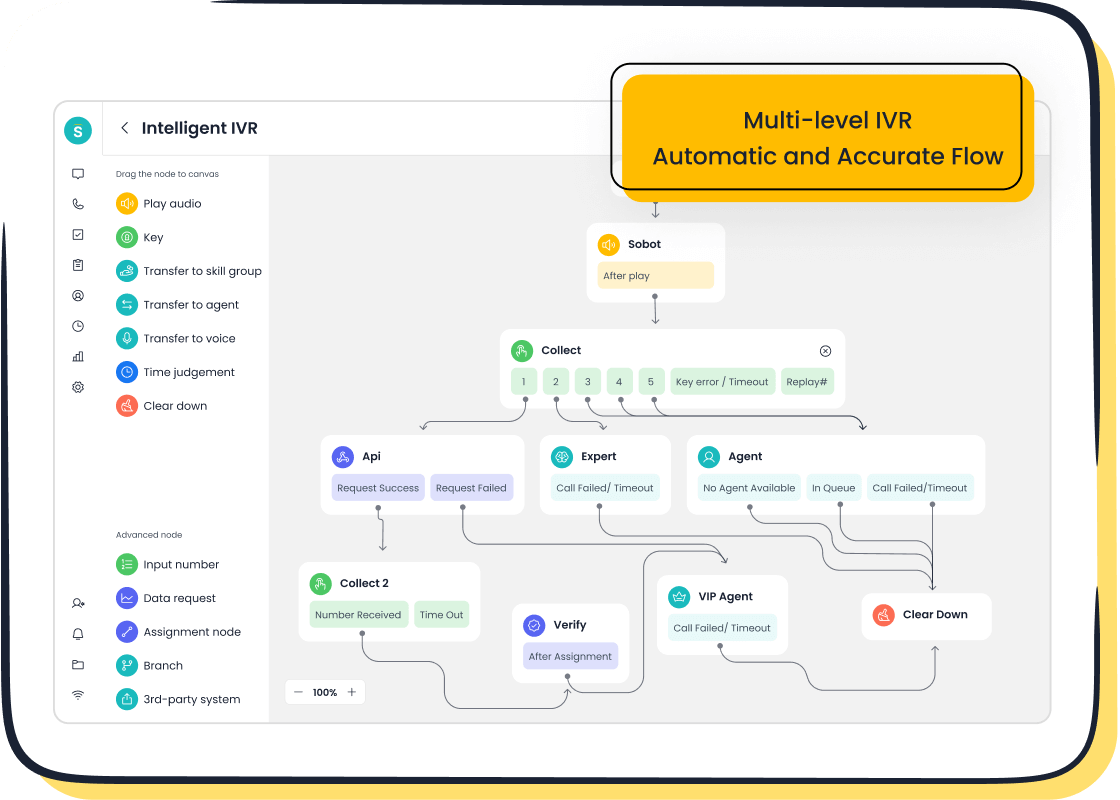
You might wonder about the real difference between a customer experience map vs customer journey map in service platforms. A customer journey map focuses on specific transactions and touchpoints, helping you spot pain points and improve each interaction. A customer experience map gives you a bigger picture, showing all customer interactions and overall satisfaction. With Sobot, you get tools that let you see both views, so you can boost your customer communication and make your operations more efficient.
- Journey maps break down exact steps and channels, making it easier to fix issues.
- Experience maps unify your strategy and reveal where customers spend their time.
Customer Experience Map Overview
Definition of Experience Map
An experience map helps you see the big picture of how customers interact with your brand. You use an experience map to understand every step a person takes, from first learning about your service to becoming a loyal customer. Leading service design organizations say that an experience map is a research-based tool. It shows common customer experiences over time and gives you insights into your audience.
An experience map lets you view the customer as a whole person, not just a buyer. You can see what they feel, think, and do at each stage. This helps you improve their overall journey.
Sobot stands out as a provider of customer experience mapping solutions. With Sobot, you can use tools like chatbots, live chat, and the Voice/Call Center to collect data and build a complete experience map. These tools help you understand what your customers need and how they move through your service.
Scope Across Service Platforms
You can use an experience map in many types of service platforms. For example:
- SaaS companies use an experience map to focus on onboarding and customer support.
- Retailers use an experience map to track both online and in-store visits.
- Telecommunications companies use an experience map to follow unique touchpoints, like service delivery and support calls.
Sobot’s Voice/Call Center brings all these channels together. You can manage calls, messages, and chats in one place. This makes your experience map more accurate and helps you spot trends across different platforms.
Key Elements of Experience Map
When you build an experience map, you include several key elements:
- You look at all customer interactions.
- You find pain points where customers struggle.
- You work to enhance the customer experience.
- You bring together teams from different parts of your company.
- You aim to improve business performance.
- You plan for the future.
You also track emotions and touchpoints, create timelines, and gather insights into what customers think and feel. Sobot’s Voice/Call Center supports this by integrating social media, messaging apps, and traditional calls. Over 10,000 brands trust Sobot to boost agent productivity and resolve issues faster. This makes your experience map a powerful tool for improving customer satisfaction and loyalty.
| Feature | Sobot | Competitors |
|---|---|---|
| Product Offering | All-in-one contact center platform | Focus on single core products |
| AI Integration | Five-AI system for enhanced engagement | Limited AI capabilities |
| Pricing | Competitive, often lower than others | Generally higher prices with hidden fees |
| Customer Support Availability | Timely access to sales and support teams | Varies by provider |
A strong experience map helps you keep customers happy and coming back. Satisfied customers are more likely to renew, refer others, and try new products.
Customer Journey Map Essentials
Journey Map Definition
A journey map helps you see how customers interact with your service at every step. In the context of service platforms, a customer journey map is a visual tool that shows each stage a customer goes through, from first contact to post-service support. You use a journey map to understand the customer’s experience across different touchpoints. This approach highlights how each stage connects, making it easier to spot areas for improvement and boost satisfaction. When you create a journey map, you see your service from the customer’s point of view. This helps you find hidden pain points and focus your efforts where they matter most. A journey map also helps you align your technology and teams, so every channel delivers a consistent experience.
Mapping Steps in Service Platforms
You can follow a clear process to build a journey map for your service platform:
- Define your goals and scope. Decide what you want to achieve with your journey map.
- Collect and analyze customer data. Use both numbers and stories to understand real experiences.
- Identify and optimize touchpoints. List every interaction and check how well each one works.
- Map emotions and pain points. Notice how customers feel at each stage and look for ways to make things better.
- Validate and test your journey map. Ask customers and team members for feedback and make improvements.
Tip: Work with different departments, keep your journey map updated, and focus on making each channel feel personal for your customers.
Sobot’s Voice/Call Center makes this process easier. You can track calls, chats, and messages in one place. The platform reduces response times and helps your team focus on complex tasks. With WhatsApp integration and AI-powered chatbots, you can respond quickly and keep your journey map accurate.
Journey Map Components
A strong journey map includes several key parts:
- Stages of the customer journey
- Customer personas
- Customer expectations
- Customer touchpoints
- Customer actions
- Emotions
- Channels
- Opportunities
You can use Sobot’s Voice/Call Center to gather data for each component. This helps you see where customers get stuck and where you can improve. By tracking every detail, you make sure your journey map stays useful and up to date.
Customer Experience Map vs Customer Journey Map: Key Differences
Scope and Focus Comparison
You need to understand the key differences between a customer experience map and a customer journey map before you choose the right tool for your service platform. The customer experience map vs customer journey map debate centers on how each map views the customer’s relationship with your brand.
A customer experience map gives you a wide-angle view. You see every possible interaction a customer can have with your business, from first awareness to long-term loyalty. This map helps you spot trends and patterns across all channels. You use it to guide your overall strategy.
A customer journey map, on the other hand, zooms in on a specific path. You follow one type of customer or one goal, such as making a purchase or getting support. This map helps you improve each step in that journey.
Here is a table that shows the key differences in scope and focus:
| Aspect | Customer Experience Map (CEM) | Customer Journey Map (CJM) |
|---|---|---|
| Scope | Multi-channel view of customer interactions | Single-channel focus on specific product/service |
| Target Audience | Overall customer experience | Specific buyer persona |
| Detail Level | Broad overview of customer experience | In-depth analysis of a specific journey |
| Purpose | Strategic insights across all touchpoints | Tactical improvements in specific areas |
You can see that a customer experience map vs customer journey map comparison reveals that one is broad and strategic, while the other is focused and tactical. You use a customer experience map to unify your vision across the company. You use a customer journey map to fix problems in a single process.
Tip: Use a customer experience map when you want to understand the big picture. Use a customer journey map when you need to improve a specific part of the customer’s path.
Application in Service Platforms
You apply these maps differently in service platforms like banking, healthcare, and e-commerce. The key differences show up in how you use each map to solve problems and improve service.
A customer experience map helps you see all the ways customers interact with your brand. You use it to find pain points and make your service better across every channel. For example, in banking, you might use a customer experience map to improve overall satisfaction and loyalty. In healthcare, you use it to enhance the patient experience at every touchpoint. In e-commerce, you use it to boost retention and make shopping easier.
A customer journey map helps you focus on one process. In banking, you might map the steps for opening an account. In healthcare, you follow a patient from booking an appointment to follow-up care. In e-commerce, you track the purchase process and post-purchase support.
Here is a table that shows how you apply each map in different service platforms:
| Aspect | Customer Experience Map | Customer Journey Map |
|---|---|---|
| Scope | Comprehensive view of all interactions with a brand | Focused on specific interactions leading to outcomes |
| Objective | Identify pain points and optimize touchpoints | Understand customer experience at each defined stage |
| Application in Banking | Improves overall customer satisfaction and loyalty | Guides specific interactions during account opening |
| Application in Healthcare | Enhances patient experience across all touchpoints | Maps patient journey from appointment to follow-up |
| Application in E-commerce | Optimizes shopping experience and customer retention | Focuses on purchase process and post-purchase support |
When you use Sobot’s Voice/Call Center, you can collect data for both types of maps. You get a unified workspace that brings together calls, chats, and messages. This helps you build a customer experience map that covers every channel. You can also use Sobot to track specific journeys, like order tracking or support requests, and create detailed journey maps.
Note: Customer experience maps help you see the whole customer lifecycle. Customer journey maps help you improve one part of that lifecycle.
Impact on Customer Communication
The customer experience map vs customer journey map discussion matters most when you want to improve how you talk to your customers. Each map changes your communication strategy in a different way.
A customer journey map helps you find and fix pain points in specific interactions. You can use it to improve targeted communication. For example, if you see that customers get confused during checkout, you can send clear instructions or reminders at that stage.
A customer experience map gives you a complete view of all customer interactions. You use it to make broad changes to your communication and engagement. For example, a golf club used a customer experience map to review the entire member experience. They found ways to improve their membership process and communications, which made members more loyal.
Here is a table that shows the impact on communication outcomes:
| Type of Map | Focus Area | Impact on Communication Outcomes |
|---|---|---|
| Customer Journey Map | Specific interactions and pain points | Helps identify and address specific customer pain points, improving targeted communication. |
| Customer Experience Map | Entire customer experience | Provides a comprehensive view, leading to broader improvements in communication and engagement. |
You can use Sobot’s tools to support both approaches. The Voice/Call Center lets you track every call and message. You can use chatbots to answer common questions and free up agents for complex issues. This makes your communication faster and more personal.
To sum up, the customer experience map vs customer journey map comparison shows three key differences. First, they have different scopes and focuses. Second, you use them in different ways on service platforms. Third, they change how you communicate with your customers. When you understand these key differences, you can choose the right map for your goals and improve your service.
When to Use Experience Map or Journey Map
Use Cases for Experience Map
You should use an experience map when you want to understand every aspect of customer interactions with your brand. For example, a member-only golf club noticed a drop in overall membership, even though new member rates stayed steady. The club could not pinpoint when or why members left. By creating an experience map, the club reviewed all critical interactions, from sign-up to daily use. This approach revealed gaps in communication and helped the club make improvements that increased loyalty and customer retention.
Sobot’s retail and e-commerce solution gives you a practical way to apply experience mapping. The platform brings together omnichannel AI, scenario-based AI, and secure AI to track interactions across websites, apps, and social media. You can see how customers move through each stage, spot critical interactions, and make improvements that boost customer retention and loyalty.
Use Cases for Journey Map
A journey map works best when you want to focus on a specific process or set of critical interactions. You can use journey maps to improve the checkout process, onboarding, or support requests. These maps help you find pain points and make targeted improvements. Journey maps rely on research and real customer stories. They show you where customers face roadblocks and how you can fix them.
| Aspect | Description |
|---|---|
| Purpose | Visualizes customer experiences and interactions with your company. |
| Key Benefits | Identifies pain points, increases sales, loyalty, and team alignment. |
| Application | Improves engagement and success through personalized experiences. |
Samsung’s story shows how journey mapping can drive results. By using Sobot’s all-in-one contact center, Samsung unified its channels and improved agent efficiency by 30%. The company tracked critical interactions, made improvements, and achieved a 97% customer satisfaction rate.
Choosing the Right Map for Service Design
To choose between an experience map and a journey map, you should:
- Represent your customer’s perspective, including outside influences.
- Use research to gather accurate insights about customer interactions.
- Recognize and represent different customer personas for unique journeys.
If you want to improve overall customer retention and loyalty, start with an experience map. If you need to fix specific critical interactions, use a journey map. Both tools help you make improvements that matter most to your customers.
Practical Examples with Sobot
Sobot Voice/Call Center in Experience Mapping

You can use Sobot’s Voice/Call Center to improve your customer experience map. The platform gives you a unified workspace, so you do not need to switch between tools. This setup reduces customer repetition and helps you resolve issues on the first call. Voice AI and IVR increase your phone handling capacity. You do not need to hire more staff to manage higher call volumes. The knowledge base integration ensures you give consistent answers, no matter the channel. Automation handles up to 70% of routine questions, which means your team can focus on complex cases. You see about a 30% increase in customer satisfaction and requests get resolved 50% faster.
| Feature | Importance for Customer Experience |
|---|---|
| Unified workspace | Reduces customer repetition and enhances first-contact resolution |
| Voice AI + IVR | Increases phone handling capacity without needing larger staff |
| Knowledge base integration | Ensures consistent answers across all communication channels |
| Automation rates | AI manages up to 70% of routine inquiries |
| Reported impact | Approximately 30% increase in customer satisfaction; 50% faster resolution of requests |
You can learn more about these features at Sobot Voice/Call Center.
Sobot Journey Mapping for Retail & E-commerce
Sobot’s customer journey mapping tools help you track every step your customers take in retail and e-commerce. AI agents guide users through each stage, which leads to a 124% year-over-year increase in spending for eCommerce clients. The system provides step-by-step support that matches customer needs. This approach improves overall user experience and satisfaction. The platform answers complex questions, so your experts can focus on unique cases. Chat logs turn into insights about what customers want and where they get confused. You can use these insights to improve your user journey and overall user experience.
| Benefit Type | Description |
|---|---|
| Revenue Growth | AI agents contribute to a 124% year-over-year increase in spending for eCommerce clients. |
| Customer Experience Improvement | Provides step-by-step guidance that aligns with customer needs, enhancing overall satisfaction. |
| Support Load Reduction | Consistently answers complex questions, allowing human experts to focus on nuanced cases. |
| Strategic Insights | Transforms chat logs into actionable insights about customer demand and confusion. |
See more about Sobot’s retail and e-commerce solutions at Sobot Retail & E-commerce.
Lessons from Samsung’s Implementation
Samsung used Sobot to unify its communication channels and improve agent efficiency. The company faced many customer inquiries each day. Sobot’s all-in-one platform helped Samsung connect data and provide smart, personalized service. Agents could see the full customer journey and understand customer emotions at every stage. This led to a 30% increase in agent efficiency and a 97% customer satisfaction rate. Samsung’s story shows how a strong customer journey map and a complete customer experience map work together. You can read more about Samsung’s results at Samsung’s Customer Story.
Tip: When you compare Customer Experience Map vs Customer Journey Map, you see that both tools help you improve overall user experience. Use Sobot to build both maps and get the best results for your business.
You now know that customer journey maps show the steps customers take, while experience maps give you a full view of their feelings and actions. This difference helps you understand not just where customers drop off, but why. Mapping leads to a positive customer experience and better communication.
| Benefit | Description |
|---|---|
| Performance Improvement | Clear goals boost satisfaction and efficiency by 40%. |
| Data Analysis | Customer feedback guides smart decisions. |
| Goal Setting | Measurable targets focus your team on key journeys. |
To get started with Sobot’s tools:
- Review your channels and journeys.
- Use analytics to spot pain points.
- Explore AI tools like chatbots.
- Set clear goals for success.
Mapping with Sobot helps you build stronger customer relationships.
FAQ
What is the main difference between a Customer Experience Map and a Customer Journey Map?
You use a Customer Experience Map to see every interaction a customer has with your brand. A Customer Journey Map focuses on one specific path or process. The "Customer Experience Map vs Customer Journey Map" debate centers on scope and detail.
When should you use a Customer Experience Map vs Customer Journey Map?
You should use a Customer Experience Map when you want to improve the overall customer experience. Use a Customer Journey Map when you need to fix or analyze a specific process, like onboarding or checkout.
How does Sobot help with Customer Experience Map vs Customer Journey Map?
Sobot gives you tools to build both maps. You can track calls, chats, and messages in one place. This helps you understand the full customer experience and also lets you focus on single journeys for improvement.
Why does Customer Experience Map vs Customer Journey Map matter for service platforms?
You need to know the difference to choose the right tool. Customer Experience Maps help you see the big picture. Customer Journey Maps help you solve specific problems. Both improve communication and service quality.
Can you use both maps together for better results?
Yes! You can use a Customer Experience Map to spot broad trends. Then, you can use a Customer Journey Map to fix issues in key steps. Combining both gives you a complete view and better results.
See Also
Transforming Support With AI-Powered Customer Service Agents
Comparative Analysis of Leading Voice of Customer Tools
Enhancing E-commerce Customer Experience Through Chatbots

