Choosing Your SMB's Customer Software


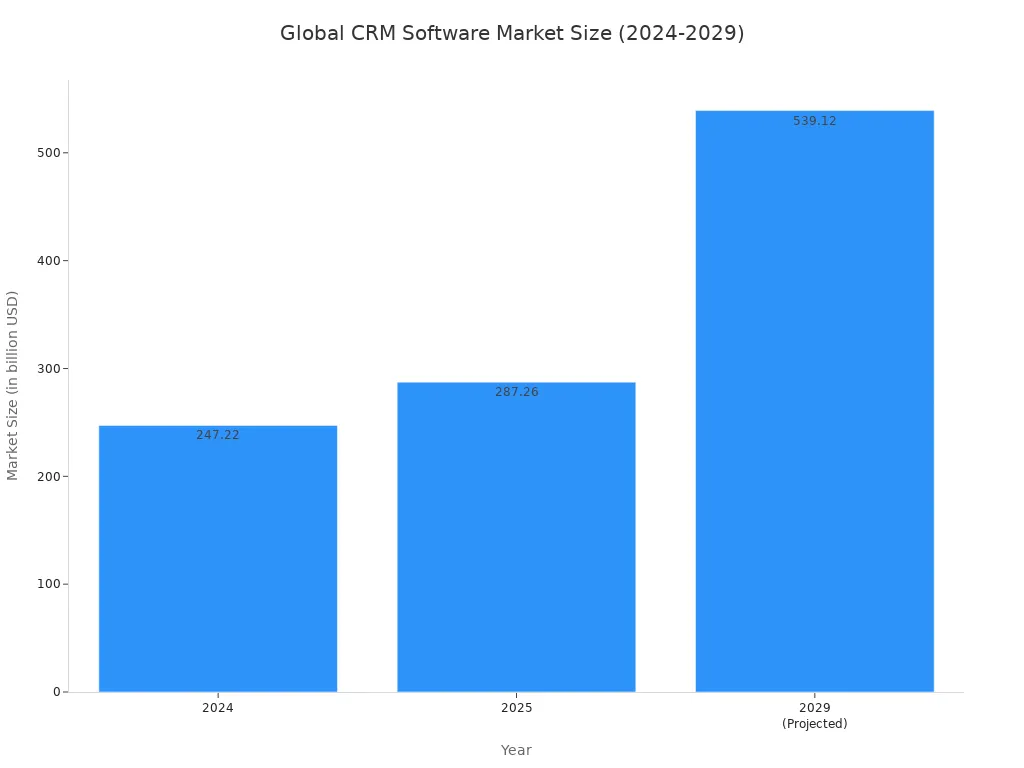
Choosing software for your small business presents a key decision: crm vs contact center software. A standalone crm is a cost-effective start if your primary goal is managing sales leads and customer data. The crm software market continues to show strong growth.
However, if your business relies on high-volume communication and diverse customer interactions, an integrated contact center software from a provider like Sobot is the more powerful choice. This approach elevates the customer experience. This guide will help you decide which path is right for your sales goals and service needs. The right crm or contact center software helps your small business provide a better experience for every customer.
CRM vs Contact Center Software: The Core Differences
Understanding the debate of crm vs contact center software starts with knowing what each tool does. One is a database for building customer relationships. The other is a communications hub for managing live interactions. Your choice between them shapes your sales and service operations.
What is a Standalone CRM?
A Customer Relationship Management (CRM) tool is your digital address book for business. You use a CRM to store and organize customer data. This software helps your sales and marketing teams track leads, manage sales pipelines, and nurture customer relationships. A standalone CRM is a powerful database. It gives you a central place to see every customer's history.
Most CRM software focuses on a few key areas:
- Contact Management: Storing customer names, emails, and phone numbers.
- Sales Pipeline: Tracking a lead from initial contact to a closed deal.
- Marketing Automation: Sending targeted emails and campaigns.
Popular CRM systems like HubSpot or Zoho CRM are excellent for organizing data. However, a basic CRM often handles communication channels separately. This is a key point in the crm vs contact center software discussion. A CRM holds the "who," but you need another tool for the "how" of communication. This is where the limits of some crm software appear. The CRM is essential for sales.
What is an Integrated Contact Center?
An integrated contact center is a more comprehensive solution. It combines the data functions of a CRM with the communication tools needed for modern service. This is the main difference in the crm vs contact center software comparison. This type of contact center software unifies all your customer interactions.
An integrated platform brings phone calls, emails, live chat, and social media messages into one single workspace for your agents.
This creates a seamless customer journey. For example, if a customer emails you and then calls, your agent sees both interactions in one place. There is no need to switch between systems. This is the power of an integrated crm and contact center. It connects every touchpoint.
This approach uses advanced features to improve service:
- Omnichannel Routing: Automatically sends interactions to the best agent, no matter the channel.
- Unified Profiles: Gives agents a full view of the customer's history and past interactions.
- AI and Automation: Uses tools like chatbots and intelligent IVR to provide 24/7 service.
Ultimately, contact center software is built to manage a high volume of interactions efficiently, improving both agent productivity and customer satisfaction. The right contact center software transforms your service capabilities.
The Case for Integrated Contact Center Software
An integrated contact center software offers a powerful alternative to a standalone CRM. It combines communication tools with customer data. This creates a single platform for all your service needs. While a basic CRM stores information, an integrated system manages the entire conversation. Let's explore the pros and cons of this approach for your business.
Key Pros: Efficiency and a Unified View
The biggest advantage of integrated contact center software is efficiency. Your team gets a unified view of every customer. This means they see all past interactions in one place. No more switching between different apps for email, chat, and phone calls. This unified workspace is a game-changer for productivity.
Platforms like Sobot's Omnichannel Solution are prime examples of this all-in-one approach. They bring every communication channel into a single dashboard. This integration simplifies your agents' jobs. They have the full context needed to resolve issues quickly.
A unified agent workspace delivers several key benefits:
- Improved agent productivity: Centralizing tools and information minimizes the time needed to manage customer interactions.
- Faster response times: Agents have immediate access to all necessary information.
- Streamlined operations: Efficient workflows contribute to better operational efficiency and potential cost reductions.
This unified view is powered by features that drive performance. For instance, Sobot's product suite includes an intelligent IVR that helps customers find answers themselves. AI-powered chatbots handle common questions 24/7. This frees up your human agents to focus on more complex problems. The result is a smarter, more efficient customer support operation.
Elevating the Customer Experience
A better agent experience leads directly to a better customer experience. When your team is efficient, your customers feel it. They get faster, more personalized service. Research shows that 90% of customers expect consistent interactions, no matter which channel they use. Integrated contact center software makes this possible.
Imagine a customer sends an email, then calls your support line. With an integrated system, the agent who answers the phone instantly sees the email. They don't need to ask the customer to repeat themselves. This creates a smooth, frustration-free journey. This seamless experience builds trust and loyalty.
The impact of this unified approach is significant. Just look at Opay, a leading financial service platform. Before using an integrated system, their customer satisfaction rate was 60%.
After implementing Sobot's unified solution, Opay saw its customer satisfaction jump to 90%. The company also achieved a 20% reduction in overall cost and a 17% increase in conversion rates.
These results show the power of connecting your customer interactions. By unifying social media, email, and voice channels, Opay transformed its customer service and marketing. This is the kind of powerful experience that integrated contact center software can deliver.
Potential Cons: Cost and Complexity
While the benefits are clear, you should also consider the potential downsides. The two main concerns for small businesses are cost and complexity. Integrated contact center software is a more powerful tool than a basic CRM, and its price often reflects that.
For a small team of 10 agents, you can expect the monthly cost to be between $250 and $600. This investment can be significant for a new business. You need to weigh this cost against the value it brings in operational efficiency and improved customer experience.
Implementation can also be more complex than setting up a simple CRM. Integrating multiple communication channels and training your team on new features takes time. You might face challenges such as:
- Connecting new software with your existing systems.
- Training your team to use all the new features effectively.
- Ensuring data is managed correctly across all platforms.
These challenges are manageable, but they require planning. You must ensure your team is ready to adopt a new way of working. Evaluating the pros and cons helps you decide if the advanced capabilities and superior service of an integrated system are the right fit for your business's current stage.
A Decision Framework for Your Small Business
Making the right choice between a CRM and an integrated contact center depends entirely on your business's unique situation. You can find the best fit by asking the right questions. Use this framework as a checklist to guide your decision and invest in a solution that supports your goals for sales and service.
Evaluate Your Primary Need: Sales vs. Support
First, you need to identify your main business driver. Is your primary focus on generating leads and closing deals, or is it on providing outstanding post-sale support? Your answer will point you toward the right type of software.
Ask yourself these questions:
- What is my main goal right now? If your goal is to organize contacts and track your sales pipeline, a standalone CRM is an excellent starting point. It helps your sales and marketing teams manage the customer journey from prospect to conversion.
- Where do my employees spend most of their time? If your team is heavily focused on sales activities like outreach and follow-ups, a CRM provides the core features they need. If they spend their days answering calls, emails, and chats, you need a tool built for high-volume interactions.
- What problem am I trying to solve? Are you losing track of sales leads? A CRM can fix that. Are customers complaining about slow response times or having to repeat themselves? An integrated contact center addresses those service issues directly.
For a new small business focused on growth, a CRM is often the first step. It builds the foundation for your sales and marketing efforts. However, if your business model relies on continuous customer support, you may need more from the start.
Assess Your Interaction Volume
Next, consider the quantity and complexity of your customer interactions. A low volume of emails and calls is manageable with basic tools. A high volume requires a system designed for efficiency.
- How many customer inquiries do you handle daily? If it's just a handful, a simple CRM and an email client might suffice. If you're handling dozens or hundreds of interactions across multiple channels, you need a more robust solution.
- What channels do your customers use? Do they only email you, or do they also call, use live chat, and contact you on social media? Managing multiple channels without an integrated system can quickly become chaotic.
For businesses with high call volumes, solutions like Sobot's Voice/Call Center are built to create efficiency. They use powerful features to manage the load and improve the customer experience. For example, AI-powered tools can screen calls, understand the customer's need, and route them to the right agent. This is far more advanced than a traditional phone menu.
These features deliver measurable results.
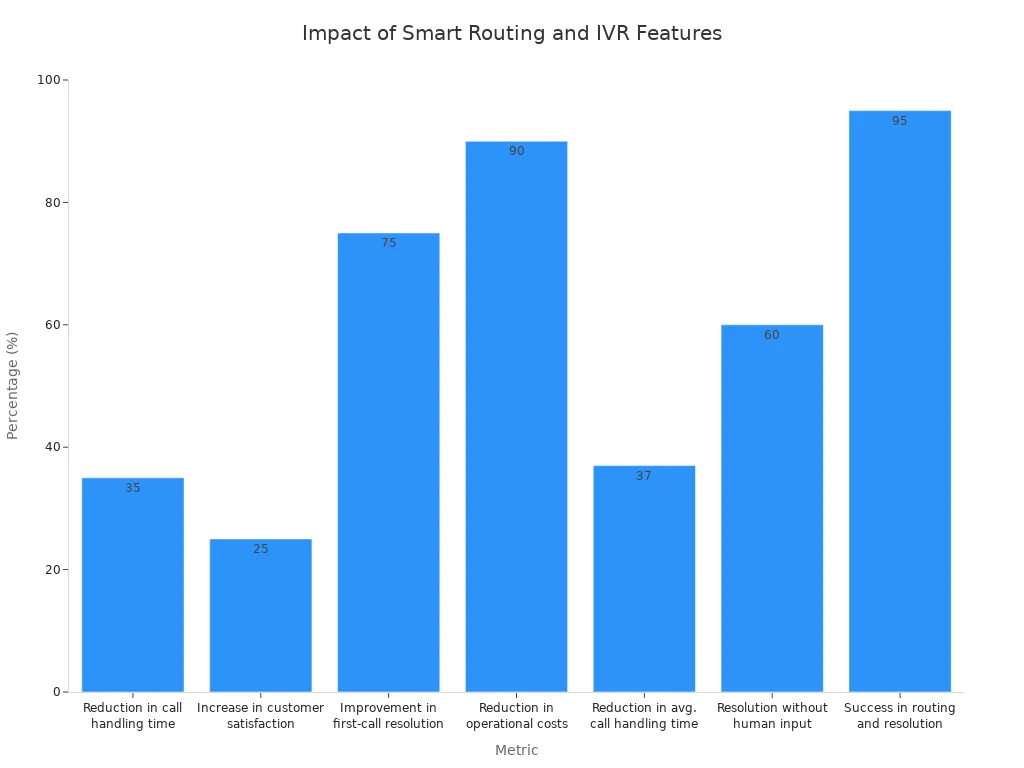
Here is how smart features can transform your customer support operations:
| Metric | Impact |
|---|---|
| First-Call Resolution | 75% Improvement |
| Operational Costs | Up to 90% Reduction |
| Call Handling Time | 30-40% Reduction |
| Routing & Resolution Success | Up to 95% Success Rate |
If your team is overwhelmed by customer interactions, these features can provide immediate relief and a significant return on investment.
Consider Your Budget and Team
Your budget and team size are critical factors. You need a solution that is not only affordable but also one that your team can adopt and use effectively.
- What is your monthly software budget? A standalone CRM is generally more affordable, making it a popular choice for a small business with a tight budget. An integrated contact center has a higher cost, so you must weigh that against the value of improved efficiency and customer satisfaction.
- How large is your team? A small team of 1-3 people might manage with a basic CRM. As your team grows, the need for a unified system to coordinate interactions becomes more important.
- What is your team's technical skill level? A simple CRM is often intuitive and easy to learn. An integrated platform has more features and may require more training. You should choose a tool that your team will feel confident using every day.
Think about the long-term cost as well. A cheaper CRM might seem like a good deal now, but if you have to add multiple other tools to handle communication, the total cost could end up being higher.
The Power of Seamless Integration
Finally, think about how your new software will connect with the other tools you already use. A tool that works in isolation creates more problems than it solves.
A CRM that operates in isolation is little more than a database. Today’s businesses rely on a complex ecosystem of tools, including marketing automation platforms, e-commerce systems, customer support software, analytics tools, and more.
When your CRM is not connected to your other systems, you create data silos. Your sales team has one set of information, and your customer service team has another. This leads to an inconsistent customer experience.
The goal is a 360-degree view of your customer. To achieve this, you need seamless integration.
- What other software do you use? Make a list of your essential tools for email marketing, scheduling, and accounting.
- Can the CRM connect to these tools? A good CRM should offer integrations with popular apps. For example, many CRM platforms can connect with tools like:
- Email Marketing: Mailchimp, Gmail, Outlook
- Scheduling: Calendly, Google Calendar
- Customer Service: Zendesk, Intercom
- Automation: Zapier
This integration is key to a smooth workflow. However, connecting a standalone CRM to separate communication tools can be complex. You often need third-party connectors like Zapier to make everything work together. An integrated contact center, on the other hand, has these communication features built-in, simplifying your tech stack. The right integration strategy ensures your business processes run smoothly and gives you a complete view of all customer interactions.
Planning for Growth: Scalability and Future-Proofing

Your choice of software today impacts your ability to grow tomorrow. You need a solution that scales with your ambition. A standalone CRM and an integrated platform offer different paths for your growing small business.
How a Standalone CRM Scales
A standalone customer relationship management (crm) system can grow with your business, but it requires careful planning. As your sales team expands, you will need to move from a free or basic crm software to a paid plan. This unlocks essential features for managing a larger team.
You should evaluate a crm software's limits early on. Consider these factors:
- User and Record Caps: Does the crm limit how many users or contacts you can add?
- Automation Rules: Will you need more advanced automation for your sales process as you grow?
- Integration Access: Does the crm have an API to connect with other tools you might need later?
The cost of a crm also scales significantly. Adding more users and advanced features to your crm software increases your monthly bill. The total cost of a crm goes beyond the subscription price.
As your sales operations become more complex, you must account for the total cost of ownership. This includes per-user fees, add-ons, and potential migration costs.
Here is an example of how costs for a crm software can grow:
| Scenario | Team Size | Plan Level | Monthly Cost | 1-Year Total |
|---|---|---|---|---|
| Starter | 5 users | Basic | $125 | $1,775 |
| Growth | 20 users | Mid-tier | $800 | $10,600 |
| Scale | 100 users | Professional | $7,500 | $96,000 |
How an Integrated Platform Grows With You
An integrated platform is designed for scalability from day one. It combines communication tools with a crm, creating a future-proof foundation for your small business. This approach helps you manage growth without the complexity of adding and connecting separate tools.
Platforms like Sobot grow with you by offering:
- Fast Deployment: Out-of-the-box integrations with tools like Shopify and Salesforce get you started quickly.
- AI Assistance: AI-powered bots help small teams manage more conversations, reducing the need for a large support staff.
- Built-in Analytics: You get immediate insights into customer behavior across all channels.
This type of platform future-proofs your operations with advanced AI capabilities. These features are built-in, not expensive add-ons. You gain access to powerful tools that support your sales and service teams as you scale. This includes AI-led agent assistance, automated call scoring for coaching, and intelligent routing to connect each customer to the perfect agent.
Your choice in the crm vs contact center software debate depends on your goals. A standalone crm is a great start for a small business focused on sales. This crm software helps you manage your sales pipeline. However, if your success relies on high-quality customer support, you need more. An integrated contact center software like Sobot provides a superior customer service experience from day one. The best crm or service platform is the one that fits your specific needs. Your sales goals and service ambitions should guide your decision.
Embark on your contact journey. Discover how Sobot's unified solutions can elevate your customer experience.
FAQ
Can I use a CRM for customer support?
Yes, you can use a CRM for basic support. However, it is not designed for high-volume communication. An integrated contact center offers better tools for managing many customer interactions, which improves your operational efficiency and service quality.
What is the main benefit of an integrated platform?
The main benefit is a unified customer view. Your sales and marketing teams see the entire customer journey in one place. This helps you build stronger customer relationships and provide consistent service across all channels.
Is an integrated contact center too expensive for a startup?
The initial cost can be higher than a basic CRM. You should evaluate the return on investment. Better efficiency and higher customer satisfaction often justify the expense, especially if your business model relies on excellent service for sales growth.
How does this software help my sales process?
An integrated platform supports sales by providing rich customer data. Your team understands a customer's full history before they even start a conversation. This context helps them personalize their approach and close deals more effectively.
See Also
Essential Guide: Selecting Top Social Media Customer Service Software
Comparing Leading Voice of Customer Software Solutions for Businesses
Discovering the Ten Best Customer Service Software Options for 2024
A Comprehensive Guide to Call Center Quality Assurance Software

