How to Integrate CRM and Phone Systems for Better Support

Imagine you answer a call from a customer who needs help fast. You search through your crm for details, but the information is scattered. You lose time and the customer feels frustrated. crm phone system integration solves this problem. You connect every call to customer data in one place. You see past interactions, update records, and respond quickly. Sobot helps you streamline support and boost customer satisfaction. You can follow clear steps to improve your workflow and deliver better results.
CRM Phone System Integration Explained

What Is CRM Phone System Integration?
CRM phone system integration connects your phone system with your CRM. This process lets you share information between both platforms. You can see customer details during a call and update records in real time. This integration helps you avoid switching between different tools. It also saves time and reduces errors.
Here is a table that shows the main components of crm phone system integration:
| Component/Step | Description |
|---|---|
| Definition of Integration | Connecting phone systems and CRM for seamless information sharing. |
| Automatic Call Logging | Calls are logged in CRM automatically without manual entry. |
| Customer Information Display | Customer details appear on the agent's screen during calls. |
| Two-Way Data Flow | Information updates in both systems automatically. |
| Unified Reporting | Combines data from both systems for comprehensive reporting. |
| Workflow Automation | Triggers phone actions based on customer categorization. |
| Selecting Compatible Systems | Assessing compatibility between phone systems and CRMs before integration. |
| Testing the Integration | Conducting tests in a non-production environment to ensure functionality. |
| Pilot Deployment | Rolling out the integration in phases to gather feedback and provide support. |
You can see how crm phone integration brings together your call center software and crm for better support.
How It Works for Customer Support
When you use crm phone system integrations, your support team gains many advantages. CRM telephony integration links voice interactions directly to customer data. You can log calls automatically and view caller information in real time. This setup gives you a unified view of each customer.
- You get screen pops that show caller details as soon as the phone rings.
- You can use click-to-dial features to make calls faster.
- Your team can track every call and update customer records without extra steps.
- You see all interactions in one place, making it easier to help customers.
CRM integration with phone systems uses native integrations, marketplace connectors, or API-based methods. These options let you customize workflows and improve efficiency. With crm with phone system integration, you create a seamless experience for both your team and your customers. Phone system integration ensures that every call and interaction is recorded and easy to access. This approach helps you deliver better service and build stronger relationships.
Why Integrate CRM with Phone Systems?
Customer Experience Benefits
You want every customer to feel valued during each interaction. CRM phone system integration gives you a single view of customer data, so you can greet callers by name and see their full history. This approach helps you build a stronger customer relationship and makes every call more personal. When you use crm phone integration, you can offer a seamless omnichannel experience. Customers do not need to repeat information, and you can resolve issues faster. The table below shows how crm phone system integration improves customer experience:
| Improvement Type | Description |
|---|---|
| Centralized customer communication | Unified access to customer interaction history, enhancing relationship-focused conversations. |
| Seamless omnichannel experience | Integration of multiple communication channels for a continuous interaction thread. |
You can see how crm integration with phone systems leads to better support and higher satisfaction.
Productivity and Efficiency Gains
CRM integration helps your team work smarter. With crm phone integration, you remove manual tasks like dialing numbers or logging calls. Features such as click-to-call and automatic call logging save time and let agents focus on helping customers. You also get instant customer history access, which means you can solve problems on the first call. Support teams benefit from improved first-call resolution, while sales teams spend more time prospecting. CRM with phone system integration boosts productivity and makes your call center software more effective.
- Sales teams reclaim up to 30 minutes daily by reducing administrative work.
- Support teams resolve issues faster with instant access to customer data.
Data Accuracy and Unified Records
Accurate data is key for great customer service. CRM integration ensures all departments use the same information. You avoid data silos and reduce the risk of errors. Automated data capture keeps records up to date and consistent. The table below highlights the benefits of unified records:
| Benefit | Description |
|---|---|
| Elimination of Data Silos | Integration ensures all departments access a unified data source, improving efficiency. |
| Data Integrity | Consistent data across platforms reduces duplication and maintains up-to-date records. |
With crm telephony integration, you create a single source of truth for every customer. This approach supports workflow automation and helps you make better decisions.
Key Benefits of CRM with Phone System Integration

Streamlined Communication
You can connect your calls, voicemails, and messages to customer profiles with crm phone system integration. This setup saves time and reduces errors. You do not need to enter data by hand or switch between tools. Your team can see all call details in one place. This approach helps you respond faster and keeps your records accurate.
- You link every call to the right customer.
- You avoid mistakes from manual data entry.
- You keep communication smooth and organized.
Personalized Interactions
When you use crm phone integration, you see each customer’s history before you answer a call. You greet customers by name and know their past issues. This makes every interaction feel personal. You can solve problems faster because you have all the information you need. Integrated crm tools help you build trust with your customers.
Faster Response Times
Crm integration lets you act quickly. You get instant access to customer data during a call. You do not waste time searching for information. Your team can answer questions and resolve issues on the first call. Phone system integration means you help customers without delay. This leads to higher satisfaction and better customer service.
Enhanced Analytics and Reporting
You can track every call and see what happens after each interaction. Crm phone integration gives you detailed reports on agent performance and customer satisfaction. You spot trends and find ways to improve. The system removes friction and gives your team the tools to work smarter. You use analytics to make better decisions and create seamless experiences for your customers.
Tip: Use analytics from your crm to measure call outcomes and agent performance. This helps you improve your support over time.
Step-by-Step CRM Integration Guide
Integrating your CRM and phone system can transform your customer service. You can follow these steps to make the process smooth and effective. This guide will help you understand what to check, how to choose the right tools, and how to train your team for success.
Assessing Current Systems
Start by looking at your current CRM and phone system. You want to know if they can work together. Use this checklist to guide your assessment:
- Plan for integration. Set clear goals for what you want to achieve.
- Assess your business needs and goals. Identify pain points that crm phone system integration will solve.
- Choose the right CRM and phone system that can be integrated. Research options with proven integration capabilities.
- Map out customer interaction workflows. Document how your team handles calls and how this will change after integration.
Tip: Write down your main challenges. This will help you focus on the features you need most.
Choosing Compatible CRM and Call Center Software
Selecting the right CRM and call center software is key. You want tools that are easy to use and can grow with your business. The table below shows important criteria to consider:
| Criteria | Description |
|---|---|
| Ease of Use | A user-friendly interface ensures quick adaptation and efficient management of customer interactions. |
| Scalability | A scalable CRM can handle increasing data volume and complexity as your business grows. |
| Customization | Customizable CRMs let you match the software to your unique processes and workflows. |
| Integration | Seamless integration with existing systems centralizes customer data and enhances accessibility. |
| Mobile Accessibility | Mobile access lets remote teams manage customer information and tasks from anywhere. |
| Reporting and Analytics | Comprehensive reporting features support informed decision-making through accurate data analysis. |
| Security | Strong security measures protect customer data from unauthorized access and breaches. |

Sobot Voice/Call Center stands out as an example of seamless integration. You can connect it with your CRM quickly. The platform offers a unified workspace, intelligent IVR, and global number availability. Sobot supports businesses of all sizes and operates in over 50 countries. You can manage calls, messages, and customer data in one place. This makes it easy for your team to deliver great customer service.
Integration Methods (Native, API, Middleware)
You have several ways to connect your CRM and phone system. Each method has its own benefits.
- Native Integration: Some CRMs and phone systems offer built-in connections. You can set these up with just a few clicks. This method is fast and simple.
- API Integration: If you need more control, you can use APIs. This lets you customize how data moves between systems. Sobot provides open APIs, so you can link your CRM and call center software to fit your needs.
- Middleware: Middleware tools act as a bridge between your CRM and phone system. They help when native or API options are not available.
Sobot Voice/Call Center makes integration easy. You can use its open API to connect with many popular CRMs. The system supports real-time data sync, so your team always has the latest customer information during calls.
Implementation Steps
Once you choose your tools and integration method, you can start the setup. Follow these steps for a smooth process:
- Prepare your team. Tell them about the changes and what to expect.
- Set up the integration in a test environment. Check that calls, data, and workflows move as planned.
- Roll out the integration in phases. Start with a small group, then expand to the whole team.
- Monitor the system. Watch for any issues and fix them quickly.
- Collect feedback from your team. Use their input to improve the setup.
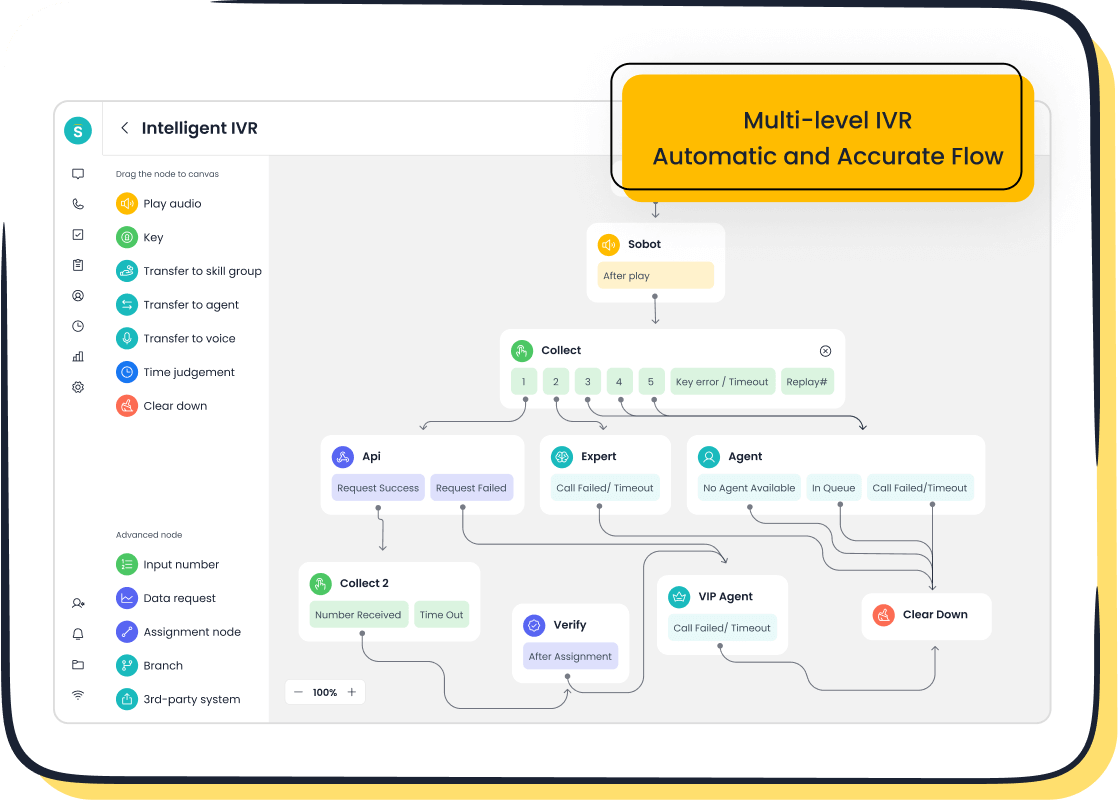
Sobot’s Voice/Call Center offers a drag-and-drop IVR, smart call routing, and real-time monitoring. You can deploy the system quickly and scale it as your business grows. The platform’s global network ensures stable and secure phone system integration.
Note: Sobot’s customer Weee! used these steps to upgrade their support. They faced challenges with inflexible IVR and language barriers. After switching to Sobot, they saw a 20% boost in agent efficiency and cut resolution time by 50%. Their customer satisfaction score reached 96%. You can read more about their story here.
Training and Onboarding
Training your team is vital for successful crm integration. You want everyone to feel confident using the new system. Use the table below to plan your training:
| Training Component | Description |
|---|---|
| Basic Training | Introduces the integrated system, focusing on the interface and basic features like click-to-call and call logging. |
| Advanced Features | Covers complex functionalities such as accessing customer data during calls and adding notes to CRM records. |
| Best Practices | Provides guidelines on leveraging the integrated system to improve customer interactions and ensure data quality. |
| Hands-on Sessions | Offers practical training sessions to help staff become comfortable with the system. |
| Data Entry | Emphasizes the importance of accurate data entry to maintain customer information integrity. |
| Customer Interaction | Teaches how to use customer data during calls for personalized experiences. |
| Follow-up | Trains on setting up follow-up tasks and reminders within the CRM from the phone system. |
| Reporting | Shows how to generate reports combining call data and CRM data to track performance and trends. |
| Troubleshooting | Prepares the team to handle common technical issues, including connectivity problems and data discrepancies. |
| Support Channels | Provides information on accessing technical support from internal IT or external vendors. |
Sobot makes onboarding simple. The platform offers a unified workspace, so agents can manage calls, tickets, and chats in one place. You can use Sobot’s AI-powered chatbot and voicebot to automate routine tasks. This frees up your team to focus on complex customer issues. Sobot’s training resources and support channels help your team get up to speed quickly.
Callout: Sobot’s omnichannel solution lets you handle calls, live chat, tickets, and WhatsApp messages from one dashboard. You can deliver a seamless experience for every customer.
Sobot’s real-world success with Weee! shows how effective crm phone integration can be. You can improve agent efficiency, reduce call resolution times, and boost customer satisfaction. With Sobot, you get a stable, secure, and scalable solution for all your customer contact needs.
Essential Features in CRM Phone System Integration
When you look for a crm phone system integration, you want features that make your support team faster and more effective. The right tools help you deliver better service and keep your customers happy. Let’s explore the most important features you should expect.
Click-to-Call and Call Logging
Click-to-call lets you start a call with one click. You do not need to dial numbers by hand. This saves time and reduces mistakes. Automatic call logging records every call in your crm. You do not have to enter details after each call. This feature keeps your records accurate and up to date.
| Feature | Benefit |
|---|---|
| One-Click Calling | Agents can initiate calls instantly, reducing manual dialing time. |
| Automatic Logging | Calls and outcomes are logged automatically, minimizing administrative tasks. |
| Analytics Dashboard | Provides real-time monitoring of key metrics for data-driven decisions. |
You can use these features in Sobot Voice/Call Center. The system also records calls and syncs notes, so you always have a full history for each customer.
Unified Workspace and Caller ID
A unified workspace brings all your communication channels together. You see calls, chats, tickets, and emails in one place. Caller ID shows you who is calling and displays their history. This helps you greet customers by name and solve problems faster.
| Outcome | Impact |
|---|---|
| Faster resolutions | Real-time guidance and next-best actions lead to quicker problem resolution. |
| Shorter agent ramp time | Embedded scripts and contextual workflows reduce onboarding time for new agents. |
| Lower after-call work | AI-generated summaries improve accuracy and reduce the workload post-call. |
| More consistent CX | CRM-integrated workflows ensure context is preserved across channels. |
Sobot’s unified workspace and caller ID features help you deliver a smooth experience for every customer.
Smart Routing and IVR
Smart routing sends each call to the right agent. IVR (Interactive Voice Response) lets customers choose options and reach the right department. Sobot’s intelligent IVR uses a drag-and-drop interface. You can set up menus and greetings quickly.
- Smart routing reduces hold times and misrouted calls.
- Customers reach the right person on the first try.
- You see a 50% reduction in agent handle times.
You help customers faster and improve satisfaction with these features.
Advanced Analytics
Advanced analytics give you insights into every call and customer interaction. You can track call volume, agent performance, and customer satisfaction. Sobot’s analytics dashboard shows real-time data and trends. You use this information to make better decisions and improve your support.
- Intelligent call routing directs high-value customers to senior agents.
- Automated workflows create follow-up tasks based on call outcomes.
- Multi-channel integration lets you manage SMS, WhatsApp, and chat in one platform.
With these features, crm integration becomes a powerful tool for your business. Sobot Voice/Call Center brings all these elements together, making phone system integration simple and effective.
Overcoming CRM Integration Challenges
Data Sync and Security
You may face challenges when you connect your CRM and phone system. Data sync is one of the biggest hurdles. Automatic synchronization of call logs and contact information helps you keep records up to date. This process removes the need for manual updates. You also need tools that detect duplicate entries. These tools keep your CRM organized and accurate.
Security is just as important. You must protect customer information with access controls and encryption. Audit trails help you track who views or changes data. Some older platforms may not meet modern privacy standards. You should check if your integration supports the latest security protocols. API rate limits can slow down data flow. Error recovery steps are important to keep your data safe. Handling custom objects can make integration more complex. You need to plan for these issues before you start.
Tip: Always test your phone system integration in a safe environment before going live.
User Adoption
Getting your team to use the new system can be tough. You should create a culture that supports CRM adoption. Encourage open dialogue and share regular updates. Recognize and reward team members who use the system well. Gather feedback from users and make improvements based on their ideas.
You can make the system easier by automating repetitive tasks. Seamless integration with your existing tools helps your team feel comfortable. Ongoing support and training keep everyone on track. When you show how CRM integration improves company results, your team will want to use it more.
Compliance Considerations
You must follow rules when you handle customer data. Call logging is required in many industries. Automatic logging ensures you do not miss important records. You should review who has access to data often. Regular audits help you stay in line with privacy laws and company policies. Stay updated with the latest security protocols to protect sensitive information.
| Compliance Consideration | Description |
|---|---|
| Call Logging | In regulated industries, call logging is often required for compliance. Automatic logging ensures compliance isn't missed. |
You can overcome these challenges with careful planning and the right tools. CRM phone system integration helps you deliver better service and keep your data safe.
Best Practices for CRM and Call Center Software Integration
Setting Objectives and KPIs
You need clear goals before starting crm integration. Set objectives that match your business needs. Decide what you want to achieve with crm phone system integration. You might want to reduce call resolution times or improve customer satisfaction. Choose KPIs that help you measure progress. Track metrics like first-call resolution rate, average call duration, and customer feedback scores. When you set targets, you guide your team and keep everyone focused.
- Define what success looks like for your integration.
- Use KPIs to measure call quality and customer experience.
- Review your goals often to make sure you stay on track.
Continuous Optimization
You should always look for ways to improve your crm and phone system integration. Regular updates and reviews help you get the most value. Use data from your crm to spot trends and fix problems. AI-powered tools can help you make better decisions. When you optimize, you boost operational efficiency and increase user adoption. You also improve customer engagement by using better data.
| Benefit | Description |
|---|---|
| Operational Efficiency | Enhances processes and reduces time wastage in CRM and phone system usage. |
| User Adoption | Increases the likelihood of users embracing the integrated systems. |
| Customer Engagement | Improves interactions with customers through better data utilization. |
- Continuous optimization gives you a competitive advantage.
- Systematic execution based on performance and feedback enhances customer engagement.
- AI-powered relationship intelligence supports smarter choices.
Gathering Team Feedback
You need input from your team to make crm integration work well. Use surveys to collect feedback after each call. Embed feedback forms on your website or customer portal for real-time responses. Monitor interactions and online reviews to learn about customer experiences. When you listen to your team, you find ways to improve workflows and boost satisfaction.
| Method | Description |
|---|---|
| Surveys | Utilize email surveys within your CRM to gather targeted feedback with personalized touches. |
| Feedback Forms | Embed forms on websites or customer portals to collect real-time feedback post-interaction. |
| Monitoring Interactions | Track customer service interactions and online reviews to gain insights into customer experiences. |
Tip: Act on feedback quickly. Small changes can make a big difference in call quality and customer happiness.
You build a stronger support team when you set clear goals, optimize regularly, and gather feedback. These best practices help you get the most from crm phone system integration.
You can improve customer relationship management by following clear steps for crm integration. Start by assessing your current crm and phone system integration. Choose tools that support click-to-call, call logging, and real-time analytics. Train your team to use features like contact pop-ups and automated workflows. The table below shows how integration transforms your support:
| Challenges Without Integration | Benefits of Integration |
|---|---|
| Missed call opportunities | Improved call logging and follow-up capabilities |
| Poor data visibility | Enhanced insights into call metrics and agent performance |
| Manual data entry burden | Reduced administrative overhead, allowing more time for customer engagement |
| Fragmented customer context | Streamlined access to complete customer history for better service |
Evaluate your systems and explore Sobot for a seamless phone system integration. Reach out for a demo to see how crm integration can boost your customer support and business results.
FAQ
What is CRM phone system integration?
CRM phone system integration connects your phone system with your CRM. You can see customer details during calls, log calls automatically, and manage all interactions in one place. This setup helps you deliver better support and keep records accurate.
How does CRM phone system integration improve customer support?
You get instant access to customer history and call details. This lets you answer questions faster and solve problems on the first call. CRM phone system integration also reduces manual work and helps your team focus on customers.
Can Sobot Voice/Call Center integrate with my existing CRM?
Yes, Sobot Voice/Call Center offers seamless CRM phone system integration. You can connect it to many popular CRMs using native tools or open APIs. This makes it easy to sync data and manage calls from one unified workspace.
What features should I look for in CRM phone system integration?
Look for click-to-call, automatic call logging, unified workspaces, smart routing, and advanced analytics. These features help you save time, reduce errors, and improve customer satisfaction. Sobot Voice/Call Center includes all these essential tools.
Is CRM phone system integration secure?
Yes, CRM phone system integration uses encryption and access controls to protect your data. Sobot ensures secure data transfer and meets high security standards. You can trust that your customer information stays safe and private.
See Also
Essential Aspects of CRM Call Center Solutions
Excelling in Live Chat for Client Assistance
Overview of Comprehensive Omnichannel Call Center Tools

