CRM Contact Center Software Guide 2025

A CRM contact center software unites your customer relationship management (CRM) with communication tools. This platform creates a single source of truth for all interactions. You can use it to build stronger customer relationships and improve efficiency. The market is growing fast, with experts from Precedence Research projecting it to reach USD 42.67 Billion in 2025. This guide reviews the best CRM software to improve your customer service. We feature top picks like Sobot for all-in-one solutions, Salesforce for enterprise, and HubSpot for SMBs. With Sobot AI, businesses can leverage intelligent automation to streamline operations, while the robust Sobot call center capabilities ensure seamless customer interactions.
Why You Need CRM Contact Center Software

Investing in the right technology is crucial for growth. A CRM contact center software helps you build better customer relationships and operate more efficiently. It moves you beyond traditional customer service into a new era of unified, intelligent interactions.
What is a CRM Contact Center?
A traditional call center mainly handles phone calls. A modern CRM contact center is much more. It is a unified platform that manages all customer interactions and data. This approach helps you optimize customer service and drive business growth. Gartner predicts that by 2025, 80% of customer service organizations will shift to messaging platforms, making integrated systems essential.
| Feature | Traditional Call Center | CRM-Integrated Contact Center |
|---|---|---|
| Scope | Limited to voice communication. | Manages sales, marketing, and omnichannel communication. |
| Channels | Phone calls. | Live chat, email, phone, website, and social media. |
| Focus | Call handling efficiency. | Overall customer satisfaction and unified experiences. |
Enhance Customer Experience
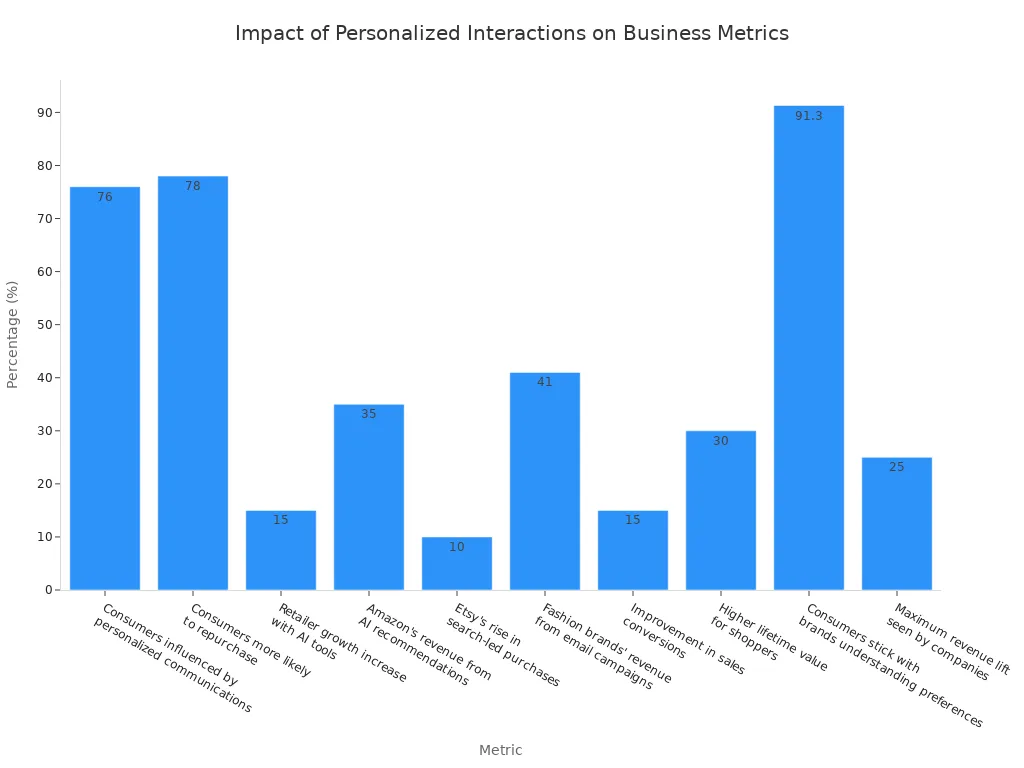
Personalization is key to building customer loyalty. A good CRM gives your team the tools to create tailored interactions. Studies show that 78% of consumers are more likely to repurchase from brands that provide personalized content. A unified CRM helps you deliver this level of service, which can improve customer satisfaction by up to 20%. This directly impacts your bottom line and strengthens your brand reputation.
Boost Agent Productivity
Your agents need the right tools to succeed. A cloud-based CRM platform gives them a complete view of every customer. They no longer need to switch between different systems to find information. This saves time and reduces frustration. With all data in one place, your customer support team can resolve issues faster and provide a more consistent customer experience.
Centralize Customer Data
Scattered customer data creates major problems. It leads to inefficiency, poor communication, and a negative customer experience.
According to Melody Chien, a senior director analyst at Gartner, “good quality data provides better leads, a better understanding of customers, and better customer relationships.” Siloed information can cost a company up to 30% of its annual revenue. A CRM system solves this by creating a single source of truth for all your customer data.
Enable Data-Driven Decisions
A unified CRM platform gives you powerful insights. You can track key metrics and understand customer behavior better. This information helps you make smarter decisions about your products, marketing, and customer service strategies. Instead of guessing, you can use real data from your CRM to guide your business and stay ahead of the competition.
Essential Features for 2025

Choosing the right crm software means looking for features that meet modern customer demands. The best platforms help you build strong customer relationships and streamline your operations. Here are the essential features your crm contact center needs in 2025.
Omnichannel Communication Hub
Your customers want to connect with you on their preferred channels. A true omnichannel hub unifies interactions from voice, email, chat, and social media into one view. This is crucial because 73% of customers expect a seamless experience when they switch between channels. A unified platform provides this consistency, improving the overall customer experience.
AI-Powered Automation and Insights
Artificial intelligence transforms customer service. AI-powered tools handle simple, repetitive tasks, freeing your agents for more complex issues. For example, Sobot’s AI-powered Voicebot and ChatGPT enablement provide 24/7 support. As 83% of contact center leaders agree, AI is key to delivering round-the-clock, omnichannel customer service.
Advanced Analytics and Dashboards
You need data to make smart decisions. Advanced analytics dashboards give you a clear view of key performance indicators (KPIs). You can track metrics like call volume, average handle time, and customer satisfaction (CSAT). This information helps you understand performance and find areas for improvement in your customer service strategy.
Intelligent Call Routing and IVR
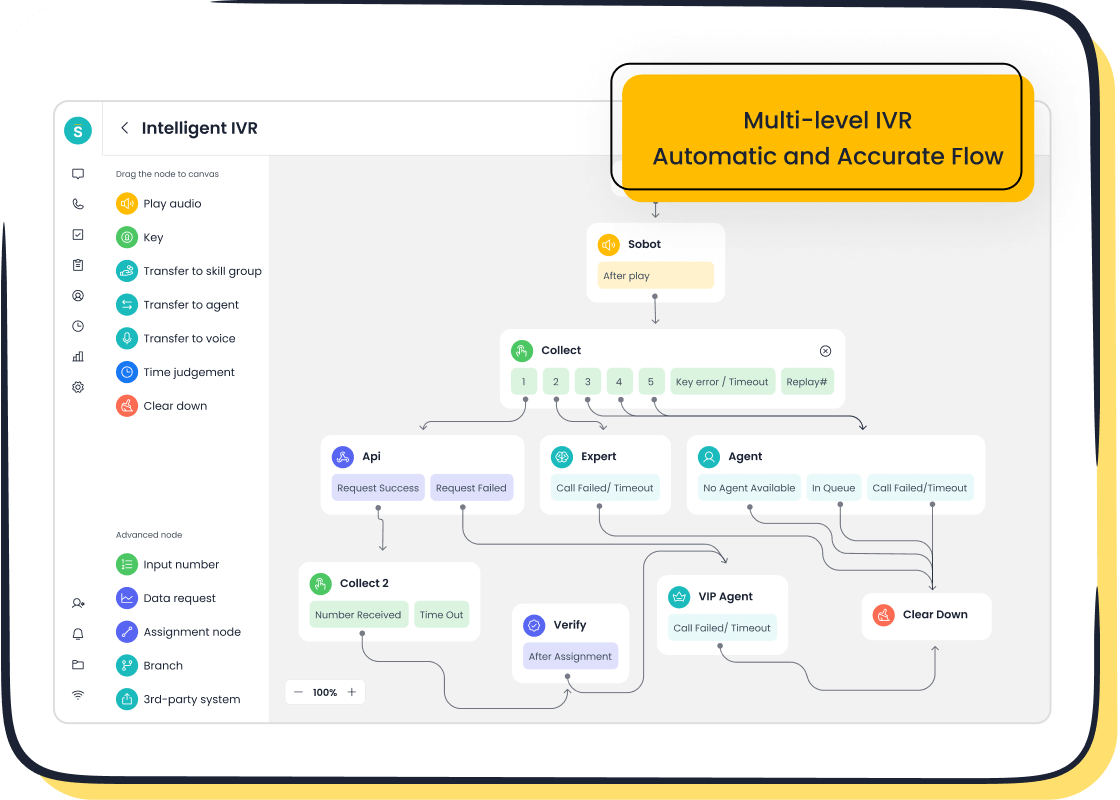
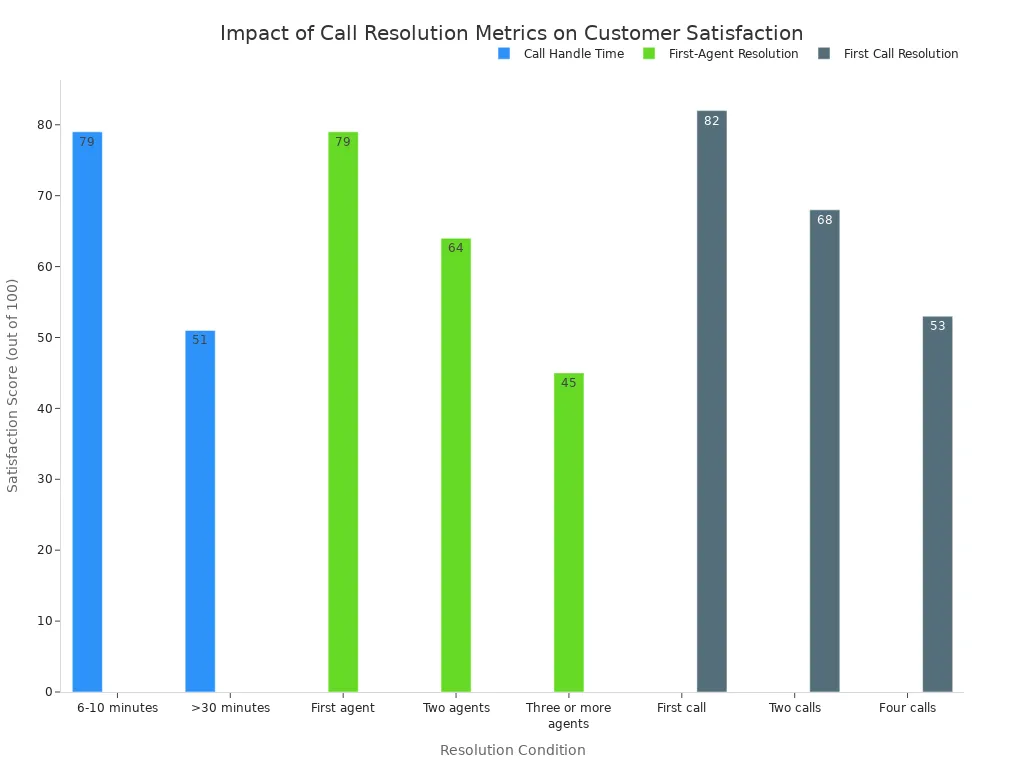
Connecting customers to the right agent quickly is vital. Intelligent routing uses customer data from your crm to direct calls to the most qualified agent. This improves first-call resolution, which directly impacts satisfaction. For instance, Sobot offers a drag-and-drop IVR builder to easily create smart call flows.
Seamless Third-Party Integrations
Your crm software should work with the other tools you use. Seamless integrations connect your cloud-based crm to essential applications like Salesforce or Shopify. This creates a more powerful and unified system. Sobot, for example, integrates smoothly with these platforms, ensuring your customer data flows where it's needed.
Unified CRM and Contact Management
A native, unified system for your crm and contact management offers major advantages. It ensures better data accuracy and a smoother user experience compared to relying on separate systems. This tight integration provides a single source of truth for all customer information, which is the foundation of effective contact management.
Top CRM Contact Center Software in 2025
Choosing the right crm software is a major decision for your business. You need a platform that not only meets your current needs but can also grow with you. To help you decide, we have reviewed the best crm software options for 2025. This section breaks down the top contenders, their strengths, and who they are best suited for.
| Software | Our Score | Best For |
|---|---|---|
| Sobot | 9.8 / 10 | All-in-One Omnichannel Solutions |
| Salesforce Service Cloud | 9.5 / 10 | Enterprise Scalability |
| HubSpot Service Hub | 9.2 / 10 | Integrated Inbound Marketing |
| Zendesk Suite | 9.0 / 10 | Customer-Centric Support Teams |
Sobot: Best for All-in-One Omnichannel Solutions
Sobot offers a complete crm contact center solution. It unifies all your communication channels into a single, powerful platform. You can manage voice calls, live chat, tickets, and even WhatsApp conversations from one workspace. This all-in-one approach simplifies your operations and provides a seamless experience for both your agents and customers.
A key advantage of Sobot is its reliability and global reach. The platform guarantees 99.99% uptime, so your customer service is always available. It also provides global phone number availability, making it an excellent choice for businesses with an international customer base.
Success Story: Global technology leader Samsung transformed its customer service using Sobot. By implementing the all-in-one solution, Samsung achieved a 97% customer satisfaction rate and saw a 30% increase in agent efficiency. This shows the powerful impact of a truly unified platform.
Key Features
- Omnichannel Inbox: Unifies interactions from voice, email, live chat, social media, and WhatsApp into a single agent view.
- AI-Powered Tools: Includes an intelligent chatbot, AI Agent, and a voicebot to automate responses and provide 24/7 support.
- Cloud Call Center: Offers a robust voice solution with features like a drag-and-drop IVR builder, intelligent call routing, and real-time monitoring.
- Ticketing System: Automates ticket creation and workflows to ensure issues are tracked and resolved efficiently.
- WhatsApp Business API: As an official WhatsApp Business Solution Provider (BSP), Sobot enables you to engage customers on their favorite messaging app.
| Pros | Cons |
|---|---|
| Truly all-in-one platform for all channels. | Pricing is customized and requires a quote. |
| High reliability with 99.99% guaranteed uptime. | May have more features than a very small team needs. |
| Strong AI and automation capabilities. | |
| Excellent for global teams with worldwide number access. |
Pricing Sobot provides customized pricing based on your specific business needs. You can contact their team for a detailed quote and a demo to see the platform in action.
Salesforce Service Cloud: Best for Enterprise Scalability
Salesforce Service Cloud is a powerhouse in the crm world, especially for large businesses. It offers unmatched scalability and customization options. You can tailor the platform to fit your complex workflows and integrate it deeply into the Salesforce ecosystem. This makes it ideal for enterprises that need a robust solution to manage massive volumes of customer data and interactions.
The platform's strength lies in its ability to grow with your organization. From advanced case management to AI-powered analytics with Einstein AI, Salesforce provides the tools you need to optimize every aspect of your customer service operations at scale.
Key Features
- Advanced Case Management: Centralizes customer issues with customizable workflows to meet specific business and regulatory requirements.
- Omnichannel Routing: Intelligently routes cases from any channel to the best-fit agent based on skill, availability, and customer history.
- Einstein AI Integration: Uses artificial intelligence to provide agents with predictive recommendations and automate routine tasks.
- Process Automation: Allows you to build macros and automated workflows to handle repetitive tasks, ensuring consistency and efficiency.
- Deep Integration: Offers extensive API capabilities and connectors for seamless integration with ERPs, billing systems, and other enterprise tools.
| Pros | Cons |
|---|---|
| Highly scalable for growing and large enterprises. | High total cost of ownership, including licensing and customization. |
| Maximizes team productivity through powerful automation. | Requires significant training for your team to use effectively. |
| Strong community and extensive support network. | Implementation can be a long and complex process. |
| Advanced tools provide a competitive edge. | Heavily dependent on the Salesforce ecosystem. |
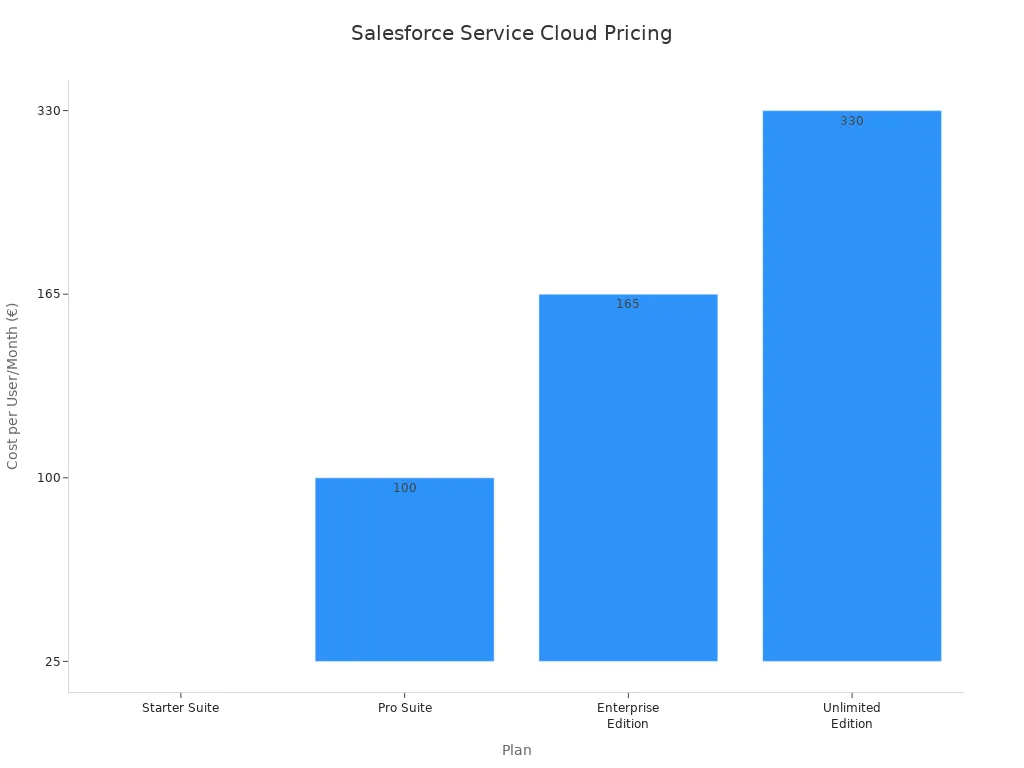
Pricing Salesforce offers multiple pricing tiers, with costs increasing as you add more advanced features and AI capabilities. Add-ons for voice, field service, and AI can also increase the total investment. This makes the crm expensive for smaller teams.
HubSpot Service Hub: Best for Integrated Inbound Marketing
HubSpot Service Hub is an excellent choice for small to medium-sized businesses (SMBs), especially those already using HubSpot's Marketing or Sales Hubs. Its greatest strength is its seamless integration with the broader HubSpot crm platform. This creates a single, unified view of the entire customer journey, from the first marketing touchpoint to post-sale support.
This integration helps you break down silos between your marketing, sales, and service teams. Everyone works from the same customer data, leading to smoother handoffs and more personalized customer relationships. The platform is designed for ease of use, allowing you to build powerful workflows without needing to write any code.
Key Features
- Unified CRM Platform: Connects service interactions with marketing and sales data for a complete 360-degree customer view.
- Help Desk & Ticketing: Automates ticket creation and organization to help your team manage and prioritize support requests.
- Knowledge Base: Lets you build a library of help articles to empower customers to find answers on their own, reducing agent workload.
- Customer Feedback Surveys: Helps you collect valuable feedback through NPS, CSAT, and custom surveys to measure customer happiness.
- Cross-Functional Workflows: Automates tasks across departments, such as creating a follow-up task for sales after a support ticket is closed.
| Pros | Cons |
|---|---|
| Seamless integration with HubSpot's Marketing and Sales Hubs. | Advanced features are locked behind higher-priced tiers. |
| Very user-friendly and easy to set up. | May not be robust enough for large, complex enterprises. |
| Excellent for aligning sales, marketing, and service teams. | Contact-based pricing can become expensive as your list grows. |
| Strong focus on inbound methodology and customer experience. |
Pricing HubSpot offers a free plan with basic tools, making it accessible for new businesses. Paid plans start with the Starter tier and scale up to the Professional and Enterprise tiers, which unlock more advanced automation and reporting features for your contact management.
Zendesk Suite: Best for Customer-Centric Support Teams
Zendesk Suite is designed with the customer support agent in mind. It provides a clean, intuitive workspace that helps teams manage conversations across multiple channels efficiently. The platform excels at ticketing and workflow automation, making it a top choice for teams focused on delivering fast and effective customer service.
Zendesk's Agent Workspace is a core feature, consolidating all channels and customer context into one place. This allows agents to handle inquiries from email, chat, and phone without switching screens. With powerful tools for automation, analytics, and self-service, Zendesk empowers your team to focus on what matters most: helping customers.
Key Features
- Agent Workspace: A unified interface that brings together all communication channels and customer history for efficient support.
- Advanced Ticketing System: Gathers requests from all channels into a single queue with powerful automation, triggers, and SLA management.
- Help Center & Knowledge Base: Enables you to create a self-service portal for customers, which reduces ticket volume and improves satisfaction.
- Analytics and Reporting: Provides customizable dashboards to track key metrics like response times and CSAT scores, helping you make data-driven decisions.
- Extensive Integrations: Offers a large marketplace of apps and integrations to connect your cloud-based crm with other business tools.
| Pros | Cons |
|---|---|
| Intuitive and easy for support agents to learn and use. | Some advanced features require higher-tier plans or add-ons. |
| Powerful ticketing and workflow automation. | Can become costly as you add more agents and channels. |
| Strong analytics for tracking team performance. | The crm capabilities are less comprehensive than dedicated sales CRMs. |
| Large app marketplace for extending functionality. |
Pricing Zendesk offers several plans for its Suite, starting with Suite Team and scaling up to Suite Enterprise. Each tier adds more agents, features, and levels of support. You should evaluate which plan provides the right balance of features and cost for your team's size and needs.
How to Choose the Right CRM Software
Selecting the right platform is a critical step for your business. A thoughtful approach ensures you find the best crm software to support your team and build better customer relationships. Follow these steps to make a confident choice.
Assess Your Business Needs and Goals
First, you need to define what you want to achieve. Are you trying to improve your customer service response times? Do you need better contact management to track leads? Having clear business objectives is essential. Without clear goals, you might choose a crm that doesn't support your core functions. Make a list of your top priorities before you start looking at options.
Evaluate Features vs. Your Requirements
Once you know your goals, compare them to the features of each crm software. A common mistake is choosing a system that is not customized to your business needs. This can lead to wasted resources and low productivity.
- Poor Data Quality: Using a new crm with outdated or duplicate information will hurt your results. Clean your data before you migrate it.
- Lack of Customization: A one-size-fits-all crm rarely works. The system should adapt to your unique workflows.
- Poor User Adoption: If the crm is hard to use, your team won't adopt it. This leads to incomplete data and a poor return on investment.
Consider Budget and Scalability
Your budget is a key factor. CRM pricing models vary. Some charge a fixed fee per user each month (seat-based), while others charge based on how much you use the platform (usage-based). A seat-based model offers predictable costs, which is great for stable teams. A usage-based model offers more flexibility for growing businesses. Think about your company's future growth. Choose a crm that can scale with you.
Request Demos and Free Trials
Never buy a crm without trying it first. Demos and free trials let you see the software in action. Prepare for these trials to get the most value.
- Set clear objectives for what you want to test.
- Create custom scenarios that reflect your daily challenges.
- Involve your team in the trial to get their feedback.
This hands-on experience is the best way to confirm if a crm is the right fit for your team and your customers.
Choosing the right crm contact center software is a key business decision. The best crm improves your customer service and boosts team efficiency. This guide gives you the insights to select the perfect crm software for your goals. Remember to follow these simple steps:
- Assess your unique business needs.
- Compare features against your requirements.
- Use free trials to test the crm.
You now have the knowledge to make a confident choice. Ready to embark on your contact journey?
FAQ
What is the main difference between a CRM and a contact center?
A CRM stores customer data. A contact center handles customer communications. Modern CRM contact center software combines both. This gives your team a complete view of the customer in one place, improving service and efficiency.
How long does it take to implement CRM contact center software?
Implementation time varies. Cloud-based platforms can be set up in days or weeks. More complex enterprise systems might take several months. Your choice depends on your team's size and technical needs.
Can this software work for a small business?
Yes. Many CRM software providers offer plans for small businesses. These plans provide essential tools for contact management and customer service. They allow you to start small and scale up as your business grows.
What is an all-in-one contact center solution?
An all-in-one solution, like Sobot, unifies every communication channel. It combines voice, chat, email, and social media into a single platform. This approach simplifies workflows for your agents and creates a seamless experience for your customers.
See Also
Leading Free CRM Solutions for Call Centers: A 2024 Overview
Evaluating the Best Cloud Contact Center Services: 2024 Expert Reviews
Your Essential Guide to Omnichannel Software for Call Centers
Comprehensive Review of Leading Contact Center Solutions for 2024

