Create Ticketing Automatically with AI

Answering user queries in a timely manner is a cornerstone of excellent customer service. However, manual ticket handling often slows down your support teams and frustrates customers. According to Help Scout, nearly 60% of customers define an “immediate response” as 10 minutes or less. This expectation gap creates significant frustration.
The solution is an AI-powered system for service desk automation. This technology helps you create ticketing automatically, boosting efficiency and improving your customer service. With the right automation, you can streamline processes and meet customer expectations head-on.
Your Roadmap to Success This guide offers a clear, five-step path to implementing service desk automation. You will learn how to analyze your current workflow, select the best tools like Sobot, define your automation logic, test the new system, and monitor its performance. This journey will transform your help desk operations.
Step 1: Analyze Your Process for Service Desk Automation
Before you can improve your customer service with automation, you must first understand your current state. A deep analysis of your existing processes reveals where service desk automation can have the biggest impact. This foundational step ensures your automation strategy is targeted and effective.
Map Your Ticket Lifecycle
First, you need to map your entire ticketing process from start to finish. This visual map helps you see how tickets move through your system. A clear ticketing system workflow shows every touchpoint, from the moment a customer submits a request to its final resolution. This analysis is key to successful service desk automation.
💡 Tip: Think like your customers. Mapping the journey helps you understand their experience and pinpoint where automation can make it smoother.
Great companies do this to refine their processes. For example:
- IKEA maps the entire furniture buying journey. They track everything from in-store navigation to the assembly experience. This helps them find pain points and improve instructions, a core part of their customer service.
- Salesforce maps the complex B2B software implementation journey. They identify decision bottlenecks and track user adoption to ensure customers see value quickly.
Identify Bottlenecks and Pain Points
With your map complete, you can now spot the problems. Where do things slow down? What frustrates your team and your customers? A slow ticketing system workflow often leads to poor customer satisfaction. Delays in resolving tickets can lower trust and increase customer churn. Your goal with service desk automation is to fix these issues.
Look for these common bottlenecks that hinder efficiency:
- Manual Repetitive Tasks: Agents waste time on routine tasks that automation could handle.
- Lack of Integration: Separate systems create data silos and slow down your team.
- Poor Reporting: You cannot improve what you do not measure. A lack of data prevents smart decisions.
- No Self-Service Options: Customers are forced to create tickets for simple questions that automation could answer instantly.
Identifying these pain points helps you define workflows for your new service desk automation. This focused approach ensures your automation efforts solve real problems.
Step 2: Choose the Right Automation Tool
After analyzing your processes, you need to select the right automation software. The tool you choose will be the engine for your new ticketing system workflow. Your decision will impact efficiency, scalability, and the overall success of your service desk automation strategy. You have two main paths: using the built-in features of your current help desk or adopting a specialized AI-powered platform.
Evaluate Native Help Desk Features
Many help desk platforms like Zendesk or Salesforce Service Cloud offer built-in automation features. These tools are often cost-effective and ready to use right away. They can handle basic tasks and are a good starting point for simple service desk automation.
However, native tools can be limited. They may lack the flexibility for unique processes or the power for greater scalability. Before you commit, evaluate if your current system has the essential features you need.
Key Features to Look For:
- Automatic Triage: Can it route tickets based on keywords or sender?
- Workflow Automation: Does it offer templates for common requests like password resets?
- SLA Management: Can you set and track response time goals?
- Self-Service Portals: Does it provide a knowledge base for customers?
If your current tool falls short, it is time to explore a more powerful option. A weak ticketing system workflow will continue to cause delays, even with some automation.
Explore AI-Powered Platforms like Sobot
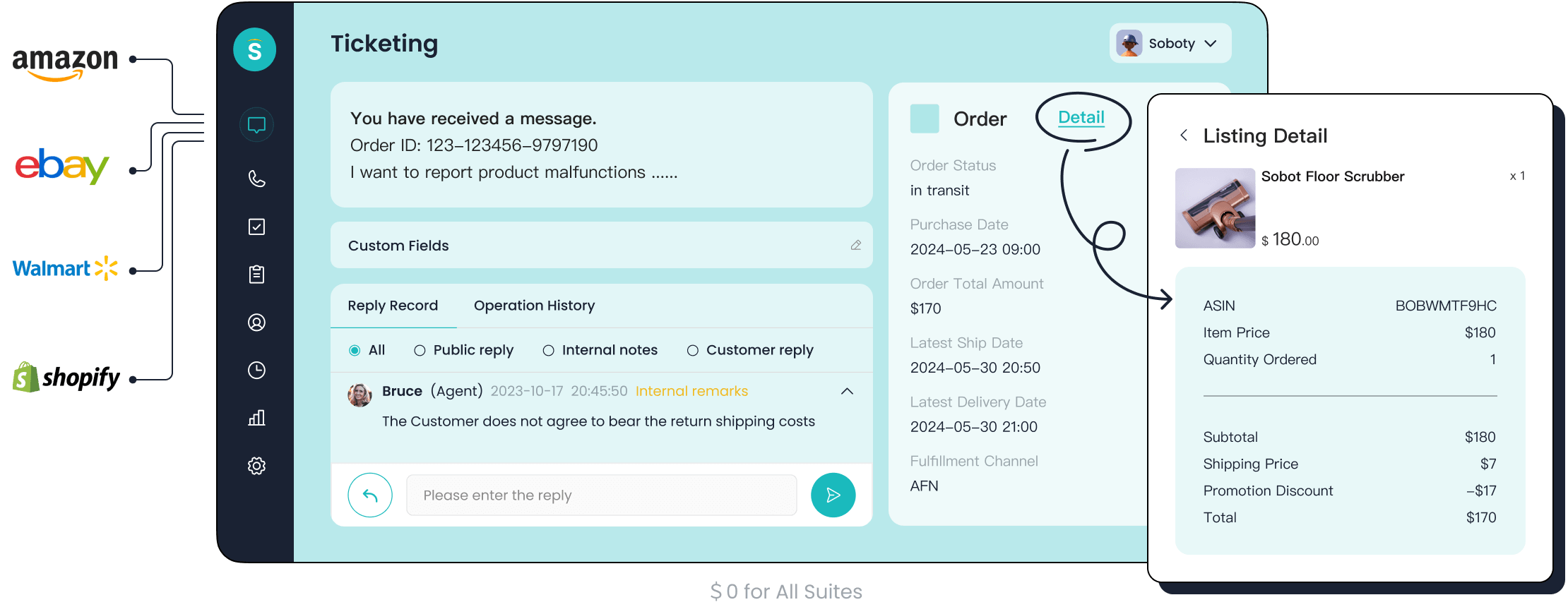
For true transformation, you should consider an all-in-one platform built on AI. The Sobot Ticketing System is a prime example. It is designed to create ticketing automatically and unify all your customer service channels. This approach directly solves the pain points of data silos and manual effort.
Sobot integrates email, live chat, and even voicemail into a single workspace. This unified system gives your agents the full context of every customer interaction, which improves your customer service. The platform uses powerful automation to handle repetitive tasks. Its AI can analyze incoming tickets for intent and urgency, enabling intelligent automated ticket assignment that goes beyond simple keywords. This level of automation frees your team to focus on complex issues.
Furthermore, Sobot is an official WhatsApp Business Solution Provider (BSP). This means Sobot is an expert partner authorized by Meta to help you connect with customers on WhatsApp. This capability allows you to automate conversations and manage tickets on one of the world's most popular messaging apps, ensuring you meet customers where they are.
Step 3: Define Your Automated Ticket Assignment Logic
Once you have your tool, you must define the rules that will power your service desk automation. This logic acts as the brain of your operation, telling the system where each ticket should go. Creating clear rules for automated ticket assignment is essential for an efficient ticketing system workflow and better customer service. Your automation is only as smart as the processes you design.
Set Up Keyword-Based Routing
Keyword-based routing is the simplest form of automation. You can create rules that scan incoming tickets for specific words or phrases. A system like Sobot allows you to create custom trigger rules with ease. For example, a ticket with the word "refund" can be automatically assigned to the finance support group. This simple automation ensures the request immediately reaches the right experts.
💡 Pro Tip: Start with your most common and easily identifiable requests. You can always add more complex rules later. Companies like Beard & Cologne Co. used this method for "refund" and "shipping" issues, which helped them decrease misrouted tickets by 40%.
Implement Skills-Based and Round-Robin Rules
You can create more advanced processes for ticket distribution. Two popular methods are skills-based routing and round-robin routing. Skills-based routing sends tickets to agents with specific expertise. Round-robin routing distributes tickets evenly among a team to balance the workload.
| Routing Method | Routes Based On | Best For |
|---|---|---|
| Skills-based | Agent skills and specialties | Teams with diverse expertise or multiple products |
| Round-robin | A preset list of agents in sequence | Teams where agents have similar skills |
Choosing the right method improves your ticketing system workflow. Use skills-based routing for complex issues and round-robin for general inquiries to maintain fairness and efficiency.
Leverage AI for Automated Ticket Categorization
To truly create ticketing automatically, you need to go beyond basic rules. AI-powered service desk automation analyzes ticket content for intelligent triage. Instead of just looking for keywords, Sobot's AI uses Natural Language Processing (NLP) to understand the full context, intent, and urgency of a message. This leads to smarter automated ticket assignment and better customer service.
This advanced automation can:
- Read the full message to understand the customer's actual problem.
- Detect urgency from phrases like "I need help now" or "my system is down."
- Route the ticket intelligently based on both topic and priority.
This level of automated ticket categorization ensures critical issues are flagged and handled immediately, transforming your support from reactive to proactive.
Step 4: Implement and Test Your System

You have defined your logic. Now it is time to bring your automation to life. A careful implementation and testing phase ensures your new system works as expected before you launch it company-wide. This step prevents major disruptions and builds confidence in your new automation software.
Run a Controlled Pilot Program
Before a full rollout, you should run a small, controlled pilot test. This test lets you see how the automation performs in a real environment without risking your entire support operation. A pilot program is a critical step to validate your new processes.
Follow these best practices for a successful pilot:
- Choose Your Testers: Select a small group of 10-20 agents who will use the new system. This group should be large enough for good feedback but small enough to manage easily.
- Set a Timeline: Decide on a specific duration for the test. A period of 30 days is often enough to encounter both common and infrequent ticket types.
- Provide Training: Make sure your pilot team receives full training on the new system. This ensures they can use the automation features effectively and provide accurate feedback.
Gather Feedback and Refine Rules
The main goal of the pilot is to gather feedback. This information is essential for refining your automation rules and improving the system. You need to know what works well and what causes problems.
Effective Feedback Methods 🗣️ Use a mix of methods to get a complete picture.
- Surveys: Ask agents to rate their experience and identify issues.
- Interviews: Talk directly with users to understand their thoughts in detail.
- Usage Data: Analyze how agents interact with the system to spot hidden problems.
Use this feedback to fine-tune your system. You might discover that your rules for automated ticket assignment need adjustments or that a specific workflow is confusing. Continuous refinement is the key to successful automation. This iterative process ensures your final system is efficient and user-friendly.
Step 5: Train Your Team and Monitor for Efficiency
Your service desk automation is now ready for its final step: the full launch. Success depends on two key actions: preparing your team for the new process and measuring the results. Proper training ensures smooth adoption, while monitoring proves the value of your automation investment.
Educate Agents on the New Workflow
A new system can make agents worry about their roles. You can address this by showing them how automation helps them, not replaces them. The goal is to free them from repetitive tasks so they can focus on complex problem-solving. This shift elevates their work and improves your overall customer service.
"In a future where automation does a lot more, all workers would benefit from up-skilling on empathy, managing complexity across multiple knowledge domains, improvisation, and decision-making in ambiguity." - Kam Star, Vice President of Entire Product Portfolio at SS&C Blue Prism
Effective training for your new ticketing system workflow should include:
- Hands-On Practice: Let agents use the system in a test environment to build confidence.
- Focus on Soft Skills: With automation handling simple queries, train agents on empathy and creative problem-solving for tougher cases.
- On-Demand Resources: Create a knowledge base with short videos and guides that agents can access anytime.
Track Key Performance Indicators (KPIs)
You must track performance to measure the success of your service desk automation. The right KPIs show you exactly how the new system improves efficiency and customer satisfaction.
Look at the success of OPPO, a leading smart device brand. By implementing Sobot's automation, they achieved incredible results. Their chatbot handled 83% of queries without human help, and they earned a 94% positive feedback rate. This shows what is possible. The ultimate goal of automation is not just speed, but real business growth. For OPPO, this powerful ticketing system workflow led to a 57% increase in customer repurchase rates. This demonstrates that excellent service directly drives loyalty and revenue, providing the greater scalability your business needs.
Track these essential KPIs to measure your own success:
| Key Performance Indicator | What It Measures |
|---|---|
| First Response Time | How quickly you first reply to a customer. |
| Average Resolution Time | The total time it takes to solve a ticket. |
| First Contact Resolution | The percentage of issues solved in one interaction. |
| Customer Satisfaction (CSAT) | How happy customers are with the support they received. |
Monitoring these metrics will prove the value of your new system and guide future improvements for even greater efficiency and scalability.
You now have a proven path to help desk excellence. Following the five steps—Analyze, Choose, Define, Test, and Monitor—helps you create ticketing automatically. This service desk automation delivers increased efficiency and smoother customer service. Your team gains powerful automation, and this automation boosts their efficiency. This service desk automation will transform your customer service.
Embark on Your Contact Journey and create ticketing automatically to transform your help desk today.
FAQ
How does automation improve customer service?
Automation handles repetitive tasks instantly. This speed reduces customer wait times. Your team can then focus on complex problems. This dual approach to automation leads to faster, higher-quality support and happier customers. Good automation is key to efficiency.
Can this automation integrate with my existing tools?
Yes. A platform like Sobot connects with many tools you already use. This automation integrates with email, chat, and e-commerce platforms like Shopify. This creates a unified system, removes data silos, and makes your support automation more powerful.
What is the role of AI in ticketing automation?
AI makes your automation smarter. It goes beyond simple keywords to understand a customer's true intent and urgency. This advanced automation allows for more accurate ticket routing and prioritization, ensuring critical issues get immediate attention.
Will automation replace my support agents?
No, automation empowers your agents. It handles the simple, repetitive questions. This frees your team to focus on high-value tasks that require human skills like empathy and complex problem-solving. This automation elevates their role and improves job satisfaction.
See Also
Elevating Customer Service Efficiency Through Advanced AI Software Solutions
A Comprehensive Guide to Implementing AI in Call Center Operations
An In-Depth Review of Enterprise AI Solutions for Call Centers
Discovering the Top 10 AI Tools for Enterprise Contact Centers
Understanding How Call Center Automation Drives Operational Efficiency Effectively

