How to Configure and Diagnose Systems with Service Tools

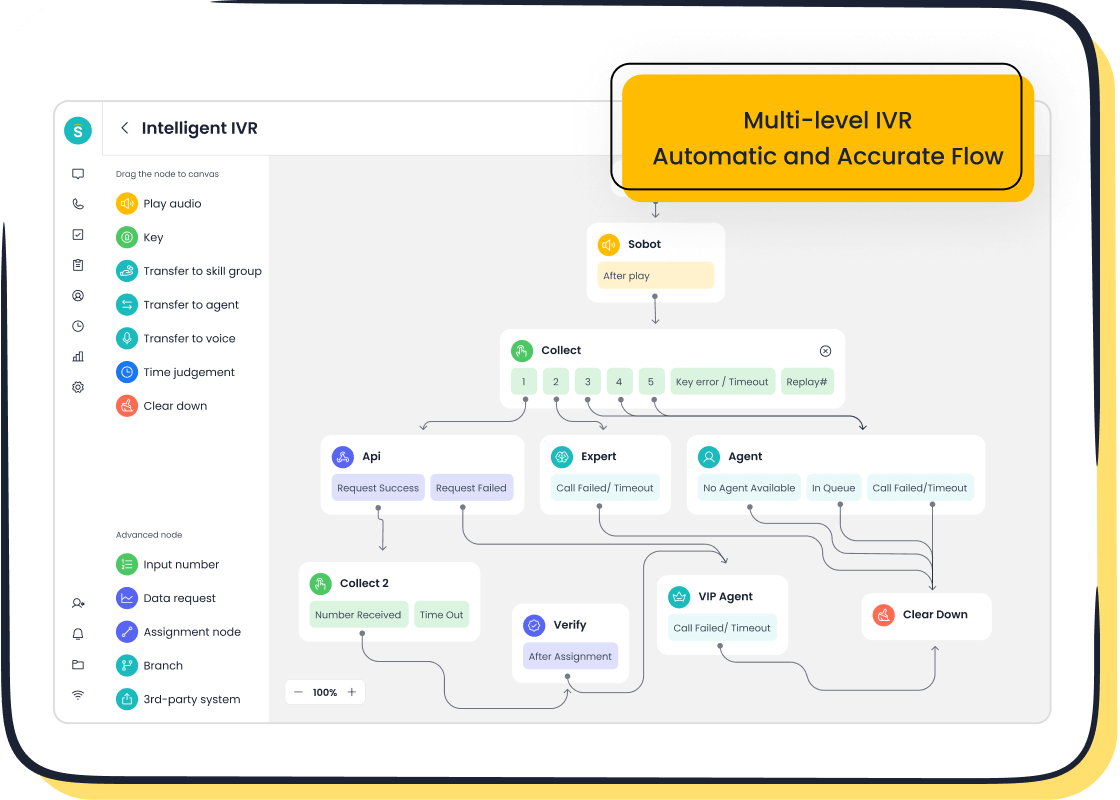
Digital service tools help you configure and diagnose systems quickly, keeping your customer support running smoothly. In retail and e-commerce, you see real results when you use the right tools.
| Company | Digital Tool Used | Benefits |
|---|---|---|
| Canadian Hearing Solutions | AI chatbot and live chat | Handles bookings and urgent support, giving fast, tailored help. |
| Le Reve | AI chatbot and live chat | Simplifies order tracking and returns for a seamless experience. |
With Sobot call center and Sobot AI, you gain a powerful service tool that unifies your data, improves diagnostics, and helps you spot hidden patterns. This comprehensive guide will show you how to make the most of these solutions.
Service Tool Basics

What Is a Service Tool
A service tool helps you check, configure, and fix systems in your business. You use these tools to find problems, monitor performance, and make sure everything works as it should. In customer support, you often see three main types of service tools:
| Tool Type | Description |
|---|---|
| Built-in Diagnostic Tools | Tools included in operating systems to check for hardware and software issues. |
| Third-Party Software | Software options for in-depth analysis, such as system scanners and performance monitors. |
| Hardware Diagnostic Tools | Tools that test physical components of a computer, like hard drives or memory. |
Service tools often include features like reading error codes, resetting alerts, and showing live data streams. These functions help you spot issues quickly and keep your systems running smoothly.
Why Use Service Tools
You use service tools to keep your systems reliable and reduce downtime. When you monitor your systems in real time, you can fix problems before they grow. Many companies, like AWS and Netflix, have shown that strong monitoring and reporting systems lead to better reliability and happier customers.
Proactive maintenance and regular upgrades with service tools prevent unexpected failures and boost performance.
You also use service tools to keep track of changes, analyze error logs, and follow a clear troubleshooting process. This helps you solve problems faster and protect your data. Good configuration with the right service tool makes it easier to add new software or hardware and keeps your business safe from threats.
Sobot in Customer Contact
Sobot stands out in customer contact because it brings advanced AI and a unified workspace to your team. With Sobot, you get tools like an AI-powered Voicebot, live chat, and a ticketing system. These features help you answer customer questions faster and more accurately. Sobot also supports multiple languages and connects with platforms like WhatsApp, so you can serve customers around the world.
| Company | Results | Customer Satisfaction Increase | Chatbot Resolution Rate |
|---|---|---|---|
| OPPO | 83% | 94% | 57% |
Sobot’s focus on secure data and ethical AI means you can trust it to handle sensitive information. You get 24/7 support, which lets your agents focus on complex issues while the system handles routine tasks.
Choose Service Tool
Criteria for Selection
When you choose a service tool for your business, you want to make sure it fits your needs. You should look for tools that help you find problems quickly, test your systems, and keep everything running smoothly. Here is a table that shows important criteria to consider:
| Criteria for Tool Selection | Description |
|---|---|
| Isolating faults | Pinpoints issues to specific hardware components |
| Exercising the system | Reveals subtle problems, whether hardware-related or not |
| Monitoring | Detects issues before they lead to downtime |
You should also think about how the tool connects with other systems. For example, strong CRM integration helps you share information in real time and avoid data silos. This is important for industries like retail and finance, where fast and accurate customer service matters.
Sobot Voice/Call Center Features

Sobot Voice/Call Center gives you many features to support system configuration and diagnostics. You get intelligent call routing, which uses AI to send calls to the right agent. Interactive Voice Response (IVR) guides callers and collects basic information. Call recording helps with training and quality checks. Real-time analytics let you monitor agent performance and customer satisfaction. The AI-powered Voicebot automates simple tasks, so your team can focus on complex issues. Sobot also offers robust integration, connecting with your CRM and other tools. Data security is a priority, with end-to-end encryption and compliance with regulations like GDPR.
| Feature | Description |
|---|---|
| Intelligent Call Routing | Connects calls to the right agents, reducing wait times |
| Interactive Voice Response (IVR) | Guides callers and collects information automatically |
| Call Recording | Records calls for training and quality assurance |
| Monitoring and Real-Time Analytics | Lets you watch agent performance and customer satisfaction live |
| AI-Powered Voicebot | Automates repetitive tasks |
| Robust Integration | Connects with existing systems easily |
| Data Security | Protects customer data with encryption and compliance |
Match Tool to Needs
You need to match your service tools to your business goals. If you want to improve customer support, look for tools that automate tasks and provide real-time insights. Modular software packages let you customize features for your needs. For example, you can set clear KPIs for your support team, like reducing response times or increasing satisfaction scores. You can also use customer feedback to guide your choices. Sobot Voice/Call Center supports these goals with flexible integration and advanced analytics, helping you align technology upgrades with operational efficiency.
Setup and Configuration
Setting up your system with a service tool like Sobot Voice/Call Center helps you deliver better customer support and keep your operations running smoothly. This comprehensive guide gives you a step-by-step guide to prepare, connect, and configure your system for optimal performance.
Prepare System
Before you start, you need to get your system ready for integration. Follow these steps to make sure everything works as expected:
-
Set Up the Necessary Infrastructure
Check that your hardware and software are compatible with Sobot Voice/Call Center. Make sure you have a stable internet connection. This helps prevent dropped calls and ensures smooth communication. -
Train Call Center Agents
Give your agents hands-on training. Teach them how to use the new tools and follow best practices. Make sure they understand compliance rules and know how to handle sensitive customer data. -
Optimize Call Scripts and Workflows
Customize your call scripts for different customer scenarios. Streamline your workflows so agents can work efficiently and provide quick responses.
Tip: Regular training sessions and script updates help your team stay sharp and ready for new challenges.
You may face some challenges during this phase. Here is a table that shows common issues and how you can solve them:
| Challenge | Solution |
|---|---|
| Technical Integration | Start with a full assessment of your current systems. Use APIs or middleware to connect everything smoothly. |
| Accuracy in Understanding User Inputs | Invest in strong natural language understanding (NLU) models. Update them often and add fallback options for tricky queries. |
| Handling Ambiguity | Use advanced NLU and memory features. Test your system with real-world scenarios to improve accuracy. |
| Managing Customer Expectations | Tell customers what the voicebot can and cannot do. Make it easy to switch to a human agent if needed. |
Connect Service Tool
Now you need to connect Sobot Voice/Call Center to your enterprise systems. This step ensures your agents can access all the information they need in one place.
| Requirement Type | Description |
|---|---|
| CRM Integration | Connect Sobot Voice to your CRM. Agents can make outbound calls directly from their workspace. |
| Technical Management System | Integrate with your technical management system for faster operations and better efficiency. |
| Centralized Platform | Use Sobot as a single platform to manage customer interactions across all channels. |
Note: Sobot Voice/Call Center supports easy integration with popular CRM systems. You can find more details on the Sobot Voice/Call Center page.
When you connect your service tool, always check for compatibility and test the connection before going live. This helps you avoid disruptions during customer interactions.
Configuration Steps
After connecting your systems, you need to configure your service tool for daily use. Follow these steps for a smooth setup:
-
Customize IVR and Call Routing
Set up your Interactive Voice Response (IVR) menus. Use the drag-and-drop interface to build call flows that match your business needs. Assign calls to the right agents or teams based on customer input. -
Set Up Unified Workspace
Make sure your agents can see all customer information in one place. This unified workspace helps them respond faster and with more accuracy. -
Enable Monitoring and Analytics
Turn on real-time monitoring. Use analytics to track agent performance and customer satisfaction. This data helps you spot trends and make improvements. -
Automate Routine Tasks
Use Sobot’s AI-powered Voicebot to handle simple customer requests. This frees up your agents to focus on complex issues. -
Secure Your System
Enable encryption and follow data protection best practices. Regularly update your software to keep your system safe.
Tip: Automate software upgrades and security patches. This keeps your system secure and running at peak performance.
When you configure your system, avoid these common pitfalls:
- Do not use overly complex user interface configurations. Too many applets or business components can slow down your system.
- Avoid using case insensitivity in queries. Case-sensitive searches work faster and improve performance.
- Use configuration templates to simplify repetitive tasks and ensure consistency.
- Implement structured change management. Use change management software to automate approvals and reduce errors.
- Monitor changes and conduct regular audits to stay compliant with company policies.
Note: Sobot Voice/Call Center makes it easy to automate many of these tasks, helping you maintain a stable and efficient system.
By following this step-by-step guide, you can set up your service tools quickly and avoid common mistakes. Sobot’s flexible configuration options and strong integration features help you deliver reliable customer support every day.
Diagnostics Guide

Run Diagnostics
You need to use diagnostics tools to keep your systems healthy and efficient. These tools help you find problems, test performance, and keep your business running smoothly. When you use a network diagnostics tool, you can check your system’s connections, spot slowdowns, and fix issues before they affect your customers.
Here is how you can use diagnostics tools for system analysis:
-
Identify Problems
Start with initial machine diagnostics. Use online diagnostic tools to scan your system for errors, viruses, or hardware malfunctions. These tools help you pinpoint where things go wrong. -
Test System Performance
Run diagnostics tools to check how well your hardware works. Look at CPU usage, memory, and disk I/O. A network diagnostics tool helps you see if your network is fast and stable. -
Troubleshoot Issues
Use diagnostics tools to get detailed reports. These reports show you error codes and suggest solutions. You can fix problems faster and keep your system running. -
Support Preventive Maintenance
Regular use of diagnostics tools helps you catch small issues early. This prevents bigger problems and keeps your system reliable. -
Train Your Team
Diagnostics tools are great for training. Your team can learn how to spot and fix issues, making them more skilled and confident.
When you use Sobot’s Voice/Call Center, you get built-in monitoring and analysis. The platform gives you real-time data on calls, agent performance, and system health. You can use the network diagnostics tool to check call quality and spot network issues. Sobot’s unified workspace lets you see all your diagnostics tools in one place, making it easy to run checks and keep your system in top shape.
Tip: Schedule regular diagnostics checks. This helps you find problems before they impact your customers.
You should also collect the right data during diagnostics. Here is a table that shows important metrics to monitor:
| Metric | Importance | Monitoring Approach |
|---|---|---|
| CPU Usage | Shows system load and performance | Use system monitoring tools |
| Memory Usage | Tracks memory consumption and leaks | Monitor with dashboards |
| Disk I/O | Measures disk read/write speed | Use diagnostics tools for storage |
| Network Traffic | Checks data flow across network interfaces | Use a network diagnostics tool |
| Response Time | Shows how fast your system responds | Use application monitoring |
| Error Rates | Tracks how often errors occur | Use error tracking tools |
| Custom Metrics | Tailor to your business needs | Use APIs and custom scripts |
You can also use online diagnostic tools to collect logs and metrics. Logs record system events with timestamps. Metrics give you numbers that show how your system works at different times. Both help you understand your system’s health.
Interpret Results
After you run diagnostics tools, you need to make sense of the results. Sobot’s monitoring and analysis features help you do this with clear dashboards and reports. You can use a network diagnostics tool to see if your network is the cause of slow calls or dropped connections.
To interpret your diagnostics results, look for patterns and trends. Here are some common methods:
| Method | Description |
|---|---|
| Correlation | Look for relationships between two things, like high CPU usage and slow calls |
| Cross-tabulation | Compare different groups, such as call types and error rates |
| Multiple Regression | See how several factors affect one result, like agent performance |
| Tree-based Analysis | Use decision trees to find what causes certain issues |
For example, if you see high error rates during peak hours, use a network diagnostics tool to check if your network gets overloaded. If you notice slow response times, check your CPU and memory usage with diagnostics tools. Sobot’s real-time analytics let you spot these issues quickly.
Note: Always compare your diagnostics results over time. This helps you see if changes you make improve your system.
You should also look at logs and metrics together. Logs tell you what happened and when. Metrics show you how much or how often. When you use both, you get a full picture of your system’s health.
Troubleshoot Issues
When diagnostics tools find a problem, you need to fix it fast. Sobot’s unified workspace helps you see all your data in one place, so you can act quickly. Use a network diagnostics tool to check if the problem comes from your network or another part of your system.
Here are steps you can follow for troubleshooting:
-
Review Diagnostic Reports
Read the reports from your diagnostics tools. Look for error codes, warnings, or unusual patterns. -
Isolate the Issue
Use your network diagnostics tool to check if the problem is with your network. If not, use other diagnostics tools to check hardware or software. -
Check Logs and Metrics
Look at logs for recent changes or errors. Use metrics to see if performance dropped at the same time. -
Apply Solutions
Follow the suggestions from your diagnostics tools. This might mean restarting a service, updating software, or fixing a network cable. -
Test Again
After you fix the issue, run diagnostics tools again. Make sure the problem is gone and your system works well.
Common issues you might find with diagnostics tools include:
- Misunderstandings about how tests work or what results mean.
- Communication problems between team members.
- Scheduling issues for maintenance or updates.
You can solve these by:
- Giving your team clear educational resources.
- Using Sobot’s ticketing system to track issues and follow up.
- Setting standards for how you share test results and updates.
Tip: Encourage your team to review their troubleshooting steps. This helps everyone learn and avoid mistakes in the future.
Sobot’s monitoring and analysis features make troubleshooting easier. You can see real-time data, track changes, and use online diagnostic tools to check your system from anywhere. The platform’s AI-powered Voicebot can even help you automate simple fixes, saving your team time.
When you use diagnostics tools regularly, you keep your system healthy and your customers happy. Sobot’s solutions give you the power to run diagnostics, interpret results, and troubleshoot issues with confidence.
Ongoing Maintenance
Preventive Diagnostics
You can keep your systems healthy by using preventive diagnostics. This approach helps you avoid unexpected downtime and keeps your business running smoothly. Preventive diagnostics work at different levels. The table below shows how each level helps protect your systems:
| Level of Prevention | Description |
|---|---|
| Primary prevention | Stops problems before they start. For example, regular system scans prevent issues that could affect network connectivity. |
| Secondary prevention | Finds problems early. Early detection of weak network connectivity helps you fix issues before they cause downtime. |
| Tertiary prevention | Reduces the impact of existing problems. Quick action on alerts can reduce machine downtime and prevent bigger failures. |
| Quaternary prevention | Avoids unnecessary fixes. Smart diagnostics help you focus on real issues, not false alarms, keeping your connectivity strong. |
Sobot’s monitoring tools let you set up alerts and run regular scans. You can spot risks early and take action before they lead to downtime.
Regular Checks
Regular system checks are key to preventing major failures. You should:
- Check network connectivity often to catch slowdowns or outages.
- Review system logs and performance data to spot trends.
- Test backup systems to make sure you can recover quickly.
High Reliability Organizations show that constant awareness of system operations helps you avoid risks. When you stay alert, you can respond fast and keep your systems stable. Regular checks also build confidence in your team and your technology.
Tip: Schedule checks during low-traffic hours to avoid disrupting customer service.
Optimize Configuration
Optimizing your system configuration helps you get the best performance and reduce errors. Here are best practices for using Sobot service tools:
| Best Practice | Description |
|---|---|
| Use a Configuration Management Database (CMDB) | Keep all your IT assets in one place for better visibility and faster problem-solving. |
| Automate Configuration | Use Sobot’s automation features to keep settings consistent and reduce mistakes. |
| Standardize Settings | Set clear rules for how systems should be configured to avoid confusion. |
| Manage Changes Carefully | Track and approve changes to prevent unwanted downtime. |
| Check Compliance | Make sure your settings follow company policies and protect against risks. |
Sobot’s unified workspace and automation tools make it easy to manage these tasks. You can monitor network connectivity, automate updates, and keep your system secure. When you follow these steps, you keep your business running and your customers happy.
Practical Tips
Common Challenges
You may face several challenges when configuring and diagnosing systems with service tools. Sometimes, agents struggle with new technology or feel overwhelmed by too many features. You might see delays if your team does not follow a clear process. Data silos can slow down your response time. If you do not update your tools, you risk security issues. To boost productivity, always train your team and keep your software current.
Tip: Create a checklist for each troubleshooting step. This helps you avoid missing important details.
Real-World Examples
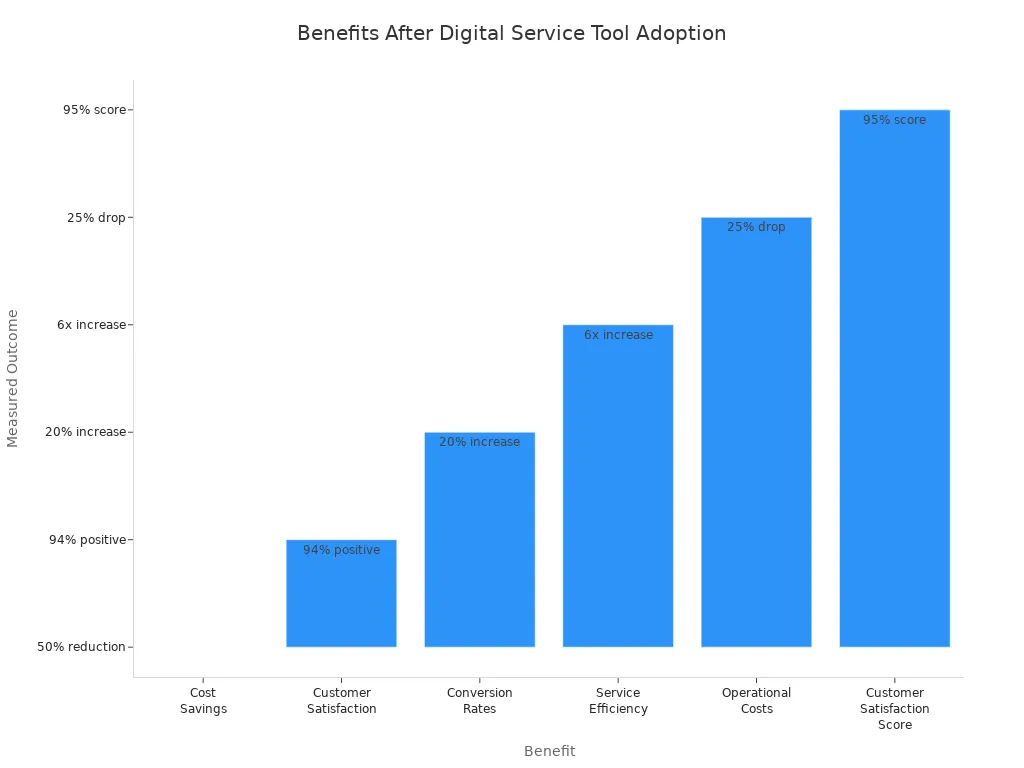
Agilent, a leader in life sciences, improved its customer service by using Sobot’s omnichannel workbench and AI-powered chatbot. Before Sobot, Agilent’s team spent too much time on routine questions. After switching, the chatbot handled simple requests, and agents focused on complex cases. This change increased productivity by six times and raised customer satisfaction to 95%. You can read more about Agilent’s experience here.
| Company | Solution Used | Result |
|---|---|---|
| Agilent | Sobot AI + Chatbot | 6x productivity boost |
Expert Advice
Experts recommend that you review your system logs regularly. Use Sobot’s monitoring tools to spot trends and fix issues early. Set clear goals for your team, such as faster response times or higher customer satisfaction. Automate routine tasks with Sobot’s AI-powered Voicebot or ticketing system. This lets your agents focus on important work. Always measure your results and adjust your process to keep improving.
Note: Small changes, like updating call scripts or using unified workspaces, can make a big difference in your team’s productivity.
Digital service tools like Sobot help you boost efficiency and improve customer support. You see real results, such as higher satisfaction and lower costs.
| Benefit | Measurement |
|---|---|
| Service Efficiency | Sixfold increase (Agilent Technologies) |
| Operational Costs | 25% drop (Agilent Technologies) |
| Customer Satisfaction | 95% score (Agilent Technologies) |
Stay proactive with regular maintenance and diagnostics. Explore Sobot’s solutions to keep your systems strong and your customers happy. Keep learning and use best practices to drive ongoing success.
FAQ
What steps help you improve network performance for customer support?
You can boost network performance by running regular speed tests, checking for network configuration problems, and using diagnostic software. Sobot’s call center tools let you monitor real-time data and spot issues early. Fast network performance keeps your remote service reliable and helps customers get quick answers.
How do you use remote service tools for troubleshooting common PC issues?
You use remote service tools to access customer computers, run diagnostic software, and fix problems from anywhere. Sobot’s live chat and voicebot features help you guide customers through technical troubleshooting. Remote service increases service productivity and gives customers fast, effective problem-solving.
What makes reliable online diagnostic tools important for customer support?
Reliable online diagnostic tools help you find network configuration problems and improve network performance. You use these tools to collect real-time data and solve issues before they affect customers. Sobot’s unified workspace lets you run diagnostics and manage configuration and management tasks for remote service.
How do you handle network configuration problems during remote service?
You check network performance using diagnostic software and review real-time data. Sobot’s call center and AI agent features help you guide customers through troubleshooting solution steps. You can fix network configuration problems quickly, keeping remote service smooth and customer satisfaction high.
Why should you monitor service productivity and technical troubleshooting with Sobot?
You monitor service productivity to see how well your team helps customers. Sobot’s dashboard shows real-time data, making technical troubleshooting easier. You track network performance and use diagnostic software to find issues. Remote service tools help you deliver effective problem-solving and keep customers happy.
See Also
Enhancing Call Center Efficiency Through Effective Monitoring Techniques
Essential Insights on Call Center Quality Assurance Tools
Enhance SaaS Customer Support Using Live Chat Approaches
Ten Essential Tips for Selecting Social Media Support Tools
The Ten Leading Customer Service Software Solutions for 2024

