Evaluating Contact Center Monitoring Options


Choosing the right contact center software is a critical decision, with the market projected to grow at an 18.8% CAGR. Effective contact center monitoring is the foundation for a superior customer experience and excellent customer service. Success hinges on evaluating essential software features for customer monitoring. Platforms like the Sobot call center, powered by Sobot and Sobot AI, offer robust monitoring features. This detailed monitoring ensures every customer interaction is optimized, making this type of contact center software essential for any customer-focused business aiming for quality service and efficient monitoring of every customer.
Essential Contact Center Monitoring Features
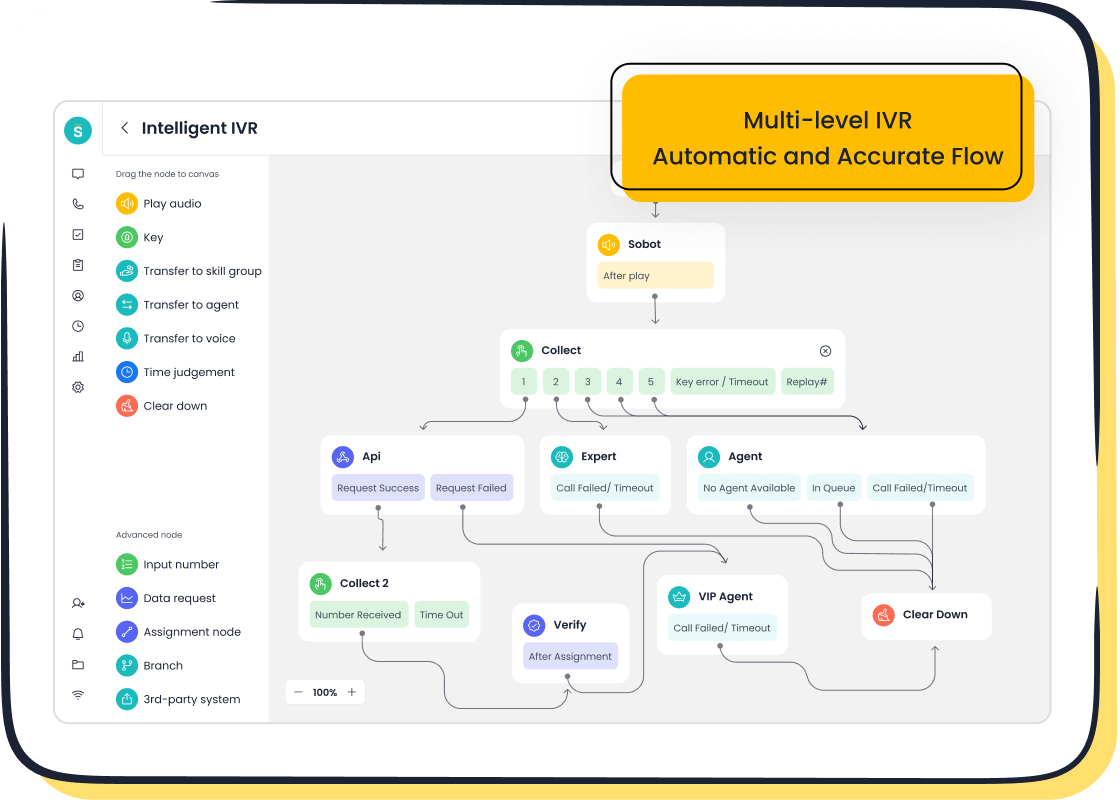
Effective contact center monitoring depends on a core set of software features. These tools provide the data and insights necessary for optimizing performance and enhancing the customer experience. The right contact center software transforms raw data into actionable intelligence for your customer support teams.
Real-Time Dashboards and Analytics
Real-time dashboards are critical features for modern contact center software. They provide an immediate, live view of operations. Managers can track key metrics and make fast, data-driven decisions to improve service quality.
Real-time monitoring gives supervisors an instant, complete picture of operations. This allows them to prevent problems by adjusting call routing or staffing.
These dashboards offer powerful real-time analytics. They display performance drivers like Average Wait Time and Call Abandonment Rate. Constant monitoring of these metrics helps managers allocate resources effectively. The software uses real-time activity tracking to provide deep analytics and reporting, which are essential for any quality assurance program. This real-time data empowers teams by showing them their performance against targets.
Call Recording and Quality Scoring
Call recording and monitoring features are fundamental for quality assurance and compliance. This software must provide secure storage and encryption to meet regulations like GDPR and HIPAA. A structured quality scoring system uses these recordings to evaluate customer interactions. This process helps managers assess agent performance and identify areas for improvement. A robust scoring system within the contact center software fosters a culture of continuous improvement. This focus on quality directly leads to more satisfied customers and better service.
AI-Powered Speech and Sentiment Analysis
AI is transforming contact center software. By 2025, over 87% of contact centers will have adopted AI features. AI-powered speech and sentiment analytics offer profound insights into customer interactions. This technology analyzes conversations for emotional cues. It helps identify at-risk customers before they churn. The software provides real-time analytics and reporting on customer sentiment. These insights allow businesses to adjust strategies and personalize engagement, improving the overall quality of customer support.
Agent Performance and Coaching Tools
Agent monitoring software includes features designed to boost agent performance. Real-time coaching tools allow managers to provide immediate guidance during live calls. This direct feedback helps improve first-call resolution rates. Three-quarters of agents receive coaching monthly, and 72% find these sessions valuable. Personalized coaching makes agents feel appreciated and engaged. These performance reporting features give agents clear paths for growth, which improves retention and the quality of service they provide to each customer.
Omnichannel Support Capabilities
Today’s customer expects a seamless omnichannel experience. They want to switch between channels without repeating information. Strong omnichannel strategies can retain up to 89% of customers. Omnichannel contact center software unifies all communication channels, from voice to social media. This integration is one of the most important features for customer service operations. It ensures consistent messaging and a unified customer view. An omnichannel platform synchronizes data, reduces friction, and provides a frustration-free journey for every customer.
Comparing Leading Monitoring Software
Selecting the right contact center software requires a careful comparison of leading options. Each platform offers a unique set of features and strengths. This analysis examines three top contenders—Sobot, Talkdesk, and Zendesk—to help you understand which solution best fits your operational needs for effective contact center monitoring. A close look at their features, pricing, and core advantages provides the insights needed for an informed decision.
Sobot Voice/Call Center: Features, Pricing, Pros & Cons

Sobot provides an all-in-one contact center software solution designed for global businesses. Its platform integrates customer service, sales, and marketing functions into a single, unified workspace. The monitoring capabilities are built directly into its comprehensive suite of tools.
Features
Sobot's Voice/Call Center is equipped with a robust set of features for complete customer interaction management and monitoring.
- Intelligent Call Management: The software includes a drag-and-drop Intelligent IVR, smart call routing, and Automatic Call Distribution (ACD) to direct each customer efficiently.
- Unified Agent Workspace: Agents get a complete view of customer information and history in one place, supporting inbound and outbound calls, transfers, and service summaries.
- Advanced Monitoring and Analytics: Real-time monitoring of metrics like queue time and talk time is standard. The system also offers call recording with speech-to-text transcription and detailed statistical reports for deep performance insights.
- AI-Powered Tools: An integrated AI Voicebot analyzes natural speech to understand customer intent, with seamless transfers to human agents when needed.
- Global and Secure Infrastructure: Sobot guarantees 99.99% SLA with a global network. It provides phone numbers from over 100 countries and ensures data security with encryption and compliance with data protection laws. As an official WhatsApp Business Solution Provider (BSP), it extends its omnichannel features.
Pricing
Sobot's contact center software is free to install. Businesses can upgrade to access advanced features, and all charges are billed in USD. For specific details on upgrade packages, it is best to contact Sobot directly.
Pros & Cons
Pros:
- True All-in-One Platform: Combines Voice, Chatbot, Ticketing System, and WhatsApp API, eliminating the need for multiple vendors.
- High Stability and Reliability: A 99.99% SLA ensures consistent service uptime and performance.
- Global Reach: Offers phone numbers and support for businesses operating across different time zones and countries.
Talkdesk: Features, Pricing, Pros & Cons
Talkdesk is a cloud-native contact center software known for its focus on AI-driven automation and analytics. It aims to improve agent productivity and customer experiences through intelligent tools.
Features
Talkdesk's platform centers on using AI to enhance quality and efficiency.
- AI-Powered Quality Management: Talkdesk QM Assist provides searchable transcripts, automated interaction scoring, and sentiment analysis to streamline quality assurance.
- Real-Time Dashboards: The "Live" dashboard gives supervisors a real-time overview of key metrics for immediate operational adjustments.
- Interaction Analytics: The software captures and analyzes customer interactions across channels to reveal trends and common topics, offering valuable business insights.
- Workforce Management (WFM): Combines AI and automation for demand forecasting, scheduling, and performance tracking.
Pricing
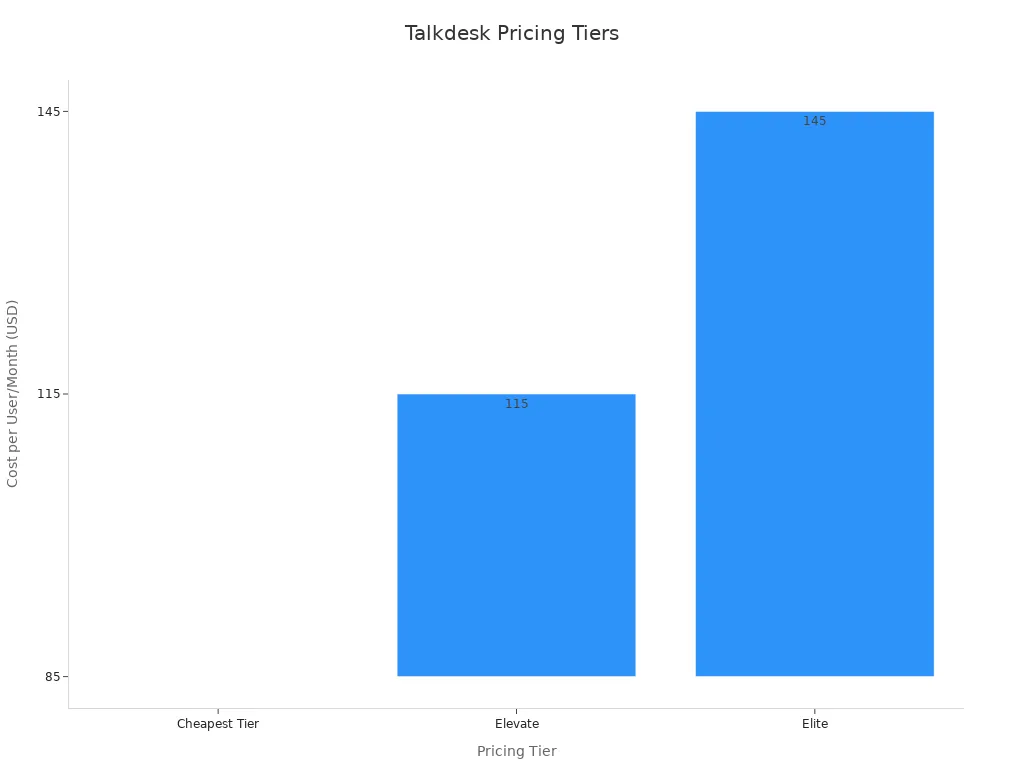
Talkdesk offers several pricing tiers, with costs increasing based on features. Key AI capabilities like AI Copilot are often included in higher-priced plans or as add-ons.
Pros & Cons
Pros:
- Advanced AI and Analytics: A strong choice for businesses that want to leverage AI for deep conversation insights and automated quality management.
- Customizable Workflows: Offers extensive tools for building custom automations and integrations.
Cons:
- Higher Starting Cost: The entry-level pricing is higher compared to some competitors.
- Add-on Costs: Many of the most powerful AI features are part of premium tiers or require separate purchases, which can significantly increase the total cost of ownership.
Zendesk: Features, Pricing, Pros & Cons
Zendesk is widely recognized for its powerful helpdesk and ticketing system. Its contact center software is built around this core strength, offering a unified solution for customer service teams.
Features
Zendesk for Service integrates voice capabilities into its well-established ticketing and support platform.
- Unified Agent Workspace: Centralizes customer interactions from all channels—email, chat, social media, and voice—into a single ticketing interface.
- Help Center and Knowledge Base: Allows businesses to build a robust self-service portal for customers, reducing agent workload.
- Native AI Capabilities: Zendesk includes AI agents (chatbots) for basic questions and intelligent triage to automatically categorize and route incoming tickets based on content and sentiment.
- Reporting and Analytics: Provides customizable dashboards and reporting tools to track ticket volume, response times, and customer satisfaction.
Pricing
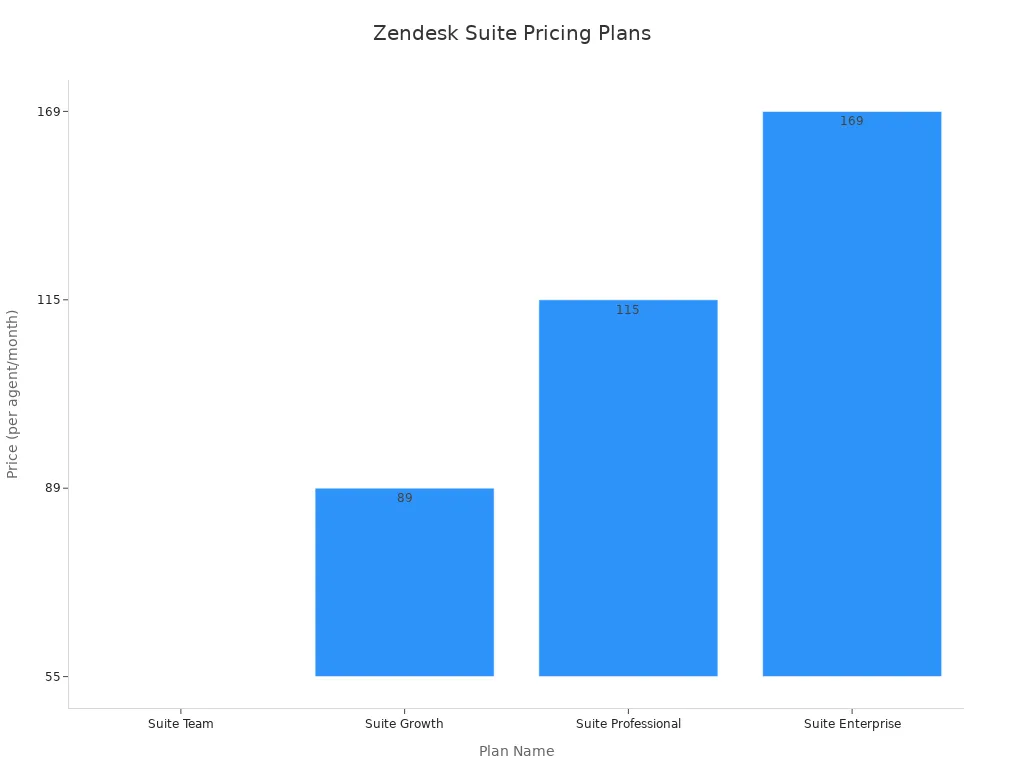
Zendesk's pricing is structured in "Suite" plans, which bundle different features. Voice capabilities are integrated into these omnichannel packages.
Pros & Cons
Pros:
- Excellent Ticketing System: Unmatched for businesses that prioritize a robust, integrated helpdesk and ticketing workflow.
- Strong Omnichannel Integration: Seamlessly combines various digital channels with its core service platform.
Cons:
- Voice as an Extension: The call center monitoring software can feel like an add-on to the core ticketing product rather than a native, voice-first solution.
- Complex for Simple Needs: The extensive features may be overwhelming for teams looking for straightforward call center functionality.
Feature Comparison Matrix
This table provides a high-level overview to help you compare these contact center software options at a glance.
| Feature | Sobot | Talkdesk | Zendesk |
|---|---|---|---|
| Real-Time Monitoring | ✅ Yes, fully integrated | ✅ Yes, with a focus on live dashboards | ✅ Yes, integrated with ticket analytics |
| AI Sentiment Analysis | ✅ Yes, via AI Voicebot & analytics | ✅ Yes, a core part of QM Assist | ✅ Yes, for intelligent ticket triage |
| All-in-One Platform | ✅ Yes (Voice, Chat, Ticket, WhatsApp) | ❌ No, primarily a contact center solution | ❌ No, primarily a helpdesk solution |
| Core Strength | Unified Global Communications | AI-Powered Quality & Analytics | Integrated Ticketing & Helpdesk |
| Starting Price | Free Installation | $85/user/month | $55/user/month (Suite Team) |
Choosing Your Call Center Monitoring System
Selecting the right contact center software involves a strategic process. A methodical approach ensures the chosen solution aligns with your business goals, integrates with existing tools, and scales for future growth. Following these five steps provides a clear path to making an informed decision.
Step 1: Define Your Business Needs and KPIs
A business must first define its specific needs and the key performance indicators (KPIs) for success. Effective monitoring starts with knowing what to measure. These metrics help evaluate agent performance and overall operational efficiency. Key KPIs include:
- First Contact Resolution (FCR): The percentage of customer issues resolved in the first interaction.
- Customer Satisfaction (CSAT): A direct measure of a customer's happiness with the service received.
- Net Promoter Score (NPS): An indicator of long-term customer loyalty.
- Average Handling Time (AHT): The average duration of a customer interaction, balancing speed and service quality.
Tracking these metrics provides a baseline for performance monitoring.
Step 2: Assess Integration with CRM and Helpdesk Systems
The best contact center software integrates seamlessly with your Customer Relationship Management (CRM) and helpdesk systems. This integration gives agents a complete customer history, enabling personalized and efficient service. When agents have all the data in one place, they improve performance and the customer does not need to repeat information. Look for contact center software that connects easily with platforms like Salesforce to unify reporting and analytics for better monitoring.
Step 3: Evaluate Scalability and Future Growth
A scalable contact center software solution grows with your business. Evaluate whether the software supports future expansion. Key features indicating scalability include cloud-based operations, omnichannel routing, and AI-powered automation. Proper monitoring tools should handle increasing interaction volumes without a drop in service quality. This forward-looking evaluation ensures your investment supports long-term performance goals.
Step 4: Compare Pricing and Total Cost of Ownership
Look beyond the initial price tag to understand the total cost of ownership. Some contact center software comes with hidden costs, such as expenses for training, system upgrades, or high employee turnover. Compare different pricing models, like per-agent versus usage-based, to see which fits your budget. A thorough financial analysis prevents future surprises and clarifies the true cost of the software and its monitoring capabilities.
Step 5: Schedule Demos and Run Pilot Programs
Finally, validate your choice with hands-on testing. Schedule demos with vendors and ask specific questions about implementation, data security, and support.
Tip: Running a pilot program with a small group of users is the best way to test a call center monitoring software in a real-world environment. This step provides valuable feedback on performance and usability before a full rollout. This final monitoring phase confirms the software meets every customer service need.
How Weee! Boosted Customer Satisfaction with Sobot
Real-world success stories demonstrate the impact of the right contact center software. Weee!, America's largest online Asian supermarket, transformed its customer service operations by partnering with Sobot. This case study shows how effective monitoring and an integrated platform can overcome significant operational hurdles.
The Challenge: Inflexible Systems and Language Barriers
Weee! serves a diverse customer base, including Chinese, Hispanic, Korean, and Vietnamese communities. This created complex service challenges. The company struggled with:
- An inflexible IVR system that could not adapt to customer needs.
- Language barriers and time zone differences between its Asian-based agents and American customer base.
- Hiring and retaining agents with the right language and technical skills.
These issues are common in e-commerce. Businesses often face high costs and operational strain when trying to provide consistent, real-time support across multiple languages and time zones.
This situation made it difficult to deliver a high-quality service experience for every customer.
The Solution: Sobot's Integrated Voice Product
Weee! implemented Sobot's Voice/Call Center product to address these pain points directly. The solution provided a flexible, drag-and-drop IVR system, allowing Weee! to create intelligent call routing workflows. This ensured each customer reached the right agent quickly.
Sobot's integrated agent workbench was a key part of the solution. It gave agents a unified platform to manage all customer communications and access synchronized information. This eliminated the need for complex system switching. An integrated workbench is proven to boost performance.
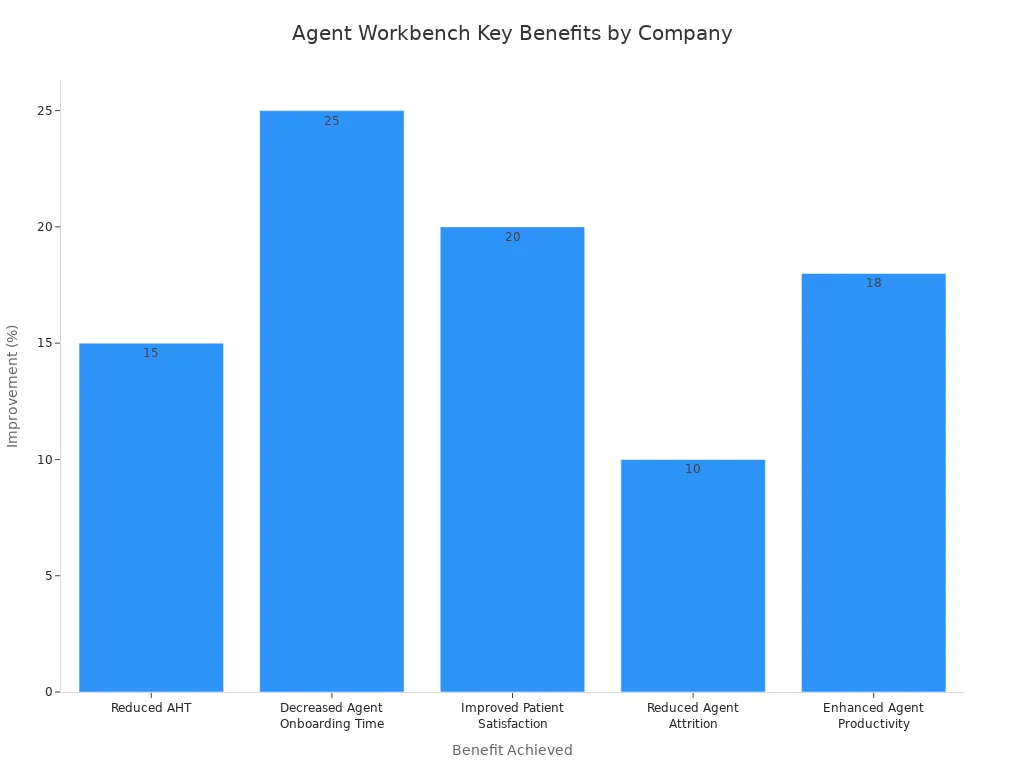
Sobot's open API also allowed for seamless integration with Weee!'s existing ticketing system, further streamlining operations.
The Results: A 20% Rise in Agent Efficiency
The results were immediate and powerful. After implementing Sobot's contact center software, Weee! achieved:
- A 20% increase in agent efficiency.
- A 50% reduction in customer issue resolution time.
- A 96% customer satisfaction score.
This 96% score is exceptional, especially when the e-commerce industry average for customer satisfaction scores is 80%. It demonstrates a significant leap in service quality and customer happiness.
Real-Time Agent Monitoring and Performance Gains
Sobot's agent monitoring software provided the tools for Weee! to sustain this high level of performance. With real-time monitoring, managers could track agent performance and identify areas for coaching. The platform's real-time analytics offered deep insights into every customer interaction. This continuous monitoring loop helped Weee! optimize its service, leading to lasting gains in efficiency and customer satisfaction. The success highlights how the right contact center software with strong monitoring capabilities drives superior business outcomes.
Choosing the right contact center software requires a clear strategy. A business must evaluate essential features, compare options, and follow a structured selection process. The best contact center software meets today's needs and scales for future performance. An all-in-one platform like Sobot's software provides robust monitoring for every customer. This level of monitoring enhances customer support.
AI-driven contact center monitoring is now essential. This software offers proactive customer support and a superior customer experience. Strong monitoring features improve agent performance and customer support for every customer. This improves overall performance and customer support.
FAQ
What is the main purpose of contact center monitoring?
Contact center monitoring helps businesses track agent performance and service quality. It uses data and analytics to identify areas for improvement. This process ensures a better customer experience and boosts operational efficiency.
Which monitoring features are most important?
Essential features include real-time dashboards, call recording, and AI-powered sentiment analysis. Omnichannel support and agent coaching tools are also critical. These features provide a complete view of performance and customer interactions.
How does an all-in-one platform benefit a business?
An all-in-one platform like Sobot unifies voice, chat, and ticketing into one system. This integration simplifies operations and reduces costs. It provides a single source of truth for all customer data, improving agent efficiency.
Why is CRM integration important for monitoring software?
CRM integration gives agents a complete customer history in one workspace. This connection enables personalized service and faster resolutions. It also streamlines reporting by combining operational data with customer data for deeper insights.
See Also
Elevate Call Center Performance: Strategic Monitoring for Optimal Results
Leading Contact Center Solutions: A Comprehensive Review for 2024
Achieving Excellence: Best Practices in Call Center Quality Management
Essential Guide: Selecting Call Center Quality Assurance Software Solutions
Leading Cloud Contact Center Services: In-depth Reviews for 2024

