Top 5 Zendesk Alternatives for Better Ticket Systems

Your team may find Zendesk's advanced features too expensive. Many small businesses also face a steep learning curve with its complex interface. This guide presents the best zendesk alternatives to solve these issues. We compare customer support platforms to help your small and medium business find a better fit. You can explore these five excellent zendesk alternatives for small businesses:
- Freshdesk
- Help Scout
- Sobot
- Zoho Desk
- Intercom
Why Businesses Seek Zendesk Alternatives

While Zendesk is a powerful tool, it may not be the perfect fit for every company. Many organizations, especially small businesses, find that its structure creates significant challenges. This leads them to search for zendesk alternatives that better align with their budget, team size, and growth plans. Let's explore the main reasons you might look for a different solution.
The High Cost of Advanced Features
You often need to pay a high price for Zendesk's best features. Basic plans may cover simple ticketing, but essential tools for modern customer support are frequently locked in expensive upper-tier plans. This includes features like advanced automation, robust analytics, and omnichannel support. For small businesses, this pricing model can make it difficult to access the tools needed to deliver excellent customer service without breaking the budget.
Note: Many teams discover that the cost per agent quickly adds up. As your team grows, the expense of maintaining a high-tier plan can become a major financial burden.
A Steep Learning Curve for Teams
Your team needs a tool they can use effectively from day one. Zendesk's platform is feature-rich, but this can also make it complex and overwhelming for new users. Setting up workflows and customizing the system often requires significant training and technical knowledge. This steep learning curve can slow down your team's productivity. It takes valuable time away from what matters most: helping your customers. A simpler platform can empower your customer support team to work more efficiently.
Support Tiers That Don't Scale
A good help desk should grow with you. Zendesk's pricing tiers can feel restrictive for a growing small and medium business. You might find yourself stuck between a plan that is too basic and one that is too expensive. This lack of flexibility forces many small businesses to seek solutions with more scalable and predictable pricing. The right platform should support your growth, not hold it back.
Freshdesk: One of the Best Zendesk Alternatives for Growth
If your business is growing quickly, you need a help desk that can keep up. Freshdesk is one of the best zendesk alternatives for teams that need to scale. It offers a powerful feature set that supports your team as your ticket volume increases. This platform helps you manage customer conversations efficiently without the high costs of other enterprise-level tools.
Key Ticketing Features
Freshdesk gives your team the tools to manage support requests effectively. It consolidates all customer queries from different channels into a single shared inbox. This ensures you never miss a request. Key features help you organize your workflow:
- Automated Ticket Assignment: You can automatically route tickets to the right agents. Use round-robin distribution to balance workloads or skill-based routing to send tickets to agents with specific expertise.
- SLA Policies: You can set clear expectations for response and resolution times. Create multiple Service Level Agreement (SLA) policies for different products, customers, or business hours.
- Collaboration Tools: Agents can discuss tickets internally and break complex issues into smaller tasks. You can also merge related tickets to keep conversations organized.
Pros: A Scalable Ticketing System
Freshdesk provides a user-friendly interface with robust features that grow with you. It is one of the most scalable zendesk alternatives available. The platform uses AI-powered ticketing to streamline your support processes. This helps you handle more queries during peak hours without needing to hire extra staff.
Success Story: Bridgestone used Freshdesk to enhance their customer support by 95%. This shows the system's power to manage a growing number of customer interactions effectively.
With features like Freddy AI Copilot, your agents can boost their productivity with writing assistance and smart response suggestions. This allows your team to scale its operations effortlessly as ticket volume increases.
Cons: Potential for Complexity
While powerful, Freshdesk can become complex as your organization grows. The platform offers very detailed role-based access controls. This precision is useful, but it can make it hard to track who has access to what. You may find yourself constantly updating permissions as employee roles change. Integrating Freshdesk with other systems, like your CRM, can also add another layer of management complexity.
Pricing: Plans for Every Stage
Freshdesk offers a flexible pricing structure designed to fit businesses of all sizes. You can start with a free plan that covers basic ticketing needs. As your team and requirements expand, you can move to paid plans that unlock more advanced features. This model allows you to pay only for what you need, making it a cost-effective solution for a growing business.
Help Scout: The Top Choice for Simplicity
If your team feels overwhelmed by complex systems, Help Scout is an excellent choice. It stands out among Zendesk alternatives by focusing on simplicity and ease of use. You get a powerful tool that feels just like a shared email inbox. This approach removes the steep learning curve, so your team can start helping customers right away.
Key Ticketing Features
Help Scout provides the essential tools your team needs for effective support. It organizes all customer conversations into one place. This makes collaboration simple and efficient. Key features include:
- Shared Inbox: You can manage emails, chats, and phone calls from a single mailbox. This keeps your team organized across different brands or departments.
- Collaboration Tools: Agents can use private notes to discuss tickets internally. Collision detection also prevents two agents from replying to the same customer at once.
- Knowledge Base (Docs): You can build a self-service help center. This allows customers to find answers on their own, reducing your team's ticket volume.
Pros: An Intuitive User Experience
Help Scout’s greatest strength is its clean and intuitive interface. The design focuses on simplicity, which helps you onboard new team members quickly. Its layout is easy to navigate, and a powerful search function lets you find past conversations instantly. Unlike Zendesk's often busy dashboard, Help Scout provides a calm, focused workspace. This user-friendly experience allows your agents to manage customer interactions without feeling overwhelmed.
Cons: Fewer Advanced Automations
The focus on simplicity means Help Scout has fewer advanced automation features. You will not find the complex, AI-powered tools that some competitors offer. For example, platforms like Zendesk or Zoho Desk provide AI that can automatically route tickets based on sentiment or forecast staffing needs. If your team requires highly customizable workflows or advanced AI assistance, you might find Help Scout a bit limited.
Pricing: Straightforward and Transparent
Help Scout offers a simple and predictable pricing model. You pay a clear price per user, without confusing tiers that lock essential features away. This transparency makes it easy to budget for your support team as it grows. You get access to what you need without worrying about hidden costs or sudden price hikes, making it a reliable choice for businesses that value clarity.
Sobot: Best for All-in-One, AI-Powered Support
If you want a single, powerful platform for all customer communications, Sobot is your ideal choice. It moves beyond a simple ticketing tool. Sobot provides an integrated contact center solution that unifies your support channels into one efficient workspace. This makes it a strong Zendesk alternative for businesses that want to streamline operations and leverage artificial intelligence.
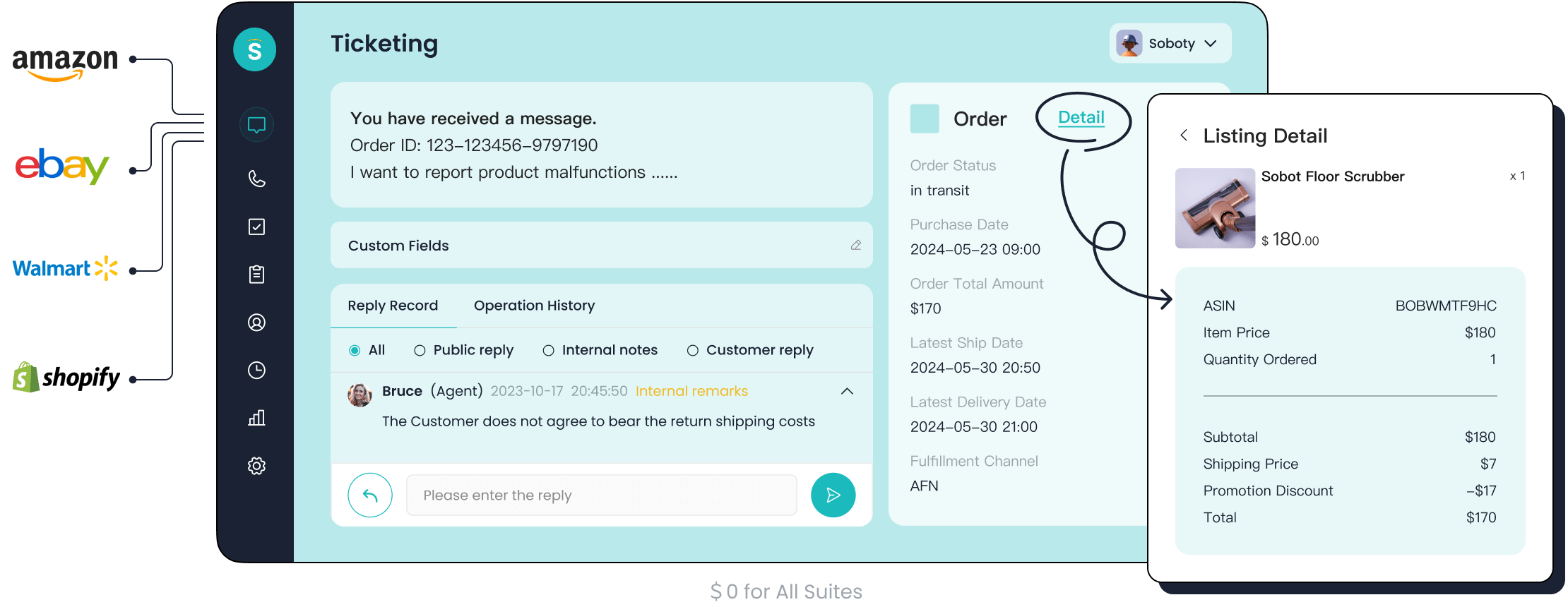
Key Ticketing Features of Sobot
Sobot’s ticketing system gives you the tools to manage cases with precision. It is designed for organized and efficient issue resolution. You can automate many parts of your support workflow.
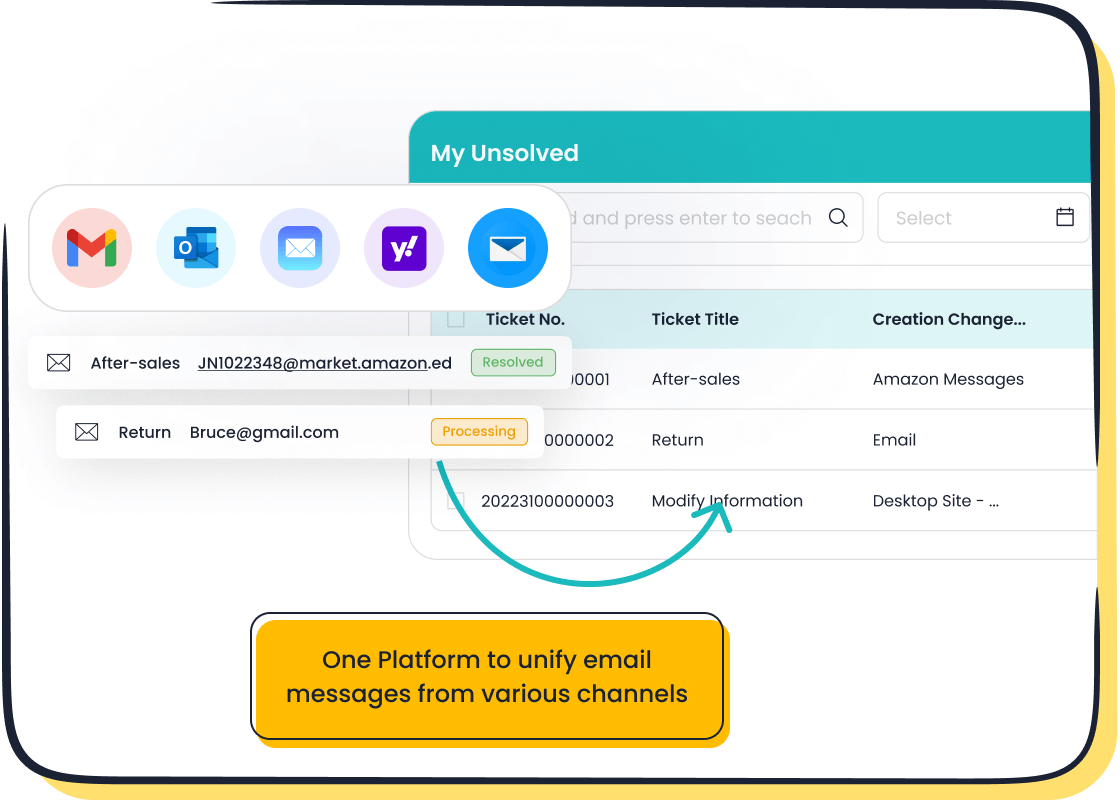
- Unified Ticket Handling: The system gathers requests from email, chat, and social media into one place.
- Automated Workflows: You can automatically assign tickets to the right agents based on custom rules.
- SLA Management: Set and monitor response and resolution times to ensure you meet customer expectations.
Pros: A Unified Omnichannel Platform
Sobot excels at creating a seamless customer experience. It unifies every touchpoint, including phone, email, and live chat, into a single platform. Your team gets a complete view of every customer interaction.
How it works: AI tools gather data from all channels. This gives your agents real-time information to provide personalized and accurate responses. You no longer need to switch between different systems to understand a customer's history.
This unified approach ensures consistency and helps your team resolve issues faster.
Pros: AI-Powered Automation and Efficiency
Sobot uses AI to make your support team more productive. Its multi-faceted AI assists customers, agents, and managers. An AI-powered chatbot can resolve common questions 24/7, while an AI Copilot suggests replies for your human agents. These tools help you handle more inquiries without sacrificing quality. The platform’s automated ticketing system also categorizes and prioritizes tickets, which leads to faster resolutions.
Pricing: Value-Driven Tiers
Sobot offers value-driven pricing tiers that provide access to its powerful, all-in-one solution. The plans are designed to deliver a comprehensive feature set that includes omnichannel support and advanced AI automation. This structure gives you the tools needed for a modern contact center without the complexity of navigating countless add-ons. You can choose a plan that fits your operational needs and budget.
Zoho Desk: The Best Value-for-Money Option
If you need powerful features without a high price tag, Zoho Desk is an excellent choice. It stands out as the best value-for-money option among Zendesk alternatives. This affordable help desk software gives you enterprise-grade tools on a small business budget. You can deliver great customer support without overspending.
Key Ticketing Features
Zoho Desk provides a complete set of tools to manage your support tickets. You can handle customer requests from many channels in one place. This help desk software helps your team stay organized and efficient.
- Multichannel Support: Manage tickets from email, social media, live chat, and phone calls.
- AI-Powered Assistance: Use Zia, Zoho's AI, to analyze customer sentiment and suggest solutions to agents.
- Automation: Set up workflows to automatically assign tickets and escalate urgent issues.
- Self-Service Portal: Build a knowledge base and community forums so customers can find answers themselves.
- Team Collaboration: Agents can tag other team members and leave private comments inside tickets.
Pros: An Affordable Help Desk Software
Zoho Desk delivers incredible value. It is a truly affordable help desk software designed for startups and small businesses. You get access to advanced features that other platforms lock behind expensive plans. The platform's pricing structure ensures you receive a high return on investment.
You get 80-90% of the features found in big-league tools at a fraction of the cost. This makes it a smart financial decision for growing teams.
Cons: Integration Can Be Complex
While Zoho Desk works perfectly within its own ecosystem, connecting it to outside tools can be challenging. You might find that setting up integrations with third-party CRM or marketing platforms requires extra technical effort. This complexity can slow down your initial setup if your business relies on a diverse set of software.
Pricing: Unbeatable Free and Paid Plans
Zoho Desk's pricing is its biggest advantage. The platform offers one of the most generous free plans available, supporting up to three agents. As your team grows, you can upgrade to a paid plan that fits your budget. This makes the help desk software both scalable and cost-effective. You get a powerful, affordable help desk software solution without worrying about hidden fees for essential features.
Intercom: The Leader in Proactive Customer Communication
If you want to move beyond simply reacting to problems, Intercom is a top choice. It helps you engage with customers before they even need to ask for help. This platform is designed for proactive communication. It blends customer support with marketing and sales tools, creating a unified customer experience.
Key Ticketing Features
Intercom organizes your support requests with a flexible ticketing system. You can manage different types of issues, from simple customer questions to complex internal tasks. This ensures every problem gets the right attention.
| Feature | Customer Tickets | Back-office Tickets | Tracker Tickets |
|---|---|---|---|
| Purpose | Track long-running customer queries and keep them updated. | Work with other teams on issues linked to a conversation. | Manage problems that affect many customers, like bugs or outages. |
| Key Benefits | Gathers information upfront and lets customers track progress. | Assigns clear ownership to back-office teams without losing context. | Creates a single source of truth for widespread issues and updates. |
Pros: Blending Support with Engagement
Intercom’s main strength is its ability to blend support with engagement. You can use it to send proactive messages to customers. For example, you can alert them about a delivery delay or a website bug. This prevents a flood of support tickets. You can also use it to onboard new users with product tours and helpful tips. This approach helps your customers succeed from day one. The platform encourages your support team to share insights with other departments. This collaboration helps improve your product and the overall customer experience.
Cons: Higher Price Point
The advanced features of Intercom come with a higher price. Its modern interface and proactive messaging tools are valuable. However, they make it one of the more expensive options. The platform is great for companies that prioritize a sleek user experience and proactive outreach. If your budget is tight, the cost might be a significant drawback.
Pricing: A Focus on Active Contacts
Intercom's pricing can be complex. You pay a base fee for each team member. You also pay extra based on your usage of certain features. A key factor is its AI agent, Fin. The more your customers use the AI for resolutions, the higher your bill can be. This model can lead to rising expenses as your company and customer interactions grow.
Compare Customer Support Platforms: Zendesk vs. The Competition
Choosing the right help desk software is a big decision. You need a tool that fits your team's workflow and budget. To help you decide, we will compare customer support platforms and their core differences. This direct comparison shows how Zendesk's competitors stack up in key areas. A clear look at these options will help you compare customer support platforms effectively.
Comparison of Ease of Use
Your team needs a tool they can use without extensive training. Some platforms have a steep learning curve, which slows down your customer support. Others prioritize simplicity, allowing your agents to start helping customers immediately. When you compare customer support platforms, consider how quickly your team can adapt. An intuitive interface means more time spent on customer service and less time on software tutorials.
Comparison of Key Ticketing Features
Each customer service software offers unique features. Understanding these differences helps you find the best fit. When you compare customer support platforms, look for the one feature that solves your biggest problem.
- Sobot: Unifies all channels like email, chat, and social media into one AI-powered ticketing system for maximum efficiency.
- Freshdesk: Uses its AI agent, Freddy AI, to read and resolve support emails based on your company policies.
- Help Scout: Focuses on a human-centric, email-first approach that makes customer support feel like a personal conversation.
- Zoho Desk: Provides an AI assistant named Zia that offers suggestions and integrates tightly with the Zoho app ecosystem.
- Intercom: Features an excellent AI agent, Fin, that helps your team manage customer chats and tickets proactively.
Comparison of Starting Price and Value
Your budget is a major factor. Pricing considerations are crucial when you select a help desk software. Some competitors offer generous free plans, while others charge more for advanced features. This table breaks down the starting costs for Zendesk and its top competitors.
| Platform | Best For | Key Ticketing Feature | Starting Price |
|---|---|---|---|
| Zendesk | Large Teams | Advanced Workflow Customization | $19/agent/month |
| Freshdesk | Growth | Freddy AI Agent | Free plan available |
| Help Scout | Simplicity | Shared Inbox Experience | $22/user/month |
| Sobot | All-in-One AI | Unified Omnichannel Ticketing | Value-driven tiers |
| Zoho Desk | Value for Money | Zia AI Assistant | Starts at $0 |
| Intercom | Proactive Support | Fin AI Agent | $29/seat/month |
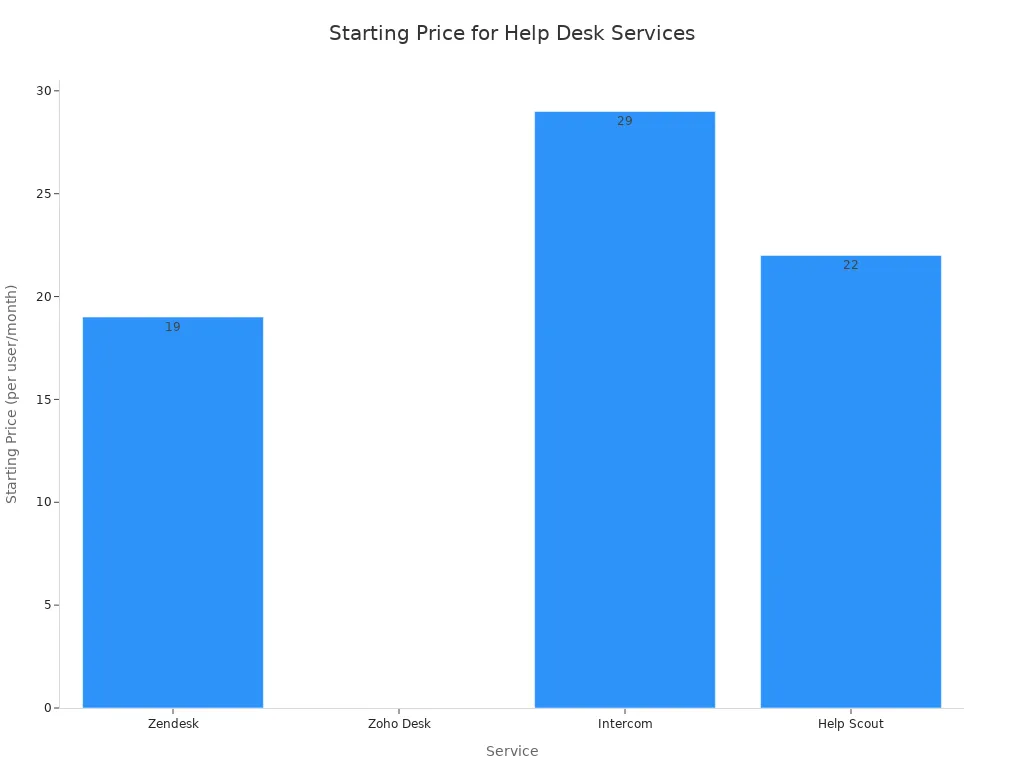
This visual guide to pricing helps you see how these competitors compare financially.
You have excellent options beyond Zendesk. Your choice depends on your primary business need.
- For ultimate simplicity, choose Help Scout.
- For the best value, Zoho Desk is a great fit.
- For a powerful, all-in-one AI platform, Sobot is one of the best zendesk alternatives.
The right customer service software aligns with your workflow. Small businesses must find the best zendesk alternatives for their specific goals. We encourage you to evaluate the best zendesk alternatives for your team. Small businesses can explore a demo of the Sobot Ticketing System today.
FAQ
How do you choose the right Zendesk alternative?
You should first list your team's biggest needs. Consider your budget, team size, and required features. A simple system like Help Scout is great for ease of use. A platform like Sobot works best if you need an all-in-one, AI-powered solution for all your channels.
Why is an omnichannel platform important?
An omnichannel platform helps you manage all customer conversations in one place. You get a complete view of every customer's history across email, chat, and phone. This allows your team to provide faster, more consistent, and more personalized support without switching between different tools.
What role does AI play in a ticketing system?
AI automates many simple tasks for your team. It can answer common questions with a chatbot, suggest replies to your agents, and route tickets to the right person. This frees up your team to focus on solving more complex customer problems and improves overall efficiency.
See Also
Leading 2024 Customer Service Software: A Top 10 Selection
Comparing Top 10 Live Chat Tools: Shopify and Its Rivals
Essential 2024 Live Chat Help Software: Our Top 10 Picks
Best Live Chat Solutions for 2024: A Comprehensive Comparison

