AI-Powered Customer Service Tools for Your Enterprise

Enterprise leaders must compare ai-powered customer service tools for enterprise beyond simple chatbots. The best AI customer service tools deliver enterprise-grade automation. They are a complete platform for AI customer service automation and customer support automation. This ai-powered service platform integrates deeply into your workflows. AI chatbots are a key part of AI-driven customer support. They provide powerful real-time results.
| AI Use Case | Adoption Rate | Primary Benefit |
|---|---|---|
| Customer service chatbots | 71% | 67% reduction in response time |
True customer support tools, like the Sobot platform, offer more. They create a full AI powered customer support system. This guide details top AI customer service tools and customer service AI platforms. It helps you choose the right AI customer service software. Your enterprise can achieve powerful AI customer service automation and real-time conversational AI. The right customer service platforms and AI customer service software will define your success.
Defining Enterprise-Grade AI Customer Service Tools
When you compare ai-powered customer service tools for enterprise, the distinction between simple chatbots and a true platform becomes clear. Enterprise-grade solutions are not just add-ons; they are foundational systems built for comprehensive customer support automation. They deliver AI customer service automation that transforms entire workflows, integrates deeply with your existing technology, and operates securely at scale.
End-to-End Workflow Automation
True AI customer service automation manages processes from start to finish. This goes far beyond answering simple questions. For example, AI-powered ticket automation can automatically sort incoming messages, understand customer intent, and route issues to the correct team. This process alone can significantly reduce first response times. These advanced customer support tools also handle complex workflows like collecting key order details before an agent ever joins the chat, creating a seamless experience. This level of customer support automation ensures efficiency at every step.
Deep Integration Capabilities
An enterprise platform must connect with your core business systems. Basic AI chatbots often operate as standalone tools. In contrast, powerful customer service platforms integrate deeply with CRM, ERP, and e-commerce systems like Shopify. This creates a unified data source. Deep API integration enables real-time data synchronization, giving your AI customer service software access to up-to-date customer history and order information. This capability is essential for providing personalized and accurate ai-driven customer support.
AI Customer Service Automation at Scale
An enterprise needs solutions that perform under pressure. A key difference between basic bots and an advanced platform is the ability to scale dynamically.
An enterprise-grade conversational AI platform can handle thousands of conversations simultaneously without slowing down. This ensures reliable 24/7 support during peak times, like holiday sales or product launches, providing a consistent real-time customer experience.
This scalability is a core feature of powerful ai powered customer support and customer service ai platforms.
Enterprise-Grade Security and Compliance
Handling customer data requires robust security. Leading AI customer service tools are built with strict security and compliance in mind. When evaluating AI customer service software, look for certifications like SOC 2 and ISO 27001. These standards demonstrate a provider's commitment to protecting sensitive information. Furthermore, the platform must ensure compliance with data privacy regulations like GDPR, using features such as data encryption and privacy-by-design principles to safeguard customer trust.
Compare Top AI-Powered Customer Service Tools for Enterprise
Choosing the right platform requires a detailed analysis of your specific needs. When you compare ai-powered customer service tools for enterprise, it becomes clear that each solution has unique strengths. This section breaks down the top contenders to help you identify the best fit for your organization's goals, technical stack, and budget.
Sobot: All-in-One Contact Center Solution
Best For: Enterprises seeking a comprehensive, unified contact center solution that eliminates the need for multiple systems. Sobot is ideal for businesses that require powerful customer support automation across all customer touchpoints without extensive coding.
Key Enterprise Features: Sobot distinguishes itself as a true all-in-one platform. It consolidates every customer interaction into a single, cohesive system. This approach provides a complete contact center solution that manages the entire customer journey. Key features include:
- Omnichannel Unification: Sobot connects customer channels from e-commerce sites like Amazon, social media including WhatsApp and Facebook, and official websites built on Shopify or WordPress. It also integrates email, SMS, and in-app messaging.
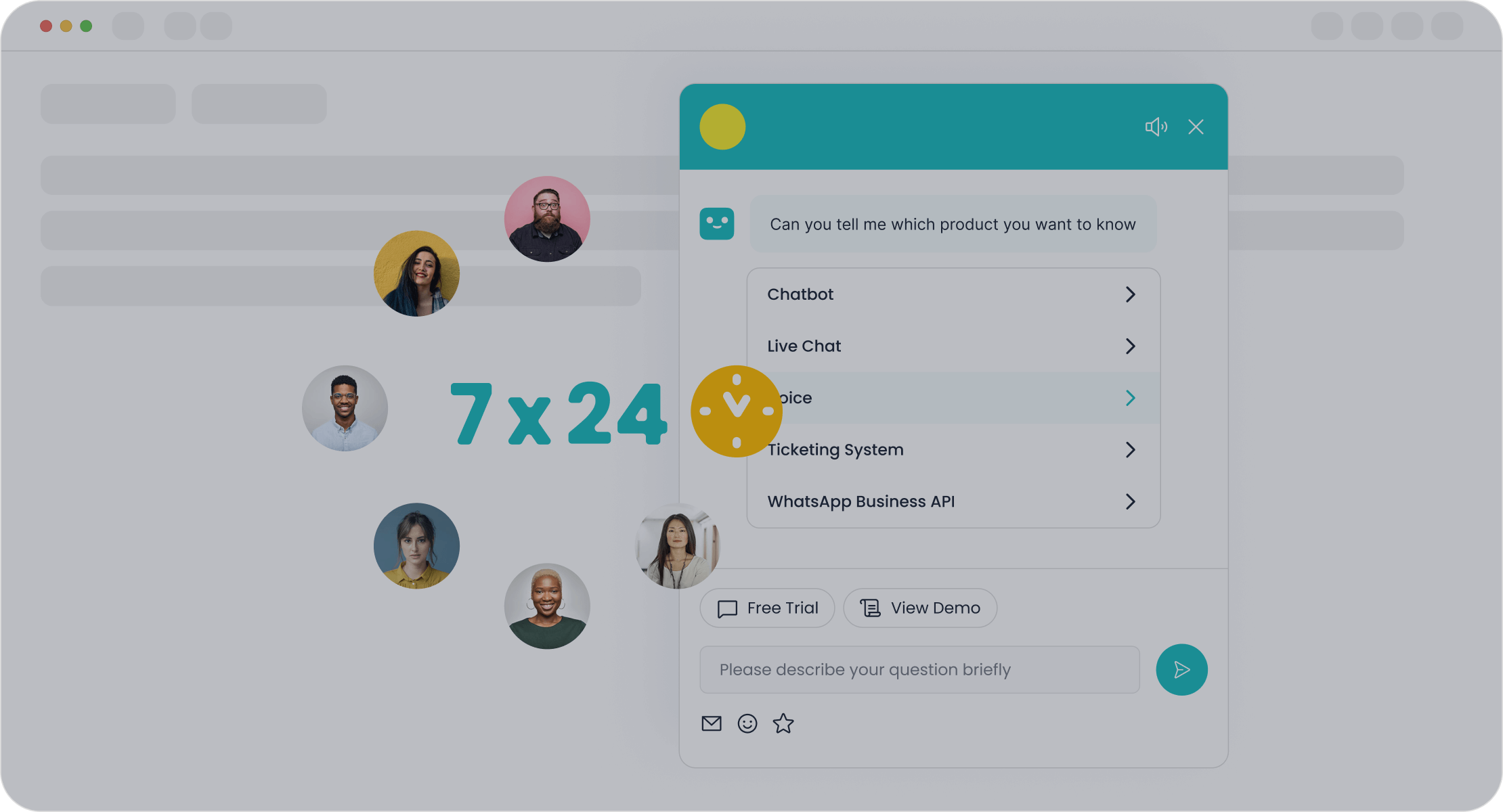
- Complete Product Suite: The platform includes a powerful product lineup designed for synergy. This features an AI Chatbot for 24/7 multilingual support, Live Chat in a unified workspace, a full-featured Voice call center, and an automated Ticketing System.
- No-Code Automation: Its point-and-click interface allows teams to design and deploy complex workflow automations without writing a single line of code, making it more accessible than platforms like Gorgias that may require more technical setup.
- Proven ROI: The impact of this ai customer service automation is measurable. For example, after implementing Sobot, electronics giant OPPO achieved an 83% chatbot resolution rate, saw a 94% positive feedback rate, and boosted its repurchase rate by 57%.
Zendesk AI: For Native Zendesk Ecosystems
Best For: Large-scale organizations and professional environments already deeply embedded in the Zendesk ecosystem. It is built to handle high ticket volumes and meet rigorous security standards like HIPAA.
Key Enterprise Features: Zendesk AI enhances its core ticketing system with powerful intelligence. It promises faster resolutions and smarter workflows for existing users.
- Intelligent Triage and Routing: The system automatically analyzes incoming tickets by intent, sentiment, and language. This allows for efficient prioritization and routing to the correct agents.
- Generative AI Agent Assist: This feature provides agents with real-time contextual response suggestions, tone adjustments, and knowledge recommendations to accelerate replies.
- Action Builder: A low-code tool that enables the automation of repetitive tasks and connects AI-driven actions across different systems.
Potential Limitations:
- Ecosystem Dependency: The AI primarily draws knowledge from Zendesk's internal ecosystem, potentially missing crucial information stored in external systems like Confluence or Notion.
- Complex Pricing: Many essential AI features are expensive add-ons or are only available in higher-priced tiers, which can strain budgets.
- Rigid Workflows: The platform may lack the flexibility needed for unique customer support automation workflows, sometimes requiring significant developer resources for customization.
Sprinklr Service: For Unified Social and CX Management
Best For: Global enterprises that prioritize a unified view of the customer across social media and traditional service channels. It is designed for companies wanting to merge marketing, social listening, and customer care into one platform.
Key Enterprise Features: Sprinklr’s main advantage is its ability to consolidate dozens of channels into a single dashboard.
“Because our platform already combined all these capabilities — voice, digital, AI, and cloud — we could offer something unique: a 360° view of the customer across all channels, well ahead of traditional CCaaS players.”
- Unmatched Channel Coverage: Sprinklr supports over 30 social platforms, 10+ messaging apps, voice, email, and live chat.
- Advanced AI Analytics: The platform excels at sentiment analysis, automated routing, and predictive analytics focused on customer service and social insights.
- Enterprise-Grade Security: It offers robust compliance and security features, including SOC 2 Type II, GDPR compliance, and HIPAA readiness.
Potential Limitations:
- Prohibitive Cost: Sprinklr is one of the most expensive ai customer service tools on the market, with high per-user costs and large minimum contract values.
- Complex Implementation: The setup process is long (3-6 months) and requires extensive training and a dedicated internal team for maintenance.
- Hidden Fees: Customers report that costs can escalate quickly with add-ons and that technical support is not included in cheaper plans.
HubSpot Service Hub: For CRM-Centric Teams
Best For: An enterprise already utilizing the HubSpot CRM for sales and marketing. Its greatest strength is creating a single source of truth for all customer data, enabling highly personalized and context-driven support.
Key Enterprise Features: Service Hub turns your CRM into a complete customer service solution. It connects all hubs to place the customer at the center of the business.
- Deep CRM Integration: It syncs all customer data, interactions, and support tickets directly within the HubSpot CRM. This improves collaboration between sales, marketing, and support teams.
- Intelligent Ticketing and Routing: The ai customer service software offers multiple ticket pipelines and robust automation to eliminate manual tasks and route conversations based on custom rules.
- Customer Relationship Building: Features include a knowledge base for self-service, a customer portal for tracking requests, chatbots, and tools for tracking NPS/CSAT. The Enterprise plan significantly expands these capabilities.
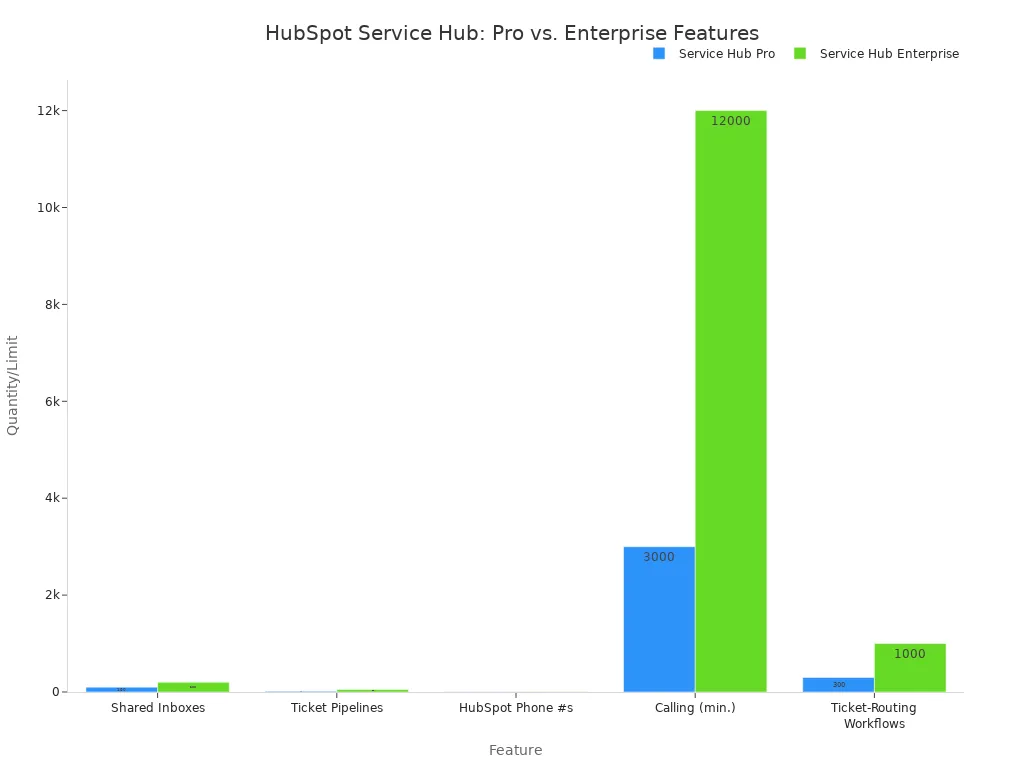
Potential Limitations:
- Best Inside Its Ecosystem: The platform delivers maximum value when used with the full HubSpot suite. For companies using a different CRM, it may create data silos.
- Cost and Complexity: The Enterprise tier is a significant investment and may be overly complex for organizations with straightforward support needs.
Intercom Fin: For Proactive Engagement and Support
Best For: Tech-forward companies focused on proactive customer engagement and retention. Fin, Intercom's conversational ai agent, is designed to guide users, anticipate needs, and resolve issues before they escalate.
Key Enterprise Features: Fin is built to act as a resolution-focused agent, powered by modern LLMs like GPT-4. It aims to reduce the burden on human support teams.
- Proactive Engagement: Fin can guide customers through onboarding, provide personalized strategic advice, and identify patterns to prevent potential issues.
- Omnichannel AI Agent: The AI chatbots can resolve queries across chat, email, SMS, and social channels in over 45 languages with real-time translation.
- Seamless Human Handoff: The platform is designed for smooth escalation to human agents when a query is too complex for the AI to handle alone. This ensures a good customer experience.
Potential Limitations:
- Knowledge Base Dependency: Fin's intelligence is entirely dependent on the quality and completeness of your knowledge base, requiring a significant upfront investment in content creation and optimization.
- Resolution-Based Pricing: The pricing model ($0.99 per resolved conversation) plus seat licenses can become very expensive, especially for teams using it across support, marketing, and sales.
- Technical Complexity: Integrating Fin with external data sources often requires developer resources, and advanced customization can be non-intuitive.
Ultimately, the process to compare ai-powered customer service tools for enterprise should center on your unique operational structure and strategic goals. Whether you need an all-in-one platform, a CRM-centric tool, or a social-first solution, the right ai customer service software is the one that best aligns with your existing workflows and future ambitions.
How to Choose the Right AI Tool for Your Enterprise
Selecting the right AI platform is a strategic decision that extends far beyond a feature comparison. The process to compare ai-powered customer service tools for enterprise requires a methodical approach. It starts with your internal goals and ends with a clear business case. This five-step framework will guide your enterprise toward the solution that delivers maximum value.
Step 1: Define Your Primary Goal
Before evaluating any AI customer service software, you must define what success looks like for your organization. Are you aiming for cost reduction, a better customer experience, or increased agent productivity? A clear primary goal will serve as your north star during the selection process.
Most enterprise goals fall into a few key categories. Your organization may be focused on operational efficiency or customer-centric transformation.
- Reduce Operational Costs: AI handles high-volume tasks instantly. It improves routing accuracy and removes manual steps. This provides 24/7 support without scaling your headcount.
- Improve Customer Experience (CX): The right platform provides instant, accurate answers. It reduces friction in the support process and maintains consistent quality.
- Boost Agent Productivity: AI agents minimize manual work. They can resolve a significant percentage of tickets autonomously. This leads to a lower cost per ticket and faster resolution times.
Note: Many organizations are moving beyond simple cost-cutting. They now use AI for a complete customer experience transformation. This involves creating highly personalized, data-driven interactions that improve service quality and empower the human workforce with real-time insights.
Step 2: Audit Your Stack and AI Customer Service Software Needs
Your existing technology and customer journey are the foundation for any new tool. An AI platform must integrate seamlessly into your current ecosystem to be effective. A thorough audit will reveal critical gaps and opportunities for customer support automation.
Start by mapping your current customer experience. This process helps you identify key touchpoints and pain points where AI can have the greatest impact.
- Audit Your Current Experience: Document every customer interaction, both digital and human. Identify disconnected systems, inconsistent data, and areas with limited data access.
- Create a Unified Data Foundation: Centralize customer data from your CRM, service logs, and marketing tools. A successful AI implementation depends on clean, connected, and timely data.
- Choose Your AI Journey Mapping Platform: Select a platform that offers robust integration capabilities. A solution with a native CRM connection often provides immediate access to data with minimal setup.
- Build Dynamic AI Personas: Use AI to segment customers based on actual behaviors, not assumptions. This allows for more effective and personalized interactions.
- Automate Key Touchpoints: Implement AI to automate interactions at specific points in the customer journey, from initial awareness to post-purchase support.
This audit will highlight where AI can deliver the most value. The following table shows common high-impact AI applications for each stage of the customer journey.
| Customer Journey Stage | High-Impact AI Applications |
|---|---|
| Awareness | Predictive analytics for content targeting; NLP for brand sentiment analysis. |
| Consideration | AI-powered chatbots for product questions; Machine learning for resource recommendations. |
| Purchase | Real-time fraud detection; Automated checkout assistance. |
| Onboarding | Personalized tutorials via AI behavior tracking; Customer intent prediction for proactive support. |
| Support | AI routing for issue matching; Real-time sentiment analysis; Knowledge base recommendations. |
| Retention & Loyalty | Predictive churn analysis; AI-tailored loyalty offers and outreach timing. |
Step 3: Evaluate the Required Level of Automation
Not all automation is created equal. Your enterprise needs to decide between simple ticket deflection and true end-to-end AI customer service automation. Basic chatbots are good for answering simple FAQs. However, a true enterprise-grade platform automates entire workflows.
Consider a complex return request. A simple bot might deflect the user to a static FAQ page. An advanced conversational ai platform, in contrast, can:
- Understand the customer's intent to make a return.
- Ask for the order number and item details.
- Verify the purchase in your e-commerce system via integration.
- Check the return eligibility based on your business rules.
- Generate a shipping label and send it to the customer.
- Create a ticket and log the entire interaction in your CRM.
This level of AI customer service automation frees human agents to handle only the most complex, high-value escalations. It transforms the support function from a cost center into an efficient, proactive operation.
Step 4: Assess Security and Governance Needs
Handling customer data is a significant responsibility. For any enterprise, security and compliance are non-negotiable. The AI customer service tools you consider must demonstrate a robust commitment to data protection.
When evaluating a vendor, look for:
- Industry-Standard Certifications: Confirm that the provider holds certifications like SOC 2 Type II and ISO 27001. These demonstrate adherence to strict security protocols.
- Data Privacy Compliance: The platform must be fully compliant with regulations like GDPR and CCPA. This includes features for data encryption, access controls, and data residency options.
- Governance Features: The solution should provide clear audit trails, role-based access controls, and data masking capabilities to protect sensitive customer information.
Your chosen partner is not just a software provider; they are a steward of your customer data. Do not compromise on security.
Step 5: Plan Implementation and Calculate ROI
A successful implementation requires a clear plan and a solid business case. Calculating the potential Return on Investment (ROI) is essential for securing budget and stakeholder buy-in. A comprehensive ROI framework should include both cost savings and revenue gains.
To build your business case, you will need several key inputs:
- Current customer service costs (salaries, training, technology).
- Total service volume (monthly or annual interactions).
- Current performance metrics (Average Handle Time, CSAT).
- AI implementation costs (licensing, integration, maintenance).
- Expected deflection rate (inquiries resolved without human agents).
With this data, you can project the financial impact. Follow these steps to build a clear ROI calculation:
- Calculate Annual Cost Savings: Estimate the savings from reduced agent workload. For example, if AI handles 30% of inquiries, you can calculate the corresponding reduction in labor costs.
- Calculate Annual Revenue Increase: Project revenue gains from improved CX. For instance, a 1% increase in customer retention or a 5% boost in conversion rates from 24/7 support can be quantified.
- Calculate Total Annual Benefits: Sum your cost savings and revenue increases.
- Calculate ROI: Use the standard formula:
(Total Annual Benefits - Annual Cost) / Annual Cost * 100%.
A strong business case also acknowledges qualitative benefits like improved brand reputation and higher employee morale. By presenting a clear, data-backed plan, you can effectively demonstrate the value of your chosen AI customer service software.
Best Practices for AI Implementation Success
Deploying an AI platform is more than a technical upgrade; it is a strategic business transformation. For a successful rollout, your enterprise must follow a structured approach. These best practices ensure your investment in ai customer service automation delivers maximum value.
Starting with a Pilot Program
A pilot program is essential for a smooth transition. It allows you to test the AI platform in a controlled environment before a full-scale launch. This process helps identify potential issues early.
- Assess Business Needs: Pinpoint specific challenges, like long response times, where AI can offer the most benefit.
- Choose the Right Tool: Select an AI platform that aligns with your goals and integrates with existing systems.
- Develop a Plan: Create a clear timeline and budget for the pilot.
- Monitor and Optimize: Track performance during the test phase to make necessary adjustments.
Training the AI with Quality Data
The performance of any ai customer service software depends entirely on the data it learns from. Inaccurate or incomplete data will lead to poor results. Your enterprise must provide high-quality training materials.
A successful customer support automation platform is built on a foundation of clean, relevant data. This includes well-structured knowledge bases, historical chat transcripts, and clear definitions for the AI's persona and tone.
Managing Change and Training Human Agents
Successful ai customer service automation empowers human agents, it does not replace them. Effective change management is critical for employee buy-in. Provide personalized training that shows agents how the new platform helps them focus on more complex issues. The system can also offer real-time insights to managers, highlighting where teams may need extra support. This approach turns your support team into advocates for the new customer support automation.
Establishing KPIs to Measure Success
You must measure the impact of your new technology. Establishing clear Key Performance Indicators (KPIs) helps you quantify the success of your implementation. These metrics provide a real-time view of performance and ROI. Key KPIs to track include:
- Resolution Rate: The percentage of tickets solved by AI alone.
- Escalation Rate: How often AI passes conversations to a human agent.
- Customer Satisfaction (CSAT): Direct feedback on the AI interaction.
- Cost per Ticket: The financial savings achieved through automation.
Choosing the right AI customer service tools for your enterprise is a strategic decision. Success is not about finding the most advanced AI. It is about matching a platform's core strengths with your operational needs. The right solution, like Sobot, acts as a digital workforce. It augments your human agents, not just deflects tickets.
Use the framework in this guide to start your internal evaluation. Build a clear business case to select the platform that will deliver true operational efficiency and ROI.
FAQ
What is the first step in choosing AI customer service tools for enterprise?
Begin by defining your primary business goal. Your main objective could be reducing operational costs, improving customer satisfaction, or boosting agent productivity. This goal will guide your entire selection process and help you measure success.
How do AI platforms improve agent productivity?
AI automates repetitive tasks and resolves common inquiries independently. This frees human agents to focus on complex, high-value customer issues. AI also provides agents with real-time suggestions and data, helping them resolve issues faster.
Will AI replace my human customer service team?
No. The best AI customer service tools for enterprise are designed to augment human agents, not replace them. They function as a digital workforce, handling routine tasks and empowering your team to perform more strategic work.
How long does it take to implement an AI solution?
Implementation time varies. A comprehensive platform like Sobot offers a no-code interface, which can significantly speed up deployment. A pilot program is the best way to test the solution and plan a smooth, full-scale rollout.
See Also
Leading AI Solutions for Modern Enterprise Contact Centers
AI Customer Service Software: Driving Efficiency in Support Operations
Elevating SaaS Customer Support Through Effective Live Chat Strategies
An In-Depth Look at AI for Enterprise Call Centers
Transforming Customer Support with AI-Powered Service Agents

