How to Choose the Best Online Call Center Software


Choosing the right online call center software can transform how you connect with your customers. With 83% of customers expecting immediate responses and 61% willing to pay more for exceptional experiences, it’s clear that customer experience is a game-changer. The right solution not only improves customer satisfaction but also boosts your team’s efficiency and retention rates by over 40%.
When evaluating options, focus on three key factors. First, features should match your business needs, ensuring seamless operations. Second, scalability helps you adapt to growth without disruptions. Third, pricing matters—compare costs carefully to find the best value. With Sobot, you can achieve all this and more.
Key Features of the Best Online Call Center Software

Omnichannel Support for Seamless Customer Interactions
Imagine this: a customer reaches out to your business through email, follows up on social media, and then calls your support line. Without omnichannel support, keeping track of these interactions can feel like juggling too many balls at once. The best call center software ensures all these touchpoints are unified into one seamless experience. This means you can respond faster, personalize your communication, and leave customers feeling valued.

Strong customer relationships are the backbone of any successful business. When you use omnichannel contact center software, you’re not just improving communication—you’re building loyalty. Customers who feel heard and appreciated are more likely to stick around. Sobot’s cloud-based call center software excels here, offering a unified workspace that consolidates all customer interactions. Whether it’s voice, email, or social media, you’ll have everything you need in one place to deliver exceptional service.
Integration with CRM and Other Business Tools
Your call management software should work like a team player, not a lone wolf. Integration with CRM and other tools is essential for streamlining operations and boosting efficiency. When your software syncs with platforms like Salesforce or Shopify, you get a complete view of your customers. This helps you anticipate their needs and resolve issues faster.
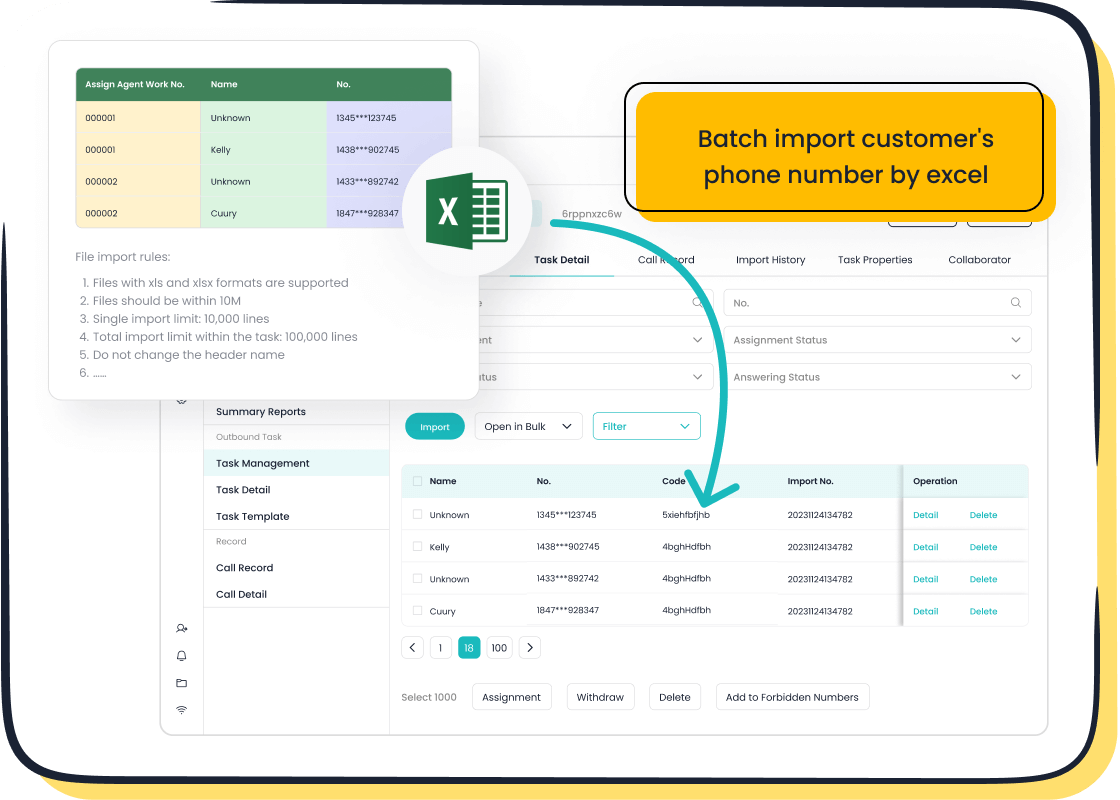
Take a look at the numbers: businesses that integrate their call center software with CRM systems see a 35% decrease in integration time, a 37% reduction in operational expenses, and a 55% improvement in process efficiency. These stats highlight how integration transforms your workflow. Sobot’s cloud-based call center system makes this process effortless. With seamless integration capabilities, you can connect your existing tools and focus on what matters—delivering top-notch customer service.
| Metric | Improvement |
|---|---|
| Integration Time Decrease | 35% |
| Reduction in Operational Expenses | 37% |
| Improvement in Process Efficiency | 55% |
Advanced Analytics and Reporting Capabilities
Data is your secret weapon. Advanced analytics and metrics in call center software give you insights that can revolutionize your operations. Imagine knowing exactly how long customers wait, how quickly agents resolve issues, and what trends are shaping your industry. This isn’t just data—it’s actionable intelligence.

With tools like voice analytics, you can track call volume, response times, and customer satisfaction scores. Predictive analytics helps you allocate resources more effectively, while speech and text analytics reveal customer sentiments. Sobot’s cloud contact center takes it a step further with real-time monitoring and performance insights. You’ll not only understand what’s happening but also why it’s happening, enabling you to make smarter decisions.
- Voice analytics tracks call volume, response times, and wait times.
- Predictive analytics forecasts trends and optimizes resource allocation.
- Speech and text analytics uncover customer sentiments and common issues.
- Agent performance management ensures quality and compliance.
- Customer journey analysis maps interactions to improve service.
When you have these tools at your fingertips, you’re not just managing calls—you’re mastering them.
Scalability to Support Business Growth
Your business isn’t static, so your call management software shouldn’t be either. As your customer base grows, your software must keep up without breaking a sweat. Scalability ensures that your system can handle increased call volumes, new team members, and even expanded operations across regions. It’s like having a tool that grows with you, always ready for the next big step.
Cloud-based solutions are a game-changer here. They allow you to scale up or down based on your needs. For example:
- Platforms like Google Cloud and AWS offer real-time analytics for handling large datasets.
- Data warehousing techniques ensure smooth data management, even as your operations expand.
- Advanced tools like Tableau and Power BI make it easy to interpret complex data, helping you make informed decisions.
Industries like retail, finance, and healthcare already rely on scalable systems to thrive. Walmart uses analytics to optimize inventory, while financial firms like Goldman Sachs analyze market trends with precision. Even healthcare providers like the Mayo Clinic leverage scalable solutions to improve patient outcomes. These examples show how scalability isn’t just a feature—it’s a necessity for growth.
Sobot’s call center software is built with scalability in mind. Whether you’re a small business or a global enterprise, it adapts to your needs. With features like global number availability and AI-powered voicebots, you can expand your reach without worrying about system limitations. Plus, its 99.99% uptime ensures reliability, no matter how much you grow.
User-Friendly Interface and Customization Options
Let’s face it—nobody wants to wrestle with complicated software. A user-friendly interface makes all the difference. It ensures your team can hit the ground running without spending weeks on training. When your software is intuitive, your agents can focus on what matters most: helping customers.
Customization options take this a step further. They let you tailor the software to fit your unique needs. Whether it’s creating custom workflows, setting up personalized dashboards, or tweaking call routing rules, customization gives you control. This flexibility ensures your software works for you, not the other way around.
Studies back this up. User experience surveys reveal three key benefits of intuitive design and customization:
- They help evaluate which features users love, guiding future improvements.
- They identify pain points, making it easier to address user frustrations.
- They measure customer satisfaction, showing how well the software meets expectations.
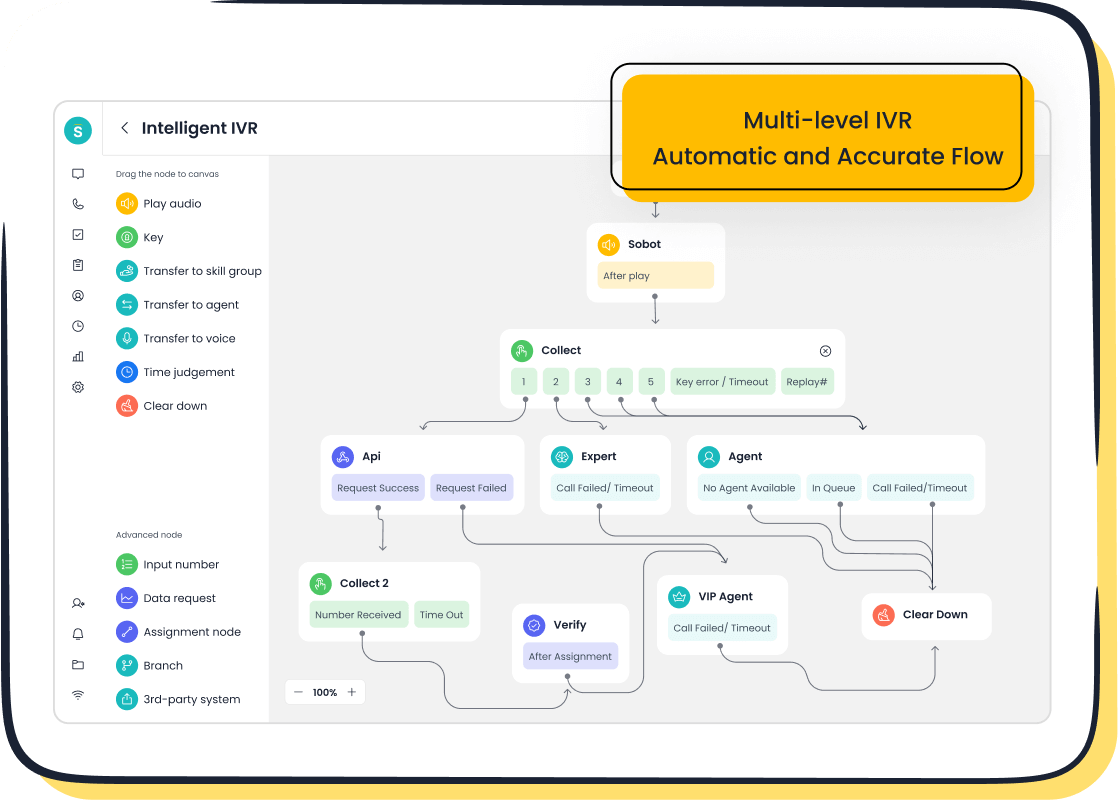
Sobot’s call management software excels in both ease of use and customization. Its drag-and-drop IVR builder simplifies call routing, while its unified workspace keeps everything organized. Need to tweak settings? No problem. The platform’s flexibility ensures it adapts to your workflow, not the other way around. With Sobot, you get a solution that’s as dynamic as your business.
Benefits of Using Online Call Center Software

Enhanced Customer Experience Through Personalization
Personalization is no longer a luxury—it’s an expectation. Customers want to feel like more than just a number. With call management software, you can deliver tailored experiences that make your customers feel valued. Imagine greeting a caller by name or referencing their previous interactions without them having to repeat themselves. These small touches can make a big difference.
Studies show that 71% of customers expect personalized experiences, and 76% feel frustrated when they don’t get them. Even more compelling, 62% of consumers say they’ll stop being loyal to brands that fail to personalize their service. By using tools like Sobot’s call center knowledge base, you can access customer histories instantly, ensuring every interaction feels personal. This not only boosts customer satisfaction but also strengthens loyalty.
| Statistic | Source |
|---|---|
| 62% of business leaders say personalization improves customer retention. | Twilio/Segment |
| 52% of consumers report higher satisfaction with personalized experiences. | Segment |
Increased Team Productivity with Automation
Automation isn’t just a buzzword—it’s a game-changer for agent productivity. By automating repetitive tasks, your team can focus on solving complex issues and delivering exceptional service. Features like intelligent IVR systems, automated call routing, and AI-powered voicebots streamline workflows and reduce manual effort.
Metrics like First Call Resolution (FCR) and Average Handle Time (AHT) improve significantly with automation. For example, Sobot’s call management software uses AI to route calls to the right agent instantly, cutting down wait times. It also provides real-time insights into agent performance, helping you identify areas for improvement. This means your team spends less time on mundane tasks and more time delighting customers.
| Metric | Description |
|---|---|
| First Call Resolution (FCR) | Resolves customer issues during the first interaction. |
| Average Handle Time (AHT) | Reduces the total duration of customer interactions. |
| Customer Satisfaction Score (CSAT) | Measures how happy customers are with the service. |
Cost-Effectiveness Compared to Traditional Systems
Switching to online call center software can save you a fortune. Traditional systems often come with hefty setup fees, maintenance costs, and limited scalability. In contrast, cloud-based solutions like Sobot’s offer flexible pricing models and minimal upfront costs. For instance, a traditional PBX system can cost over $62,000 in the first year, while VoIP solutions save businesses up to 60%.
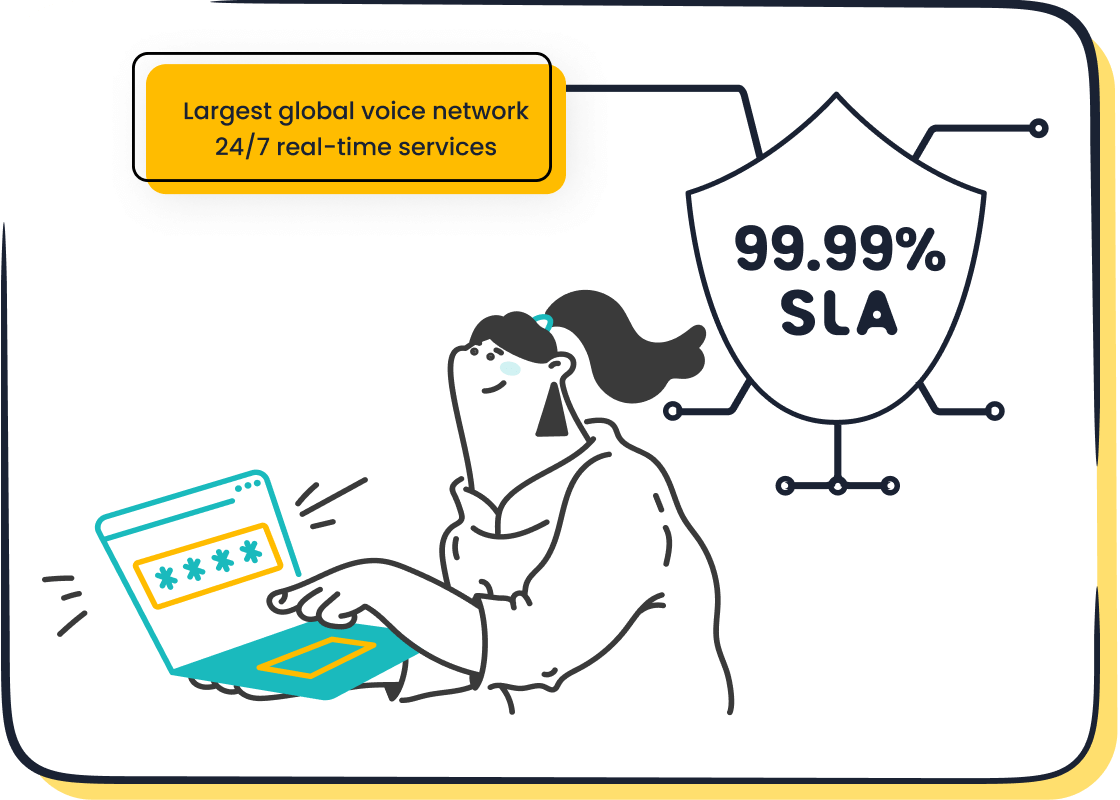
Online systems also eliminate the need for physical infrastructure, making them perfect for remote teams. With Sobot’s global number availability and encrypted data transfer, you can manage calls from anywhere without compromising security. This flexibility not only reduces costs but also ensures a higher return on investment.
💡 Tip: Investing in cloud-based call management software isn’t just about saving money—it’s about future-proofing your business.
| Advantage | Description |
|---|---|
| Cost Savings | Lower monthly fees and no setup costs lead to significant savings. |
| Flexibility | Access systems from anywhere, enabling remote work and scalability. |
| Advanced Features | Tools like speech analysis enhance service quality. |
| Improved Customer Service | AI-driven tools assist agents in real-time, improving interactions. |
Real-Time Monitoring and Performance Insights
Imagine having a bird’s-eye view of your call center operations at all times. That’s what real-time monitoring offers. It lets you track performance metrics as they happen, giving you the power to make quick decisions and improve efficiency. With the right tools, you can spot issues before they escalate and keep your team performing at its best.
Real-time monitoring provides access to key metrics that reveal how your call center is doing. Here’s a quick look at some of the most important ones:
| Metric | Description |
|---|---|
| Average Handling Time | Measures the average duration taken to handle customer calls. |
| First Call Resolution Rates | Indicates the percentage of calls resolved on the first interaction without follow-up. |
| Customer Satisfaction Scores | Reflects customer feedback on their service experience. |
| Agent Productivity Levels | Assesses the efficiency and output of call center agents. |
| Response Time Statistics | Tracks the time taken to respond to customer inquiries. |
| Service Level Compliance | Measures adherence to service level agreements (SLAs). |
| Call Quality Metrics | Evaluates the quality of calls based on predefined standards. |
These metrics aren’t just numbers—they’re insights. They help you understand what’s working and what needs improvement. For example, tracking response times can show if customers are waiting too long. Monitoring first call resolution rates can highlight whether agents are solving problems effectively.
Real-time tools also make life easier for managers. Here’s how they help:
- Track agent activity and identify areas for coaching.
- Analyze performance trends to spot bottlenecks.
- Generate automated reports for quick decision-making.
- Provide instant support to agents during calls.
Want to take it a step further? Follow these steps to maximize the benefits:
- Identify where your agents excel and where they need help.
- Measure time spent on off-call activities to improve efficiency.
- Use data to adjust processes and eliminate bottlenecks.
- Make immediate changes based on real-time insights.
Sobot’s call center software excels in real-time monitoring. It offers tools like live agent tracking, performance analytics, and automated reporting. With these features, you’ll always stay one step ahead, ensuring your team delivers exceptional service every time.
Steps to Choose the Best Call Center Software for Your Business
Identify Your Business Needs and Goals
Before diving into the sea of options, take a step back and ask yourself: What does your business truly need? Identifying your goals and priorities is the foundation of choosing the right call center software. Without this clarity, you risk investing in features you don’t need or missing out on ones that could transform your operations.
Start by outlining your objectives. Do you want to improve customer satisfaction, reduce response times, or enhance agent productivity? Setting clear goals helps you focus on specific areas like knowledge gaps or resource allocation. For example, if your team struggles with managing high call volumes, you might prioritize software with intelligent IVR and smart call routing. Linking these objectives to your broader business strategy ensures everything aligns with your company’s vision.
Collaboration is key here. Engage your team and other stakeholders to gather diverse perspectives. Your agents, managers, and even customers can provide valuable insights into what’s working and what’s not. This collaborative approach not only enhances decision-making but also ensures the software meets everyone’s needs.
Pro Tip: Write down your goals and rank them by priority. This will act as your roadmap when evaluating software options.
Research and Compare Call Center Solutions
Once you’ve nailed down your needs, it’s time to explore your options. Researching and comparing call center solutions might sound overwhelming, but it’s a crucial step in finding the best fit for your business. The key is to focus on features, performance, and value.
Start by looking at the software’s capabilities. Does it offer real-time analytics to track call performance? Can it generate historical reports to help you identify trends? Customizable reporting options are also a big plus, as they let you tailor insights to your specific needs. These features not only improve decision-making but also help you evaluate strengths and areas for improvement.
Don’t forget to check reviews and case studies. For instance, Sobot’s call center software has helped businesses like Opay achieve a 90% customer satisfaction rate while reducing costs by 20%. Such success stories can give you a glimpse of what’s possible.
Here’s a quick checklist to guide your research:
- Look for real-time analytics to monitor performance.
- Check if the software offers historical reporting for long-term insights.
- Evaluate customizable reporting options for tailored data.
- Assess performance metrics like response times and resolution rates.
Did You Know? Businesses that use advanced analytics in their call centers see a 55% improvement in process efficiency. That’s the power of data-driven decisions!
Schedule Demos and Free Trials
You wouldn’t buy a car without test-driving it first, right? The same logic applies to call center software. Scheduling demos and free trials is your chance to see the software in action and determine if it’s the right fit for your team.
During a demo, pay attention to the user interface. Is it intuitive and easy to navigate? A complicated system can slow down your agents and frustrate your customers. Also, test the customization options. Can you tweak workflows, dashboards, or call routing rules to match your needs? Flexibility is a must-have for any growing business.
Free trials take this a step further by letting you experience the software in your daily operations. Use this time to test key features like call tracking, analytics, and integration capabilities. For example, Sobot offers a drag-and-drop IVR builder and seamless CRM integration, making it easy to streamline your workflows.
Here’s how to make the most of your trial period:
- Assign a small team to test the software and gather feedback.
- Monitor how well it integrates with your existing tools.
- Evaluate its impact on metrics like response times and customer satisfaction.
- Identify any challenges or limitations before committing.
Quick Tip: Keep a checklist of your must-have features and use it to evaluate the software during the trial. This ensures you don’t overlook anything important.
Evaluate Pricing Considerations and Value for Money
When choosing call center software, pricing considerations play a big role. You want a solution that fits your budget but also delivers the features and performance you need. It’s not just about finding the cheapest option. It’s about getting the best value for your money.
Start by looking at the pricing structure. Some providers charge a flat monthly fee, while others use a pay-as-you-go model. Think about your business size and call volume. A flat fee might work better for high-volume operations, while smaller teams could benefit from flexible pricing. Don’t forget to check for hidden costs like setup fees or charges for additional features.
Next, compare what you’re getting for the price. Does the software include essential tools like real-time analytics, call routing, and CRM integration? Are there advanced features like AI-powered voicebots or global number availability? These extras can make a big difference in your team’s productivity and customer satisfaction.
Here’s a quick tip: Look for providers that offer free trials or demos. This lets you test the software before committing. For example, Sobot’s call center software provides a trial period, so you can explore its features and see if it’s worth the investment.
Finally, think about long-term value. A slightly higher upfront cost might save you money in the long run if the software improves efficiency or reduces operational expenses. Remember, the right software isn’t just an expense—it’s an investment in your business’s future.
Check Customer Reviews and Support Options
Customer reviews are like a window into the real-world performance of call center software. They give you a sense of what to expect and help you avoid unpleasant surprises. Positive reviews often highlight features that stand out, like ease of use or excellent customer support. They also act as personal recommendations, boosting your confidence in the product.
When reading reviews, pay close attention to what users say about customer service. A responsive support team can make all the difference, especially during setup or when issues arise. Look for mentions of quick response times, helpful agents, and effective problem resolution. These details validate the quality of the software and the company behind it.
Here’s why support options matter: Even the best software can run into hiccups. When that happens, you need a team that’s ready to help. Check if the provider offers 24/7 support, multiple contact channels, and a comprehensive knowledge base. Sobot, for instance, excels in this area with its global availability and robust support system.
To sum it up, reviews and support options aren’t just nice-to-haves—they’re essential. They ensure you’re not just buying software but also gaining a reliable partner for your business.
Common Mistakes to Avoid When Selecting Call Center Software
Overlooking Scalability and Future Needs
One of the biggest mistakes businesses make is choosing software that can’t grow with them. Your business might be small now, but what happens when your customer base doubles or triples? Without scalable software, you’ll face operational bottlenecks and frustrated customers. A recent survey found that 70% of small businesses struggle to scale due to inefficient processes. Don’t let outdated tools hold you back.
Scalable call center software ensures you’re ready for growth. It adapts to increased call volumes, new team members, and even global expansion. For example, cloud-based systems like Sobot’s offer features like global number availability and AI-powered tools, making it easy to handle growth without disruptions. Always think ahead—your future self will thank you.
Tip: Before committing, ask yourself: Can this software handle my business five years from now?
Ignoring Integration Capabilities
Imagine this: a customer calls your support team, but the agent can’t access their previous interactions. The customer has to repeat their issue, leading to frustration and wasted time. This happens when your call center software doesn’t integrate with your CRM or other tools. Lack of integration hampers productivity, lowers morale, and leaves customers dissatisfied.
Integrated systems solve this problem by giving agents a complete view of customer histories. They also streamline workflows, allowing agents to manage multiple interactions efficiently. For instance, an omnichannel setup reduces wait times and improves personalization. Choosing software like Sobot, which integrates seamlessly with platforms like Salesforce, ensures your team has everything they need to deliver exceptional service.
Note: Integration isn’t just a feature—it’s a necessity for modern customer service.
Focusing Solely on Pricing Instead of Value
It’s tempting to choose the cheapest option, but focusing only on price can cost you more in the long run. Cheaper software often lacks essential features, leading to poor outcomes and higher replacement costs. Experts like Chase Chappell and Matt Schmidt emphasize evaluating total cost of ownership, not just the initial price. Cloud-based systems, for example, save money on maintenance and offer better scalability.
Cost-benefit analysis can also be tricky. It often overlooks factors like inflation, interest rates, and intangible costs like customer satisfaction. Instead of just comparing prices, consider the value the software brings. Does it improve efficiency? Does it enhance customer experiences? Software like Sobot offers advanced features like real-time analytics and AI-powered voicebots, making it a worthwhile investment.
| Limitation | Description |
|---|---|
| Predicting Costs and Benefits | Relies on data availability, which can lead to inaccuracies. |
| Oversimplification | Neglects complex factors like scalability and long-term needs. |
| Intangible Costs | Hard to quantify, but they significantly impact customer satisfaction. |
Quick Tip: Think of software as an investment, not just an expense. The right choice pays off in efficiency and customer loyalty.
Skipping the Demo or Trial Phase
Skipping the demo or trial phase is like buying a car without taking it for a test drive. You miss the chance to see how the software works in real-world scenarios. This step helps you understand if the tool fits your team’s needs and workflows. Without it, you risk investing in software that doesn’t deliver the results you expect.
Demos and trials let you explore key features and test usability. They also give you a feel for how the software integrates with your existing tools. For example, you can check if the interface is intuitive or if the analytics dashboard provides the insights you need. These are things you can’t fully grasp by just reading about the product.
Here’s how to make the most of this phase:
- Involve your team: Let agents and managers test the software. Their feedback is invaluable.
- Simulate real scenarios: Use the trial to handle actual customer interactions.
- Ask questions: During the demo, clarify how specific features work.
💡 Pro Tip: Treat the trial period as a dress rehearsal. It’s your chance to identify potential challenges and ensure the software aligns with your goals.
By skipping this step, you risk wasting time and money on a solution that doesn’t meet your expectations. Take the time to test before you commit—it’s worth it.
Neglecting Employee Training and Onboarding
Even the best software won’t deliver results if your team doesn’t know how to use it. Neglecting training and onboarding can lead to confusion, frustration, and poor performance. Your employees are the ones interacting with the software daily. They need to feel confident and capable.
Effective training ensures your team understands the software’s features and how to use them efficiently. Onboarding helps them adapt to new workflows and processes. Together, these steps maximize the value of your investment. Without them, you might see low adoption rates and missed opportunities.
Different models can guide your training efforts. Here’s a quick overview:
| Evaluation Model | Description | Purpose |
|---|---|---|
| Kirkpatrick’s Four-Level Model | Measures reaction, learning, behavior, and results of training programs. | Provides a comprehensive view of training impact. |
| CIRO Model | Focuses on context, input, reaction, and output of training. | Assesses the overall effectiveness of training. |
| Phillips ROI Model | Evaluates the return on investment of training initiatives. | Helps justify training costs with financial metrics. |
🛠️ Tip: Use these models to design a training program that fits your team’s needs. For example, the Kirkpatrick model can help you measure how well employees are learning and applying their knowledge.
Don’t underestimate the importance of onboarding. A well-trained team can handle customer interactions more effectively, leading to higher satisfaction rates. Plus, they’ll feel more engaged and motivated, which boosts productivity. Investing in training isn’t just about teaching skills—it’s about empowering your team to succeed.
Why Sobot Voice/Call Center is the Best Call Center Solution
Comprehensive Features Tailored to Business Needs
When it comes to finding the perfect call center solution, you need software that truly understands your business. Sobot Voice/Call Center stands out by offering a range of features designed to meet your unique needs. Whether you're managing a small team or running a global enterprise, this solution adapts effortlessly.
For instance, Sobot’s intelligent IVR system allows you to customize call flows with a simple drag-and-drop interface. This means you can create personalized greetings, route calls efficiently, and even provide self-service options for customers. The unified workspace consolidates all customer interactions, so your agents can access everything they need in one place. This boosts productivity and ensures a seamless experience for your customers.
Sobot also supports global number availability, making it easy to expand your operations. With a 99.99% uptime, you can count on reliable service no matter where your customers are. These features aren’t just convenient—they’re essential for delivering exceptional service.
Seamless Integration with Existing Systems
Switching to new software shouldn’t disrupt your workflow. That’s why Sobot Voice/Call Center integrates effortlessly with your existing tools. Whether you’re using a CRM like Salesforce or an e-commerce platform like Shopify, Sobot ensures everything works together smoothly.
This seamless integration saves time and reduces errors. For example, when your call center software syncs with your CRM, agents can instantly access customer histories. This eliminates the need for customers to repeat themselves, creating a more personalized and efficient experience. Businesses that prioritize integration often see a 55% improvement in process efficiency and a 37% reduction in operational costs.
Sobot takes integration a step further by offering real-time data syncing. This means your team always has the most up-to-date information, enabling faster decision-making and better service delivery. It’s not just about connecting systems—it’s about creating a unified, efficient workflow.
AI-Powered Tools for Enhanced Efficiency
Imagine having a virtual assistant that works 24/7 to support your team. That’s exactly what Sobot’s AI-powered tools offer. From intelligent voicebots to predictive analytics, these features take your call center solution to the next level.
For example, Sobot’s AI-powered voicebots handle routine inquiries, freeing up your agents to focus on more complex issues. Predictive analytics helps you forecast call volumes and allocate resources effectively. This not only improves efficiency but also enhances the customer experience. Companies using data-driven strategies like these often see a 20% increase in operational efficiency.
Sobot’s AI tools also include sentiment analysis, which identifies customer emotions during calls. This allows agents to adjust their approach in real-time, ensuring a positive interaction. With these advanced capabilities, you’re not just managing calls—you’re transforming them into opportunities to build stronger customer relationships.
Global Availability and 99.99% System Uptime
When your business serves customers across different time zones, reliability becomes non-negotiable. Imagine a customer trying to reach your support team during a critical moment, only to find the system down. That’s a nightmare no business wants to face. This is why global availability and system uptime are essential features of any dependable call center software.
Sobot’s call center solution ensures you’re always connected. With a 99.99% system uptime, you can count on uninterrupted service, even during peak hours. This level of reliability means your team can handle customer inquiries without worrying about technical hiccups. Plus, Sobot’s global network spans 110 points of presence in 93 cities across 50 countries. Whether your customers are in New York, Tokyo, or Lagos, they’ll experience the same seamless service.
Here’s a quick example: A retail business running a holiday sale can’t afford downtime when call volumes spike. Sobot’s robust infrastructure ensures the system stays stable, allowing agents to assist customers without delays. This reliability doesn’t just improve customer satisfaction—it builds trust in your brand.
💡 Did You Know? A single hour of downtime can cost businesses an average of $300,000, according to Gartner. Choosing software with high uptime can save you from these losses.
Proven Success Stories, Including Opay
Real-world results speak louder than features. Take Opay, a leading financial services platform, as an example. Before partnering with Sobot, Opay struggled to manage customer interactions across multiple channels. They needed a unified solution to streamline operations and improve service quality.

Sobot’s omnichannel call center software transformed Opay’s customer service. By integrating social media, email, and voice channels, Opay reduced operational costs by 20% and boosted customer satisfaction from 60% to 90%. The intelligent IVR system allowed 60% of customers to resolve issues independently, freeing up agents to focus on complex queries. Additionally, WhatsApp Business integration achieved an 85% message reading rate, enhancing marketing efforts.
These results highlight how Sobot’s solution doesn’t just meet expectations—it exceeds them. Whether you’re in finance, retail, or any other industry, Sobot’s proven track record shows it’s a reliable partner for your business.
Choosing the right call center software isn’t just about ticking boxes—it’s about transforming how your business connects with customers. The right solution helps you improve response times, resolve issues faster, and deliver exceptional service. Metrics like First Response Time (FRT) and Average Handle Time (AHT) highlight how software impacts customer satisfaction and operational efficiency.
Aligning software features with your business goals ensures you’re not just meeting expectations but exceeding them. Tools like voice sentiment analysis and customer effort scores provide deeper insights into customer needs, helping you refine your approach. Sobot Voice/Call Center offers all this and more, making it a reliable partner for businesses looking to elevate their customer service game.
💡 Tip: Don’t settle for less. Choose software that grows with your business and empowers your team to deliver their best.
FAQ
What is call center software, and why is it important?
Call center software helps businesses manage customer interactions across multiple channels like phone, email, and social media. It’s important because it streamlines communication, improves customer satisfaction, and boosts team productivity. With tools like analytics and automation, it makes handling customer inquiries easier and more efficient.
Can call center software integrate with my existing tools?
Yes, most modern call center software integrates seamlessly with tools like CRMs, e-commerce platforms, and help desks. This integration ensures your team has access to customer data in one place, making interactions smoother and more personalized. Sobot’s solution excels in this area, offering effortless compatibility with popular platforms.
How does cloud-based call center software benefit my business?
Cloud-based call center software offers flexibility, scalability, and cost savings. You can access it from anywhere, making it ideal for remote teams. It also eliminates the need for expensive hardware. Plus, features like global number availability and real-time analytics ensure your business stays connected and efficient.
Is call center software suitable for small businesses?
Absolutely! Call center software isn’t just for large enterprises. Small businesses benefit from features like intelligent IVR, call routing, and analytics. These tools help improve customer service without requiring a big team. Sobot’s solution is designed to scale, making it perfect for businesses of all sizes.
How do I choose the best call center software for my needs?
Start by identifying your goals, like improving customer satisfaction or reducing response times. Research options, compare features, and schedule demos to test usability. Look for software that integrates with your tools and offers scalability. Sobot’s call center software checks all these boxes, making it a top choice.
See Also
Comprehensive Overview of Multichannel Call Center Solutions
Essential Insights on Quality Assurance Tools for Call Centers
Tips for Selecting the Most Effective Chatbot Solutions
Key Attributes of Customer Relationship Management Call Center Tools

