Customizing Chatbots for Customer Communication Made Easy


You can transform customer conversations with a step-by-step guide. Nearly one-third of customer communication leaders use chatbots or plan to use them. Customizing these tools brings results fast. See the table below for real improvements:
| Improvement Metric | Result |
|---|---|
| Customer Satisfaction Score (CSAT) | Increased by 20% |
| Call Volume Reduction | 30% drop in 60 days |
| Response Time Improvement | Under 1 minute |
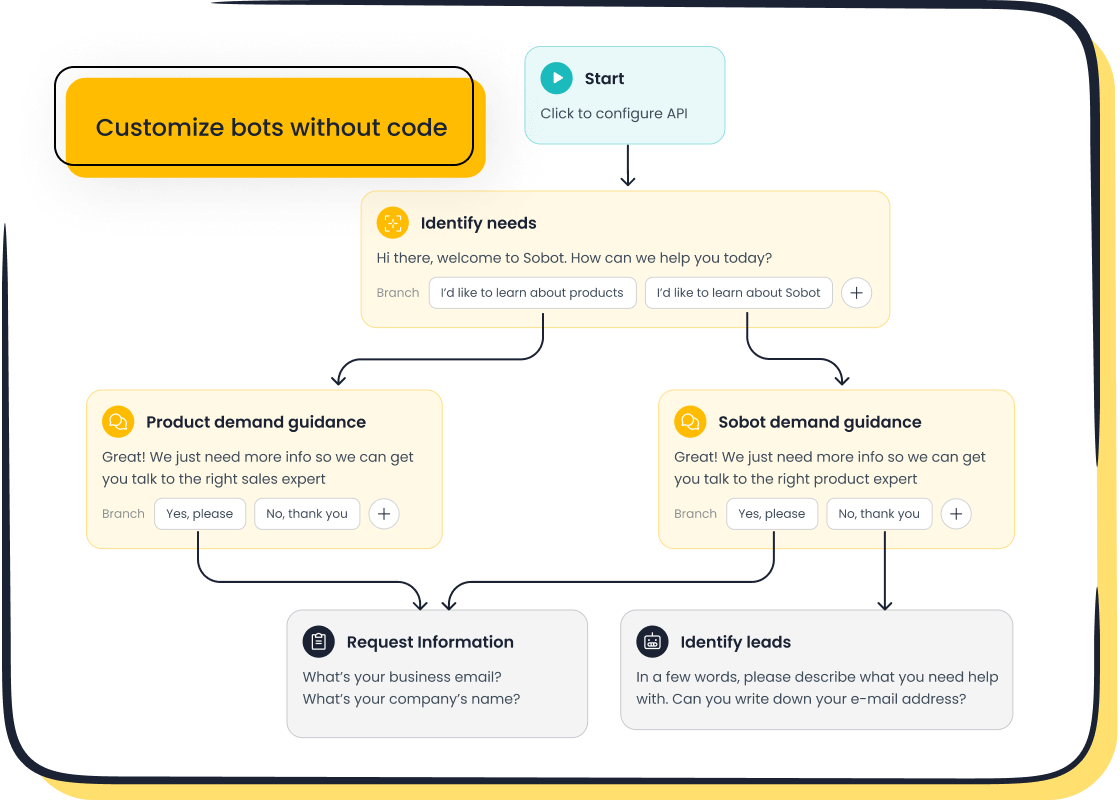
Sobot offers a no-code, AI-powered chatbot customisation for improving customer service experience. Anyone can follow a step-by-step guide, even without tech skills. Start your step-by-step guide today and see a difference. A step-by-step guide gives you control. Trust a step-by-step guide for easy success. Let a step-by-step guide help you create better conversations.
Why Chatbot Customisation Matters for Customer Service
Key Benefits for Customer Service Teams
You can unlock new levels of efficiency with customer service chatbots. Customizing your ai customer service chatbot lets you tailor responses to each customer. You can use customer data and past interactions to make conversations feel more human. When you build ai agents, you save hundreds of hours for your team. Agents can focus on important tasks instead of answering the same questions again and again.
Sobot leads the industry with ai customer service chatbots that integrate multiple channels. You get up to 50% savings on agent costs. You also gain proactive engagement features and multilingual support. Your chatbot can fetch a customer’s latest order status in real time. This is much better than giving generic answers.
Tip: Customizing ai chatbots helps you convert visitors into customers. You can offer 24/7 support and assist users before they even ask for help.
Here are some reasons customer service teams prioritize chatbot customization:
- Tailored responses based on customer history
- Real-time order status updates
- Automated lead generation
- Multilingual support for global customers
- Proactive engagement to boost improved customer engagement
Impact on Customer Satisfaction and Engagement
You see a direct impact on customer satisfaction when you use ai customer service chatbots. Customers get fast, helpful answers. They feel valued and trust your brand more. Building ai agents gives you higher scores for customer satisfaction and improved customer engagement.
| KPI | Impact of Chatbot Customization |
|---|---|
| Customer Satisfaction | Higher scores indicate fast, helpful answers and improved user experience. |
| Agent Productivity | 20–35% increase in tickets handled per agent per day post-chatbot. |
| Deflection Rate | Higher percentage of queries resolved by the bot reduces staffing needs. |
| First Contact Resolution | High FCR means fewer queries need re-handling, enhancing efficiency. |
| Average Handling Time | Bots can achieve 3–5x faster handling than human agents, saving time. |
Studies show that ai chatbots with custom design elements change how customers feel about your service. Emotional engagement and relational satisfaction matter as much as quick answers. Companies using ai for customer service see a 10% increase in customer satisfaction scores. You also get 24/7 support, which boosts loyalty and retention. Building ai agents helps you track essential metrics and optimize your service.
You can rely on ai customer service to deliver consistent, high-quality support. Sobot’s ai customer service chatbots stand out with proactive engagement and multilingual features. You build ai agents that make every conversation count.
Overcoming Challenges in Customer Service Chatbot Implementation
Addressing Technical Complexity
You may face technical complexity when you implement an automated customer support bot. Many businesses struggle with issues like lack of Natural Language Processing (NLP) capabilities. This prevents bots from understanding user questions. Bots also find it hard to handle interruptions when customers change topics or ask follow-up questions. You can overcome these challenges by integrating your bot with key business systems. For example, you can connect your bot with CRM systems for customer data access or inventory databases for real-time product information. You can also use order management systems for tracking capabilities.
| Industry | Integration Example |
|---|---|
| eCommerce Store | Bot checks payment status via Razorpay or Stripe APIs |
| Healthcare | Bot checks doctor’s availability through a booking system |
| Banking | Bot checks balance or transaction history via secure API |
| SaaS Support | Bot checks server uptime using internal monitoring dashboards |
Automated customer support bots provide insights into automated workflows. They help reduce wait times for customers. You gain relevant metrics for customer satisfaction. Customers experience more personalized interaction.
Ensuring Natural Conversations
You want your automated customer support bot to sound natural. You can define a clear persona for your bot. This makes interactions memorable and engaging. Use consistent voice and natural language. Add contractions and colloquialisms to create a conversational feel. You should avoid impersonation and maintain transparency. Let users know they are talking to an AI. Provide menu options or quick replies for common questions. Use typing indicators and strategic delays to mimic human rhythm. Emojis add warmth when used in the right context. Always offer clear escalation paths to human agents. Sentiment analysis helps your bot adapt its tone based on user emotions.
| Method | Description |
|---|---|
| Define a Persona | Develop a clear persona for the chatbot to make interactions memorable and engaging. |
| Consistent Voice | Ensure the chatbot's language reflects its defined persona consistently. |
| Use Natural Language | Incorporate contractions and colloquialisms to create a conversational feel. |
| Avoid Impersonation | Maintain transparency by not pretending to be human, which builds trust. |
| Menu Options/Quick Replies | Provide buttons for common questions to speed up interactions. |
| Sentiment Analysis | Use sentiment analysis to adapt the chatbot's tone based on user emotions, enhancing engagement. |
Managing Customer Expectations
You must understand customer expectations to design a successful customer support automation strategy. Most customers expect companies to understand their needs. Personalization increases brand loyalty. You should address pain points such as financial concerns, productivity frustrations, process friction, and support struggles. Customers want quick, efficient help. You can automate customer interactions to meet these needs. Your bot should provide timely assistance and clear information. You build trust when you deliver personalized support and manage expectations.
Note: 66% of customers expect companies to understand their needs. 70% believe personalization increases brand loyalty.
You can use customer support automation to reduce friction and improve satisfaction. Addressing pain points and offering personalized solutions helps you exceed customer expectations.
Chatbot Customisation for Improving Customer Service Experience
Customizing your chatbot for customer service experience can transform how you interact with customers. You can use ai chatbots to automate support, improve engagement, and deliver fast, accurate answers. Sobot makes chatbot customisation for improving customer service experience simple, even if you have no coding background. Let’s walk through the essential steps to create a customer service chatbot that fits your business needs.
Define Objectives and Use Cases
Start by setting clear goals for your ai customer service project. You need to know what you want your chatbot to achieve. Do you want to resolve customer service requests, generate leads, or help customers discover products? You can use ai chatbots to handle many tasks, but you must focus on your main objectives.
| Objective Type | Description |
|---|---|
| Customer Service Requests | Will your chatbot resolve issues or gather information? |
| Lead Generation | Will your chatbot help capture new leads? |
| Product Discovery | Will your chatbot guide users to the right products? |
You should also decide which key performance indicators (KPIs) matter most. These KPIs help you measure the success of your ai customer service chatbot.
| KPI Type | Description |
|---|---|
| Resolution Rate | How often does your chatbot solve issues? |
| Customer Satisfaction | How happy are your customers with the chatbot? |
| Average Handling Time | How quickly does your chatbot respond? |
Set goals that match your business needs. For example, you might want to reduce call center volume, improve response times, or boost customer satisfaction.
| Goal Type | Description |
|---|---|
| Call Center Volume | Reduce the number of calls to your support team. |
| Response Times | Make sure customers get answers faster. |
| Customer Satisfaction | Increase positive feedback from users. |
When you define objectives, you make chatbot customisation for improving customer service experience more effective. You can use ai chatbots to meet your goals and track progress with real data.
Choose the Right Platform (Sobot Chatbot)
Selecting the right platform is key to successful chatbot customisation for improving customer service experience. Sobot’s AI-powered chatbot stands out because it offers a no-code setup, omnichannel integration, and advanced AI features. You can create a customer service chatbot that works across all your channels, including WhatsApp, SMS, live chat, and more.
| Criteria | Description |
|---|---|
| Purpose | Define what your chatbot should do for your business. |
| Target Audience | Tailor interactions to your customers’ needs and style. |
| Conversational Scope | Decide what topics your chatbot will cover and when to escalate to a human agent. |
| User Experience (UX) | Make sure your chatbot is easy and pleasant to use. |
| Platform Integration | Choose if your chatbot will work on your website, app, or as a standalone tool. |
| AI, ML, and NLP Capabilities | Use advanced AI to understand and respond to customer questions. |
| Response Time and Accuracy | Set high standards for fast and correct answers. |
| Multilingual Support | Support customers in their preferred language. |
| Analytics and Reporting | Track performance with clear metrics and reports. |
| Scalability | Ensure your chatbot can grow with your business. |
Sobot’s chatbot platform checks all these boxes. You get personalized interactions, efficient lead generation, real-time data access, and a seamless ticketing system. Sobot’s omnichannel solution lets you manage all communication channels in one place, making customer service chatbots more powerful and flexible. You can learn more about Sobot’s chatbot at Sobot Chatbot.
Design Conversation Flows
You need to design conversation flows that guide users smoothly. Start with a personalized greeting. Use clear paths so customers know what to do next. Add interactive FAQs to answer common questions quickly. Sobot’s point-and-click interface lets you build these flows without coding.
- Personalize every greeting to make users feel welcome.
- Design clear conversational paths so users never get lost.
- Create interactive FAQs for instant answers.
- Deploy your chatbot across multiple channels for consistent service.
- Use process automation to handle tasks like booking, order tracking, or ticket creation.
Tip: Clear conversation flows improve engagement and help you deliver a better customer service experience.
Integrate with Systems and Channels
Integration is vital for chatbot customisation for improving customer service experience. You want your ai chatbots to connect with your CRM, ERP, and other business systems. This lets your chatbot access customer data and provide personalized support. Sobot’s chatbot integrates with popular platforms like Salesforce and Shopify, making it easy to sync data and automate workflows.
| Integration Capability | Description |
|---|---|
| Trigger Actions | Start actions in other systems, like creating support tickets. |
| Multi-Channel Support | Operate on chat, messaging apps, social media, and voice channels. |
| CRM and ERP Integration | Connect with tools to access customer data for personalized support. |
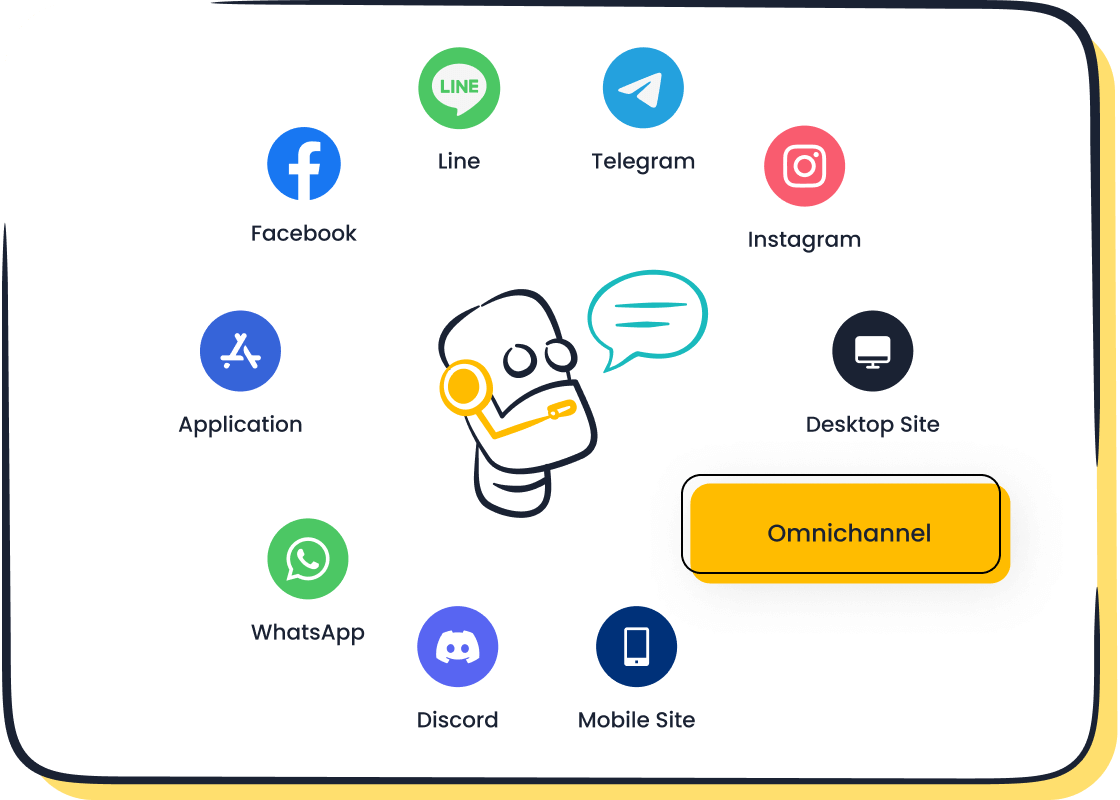
Sobot’s omnichannel solution ensures your chatbot works across all communication channels. You can manage conversations from WhatsApp, SMS, live chat, and more in one unified workspace. This approach boosts engagement and ensures customers get consistent support, no matter which channel they use. Learn more about Sobot’s omnichannel capabilities at Sobot Omnichannel Solution.
Train, Test, and Deploy
Training, testing, and deploying your ai chatbots is the final step. Sobot makes this process easy with a no-code interface. You can upload knowledge resources, train your chatbot, and test it in a chat window before going live.
- Create your Sobot account.
- Build your ai customer service chatbot using ready-to-use templates.
- Upload FAQs, articles, and other resources to train your chatbot.
- Test your chatbot by chatting with it and checking its responses.
- Deploy your chatbot across all your channels.
- Track chat history and performance metrics to improve over time.
Continuous improvement is key. Monitor your ai customer service chatbot’s performance and update its knowledge base regularly. Use analytics to spot trends and make changes that boost engagement and satisfaction.
Real-World Example: OPPO used Sobot’s chatbot to handle a surge in customer inquiries. By customizing their ai chatbots and integrating them with global channels, OPPO achieved a customer satisfaction score of 93%. This shows how effective chatbot customisation for improving customer service experience can be when you use the right platform and follow best practices.
You can achieve similar results by following these steps. Sobot’s solutions, including live chat, voice call center, voicebot, and ticketing system, work together to create a seamless customer contact center. You can unify all communication channels, automate routine tasks, and focus on delivering a great customer service experience.
By using ai customer service chatbots and customizing them for your business, you can improve efficiency, reduce costs, and boost engagement. Start your journey with Sobot and see how easy chatbot customisation for improving customer service experience can be.
Creating Personalized Customer Experience with Sobot Chatbot

Leveraging AI for Personalization
You can use ai chatbots to create personalized customer interactions that feel natural and engaging. AI customer service chatbots use context-aware responses to make every conversation unique. Natural Language Processing helps your chatbot understand different ways people ask questions. This means your ai customer service solution can respond in a way that matches each customer’s style. Self-learning features let ai chatbots improve over time by analyzing past conversations. Sentiment analysis helps your chatbot recognize emotions and respond with empathy or escalate issues when needed. With advanced ai personalization, you can offer support that feels human and builds trust.
- AI chatbots provide context-aware responses for a personalized customer experience.
- NLP enables chatbots to interpret varied phrasing and respond naturally.
- Self-learning lets chatbots evolve and tailor answers to individual needs.
- Sentiment analysis allows chatbots to recognize emotions and respond appropriately.
- Future ai customer service will offer highly tailored support based on preferences and behaviors.
Multilingual and Omnichannel Engagement
You can reach more customers with ai chatbots that support multiple languages and channels. Customer service chatbots with multilingual abilities help you avoid losing customers. In fact, 29% of businesses have lost customers due to lack of multilingual support. Sobot’s ai customer service chatbots can handle up to 20 languages, making personalized customer interactions possible worldwide. Omnichannel engagement means your chatbot can talk to customers on WhatsApp, SMS, live chat, and more. This ensures 24/7 availability and instant response time, no matter where your customers are.
| Benefit | Description |
|---|---|
| Improved Customer Satisfaction | Instant responses lead to higher customer satisfaction. |
| Reduced Average Handle Time | Chatbots can handle inquiries quickly, reducing the time spent on each interaction. |
| Cost Efficiency | Multilingual support reduces the need for hiring multiple agents, saving costs. |
| High Volume Handling | Ability to manage numerous inquiries across various platforms and languages. |
You can boost engagement and provide seamless automated customer service across all touchpoints.
Continuous Improvement with Analytics
You can use analytics to drive continuous improvement in your customer service chatbot. Start by tracking important events and setting baseline metrics for ai customer service performance. Set up a dashboard to visualize key data and analyze where your ai chatbots need better training. Hold regular meetings to review insights and prioritize updates. Focus on optimizing response time, enhancing fallback responses, and analyzing user pathways. Use advanced analytics tools to track new conversations and measure how well your ai customer service chatbots perform.
Tip: Mastering chatbot analytics helps you refine your ai chatbots, making them smarter and more effective with every interaction.
By focusing on continuous improvement, you ensure your customer service chatbots deliver better personalized customer interactions and higher engagement over time.
Evaluating Customer Service Chatbots for Your Business
When you choose customer service chatbots for your business, you need to look at several important factors. These factors help you find a solution that fits your goals and supports your team.
Ease of Customization and Use
You want customer service chatbots that are easy to set up and update. A simple interface saves you time and lets you make changes quickly. If a chatbot takes months to set up, you may wait weeks for updates. This can lower your return on investment. You should also check if the chatbot can handle unknown questions and pass conversations to human agents when needed.
The ease of setup and updates is crucial for user experience. If a chatbot takes months to set up, it will likely take weeks to make changes, indicating a low ROI. Additionally, the ability to handle unknown inquiries and facilitate human-agent handoff is essential for maintaining customer satisfaction.
Integration and Scalability
You need customer service chatbots that work well with your current tools. Easy integration lets your chatbot access customer data from systems like CRM or ERP. This helps you give better answers and personalize support. As your business grows, your chatbot should handle more conversations without slowing down. Look for these features:
- Seamless integration with existing systems
- Ability to handle more interactions as your business grows
- Personalization through access to customer data
- Omnichannel support for consistent service across platforms
- NLP capabilities for understanding natural language
- Self-learning and sentiment analysis for smarter responses
Quality of Engagement and Support
You should measure how well customer service chatbots support your customers. Use clear metrics to track performance and engagement. Here are some common metrics:
| Metric Type | Description |
|---|---|
| No Response | Instances where the chatbot fails to respond or uses a generic fallback response. |
| Apology Rate | Frequency of apologies made by the chatbot for misunderstandings or inability to answer. |
| No Response Rate | Rate at which the chatbot fails to provide any response. |
| User Feedback | Evaluation of customer satisfaction based on dialog analysis when explicit feedback is unavailable. |
| Conversation Volume | Number of conversations handled by the chatbot, indicating user adoption and engagement. |
| Satisfaction Score | Ratings from users regarding their satisfaction with the chatbot's responses and functionality. |
You can use these metrics to improve your ai chatbots and boost engagement. When you focus on these areas, you make sure your customer service chatbots deliver real value and help your business grow.
Best Practices for Customer Service Chatbot Success
Involve Customer Service Teams
You should always involve your customer service teams when setting up customer service chatbots. Your staff knows your customers best. They can help you design conversations that feel natural and helpful. When you train your team on how the chatbot works, you improve support quality. Staff can also give feedback on what works and what needs improvement. Here are some steps to follow:
- Integrate your chatbot with your existing channels for a smooth experience.
- Train your team to use and support the chatbot.
- Set clear goals for what you want the chatbot to achieve.
- Review performance often and make updates as needed.
Tip: When your team understands the chatbot, they can help customers faster and solve problems more easily.
Update Content Regularly
You need to keep your chatbot content fresh and accurate. Regular updates help your chatbot answer new questions and handle changes in your business. Focus on high-impact content first, like common questions or important workflows. Watch for questions your chatbot cannot answer. These show where you need new content. Many companies review and retrain their chatbots every month or two. If you see a drop in performance, update sooner. Always check your knowledge base to make sure it is current.
- Review and update chatbot content often.
- Prioritize updates for common or important topics.
- Monitor unanswered questions to find gaps.
- Retrain monthly or bi-monthly, or sooner if needed.
- Use performance data to guide updates.
Measure and Optimize Performance
You should track key metrics to see how well your customer service chatbots perform. Use these numbers to find what works and what needs fixing. Important metrics include conversation volume, satisfaction score, conversion rate, bounce rate, returning users, and churn rate.
| KPI | Description |
|---|---|
| Conversation Volume | Shows how many users interact with your chatbot. |
| Satisfaction Score | Measures how happy users are with chatbot responses. |
| Conversion Rate | Tracks how many users complete actions like purchases. |
| Bounce Rate | Finds users who leave before reaching their goal. |
| Returning Users | Counts users who come back for more help. |
| Churn Rate | Shows how many users stop using the chatbot over time. |
You should also watch response time, fallback rate, and retention rate. These help you spot problems and improve your chatbot. By measuring and optimizing, you make sure your customer service chatbots keep getting better and deliver real value.
You can make chatbot customization easy for your customer service team. Sobot Chatbot offers no-code setup and omnichannel engagement. You improve customer satisfaction and efficiency with chatbot customization. Chatbot customization lets you personalize conversations and track performance. You can use chatbot customization to create logical flows and instant answers. See the main takeaways below:
| Key Consideration | Description |
|---|---|
| Brand Voice | Chatbot customization reflects your brand’s personality. |
| Omni-channel Support | Chatbot customization ensures consistent service across channels. |
| Analytics | Chatbot customization helps you track metrics and improve performance. |
| Personalization | Chatbot customization makes interactions feel welcoming. |
- Chatbot customization gives you a low-barrier way to engage customers.
- Chatbot customization simulates natural conversation for non-technical users.
Focus on continuous improvement and customer satisfaction. Start your journey with Sobot’s solutions and see the benefits of chatbot customization for your business.
FAQ
What is chatbot customization?
Chatbot customization means you change how your chatbot works to fit your business needs. You can set up greetings, choose languages, and design conversation flows. This helps you give better support and create a unique customer experience.
Why does chatbot customization matter for customer service?
Chatbot customization lets you answer questions faster and more accurately. You can use customer data to give personal replies. This improves satisfaction and helps your team handle more requests with less effort.
How can I start chatbot customization with no coding skills?
You can use a no-code platform like Sobot. Just drag and drop conversation blocks, upload FAQs, and test your chatbot. You do not need to write code. This makes chatbot customization easy for everyone.
What channels can I use after chatbot customization?
You can connect your chatbot to many channels. These include WhatsApp, SMS, live chat, and social media. Omnichannel chatbot customization helps you reach customers wherever they prefer to chat.
How often should I update my chatbot customization?
You should review your chatbot customization every month. Update answers for new products or services. Check reports to find gaps. Regular updates keep your chatbot helpful and accurate.
See Also
Simple Ways to Integrate Chatbots on Your Website
Effortless Steps to Build a Website Chatbot
Quick Guide to Incorporate Chatbots on Your Site

