Call Center CRM Integration Steps for 2025


A successful call center crm integration in 2025 transforms your customer service. This crm integration hinges on a clear five-step process for your crm. This roadmap boosts agent efficiency and elevates your customer service delivery. A good crm is vital for quality customer service. The right crm integration with your crm is key. The Sobot call center and Sobot AI improve your crm for excellent customer service.
Your 5-Step Roadmap:
- Define Goals
- Select the Right Tools
- Plan the Technical CRM Integration
- Train Your Team
- Monitor & Optimize
Let Sobot help you embark on your contact journey.
Step 1: Define Goals for Call Center CRM Integration

A successful call center crm integration begins with a clear purpose. You must first define what you want to achieve. This foundational step aligns your technology investment with your business strategy. It ensures your new crm system delivers measurable results for your customer service team.
Identify Key Business Objectives
First, pinpoint your primary business goals. Do you want to increase agent productivity? Are you trying to improve customer satisfaction scores? Perhaps your goal is to boost first-contact resolution rates. A clear objective guides every decision in your crm integration project. This focus ensures your crm becomes a tool for growth, not just another piece of software.
Map Current Agent and Customer Journeys
Next, analyze your current workflows. How do agents and customers interact now? A system without proper crm integration often creates friction.
- Agents spend valuable time asking for basic background information.
- They lack immediate access to customer data like purchase history or past support tickets.
- This leads to generic customer service and slower resolution times.
Mapping these journeys reveals pain points. It shows exactly where a crm integration can streamline operations and improve the customer service experience.
Define Success KPIs
You need to know what success looks like. Define Key Performance Indicators (KPIs) before you start. These metrics will measure the impact of your crm integration.
Example KPIs to Track:
- Average Handle Time (AHT)
- First Contact Resolution (FCR)
- Customer Satisfaction (CSAT)
- Agent Occupancy Rate
Tracking these KPIs helps you prove the ROI of your new crm.
Establish a Realistic Budget and Timeline
A successful project requires a realistic plan. Establish a clear budget that covers software, implementation, and training costs. Create a detailed timeline with key milestones for your crm integration. This planning prevents scope creep and keeps your team on track. Good planning is essential for excellent customer service delivery.
Document Integration Requirements
Finally, document your specific needs. This document is a blueprint for your project. It should detail both functional and technical requirements. Functional needs include tools for managing customer data and communications. Technical needs cover system performance, security, and scalability.
Your documentation should outline:
- Project Overview: Summarize the purpose and main goals.
- Resources: List all necessary API documentation and guides.
- Data Flows: Describe how customer data will move between systems.
- Field Mapping: Detail how data fields will align to ensure consistency.
- Assumptions: Note any assumptions made during planning.
This detailed plan ensures a smooth and effective crm integration.
Step 2: Select the Right CRM and Integration Tools
With your goals defined, you can now choose the right technology. This step is crucial for your call center crm integration. Selecting the wrong tools can undermine your entire project. A thoughtful choice sets your team up for success and enhances your customer service.
Evaluate CRMs Based on Requirements
Use the requirements document you created in Step 1 as your guide. Evaluate each potential crm against your specific business needs. Look at user reviews and platform ratings to create a shortlist. A good crm should align perfectly with your customer service goals.
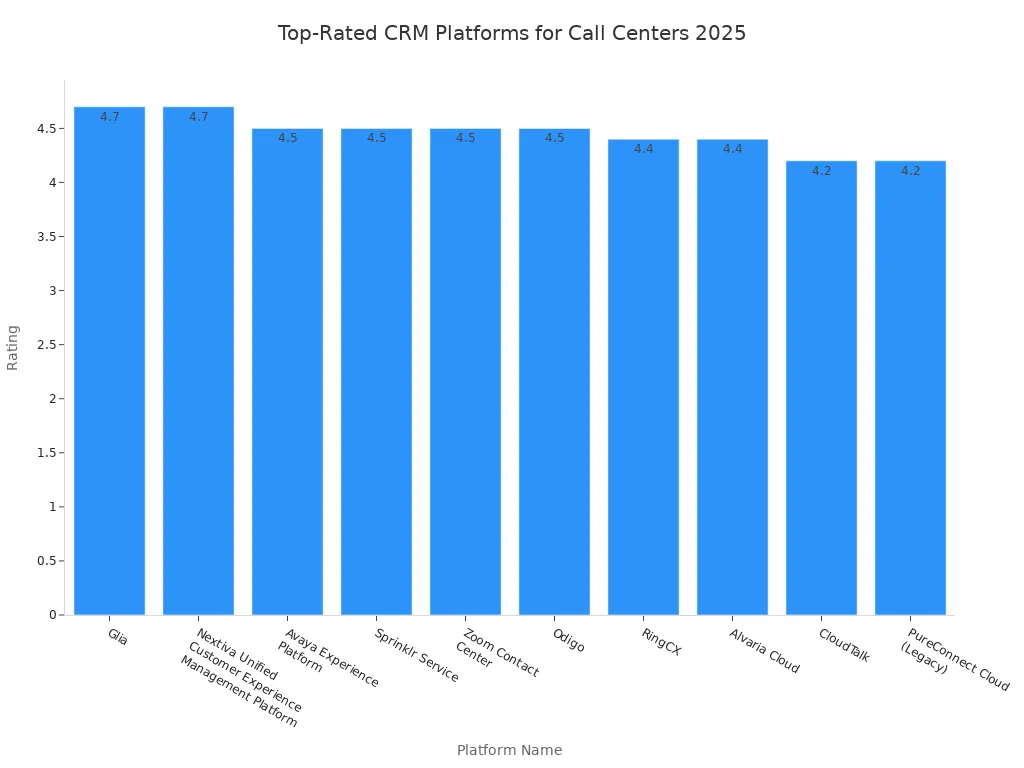
| Platform Name | Rating |
|---|---|
| Glia | 4.7 |
| Nextiva Unified Customer Experience Management Platform | 4.7 |
| Avaya Experience Platform | 4.5 |
| Sprinklr Service | 4.5 |
| Zoom Contact Center | 4.5 |
| Odigo | 4.5 |
| RingCX | 4.4 |
| Alvaria Cloud | 4.4 |
| CloudTalk | 4.2 |
| PureConnect Cloud (Legacy) | 4.2 |
Assess Native vs. Third-Party Integrations
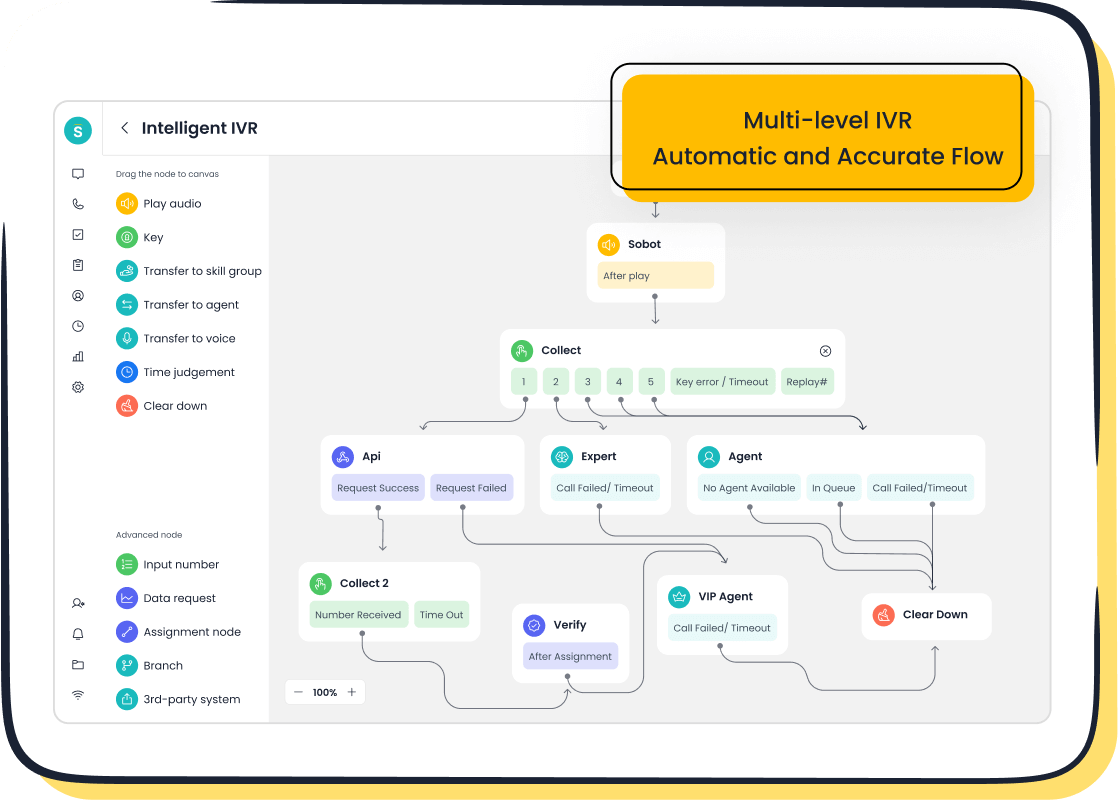
Your crm integration can be native or use third-party tools. Native integrations are built-in but may offer limited flexibility. Third-party middleware provides more customization but can add complexity and cost. This is where all-in-one platforms simplify your crm integration. Solutions like Sobot's Voice Call Center offer "Integration Made Simple" capabilities. They combine call center functions and crm integration within a single ecosystem. This approach removes many technical hurdles for your customer service team. Key factors like a 99.99% SLA and global number availability become part of a unified package, not separate challenges.
Prioritize Scalability and Future-Proofing
Your business will grow, and your crm must grow with it. Prioritize platforms that are scalable and future-proof. A modern crm should support your evolving customer service needs.
Key features to look for include:
- AI-powered analytics for data-driven decisions.
- Omnichannel capabilities to engage customers across all channels.
- Mobile-first design for agents working on the go.
- Journey orchestration to create personalized customer experiences.
Conduct Vendor Demos and Pilot Tests
Never buy a crm without testing it first. Schedule vendor demos and run pilot tests with your team. This hands-on experience is the best way to see if a crm meets your needs.
Pro Tip: Prepare a "demo roadmap" before meeting with vendors. This document should outline your key requirements and desired features. It ensures the demonstration focuses on what matters most to your business.
Analyze Total Cost of Ownership (TCO)
Look beyond the initial subscription price. A complete crm integration involves other expenses. You must analyze the Total Cost of Ownership (TCO) to understand the true investment. Hidden costs can include data migration, user training, and ongoing support. A thorough TCO analysis for your call center crm integration prevents budget surprises and ensures a sustainable investment.
Step 3: Plan Your Technical CRM Integration
A solid plan is the backbone of your call center crm integration. This phase turns your goals into an actionable strategy. You will move from planning to doing. A detailed technical plan minimizes risks and keeps your project on schedule. This ensures a smooth transition for your customer service team.
Assemble Your Project Team
First, you must build your project team. You need the right people to guide your crm integration. Each member has a specific role in ensuring a successful crm implementation.
Key Roles for Your Integration Team:
- Project Leader: Manages the project and acts as the main point of communication.
- Technical Expert: Handles the software setup and API connections for the crm.
- Department Leaders: Represent their teams' needs and promote the new crm.
- Pilot Users: Test the crm during development and provide crucial feedback.
Develop a Detailed Project Plan
Next, create a project plan with clear milestones. This roadmap tracks your progress from start to finish. Your plan should outline every critical step of the crm integration. Key milestones include completing the data audit, finishing user training, and setting a go-live date. This plan keeps everyone aligned and accountable.
Configure Data Mapping and Sync Rules
Properly configuring your customer data is essential. You must map data fields between your call center software and your crm. This ensures customer data flows correctly. Clear sync rules prevent duplicate records and missing information. Accurate customer data is vital for providing excellent customer service and improving customer satisfaction.
Test in a Sandbox Environment
You should always test your crm integration before it goes live. A sandbox is a safe, isolated testing environment. It lets you find and fix issues without affecting your live operations. During this stage, look for problems like data sync errors or broken workflows. This step protects your customer data and ensures a stable launch.
Conduct User Acceptance Testing (UAT)
After internal testing, your team performs User Acceptance Testing (UAT). Your agents and managers will use the new crm in realistic scenarios. They confirm the system meets their needs and is easy to use. This feedback is critical for making final adjustments and boosting user adoption. A successful crm integration depends on your team's approval.
Keys to a Successful CRM Implementation
A successful crm implementation delivers tangible results. It improves efficiency and boosts customer satisfaction. For instance, when Samsung implemented Sobot's all-in-one solution, they unified their communication channels. This crm integration connected their systems and streamlined access to customer data. The result was a 97% customer satisfaction rate and a 30% increase in agent efficiency. This shows how the right plan and tools transform customer service.
Step 4: Train Your Team and Drive Adoption
Technology is only as good as the people who use it. A successful crm integration depends on your team's ability to embrace the new system. You must invest in comprehensive training to drive adoption. This ensures your new crm enhances your customer service operations from day one.
Develop Role-Specific Training
One-size-fits-all training does not work. You should develop personalized training paths for different roles. Your agents, managers, and admins have unique needs. A blended learning approach works best.
- Use e-learning modules for basic crm features.
- Hold instructor-led sessions for complex skills.
- Tailor content to ensure each person understands how the crm improves their specific job.
This targeted approach makes training relevant and effective for your customer service team.
Conduct Hands-On Training Sessions
People learn by doing. You must conduct hands-on training sessions. Let your team practice in a safe environment. Use a crm sandbox to simulate real customer service scenarios. Role-playing exercises are also very effective. An agent can act as a customer while another uses the new crm to solve a problem. This practice builds confidence and skill with the crm.
Establish a Change Champion Program
You need internal advocates for your new crm. Establish a change champion program to build momentum. These champions are enthusiastic team members who promote the new technology. They act as a trusted resource for their peers.
A great change champion has strong communication skills. They can translate technical details into simple language and rally their colleagues around the crm integration.
Create a Support and Feedback Channel
Your team will have questions after the initial training. You must create a clear support and feedback channel. This gives agents a place to ask for help and share their thoughts. Use multiple methods to gather feedback, such as in-app surveys and regular team meetings. Acting on this feedback shows your team you value their input. It makes the crm integration a collaborative effort.
Communicate the "Why" Behind the Change
Your team needs to understand the purpose of the new crm. You must communicate the "why" behind the change. Explain how the crm will make their jobs easier. A unified crm gives them a full view of customer history. This means less time asking repetitive questions and more time solving problems. Better tools lead to better customer service and higher job satisfaction.
Step 5: Monitor, Measure, and Optimize
Your call center crm integration is not finished at launch. The final step is a continuous cycle of improvement. You must monitor performance, measure results, and optimize workflows. This ensures your crm delivers long-term value and transforms your customer service.
Track Pre-Defined KPIs
You must now track the KPIs you defined in Step 1. This data proves the value of your crm integration. Regularly review metrics like First Contact Resolution (FCR) and Customer Satisfaction (CSAT). These numbers show how your new crm is improving your customer service operations.
Monitor System Performance and API Health
A powerful crm needs a stable foundation. You must monitor your system's technical health to prevent downtime. This protects your customer service quality. Pay close attention to key API performance metrics.
Key System Health Metrics to Watch: 🩺
- Uptime: Your crm should be available over 99.9% of the time.
- Latency: The system should respond to requests in under 100 milliseconds for a smooth user experience.
- Error Rate: The number of failed requests should be close to zero.
- Request Rate: Track requests per minute to manage system load effectively.
Gather Agent and Customer Feedback
Data tells you what is happening. Feedback tells you why. You must gather feedback from both agents and customers. Use targeted surveys to get actionable insights about your crm and customer service.
Example Survey Questions:
- "Did we solve your problem today?" (Measures FCR)
- "How likely are you to recommend our brand to a friend?" (Measures NPS)
- "How much do you agree: This brand made it easy for me to handle my issue?" (Measures CES)
This feedback helps you understand the real-world impact of your crm.
Identify Workflow Optimizations
Use your data and feedback to find areas for improvement. Analyze how agents use the crm. Are there bottlenecks or repetitive tasks? Identifying these friction points allows you to refine workflows. A small tweak in your crm configuration can lead to big gains in efficiency.
Plan for Ongoing Enhancements
Technology evolves quickly. Your crm integration must adapt to stay effective. You should plan for ongoing enhancements. Schedule regular reviews to discuss new features and potential upgrades for your crm. This forward-thinking approach ensures your customer service team always has the best tools for the job.
You now have the five essential steps for your call center crm integration. Following this roadmap—from defining goals to continuous optimization—maximizes your return on investment. This structured crm integration is vital for your customer service. The future of customer service relies on a powerful crm. AI is transforming the crm, making your crm integration more intelligent. This enhances the entire customer experience. A successful crm integration prepares your customer service for tomorrow. Let Sobot guide your crm integration and elevate your customer service.
FAQ
What is call center CRM integration?
Call center CRM integration connects your phone system to your customer relationship management software. This connection shares data between both systems. It gives your team a unified view of every interaction, improving your customer service.
Why is CRM integration important for customer service?
Integration is vital for excellent customer service. It gives your agents complete customer histories instantly. This context helps them provide faster, more personalized support. Better support improves your overall customer service quality.
How long does a CRM integration take?
The timeline for a crm integration varies. A simple project can take a few weeks. A complex integration may take several months. Your planning and resources directly impact the schedule for your customer service project. Good planning ensures better customer service outcomes.
Can I integrate with my existing call center software?
Yes, you can often integrate with existing tools. Many modern platforms offer flexible APIs for this purpose. This helps you enhance your current customer service setup. You can improve your customer service without replacing every system. This approach provides great customer service continuity.
See Also
A 10-Step Guide to Deploying Effective Omnichannel Contact Center Solutions
Essential Features of Leading CRM Software for Call Centers
Discover the Best Free CRM Software for Call Centers in 2024
Your Comprehensive Guide to Omnichannel Call Center Software Excellence
Reviewing the Leading Contact Center Solutions Available This Year

