Essential Guide to Buying Call Center Software


Choosing call center software is a critical decision for your business's future growth. The right platform transforms your customer service operations from a cost center into a powerful value-driver, boosting operational efficiency. Modern call center software, like the Sobot call center, leverages Sobot AI to enhance customer service quality.
AI is reshaping the industry. 88% of call centers now use AI-powered tools, and 38% of customer satisfaction KPIs are evolving due to AI integration.
This guide demystifies buying call center software, empowering you to make a confident investment in tools from call center reporting software to IVR.
Understanding Call Center Software

To choose the right platform, you first need to understand what modern call center software can do. It's more than just a tool for answering calls; it's a complete system for managing your customer service operations. This technology has evolved far beyond traditional phone systems.
Defining Modern Call Center Solutions
Modern call center software moves away from outdated, disconnected systems. It provides a unified, cloud-based platform that supports your team from anywhere. This advanced call center technology is built for flexibility and growth.
Key features that define modern solutions include:
- Cloud-Native Platforms: These systems offer scalability and support for remote agents, replacing rigid on-premise hardware.
- Omnichannel Support: You can engage customers seamlessly across voice, email, chat, and social media.
- AI and Automation: Artificial intelligence powers tools like chatbots and intelligent call routing, which handle simple tasks and guide customers effectively.
- Unified Integrations: They connect with your CRM and other business tools, giving agents a complete view of the customer.
Core Benefits for Service and Efficiency
The right call center software directly improves your team's performance and your customer service quality. By automating tasks and providing better data, you boost operational efficiency. For example, T-Mobile improved its First Call Resolution (FCR) by 15% by giving agents better knowledge tools. Good call center software achieves this by empowering agents to solve issues on the first try.
Similarly, features that automate the tracking of Average Handle Time (AHT) ensure you have precise data for call center management without manual effort. This helps you refine processes and improve the overall customer experience.
Call Center vs. Contact Center Software
You will often hear the terms "call center" and "contact center" used together. While related, they serve different purposes. A call center focuses on voice calls, while a contact center handles communication across multiple digital channels. Understanding the difference is key to selecting the right call center software for your business.
Note: Choosing between them depends on how your customers prefer to communicate with you.
| Feature | Call Center Software | Contact Center Software |
|---|---|---|
| Primary Channels | Voice Calls (Inbound/Outbound) | Voice, Email, Live Chat, SMS, Social Media |
| Main Focus | Managing call volume efficiently | Creating a connected customer journey |
| Analytics | Limited to call metrics (e.g., AHT) | Advanced analytics across all channels |
| Best For | Businesses focused on phone-based call center services | Businesses needing to manage a diverse digital presence |
Essential Features of Call Center Software
Selecting the right call center software means looking closely at its features. These are the tools your team will use every day to help customers. Understanding what each feature does helps you match the software to your business goals and ensure you are building a foundation for excellent service.
Interactive Voice Response (IVR)
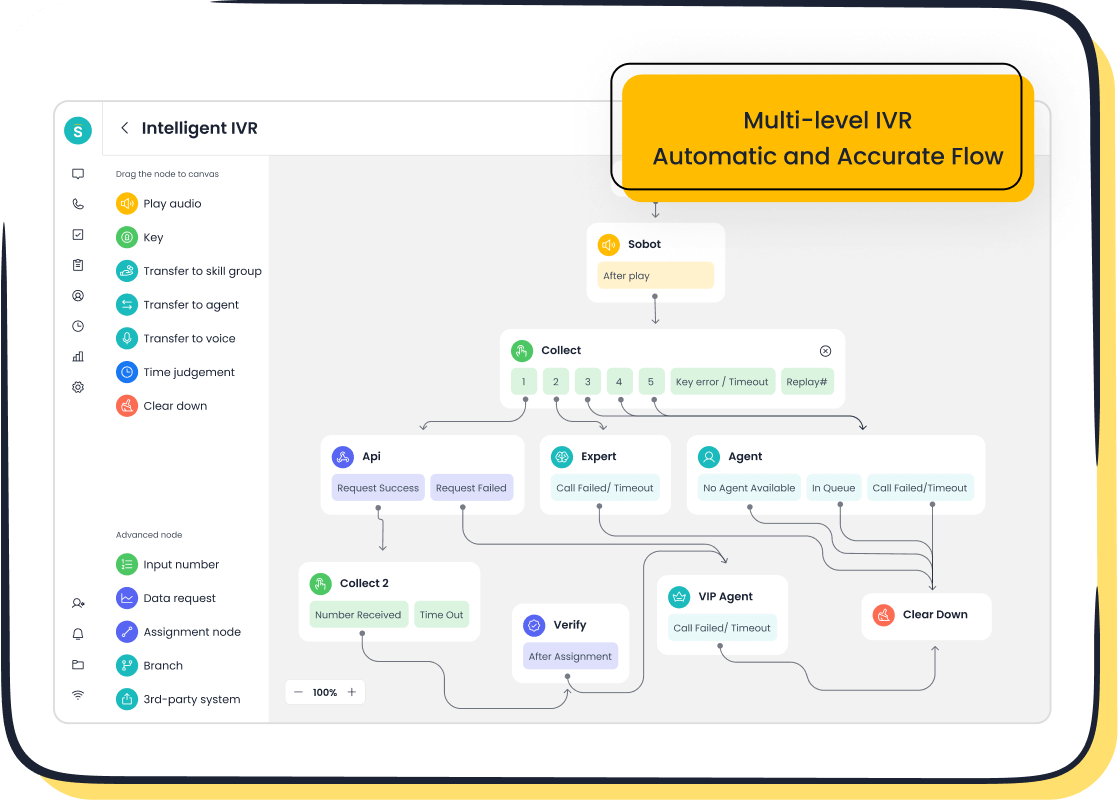
An Interactive Voice Response (IVR) system greets callers with an automated menu. It guides them to the right department or information without needing a live agent. This feature is a frontline tool for managing call volume efficiently.
Modern call center software transforms this experience. Instead of complex coding, you can use a simple drag-and-drop interface to build and update your call flows in minutes. A drag-and-drop IVR builder improves call routing efficiency by directing calls to the correct person based on the caller's menu choices. This reduces setup time because you can create and manage menus without hiring expensive professional help. For more advanced needs, an AI-powered Voicebot, like the one offered by Sobot, can understand spoken requests and resolve issues, elevating the self-service experience.
Automatic Call Distribution (ACD)
Automatic Call Distribution (ACD) is the engine that routes incoming calls to the best available agent. A basic ACD sends calls to the next free agent, but advanced systems use skills-based routing. This ensures your customers connect with the agent most qualified to solve their specific problem.
You can configure routing rules based on several factors:
- Language Skills: Send a Spanish-speaking caller directly to a fluent agent.
- Expertise Level: Route complex technical questions to your senior support staff.
- Customer Value: Prioritize calls from VIP clients to your most experienced agents.
- Agent Performance: Direct more calls to agents with high customer satisfaction scores.
This intelligent routing is a core function of both inbound call center software and more complex platforms, improving first-call resolution and customer satisfaction.
Call Center Reporting Software
You cannot improve what you do not measure. Effective call center reporting software gives you the data needed to understand performance and make informed decisions. These analytics and reporting tools track everything from team productivity to the customer experience. High-quality call center software provides clear, actionable dashboards.
Good call center reporting software helps you monitor key metrics for successful call center management.
| Metric Category | Key Metrics to Track | Why It Matters |
|---|---|---|
| Agent Performance | Average Handle Time (AHT), First Response Time (FRT), Agent Utilization | Measures individual agent efficiency and workload. |
| Operational Health | Call Abandonment Rate, Service Level (e.g., 80% of calls answered in 20s) | Shows if you have enough staff and if your processes are working. |
| Customer Experience | Customer Satisfaction (CSAT), Net Promoter Score (NPS), First-Call Resolution (FCR) | Directly measures how happy customers are with your service. |
By analyzing this data, you can identify training opportunities, optimize staffing, and boost overall operational efficiency. The best call center reporting software makes this data easy to access and understand.
CRM Integration Capabilities
Your call center software should not operate in a silo. Integrating call center software with your Customer Relationship Management (CRM) platform is essential. This connection gives your agents a complete view of the customer they are speaking with, including past interactions, purchase history, and support tickets.
When agents have context, customers don't have to repeat themselves. This simple improvement dramatically enhances the customer experience.
Top-tier call center software offers pre-built integrations with major CRM systems, such as:
- Salesforce
- HubSpot
- Zoho
- Microsoft Dynamics
This seamless flow of information empowers agents to provide faster, more personalized service.
Call Recording and Monitoring
Call recording and monitoring serve two critical functions: quality assurance and legal compliance. Managers can listen to calls to provide coaching and identify areas for agent improvement. This is a key feature for both inbound and outbound call center software.
More importantly, you must handle customer data securely and legally.
Compliance is non-negotiable. Regulations like GDPR in Europe and CCPA in California have strict rules about consent and data storage. You must inform customers they are being recorded and store the data securely.
Your call center software provider should help you meet these obligations. For example, a reliable platform like Sobot guarantees security and stability with a 99.99% SLA and robust global network support, ensuring your recorded data is protected. This is a crucial factor when choosing an outbound call center software or any system that handles sensitive information.
Omnichannel Communication
Today's customers connect with businesses through voice, email, live chat, and social media. Omnichannel support brings all these conversations into one place. This prevents a fragmented experience where a customer has to explain their issue again every time they switch channels.
A unified agent workspace is the key to making this work. Instead of juggling multiple applications, agents see every customer interaction in a single, streamlined interface. This is a core benefit of modern call center software. For example, Sobot's unified workspace centralizes customer data and conversations, allowing agents to switch between channels without losing context. This feature boosts agent productivity and provides the seamless experience customers expect. The best analytics and reporting tools will also track performance across all of these channels.
Deployment Models and Types of Call Center Software
After identifying key features, you must choose a deployment model. This decision affects your costs, control, and scalability. You also need to select from different types of call center software based on your primary business functions. Understanding these options helps you find the right call center software for your team.
The Flexibility of Cloud-Based Solutions
Cloud-based call center software is hosted by a vendor and accessed over the internet. This model is growing rapidly due to its affordability and flexibility. You avoid large upfront hardware costs. Your teams can work from anywhere with an internet connection. The vendor manages all maintenance and updates, freeing up your IT resources. This scalability makes it easy to add or remove agents as your business needs change.
The Control of On-Premise Systems
On-premise call center software runs on your own servers at your physical location. While cloud solutions are gaining popularity, on-premise systems held over half the market share in 2022. Businesses in regulated industries like healthcare or finance often choose this model. It gives you complete control over data security and compliance.
You might choose an on-premise system to:
- Meet strict data confidentiality rules.
- Integrate with existing legacy systems.
- Maintain full control over system updates.
Comparing Types of Call Center Software
You must also consider the different types of call center software. Your choice depends on your main goals.
- Inbound call center software focuses on managing incoming customer calls for service and support.
- Outbound call center software helps agents make outgoing calls for sales, lead generation, or market research.
- Blended call center software combines both inbound and outbound functions. This approach boosts agent productivity but requires more in-depth training to handle varied tasks.
Knowing these types of call center software ensures you select a platform that aligns with your operational focus.
The Rise of Hybrid Models
A hybrid model combines on-premise and cloud solutions. This approach offers a "best of both worlds" strategy. You can keep sensitive customer data on your private servers to meet data residency rules. At the same time, you can use flexible cloud tools to support remote agents or manage less critical tasks. This model allows you to modernize your call center software gradually while protecting your existing infrastructure investments.
Criteria for Buying Call Center Software

Choosing the right platform is a major decision. You need to look beyond features and evaluate how a solution fits your long-term strategy. The process of buying call center software requires you to assess scalability, security, usability, and vendor reliability. These criteria ensure your investment supports your business for years to come.
Scalability and Future-Proofing
Your business will grow, and your call center software must grow with it. A scalable platform adapts to your changing needs without requiring a complete overhaul. Future-proofing means selecting a solution that can handle not just today's challenges but tomorrow's as well.
Look for call center software that offers key scaling capabilities:
- Flexible User Management: You should be able to add or remove agent seats easily. This allows you to scale your team during peak seasons or business expansion.
- Global Reach: If you serve an international audience, you need a provider with global network support. This includes access to local numbers and multi-language options.
- AI and Automation: Artificial intelligence reduces manual work. AI-powered routing and chatbots help you handle more volume without hiring more agents, making your operations more efficient.
- Cloud-Based Infrastructure: Cloud operations eliminate the need for expensive on-premise hardware. This gives you the flexibility to scale instantly and supports a remote workforce.
Security and Compliance
Protecting customer data is not optional. You must prioritize security and compliance when choosing call center software. A data breach can damage your reputation and lead to serious legal penalties. Your vendor should be a partner in safeguarding sensitive information.
When you evaluate a vendor, ask for proof of their security practices. Certifications from third-party auditors show a commitment to protecting your data.
Key security standards to look for include:
- SOC 2: This compliance framework, established by the AICPA, audits how a company protects customer data based on criteria like security, availability, and confidentiality. A SOC 2 Type II report provides a thorough review of a vendor's controls over time.
- ISO 27001: This is a leading international standard for information security. It certifies that a vendor has a formal system in place to manage and protect information assets, including development centers and data centers.
- PCI DSS: If you handle credit card payments, your call center software must be compliant with the Payment Card Industry Data Security Standard.
- HIPAA: For healthcare organizations, compliance with the Health Insurance Portability and Accountability Act is mandatory to protect patient information.
Ease of Use and Agent Training
Complex software can frustrate your agents and slow down your operations. The best call center software is intuitive and easy to learn. A user-friendly interface helps agents find the information they need quickly, which leads to better customer conversations.
Think about the onboarding process. How long will it take to train your team on the new system? In some industries, training that lasts more than three days is considered too long. The goal is to get agents proficient in just two days. A platform with a simple design and a unified workspace reduces training time and helps your team become productive faster. This leads to higher agent satisfaction and lower turnover.
Vendor Support and SLAs
Your relationship with your software vendor does not end after the purchase. You need a partner who provides reliable support when you need it. Before you sign a contract, carefully review the vendor's Service Level Agreement (SLA). An SLA is a formal promise that outlines the level of service you can expect.
One of the most important metrics in an SLA is uptime. Uptime guarantees define how reliable the service will be. Downtime means your customers cannot reach you, which hurts your business. Top-tier cloud call center software providers typically offer a 99.99% uptime SLA. This ensures your system is almost always available. Also, check if the vendor offers 24/7 live support. Problems can happen at any time, and you need to know that help is available around the clock.
Integration with Your Tech Stack
Your call center software should connect seamlessly with the other tools you use. Integrating call center software with your CRM, helpdesk, and communication platforms creates a single source of truth for your customer data. This unified view empowers your agents to deliver personalized and efficient service.
Many vendors offer pre-built integrations for popular business tools. Look for a platform that connects easily with systems like Salesforce, HubSpot, or Shopify. These integrations automate workflows and eliminate the need for agents to switch between different applications. A strong integration capability is a key factor when you are evaluating different types of call center software.
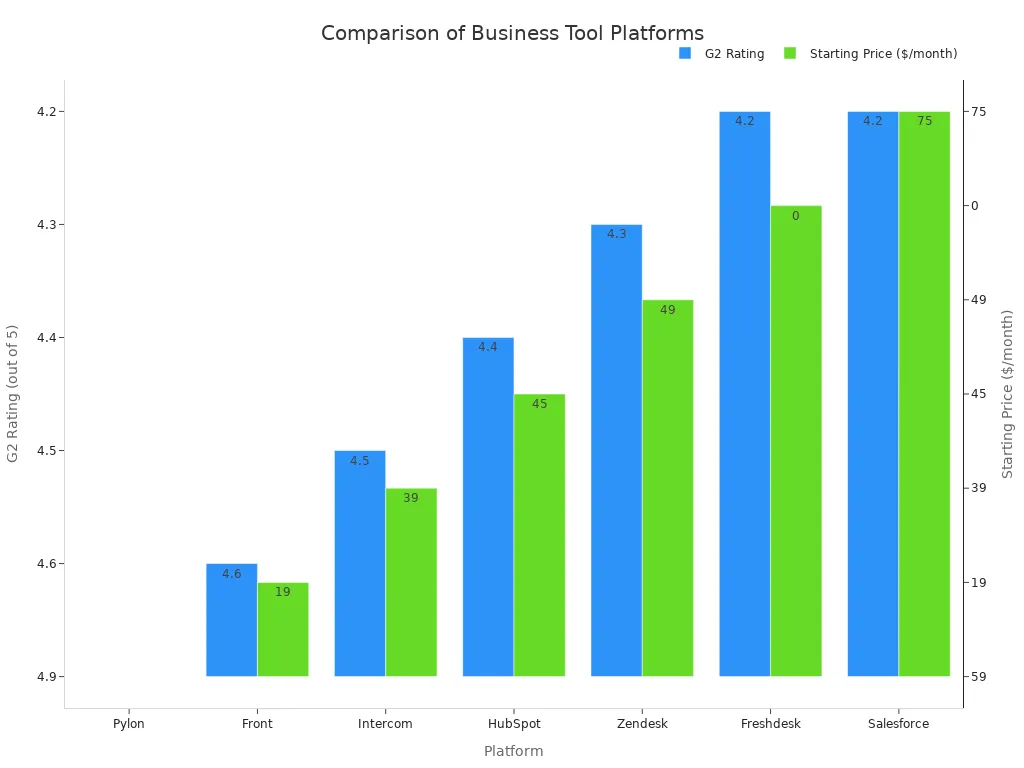
When you evaluate options, ask about the availability of APIs (Application Programming Interfaces). A robust API allows you to build custom connections to your unique in-house systems.
Why Choose an All-in-One Solution Like Sobot?
Choosing a single, unified platform simplifies your customer service operations. An all-in-one call center software connects every part of the customer journey. This approach eliminates data silos and creates a more efficient workflow for your teams.
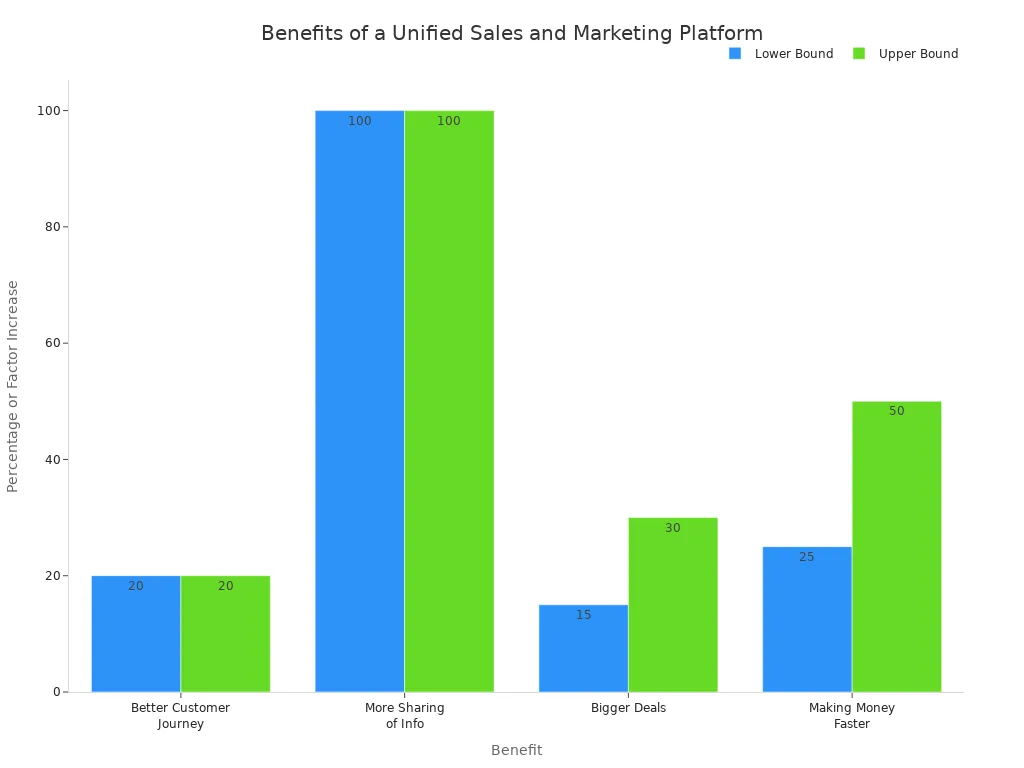
Unifying Sales, Marketing, and Support
You can create a better customer journey when your teams work together. A unified call center software gives your sales, marketing, and support staff shared information. This collaboration leads to more effective communication and stronger results. Companies that unify these teams often see bigger deals and faster growth.
Enhancing Efficiency with AI and Automation
AI and automation are key to improving operational efficiency. AI-powered tools like chatbots and voicebots handle common questions 24/7. They can resolve simple issues like order status or password resets instantly. This frees your agents to focus on more complex problems. This type of call center software uses AI to understand customer intent, which improves first-contact resolution and reduces wait times.
Achieving Higher Customer Satisfaction
An effective all-in-one call center software directly improves customer service quality. For example, Samsung used Sobot's solution to manage its customer inquiries.
The results were impressive. Samsung achieved a 97% customer satisfaction rate and saw a 30% increase in agent efficiency. This shows how the right call center software empowers agents and creates happier customers.
A Look at Sobot's Omnichannel Solution
An omnichannel platform brings all your communication channels into one place. Sobot's solution combines its call center software, live chat, ticketing system, and AI tools into a single workspace. This allows you to serve customers on their preferred channels without losing context. As an official WhatsApp Business Solution Provider (BSP), Sobot also simplifies communication on one of the world's most popular messaging apps. This integrated approach ensures your call center software can meet modern customer expectations.
Understanding Software Costs
You need to look beyond the sticker price to understand the true investment in call center software. The best platform fits your budget not just today, but for years to come. This means evaluating the complete financial picture, from initial fees to long-term operational expenses.
Common Pricing Models
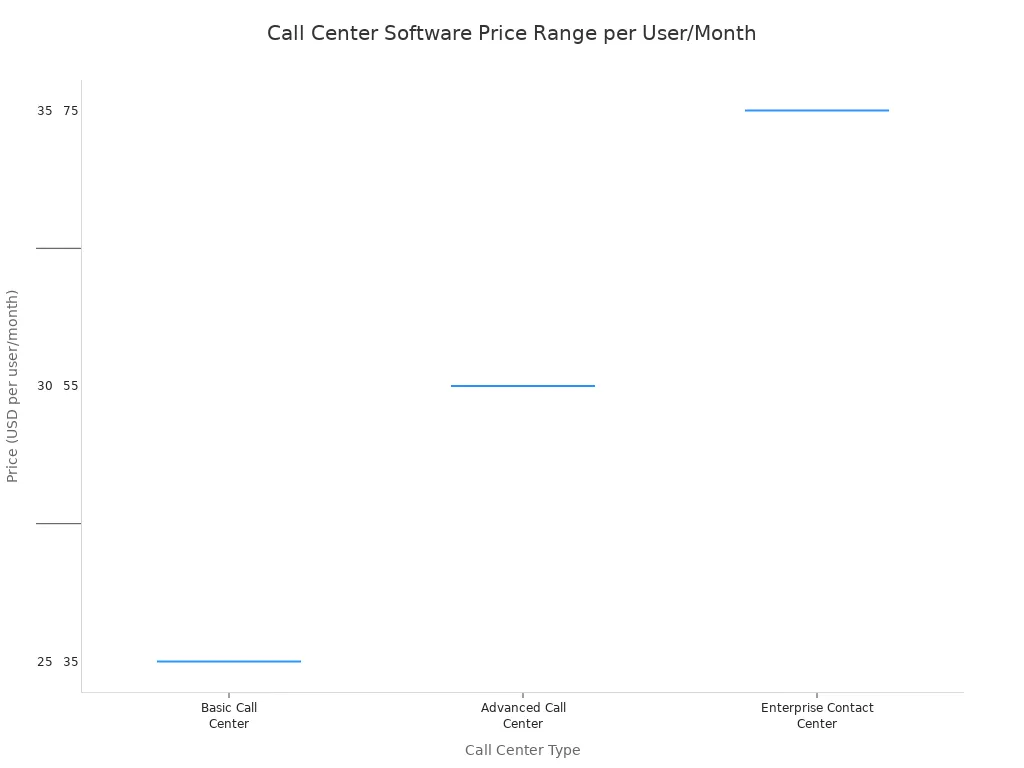
Most call center software vendors use a subscription model. You will typically pay a fee per user, per month. This pricing makes costs predictable and easy to scale. The price often depends on the features you need. Basic plans cover essential calling functions, while enterprise plans offer advanced analytics and AI capabilities.
Calculating Total Cost of Ownership (TCO)
The monthly subscription is only one part of the cost. To get a full picture, you must calculate the Total Cost of Ownership (TCO). TCO is the full price of the software over its entire life. It includes the initial purchase and all ongoing expenses.
When calculating TCO for your call center software, remember to include:
- Upfront Costs: This covers implementation, setup fees, and data migration.
- Operational Costs: These are your recurring software licenses and maintenance fees.
- Variable Costs: This includes expenses for agent training and emergency support.
Identifying Hidden Costs
Some costs are not obvious at first glance. You should watch out for these common hidden fees when buying call center software.
- Implementation Fees: Many vendors charge a one-time fee to set up the system and integrate it with your other tools.
- Training and Onboarding: While some training is free, you may need to pay for in-depth sessions for your team.
- Premium Support: Basic support is usually included, but 24/7 assistance or priority help often costs extra.
Aligning Costs with Your Budget
Once you understand all the potential costs, you can align them with your budget. Create a detailed financial plan that includes the subscription price, TCO, and a buffer for hidden expenses. This helps you choose a call center software that provides the features you need without causing financial surprises down the road. A clear budget empowers you to make a smart, sustainable investment.
Your Step-by-Step Implementation Checklist
A successful launch of your new call center software depends on careful planning. This checklist guides you through the key steps, from defining your goals to going live. Following these stages ensures a smooth transition and helps you get the most value from your investment.
Defining Project Goals and KPIs
First, you must define what success looks like for your new call center software. Clear goals and Key Performance Indicators (KPIs) show if you are achieving your objectives.
Introduce new KPIs in small steps. This gradual approach helps your team adapt without feeling overwhelmed. It also ensures you can refine metrics for better results.
To set effective goals for your call center software implementation, you should:
- Define Your Objectives: Clearly identify what you want to improve, such as reducing wait times or increasing first-call resolution.
- Align KPIs with Goals: Choose metrics that directly measure your progress toward these objectives.
- Engage Stakeholders: Involve managers and team leaders in the process to ensure everyone agrees on the goals.
- Monitor and Review: Use analytics and reporting tools to track your KPIs regularly and make adjustments as needed.
Assembling Your Project Team
You need a dedicated team to manage the implementation of your call center software. This group will oversee the project from start to finish. Your team should include a project manager, an IT specialist, and representatives from your customer service operations. Clear roles and responsibilities prevent confusion and keep the project on track.
Planning Data Migration
Moving your existing customer data to the new call center software is a critical step. You need a solid plan to transfer information like contact details and interaction histories without losing anything. Work with your vendor to understand the process. Test the migration with a small batch of data first to identify any potential issues.
Executing Agent Onboarding
Your agents must feel confident using the new call center software. A structured onboarding program is essential for effective call center management. Training should cover all key features, from making calls to using the analytics and reporting tools. Hands-on practice helps agents learn quickly and improves long-term operational efficiency.
Go-Live and Post-Launch Review
"Go-live" is the day you officially switch to your new system. Plan this transition during a period of low call volume to minimize disruption. After the launch, you should closely monitor performance. Review your KPIs to see how the new call center software is impacting your goals. Collect feedback from your agents to identify any areas for improvement.
Choosing call center software is a strategic business decision. You are not just buying a tool; you are investing in your company's future. The right call center software transforms your customer service.
Remember the most critical factors. You must align features with your needs, select the right deployment model, and evaluate the total cost of your call center software.
Use this guide to find a partner and a platform. A great call center software, like Sobot, will support your service excellence for years. This call center software will help you grow.
FAQ
What is the main difference between cloud and on-premise call center software?
Cloud-based call center software is hosted by a vendor online. You access it with an internet connection. On-premise software runs on your own servers. You manage the hardware and security yourself at your physical location.
How long does it take to set up new call center software?
Setup time varies. Cloud-based call center software can be deployed quickly, often in a few days. On-premise systems take longer due to hardware installation. A clear implementation plan helps ensure a fast and smooth launch for your team.
Can I integrate call center software with my existing CRM?
Yes. Most modern call center software offers pre-built integrations for popular CRMs like Salesforce and HubSpot. This connection gives your agents a complete customer view, which helps them provide faster and more personalized service.
Do I need technical skills to manage call center software?
You do not need deep technical skills for most cloud-based platforms. They often feature user-friendly interfaces, like drag-and-drop IVR builders. This allows you to manage call flows and settings without needing to write any code.
See Also
Your Comprehensive Handbook for Seamless Omnichannel Contact Center Solutions
Exploring Essential AI Software for Modern Call Center Operations
Mastering Customer Service Excellence with Quality Assurance Software
Discovering the Best Complimentary CRM Solutions for Call Centers This Year
Key Functionalities of Customer Relationship Management Software for Call Centers

