What Is a Shared Inbox? 10 Best Tools for 2025


A shared inbox is a central hub for your team's group emails, like info@ or support@. It helps you manage all messages in one inbox.
Your teams probably know the chaos. You forward an important email. Colleagues get CC'd on endless email threads. No one knows who replied to the customer. This confusion hurts customer satisfaction.
A shared inbox solution ends this disorder. The right shared inbox software, like Sobot, offers collaborative features. It brings order and collaboration to your team inbox. This collaborative inbox helps teams track every email. Shared inbox tools and shared inbox solutions create clear ownership for all incoming emails.
Why Your Business Needs a Shared Inbox

Adopting a shared inbox is more than a simple change; it's a major upgrade for your team's workflow and customer communication. When your teams use shared inbox solutions, they unlock new levels of efficiency and clarity.
Centralize Communication & Eliminate Silos
A shared inbox creates a single source of truth for your teams. It eliminates information silos where important context gets lost in personal accounts. This shared inbox functionality ensures all customer conversations are in one place.
- Every team member accesses the same emails and context.
- You prevent duplicate replies and confused customers.
- Valuable user information no longer gets lost, which speeds up response times.
This centralization is ideal for teams that need to work together seamlessly.
Manage All Messages in One Inbox
Shared inbox solutions allow you to manage all messages in one inbox. You can bring email, chat, and other channels together. This unified view simplifies shared email management. Your team no longer needs to switch between different apps to talk to customers. When you manage all messages in one inbox, your team can focus on what matters: providing great service. You can easily manage all messages in one inbox, creating a streamlined process for everyone.
Increase Accountability with Clear Ownership
A collaborative inbox brings clear ownership to every email. Shared inbox software lets you assign each message to a specific person. This simple action ends the confusion of "who will reply?"
With clear ownership, no email gets missed and no task is dropped. Managers can also see team workload and performance at a glance, which improves accountability and helps you meet your customer satisfaction goals.
Boost Productivity with Team Collaboration
Productivity soars when your teams have the right collaborative tools. A Deloitte survey found that digital collaboration platforms are crucial for success. Instead of forwarding emails, your teams can use internal notes and @mentions right inside the inbox. This type of collaboration helps resolve issues faster. Shared inbox tools provide features that build teamwork and transparency. This is one of the best practices for managing team inboxes. The right collaborative inbox and team inbox tools offer features for smarter workflows, making your collaborative email management more effective.
Key Features in Shared Inbox Solutions

Modern shared inbox solutions offer powerful key features to transform your team's workflow. These tools go beyond a simple inbox, providing collaborative and AI-powered features for peak efficiency. Understanding these key features helps you choose the right shared inbox software for your teams.
Email Assignment & Ownership
This feature lets you assign each incoming email to a specific team member. It creates clear responsibility. No email gets lost, and everyone knows who is handling which customer conversations. This is a fundamental aspect of shared inbox functionality.
Internal Notes & @Mentions
Your teams can stop forwarding emails for internal discussions. A collaborative inbox allows for better collaboration.
- You can use internal notes to add context right inside an email thread.
- You can @mention teammates to ask questions or get approvals without leaving the inbox. This keeps all collaboration in one place, making teamwork seamless.
Collision Detection
Have you ever sent a reply at the same time as a colleague? Collision detection prevents this. The shared inbox functionality shows you in real-time if another person is viewing or replying to an email. This simple feature avoids duplicate work and customer confusion.
Automation, Rules, and AI
The best shared inbox tools use AI to automate tasks. You can set up rules to manage your inbox automatically. For example, AI can categorize emails using keywords or auto-assign them to the correct teams. These AI automations and AI-powered features save significant time. AI helps prioritize messages, and AI can even suggest replies. This use of AI makes shared inbox management much smarter. AI is a key part of modern solutions. AI enhances many key features. AI drives efficiency.
Integrations (CRM, E-commerce)
Shared inbox software often connects with other business tools. You can integrate your inbox with a CRM or e-commerce platform. This gives your teams a full view of the customer without switching apps. It helps you manage all messages in one inbox effectively.
Reporting & Analytics
These key features help you measure performance. You can track important metrics to improve customer communication and satisfaction. AI can provide deep insights. Key features for analytics include:
- Average First Response Time: How fast your teams first reply.
- Resolution Time: How long it takes to solve an issue.
- Customer Satisfaction (CSAT) Score: Direct feedback from customers.
The 10 Best Shared Inbox Software for 2025
Choosing the right shared inbox software can transform your team's productivity and customer service. The best shared inbox software offers more than just a shared email address; it provides a platform for collaboration, automation, and insight. Below, we review the top 10 shared inbox tools to help you find the perfect fit for your business in 2025.
1. Front: Best for a Unified Customer Hub
Front positions itself as a customer operations platform. It brings all your external communication channels into one central inbox. This allows your teams to collaborate on responses and provide a human touch. Front is designed to connect every team's communication into a single, multi-channel inbox. This gives your teams both shared and individual views of customer messages.
Best For: Teams that need to manage high volumes of messages across multiple channels (email, SMS, chat, social media) and require strong internal collaboration features.
Key Features:
- Universal Inbox: Aggregates email, SMS, social media, and chat messages into one place.
- Strong Collaboration: Includes internal comments, shared drafts, and real-time notifications to facilitate teamwork.
- Workflow Automation: Lets you create rules and triggers to automatically route and prioritize messages.
- Integrations: Offers over 110 native integrations with tools like Salesforce, Asana, and Slack.
- AI and Analytics: Provides AI for summarizing and categorizing messages, plus robust reporting on team performance.
| Category | Details |
|---|---|
| Pros | ✅ All customer messages in one place ✅ Effective internal communication ✅ Intuitive for handling many messages ✅ Smooth syncing across devices |
| Cons | ❌ Conversation threading can be confusing ❌ Mobile app has some limitations ❌ Per-seat pricing can become expensive ❌ Advanced workflows have a learning curve |
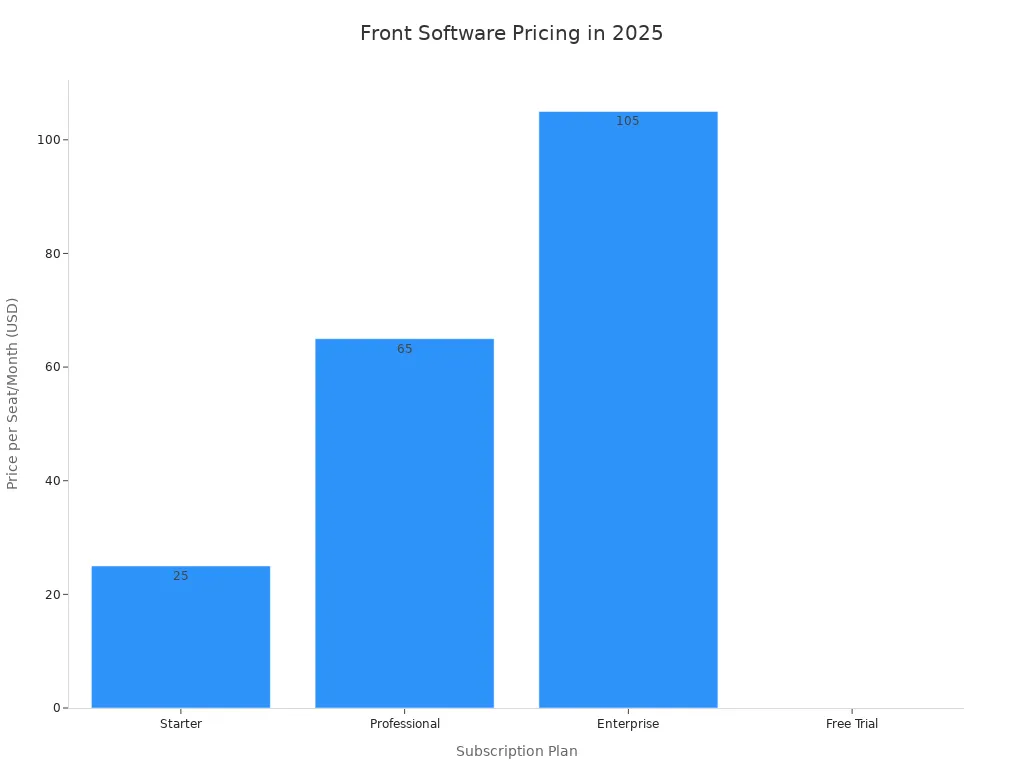
2025 Pricing: Front offers a 14-day free trial. Paid plans are billed per seat, per month.
2. Help Scout: Best for a Personal Touch
Help Scout is a shared inbox software built for teams that prioritize a personal customer experience. It is designed to make customers feel like they are talking to a person, not just getting a ticket number. This approach is perfect for small businesses and startups that want to build a strong community around their brand.
Best For: Small to medium-sized businesses that want to provide high-quality, personalized customer support without the complexity of a traditional help desk.
Key Features:
- Shared Inbox: A simple, email-like interface that your teams will find familiar and easy to use.
- Live Chat: Thoughtfully designed to only show as "live" when a human is available, which manages customer expectations effectively.
- Customer-Centric Design: All features are built to foster a feeling that your company truly cares about support.
- Knowledge Base: Lets you build a self-service help center to answer common questions.
Help Scout is known for its strong community and is a popular choice for teams switching from more complex solutions.
| Category | Details |
|---|---|
| Pros | ✅ Focuses on personal customer interactions ✅ Simple and intuitive interface ✅ Effective live chat that avoids bot frustration ✅ Strong community and support network |
| Cons | The provided documentation does not list any specific cons for Help Scout. |
2025 Pricing: Help Scout offers a 15-day free trial. Specific pricing details for 2025 were not available, but they offer various plans suitable for different team sizes.
3. Sobot: Best for Omnichannel AI-Powered Support
Sobot offers a powerful, all-in-one contact center solution that goes far beyond a typical shared inbox. Its Ticketing System unifies all your customer communication channels—including email, live chat, voice, and social media—into a single, AI-enhanced workspace. This allows your teams to manage every conversation efficiently from one dashboard. The platform uses advanced AI to automate workflows, route tickets, and provide agents with the context they need to resolve issues faster.
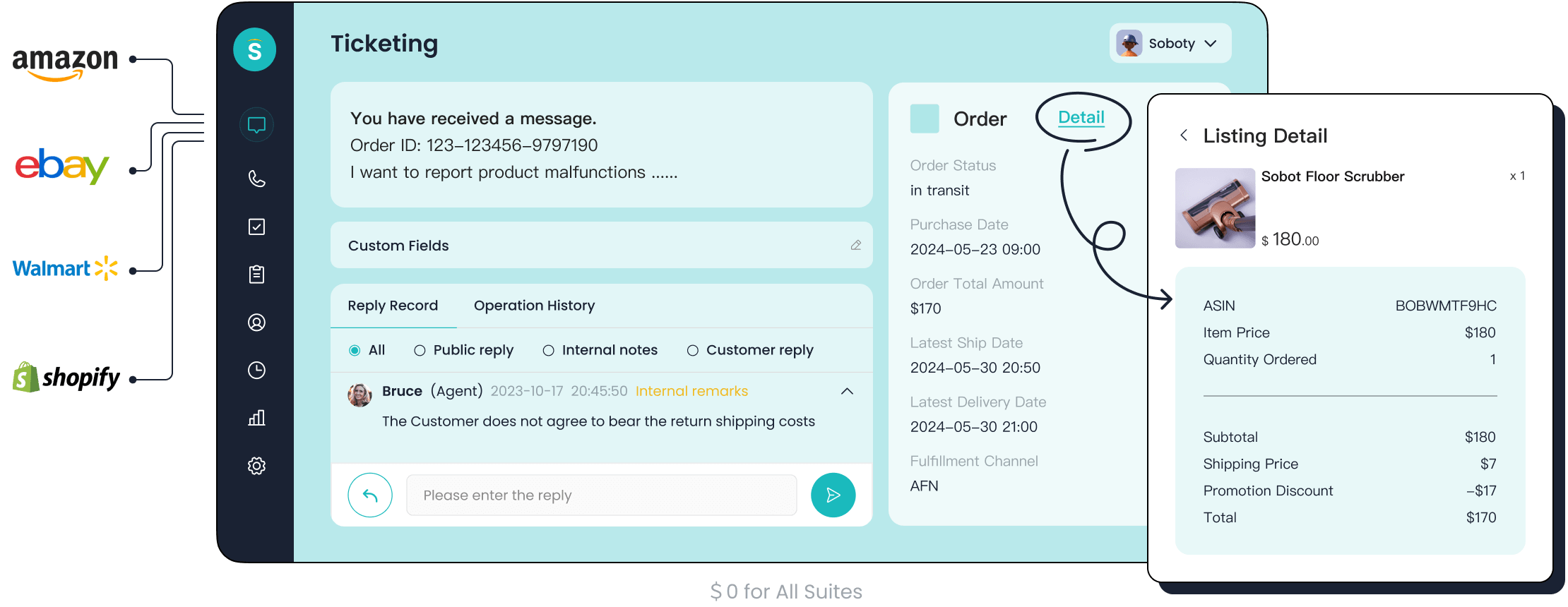
Best For: Businesses of all sizes looking for a scalable, AI-driven omnichannel solution to unify sales, marketing, and support operations and boost efficiency.
Key Features:
- Omnichannel Inbox: Integrates email, voicemail, chat, and social media into a single platform for seamless ticket management.
- AI-Powered Ticketing: Utilizes AI for automated ticket creation, routing, and suggested responses. Its AI chatbot can handle up to 80% of routine queries 24/7.
- SLA Management: Allows you to set and monitor response and resolution times to ensure service level agreements are met.
- Full Contact Center Suite: Offers a complete suite of products, including a Voice Call Center with intelligent IVR, Live Chat, and an official WhatsApp Business API.
- Trusted Analytics: Provides comprehensive analytics and smart notifications to monitor performance and improve customer support.
| Category | Details |
|---|---|
| Pros | ✅ Proven ROI: Opay, a leading financial platform, used Sobot to increase its customer satisfaction from 60% to 90% and reduce overall costs by 20%. ✅ True Omnichannel Unity: Seamlessly combines email, chat, voice, and social media, eliminating fragmented communication. ✅ Powerful AI Automations: AI-powered features and AI agents resolve routine queries, freeing up human agents for complex issues. ✅ High System Stability: Guarantees 99.99% system stability, ensuring your customer service is always online. |
2025 Pricing: Sobot provides flexible and customized pricing based on your business's specific operational needs. This ensures you only pay for the features you require, making it a cost-effective choice for growing businesses.
4. Gmelius: Best for Teams Inside Gmail
Gmelius transforms your existing Gmail inbox into a powerful collaborative workspace. It allows your teams to manage shared inboxes like support@ or sales@ without ever leaving the Gmail interface. You can even convert existing Google Groups into shared inboxes. This makes it one of the best shared inbox software options for companies deeply integrated with Google Workspace.
Best For: Teams that live in Gmail and want to add collaboration and project management features directly into their existing workflow.
Key Features:
- Gmail Integration: Works directly inside Gmail, so there is no need to learn a new platform.
- Shared Inboxes & Labels: Manage group emails and use shared labels to organize conversations across your team.
- Collaboration Tools: Features include shared email drafts, internal notes with @mentions, and email delegation.
- Kanban Boards: Turn your emails into tasks and visualize your workflow on a Kanban board inside Gmail.
- Automation: Create rules to automate repetitive tasks like email assignment and responses.
| Category | Details |
|---|---|
| Pros | ✅ Seamless integration with Google Workspace ✅ Turns Gmail into a full collaboration hub ✅ Two-way integrations with tools like Slack and Trello ✅ Strong privacy model (emails are not stored) |
| Cons | ❌ Only works with Google Workspace (no Microsoft support) ❌ Does not support other channels like social media ❌ Initial setup can be complex for advanced workflows |
2025 Pricing: Gmelius offers plans starting at $10 per user per month, with more advanced features available in higher-tier plans.
5. Hiver: Best for Google Workspace Integration
Hiver is another excellent shared inbox solution that operates directly inside Gmail. It is designed to help teams deliver outstanding customer service from an interface they already know. Hiver provides robust features for email assignment, tracking, and automation without forcing your team to switch to a new application. It is ideal for teams that want the power of a help desk within the familiar environment of Gmail.
Best For: Customer support, sales, and operations teams that rely heavily on Google Workspace and need a simple yet powerful tool for managing shared email accounts.
Key Features:
- Native Gmail Experience: All features are accessible directly within the Gmail UI.
- Email Assignment & Statuses: Assign emails to team members and track their status to ensure accountability.
- Collision Alerts: Prevents multiple agents from replying to the same email at the same time.
- Automations: Set up rules to automate workflows, such as assigning emails based on keywords.
- Analytics: Track key metrics like response time and resolution time to measure team performance.
| Category | Details |
|---|---|
| Pros | ✅ Extremely intuitive for Gmail users ✅ Easy to set up and get started ✅ Strong automation and analytics features ✅ Excellent customer support |
| Cons | ❌ Limited to Google Workspace ❌ Can be pricey for larger teams ❌ Lacks native support for other channels like SMS or voice |
2025 Pricing: Hiver's pricing starts at $15 per user per month, with plans that offer more advanced features and automations.
6. Zendesk: Best for Enterprise-Grade Scalability
Zendesk is a mature and powerful customer service platform built around a robust ticketing system. While it's more than just a shared inbox, its core functionality is perfect for large organizations that need a structured approach to managing high volumes of customer inquiries. Zendesk is designed to scale with your business, offering extensive customization and automation.
Best For: Large teams or enterprises that require a structured ticketing system, detailed reporting, and the ability to manage customer communication across many channels.
Key Features:
- Omnichannel Ticketing: Manages and tracks customer inquiries from email, chat, phone, and social media in a centralized system.
- Extensive Automation: Use triggers and automations to create complex workflows that route tickets and manage SLAs.
- In-Depth Analytics: Provides highly detailed reports and dashboards to optimize your entire support operation.
- Customization: Offers a high degree of customization to fit the specific needs of your enterprise.
| Category | Details |
|---|---|
| Pros | ✅ Highly scalable for growing enterprises ✅ Powerful automation and workflow capabilities ✅ Robust reporting and analytics features ✅ Manages inquiries across all channels |
| Cons | ❌ Can be complex and overwhelming for small teams ❌ More expensive than simpler shared inbox tools ❌ The focus on "tickets" can feel impersonal |
2025 Pricing: Zendesk offers a range of plans, with basic support suites starting around $55 per agent per month.
7. Freshdesk: Best for an Affordable Omnichannel Solution
Freshdesk is a popular shared inbox software that offers a great balance of features, affordability, and ease of use. It centralizes inquiries from email, phone, chat, and social media into a single platform, automatically converting them into tickets. Its AI-powered features, like the Freddy AI bot, help automate responses and suggest solutions, reducing the workload on your agents.
Best For: Small to medium-sized businesses looking for a cost-effective omnichannel help desk with strong automation and self-service options.
Key Features:
- Intelligent Ticketing: Automatically converts inquiries from all channels into prioritized and assigned tickets.
- Team Collaboration: A collaborative workspace allows agents to share ownership of tickets and leave internal notes.
- Self-Service Portal: Build a knowledge base and forums to empower customers to find answers on their own.
- Workflow Automation: Automate processes based on triggers like keywords, requestor, or time.
| Category | Details |
|---|---|
| Pros | ✅ Easy-to-use interface ✅ Strong reporting and analytics tools ✅ Excellent self-service customer portal ✅ Free plan available for up to 3 agents |
| Cons | ❌ Some users report issues with the ticketing system ❌ Mobile app can be unreliable ❌ Customer support can be inconsistent |
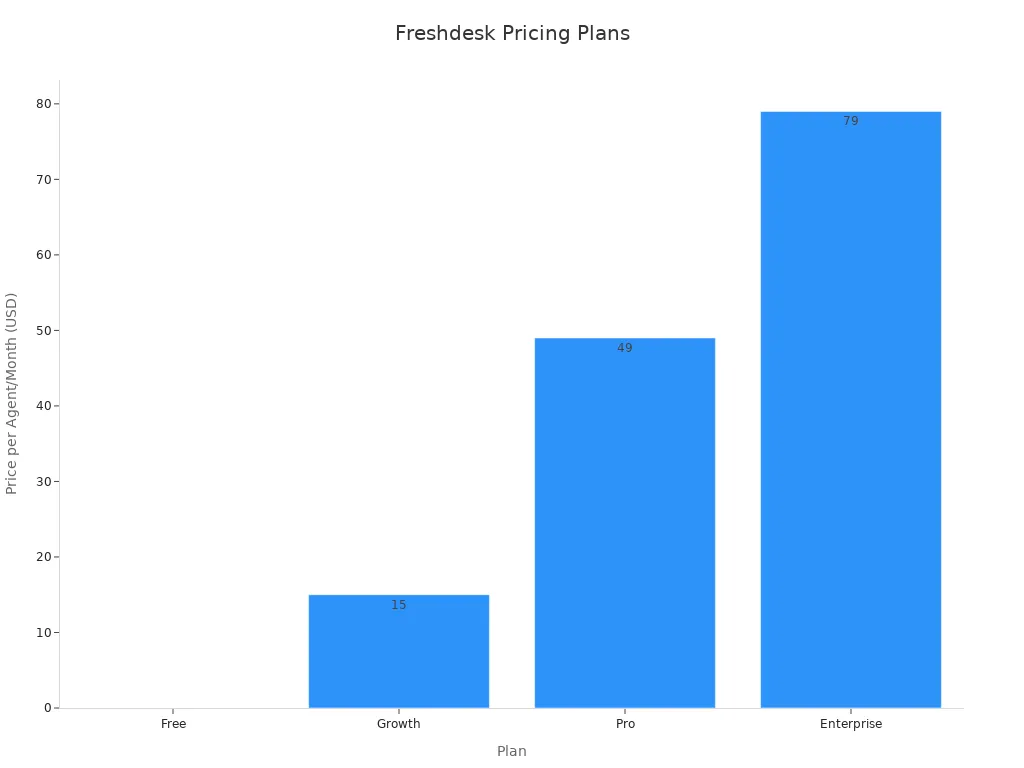
2025 Pricing: Freshdesk offers a free plan for up to 3 agents. Paid plans provide more advanced features and start at $15 per agent per month.
8. Missive: Best for Internal & External Chat
Missive offers a unique approach by merging your external customer communication with your internal team chat. It allows your team to have "behind the scenes" discussions right inside an email thread from a customer. You can @mention colleagues, co-author replies, and manage tasks without ever leaving the conversation. This breaks down silos between your inbox and your chat app.
Best For: Highly collaborative teams that want to unify their internal chat and external email into a single, powerful application.
Key Features:
- Unified Inbox: Combines email, SMS, WhatsApp, and social media with internal team chat.
- Internal Chat on External Messages: Chat with your team directly within an email thread for full context.
- Collaborative Drafting: Write and edit replies together with your teammates in real-time.
- Task Management: Turn any message into a task, assign it, and set a due date.
| Category | Details |
|---|---|
| Pros | ✅ Blends internal and external communication seamlessly ✅ Powerful real-time collaboration features ✅ Turns your inbox into a task manager ✅ Supports a wide range of channels |
| Cons | ❌ The interface can feel busy for new users ❌ Can be more expensive than basic shared inbox tools ❌ Some features have a steeper learning curve |
2025 Pricing: Missive offers a free plan with limited history. Paid plans start at $14 per user per month.
9. Groove: Best for Simplicity and Ease of Use
Groove is designed for small businesses that want a simple, no-nonsense shared inbox. Its interface is clean and intuitive, making it easy for anyone on your team to get started without extensive training. Groove focuses on the core features you need to manage customer conversations effectively, such as a shared inbox, knowledge base, and reporting, without the bloat of more complex systems.
Best For: Small, growing businesses that need a simple and affordable help desk that is easy to set up and use.
Key Features:
- Simple Shared Inbox: An intuitive inbox that feels like a standard email client.
- Drag-and-Drop Editor: Easily create and manage knowledge base articles without any coding.
- Automation Rules: Automate common tasks like assigning conversations or sending auto-replies.
- Reporting: Get insights into conversation volume, response times, and customer satisfaction.
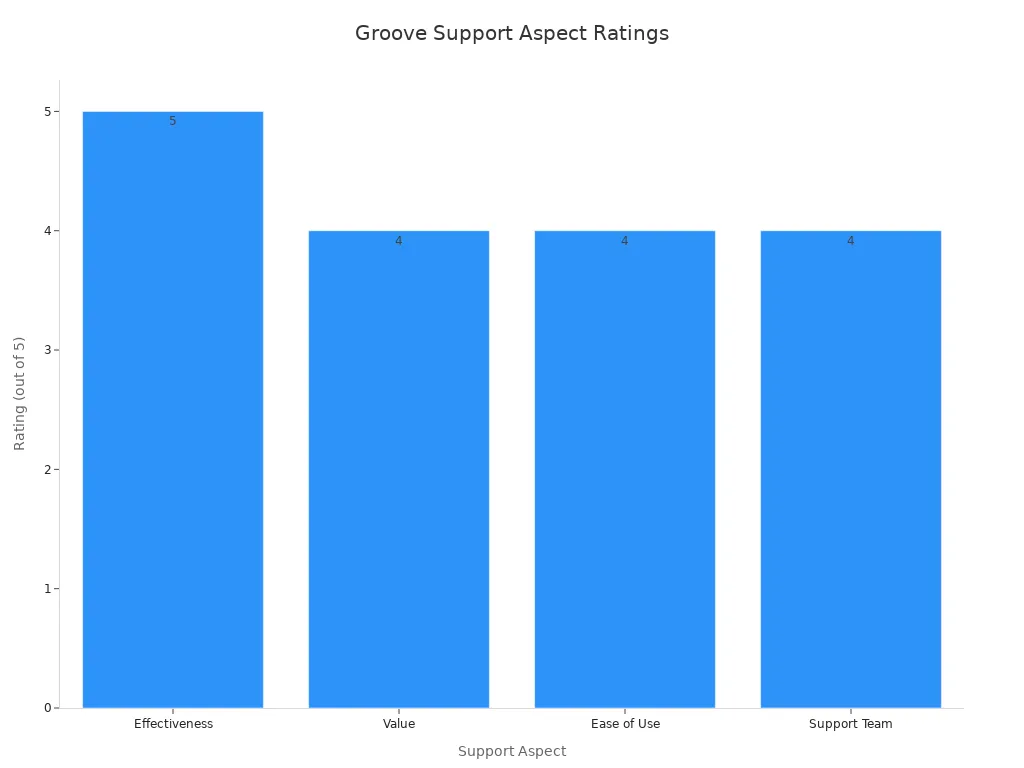
Users praise Groove for its "total no-brainer" interface and strong community support, making it incredibly user-friendly for beginners.
| Category | Details |
|---|---|
| Pros | ✅ Extremely easy to use and navigate ✅ Quick to set up and implement ✅ Excellent and responsive customer support ✅ Affordable pricing for small businesses |
| Cons | ❌ Lacks some of the advanced features of larger platforms ❌ Reporting is less detailed than competitors ❌ Fewer integrations than other solutions |
2025 Pricing: Groove's pricing is designed for small businesses, with plans that offer a great set of features at a competitive price point.
10. HubSpot Service Hub: Best for HubSpot CRM Users
If your business already uses the HubSpot CRM, the HubSpot Service Hub is a natural choice. It integrates seamlessly with the rest of the HubSpot platform, giving your team a complete 360-degree view of every customer. The Service Hub includes a shared inbox, ticketing system, live chat, and knowledge base, all connected to your central CRM data.
Best For: Businesses of any size that are already invested in the HubSpot ecosystem and want to connect their customer service operations with their sales and marketing data.
Key Features:
- Deep CRM Integration: Every conversation is automatically logged in the HubSpot CRM, providing full context.
- Ticketing System: Organize and track all customer inquiries as tickets.
- Automation: Use workflows to automate ticket routing, escalations, and other repetitive tasks.
- Customer Feedback Surveys: Collect feedback (like NPS) to measure and improve customer satisfaction.
| Category | Details |
|---|---|
| Pros | ✅ All-in-one platform for marketing, sales, and service ✅ Intuitive and easy-to-navigate interface ✅ Excellent educational resources via HubSpot Academy ✅ Powerful automation capabilities |
| Cons | ❌ Costs can escalate quickly as you move to higher tiers ❌ Reporting can be limited on lower-priced plans ❌ Less customization available compared to some enterprise solutions |
2025 Pricing: HubSpot Service Hub offers a free plan with basic tools. Paid plans start at $15 per seat per month, with enterprise tiers starting at $150 per seat per month.
Moving to shared inbox solutions is a major upgrade. It boosts team efficiency and improves the customer experience. The right shared inbox software enhances collaborative work for your teams. Review your teams' specific pain points. Match them against the features of the best shared inbox tools. This helps you find the right solutions for your inbox.
Your next step is clear. Shortlist two or three tools from this list. Sign up for free trials. See which inbox best fits your teams' workflow.
FAQ
What is the main difference between a shared inbox and a regular email inbox?
A regular email inbox is for one person. A shared inbox is a collaborative space for a team. It allows multiple users to manage, assign, and reply to emails from a single address like support@. This type of inbox centralizes team communication.
Can I use my existing email address with a shared inbox?
Yes, you can connect your existing group email addresses. Most shared inbox tools let you forward emails from addresses like info@ or sales@ directly into the new shared inbox system. Your team can then manage everything from the new inbox platform.
How does a shared inbox improve team productivity?
A shared inbox boosts productivity with key features. You can assign emails to specific people. Internal notes let you collaborate without messy email forwards. Automation handles repetitive tasks. This keeps your team's main inbox organized and efficient.
Is a shared inbox the same as a ticketing system?
They are similar but not identical. A basic shared inbox helps manage group emails. A ticketing system, like the one from Sobot, is more advanced. It converts every message into a trackable ticket and often includes a more powerful inbox with omnichannel support.
See Also
Best Chat Software Solutions for Businesses in 2024
Leading Live Chat Support Software Options for 2024
Premier Customer Service Software Platforms for 2024
Comparing Top 10 Live Chat Tools: Shopify and Rivals
Discovering the Leading Cloud Contact Center Platforms for 2025

