Top 10 Outbound Call Center Picks for 2025


Looking for the best call center software in 2025? This software improves your customer service and lowers business cost. The right call center software enhances every customer interaction. Sobot AI offers a great service to reduce your cost. We review the top outbound software picks below. Each offers a unique service for your customer. The Sobot call center provides a complete service. It helps manage customer service cost. This outbound call center service improves customer service and lowers your cost. Sobot is a top choice for any customer.
- Sobot: All-in-One Outbound Call Center
- RingCentral: Versatile Communications Hub
- Nextiva: Top Choice for User Experience
- Dialpad: Leading with AI and Analytics
- CloudTalk: Best for Automation & Integrations
- Aircall: Ideal for Sales Teams Using CRMs
- Five9: Scalable Enterprise-Grade Power
- LiveAgent: Strong Multichannel Support Solution
- Zoho CRM: Best for Integrated Sales & Calling
- Freshcaller: Great Value for Growing Teams
A Quick Look at the Top 10 Software Picks

You have the list of top contenders. Now, you need to find the perfect fit for your team. Each call center software on our list provides a unique service. Your choice impacts everything from agent productivity to customer satisfaction. The right software helps you deliver excellent customer service. It also helps you control your operational cost.
Selecting the best software means looking at your specific needs. Do you need a simple outbound dialing tool? Do you require a complete outbound call center solution? Your answer will guide your decision. A great service helps your team connect with each customer effectively. It makes their job easier and more productive.
Why does the right software matter?
- It improves the quality of your customer service.
- It lowers the overall cost of your operations.
- It provides a better experience for every customer.
- It gives your team the tools for a superior service.
This guide will break down each option. You will learn about their features, strengths, and ideal uses. This information helps you make a smart investment. You can find a service that grows with your business. A lower cost and a happier customer base are achievable goals. This review of call center software will help you understand how each outbound tool can support your team. We want you to choose a software that provides a reliable service for each customer.
1. Sobot: All-in-One Outbound Call Center
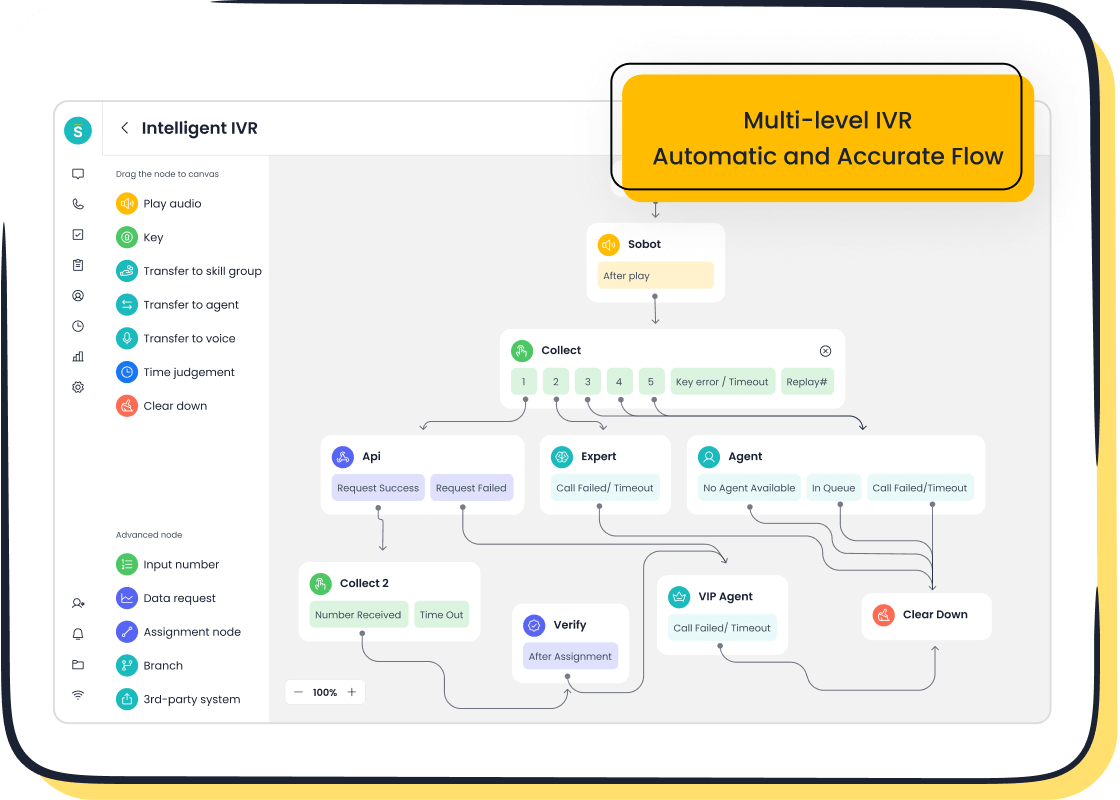
Sobot positions itself as a complete outbound call center solution. It helps businesses unify their communications to improve customer service and manage operational cost. This call center software is designed for companies that want to combine their sales, marketing, and support efforts into one efficient system. The software provides a robust service for every customer interaction.
Key Features
Sobot offers a powerful suite of tools to enhance your outbound operations. You can use these features to connect with your customer base more effectively.
- Bulk Outbound Task: This feature lets you automate large calling campaigns. You can assign leads to agents based on priority, which helps streamline your workflow.
- AI-powered Voicebot: The intelligent voicebot handles interactions and recognizes customer intent. This frees up your agents to focus on more complex issues, reducing your overall cost.
- Intelligent IVR: You can build custom call menus with a simple drag-and-drop interface. This tool routes each customer to the right agent or department quickly.
- Unified Workspace: Agents get a single view of all customer communications. This includes calls, messages, and data from your CRM, providing a seamless service experience.
Pros
This software delivers several key advantages. It offers a stable and powerful service for businesses of all sizes. The platform provides multi-channel dialer support, allowing you to reach your customer on their preferred channel. You get a reliable service backed by a 99.99% SLA and global number availability. This ensures your outbound dialer is always ready. The all-in-one approach combines voice, SMS, and WhatsApp on a single platform, which helps lower your technology cost.
A One-Stop Solution Sobot offers a comprehensive package. You get the software, phone numbers, and integrations in one place. This simplifies your operations and reduces the total cost of ownership.
Best For
Sobot is the ideal call center software for businesses seeking a unified and scalable communication platform. If you need to manage high volumes of outbound calls for sales or customer service, this solution provides the necessary tools. It is perfect for companies that want to reduce complexity and cost by using a single vendor for all their communication needs. Any organization focused on delivering excellent customer service will find this software valuable.
2. RingCentral: Versatile Communications Hub
RingCentral offers a unified platform that goes beyond traditional calling. You can use this software to manage phone calls, video meetings, and team messages in one place. This approach helps your teams collaborate better. It also improves how you deliver customer service. The goal is to provide a single service for all your communication needs, which can help you manage your overall cost.
Key Features
This call center software provides powerful tools to improve your team's performance. You can use these features to create a better experience for each customer.
- Integrated CRMs: You can connect your CRM to see a full customer history. This gives agents access to past interactions and notes for a more complete service.
- Automatic Dialers: The software includes several dialer options. You can choose from progressive, preview, and predictive dialers to make your outbound campaigns more efficient.
- Reporting and Analytics: You get real-time data on agent performance. This information helps you make smart decisions to improve your customer service.
- Call Recording and Monitoring: Managers can listen to calls to track performance. You can also provide live coaching to agents to help them with a difficult customer.
Pros & Cons
Pros: RingCentral's biggest strength is its all-in-one design. You get a reliable service for nearly every communication task. This can reduce the need for multiple tools and lower your technology cost.
Cons: The wide range of features can be overwhelming for new users. The comprehensive nature of the platform may also come at a higher cost, which might not be ideal if you only need basic outbound calling functions.
Best For
RingCentral is an excellent call center software for businesses that want a single solution for all communications. If your company needs to connect its sales, support, and internal teams on one platform, this is a strong choice. It is best for organizations that value a unified system over a specialized outbound tool. This software helps you provide a consistent service to every customer across different channels, justifying its cost for the right user.
3. Nextiva: Top Choice for User Experience
Nextiva provides a call center software known for its excellent user experience. You can use this software to create a smooth journey for every customer. The platform unifies all your communication channels. This approach helps you deliver a consistent and high-quality service. It also helps you manage the total cost of your operations by improving efficiency.
Key Features
This software offers several features that create a better experience. You can use these tools to improve your customer service and build stronger relationships.
- Unified-CXM Platform: This AI-powered system connects all customer interactions. It brings together voice, chat, SMS, email, and social media into one place.
- End-to-End Journey Orchestration: You get real-time insights into the customer journey. This allows you to automate workflows and provide a more personal service.
- AI and Automation: The software uses AI to give you a 360-degree view of each customer. This makes it easy to deploy and optimize your customer service processes.
- Workforce Engagement Tools: Built-in automations help you manage your team. These tools reduce agent fatigue and simplify management, which can lower your training cost.
Pros & Cons
Pros: Nextiva's main advantage is its focus on a unified customer experience. The platform gives your team a complete view of each customer, which reduces stress and repetitive questions. This leads to better employee morale and a superior service.
Cons: The advanced features and focus on a complete journey might be more than a small team needs. This extensive capability can come with a higher cost, which may not fit every budget. The initial setup could also require more effort to get the full benefit of the software.
Best For
Nextiva is the best call center software for businesses that prioritize a seamless customer journey above all else. If your goal is to connect every touchpoint and provide a deeply personalized service, this is an excellent choice. It is ideal for companies willing to invest in a platform that improves both the customer and employee experience. This investment can lead to a lower long-term cost through higher retention and efficiency.
4. Dialpad: Leading with AI and Analytics
Dialpad offers a call center software that puts artificial intelligence at the forefront. You can use this software to gain deep insights from every customer conversation. The platform focuses on analytics and real-time assistance. This helps your team improve its customer service and manage operational cost.
Key Features
This software provides several AI-driven tools to boost performance. You can use these features to deliver a smarter service.
- AI Voice: Dialpad's AI provides real-time transcription during calls. It uses natural language processing to create accurate transcripts.
- Sentiment Analysis: The software monitors the emotional tone of a live customer call. This tracking feature identifies positive or negative sentiment, which allows managers to provide help when needed.
- Real-Time Agent Assist: AI provides agents with helpful information during calls. This feature improves the quality of your customer service.
- Post-Call Analytics: You get detailed reports on call outcomes and agent performance. This data helps you lower your training cost.
Best Outbound Call Tracking Software
Dialpad is the best outbound call tracking software for teams that need deep insights. The platform excels at tracking key metrics. Its real-time call monitoring gives you a live view of performance. The software makes tracking every outbound interaction simple. This detailed monitoring helps you understand each customer journey. You can use this information for better tracking and to refine your service strategy. This makes it the best outbound call tracking software for data-focused businesses.
Pros & Cons
Pros: The main advantage is its powerful AI engine. It provides actionable insights that can transform your customer service. The detailed tracking and analytics offer a clear path to reducing cost and improving service quality.
Cons: The advanced features can make the software complex for new users. The full suite of AI tools may come at a higher cost, which might not be suitable for teams on a tight budget.
Best For
Dialpad is the ideal outbound call center software for data-driven organizations. If your team wants to use AI to analyze conversations and optimize performance, this is a top choice. It is perfect for businesses that need to make informed decisions based on detailed analytics. This software helps you provide a superior service to every customer by leveraging powerful technology, justifying its cost for teams focused on continuous improvement.
5. CloudTalk: Best for Automation & Integrations
CloudTalk is a call center software built for teams that want to automate tasks. You can use this software to connect with your other business tools easily. This approach helps you improve rep productivity and deliver better customer service. The main goal is to save time and reduce the overall cost of your operations.
Key Features
This software offers smart features to make your work easier. You can use these tools to provide a great service for every customer.
- Power Dialer: This feature automatically dials the next number on your list. It helps your agents spend more time talking to a customer and less time dialing.
- Workflow Automation: You can create custom workflows to handle routine tasks. This feature helps you manage follow-ups and other actions without manual effort.
- Smart Dialer: The software compiles a list of numbers from any website. You can then queue them into a dialing list with a single click.
- Click-to-Call: This tool lets you call any phone number on your screen instantly. It improves agent productivity and makes calling simple.
Pros & Cons
Pros: CloudTalk's greatest strength is its powerful automation and extensive integrations. This software helps you optimize outreach strategies and streamline your processes. The focus on automation provides an excellent service that can significantly lower your operational cost.
Cons: The number of features might be too much for very small teams. The pricing can increase as you add more integrations, which may raise the total cost for your business.
Best For
CloudTalk is the best call center software for businesses that rely on automation. If your team needs to connect its calling platform with many other tools, this is a top choice. It is perfect for sales and customer service teams that want to eliminate repetitive tasks. This software helps you provide a fast and efficient service to each customer. You can justify the cost by the time saved and the improved workflow. A happy customer is the result of a smooth service.
6. Aircall: Ideal for Sales Teams Using CRMs
Aircall provides a call center software designed specifically for sales and support teams. You can use this software to improve your team's workflow with powerful integrations. The platform focuses on connecting with your existing CRM. This connection helps you deliver a better service to every customer. The goal is to boost productivity and provide excellent customer service without a high setup cost.
Key Features
This software offers features that help your team work smarter. You can use these tools to enhance each customer interaction and improve your service.
- Robust Integrations: Aircall offers over 100 integrations with popular business tools. This makes it easy to connect the software to your helpdesk or CRM.
- Power Dialer: This feature helps your sales team make more calls. It automates dialing from a pre-loaded list, saving valuable time.
- CRM Sync: The software provides a strong crm sync. It logs calls, recordings, and notes automatically inside your customer records.
- Advanced Analytics: You get access to supervisor tools and real-time data. This helps you monitor team performance and improve your customer service.
Pros & Cons
Aircall has clear strengths and some drawbacks. The main benefit is its focus on integrations with crm systems, which improves the service you provide. However, the cost and customer support can be concerns.
| Category | Pros | Cons |
|---|---|---|
| General Sentiment | Simple interface, useful features like call tagging and transcription | Frustration with customer service responsiveness and helpfulness |
| Specific Features | User-friendly, robust integrations, great for sales and support teams | Higher price point, requires a three-user minimum, mobile app glitches |
Best For
Aircall is the best call center software for sales teams that live inside their CRM. If your team relies heavily on tools like Salesforce or HubSpot, this is a top choice. The software helps you provide a seamless service to each customer. It is perfect for businesses that want to improve agent productivity through deep integrations. The higher cost is justified for teams that need a reliable and deeply connected calling solution. This focus on connectivity helps you manage your total operational cost by making your team more efficient.
7. Five9: Scalable Enterprise-Grade Power
Five9 provides a call center software built for large businesses. You can use this platform to manage a high volume of customer interactions. The software is designed to grow with your company. It helps you deliver excellent customer service while managing your operational cost. This solution offers a powerful service for enterprises that need reliability and scale.
Key Features
This software comes with features that support complex operations. You can use these tools to protect customer data and improve your service.
- Intelligent Cloud Platform: The software uses AI to optimize your customer service. It includes tools like intelligent routing and agent assistance.
- Advanced Dialers: You get access to predictive, power, and preview dialers. These tools help your team connect with each customer more efficiently.
- Enterprise-Grade Security: Five9 offers a defense-in-depth approach to security. You get safeguards that meet major compliance standards like HIPAA, PCI DSS, and GDPR.
- Robust Analytics: The platform provides detailed reports and dashboards. This data helps you track performance and find ways to lower your business cost.
Pros & Cons
Pros: Five9's main strength is its scalability. The platform can handle the demands of a large enterprise. Its strong security features give you peace of mind. This focus on power and compliance provides a dependable service for your most important customer needs.
Cons: This powerful software can be complex to set up. The enterprise-level features come with a higher cost. This might not be the right fit for small teams with simple needs.
Best For
Five9 is the best call center software for large-scale enterprises. If your organization requires top-tier security, compliance, and scalability, this is a leading choice. It is perfect for businesses that need to provide a flawless service to a massive customer base. The investment cost is justified for companies that cannot compromise on performance or data protection. This software helps you deliver a superior customer service experience at scale.
8. LiveAgent: Strong Multichannel Support Solution
LiveAgent offers a customer service platform focused on multichannel customer support. You can use this software to manage all your customer communications in one place. The platform helps you provide excellent customer support. This approach improves your customer service and helps manage your operational cost. This software is a strong choice for teams that need a unified customer support solution.
Key Features
This call center software provides tools to improve your customer support. You can use these features to deliver a better service for every customer.
- Universal Inbox: This feature gathers all customer messages into one inbox. It supports email, live chat, social media, and calls for complete customer support.
- Built-in Call Center: The software includes inbound and outbound calling capabilities. This helps your team provide a comprehensive customer support service.
- Help Desk Automation: You can set up rules to automate routine tasks. This improves your customer support workflow and reduces manual work.
- Customer Portal: This tool lets you create a knowledge base for your customer base. It empowers each customer with self-service options, which can lower your support cost.
Pros & Cons
Pros: LiveAgent's main strength is its all-in-one customer service platform. It provides a great service for teams that handle many types of communication. The affordable pricing makes it a good value, helping you control your total cost.
Cons: The interface can feel dated compared to newer tools. The extensive features might be overwhelming if you only need basic customer support. This can increase the initial setup cost in terms of time.
Best For
LiveAgent is the best customer service platform for businesses that need a complete customer support hub. If your team manages a high volume of inquiries across many channels, this is an excellent choice. It is perfect for companies looking for a powerful service at a reasonable cost. This software helps you provide consistent customer service. A happy customer is the result of effective customer support.
9. Zoho CRM: Best for Integrated Sales & Calling
Zoho CRM integrates calling directly into its sales platform. You can use this software to manage your entire customer lifecycle in one place. This approach is for teams that want their calling tool and customer data to live in the same system. It helps you provide a consistent service from the first contact to the final sale. This focus on integration improves your customer service.
Key Features
This software offers features that connect your calling with your sales activities. You can use these tools to make your team more efficient and improve every customer interaction.
- PhoneBridge Integration: This feature connects Zoho with over 50 telephony providers. It allows you to make and receive calls from within the CRM.
- Single-Click Calling: You can call any customer directly from their record with just one click. This saves time and reduces manual dialing errors.
- Automated Call Logging: The software automatically logs every call. It attaches recordings and notes to the correct customer record for a complete history.
- Sales Automation: You can create workflows that trigger actions based on call outcomes. This helps you automate follow-ups and other sales tasks.
Pros & Cons
Pros: The biggest advantage is the unified platform. Your team gets a complete view of every customer, which helps them provide a more personalized service. This deep integration improves your sales process and enhances your customer service.
Cons: The main drawback is the layered cost structure. The total cost is not a single price. You must consider multiple factors to understand the full investment.
- The base Zoho CRM plan is a required subscription.
- A separate Telephony Partner License is needed for calling features.
- Additional usage-based charges apply for outbound calls, international rates, and virtual numbers. This variable cost can make budgeting more complex.
Best For
Zoho CRM is the best call center software for businesses that are already using or plan to commit to the Zoho ecosystem. It is perfect for sales-focused teams that want to streamline their workflow by combining their CRM and calling tools. If your primary goal is to give your sales team a single platform to manage every customer, this is an excellent choice. The comprehensive service can justify the multi-part cost for teams that need this level of integration.
10. Freshcaller: Great Value for Growing Teams
Freshcaller offers a call center software that provides excellent value for growing teams. You can start with a free plan and scale up as your needs change. This software helps you manage your customer communications without a large initial cost. The platform is designed to improve your customer service and grow with your business. It provides a flexible service for any team.
Key Features
This software includes features that support your team at every stage. You can use these tools to provide a better service to each customer.
- Scalable Plans: You can begin with a free plan that offers basic call routing and recording. As your team grows, you can upgrade to access advanced features like skill-based routing and call monitoring.
- Voicemail and IVR: Even the entry-level service includes essential tools. You can set up an Interactive Voice Response (IVR) system to guide each customer.
- Call Analytics: The software provides reports on call metrics. This data helps you understand your performance and improve your customer service.
- Integrations: You can connect the software with other business tools. This helps create a more unified workflow for your team.
Pros & Cons
Pros: The biggest advantage is the low entry cost. The free plan allows any business to start improving its customer service immediately. This software makes it easy to manage your support cost as you expand. The service is user-friendly and easy to set up.
Cons: The free plan has limitations on call volume and features. To get advanced analytics and integrations, you must upgrade, which increases the overall cost. The basic support on the free tier may not be enough for a customer with urgent issues.
Best For
Freshcaller is best for startups and small businesses that need a flexible and affordable calling solution. If you want a service that can grow with you, this is a great choice. It is perfect for teams that need to manage their budget carefully. This software helps you provide a quality experience for every customer without a high upfront cost. You can deliver great customer service while controlling your expenses.
Comparative Analysis of Call Center Software
Choosing the right call center software requires a direct comparison. This table helps you see how each platform stacks up. You can evaluate each software based on its pricing, key features, and ideal business fit. Use these user reviews and data points to find the best service for your customer.
| Software | Pricing Model | Standout Feature | Ideal Business Size | G2/Capterra Reviews |
|---|---|---|---|---|
| 1. Sobot | Custom pricing based on needs. This platform offers a one-stop solution to manage cost. | All-in-One Omnichannel Platform: Unifies voice, SMS, WhatsApp, and CRM in one workspace for a complete customer service. | Small to Enterprise | 4.6 / 5 |
| 2. RingCentral | Tiered per-user pricing. The platform offers different levels of service. | Unified Communications Hub: Combines phone, video, and messaging into a single platform. | Medium to Enterprise | 4.4 / 5 |
| 3. Nextiva | Tiered per-user pricing. The pricing reflects its focus on customer experience. | Unified-CXM Platform: Focuses on orchestrating the end-to-end customer journey. | Medium to Enterprise | 4.5 / 5 |
| 4. Dialpad | Tiered per-user pricing. The pricing scales with its advanced AI features. | AI-Powered Analytics: Provides real-time sentiment analysis and agent assistance. | Small to Enterprise | 4.4 / 5 |
| 5. CloudTalk | Tiered per-user pricing. The pricing depends on the level of automation needed. | Workflow Automation: Offers a smart dialer and extensive integration options to save time. | Small to Medium Business | 4.3 / 5 |
| 6. Aircall | Tiered per-user pricing with a 3-user minimum. | Deep CRM Integration: Provides seamless sync with tools like Salesforce and HubSpot. | Small to Medium Business | 4.3 / 5 |
| 7. Five9 | Custom pricing. The pricing is designed for large-scale needs. | Enterprise-Grade Scalability: Built to handle high-volume and complex operations securely. | Large Enterprise | 4.2 / 5 |
| 8. LiveAgent | Tiered per-user pricing, including a free plan. | Universal Inbox: Gathers all customer support channels into one shared inbox. | Small to Medium Business | 4.5 / 5 |
| 9. Zoho CRM | Multi-part pricing. The cost includes the CRM, a telephony license, and usage fees. | Integrated Sales & Calling: Combines calling features directly within the Zoho CRM platform. | Small to Medium Business | 4.0 / 5 |
| 10. Freshcaller | Tiered per-user pricing, including a free plan. | Scalable Pricing Plans: Allows a business to start for free and grow. | Startups & Small Business | 4.4 / 5 |
A Note on Pricing When you evaluate the pricing for any call center software, look beyond the monthly number. Many providers offer discounts for annual billing. This can lower your effective cost but often requires a contract. Understanding the full pricing structure helps your business make a better financial decision. These reviews show that the best platform depends on your specific customer service goals.
Pricing Model
The pricing model for each software varies. Some offer simple tiered pricing plans, while others have custom pricing. Your choice affects the total cost for your business. A good service provides clear pricing.
Standout Feature
Each platform has a unique feature. This could be advanced AI, deep integrations, or an all-in-one service. This feature often defines the best use for the software and its impact on your customer.
Ideal Business Size
A software platform is not one-size-fits-all. Some are built for a small business, while others serve large enterprises. Matching the platform to your business size ensures you get the right service.
G2/Capterra Rating
User reviews on sites like G2 and Capterra give you real-world insights. These reviews reflect customer satisfaction with the service and platform. High ratings in reviews often point to a reliable product.
Choosing the right outbound call center software depends on your business needs. Your business must weigh the service pricing and total cost. This guide helps your business find the best fit for your customer service goals.
- Best for Startups on a Budget: Freshcaller offers great value with its flexible pricing.
- Best for Deep CRM Integration: Aircall excels here. Other tools like Ringover and Aloware also provide seamless sales integration.
- Best for High-Volume Sales Dialing: Dialpad provides the power your team needs.
Your final choice impacts your customer experience. A good service with the right pricing helps your business manage its cost. This software choice defines your customer service. Your customer will thank you for the improved service. This decision helps control your business cost.
FAQ
How do I choose the right software for my team?
You should start by listing your team's main needs. Consider your business size, budget, and the features you must have. This list helps you compare options effectively. A clear plan makes your decision easier.
What should I look for in software pricing?
You need to look beyond the monthly fee. Ask about extra costs for setup, additional users, or phone numbers. Understanding the complete pricing structure helps you avoid surprises and manage your budget better.
Why is good customer support important?
Good customer support helps you solve problems quickly. When your system has an issue, a responsive support team minimizes downtime. This ensures your agents can keep working and serving your customers without long delays.
How much should I trust online reviews?
You can use online reviews as a helpful guide. They offer real user opinions on a platform's strengths and weaknesses. Look for patterns in the feedback to get a balanced view of the software.
See Also
Leading 10 Philippine Call Centers: A Comprehensive 2024 Review
Discovering the Best 10 Remote Call Center Employment Opportunities
Evaluating the Premier 10 Call Center Analytics Software for 2024
Exploring the Foremost Cloud Contact Center Solutions for 2025
Analyzing the Leading Contact Center Solutions: An In-Depth 2024 Review

