Top Inbound Call Center Solutions for SMBs


Finding the right inbound call center solution helps you deliver excellent customer support. You need the best call center software to meet your goals. Here are the top choices and what makes each one stand out:
- Sobot: The Sobot call center offers the best all-in-one platform for omnichannel support, powered by Sobot AI.
- RingCentral: This option is the most scalable for your growing teams.
- Talkdesk: It is best for its AI-powered quality assurance features.
- Aircall: It provides the easiest and most seamless CRM integration.
- Nextiva: This gives you great value for unified communications.
Top Inbound Solutions: A Quick Comparison
Choosing the right inbound call center solution helps you manage customer calls effectively. To find the best call center software for your business, you need to compare the top options. This table breaks down the essential call center features, ideal use cases, and pricing for each provider. Use this guide to see how each call center software stacks up.
| Solution | Best For | Key Inbound Features | Starting Price |
|---|---|---|---|
| Sobot | All-in-one omnichannel support | • Unified workspace (Voice, Chat, WhatsApp) • Drag-and-drop IVR builder • AI-powered Voicebot • 99.99% uptime SLA | Contact for Quote |
| RingCentral | Growing teams needing scalability | • Call routing and queueing • Advanced call monitoring • Real-time analytics | $20/user/month (billed annually) |
| Talkdesk | AI-powered quality assurance | • AI-driven speech analytics • Call recording and screen recording • Customer sentiment analysis | $85/user/month |
| Aircall | Seamless CRM & app integration | • One-click CRM integration • Power dialer • Call conferencing | $30/license/month (billed annually) |
| Nextiva | Value for unified communications | • Unlimited voice calling • Auto-attendant • Voicemail to email/SMS | $15/user/month (billed annually) |
Note: Prices are subject to change. You should always check the provider's official website for the most current information. Many call center software providers offer different tiers with more advanced features.
Reviews of the Best Call Center Software

Now that you have a quick comparison, let's dive deeper into each solution. This detailed review will help you understand the specific features, benefits, and costs associated with each call center software. You can then make an informed decision for your business needs.
Sobot: All-in-One Omnichannel Platform
Sobot provides a complete, all-in-one inbound call center solution designed to unify your customer communications. It helps you manage interactions from voice, chat, email, and social media all in one place. This approach improves agent efficiency and elevates the customer experience. Global brands like Samsung trust Sobot to power their customer service, achieving a 97% customer satisfaction rate and a 30% boost in agent productivity. The platform is built for reliability, offering a 99.99% uptime SLA to ensure your business is always available to your customers.

Key Features for SMBs:
- Unified Workspace: Your agents get a single view of all customer interactions. They can handle calls, live chats, WhatsApp messages, and support tickets without switching between different applications.
- Drag-and-Drop IVR: You can easily build and customize your interactive voice response (IVR) menus. This feature lets you create intuitive call flows that guide customers to the right department or agent in real time.
- AI-Powered Voicebot: Sobot uses advanced AI to power its Voicebot. This tool understands customer intent, handles common questions, and provides 24/7 support, freeing up your human agents for more complex issues. The use of AI in call center operations significantly reduces wait times.
- Seamless Integrations: The call center software connects with essential business tools. You can integrate with e-commerce platforms like Shopify, CRMs, and social media channels like Facebook and Instagram.
- AI Copilot for Agents: This feature assists your team during live conversations. It provides real-time suggestions, pulls up customer information, and helps generate post-call summaries, improving both speed and quality of service.
Pros & Cons
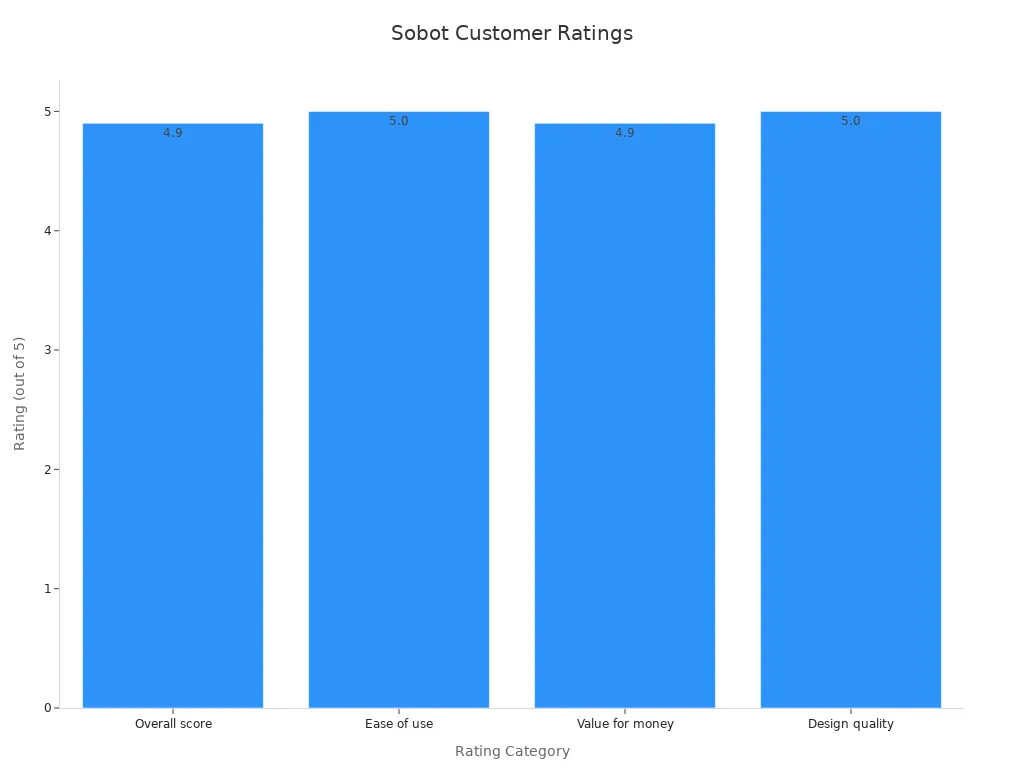
Users consistently give Sobot high marks for its powerful features and ease of use. The platform excels in providing a truly unified experience for both agents and customers, which is critical for modern customer support.
| Category | Sobot Rating |
|---|---|
| Overall score | 4.9/5 |
| Ease of use | 5/5 |
| Value for money | 4.9/5 |
| Design quality | 5/5 |
Pricing
Sobot offers customized pricing based on your specific business needs. You can contact their sales team for a detailed quote.
RingCentral: Scalable for Growing Teams
RingCentral is a well-known name in business communications that offers a scalable call center software. It is designed to grow with your team, providing a range of features that support expanding operations. This solution is a good fit if you anticipate a significant increase in call volume and agent numbers over time.
Key Features for SMBs:
- Shared phone numbers for teams to handle calls.
- Support for physical desk phones.
- A multi-level auto-attendant to direct calls.
- Real-time analytics and call monitoring.
Pros & Cons
| Pros | Cons |
|---|---|
| ✅ Scales easily as your team grows. | ❌ Texting features are limited and can be costly. |
| ✅ Supports shared numbers for voice calls. | ❌ The user interface can feel clunky and outdated. |
| ✅ Offers robust call routing options. | ❌ Call recording storage is limited to 90 days on some plans. |
Pricing
RingCentral's contact center plans start at $65 per agent per month when billed annually. This plan includes core features like ACD and IVR. More advanced features and omnichannel routing are available in higher-tier plans, which require a custom quote.
Talkdesk: Advanced AI and Automation
Talkdesk is a call center software that heavily focuses on artificial intelligence and automation to improve customer experience management. It offers industry-specific solutions for sectors like healthcare and finance, with pre-built AI tools tailored to their unique needs. If your priority is leveraging AI for quality assurance and agent assistance, Talkdesk is a strong contender.
Key Features for SMBs:
- AI-powered speech and sentiment analytics.
- Generative AI for creating automatic call summaries.
- Agent Assist tools that provide real-time guidance.
- A conversational AI-powered IVR and virtual agent.
Pros & Cons
| Pros | Cons |
|---|---|
| ✅ Powerful, industry-specific AI features. | ❌ High starting price may not fit all SMB budgets. |
| ✅ Excellent for quality assurance and agent coaching. | ❌ Many key features are only available as quote-based add-ons. |
| ✅ Offers a 100% uptime SLA on most plans. | ❌ Can become very expensive as you add more features. |
Pricing
Talkdesk’s pricing is primarily quote-based. The CX Cloud Essentials plan starts at $85 per user per month, but most businesses will need one of the more advanced Experience Clouds. These plans require you to contact sales for a custom price, as do add-on packages for features like workforce management and proactive outbound engagement.
Aircall: Seamless CRM & App Integration
Aircall stands out for its simplicity and deep integration with other business tools. This cloud-based calling solution is built to work seamlessly with your existing CRM and helpdesk software. If your main goal is to have a phone system that plugs directly into platforms like Salesforce or HubSpot with minimal effort, Aircall is an excellent choice.
Key Features for SMBs:
- Over 100 one-click integrations with popular business apps.
- A power dialer to improve outbound call efficiency.
- Call conferencing and shared call inboxes for teams.
- An open API for building custom workflows.
Pros & Cons
| Pros | Cons |
|---|---|
| ✅ Extremely easy to set up and integrate with CRMs. | ❌ Can get expensive when you add essential features. |
| ✅ User-friendly interface for agents. | ❌ AI summaries and advanced analytics are paid add-ons. |
| ✅ Strong ecosystem of over 100 app integrations. | ❌ Per-user pricing climbs quickly as your team grows. |
Pricing
Aircall’s pricing begins at $30 per license per month (billed annually). This plan covers basic features and integrations. However, many "must-have" features for a modern call center software, such as advanced analytics and AI capabilities, are only available as costly add-ons.
Nextiva: Top Value for Unified Communications
Nextiva offers a unified communications platform that combines voice, video, and team messaging into one package. It is known for providing great value, making it a popular choice for SMBs looking for an affordable, all-around communication tool. If you need more than just a phone system and want to consolidate your communication tools, Nextiva delivers a lot of functionality for the price. This makes it a contender for the best call center software for budget-conscious businesses.
Key Features for SMBs:
- Unlimited voice calling in the US and Canada.
- HD video conferencing and team chat.
- A mobile app for working from anywhere.
- Voicemail-to-email transcription.
Pros & Cons
| Pros | Cons |
|---|---|
| ✅ Very affordable and offers great value. | ❌ Mobile app has reported reliability issues like dropped calls. |
| ✅ Combines phone, video, and chat in one platform. | ❌ CRM integrations are not available on the basic plan. |
| ✅ Known for reliable service and good customer support. | ❌ Lacks advanced AI-powered analytics in lower-tier plans. |
Pricing
Nextiva’s pricing for its business communication plans starts at $23 per user per month for the Core plan. However, to get true call center software features like an advanced IVR, omnichannel routing, and AI-powered analytics, you will need to upgrade to the quote-based Engage or Power Suite CX plans.
Essential Call Center Software Features for SMBs

When you evaluate different solutions, you will find several core call center features that are essential for success. The right call center software gives you the tools to improve efficiency and deliver better customer support. You should look for these key capabilities in any platform you consider.
Automatic Call Distribution (ACD)
Automatic Call Distribution (ACD) is the engine of your inbound call center software. It automatically routes incoming calls to the most appropriate agent or department based on rules you set. This feature improves first-call resolution because it connects customers with agents who have the right skills to solve their problem on the first try. Common routing strategies include:
- Skills-based routing: Sends calls to agents with specific expertise.
- Least-idle routing: Directs calls to the agent who has been waiting the longest.
Interactive Voice Response (IVR)
An Interactive Voice Response (IVR) system allows your customers to interact with a voice menu. You can use it to guide callers to the right department or provide self-service options for common questions. A well-designed IVR improves the customer experience.
Tip: Keep your IVR menu simple with five options or less. Always provide a clear way for callers to reach a live agent, such as by pressing "0".
CRM Integration
Your call center software must connect with your Customer Relationship Management (CRM) platform. This integration gives your agents a complete view of the customer's history the moment a call comes in. Agents no longer need to switch between screens or manually enter data. This is crucial for customer experience management, as many customers expect you to already know their history.
Call Recording and Analytics
Call recording and analytics are vital for quality assurance and training. This feature allows you to review conversations to ensure quality and compliance. The analytics tools in your call center software help you track key performance indicators (KPIs) like Average Handle Time (AHT) and First Call Resolution (FCR). You can use these insights to provide constructive feedback and create personalized development plans for your agents.
Omnichannel Support Capabilities
Modern customers use multiple channels to communicate. A strong call center software offers true omnichannel support, not just multichannel customer service. This means it unifies voice, email, chat, and social media into a single, seamless conversation. For example, a customer can start a chat on your website and continue the conversation over the phone without repeating themselves. This unified approach is central to modern customer experience management and is often powered by a flexible cloud-based calling infrastructure. Good multichannel customer service is a baseline for excellent customer support.
How to Choose Your Inbound Call Center Solution
Selecting the right inbound call center solution requires a clear plan. You can follow these five steps to find the best call center software for your business. This process helps you make a smart and confident choice.
Step 1: Define Your Budget and Team Size
First, you need to look at your budget. How much can you spend on call center software each month? Most providers charge per user. You should multiply the per-user price by the number of agents on your team. This gives you the total monthly cost. Knowing your budget helps you narrow down your options from the start.
Step 2: List Your Must-Have Features
Next, you should make a list of essential features. Think about what your team truly needs to succeed. Do you need a simple IVR or a complex one? Is call recording a priority for training?
Tip: Review the "Essential Call Center Software Features" section above. Use it as a checklist to decide which features are non-negotiable for your new call center software.
Step 3: Assess Your Integration Needs
Your call center software must work with your other business tools. Does it need to connect to your CRM, e-commerce platform, or helpdesk? Good integrations create a smooth workflow for your agents. They save time and prevent your team from switching between different apps. The right call center software makes this process simple.
Step 4: Prioritize Ease of Use
You should choose a call center software that is easy for your team to learn and use. A simple, intuitive interface reduces training time. It also helps your agents feel more confident. Look for solutions that offer a clean design and straightforward navigation.
Step 5: Plan for Future Growth
Finally, think about your company's future. Your business might grow quickly. You need a call center software that can scale with you. Can you easily add more agents? Can you upgrade your plan to get more advanced features later? Choosing a flexible solution saves you from having to switch providers down the road.
Choosing the right inbound call center solution requires balancing your budget, features, and integration needs. While some platforms offer great scalability, an all-in-one solution like Sobot provides unique value. It unifies voice, chat, and other channels into one workspace, which improves your customer support. This creates a seamless experience for both your agents and customers.
Ready to upgrade your customer support? Explore Sobot's Voice Call Center and book a demo today to see how it can meet your business needs.
FAQ
What is the most important feature in call center software?
Your specific needs determine the most important feature. However, Automatic Call Distribution (ACD) and CRM integration are vital. ACD routes calls to the right agent. CRM integration gives your team customer history for faster, more personalized service.
Can I keep my business phone number?
Yes, you can usually keep your number. Most cloud-based providers offer number porting. This process moves your existing business number to their service. You avoid giving customers a new number and maintain business continuity.
How does an inbound call center solution help a small team?
This software makes your small team seem bigger and more professional. Features like IVR and smart call routing manage calls efficiently. You can handle more customer inquiries with fewer agents and provide a better overall experience.
What is a cloud-based call center?
A cloud-based call center runs on the provider's servers. You access the software over the internet. This model is flexible, scalable, and cost-effective. It requires no expensive hardware for you to buy or maintain.
See Also
Best Contact Center Platforms: An In-Depth Review for 2024
Your Essential Guide to Omnichannel Call Center Software Solutions
Discover the Top 10 VoIP Software for Small Business Needs
Implementing Omnichannel Contact Center Solutions: A 10-Step Guide
Examining Top AI-Powered Enterprise Call Center Solutions Today