Top Customer Communication Management Tools 2025

Choosing the right customer communication management software is a major challenge. The market for CCM software is growing fast, making your decision more critical than ever.
| Source | Market Size 2025 (USD Billion) |
|---|---|
| MarketGrowthReports.com | 2.31 |
| MarketResearchFuture.com | 2.429 |
This guide provides a clear list of top tools for 2025. It will help you find the best customer communication management software for your needs. We review diverse platforms, from the comprehensive Sobot call center powered by Sobot AI to other specialized options. A great customer communication management tool improves your customer experience. Use this resource to make a confident choice and save valuable time.
Top Customer Communication Management Tool Picks for 2025

Finding the right platform can feel overwhelming. You need a clear path to compare the top options. This guide simplifies your search. We have curated a list of the best customer communication management solutions for different business needs. This list will help you identify the ideal customer communication management tool for your company. We will explore each option in more detail later in this article. Your goal is to find the best customer communication management software that aligns with your team's goals. The right ccm software can transform your customer interactions.
Here are our top picks for 2025. Each ccm software excels in a specific area, helping you narrow down your choices.
Best Overall: Zendesk
- Zendesk offers a complete and scalable service suite that grows with your business.
Best for Enterprise: Quadient Inspire
- Quadient Inspire provides powerful, secure communications for large, regulated industries.
Best for Small Businesses: Front
- Front creates a collaborative hub for teams managing shared inboxes like email and SMS.
Best for AI and Automation: Sobot
- Sobot delivers a stable, all-in-one contact center with powerful AI and automation features.
Best for Customization: Twilio Flex
- Twilio Flex gives you the ultimate flexibility to build a completely custom communication platform.
Zendesk: The Complete Service Suite
Zendesk provides a powerful platform for managing all your customer communications. You can use it to build a unified and efficient support system. The software is designed to grow with your business, from a small startup to a large enterprise. It helps you deliver a consistent and high-quality customer experience at every stage.
Best For: Integrated and scalable customer service.
You will find Zendesk is an excellent choice if you need a solution that scales. It adapts to your company's changing demands. The platform brings all your support channels together in one place. This integration simplifies your team's workflow and improves efficiency. Your agents can manage all customer interactions without switching between different tools.
Key Features: Omnichannel ticketing, AI bots, extensive marketplace, analytics.
Zendesk offers a robust set of features to enhance your support operations. You can leverage these tools to provide faster and smarter service.
- Omnichannel Ticketing: This feature centralizes conversations from email, chat, phone, and social media into a single ticket. It gives your agents a complete view of the customer's history.
- AI Bots: You can deploy AI-powered bots to answer common questions instantly. This frees up your human agents to handle more complex issues.
- Extensive Marketplace: The platform offers a large marketplace with over 1,000 apps and integrations. You can connect Zendesk to the other tools you already use.
- Advanced Reporting and Analytics: You get access to powerful dashboards. These tools help you track key metrics and understand team performance.
Tip: Use Zendesk's omnichannel communication capabilities to create a seamless journey for your customers, no matter how they choose to contact you.
Pricing: Tiered suite and individual product plans.
Zendesk structures its pricing to offer flexibility. You can choose from various tiered "Suite" plans that bundle multiple products together. Alternatively, you can purchase individual products, like "Support" or "Chat," separately. This model allows you to select a plan that fits your specific needs and budget.
Pros & Cons: Highly scalable and feature-rich; can be complex to configure.
The platform is extremely scalable and packed with features. This makes it a strong contender for growing businesses. However, the vast number of options can make the initial setup feel complex. You may need to dedicate time and resources to configure the system perfectly for your team.
Sobot: All-in-One Contact Center Solution
Sobot provides a complete customer contact center designed for stability and performance. You get an all-in-one platform that unifies your Voice Call Center, Live Chat, Chatbot, and official WhatsApp API. This integration creates a seamless environment for all your customer interactions. With a guaranteed 99.99% system stability, you can trust the platform to support your business operations without interruption, boosting customer satisfaction.
Best For: Businesses needing a stable, unified omnichannel solution.
You will find Sobot ideal if your goal is to consolidate communication channels into one reliable system. It helps you manage every touchpoint efficiently. This unified approach ensures a consistent customer experience and improves agent productivity. Your team gains a single view of the customer, leading to higher satisfaction.
Key Features: AI-powered voicebot, unified workspace, intelligent IVR, WhatsApp BSP.
Sobot equips your team with powerful tools to enhance service quality and satisfaction.
- AI-Powered Voicebot: You can use an intelligent voicebot to handle inquiries and recognize customer intent, providing instant support.
- Unified Workspace: This feature gives agents a single interface to manage calls, chats, tickets, and customer data from all channels.
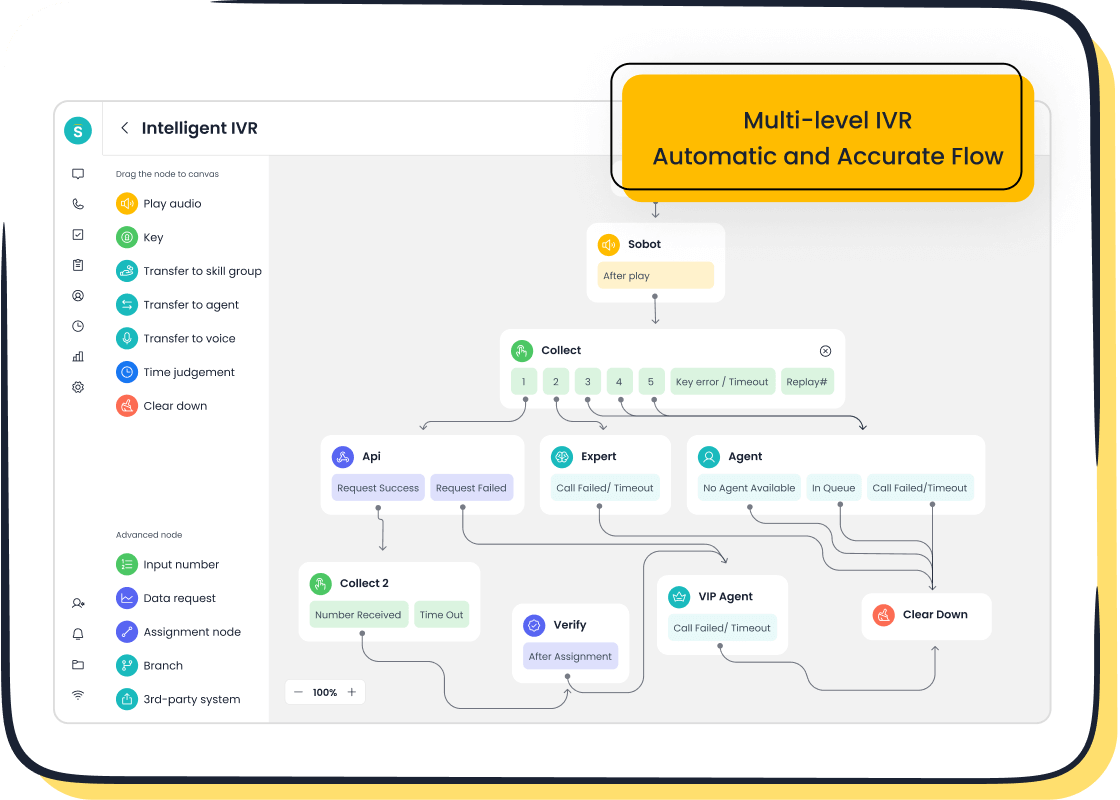
- Intelligent IVR: You can easily build and customize call routing menus with a drag-and-drop interface to guide callers effectively.
- WhatsApp BSP: As an official WhatsApp Business Solution Provider, Sobot enables you to engage customers on their preferred messaging app.
Real-World Results: Global tech leader OPPO transformed its service with Sobot, achieving remarkable gains in efficiency and customer satisfaction. By implementing Sobot's chatbot and ticketing system, OPPO saw:
- An 83% chatbot resolution rate, freeing up human agents.
- A 57% increase in customer repurchase rate, proving the impact of great service on loyalty and satisfaction.
Pricing: Custom plans based on business needs.
Sobot offers flexible pricing tailored to your company's specific requirements. You can work with their team to create a custom plan that aligns with your operational scale and budget, ensuring you only pay for what you need. This approach supports long-term satisfaction with the platform.
Pros: Stable and powerful platform, seamless integrations, strong AI capabilities.
You can rely on Sobot's robust and stable infrastructure. The platform offers seamless integrations with your existing systems, like CRMs, to create a truly connected workflow. Its strong AI capabilities automate repetitive tasks and provide valuable insights, empowering your team to deliver exceptional service.
Quadient Inspire: Enterprise-Grade CCM Software
You should consider Quadient Inspire if your business operates in a regulated industry. This platform is a powerful customer communication management software built for large enterprises. It handles high volumes of complex communications with a focus on security and compliance. You can use this ccm software to manage sensitive customer data confidently. It helps you meet strict industry standards while delivering personalized experiences at scale.
Best For: Regulated industries needing high-volume, compliant communications.
You will find Quadient Inspire is an excellent fit for sectors like insurance, banking, and healthcare. These industries face heavy regulatory oversight. For example, a leading Dutch insurance group successfully used Quadient Inspire to modernize its outdated systems. The company improved its operational efficiency, security, and compliance with regulations like GDPR. This ccm software helps you navigate similar challenges effectively.
Key Features: Journey mapping, high-volume batch processing, compliance tools.
Quadient Inspire offers a suite of features designed for enterprise-level demands. You can use these tools to orchestrate and deliver millions of communications.
- Journey Mapping: This tool lets you visualize and manage the entire customer journey. You can design and automate interactions across multiple touchpoints.
- High-Volume Batch Processing: You can efficiently generate and deliver large batches of documents. This includes bills, statements, and policies.
- Compliance Tools: The software has built-in features to help you adhere to legal requirements. You can ensure every message is compliant and secure.
Quadient incorporates compliance criteria directly into the communication process. This ensures all messages adhere to industry regulations like GDPR or HIPAA. This minimizes legal risks and enhances customer trust.
Pricing: Custom enterprise licensing.
Quadient Inspire uses a custom pricing model. You will work directly with their sales team to get a quote based on your company's specific needs. The licensing is tailored for enterprise use, reflecting the platform's scale and capabilities.
Pros & Cons: Powerful and secure for complex needs; significant investment required.
The platform offers unmatched power and security for complex communication workflows. You gain total control over your customer interactions. However, this level of capability requires a significant investment. The cost and complexity make it best suited for large organizations with specific compliance needs.
Front: The Collaborative Communication Hub
You can transform your team's productivity with Front, a platform designed for collaboration. It turns chaotic shared inboxes into organized and efficient workspaces. If your team struggles with traditional email management, you know the common problems. Messages get missed, multiple people send redundant replies, and no one has clear responsibility. Front solves these issues by creating a system of accountability and transparency.
Best For: Teams managing shared inboxes like email and SMS.
You will find Front is perfect for teams that need to work together on customer messages. It enhances human collaboration with a best-in-class shared inbox. Unlike traditional email clients that force you to use generic addresses like support@company.com, Front lets you keep your personal email identity while still giving your team full visibility. This approach helps you deliver faster, more personal service.
Key Features: Universal inbox, team collaboration rules, automated workflows.
Front provides powerful features that help your team work together seamlessly. You can manage all customer requests from email, live chat, texts, and social media in one place.
- Universal Inbox: This feature works like a familiar email interface but brings all your communication channels together. You no longer need to juggle multiple platforms.
- Team Collaboration: You can use internal comments and shared drafts to work on replies together in real-time. AI summaries help everyone get up to speed quickly.
- Automated Workflows: You can set up rules to automatically assign messages to the right person, ensuring every inquiry has a clear owner and nothing slips through the cracks.
"With Front, team members manage both their individual email and the company’s shared support inbox within the same system — an absolute game-changer for us." – Director of Customer Experience, One Step GPS
Pricing: Tiered per-user plans.
Front offers several pricing tiers based on a per-user, per-month model. You can choose a plan that matches your team's size and the features you need. This flexible structure allows you to scale your plan as your team grows.
Pros & Cons: Excellent for team efficiency; less focused on proactive outbound campaigns.
You will see a major boost in your team's efficiency and internal transparency. The platform excels at managing inbound conversations and ensuring timely responses. However, its primary strength is collaborative response management. It is less focused on tools for proactive, large-scale outbound marketing or sales campaigns.
Twilio Flex: The Programmable Communication Cloud
You can think of Twilio Flex as a set of building blocks for your contact center. Unlike pre-built software, it gives your development team the power to create a completely unique platform. You get total control to design a customer communication management experience that fits your exact business processes. This approach is perfect when standard solutions do not meet your specific operational needs.
Best For: Companies with developers building a custom contact center.
You will find Twilio Flex is the right choice if you have a technical team ready to build. It is designed for businesses that want to innovate beyond the limits of traditional software. You can craft a solution from the ground up, ensuring every feature and workflow matches your vision for customer interaction.
Key Features: Programmable APIs for all channels, customizable agent UI.
Twilio Flex provides the core components you need to build a powerful system. You can use its programmable APIs to connect any communication channel and customize the agent interface completely. This flexibility allows you to support modern use cases that go beyond typical support queues.
- Communication hubs for internal teams
- Curbside pickup coordination
- Vaccine inventory management and distribution
- Real-time asset control
- Advanced concierge experiences
Pricing: Per-user per-hour or named user pricing.
You have two main options for pricing. You can pay per active user on an hourly basis, which is great for teams with variable schedules. Alternatively, you can choose a flat monthly rate for each named user. This flexible model lets you manage costs effectively based on your team's usage patterns.
Pros & Cons: Ultimate flexibility and control; requires technical expertise to build.
The greatest strength of Twilio Flex is its limitless flexibility. You can build anything you can imagine. However, this freedom requires significant developer resources to design, build, and maintain your system.
"With the Twilio Flex platform, we experience a 30% reduction in average handle time. It also gives us the freedom to focus on the creative use of contact center technology in our business. We can iterate more quickly, without losing control over the things we care about owning... Flex gives me confidence that we will continue to push the boundaries of what’s possible." – Grace Miller, VP of Product at Scorpion Law Firm Digital Marketing
Intercom: Proactive Conversational Engagement
You can use Intercom to start conversations with customers directly on your website. The platform is built to help you move beyond reactive support. It empowers your teams to actively connect with visitors for sales, marketing, and support purposes. This approach helps you guide users through their journey and improve overall customer engagement.
Best For: Proactive sales and support through live chat.
You will find Intercom is an excellent tool if you want to proactively engage website visitors. It allows your sales and support teams to initiate conversations with potential leads or customers who may need help. Instead of waiting for someone to reach out, you can use targeted messages to offer assistance, suggest products, or answer questions in real time.
Key Features: Proactive messaging, integrated help center, advanced chatbots.
Intercom provides a suite of tools designed to boost your customer interactions. You can leverage these features to create a seamless and helpful experience.
- Proactive Messaging: You can send automated, targeted messages to visitors based on their behavior. For example, you can trigger a chat prompt for a user who has been on your pricing page for over a minute.
- Integrated Help Center: You can build a knowledge base directly within the Intercom widget. This allows customers to find answers themselves without leaving the page.
- Advanced Chatbots: You can deploy sophisticated bots to qualify leads, book meetings, and answer common questions 24/7, which enhances customer engagement even when your team is offline.
Pricing: Starter, Pro, and Premium plans.
Intercom offers tiered plans with different per-seat costs. Your total investment, however, depends heavily on your usage and the features you add.
Note on Costs: Be aware that add-ons and usage can significantly increase your monthly bill.
- AI features like the Fin AI Agent are often priced per resolution.
- Communication channels like SMS and WhatsApp have usage-based fees per message or conversation.
- Exceeding the number of people you can message in a month also results in additional charges.
Pros & Cons: Strong for live engagement; can become expensive with more features.
The platform excels at creating live, conversational experiences that drive sales and improve support. You can build strong relationships with customers through real-time interaction. However, the pricing model means costs can rise quickly. As you add more advanced features, increase your contact list, or expand your messaging volume, your total expenses can become substantial.
MessageBird: The Omnichannel Communications Platform
You can connect with customers around the world using MessageBird. This platform specializes in global communication. It helps you reach people on the channels they prefer, including SMS, voice, and popular chat apps. If your business has an international audience, you need a reliable way to manage these connections. MessageBird provides the infrastructure to make global messaging simple and effective.
Best For: Global communication across SMS, voice, and chat apps.
You will find MessageBird is an excellent choice for expanding your international presence. The platform is built on a powerful global network. It gives you the ability to send and receive messages reliably across borders. This reach is possible through partnerships with hundreds of carriers.
Global Network Reach: MessageBird's infrastructure supports SMS messaging through over 240 direct-to-carrier connections in more than 140 countries. This ensures your messages are delivered quickly and dependably, no matter where your customers are.
Key Features: Automated flow builder, global carrier network, unified inbox.
MessageBird offers tools to help you manage and automate your customer interactions. You can use these features to create efficient workflows and provide better service.
- Automated Flow Builder: You can design communication workflows with a visual, drag-and-drop interface. This tool helps you build customer experiences with less coding. While some users note a learning curve, the graphical UI is designed to simplify the process.
- Global Carrier Network: You gain access to a robust network with partnerships with 220 carriers worldwide. This foundation provides the speed and reliability needed for international communication.
- Unified Inbox: This feature brings all your customer conversations from different channels into one central place. Your team can manage messages from SMS, WhatsApp, and other apps without switching between platforms.
Pricing: Pay-as-you-go and custom plans.
MessageBird offers flexible pricing to fit different business needs. You can start with a pay-as-you-go model, which means you only pay for what you use. For larger businesses with higher volume, you can work with their team to create a custom plan tailored to your specific requirements.
Pros & Cons: Strong global reach; UI can be less intuitive than competitors.
The platform’s biggest advantage is its extensive global network, which gives you unparalleled reach. You can confidently connect with an international customer base. On the other hand, some of its tools, like the Flow Builder, may feel complicated at first and require some time to learn.
Freshdesk: Intuitive and Affordable Support
You can get your support system running quickly with Freshdesk. This platform is known for its user-friendly design and affordable pricing. It is a popular customer communication management software for companies that need a powerful tool without a steep learning curve or a large budget. Its intuitive interface helps your team get started with minimal training.
Best For: SMBs seeking a user-friendly helpdesk solution.
You will find Freshdesk is an excellent match for small to medium-sized businesses. It is designed specifically for budget-conscious organizations that prioritize ease of use. If you have a support team of 5 to 100 agents, this platform provides the tools you need to manage customer inquiries effectively. Its focus on quick deployment means you can improve your support operations almost immediately.
Key Features: Omnichannel ticketing, self-service portals, AI-powered bots.
Freshdesk offers a solid set of features to help your customer support teams succeed. You can use these tools to organize conversations and provide faster answers.
- Omnichannel Ticketing: This feature gathers all customer messages from email, phone, chat, and social media into one unified inbox.
- Self-Service Portals: You can build a knowledge base or FAQ page. This allows customers to find answers on their own, reducing ticket volume.
- AI-Powered Bots: You can deploy bots to handle common questions, freeing up your agents to focus on more complex customer issues.
Pricing: Includes a free plan and affordable paid tiers.
You can start with a free plan that covers basic ticketing needs. This is a great way to test the platform. However, you should know the free version has limitations. It lacks features like in-app notifications and advanced reporting.
Note: To unlock more powerful tools, you will need to upgrade. Paid plans, starting around $15 per agent per month, add essential features like automation, advanced integrations, and detailed helpdesk reports.
Pros & Cons: Great value and easy to use; advanced features less robust than enterprise tools.
The platform offers fantastic value and is incredibly easy to use, making it a top choice for smaller teams. You can set it up quickly and start improving your customer service right away. The main drawback is that its advanced features are not as powerful as those found in more expensive, enterprise-focused software. While perfect for many, you might outgrow it if your needs become highly complex.
Aircall: The AI-Powered Voice Platform

You can upgrade your business phone system with Aircall. This platform is a cloud-based voice solution designed for modern sales and support teams. It integrates directly into your existing workflows. You can set up a professional phone system in minutes without needing any special hardware. Aircall helps your team make and receive calls from anywhere, using a desktop or mobile app. This flexibility improves productivity and ensures you never miss an important customer call.
Best For: Sales and support teams needing a powerful phone system.
You will find Aircall is a perfect fit for teams that rely heavily on phone conversations. It provides the tools needed to manage high call volumes efficiently. Sales teams can use it to streamline their outreach and follow-up processes. For customer support teams, it offers features that improve response times and service quality. The platform is built to enhance voice communication for any business that values direct customer interaction.
Key Features: AI-powered call analysis, CRM integration, call coaching tools.
Aircall provides a rich set of features to optimize your voice communications. You can use these tools to gain insights and improve team performance.
- AI-Powered Call Analysis: You can get transcriptions and summaries for every call. AI helps you identify key topics, trends, and customer sentiment automatically.
- CRM Integration: Aircall connects seamlessly with popular CRM platforms like HubSpot and Salesforce. This integration logs all call activity and gives you instant context on who is calling.
- Call Coaching Tools: You can use features like call whispering and live monitoring. These tools allow managers to guide agents during live calls without the customer hearing.
Tip: Use Aircall's call recording and transcription features to create a library of best-practice examples. This helps you train new team members more effectively.
Pricing: Tiered per-user plans.
Aircall offers several pricing plans based on a per-user, per-month subscription model. You can choose a tier that aligns with your team's size and feature requirements. Each plan includes a core set of features, with more advanced capabilities available in higher tiers. This structure allows you to scale your phone system as your business grows.
Pros & Cons: Excellent voice features and integrations; less focused on text-based channels.
The platform’s main strength is its powerful suite of voice-centric features and deep CRM integrations. You get a top-tier phone system that boosts team productivity. However, Aircall is primarily a voice platform. It does not offer native support for text-based channels like email or social media, focusing instead on perfecting the call experience.
HubSpot Service Hub: The Integrated CRM Platform
You can unify your customer service with your sales and marketing efforts using HubSpot Service Hub. This platform is part of a larger ecosystem. It connects all your customer interactions into a single, powerful CRM. This integration provides a complete view of every customer, which is essential for excellent customer experience management. Your team gets the context it needs to deliver personalized support and boost customer satisfaction.
Best For: Businesses already using the HubSpot ecosystem.
You will find HubSpot Service Hub is the perfect choice if your company already uses HubSpot's CRM, Marketing, or Sales Hubs. The platform is designed to work seamlessly with these tools. This native connection eliminates data silos and creates a single source of truth for all customer data. This unified view helps you improve customer engagement and overall satisfaction.
Key Features: Help desk automation, knowledge base, customer feedback surveys.
HubSpot Service Hub offers a suite of tools to streamline your support processes and improve customer satisfaction. The platform's strength lies in its deep integration with the HubSpot CRM.
| Feature | HubSpot Service Hub | Traditional Helpdesk Solutions |
|---|---|---|
| CRM Integration | Fully integrated with HubSpot CRM | Requires third-party integrations |
| Omnichannel Support | Centralized inbox for email, chat, social | Disconnected communication tools |
| Knowledge Base | SEO-optimized with analytics | Basic knowledge base functionality |
You can also use automated workflows to manage tickets and set up an SEO-optimized knowledge base. This allows customers to find answers on their own, which increases their satisfaction. Customer feedback surveys help you measure satisfaction and gather valuable insights to improve your service.
Pricing: Free tools available; tiered paid plans.
You can start with HubSpot's free tools, which include basic ticketing and live chat. These are great for small teams. As your needs grow, you can upgrade to paid plans. The tiered plans unlock more advanced features like automation, reporting, and deeper customization to enhance customer engagement.
Pros & Cons: Seamless integration with HubSpot CRM; may be limited if not using HubSpot.
The platform’s biggest advantage is its flawless integration with the HubSpot CRM. This connection provides unmatched context for all customer interactions and boosts satisfaction. However, if you do not use the HubSpot ecosystem, you might find the platform less powerful than a dedicated, standalone tool. The true value comes from using it as part of the complete HubSpot suite to create a superior customer experience.
How to Choose the Right Customer Communication Management Software

Selecting the right customer communication management software can feel like a huge task. You need a clear method to compare your options. A great approach is to create a simple scorecard. You can use the questions below to build your scorecard and rank each potential ccm software objectively. This process will help you find the best customer communication management software for your unique needs.
Evaluate Your Core Communication Channels
First, ask your team: "Which channels do our customers use most to contact us?" Your customer communication management tool must excel on these primary channels. Make a list of your essential platforms.
- Phone (Voice)
- Live Chat
- SMS
- Social Media (e.g., WhatsApp, Facebook Messenger)
A platform might have great features, but it is useless if it does not support your main communication pathways.
Assess AI and Automation Needs
Next, consider automation. Ask: "What repetitive tasks can we automate to free up our team?" Look for ccm software that offers AI-powered features. These can include chatbots for instant answers, automated ticket routing, or voicebots for call centers. Good automation improves efficiency and lets your agents focus on complex problems.
Check for Critical System Integrations
You should then ask: "What are our must-have system integrations?" Your new customer communication management software must connect with your existing tools. A lack of integration creates data silos and inefficient workflows. Key systems to consider include:
- Customer Relationship Management (CRM)
- Enterprise Resource Planning (ERP)
- Billing and payment platforms
Seamless integration creates a unified view of the customer, which is vital for personalized service.
Consider Scalability for Future Growth
Think about the future of your business. Ask: "Will this ccm software grow with us over the next five years?" A scalable platform should handle increasing communication volume without a drop in performance. Consider if the ccm software supports a cloud-based, on-premise, or hybrid model. A flexible deployment model allows you to adapt as your needs change.
Analyze Total Cost of Ownership
Finally, look beyond the sticker price. Ask: "What is the true total cost of this customer communication management software?" The initial price is only part of the story. You must also account for other expenses.
Watch for Hidden Costs: Many platforms have additional fees for setup, employee training, system integration, and ongoing maintenance. These can add up quickly.
Compare the cost structures of different deployment models.
| Cost Component | Cloud-Based Solution | On-Premise Solution |
|---|---|---|
| Upfront Investment | Lower (subscription-based) | Significant (hardware, licenses) |
| Ongoing Costs | Monthly fees, usage charges | Maintenance, IT staff, electricity |
| Maintenance | Handled by the provider | Managed by your internal team |
Understanding the total cost of ownership helps you make a financially sound decision.
Choosing the best customer communication management tool is not a one-size-fits-all decision. The right customer communication management software depends on your company's size, industry, and primary channels. Use the "How to Choose" criteria as your checklist to evaluate each ccm software. This will help you select the best ccm software for your needs.
Looking ahead to 2026, AI will become even more central to a great customer experience.
- AI will act as autonomous agents, optimizing campaigns on its own.
- Conversational AI will deliver highly personalized and aware interactions.
- Authentic, human-led content will be essential to build trust and stand out.
A unified, AI-enhanced customer communication management software will be critical for your business success.
FAQ
What is customer communication management (CCM)?
Customer communication management is the strategy and technology you use to create, deliver, and manage all outbound and inbound customer messages. It helps you ensure every interaction is consistent, personalized, and professional across all channels.
Why is an all-in-one solution important?
An all-in-one solution unifies your communication channels like voice, chat, and email into a single platform. You gain a complete view of the customer journey. This integration improves agent efficiency and provides a seamless experience for your customers.
How do I know if my business needs a CCM tool?
You should consider a CCM tool if you face these challenges:
- Your teams struggle to manage high volumes of messages.
- Customers complain about inconsistent service.
- You lack a single view of customer interactions.
What is the first step to choosing a CCM platform?
You should start by identifying your core communication channels and business needs. Ask your team which channels are most important for your customers. Use this information to create a scorecard to evaluate potential customer communication management software options objectively.
See Also
Leading Voice of Customer Platforms: A 2024 Software Review
Discover the Ten Best Customer Service Software Solutions for 2024
Evaluating the Top Cloud Contact Center Services: A 2024 Overview
Comparing the Foremost Voice of Customer Software Options Available Today
Examining the Premier Contact Center Solutions: A Comprehensive 2024 Review