Your Guide to Contact Center Reporting Software

The contact center software market is set to reach USD 42.67 Billion in 2025. Finding the right tool is crucial. This guide reviews the top 10 solutions to help you choose.
- Sobot
- Talkdesk
- Five9
- NICE CXone
- Genesys Cloud CX
- Aircall
- RingCentral Contact Center
- 8x8 Contact Center
- Zendesk Talk
- LiveAgent
This guide breaks down each contact center reporting software. It explores features, pricing, and uses. Managers can use this information to find the best call center software. Tools like the Sobot call center, powered by Sobot AI, offer unique advantages for different operational needs.
Evaluating Call Center Software Criteria

Choosing the right contact center reporting software requires a close look at its features. Teams should evaluate tools based on their analytics, operational capabilities, and security standards. This ensures the selected call center software meets all business needs.
Key Reporting and Analytics Features
Strong reporting and analytics are the foundation of any good call center performance management software. Real-time performance dashboards give managers immediate insights. Effective performance management software tracks key metrics. This real-time reporting helps with quick decisions for performance improvement.
Key real-time metrics include:
- Service Level: Shows the percentage of calls answered in a set time.
- Agent Status: Displays if agents are available, busy, or in another state.
- Average Waiting Time: Highlights recent wait trends for callers.
- Calls in Queue: Shows the current backlog of waiting calls.
- Longest Waiting Time: Indicates how long one caller has been waiting.
For long-term strategy, historical reporting and analytics are vital. AI-powered conversation analytics, a feature of advanced call center performance management software, turns interactions into actionable insights. This helps refine workflows and supports ongoing performance improvement. This type of performance management software is essential. A quality management software often includes these reporting and analytics tools. The right call center performance management software makes this analysis simple.
Essential Operational Features
Operational tools streamline daily tasks. The best call center software includes features that improve efficiency and customer experience. Good call center performance management software automates routing. This is a core function of performance management software. Better workforce management starts here.
Pro Tip: Look for a call center software with a drag-and-drop IVR editor. This allows managers to quickly change call flows for new campaigns or agent schedules, a key feature in modern call center performance management software.
Essential features for workforce management include:
- Interactive Voice Response (IVR): Guides callers with automated menus to the right department.
- Smart Call Routing: Uses rules to send calls to the best agent based on skill or availability.
- AI-Powered Automation: Leverages AI to connect customers to agents and handle routine tasks.
These features, found in top-tier performance management software, reduce wait times. They also ensure customers reach the most qualified agent. This is a hallmark of good call center performance management software.
Security and Compliance Standards
Security is not optional. Call center performance management software must protect customer data. It needs to follow major data privacy laws. This protects both the customer and the business. Real-time performance dashboards should not expose sensitive data. Another function of performance management software is to secure information.
Key compliance areas for performance management software include:
- GDPR and CCPA: Regulations that require transparency in data use. Customers must be able to access or delete their data.
- Data Minimization: Collecting only the data necessary to do business.
- Consent Management: Getting clear permission from customers before collecting data.
A reliable call center performance management software builds trust. It shows a commitment to data security. Real-time performance dashboards in this performance management software must also be secure.
1. Sobot: All-in-One Omnichannel Solution
Best for: Businesses needing a unified, AI-powered platform for global customer service.
Overview
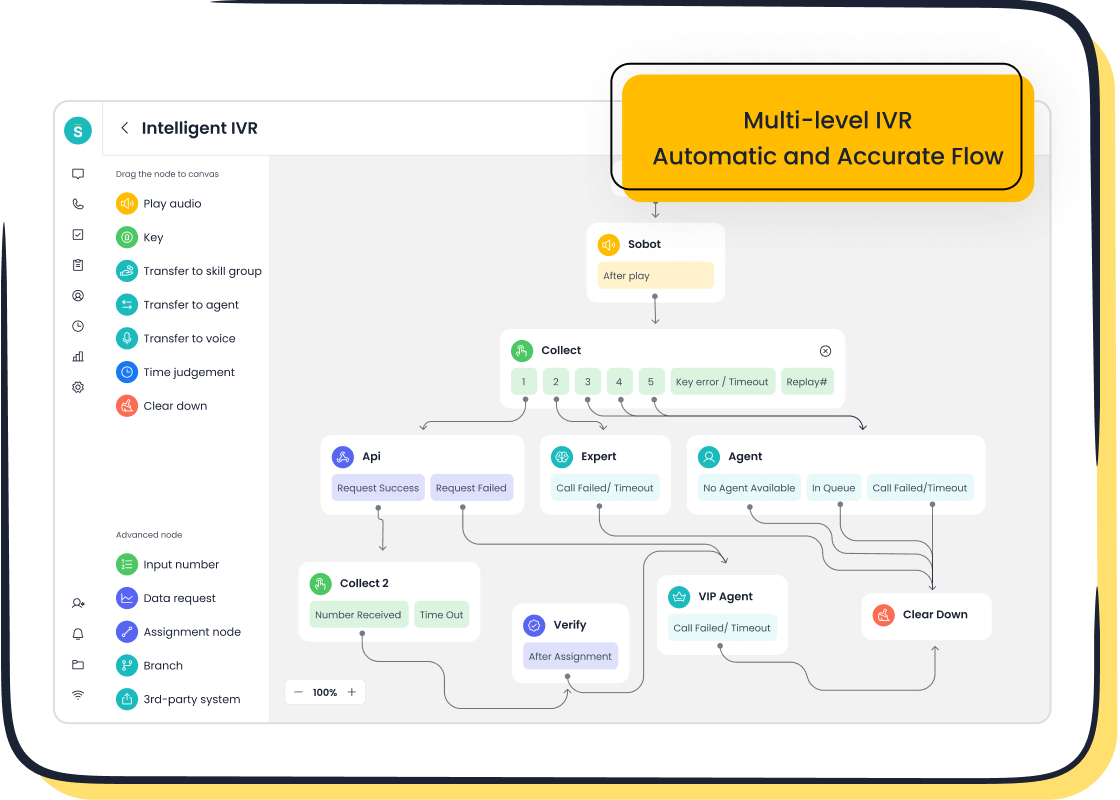
Sobot offers an all-in-one omnichannel solution designed to unify customer interactions. This call center performance management software helps businesses manage communications across various channels from a single platform. It is a powerful performance management software for teams of all sizes. Global brands like Samsung use Sobot to enhance their customer service operations. The company achieved a 97% customer satisfaction rate and a 30% increase in agent efficiency after implementing Sobot. This performance management software provides the tools needed for significant performance improvement. Sobot's platform is a comprehensive call center performance management software.
Key Features
Sobot's strength lies in its multi-faceted AI capabilities. This performance management software uses AI to support customers, agents, and managers. The platform's features make it a leading call center performance management software.
- AI Agent: Provides customers with accurate, human-like responses from a knowledge base.
- AI Copilot: Assists support agents with reply suggestions and conversation summaries. This feature offers a form of ai-powered coaching to improve responses.
- AI Insight: Gives administrators detailed real-time performance dashboards for tracking team metrics. This is a key part of any good performance management software.
This call center performance management software also includes an AI voicebot for calls. The system provides ai-powered coaching to guide agents. This performance management software helps deliver excellent customer support.
Pricing
Sobot provides flexible pricing plans. The costs vary based on the scale of deployment and features required. This performance management software offers options for different business sizes.
| Plan Type | Monthly Cost | Target Organizations |
|---|---|---|
| Basic Plan | $79 | General users |
| Higher Tiers | Available on request | Larger organizations needing advanced features |
Note: Sobot also offers usage-based models, with costs ranging from $0.01 to $0.10 per interaction, making it a flexible call center performance management software.
Key Advantages
Sobot delivers exceptional reliability and global reach. The cloud contact center boasts 99.99% system stability, ensuring consistent service. Its global network supports businesses operating in multiple regions. As an official WhatsApp Business Solution Provider (BSP), Sobot enables seamless integration with a key communication channel. This performance management software provides robust real-time performance dashboards. The platform's ai-powered coaching helps agents grow. Sobot is a complete call center performance management software. It is a dependable performance management software for any modern business. This call center performance management software stands out from the competition.
2. Talkdesk: AI-Powered CX Platform
Best for: Enterprise-level, AI-driven customer experience.
Overview
Talkdesk provides a cloud contact center platform specifically designed for large organizations. This call center performance management software focuses on using artificial intelligence to enhance every aspect of the customer journey. The platform aims to unify communications and provide deep analytical insights. As a comprehensive performance management software, it gives enterprises the tools to manage complex support operations. This call center performance management software is built to handle high volumes of interactions. The performance management software helps businesses improve their overall customer experience.
Key Features
The Talkdesk call center performance management software is notable for its extensive suite of AI-driven tools. This performance management software offers features that support agents and managers alike. The platform's ai-powered coaching capabilities are integrated directly into the agent workflow.
- QM Assist: This tool uses AI to automate quality management. It provides searchable transcripts and analyzes sentiment to score interactions.
- Interaction Analytics: This feature captures and analyzes conversations across all channels. It helps identify trends and common customer topics.
- Agent Assist Solutions: This call center performance management software offers generative AI tools that automatically summarize calls and suggest responses. This form of ai-powered coaching helps reduce handle times.
- No-code AI Bot Building: The performance management software allows teams to create and train AI bots without technical expertise, improving self-service options. This ai-powered coaching helps non-technical staff build effective models.
Pricing
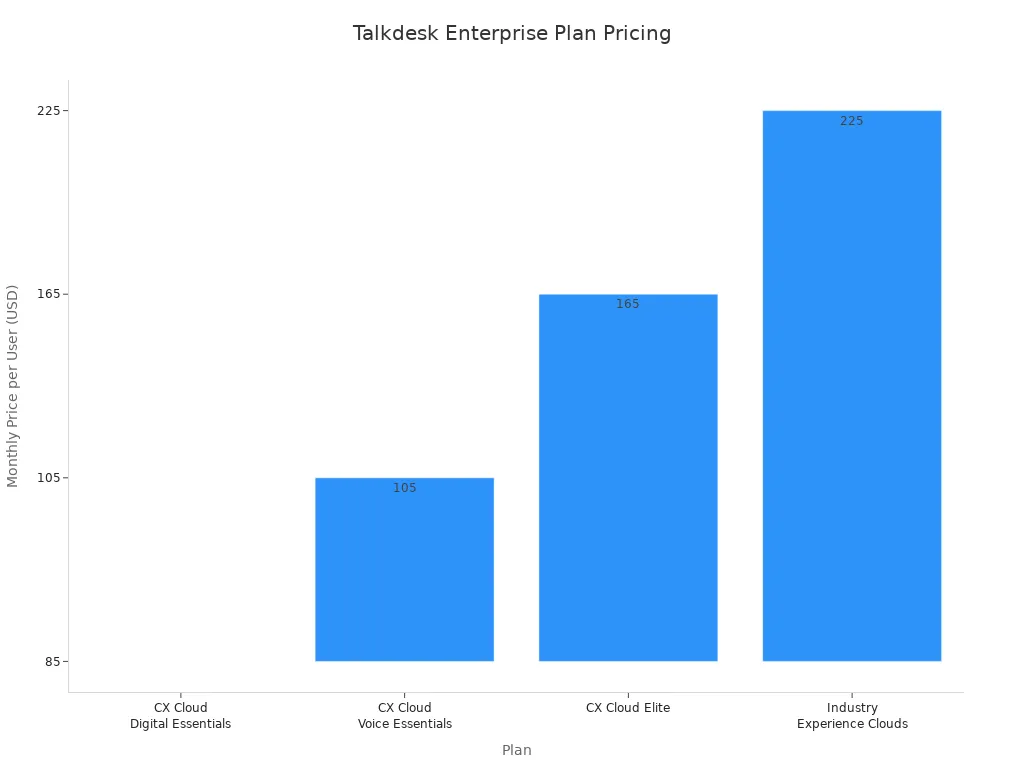
The pricing for this call center performance management software is structured in tiers for enterprise clients. The performance management software requires annual contracts, with costs varying by feature set.
| Plan | Monthly Price/User (Annual Billing) | Key Inclusions |
|---|---|---|
| CX Cloud Digital Essentials | $85 | Digital channels, studio routing, basic APIs |
| CX Cloud Voice Essentials | $105 | Voice engagement, real-time dashboards |
| CX Cloud Elite | $165 | Advanced reporting, Workforce Management |
| Industry Experience Clouds | $225+ | Industry-specific workspaces and integrations |
Note: The listed prices often require a three-year contract. Additional costs for usage, storage, and premium AI features may apply separately.
Pros & Cons
This call center performance management software offers powerful capabilities but may not fit every team. The performance management software is robust.
Pros:
- ✅ Advanced AI and Automation: The platform's deep integration of AI provides sophisticated analytics and agent assistance.
- ✅ Enterprise-Grade Scalability: This call center performance management software is built to support the complex needs of large, global teams.
- ✅ Detailed Analytics: The performance management software offers strong real-time performance dashboards for in-depth analysis.
Cons:
- ❌ Complex Pricing: The pricing structure can be complicated, with many features available only as add-ons.
- ❌ High Cost: This call center performance management software is one of the more expensive options, making it less accessible for smaller businesses.
- ❌ Potential Overkill: The extensive feature set of this performance management software might be overwhelming for teams with simpler needs.
3. Five9: Enterprise Cloud Platform
Best for: Large-scale contact centers needing scalability and reliability.
Overview
Five9 provides an enterprise cloud contact center platform built for scalability. This call center performance management software helps large businesses manage high volumes of customer interactions. The system centralizes communications from various channels into a single hub. As a robust performance management software, it gives supervisors the tools to monitor operations and maintain quality. This call center performance management software is designed to support thousands of agents across different regions, ensuring operational consistency. This performance management software is a choice for enterprises seeking a reliable solution.
Key Features
The Five9 call center performance management software offers a wide array of features for customer and employee engagement. This performance management software uses automation to handle repetitive tasks.
- Omnichannel Engagement: The platform unifies voice, email, chat, social media, and SMS interactions. This allows agents to manage all communications from one place.
- AI and Automation: This call center performance management software includes intelligent virtual agents (IVAs) for customer self-service. It also has AI tools that assist agents with real-time guidance.
- Workforce Engagement: This performance management software provides tools for quality management, performance tracking, and gamification to keep agents motivated.
- Supervisor Tools: Managers get access to live monitoring, call whispering, and detailed analytics to oversee team performance. This is a key part of the performance management software.
Pricing
The pricing for this call center performance management software is based on a per-user, per-month model. The performance management software offers several bundles with different capabilities.
| Plan | Price (Per User/Month) | Key Features |
|---|---|---|
| Core | $149 | Blended inbound/outbound voice, call recording |
| Premium | $169 | Adds web chat, email, and basic quality management |
| Optimum | $199 | Adds workforce management and proactive notifications |
| Ultimate | $229 | Adds interaction analytics and workflow automation |
Note: Many features, such as CRM connectors and advanced IVR, are available as paid add-ons. This call center performance management software typically requires a minimum 12-month contract.
Pros & Cons
This call center performance management software has clear strengths for large organizations, but some aspects require consideration. The performance management software is powerful.
Pros:
- ✅ High Scalability: The platform is built to grow with large, global enterprises.
- ✅ Strong Compliance: This call center performance management software meets enterprise standards like PCI and HIPAA.
- ✅ Comprehensive Feature Set: The performance management software offers extensive tools for automation and agent engagement.
Cons:
- ❌ Complex Pricing: The total cost can increase significantly with necessary add-ons.
- ❌ No Free Trial: Businesses cannot test the platform before committing to a contract.
- ❌ Minimum Seat Requirement: This performance management software may have a minimum seat requirement, making it less suitable for smaller teams.
4. NICE CXone: Advanced Workforce Optimization
Best for: Teams focused on agent performance and workforce management.
Overview
NICE CXone offers a cloud platform centered on workforce optimization. This call center performance management software helps teams improve agent productivity and service quality. The system is a comprehensive performance management software designed for businesses that prioritize data-driven decisions. This call center performance management software provides tools for detailed analysis and agent development. The performance management software aims to create a more efficient and engaged workforce.
Key Features
The NICE CXone call center performance management software includes a robust suite of tools for workforce management. This performance management software gives managers deep visibility into team operations. The platform's features support continuous performance improvement. This call center performance management software offers ai-powered coaching to guide agents.
- Workforce Management: This feature helps with scheduling, forecasting, and adherence tracking.
- Performance Management: This tool uses gamification and personalized coaching to motivate agents.
- Quality Management: The system allows for automated and manual scoring of interactions.
- Interaction Analytics: This call center performance management software analyzes conversations to find trends and insights.
- Real-time Guidance: This performance management software provides agents with in-the-moment suggestions, a form of ai-powered coaching.
This call center performance management software is a complete performance management software for agent-focused teams.
Pricing
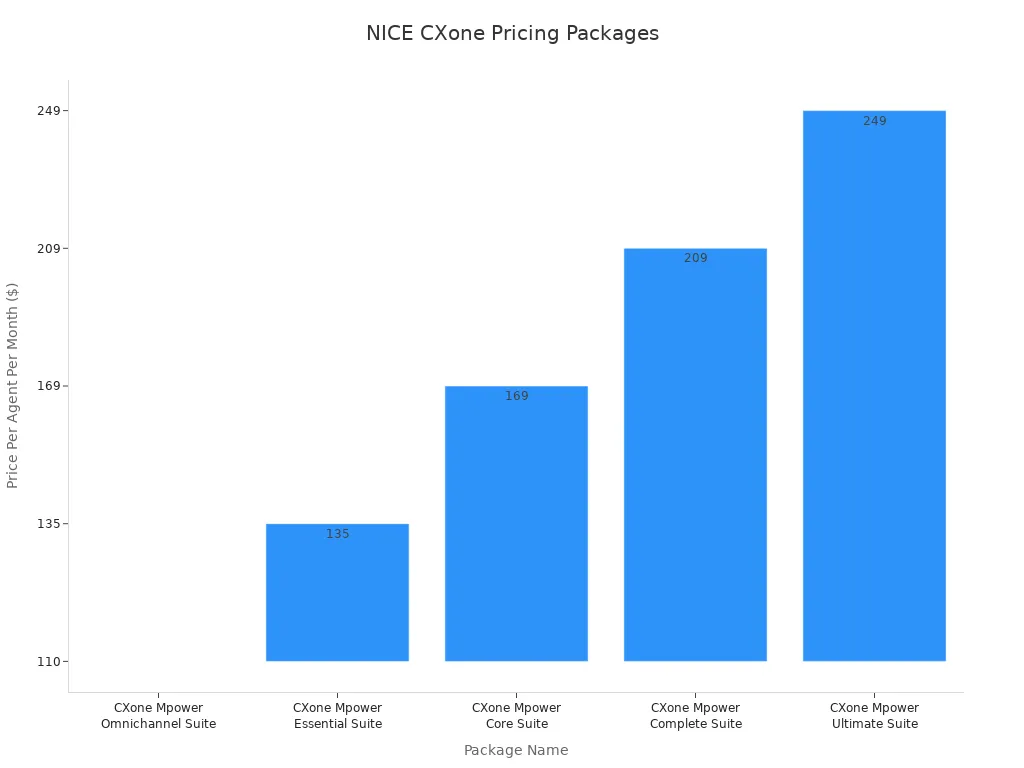
The pricing for this call center performance management software is tiered. The performance management software offers packages based on channel needs and feature depth.
| Package Name | Price Per Agent Per Month |
|---|---|
| CXone Mpower Omnichannel Suite | $110 |
| CXone Mpower Essential Suite | $135 |
| CXone Mpower Core Suite | $169 |
| CXone Mpower Complete Suite | $209 |
| CXone Mpower Ultimate Suite | $249 |
Note: Industry-specific packages are also available. Costs can vary, so direct consultation is recommended for an accurate quote.
Pros & Cons
This call center performance management software provides strong workforce management tools. However, its complexity may not suit all businesses. This performance management software is powerful.
Pros:
- ✅ Deep Workforce Tools: The platform excels at workforce management, quality assurance, and agent analytics.
- ✅ Strong Analytics: This performance management software offers detailed real-time performance dashboards for supervisors.
- ✅ Integrated AI: The system uses ai-powered coaching and automation to support agents.
Cons:
- ❌ Complex for Small Teams: The extensive features of this call center performance management software can be overwhelming for smaller operations.
- ❌ Higher Price Point: The cost is higher than some competitors, especially for advanced suites.
- ❌ Steep Learning Curve: The depth of the real-time performance dashboards and tools may require significant training.
5. Genesys Cloud CX: Omnichannel Journey Orchestration
Best for: Companies mapping and managing complex customer journeys.
Overview
Genesys Cloud CX is a cloud contact center platform that excels at journey orchestration. This call center performance management software helps businesses manage and personalize interactions across the entire customer experience. The system is a comprehensive performance management software for organizations that need to understand and guide complex customer paths. This call center performance management software provides the tools to connect every touchpoint. This performance management software is designed for deep operational control.
Key Features
The Genesys call center performance management software offers advanced tools for journey management. This performance management software uses AI to create personalized interactions. The platform's features make it a powerful call center performance management software.
- Advanced Journey Analytics: This performance management software goes beyond basic mapping. It uses path discovery and intelligent alerts for real-time optimization.
- Omnichannel Suite: The platform unifies data from various channels and systems. This gives a complete view of the customer journey.
- AI-Powered Orchestration: This call center performance management software leverages AI to deliver personalized interactions based on customer goals. It includes ai-powered coaching to help agents.
- Continuous Optimization: The system provides insights for root cause analysis. This helps businesses constantly improve their processes. This form of ai-powered coaching supports ongoing agent development.
This call center performance management software is a complete performance management software for journey-focused teams.
Pricing
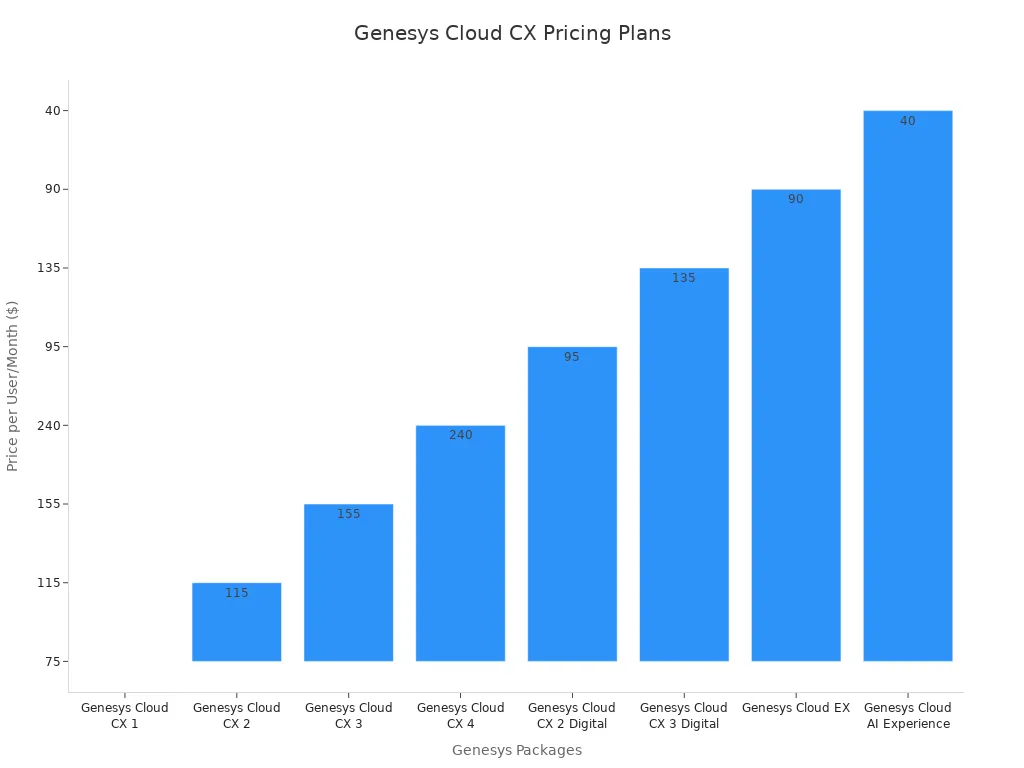
The pricing for this call center performance management software is available in multiple tiers. This performance management software offers plans for voice, digital, and combined needs.
| Genesys Package | Price (Per User/Month) | Key Features |
|---|---|---|
| Cloud CX 1 | $75 | Voice only, IVR, reporting |
| Cloud CX 2 | $115 | Adds digital channels and quality management |
| Cloud CX 3 | $155 | Adds workforce management and text analytics |
| Cloud CX 4 | $240 | Adds journey management and Agent Copilot |
Note: Genesys Cloud requires a minimum monthly contract commitment, often starting at $2,000. Plans are typically billed annually, and implementation fees are a separate, one-time cost.
Pros & Cons
This call center performance management software offers strong journey management tools. However, its structure may not be ideal for every organization. This performance management software is a significant investment.
Pros:
- ✅ Powerful Journey Orchestration: The platform excels at mapping and managing complex customer journeys.
- ✅ Flexible Pricing Models: Offers per-user, per-hour, and concurrent pricing to fit different staffing needs.
- ✅ Deep Analytics: This performance management software provides advanced analytics for process optimization.
Cons:
- ❌ High Minimum Commitment: The minimum monthly spend makes this call center performance management software inaccessible for small businesses.
- ❌ Complex Plan Structure: Key features like journey management are only in the most expensive tier.
- ❌ Separate Implementation Costs: The subscription price does not include the initial setup fees.
6. Aircall: CRM-Integrated Voice Platform
Best for: Sales and support teams deeply integrated with their CRM.
Overview
Aircall provides a cloud-based voice platform that integrates directly with CRM systems. This call center performance management software is designed for teams that rely heavily on tools like Salesforce and HubSpot. The system helps businesses streamline their phone operations. As a performance management software, it centralizes call data within the CRM. This call center performance management software aims to improve agent productivity. The performance management software is a popular choice for sales and customer support teams. This call center performance management software helps them manage communications efficiently.
Key Features
The Aircall call center performance management software focuses on voice communication and CRM synergy. This performance management software offers several tools to enhance call-based interactions.
- One-Click CRM Integration: The platform connects with over 100 business tools. This allows agents to make calls directly from their CRM interface.
- Call Coaching Tools: This call center performance management software includes features like call whispering and live call monitoring. Managers can guide agents during live conversations.
- Power Dialer: This feature automates outbound calling from a pre-loaded list of numbers. It helps sales teams improve their outreach efficiency.
- Analytics Dashboard: This performance management software provides basic analytics on call volume, wait times, and agent activity. This call center performance management software helps track key metrics.
This performance management software is a focused call center performance management software for voice-centric teams.
Pricing
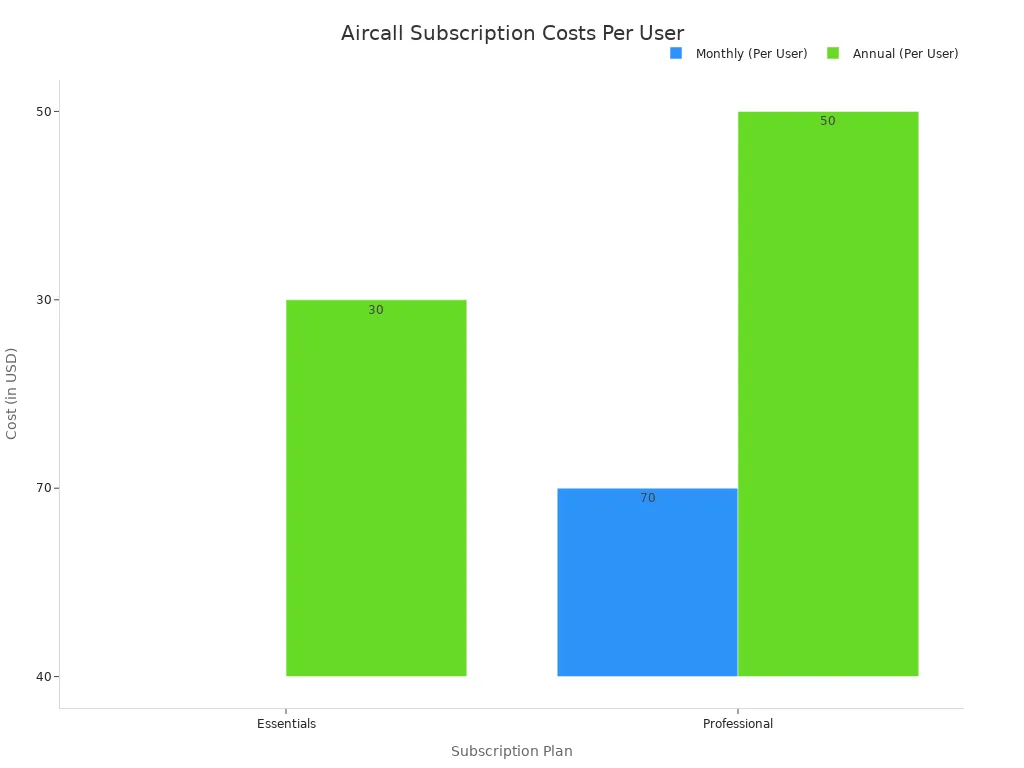
The pricing for this call center performance management software is offered in several tiers. This performance management software has plans that require a minimum number of users.
| Plan | Monthly (Per User) | Annual (Per User) |
|---|---|---|
| Essentials | $40 | $30 |
| Professional | $70 | $50 |
| Custom | Contact sales | Contact sales |
Note: The Essentials and Professional plans require a three-user minimum. The Custom plan has a 25-user minimum. Add-ons like Analytics+ ($15/user/month) and Aircall AI ($9/user/month) increase the total cost of this performance management software.
Pros & Cons
This call center performance management software has specific strengths and limitations. The performance management software is not for everyone.
Pros:
- ✅ Excellent CRM Integration: The platform works seamlessly with many popular CRM and helpdesk tools.
- ✅ User-Friendly Interface: The software is known for its simple setup and ease of use.
- ✅ Strong Voice Features: It offers robust tools for call management and coaching.
Cons:
- ❌ Limited Channels: This call center performance management software is primarily focused on voice and lacks native support for email or social media.
- ❌ Minimum User Requirement: The three-user minimum makes it less accessible for very small teams or solo entrepreneurs.
- ❌ Add-on Costs: Key features like advanced analytics and AI are only available as paid add-ons.
7. RingCentral Contact Center: Unified Communications Hub
Best for: Businesses seeking a single platform for all communications (UCaaS + CCaaS).
Overview
RingCentral offers a platform that combines unified communications with contact center tools. This call center performance management software is for businesses that want a single solution for internal and external communication. The system merges a company's phone system (UCaaS) with its customer service operations (CCaaS). This performance management software creates a connected environment. This approach helps streamline workflows. The RingCentral call center performance management software is a comprehensive performance management software for integrated business communications.
Key Features
The RingCentral call center performance management software provides a suite of tools for managing customer interactions. This performance management software focuses on routing and agent management. The features of this call center performance management software support a blended communication strategy.
- Omnichannel Routing: This performance management software directs interactions from various channels to the right agents.
- Automated Call Distribution (ACD): The system uses rules to distribute incoming calls efficiently.
- Interactive Voice Response (IVR): This feature guides callers through menus to self-serve or reach the correct department.
- Predictive Dialer: An outbound tool in this call center performance management software helps sales and service teams connect with customers proactively.
- CRM Integration: The platform connects with popular Customer Relationship Management systems.
This performance management software provides the essential tools for a modern cloud contact center.
Pricing
RingCentral has separate pricing for its business phone and contact center products. This call center performance management software requires contacting sales for detailed quotes.
For a combined solution, businesses typically purchase both a RingEX (UCaaS) and a RingCX (CCaaS) plan. The entry-level, AI-powered RingCX plan starts at $65 per agent per month. The RingEX business phone plans begin at $30 per user per month.
For larger teams or advanced needs, this performance management software requires a custom quote. A public comparison table for the different contact center plans is not available. This call center performance management software is priced for businesses needing both services.
Pros & Cons
This performance management software offers a unique all-in-one approach. However, this model has its own considerations.
Pros:
- ✅ Unified Platform: Combines internal and external communications in one system.
- ✅ Strong UCaaS Features: Leverages a robust business phone system foundation.
- ✅ Good Scalability: The platform can support growing teams.
Cons:
- ❌ Complex Pricing: Combining two separate services can make costs difficult to predict.
- ❌ Contact Sales for Details: Full pricing and feature comparisons are not publicly listed.
- ❌ Separate Products: The UCaaS and CCaaS components are distinct products, not a single, ground-up solution.
8. 8x8 Contact Center: Integrated Voice and Video
Best for: Organizations that require integrated voice, video, and chat in one solution.
Overview
8x8 provides a contact center platform that integrates voice, video, and chat into a single solution. This call center performance management software is designed for businesses that want to unify their communication channels. The system combines customer engagement tools with internal collaboration features. As a comprehensive performance management software, it helps teams manage interactions from one place. This call center performance management software supports businesses looking for an all-in-one communications hub. This performance management software aims to streamline workflows for agents and supervisors.
Key Features
The 8x8 call center performance management software offers a range of tools for omnichannel communication. This performance management software leverages a strong voice infrastructure.
- Unified Agent Workspace: Agents use a single interface to handle voice and digital interactions. This workspace includes a softphone for high-quality calls, removing the need to switch apps.
- Integrated Communications: The platform offers APIs for voice and video. It also integrates with Microsoft Teams, giving businesses flexible connection options.
- Precision Routing: This call center performance management software uses skill-based rules to direct interactions to the best available agent.
- Advanced Call Controls: This performance management software provides supervisors with tools for monitoring and reporting on agent activities.
This call center performance management software is a complete performance management software for unified communications.
Pricing
The pricing for this call center performance management software is part of 8x8's X Series plans. This performance management software bundles unified communications with contact center features.
Note: Contact center capabilities are included in the higher-tier X Series plans (X6, X7, and X8). Businesses must contact the 8x8 sales team for a custom quote, as pricing depends on the specific features and number of users required for the performance management software.
This call center performance management software is priced for businesses needing a combined solution.
Pros & Cons
This call center performance management software offers a unified approach that has both benefits and drawbacks. This performance management software is a notable option.
Pros:
- ✅ All-in-One Platform: Combines UCaaS and CCaaS features in a single package.
- ✅ Strong Voice Quality: Known for its reliable, enterprise-grade voice infrastructure.
- ✅ Microsoft Teams Integration: Offers certified integration for enhanced collaboration.
Cons:
- ❌ Complex Plan Tiers: Contact center features are only in the more expensive plans.
- ❌ No Standalone Option: Businesses must buy the bundled UCaaS product.
- ❌ Quote-Based Pricing: The lack of transparent pricing makes budget planning difficult.
9. Zendesk Talk: Integrated Service Suite
Best for: Current Zendesk users wanting to add a native voice channel.
Overview
Zendesk Talk functions as an integrated voice channel within the broader Zendesk Service Suite. It is not a standalone product. This call center performance management software is designed for businesses already using Zendesk that want to add native phone support. The system allows agents to handle calls from the same interface they use for other channels. This performance management software helps create a more unified agent experience. For existing users, this call center performance management software provides a familiar environment for expanding their customer support operations. This performance management software is a logical next step for teams embedded in the Zendesk ecosystem.
Key Features
The Zendesk Talk call center performance management software adds several voice-specific capabilities to the Zendesk Suite. This performance management software enhances the platform with essential call-handling tools.
- Standard Call Tools: The system includes Interactive Voice Response (IVR) menus, skill-based routing, and call recording.
- Unified Workspace: Agents can see a customer's full history and past conversations while on a call.
- AI-Powered Features: This call center performance management software offers post-call transcripts and summaries. Upcoming features include AI agents for pre-call interactions and an Agent Copilot for real-time guidance.
- Quality Assurance: An available add-on for this performance management software helps review calls to identify coaching opportunities.
This call center performance management software provides a solid feature set for voice integration. This performance management software is built to complement Zendesk's other tools.
Pricing
The pricing for this call center performance management software is usage-based and requires an existing Zendesk Suite subscription. This performance management software adds costs on top of the main plan.
Note: Costs are separate from the Suite plan. A phone number must be purchased (starting at $2/month). Calls are billed per minute, with U.S. inbound calls at $0.037/minute and outbound at $0.022/minute. Text messaging is also a paid add-on.
This pricing model makes this call center performance management software flexible but potentially unpredictable for businesses with fluctuating call volumes. This performance management software requires careful budget monitoring.
Pros & Cons
This call center performance management software offers clear benefits for a specific user base but has limitations for others. This performance management software is not a universal solution.
Pros:
- ✅ Seamless Integration: Works perfectly within the existing Zendesk environment.
- ✅ Unified Agent View: Consolidates customer data and interaction history for agents.
- ✅ Easy to Add: Simple for current Zendesk customers to activate and use.
Cons:
- ❌ Not Standalone: Cannot be purchased without a Zendesk Suite subscription.
- ❌ Usage-Based Costs: Per-minute pricing can lead to variable monthly bills.
- ❌ Voice-Centric: It is primarily a voice add-on, not a comprehensive, ground-up omnichannel platform.
10. LiveAgent: Chat-Based Support Specialist
Best for: Companies with a heavy focus on live chat and social media support.
Overview
LiveAgent is a call center performance management software designed for teams that prioritize digital channels. This performance management software helps businesses manage live chat, email, and social media from one place. It is a popular choice for customer support teams needing a strong chat-based solution. This call center performance management software centralizes communications to improve agent workflow. The performance management software is built to handle high volumes of digital interactions. This call center performance management software offers a focused approach.
Key Features
The LiveAgent call center performance management software provides several tools for digital engagement. This performance management software helps organize conversations. The features of this call center performance management software support efficient team operations.
- Universal Inbox: This performance management software combines all messages from chat, email, and social media into one dashboard.
- Hybrid Ticket Stream: This call center performance management software tracks a customer's journey across different channels in a single ticket.
- Built-in CRM: Agents can store and edit customer information directly within the performance management software.
- Automation Rules: This call center performance management software uses rules to automate repetitive tasks and assignments.
This performance management software is a complete call center performance management software for chat-focused teams.
Pricing
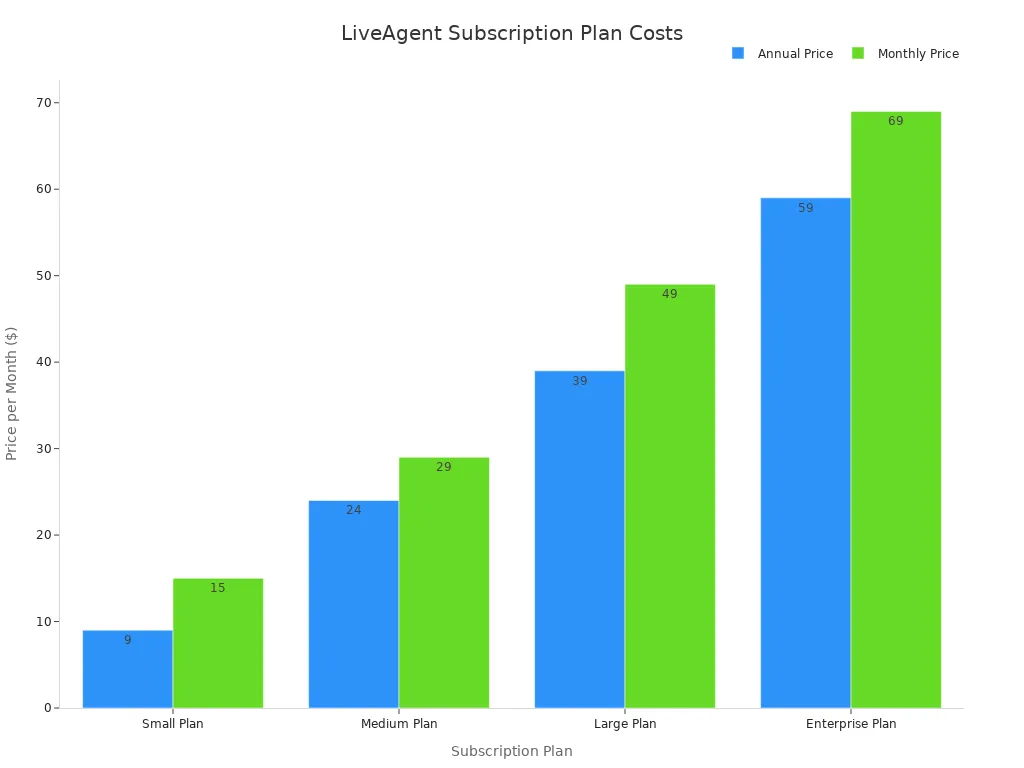
The pricing for this call center performance management software is available in several tiers. This performance management software offers both monthly and annual billing options.
| Plan | Monthly Cost (Billed Annually) | Key Features |
|---|---|---|
| Small | $15 per agent | Ticketing, Live Chat, Knowledgebase |
| Medium | $29 per agent | Adds Call Center, IVR, Reporting |
| Large | $49 per agent | Adds Social Media, SSO, Time Tracking |
| Enterprise | $69 per agent | Adds Dedicated Manager, Priority Support |
Note: Social media integration is an add-on for lower tiers or included in the Large and Enterprise plans. This makes the total cost of the performance management software variable.
Pros & Cons
This call center performance management software has clear strengths for digital-first teams. However, its structure has some limitations.
Pros:
- ✅ Strong Chat Features: The platform excels at live chat and digital channel management.
- ✅ Affordable Entry Point: The Small plan offers a low-cost start for basic needs.
- ✅ User-Friendly Interface: The software is known for being easy to set up and use.
Cons:
- ❌ Limited Lower Tiers: Key features like social media and reporting are not in the basic plans.
- ❌ Voice is Secondary: The platform is not primarily a voice-centric solution.
- ❌ Add-on Costs: The price of this performance management software can increase with necessary add-ons.
How to Choose the Right Reporting Software

Choosing the right contact center reporting software requires a clear strategy. Teams can find the best call center software by evaluating their needs, integration capabilities, features, and pricing. This process ensures the selected performance management software aligns with business goals.
Step 1: Assess Your Team's Needs
First, a team must identify its key performance indicators (KPIs). Managers should know what they need to measure. This helps them select the right call center performance management software. Important metrics often include:
- Call Processing KPIs: Average Handle Time (AHT), First Contact Resolution Rate, and Abandonment Rate.
- Workforce Management KPIs: Schedule Adherence and Agent Occupancy Rate.
Understanding these metrics is the first step toward performance improvement. A good performance management software will track these specific needs. This makes the call center performance management software a valuable asset.
Step 2: Evaluate Integration Requirements
Next, consider how a new call center software will connect with existing tools. A performance management software must integrate smoothly with your Customer Relationship Management (CRM) system. This creates a unified view of customer data. A call center performance management software that works with your current tech stack prevents data silos. This makes the performance management software more effective. The right call center software enhances existing workflows.
Step 3: Focus on Call Center Performance Management Software Features
A team should look for specific features that drive results. A quality call center performance management software offers tools for managers and agents. Real-time performance dashboards give supervisors immediate insight into operations. Another key feature is ai-powered coaching, which provides agents with in-the-moment guidance. This focus on features ensures the performance management software supports continuous performance improvement. The best call center performance management software includes both analytics and agent support tools. This makes the performance management software a complete solution.
Step 4: Compare Pricing and Request Demos
Finally, compare options and schedule demos. During a demo, ask critical questions to understand the call center software fully.
Key Questions for Your Demo:
- Is the platform a true omnichannel solution?
- How secure is the customer data within the performance management software?
- What do your pricing and subscription options look like?
Getting clear answers helps you evaluate the contact center reporting software. A good call center performance management software vendor will be transparent. They will explain their real-time performance dashboards and ai-powered coaching features. This step confirms if the performance management software is the right fit. The call center performance management software should meet both technical and budget needs.
The best contact center reporting software depends on your team's needs. A good call center software improves the customer experience. This call center software is a great performance management software. This performance management software helps customer support. A call center software is a key performance management software. This performance management software helps teams. The right call center software is a good performance management software. This performance management software improves customer support. A call center software is a vital performance management software. This performance management software is a key performance management software.
| Tool | Best For | Standout Feature | Price Point |
|---|---|---|---|
| Sobot | Global, AI-powered service | All-in-one omnichannel platform | From $79/month |
| Talkdesk | Enterprise AI operations | Advanced AI and QM Assist | From $85/user/month |
| Aircall | CRM-integrated teams | One-click CRM calling | From $30/user/month |
Start your free trials today to find the perfect fit for your contact journey.
FAQ
What is contact center reporting software?
Contact center reporting software tracks key metrics. It helps managers monitor agent performance and operational efficiency. This performance management software provides real-time dashboards and historical data. Teams use these insights to improve customer service and make informed decisions about their call center software.
How does this software improve agent performance?
This software offers tools for performance improvement. Managers can use real-time performance dashboards to monitor agent activity. AI-powered coaching provides agents with live guidance. Quality management features also help identify areas where agents need more training, improving overall service quality.
Can small businesses use this type of software?
Yes, many solutions cater to small businesses. Some call center software, like Sobot, offers flexible plans that scale with a company's needs. These platforms provide essential features without the high cost or complexity of enterprise-level systems, making them accessible for smaller teams.
What is the difference between UCaaS and CCaaS?
UCaaS (Unified Communications as a Service) handles internal team communication like chat and video meetings. CCaaS (Contact Center as a Service) manages external customer interactions across channels like voice and email. Some platforms combine both to create a single, integrated communication hub.
See Also
Mastering Seamless Customer Interactions: Your Omnichannel Call Center Software Handbook
Elevating Service Excellence: A Comprehensive Guide to Call Center QA Software
Unveiling the Best 10 Call Center Analytics Software Solutions for 2024
Evaluating the Leading Cloud Contact Center Services: In-depth Reviews for 2024
Discovering the Premier Contact Center Solutions: An Expert Review for 2024

