10 Auto Ticket Routing Tools for Teams in 2026


You want to eliminate manual ticket sorting and improve your team's efficiency. Modern AI ticketing systems use intelligent auto ticket routing to achieve this. An automated system instantly analyzes and assigns each incoming ticket, enhancing your customer support service and accelerating ticket resolution. Better ticketing leads to a better customer experience.
Modern AI ticketing systems learn your team's patterns over time, making auto ticket routing decisions more accurate. This automated approach boosts operational efficiency for your entire service team.
Here is a quick look at the tools we will explore:
| Tool Name | Focus Area |
|---|---|
| Zendesk | Scalable Omnichannel Support |
| Sobot | Unified Automated Ticketing |
| Salesforce Service Cloud | Data-Driven Enterprise Routing |
| Intercom | Conversational AI-First Routing |
| Freshdesk | User-Friendly Automation |
| HubSpot Service Hub | Integrated CRM & Ticketing |
| Zoho Desk | Value-Packed Ticketing System |
| Front | Collaborative Inbox Routing |
| Jira Service Management | IT & Developer-Focused Routing |
| LiveAgent | Cost-Effective Omnichannel |
Understanding AI Ticketing Systems and Key Features

To choose the right tool, you first need to understand the technology that powers it. Modern AI ticketing systems go far beyond simple ticket forwarding. They act as an intelligent hub for your entire customer service operation. Let's explore the key features that make this possible.
Defining Modern Ticket Routing
Modern ticket routing is not just about sending a ticket to the next available agent. It involves using intelligence to analyze each incoming request's content, intent, and urgency. The goal of this smart routing is to assign the ticket to the best-suited agent or department automatically. This ensures the customer gets the right help on the first try, which is a critical first step in quality customer support.
Essential AI and Automation Capabilities
The "smart" part of AI ticketing systems comes from specific technologies. These are the key features that drive efficiency:
- Natural Language Processing (NLP): This allows the system to read and understand human language in emails and chats. It identifies the core issue and customer sentiment.
- Machine Learning (ML): The system learns from your past ticketing data. It recognizes patterns to predict the correct category and priority for a new ticket, improving its accuracy over time.
This level of service automation frees your team from manual sorting and enables powerful self-service options for customers.
Omnichannel Integration Standards
Your customers contact you through email, social media, and chat. An effective automated ticketing system unifies these channels. It uses tools like REST APIs to create seamless omnichannel support. This connects all communication streams into one platform, giving your agents a complete view of the customer's history without switching between apps.
Custom Workflows and Rules Engines
Advanced AI ticketing systems allow you to build custom customer support workflows. You define the ticket routing logic based on your team's needs. This workflow automation can handle complex scenarios without manual intervention.
Pro Tip: Use your rules engine to create automated ticketing workflows. For example, you can automatically route any ticket containing the word "refund" to your billing department and flag it as high priority.
Performance Analytics and Reporting
How do you know your automated ticketing is working? You measure it. A good ticketing system provides detailed analytics on key features and performance. You can track metrics like:
- First-Contact Resolution (FCRR): The percentage of issues solved in the first interaction.
- Ticket Resolution Time: The average time it takes to close a ticket.
- Customer Satisfaction (CSAT): Gartner research shows AI can boost CSAT by up to 25%.
Tracking these numbers helps you prove the value of your service and continuously improve your customer support.
1. Zendesk: Scalable Omnichannel Support
Zendesk is a well-known leader in the customer support industry, offering a powerful suite of tools for large teams. Its platform is designed to handle high volumes of inquiries, making it a go-to for enterprises that need a robust service solution. As one of the major AI ticketing systems, it provides advanced features to manage complex workflows.
Key Routing Features
Zendesk uses AI to make your ticketing process smarter and more efficient. One of its key features is 'Intelligent Triage.' This automated tool analyzes every incoming ticket for its intent, language, and sentiment. This detailed analysis helps you create very specific routing rules, ensuring requests go to the right agent every time. You can also build custom workflows to manage the entire ticket lifecycle, from initial assignment to final resolution. These key features provide a high degree of control over your customer support operations.
Pros and Cons
Zendesk offers a powerful and highly scalable platform. Its AI-driven analysis provides deep insights into customer needs. However, you should consider a few points.
Pros:
- Advanced AI for intelligent ticket classification.
- Highly customizable and scalable for growing teams.
- Strong analytics and reporting capabilities.
Cons:
- Its extensive features can create a steep learning curve for new users.
- The initial setup of automated ticketing rules can be complex and may require technical help.
- Some users find that different channels are handled in silos, which can affect true omnichannel support.
Best For: Global Teams Needing an Integrated Ecosystem
Zendesk is an excellent choice for large, global organizations that need a comprehensive service platform. If your team can invest the time in setup and training, its powerful automated routing and analytics capabilities provide immense value for managing a complex support environment.
2. Sobot: The Unified Automated Ticketing System
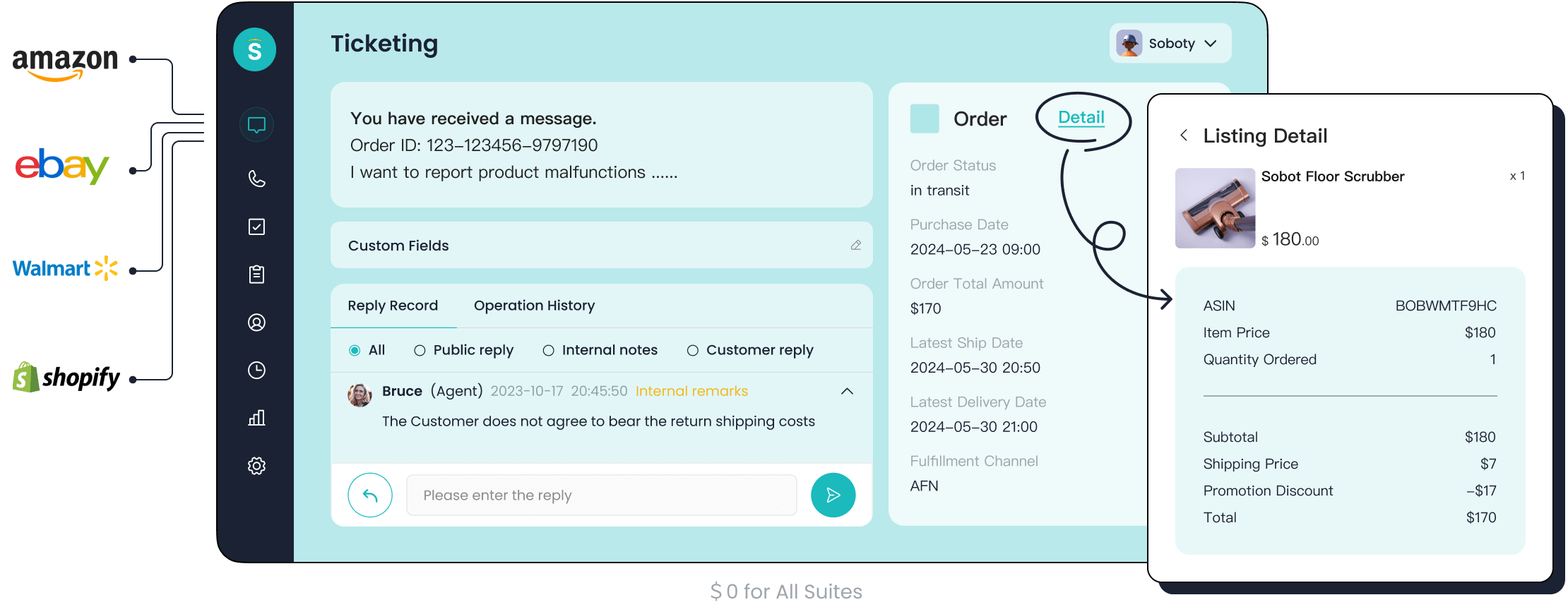
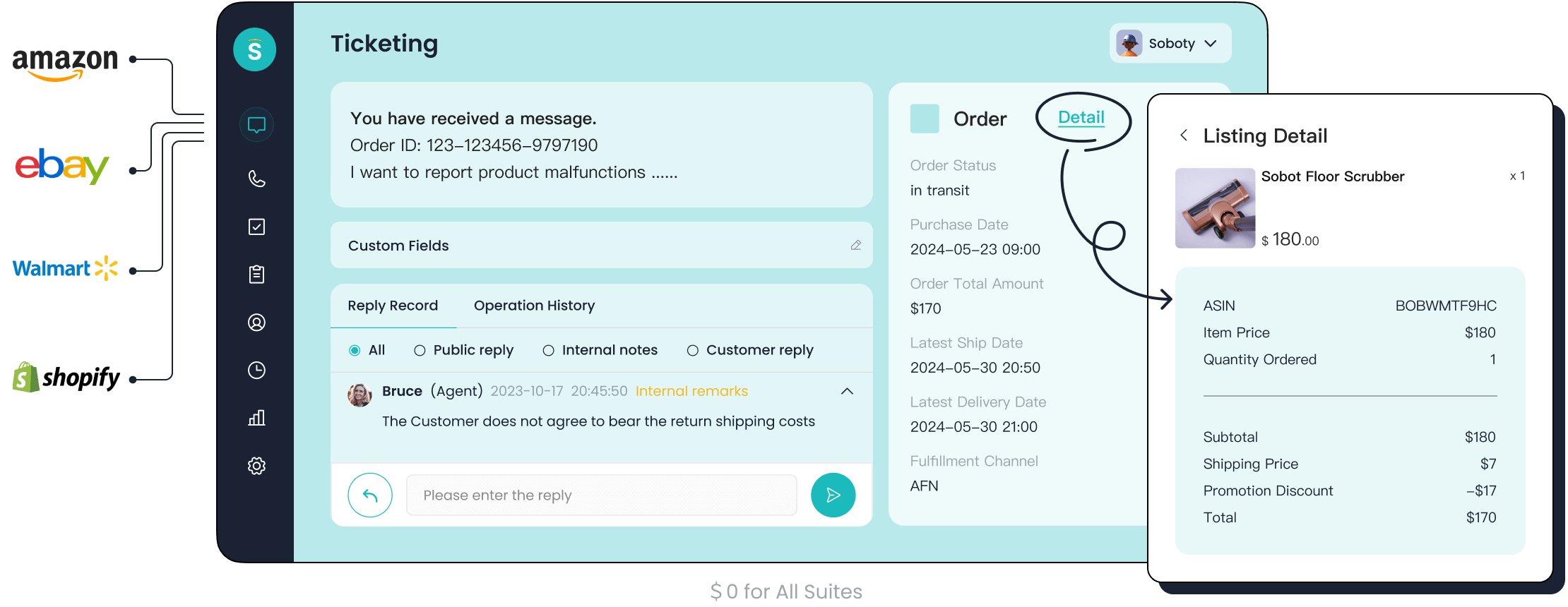
Sobot offers a complete, all-in-one contact center solution designed to boost your team's performance. This automated ticketing system unifies all your customer conversations, from email and chat to social media, into a single workspace. It helps you deliver a consistent and high-quality service experience.
Key Routing and AI Features
Sobot's platform is built for intelligent automation. The system uses AI-powered ticketing to analyze and categorize incoming requests instantly. This ensures every ticket is sent to the right agent or department without manual work. You can define your own routing logic with custom triggers and rules.
Some of the key features include:
- Unified Inbox: Manages messages from all channels in one place.
- SLA Reminders: Automatically tracks response and resolution times to keep your team on target.
- Multilingual Support: Translates tickets, allowing you to provide excellent customer support globally.
- Canned Responses: Provides quick, pre-written answers to common questions, speeding up your ticketing process.
Benefits and Advantages
Using Sobot helps you enhance efficiency and improve customer satisfaction. The automated workflows reduce repetitive tasks, freeing your agents to handle more complex issues. This focus on efficiency leads to lower operational costs and better Net Promoter Scores (NPS). As an official WhatsApp Business Solution Provider (BSP), Sobot provides powerful omnichannel support.
Proof Point: J&T Express Global logistics leader J&T Express used Sobot's solution to streamline its communications. The result was a 35% increase in delivery rates and a 50% reduction in overall costs, showcasing the platform's impact on operational efficiency.
Best For: Businesses Seeking an All-in-One Contact Center Solution
Sobot is the ideal choice for global enterprises in sectors like retail, logistics, and finance. If you are looking for a comprehensive and automated service platform that combines a chatbot, live chat, and one of the most effective AI ticketing systems, Sobot provides a powerful solution to scale your customer support operations.
3. Salesforce Service Cloud: Data-Driven Enterprise Routing
Salesforce Service Cloud leverages the power of your existing customer data to deliver a highly intelligent ticketing experience. If your business already operates within the Salesforce ecosystem, this tool uses that deep data well to power its automated routing. It transforms your customer support by connecting every interaction to a rich customer profile.
Key Routing Features
The core of Salesforce's automated service is its Einstein AI. This technology analyzes your past cases to learn patterns. It then uses that knowledge to manage incoming requests. The process is simple but powerful:
- AI Case Classification: Einstein AI reads a new ticket and predicts its category, issue type, and priority. For example, it can tell the difference between a routine "password reset" and an urgent "system outage."
- AI-Based Routing: After classification, the system sends the ticket to the best agent. It considers agent skills, availability, and current workload to make the smartest choice.
These key features ensure that complex issues get immediate attention from experts. This automated process moves beyond simple rules to create a truly dynamic workflow. The platform's key features also include APIs that let you connect other machine learning models for even more advanced ticketing customization.
Pros and Cons
Salesforce is one of the most powerful AI ticketing systems available, but you should weigh its strengths and challenges.
Pros:
- Highly scalable for businesses of any size.
- Maximizes team productivity by automating repetitive tasks.
- Offers a competitive edge with advanced customer service tools.
Cons:
- The total cost can be high, including licensing and maintenance.
- It often requires significant training for your team to use it effectively.
- Implementation can be complex and take longer than expected.
Best For: Organizations Embedded in the Salesforce CRM
Salesforce Service Cloud is the top choice for teams already using the Salesforce CRM. It allows you to create a single, unified view of your customer. This deep integration makes your routing and service decisions smarter, as every action is informed by a complete customer history.
4. Intercom: Conversational AI-First Routing
Intercom takes a different approach to customer support by prioritizing real-time conversations. It combines a messenger, automated bots, and a ticketing system into one platform. This tool helps you engage customers directly through live chat, making the service experience feel more personal and immediate.
Key Routing Features
Intercom's key features revolve around its powerful AI chatbot, Fin. This automated assistant engages customers first to solve issues instantly. Fin's process is highly effective:
- It uses its AI to understand a customer's question.
- It searches your support content to find the right answer.
- It provides a clear, natural-language response.
- If it cannot find an answer, it intelligently passes the conversation to the right human agent.
This automated routing ensures that your team only receives the ticket when human expertise is truly needed. Fin can also ask clarifying questions to improve accuracy, creating a smooth and efficient service. These key features make it one of the more advanced conversational AI ticketing systems.
Pros and Cons
Intercom's conversational model offers distinct benefits, but you should also consider its trade-offs.
Pros:
- Excellent live chat and messaging tools improve customer engagement.
- Strong automation capabilities reduce manual tasks for your team.
- The user-friendly interface is modern and easy to navigate.
Cons:
- The pricing structure can be expensive, especially as your business grows.
- Its ticketing features are less advanced than dedicated support platforms.
- The complex pricing model can make it hard to predict your total costs.
Best For: Teams Focused on Real-Time Sales and Support
Intercom is the perfect choice for teams that want to focus on proactive, real-time engagement. If your business model relies heavily on live chat for sales and customer support, Intercom's conversational-first approach provides an excellent platform for building relationships and resolving issues quickly.
5. Freshdesk: User-Friendly Auto Ticket Routing
Freshdesk offers a great balance between powerful features and an easy-to-use design. You will find its platform intuitive, making it a popular choice for businesses that want effective auto ticket routing without a steep learning curve. This tool helps you improve your customer support service from day one.
Key Routing Features
Freshdesk uses a smart engine called Omniroute to power its automated ticketing. This system gives you precise control over how work is distributed. You can set up rules to ensure the right agent gets the right ticket every time.
The key features of its routing system include:
- Skill-based Routing: The system assigns a ticket to agents who have the specific skills needed to solve the issue.
- Load-based Routing: It checks how many tickets each agent is currently handling. This automated process prevents any single team member from becoming overloaded.
Omniroute checks agent availability and capacity before assigning any work. This ensures your ticketing workflow remains smooth and efficient.
Pros and Cons
Freshdesk is praised for its simplicity, but you should consider its limitations. Many users find it to be one of the most user-friendly AI ticketing systems available.
Pros:
- The interface is clean and intuitive, making it easy for your team to get started.
- It centralizes customer inquiries from many channels into one organized place.
- The automation tools are effective for managing a growing volume of requests.
Cons:
- Some users want more advanced reporting and deeper customization options.
- You might experience occasional system lags during peak times.
- There are significant price gaps between subscription plans.
Best For: SMBs Needing a Balance of Power and Simplicity
Freshdesk is an excellent choice for small to mid-sized businesses (SMBs). It gives you a powerful service platform that is easy to manage. If your team needs a solution that is both affordable and scalable, Freshdesk provides the key features to improve your customer support without overwhelming your team.
6. HubSpot Service Hub: Integrated CRM and Ticketing
HubSpot Service Hub connects your ticketing directly to its powerful CRM. This integration gives your team a complete history of every customer interaction. You see marketing emails, sales calls, and past service issues all in one place. This unified view makes your customer support smarter and more personal.
Key Routing Features
HubSpot allows you to build automated workflows to manage your ticketing process. You can create rules that assign tickets based on any data point in your CRM. For example, you can set up a routing rule to send a ticket from a high-value customer directly to a senior agent. The key features of this system let you design a custom service experience. These automated workflows are one of the platform's key features for improving team efficiency.
Pros and Cons
The biggest advantage of HubSpot is its all-in-one platform. Your team gets a 360-degree view of the customer, which improves the quality of your service. However, you should be aware of some limitations.
Pros:
- Deep integration with HubSpot's CRM provides a single customer view.
- The workflow builder is powerful for creating CRM-based rules.
- It unifies your marketing, sales, and service teams on one platform.
Cons:
- Reporting features may lack the detailed customization you need.
- Complex automated workflows with conditional logic can be difficult to build.
- Support for channels like WhatsApp and Instagram is limited without third-party tools.
- Some features, like email automation for follow-ups, may require you to purchase the Marketing Hub, adding unexpected costs.
Best For: Marketing-Led Companies Prioritizing a Single Customer View
HubSpot Service Hub is the best choice for businesses already using the HubSpot CRM. It is perfect for teams that want to align their customer support efforts with marketing and sales activities. If a complete, unified customer profile is your top priority, HubSpot provides an excellent solution.
7. Zoho Desk: Value-Packed Ticketing System
Zoho Desk gives you many powerful tools without a high price tag. It is a comprehensive customer service ticketing system designed for teams that need advanced features on a budget. This platform helps you manage customer support requests effectively and integrates smoothly with other Zoho products.
Core Ticketing System Features
The brain behind Zoho Desk's automated service is its AI assistant, Zia. It works to make your ticketing process faster and smarter. Zia helps your team by performing several key automated tasks:
- Analyzes Customer Sentiment: It reads each ticket to understand if a customer is happy or upset, giving your agents immediate context.
- Auto-Tags Key Topics: Zia identifies and tags important topics within a ticket. This helps agents quickly grasp the main issue.
- Predicts Ticket Fields: The system automatically fills in fields like priority or category. This action triggers workflows to get the ticket to the right person faster.
Pros and Cons
Zoho Desk offers a lot of power, but you should consider its trade-offs. Its strength lies in its deep customization and affordability, making it a robust ticketing system.
Pros:
- Highly customizable to fit your team's specific workflows.
- Offers excellent value with a feature-rich free plan.
- Integrates seamlessly into the larger Zoho software ecosystem.
Cons:
- The interface can feel text-heavy and less modern than competitors like Freshdesk.
- There is a steeper learning curve due to its extensive customization options.
- Premium support and some advanced features can increase the overall cost.
Best For: Businesses on a Budget or Using the Zoho Suite
Zoho Desk is the perfect automated ticketing system for businesses that already use other Zoho applications. It is also a top choice for growing companies that need a powerful service platform but must watch their spending. If you want deep customization and are willing to invest time in the setup, this ticketing system provides exceptional value.
8. Front: Collaborative Inbox Ticket Routing
Front transforms your shared inboxes like support@ into a collaborative workspace. It is an automated ticketing system built around the familiar feel of email. This approach helps your team manage customer conversations together without losing personal accountability. You get a powerful service platform that unifies messages from email, chat, and social media.
Key Routing Features
Front’s power comes from its automated rules engine. You can create custom workflows using a simple "When, If, Then" structure. This gives you precise control over your ticketing process. The key features allow you to build rules that trigger when a new message arrives. You can then set conditions, like checking for the word "invoice" in the subject line. Finally, you define an action, such as moving the ticket to your billing team.
This automated routing system lets you:
- Assign conversations to a specific teammate or to a group using round-robin distribution.
- Move a new ticket to the correct inbox based on its content.
- Send a conversation to the designated account owner for a personalized service experience.
Pros and Cons
Front’s collaborative model offers clear benefits for team-based customer support. However, you should also consider its potential drawbacks.
Pros:
- The unified inbox consolidates all customer messages for better organization.
- Strong collaboration tools like internal comments and shared drafts improve teamwork.
- Clear ownership for every conversation ensures nothing gets missed.
Cons:
- The total cost can be high for licensing and implementation.
- Its advanced key features can create a steep learning curve for your team.
- The mobile app may lack some functionality compared to the desktop version.
Best For: Teams Managing Shared Inboxes like support@
Front is an excellent choice for teams that live in shared inboxes. If your customer support workflow is built around collaboration and you want to add structure to your email and social channels, this automated ticketing system provides the tools you need. It is ideal for businesses that value team alignment in their ticketing and service delivery.
9. Jira Service Management: IT and Developer-Focused Routing
Jira Service Management is an automated ticketing system built for technical teams. It connects your IT operations and development projects directly to your support requests. This creates a unified platform where you can track issues from a customer report all the way to a software fix. It is a powerful help desk for managing internal and external technical service.
Key Routing Features
The core of Jira's automated ticketing is its powerful automation engine. You can set up rules to handle incoming requests without any manual work. This automated process uses a simple but effective structure.
The key features of its routing logic include:
- Triggers: An event starts the rule, such as when a new ticket is created.
- Conditions: The system checks if the ticket meets certain criteria. For example, it can look for the word "VPN" in the request.
- Actions: If the conditions are met, the system performs an action. This could be assigning the ticket to your network specialist or changing its priority to "High."
This system gives you precise control over your ticketing and ensures every issue gets to the right person quickly.
Pros and Cons
Jira offers deep capabilities for technical teams, but you should understand its specific focus. It is a very different service tool than a general customer support platform.
Pros:
- Powerful automation for creating complex IT workflows.
- Deep integration with Jira Software for a seamless dev and support experience.
- Highly customizable to fit your team's specific processes.
Cons:
- The platform is primarily aimed at developer and IT operations teams.
- It does not emphasize live chat or other real-time customer interaction features.
- The interface and features can be complex for non-technical users.
Best For: IT Support and Development Teams
Jira Service Management is the best automated ticketing system for teams that live inside the Atlassian ecosystem. If your organization already uses Jira for project management, this help desk solution provides unmatched integration. It is the ideal choice for IT service desks and development teams that need to manage incidents, problems, and service requests efficiently.
10. LiveAgent: Cost-Effective Omnichannel Ticketing
LiveAgent provides a complete automated ticketing system at a competitive price. This solution is great for small businesses that need powerful tools without a large budget. It combines many communication channels into one platform, helping you deliver excellent customer support. The system is known for being an amazingly complete and easy-to-set-up service.
Key Routing Features
LiveAgent gives you flexible control over your automated ticketing process. The platform uses skills-based routing to send each ticket to the agent best qualified to handle it. This automated method works across all channels, from email to social media. You can also configure specific distribution rules.
Some of the key features for routing include:
- Ring to all: Notifies every available agent about a new chat or call.
- Max utilization: Assigns new chats to the agent with the most active conversations.
- Average utilization: Balances the workload by assigning chats to agents with the fewest conversations.
- Random assignment: Distributes work evenly among agents over time.
These key features help you create an efficient ticketing workflow for your team.
Pros and Cons
LiveAgent offers a strong feature set for its price, but you should consider both its strengths and weaknesses.
Pros:
- Offers comprehensive features and omnichannel support at a reasonable price.
- Provides detailed reports that show response speed and customer ratings.
- The platform is easy to set up and integrate with social media.
Cons:
- Some users report occasional bugs, like showing agents online when they are not.
- The system may include non-rated tickets in overall agent performance scores.
- You may need to log in frequently to keep the account active.
Best For: Small Businesses Needing a Comprehensive, Affordable Solution
LiveAgent is an ideal ticketing system for small businesses. It offers a feature-rich service that helps you manage your customer interactions effectively. If you need a powerful and affordable solution that combines a knowledge base, live chat, and robust ticketing, LiveAgent is an excellent choice.
How to Choose the Right Auto Ticket Routing Tool
Choosing the right automated ticketing system can transform your customer support. The best solution for your team depends on your specific needs. This practical guide will walk you through the key steps to make an informed decision.
Step 1: Assess Your Team Size and Complexity
First, look at your team. A small team of five might need a simple, straightforward ticketing system. A large, global team of 100 needs a scalable solution with advanced features. Consider if your team works in one office or across different time zones. The right tool will support your team's structure and workflow.
Step 2: Define Your Primary Use Case
Next, define what you need the tool to do. Are you an IT team managing technical issues? Or are you a sales team using ticketing for lead follow-up? Your primary use case determines which features are most important. A good auto ticket routing setup for a retail business looks very different from one for a software company.
Step 3: Evaluate Integration Needs
Your new tool must work with your existing software. Make a list of the programs you rely on every day, such as your CRM, e-commerce platform, or communication apps. An automated ticketing system that integrates smoothly creates a unified workspace. This seamless connection saves your team time and prevents information from getting lost.
Step 4: Compare Pricing and Total Cost
Look beyond the monthly subscription fee. Consider the total cost of the service. Some platforms have extra costs for setup, training, or premium features. Ask about different pricing tiers and what each includes. A clear understanding of the full investment helps you find a solution that fits your budget long-term.
Step 5: Request Demos and Run a Pilot
Never buy a ticketing system without trying it first. Request demos from your top choices. After a demo, run a pilot program with a small group of agents. This test helps you see how the auto ticket routing performs in a real-world setting.
Track Your Progress During your pilot, measure key performance indicators (KPIs) to see the tool's impact. Key metrics to watch include:
- Efficiency Metrics: Average Handling Time and Ticket Backlog.
- Quality Metrics: Ticket Reopens and Agent Training Scores.
- Customer Experience Metrics: Customer Satisfaction Score (CSAT) and First Contact Resolution Rate (FCR).
- Cost Metrics: Cost per Ticket and Agent Utilization Rate.
Finding the perfect auto ticket routing tool is not a one-size-fits-all process. The right solution depends on your team's unique needs, budget, and software. Investing in an automated ticketing solution is crucial for future efficiency. It improves your customer support and boosts customer satisfaction. This investment ensures your business remains competitive and delivers a superior experience in 2026 and beyond, leading to greater operational efficiency.
Use the "How to Choose" section as your checklist to find the best solution for your team.
FAQ
What is the main goal of an auto ticket routing tool?
The primary goal is to improve your team's efficiency. These tools automatically analyze and assign incoming customer requests. This process eliminates manual sorting, speeds up response times, and ensures the right agent handles each issue, improving your overall customer support service.
How does AI help in a ticketing system?
AI makes your ticketing system smarter. It reads customer messages to understand the topic and urgency. It then automatically categorizes, prioritizes, and assigns the ticket. This automation frees up your team to focus on solving complex problems instead of doing repetitive tasks.
Can these tools help customers help themselves?
Yes, many platforms include features that promote customer self-service. You can build a knowledge base with articles and guides. The system can then suggest these resources to customers, allowing them to find answers on their own and promoting effective self-service.
How do I know which tool is right for my business?
Start by evaluating your team's size, budget, and technical needs. Define your main goals, like improving IT support or unifying sales and service. Then, request demos and run a pilot program to see which platform works best for your team's workflow.
See Also
Leading 10 Customer Service Software Solutions for Businesses in 2024
Revolutionary AI Tools: Top 10 for Enterprise Contact Centers Today
Unveiling the Top 10 Speech Analytics Tools for Call Centers 2024
Exploring the Top 10 IVR Interactive Voice Response Software for 2024

