Mastering Ticketing System Benefits A Beginner's Guide

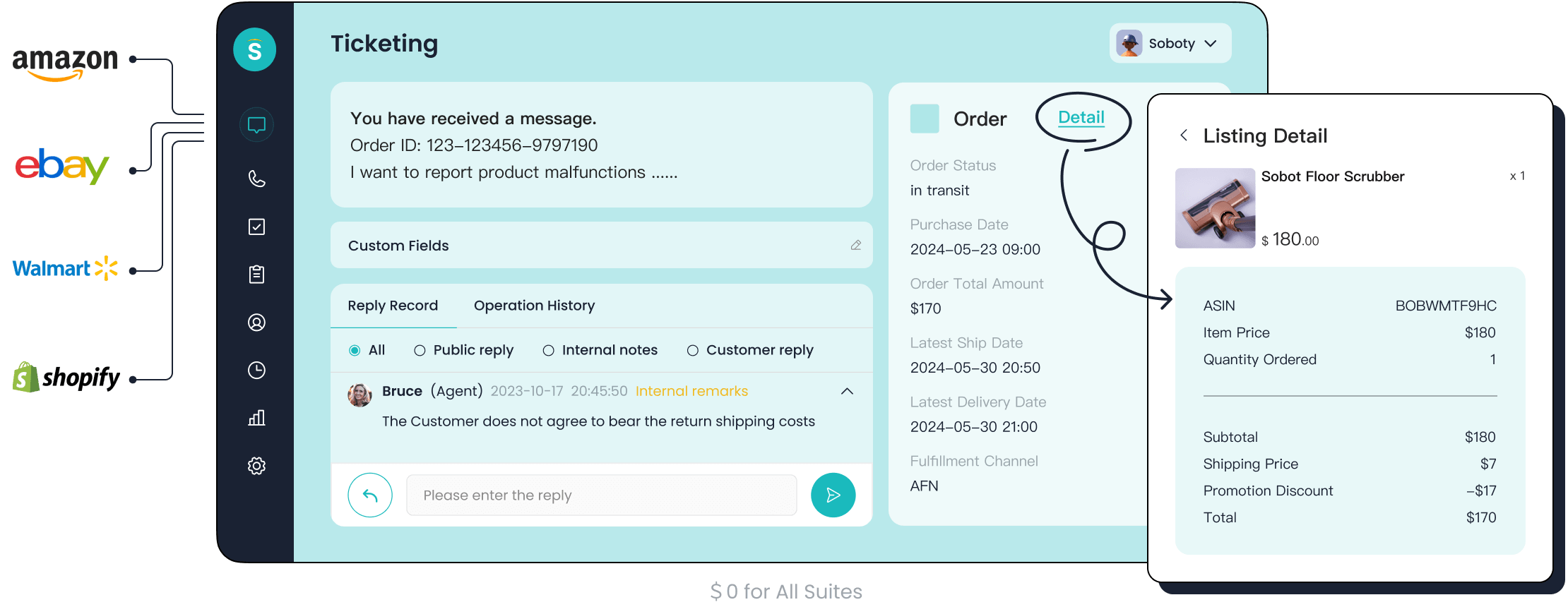
You may feel frustrated managing customer requests from many places. A helpdesk ticketing system organizes this chaos. This help desk beginners guide shows you the benefits of ticketing system. A good helpdesk turns messy emails and chats into an orderly helpdesk ticketing system. You can improve customer support with the right help desk software. Your helpdesk team can provide better help desk support. The Sobot helpdesk ticketing system is a great tool. It uses Sobot AI and works with the Sobot call center. This help desk ticketing software helps your helpdesk succeed.
The Core Benefits of a Ticketing System

A helpdesk ticketing system does more than just organize emails. It transforms your entire customer support operation. You can unlock powerful advantages that help your business grow. Understanding the benefits of a ticketing system shows you its true value. Let's explore how this tool can revolutionize your helpdesk.
Centralize and Streamline Operations
Imagine all your customer conversations in one place. No more hunting through different inboxes or social media accounts. A helpdesk ticketing system gives you a central hub for every customer issue. This unified view is one of the key benefits of a ticketing system.
Your team can see every email, chat, and call related to a customer. This organization streamlines your entire workflow. For example, integrating an e-ticketing system can connect field operations directly to your accounting software. This connection improves efficiency and gives you better financial control. A good helpdesk ticketing system also improves collaboration. It allows your entire help desk team, including experts from other departments, to contribute to solving a customer issue. This level of collaboration ensures faster, more accurate answers.
Key advantages of centralizing your helpdesk include:
- Optimized Team Collaboration: Everyone can see and contribute to tickets, improving teamwork.
- Streamlined Workflows: You reduce manual tasks like sorting and assigning tickets. Your helpdesk team can focus on ticket resolution instead of admin work.
- Greater Scalability: Your helpdesk can handle more requests without needing more staff, maintaining high service standards as you grow.
Enhance Customer Satisfaction
Happy customers are loyal customers. A helpdesk ticketing system is essential for improving customer satisfaction. It helps you provide fast and effective help desk support. When you solve a customer's problem on the first contact, you build trust. This trust is a cornerstone of customer loyalty. A positive customer experience encourages people to stay with your brand.
Quick and effective issue resolution makes your company seem more competent. Customers appreciate a brand that is easy to work with. This positive feeling directly impacts customer retention. Happy customers often share their experiences, leading to positive word-of-mouth referrals. A strong helpdesk ticketing system helps you deliver consistent, high-quality customer support. This consistency boosts your brand's reputation and strengthens long-term relationships. Ultimately, better ticket management leads to higher customer satisfaction.
Tip: Focus on improving your first-contact resolution rate. When you solve an issue quickly, you show customers you value their time. This simple act can significantly boost customer satisfaction and loyalty.
Boost Team Productivity and Morale
A disorganized helpdesk creates stress for your agents. A helpdesk ticketing system brings order and boosts productivity. Studies show the impact is significant. For instance, one survey found that automated systems can reduce time spent on administrative tasks by up to 40%. Another report showed that organizations using a helpdesk ticketing system saw a 22% increase in agent productivity.
AI-powered tools within help desk software can prioritize up to 20% of tickets automatically. This ensures your help desk team works on the most urgent issues first. This improved ticket management process has a direct effect on morale.
- Clear Processes: Organized workflows mean agents know exactly what to do.
- Balanced Workloads: Automatic ticket assignment prevents any single agent from becoming overwhelmed.
- Increased Job Satisfaction: When your team has the right collaboration tools, they feel empowered and less stressed.
Optimized ticketing workflows reduce employee burnout. A happy and efficient helpdesk team provides better help desk support. This creates a positive cycle of excellent service and high morale. The right collaboration tools make your helpdesk a better place to work.
Gain Data-Driven Insights
One of the most powerful benefits of a ticketing system is the data it provides. A modern helpdesk ticketing system collects information on every interaction. You can use this data to make smart decisions about your products, services, and support processes. An IT ticketing system, for example, can track recurring technical problems.
You can monitor key performance indicators (KPIs) to measure your helpdesk's performance. Common metrics include:
| Metric Category | Examples | Purpose |
|---|---|---|
| Efficiency | Average Resolution Time, Ticket Backlog | Measures team productivity. |
| Quality | Ticket Reopens, Error Rate | Assesses the quality of your support. |
| Customer Experience | Customer Satisfaction (CSAT), Net Promoter Score (NPS) | Gauges how happy customers are. |
| Cost | Cost per Ticket, Agent Utilization | Ensures your helpdesk is financially efficient. |
Analyzing this data helps you spot trends and pain points. For example, if many customers report the same issue with a website feature, you can pinpoint the cause and develop a solution. Companies use these insights from their help desk solutions to drive real improvements. Some have saved millions by expanding self-service options based on ticket data. Others have boosted their customer satisfaction scores to 90% by automating complex workflows. Using data from your help desk software for ticket management shows you are committed to improving the customer service you provide.
Key Features of a Helpdesk Ticketing System
Understanding the features of a helpdesk ticketing system helps you choose the right tool. A modern helpdesk offers more than just basic tracking. It provides powerful features to improve your help desk support. Let's explore the key functions that make a helpdesk ticketing system an essential part of your business.
Unified Ticket Management
A great helpdesk ticketing system gives you a single place for ticket management. Your helpdesk team can see every customer issue without switching between screens. This unified view improves collaboration. You can set clear rules for prioritizing tickets. A simple formula is Impact x Urgency = Priority. This helps your helpdesk focus on the most critical problems first. The Sobot helpdesk ticketing system allows you to set ticket priority, ensuring your team addresses urgent requests immediately. This organized approach to ticket management is vital for an efficient helpdesk.
Multi-Channel Support Consolidation
Customers contact you through many channels. A staggering 90% of consumers expect consistent support whether they use email, chat, or social media. A helpdesk ticketing system consolidates these conversations. Sobot’s "Unified Handling Across Channels" feature brings every message into one helpdesk inbox. This removes redundant communication and strengthens your brand's professionalism. Your helpdesk can see the full customer history instantly. This leads to faster responses and better help desk support. Effective ticket management across channels is key to a modern digital ticketing system.
Automation and Intelligent Workflows
Automation and workflow management saves your helpdesk valuable time. You can automate repetitive tasks like ticket assignment. For example, you can use skill-based routing to send a technical issue to the right expert. The Sobot helpdesk ticketing system uses "AI-powered Ticketing" to make this process smarter. It can also send "SLA Reminders" to your helpdesk team, preventing missed deadlines. You can also use "Canned Responses" for common questions. This automation improves ticket management and lets your team focus on solving complex problems.
Self-Service with a Knowledge Base
Many customers want to find answers on their own. In fact, 91% of people say they would use a self-service portal if it met their needs. A helpdesk ticketing system with a knowledge base provides this option. You can create a self-service portal with articles and FAQs. This self-service portal empowers customers and reduces your ticket volume. Some companies see a ticket reduction of 20-40% after building a good self-service portal. This feature improves collaboration by giving your helpdesk a shared information source. A self-service portal is a win for both you and your customers.
Reporting and Trusted Analytics
You cannot improve what you do not measure. A help desk ticketing system provides detailed reporting and analytics. You can monitor key metrics like response times and customer satisfaction. This data gives you insights into your helpdesk performance. Sobot’s help desk software offers "Trusted Analytics" for clear tracking. Good reporting and analytics help you identify trends and make informed decisions. This is crucial for effective ticket management. The right help desk ticketing software gives you the collaboration tools and tracking data to grow.
Choosing Your Help Desk Software: A Step-by-Step Guide
Selecting the right help desk software can feel like a huge task. You want a tool that empowers your team and delights your customers. This practical guide breaks the process down into five simple steps. Following this checklist will help you find the best help desk solutions for your business needs.
Step 1: Assess Your Business Needs
Before you look at any software, you must first understand your own needs. A clear assessment helps you choose a helpdesk ticketing system that truly fits your team. You can start by gathering information directly from your customers and your support agents.
Here is how you can assess your requirements:
- Collect Customer Feedback: Train your helpdesk agents to ask open-ended questions. For example, they can ask, “What is the biggest challenge you face when you need support?” This gives you direct insight into customer pain points.
- Use Post-Interaction Surveys: Send short surveys after a support conversation ends. You can ask customers to rate their satisfaction with your response time on a scale of 1 to 10. This feedback helps you measure performance on a larger scale.
- Track Support Volume: Monitor the number of requests you receive across all channels. If most questions are simple and repetitive, you may need a helpdesk with a strong self-service portal. This data shows you where to invest.
Understanding these areas helps you define what you need from a help desk software.
Step 2: Evaluate Essential Features
Once you know your needs, you can evaluate the features of different systems. The best help desk solutions offer tools that make your team's job easier. As a beginner, you should focus on the core functions that deliver the most impact. These are the key features to look for in a helpdesk ticketing system.
- User-Friendly Interface: Your helpdesk team should be able to use the new tool without extensive training. An intuitive interface allows agents to search, filter, and manage tickets quickly. This boosts productivity from day one.
- Multi-Channel Support: Customers contact you through email, chat, phone, and social media. A great helpdesk ticketing system brings all these conversations into one place. This gives your agents the full context for every issue.
- Quick Ticket Creation: Your agents should be able to create a new ticket in seconds. A simple system that requires only a few essential details streamlines the process for your helpdesk.
- Ticket Categories and Tags: Organization is critical. The ability to categorize tickets by status or type helps your helpdesk prioritize work. Custom tags provide more data for faster resolution.
These features form the foundation of an effective help desk ticketing software.
Step 3: Prioritize Ease of Use and Scalability
Two factors are critical for long-term success: ease of use and scalability. An easy-to-use tool ensures your team will actually adopt it. A system with good scalability ensures it can grow with your business.
An intuitive interface can reduce training time by up to 60%. When a tool feels simple, your helpdesk team is more likely to use it willingly. This high adoption rate is a true sign of success. As former Facebook design VP Julie Zhuo said:
“A well-designed product is your best marketing tool.”
At the same time, you need to plan for the future. Scalability means the help desk software can handle more tickets, users, and features as your company expands. Key indicators of scalability include:
- Automation Tools: The ability to automate ticket routing and responses allows your helpdesk to handle more volume without hiring more staff.
- Knowledge Base Software: A self-service portal reduces agent workload. This frees up your team to focus on complex issues, a key part of scalability.
- Flexible Plans: The helpdesk ticketing system should offer plans that let you add features or agents as needed. This ensures you only pay for what you use, which is vital for scalability.
Prioritizing ease of use and scalability helps you choose a helpdesk that serves you both today and tomorrow.
Step 4: Check Integration Capabilities
Your helpdesk does not operate in a vacuum. It needs to connect with the other tools you use every day. Seamless integrations are essential for creating a unified workflow and providing your helpdesk agents with complete customer context. When evaluating a helpdesk ticketing system, check its ability to connect with your existing software.
The most important integrations for a modern helpdesk include:
- CRM Platforms: Connecting your help desk software to a Customer Relationship Management (CRM) tool like Salesforce gives agents a 360-degree view of the customer. They can see past purchases and interactions without switching tabs.
- E-commerce Platforms: For retail businesses, integration with platforms like Shopify is a game-changer. It allows your helpdesk to view order details and process returns directly from the ticket interface.
- Collaboration Tools: Integrations with tools like Slack or Microsoft Teams streamline communication between your support team and other departments, like engineering or marketing.
The Sobot helpdesk ticketing system supports these common integrations, ensuring your helpdesk has all the information it needs in one place. This connectivity is a hallmark of the best help desk solutions.
Step 5: Compare Pricing and Test with a Trial
Finally, you need to consider the cost. Help desk software comes with various pricing models. Understanding them helps you find a solution that fits your budget.
Common pricing models include:
| Pricing Model | How It Works | Best For |
|---|---|---|
| Per-Agent Pricing | You pay a monthly fee for each agent using the system. | Businesses that want predictable costs as their team grows. |
| Tiered Pricing | Plans are offered in tiers, with more features available at higher price points. | Companies that need advanced functionalities like automation. |
| Flat-Rate Pricing | You pay a single fixed fee for all available features. | Businesses with consistent ticket volumes. |
Never commit to a helpdesk ticketing system without testing it first. Almost every provider offers a free trial or demo. Use this opportunity to let your helpdesk team experience the software firsthand. Check if the interface is intuitive and if the features match your needs. A trial is the best way to confirm if a tool is the right choice for your helpdesk and its scalability.
Real-World Success with Help Desk Solutions: OPPO's Story
Theory is helpful, but seeing a helpdesk ticketing system in action shows its true power. Let's look at how OPPO, a leading smart device company, transformed its customer service. You can see how the right helpdesk can solve major business challenges.
The Challenge: Managing High Volume
OPPO faced a huge number of customer questions, especially during big shopping events. This high volume overwhelmed their helpdesk agents. Customers experienced long wait times, which led to frustration. The company needed a better way to manage each customer issue. Their helpdesk struggled with several key challenges common in the electronics industry.
- Diverse Product Range: The helpdesk needed deep knowledge of many different products, from smartphones to accessories.
- Complex Technical Issues: Agents had to diagnose software glitches and hardware problems for customers.
- High Customer Expectations: Customers wanted fast and accurate answers from the helpdesk.
This situation showed that their existing helpdesk setup could not keep up with their growth.
The Solution: Sobot's Integrated System
OPPO partnered with Sobot to build a better helpdesk. They implemented Sobot's chatbot and helpdesk ticketing system. This created a powerful human-machine team. The chatbot automatically handled common, repetitive questions. This freed up the human helpdesk agents to focus on more complex problems. Sobot's helpdesk ticketing system organized all incoming requests. The helpdesk team could now manage every issue from one unified platform. This integrated helpdesk ticketing system streamlined their entire workflow. The Sobot helpdesk ticketing system made the support process much more efficient for the helpdesk.
The Results: A 57% Repurchase Rate Increase
The results of implementing Sobot's help desk solutions were remarkable. The new system had a massive impact on efficiency and customer loyalty. The helpdesk saw incredible improvements across the board.
OPPO's chatbot achieved an 83% resolution rate, and the company saw a 94% positive feedback rate from customers. Most impressively, these improvements led to a 57% increase in their repurchase rate.
These numbers show the value of an effective helpdesk ticketing system. By giving its helpdesk the right tools, OPPO turned its support center into a driver of business growth. This success story proves that a great helpdesk ticketing system does more than just solve problems; it builds lasting customer relationships.
Getting Started with Your New Helpdesk
You have chosen your help desk software. Now you can set up your helpdesk for success. A strong start ensures your help desk team can provide excellent help desk support from the beginning. This process involves careful setup, team training, and clear goal-setting.
Best Practices for Initial Setup
A great setup makes your helpdesk ticketing system work for you. You should customize your work environment to fit your needs. Start by creating ticket forms with custom fields. This helps your helpdesk gather specific details for better ticket management. You should also build a knowledge base. This central hub for guides and FAQs promotes self-service and improves collaboration.
Your goal is to create a system that supports both your agents and your customers. A well-configured helpdesk ticketing system streamlines workflows and improves collaboration from day one.
Finally, integrate your help desk software with other tools. Connecting to your CRM gives your helpdesk a full view of the customer. This initial setup is crucial for effective ticket management and team collaboration.
Training Your Team for Success
Your help desk team needs confidence to use the new help desk software. Effective training makes this happen. You can use simulated workflows to give agents hands-on practice. This lets them learn the system in a risk-free environment. You should also provide easy access to experienced peers. A dedicated chat room for questions can improve collaboration and speed up learning. This support helps your helpdesk feel empowered. Good training ensures your helpdesk provides consistent help desk support.
Defining Service Level Agreements (SLAs)
Service Level Agreements (SLAs) set clear expectations for your helpdesk. They define your goals for response and resolution times. This is a key part of ticket management. For example, top companies aim for a first response time of under one hour for email. For live chat, the goal is often under two minutes. Setting these targets helps with the tracking of your helpdesk performance. Your helpdesk ticketing system uses these rules for tracking and sending reminders.
Monitoring Key Metrics from Day One
You must measure performance to improve it. Start tracking key metrics as soon as your helpdesk is live. Your help desk software provides the data you need. Monitor metrics like first response time and customer satisfaction scores. This tracking gives you valuable insights into your helpdesk operations. Using these collaboration tools for tracking helps you identify areas for improvement and celebrate successes.
Your helpdesk needs a helpdesk ticketing system. This tool is essential for efficient customer support. You now understand the benefits of ticketing system. You can choose the right help desk solutions for your helpdesk. A powerful helpdesk ticketing system like Sobot improves customer satisfaction and drives growth for your helpdesk. Your helpdesk can deliver excellent customer service. This improves customer satisfaction and your helpdesk team's morale. Your helpdesk will provide better customer support.
Ready to transform your helpdesk? Embark on Your Contact Journey by exploring the Sobot Ticketing System or requesting a demo today!
FAQ
What is a helpdesk ticketing system?
A helpdesk ticketing system is a software tool that helps you manage customer questions. It turns every customer request from email, chat, or phone into a ticket. This process organizes communication and helps your team track and solve issues efficiently.
What channels can a ticketing system manage?
A good system unifies many communication channels. You can manage requests from email, live chat, social media, and even voicemail all in one place. This gives your team a complete view of every customer conversation without switching between different apps.
How does a ticketing system improve teamwork?
This system improves teamwork by creating a shared workspace. Your agents can see all open tickets, add internal notes, and assign tasks to experts in other departments. This makes it easier for your helpdesk team to work together to find the best solution.
See Also
Achieving Excellence in Live Chat for Superior Customer Service
An Essential Handbook for Efficient Live Chat Agent Management
Optimizing Live Chat Performance Within the Dynamic Retail Sector
Expertly Utilizing Depop's Live Chat for Rapid Customer Assistance
A Comprehensive Guide to Comparing Live Chat Support Expenses

