Top Contact Center Tools A Beginner's Guide


Choosing the right contact center software can feel overwhelming. This guide simplifies your search for the top contact center tools. The best customer service tools manage communications, organize data, and boost team performance. Improving your customer experience is crucial, as the market for these contact center solutions is rapidly growing.
The contact center software market is projected to reach $112.72 billion by 2029.
We will help you find a customer support software solution that fits your business needs. Let Sobot help you embark on your contact journey.
Understanding Core Contact Center Software

To find the right tools, you first need to understand the core components of modern contact center software. These systems work together to streamline your operations. They help you manage customer conversations, organize data, and optimize your team's performance. Let's explore the three main pillars.
Communication Management (ACD & IVR)
Effective communication is the heart of customer service. This is where Automatic Call Distribution (ACD) and Interactive Voice Response (IVR) systems become essential.
- ACD technology intelligently routes incoming calls to the best-suited agent. This skill-based routing ensures customers connect with an expert on their first try, which can improve first-contact resolution by 15-25%.
- IVR systems greet callers and offer self-service options. This feature provides 24/7 availability and reduces operational costs. Good call center software uses IVR to guide customers efficiently, enhancing their experience.
Customer Relationship Management (CRM)
A Customer Relationship Management (CRM) system is your central hub for customer data. Integrating a CRM with your customer support software gives your agents a complete view of every customer. This includes key data points like:
- Purchase history
- Contact information
- Previous interactions
By providing instant access to this information, customer relationship management tools reduce agent stress and eliminate manual data entry. This allows your team to resolve issues faster and handle more inquiries. Many enterprise call center solutions rely on strong CRM integration.
Workforce and Performance Management (WFM)
Workforce and Performance Management (WFM) tools help you manage your most valuable asset: your team. This type of call center software automates complex tasks. WFM functions include demand forecasting and employee scheduling. These cloud-based systems ensure you have the right number of agents working at the right times.
Performance management tools track key metrics using real-time dashboards and agent scorecards. This helps you identify coaching opportunities and improve service quality. Ultimately, WFM helps you build a more efficient and effective team. This is a key feature in enterprise call center solutions and contact center as a service platforms. The best customer support software and call center software often include these cloud-based solutions for customer relationship management.
Key Features of Customer Support Software
Now that you understand the core components, let's look at the key features of customer support software. These features transform a basic system into a powerful tool for growth. The right contact center software will improve both your team's workflow and your customer experience.
Omnichannel Communication Hub
Modern customers expect to connect with you on their preferred channels. An omnichannel communication hub unifies voice, chat, email, and social media into a single agent workspace. This multi-channel integration improves operational efficiency.
Businesses using omnichannel communication strategies see a 91% higher year-over-year customer retention rate.
A unified platform, like Sobot's Omnichannel Solution, gives your agents a complete view of the customer's journey. This eliminates the need to switch between different apps, allowing your team to provide faster, more consistent service. Good customer engagement strategies start here.
Automation and AI-Powered Chatbots
Automation helps your team work smarter, not harder. AI-powered tools can handle common questions 24/7, freeing your agents to focus on complex issues. In fact, AI chatbots can resolve up to 86% of customer inquiries without human help. Sobot's AI-powered Voicebot and Chatbot offer this round-the-clock support, boosting customer satisfaction. This is a key feature in modern enterprise call center solutions.
Essential Call Center Software Functions
Your call center software needs specific functions to manage calls effectively. These tools form the backbone of your voice support channel. Look for a call center solution with these features:
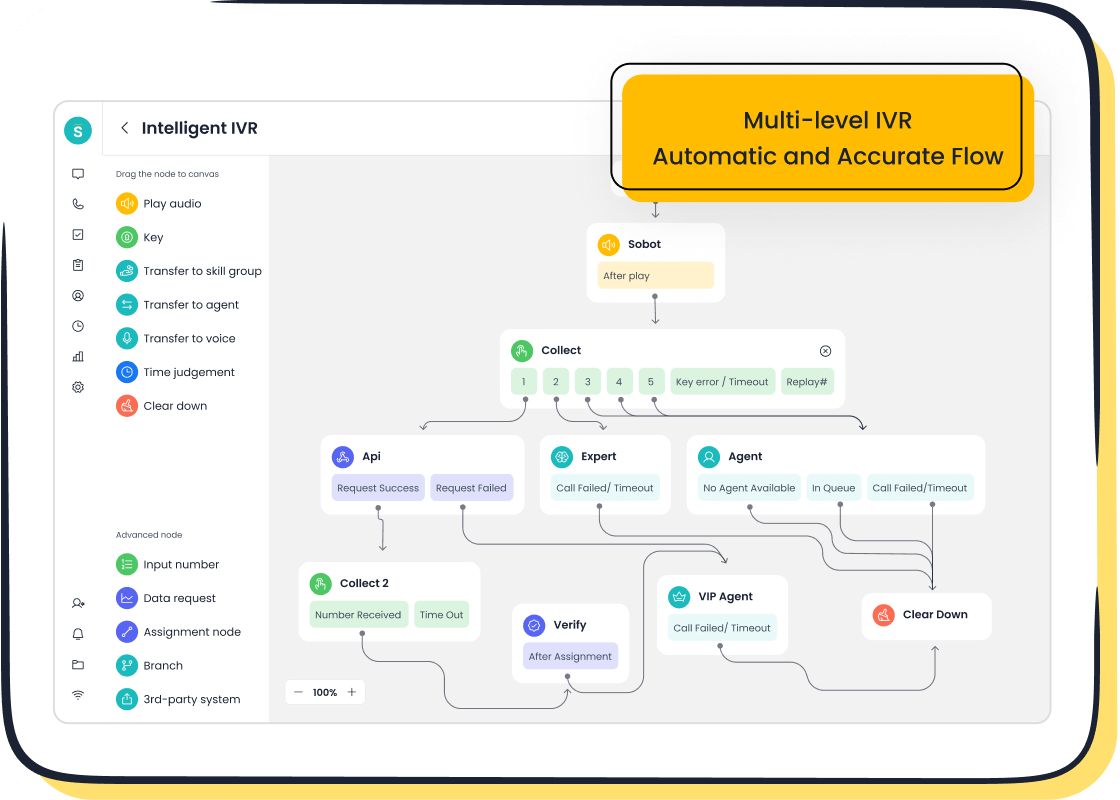
- Intelligent IVR: A drag-and-drop IVR builder, like the one in Sobot's Voice/Call Center, lets you create custom call flows easily.
- Smart Call Routing: This technology reduces wait times by directing callers to the right agent instantly.
- Call Recording: Recording calls is vital for quality assurance and agent coaching.
These functions are essential in any high-performing call center software.
Reporting and Analytics
You cannot improve what you do not measure. Reporting and analytics tools give you the real-time insights needed to optimize performance. The best call center software provides dashboards that track key metrics. Top metrics include Customer Satisfaction (CSAT), Average Handle Time (AHT), and First Call Resolution (FCR).
Using reporting and analytics helps you spot trends, identify customer insights, and make data-driven decisions. This is a must-have for enterprise call center solutions and ticket management systems. Strong reporting and analytics are a core part of any effective customer support software.
How to Choose Your Contact Center Software
Selecting the right platform is a critical decision. A methodical approach will help you find the best fit for your team and customers. This three-step process simplifies the task of choosing customer support software. It guides you from understanding your core needs to making a final, informed choice.
Step 1: Assess Your Business Needs
Before you look at any software, you must first understand your own business. A clear assessment of your needs ensures you choose a solution that solves your actual problems. Start by evaluating your current communication volume and team size. Then, think about your future growth. A scalable solution will save you from a difficult migration later.
To determine your capacity needs, ask your team these key questions:
- What is your maximum requirement for peak concurrent calls?
- What are your traffic patterns and seasonality? Do you have high-frequency, short calls or fewer long calls?
- What are your business continuity requirements, like needing backup channels?
- Are you willing to scale capacity for peak times or maintain a fixed limit?
- How quickly can your provider add new capacity when you need it?
- How flexible is the channel distribution? Can you pool channels across different regions?
Your answers will help you define the technical requirements for your ideal contact center software. Also, consider your operational goals. Do you want to reduce wait times? Improve first-contact resolution? Support more channels? Your specific needs will point you toward the right features.
Step 2: Define Your Budget
Your budget is a major factor in your decision. Understanding the costs involved will help you narrow down your options. Budgeting for customer support software involves more than just the monthly subscription fee. You must also account for potential hidden costs.
Entry-level plans for small businesses typically range from $10 to $50 per user per month. More advanced plans come with higher price tags. To give you an idea of the market, here are some starting prices from various providers:
| Company | Entry-Level Plan (per user per month) |
|---|---|
| Talkdesk | $85 |
| Genesys Cloud CX | $75 (named) or $110 (concurrent) |
| Zoom Contact Center | $69 |
| NICE CXone Mpower | $71 or $94 |
| Nextiva Contact Center | $15, $25, or $50 |
| Dialpad Support | $80 |
| Broadvoice GoContact | $10 (plus usage) |
Watch Out for Hidden Fees! 🕵️ Some subscriptions come with extra charges that can surprise you. Be sure to ask about these potential costs:
- Fees for data transfer or API calls between your software and CRM.
- Charges for AI features like transcription or sentiment analysis.
- Extra costs for adding new channels like chat or social media.
- Fees for exceeding usage limits on calls or data storage.
- Price increases when you renew your contract.
A clear budget helps you focus on the top contact center tools that provide the most value for your investment. Always ask for a detailed pricing breakdown to avoid surprises.
Step 3: Create a Feature Checklist
Now you can create a checklist of essential features. This list should come directly from the business needs you identified in Step 1. Prioritize features into "must-haves" and "nice-to-haves." This helps you compare different customer support software options objectively.
For most new or growing businesses, a strong starting checklist includes these five must-have features:
- Omnichannel Hub: You need a single interface to manage calls, emails, and chats. This improves agent productivity and creates a consistent customer experience.
- CRM Integration: Your agents need instant access to customer history. Integration with your CRM saves time for everyone and allows for personalized service.
- Call Routing and IVR: An intelligent routing system gets customers to the right person quickly. A simple IVR can automate answers to basic questions, reducing agent workload.
- AI and Automation: AI-powered tools can handle simple tasks, create call summaries, and offer real-time agent assistance. This frees your team to focus on complex customer issues.
- Analytics and Reporting: You need visibility into key metrics like average handle time and first-call resolution. Good reporting helps you optimize your team and improve service.
Finally, look for a contact center software solution that is easy to use and can scale with your business. Cloud-based platforms with modular designs offer the flexibility to add users and features as you grow.
Comparing Top Contact Center Tools
You have assessed your needs, set a budget, and made a feature checklist. Now it is time to compare the top contact center tools. This final stage involves looking closely at starter plans, understanding the value of an all-in-one platform, and using reviews and trials to make your choice.
What to Look For in a Starter Plan
Starter plans are an affordable entry point into contact center software. They are designed for small teams and offer basic features. However, you must understand their limitations. These plans often lack advanced functions like deep analytics or full omnichannel support. Adding these features later can increase your bill unexpectedly.
Heads Up! Watch for Extra Costs 🕵️♀️ Your total cost is often more than the base subscription. Be aware of these common additional charges:
- Add-On Fees: You might pay extra for each new channel, such as social media or chat.
- Storage Costs: Basic call recording may have small storage limits. Exceeding them can lead to extra fees per gigabyte.
- Overage Charges: Many providers set limits on call minutes or users. Going over these limits results in additional billing.
- Integration Fees: Connecting the software to your CRM can sometimes involve setup or technical support fees.
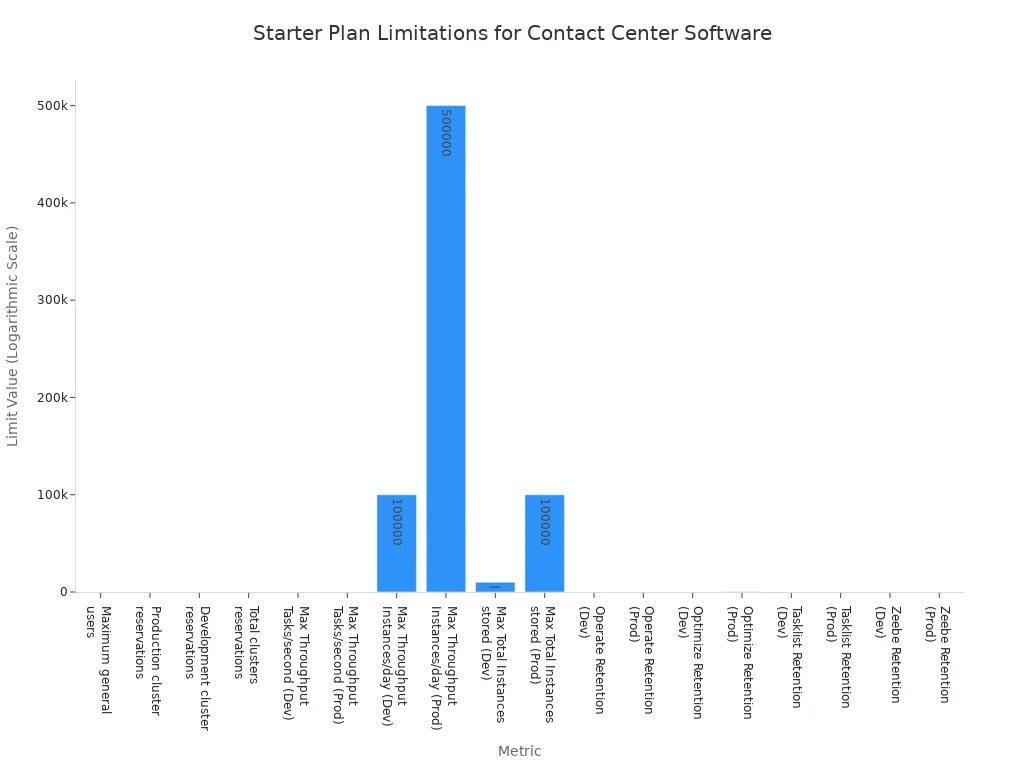
Starter plans also come with specific usage limits. These limits can affect everything from the number of users to data retention policies. Understanding these numbers is key to choosing a plan that will not hold you back.
| Category | Metric | Starter Plan Limit |
|---|---|---|
| Organizational Limits | Maximum general users | 100 |
| Production cluster reservations | 2 | |
| Cluster Usage Limits | Max Throughput Tasks/second (Production) | 65 |
| Max Throughput Process Instances/day (Production) | 0.5 M | |
| Data Retention Policies (in days) | Operate (Production) | 30 |
| Optimize (Production) | 180 | |
| Tasklist (Production) | 30 |
When you evaluate a starter plan, look for core features that deliver immediate value. Your ideal customer support software should offer:
- Ease of Use: A simple dashboard and quick setup process are essential. You should be able to get started in minutes without needing to code.
- Social Media Integration: The ability to sell and support customers on platforms like WhatsApp and Facebook is crucial for modern business.
- Basic Analytics: You need tools to see your sales performance and understand customer behavior.
- Affordability: The plan should be financially accessible for your current budget.
Why an All-in-One Solution Like Sobot Works
Using separate tools for chat, voice, and ticketing creates major problems. These legacy systems are complex and difficult to maintain. This complexity leads to a poor customer experience. Agents must manually classify tickets, which is slow and prone to error. Your team also struggles to personalize conversations because customer data is scattered across different platforms. This fragmented approach makes it impossible to deliver consistent, high-quality service.
An all-in-one solution solves these issues. It is why a platform like Sobot is an ideal choice for beginners and growing businesses. Sobot combines multiple tools into one unified platform. You get a Voice Call Center, Live Chat, Ticketing System, and WhatsApp API all in a single workspace. This integration eliminates data silos and empowers your team.
This approach is especially powerful for enterprise call center solutions. Sobot offers key advantages that set you up for success:
- 99.99% System Stability: Downtime hurts your reputation and your bottom line. A 99.99% uptime guarantee means your system is unavailable for less than 4.5 minutes per month. This reliability ensures you provide a seamless customer experience, even during peak times. It protects your brand and supports long-term customer retention.
- Easy Integration: Sobot's cloud-based systems connect easily with your existing tools. This simple integration saves you time and technical headaches.
- Global Network: Sobot's platform supports your business as it grows, with a network that spans the globe.
The value of this human-machine cooperation is clear in real-world results.
OPPO's Success with Sobot 🚀 Leading smart device innovator OPPO needed to improve service efficiency. They used Sobot's integrated solution to combine human agents with AI. This strategy delivered incredible results. OPPO achieved an 83% chatbot resolution rate and saw a 57% increase in their repurchase rate. This proves how a unified solution can boost both customer satisfaction and revenue.
Choosing an all-in-one platform provides a scalable foundation. You start with what you need today and can easily add more features as your business expands. This makes it one of the smartest investments you can make in your contact center solutions.
Reading Reviews and Using Free Trials
Making your final decision requires two more steps: checking reviews and testing the software yourself. User reviews give you honest feedback from people who have already used the tools. They offer insights you will not find in a sales brochure.
You can find trusted user reviews on sites like G2. These platforms provide detailed ratings and reports on the top contact center tools. Reading what other users say about a platform's ease of use, customer support, and reliability helps you create a shortlist of the best call center software.
After reading reviews, you must use a free trial. A trial is your chance to see if the software truly fits your team's workflow. To get the most out of it, you need a structured plan.
Follow these steps to evaluate any call center software trial:
- Define Your Goals: Know what you want to achieve before you start.
- Involve Your Team: Include the agents who will use the software every day.
- Test Real Scenarios: Use the software for actual customer interactions or simulate your typical workflows.
- Explore All Features: Investigate every feature, even ones you may not need right away.
- Check Customer Support: Test the provider's support team to see how responsive they are.
- Test Integrations: Connect the software with your CRM to ensure they work together smoothly.
- Document Everything: Keep detailed notes on what you like and dislike.
A thorough trial of enterprise call center solutions will confirm if a platform is the right fit. It helps you choose contact center solutions that will improve customer satisfaction and drive your business forward. These cloud-based systems are a major investment, so take the time to choose wisely.
Choosing the right contact center software is a journey. You learned to assess your needs, define a budget, and compare the top contact center tools. The best call center software improves your customer experience and boosts customer satisfaction. For growing businesses, the ideal solution is a scalable, all-in-one platform. This approach ensures your customer support software can expand with you.
Ready to enhance your customer interactions? Explore Sobot's all-in-one contact center solutions and start your free trial today at https://www.sobot.io/.
FAQ
What is contact center software?
Contact center software is a tool that helps you manage all customer communications. It unifies channels like voice, email, and chat into one platform. This helps your team provide faster and more organized support.
Why should I choose an all-in-one solution?
An all-in-one solution combines multiple tools into a single system. You get voice, chat, and ticketing in one place. This approach eliminates data silos. It gives your team a complete view of the customer for better service.
How do cloud-based systems benefit my business?
Cloud-based systems offer great flexibility and scalability. You can easily add users or features as your business grows. They also reduce the need for expensive on-site hardware and maintenance, saving you money.
Is a free trial really necessary?
Yes, a free trial is essential. It lets you test the software with your team in real-world situations. You can check its features, ease of use, and integration capabilities before you commit to a purchase.
See Also
Leading AI Innovations for Modern Enterprise Contact Center Operations
A Ten-Step Guide to Deploying Seamless Omnichannel Contact Centers
Essential Handbook for Understanding Omnichannel Call Center Technology
Comprehensive Review of Premier Contact Center Solutions for the Year 2024
Understanding Quality Management System Principles for Call Center Success

