8 Tips for Automated Ticket Assignment

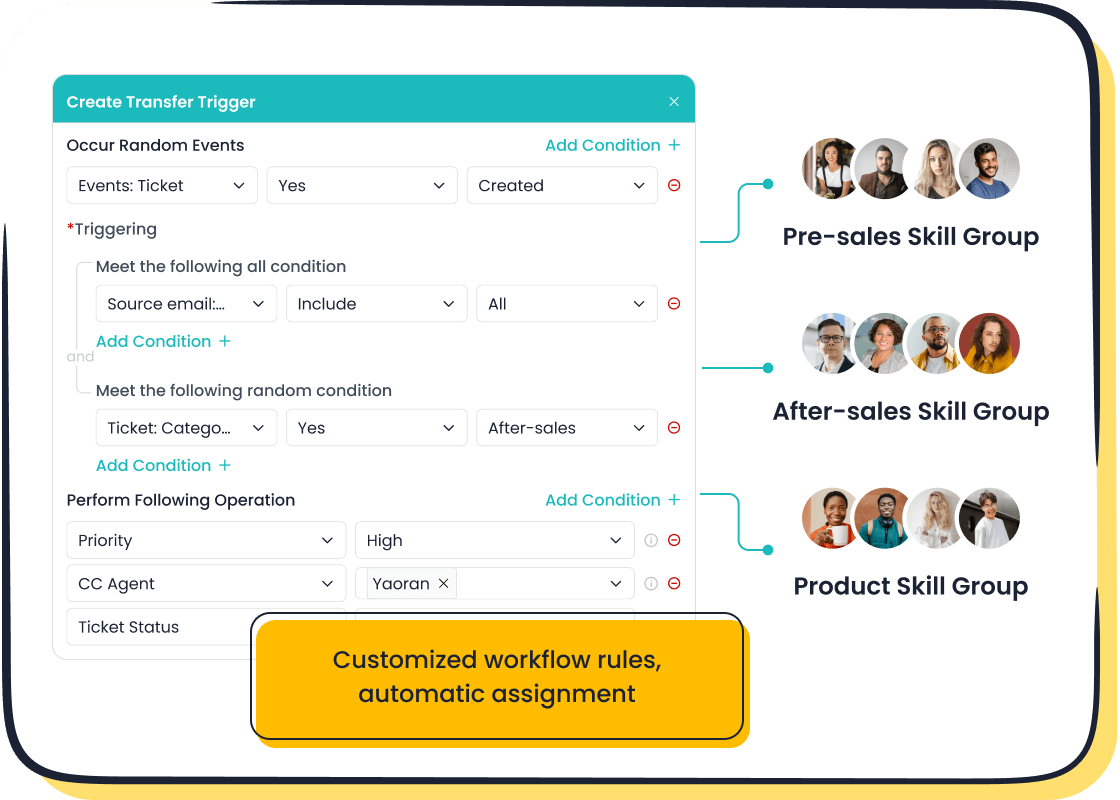
Here are eight strategies to optimize your ticket assignment process:
- Ensure Fair Workloads with Round-Robin
- Prevent Agent Burnout with Load-Balancing
- Master Skill-Based Routing
- Automate Triage by Topic and Category
- Prioritize by Urgency and Sentiment
- Leverage Customer Data for VIP Treatment
- Identify and Address Churn Risks
- Build a Clear Prioritization Hierarchy
Implementing these automated ticket assignment strategies with a system like Sobot helps your support team manage every ticket effectively. This approach improves your support quality, leading to up to 30% faster ticket resolution and a 50% boost in agent efficiency.
You can see up to 70% higher satisfaction when you automate how you handle a customer support ticket. This process ensures the right ticket goes to the right support agent, every time. Explore the details of each tip below.
Tip 1: Ensure Fair Workloads with Round-Robin
One of the simplest and most effective automated ticket assignment strategies is round-robin distribution. It helps you create a fair and balanced ticket assignment process for your support team.
What is Round-Robin Distribution?
Round-robin automatically assigns each new ticket to the next agent in a sequence. Imagine you have three support agents: Anna, Ben, and Chloe.
- The first ticket goes to Anna.
- The second ticket goes to Ben.
- The third ticket goes to Chloe.
- The fourth ticket goes back to Anna.
This cycle repeats, ensuring every agent receives an equal number of customer support tickets. This method prevents any single agent from becoming overloaded while others have little to do. It is a foundational strategy for any support operation.
Comparing Automated Ticket Assignment Strategies
While round-robin is great for fairness, you should consider other factors to optimize your ticket assignment process. A simple volume-based approach does not account for agent availability or ticket complexity. You need more advanced strategies to improve your support quality.
| Best Practice | Why It Matters for Support | What Breaks if Skipped |
|---|---|---|
| Qualify the ticket first | Routing a complex technical ticket to a generalist wastes time. | Your best agents triage simple issues while a difficult ticket waits. |
| Apply eligibility rules | Agents on vacation or in training should not receive a new ticket. | A ticket gets assigned to an unavailable agent, delaying customer support. |
| Track outcomes, not just volume | Fairness in volume does not equal fairness in effort. One ticket may take 10 minutes, another two hours. | You might mistake ticket volume for performance, burning out your top support agents. |
Best Practices for Even Ticket Distribution
You can enhance a basic round-robin system by adding layers of logic. This creates a more intelligent automated ticket assignment system. Consider these hybrid models for your support team:
- Tiered Distribution: Use round-robin for general inquiries. Route a more complex ticket to agents with specific skills.
- Time-Based Routing: Adjust your rules for peak hours versus after-hours support. You can create special queues for weekends to handle every ticket efficiently.
- Priority-Based Assignment: Send every high-priority ticket directly to senior agents. Distribute standard customer support tickets evenly among the entire team.
Tip 2: Prevent Agent Burnout with Load-Balancing
Load-balancing is one of the most effective automated ticket assignment strategies to protect your support team's well-being. It moves beyond simple rotation to consider your agents' real-time capacity. This ensures a truly fair ticket assignment process.
The Difference Between Load-Balancing and Round-Robin
Round-robin gives every agent the same number of customer support tickets. Load-balancing, however, looks at how many open tickets an agent is currently handling. It assigns the next incoming ticket to the agent with the lightest active workload.
Think of it this way:
- Round-Robin: Gives a ticket to the next person in line, even if they are already busy.
- Load-Balancing: Gives a ticket to the person with the most free time.
This prevents a skilled agent from getting buried under a difficult ticket while another agent with quick, easy tickets keeps receiving more.
Setting Maximum Ticket Limits per Agent
A key part of load-balancing is setting a cap on the number of tickets an agent can own at one time. This is a powerful tool for your support operation.
You can define a rule that stops assigning a new ticket to any agent who already has, for example, five open tickets. The system will skip them until they resolve a ticket, freeing up their capacity.
This simple setting in your automated ticket assignment system guarantees no one on your support team is ever overwhelmed. It is one of the best strategies to maintain a healthy work pace.
How Load-Balancing Improves Support Quality
When your support agents have a manageable number of customer support tickets, they can give each ticket the attention it deserves. This focus leads to better, more thorough support. An agent who isn't rushing can solve a customer's problem correctly the first time. This improves first-contact resolution rates and boosts customer satisfaction. A balanced ticket assignment process means your team provides consistent, high-quality support with every single ticket.
Tip 3: Master Skill-Based Automated Ticket Assignment
Moving beyond simple rotation, skill-based assignment matches each ticket to the agent best qualified to solve it. This is one of the most powerful automated ticket assignment strategies for improving first-contact resolution. You can use a platform like Sobot's Ticketing System to create custom rules that route a ticket based on specific agent skills. This is a core feature of an omnichannel solution, which unifies customer data to make smarter routing decisions for your support team.
Defining and Tagging Agent Skills
Effective skill-based assignment starts with clear definitions. You need to identify and tag agent competencies within your support system. This creates a clear ticket assignment process.
Follow these steps to build your system:
- Define Categories: Establish simple, consistent categories for skills. This could include product knowledge, technical ability, or language fluency.
- Set a Hierarchy: Determine which teams or agents handle specific ticket types. This ensures every ticket has a clear path to resolution.
- Train Your Agents: Teach your support team how to apply tags correctly. Consistent tagging is crucial for the system to work.
- Don't Over-Tag: Keep your tagging system simple. Too many options can cause confusion and misrouted customer support tickets.
Routing by Language and Region
For global companies, language is a critical routing criterion. A customer is 75% more likely to buy from you if you offer support in their native language. Skill-based assignment ensures a ticket written in Spanish goes directly to a Spanish-speaking agent. This eliminates language barriers and reduces customer frustration. AI-powered systems can even translate a ticket in real-time to identify the language and route it correctly, improving support efficiency.
Language fluency is only part of the equation. Successful customer interactions also depend on cultural awareness. Your team must understand how cultural differences impact communication, including tone, formality, and even response time expectations.
Assigning by Technical and Product Expertise
Some customer support tickets require deep technical knowledge, while others are simple billing questions. Skill-based assignment allows you to route a complex bug report to a Tier 2 engineer and a password reset request to a Tier 1 agent. This ensures your experts focus on the right problems. Using specific criteria for your ticket assignment process leads to better outcomes for your business and customers.
| Company Type | Strategy Used | Outcome |
|---|---|---|
| SaaS Platform | Rule-based + Escalation | 40% faster response times |
| E-commerce Retailer | Workload balancing + VIP routing | 30% less agent overtime |
| Digital Agency | Multi-channel aggregation | 20% reduction in misrouted tickets |
By matching the ticket's criteria to the right agent's skills, you improve support quality and resolve issues faster.
Tip 4: Automate Triage by Topic and Category
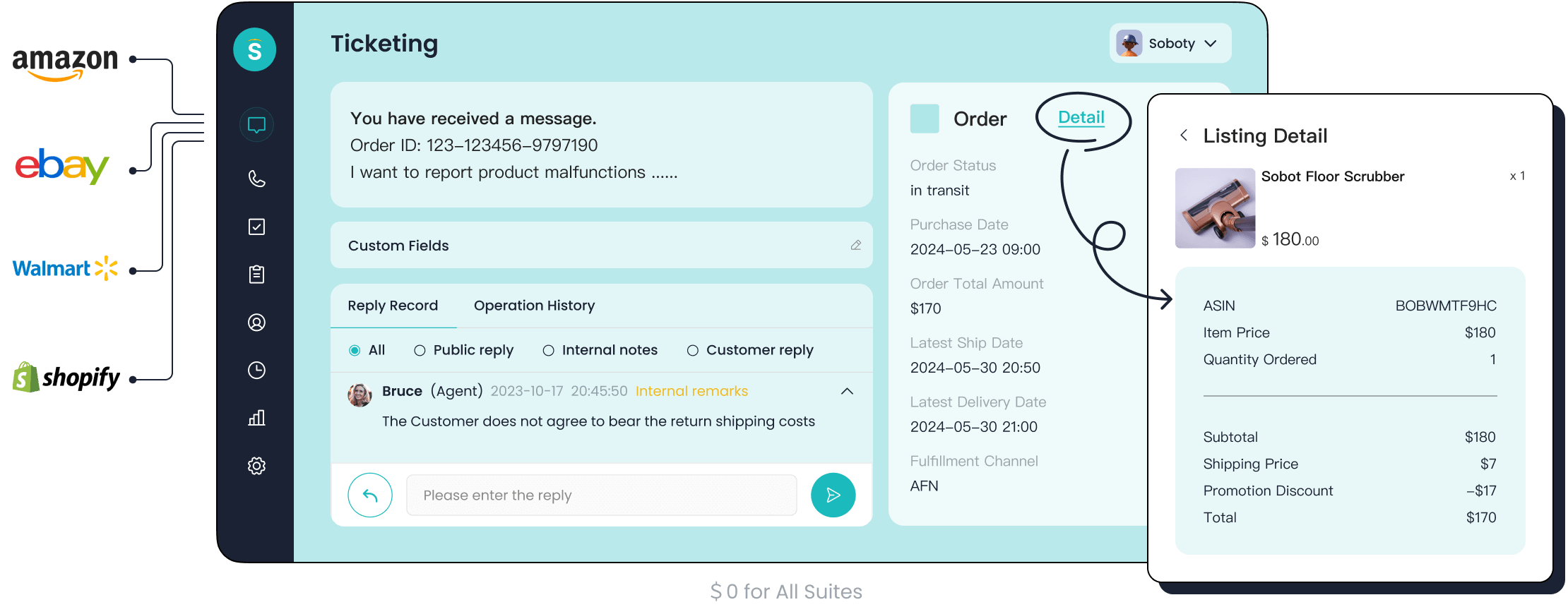
You can significantly speed up your support by automatically sorting each incoming ticket. This is one of the most effective strategies for a smarter ticket assignment process. By using keywords and categories, you ensure every ticket lands in the right queue from the start.
Using Keywords to Automatically Categorize Tickets
Your system can scan a new ticket for specific words or phrases. These keywords act as criteria to automatically categorize the ticket. For example, a ticket containing "refund" or "billing error" can be tagged as a "Billing Issue." This simple step directs the ticket to the correct department without manual review. This method is a core part of an efficient ticket assignment process.
Different industries use unique criteria to sort their customer support tickets.
| Industry | Keywords/Categories Used | Triage Logic/Outcome |
|---|---|---|
| Home Services | "leak," "no heat," "emergency" | Routes the ticket to available technicians in the service area. |
| Property Management | "flooding," "gas smell," "lockout" | Sends the ticket to on-call maintenance support staff with relevant details. |
| Law Firms | "court date," "deadline tomorrow" | Routes the urgent ticket to attorney teams for immediate action. |
Routing Tickets to Specialized Teams
Once a ticket is categorized, you can route it to a specialized support team. A technical ticket goes to engineers, while a sales question goes to the sales team. This ensures the first person to handle the ticket has the right skills to solve it.
Routing to experts provides several benefits:
- Improves First-Contact Resolution: The right support agent resolves the ticket on the first try.
- Enhances Customer Satisfaction: Customers get faster, more accurate answers.
- Boosts Efficiency: Your support agents avoid spending time on a complex ticket outside their expertise.
Optimizing Your Ticket Assignment Process with AI
You can take automation a step further with AI. AI-powered tools can categorize and route a ticket with incredible accuracy, reducing manual triage by up to 80%.
For example, leading smart device innovator OPPO used Sobot's chatbot to automate its support. The chatbot handles repetitive queries, acting as the first line of triage. This form of automated support achieved an 83% chatbot resolution rate.
This success freed up human agents to focus on more complex customer support tickets. By using AI to handle the initial ticket triage, you improve efficiency and allow your expert support team to focus on high-value issues.
Tip 5: Prioritize by Urgency and Sentiment
Not all support requests are equal. Some require immediate attention to prevent customer churn. One of the most important strategies you can implement is to automatically prioritize a ticket based on its urgency and the customer's emotional state. This ensures your team can give priority to urgent requests.
How to Automatically Detect Urgency
Your system can automatically scan every new ticket for keywords and phrases that signal a high-priority issue. This allows you to give priority to urgent requests before an agent even sees the ticket. Your system can look for specific criteria, such as:
- Explicit Indicators: Words like
urgent,now,critical, oras soon as possible. - Business Impact: Phrases that mention financial loss, like "costing us money" or "production outage."
- Negative Tone: Multiple exclamation points or words that convey panic.
Modern voice support solutions can even do this in real-time. A voicebot integrated into your call center can analyze a customer's tone and keywords during a call. If it detects stress or urgent language, it can automatically raise the ticket's priority level for your support team. This is a powerful way to manage the priority of each ticket.
Using Sentiment Analysis to Flag Frustration
Beyond simple keywords, you can use AI-powered sentiment analysis to understand how a customer feels. This technology uses Natural Language Processing (NLP) to identify the emotion behind the words in a ticket. It can detect specific feelings like anger, frustration, or disappointment. These criteria help you identify an at-risk customer.
Sentiment analysis helps you:
- Categorize a ticket as positive, negative, or neutral.
- Pinpoint frustration related to a specific product or service.
- Understand context and sarcasm that keyword lists might miss.
By flagging a ticket with negative sentiment, you can give priority to urgent requests from unhappy customers. This proactive support can turn a negative experience into a positive one. These criteria are vital for your support operation's success.
Creating an Escalation Path for Priority Issues
Once your system identifies a high-priority ticket, you need a clear plan to handle it. An automated escalation path ensures the right support agent addresses the most critical customer support tickets immediately.
You can create a rule that automatically assigns any ticket with a "High" priority and "Negative" sentiment to a senior support agent or team lead. This bypasses the standard queue, guaranteeing a fast and expert response.
This process removes manual guesswork. It creates a reliable system where every high-priority ticket receives the attention it deserves. Building a clear path for each priority level is essential for effective support and managing customer support tickets.
Tip 6: Leverage Customer Data for VIP Treatment
Your most valuable customers deserve a higher level of service. One of the most impactful automated ticket assignment strategies is to identify these VIPs and give their issues top priority. This approach builds loyalty and protects your most important revenue streams. Excellent support for these accounts is crucial.
Integrating Your CRM with Sobot's Ticketing System
You first need to know who your VIPs are the moment they create a ticket. You can achieve this by integrating your Customer Relationship Management (CRM) platform with Sobot's Ticketing System. This connection gives your support team a complete 360-degree view of the customer. When a new ticket arrives, your agents instantly see crucial data like purchase history, contract value, and even past live chat conversations. This unified data is essential for providing personalized and high-priority support.
Defining Your VIP Customer Tiers
Next, you must define what makes a customer a VIP. You can create tiers based on clear business criteria. This allows you to segment customers and offer different levels of support. Your system can use this information to assign the right priority to every ticket.
Consider using the following criteria to build your tiers:
- Spending History: Customers who have spent over a certain amount.
- Subscription Level: Users on an enterprise or premium plan.
- Contract Value: B2B clients with high-value contracts.
Setting clear criteria ensures your system correctly identifies which customer support tickets need special attention.
Prioritizing Tickets from High-Value Customers
Once you have your data integrated and tiers defined, you can automate the VIP support experience. You can create rules that automatically escalate any ticket from a top-tier customer.
For example, you can set a rule: If a ticket is from a "Platinum Tier" customer, automatically set the priority to "Highest" and assign it to a dedicated senior support agent.
This ensures that a critical ticket from a key account never gets stuck in the general queue. This proactive handling gives your most important customers the fast, expert support they expect. Applying this priority to each incoming ticket from a VIP is a powerful way to increase retention and satisfaction. These automated customer support tickets are resolved faster, strengthening your business relationships.
Tip 7: Identify and Address Churn Risks
Losing a customer is more expensive than keeping one. One of the most valuable automated ticket assignment strategies is to identify customers who might leave and give them immediate support. This helps you protect your revenue and build loyalty. A well-defined process for each at-risk ticket is essential.
Using Automation to Flag At-Risk Customers
You can teach your system to find customers who show signs of leaving. Your support system can automatically flag a ticket based on specific data-driven criteria. This proactive support approach helps you spot trouble before it grows.
Your system can monitor for the following criteria:
- A sudden increase in ticket volume from one customer.
- Low CSAT or NPS scores from recent surveys.
- Multiple customer support tickets about the same issue.
- Negative comments or sentiment in ticket feedback.
- Longer than average resolution times for a specific ticket.
Using these criteria helps your support team identify an at-risk ticket without manual review.
Creating a "Churn Risk" Queue for Fast Responses
Once your system flags a ticket as a churn risk, you need a plan. You should create a dedicated queue for these high-priority customer support tickets. This ensures they get the fastest possible response from your best agents.
You can set up a rule: If a ticket meets the "Churn Risk" criteria, immediately assign it to a senior support agent or a customer success manager. This special handling shows the customer you are taking their problem seriously.
This dedicated queue moves the ticket ahead of less urgent requests. It is a simple way to deliver excellent support when it matters most.
Proactive Support as a Retention Strategy
Fixing a problem is good, but preventing one is better. Proactive support is a powerful retention strategy. It helps you build stronger relationships and increases customer lifetime value. When you anticipate a customer's needs, you show them you care. This approach is more cost-effective than trying to win back a customer who has already left. Timely support and communication make customers feel valued. This encourages them to stay with your business, turning a risky situation into a loyal partnership.
Tip 8: Build a Clear Prioritization Hierarchy
You have multiple automated ticket assignment strategies in place. Now, what happens when a single ticket triggers several rules? A clear hierarchy ensures the most important ticket always gets top priority. This is the final step in creating a truly intelligent ticket assignment process.
Why a Rule-Based Hierarchy is Crucial
A well-defined priority system is crucial for any support team managing a high volume of tickets. It helps you understand customer issues and align them with your business goals. This systematic approach ensures that your agents address the most urgent ticket first. It prevents your support team from feeling overwhelmed and helps them deliver timely, effective solutions. A clear hierarchy is the backbone of an efficient automated ticket assignment system.
How to Set Up Your Ticket Assignment Process Hierarchy
You can set up your ticket assignment process with a few simple steps. First, you need to define your support ticket prioritization criteria. This helps your agents know which issues to address first.
- Set Ticket Priority: Define levels like 'Low,' 'Normal,' and 'High.' This guides your support team based on urgency.
- Add Tags: Use tags to group a similar ticket, like 'Billing Issue' or 'Software Bug.'
- Set Ticket Status: Use statuses like 'Open' or 'Closed' to show the current stage of each ticket.
After you define your support ticket prioritization criteria, you can set up your auto-assign ticket rules. You can create rules that automatically assign a ticket to a specific agent or group based on these criteria. This is how you set up your ticket assignment process for maximum efficiency.
Handling Tickets with Multiple Automation Tags
A single ticket can have multiple tags, like 'VIP' and 'Urgent.' You need a clear algorithm to handle this. A robust system like Sobot's Ticketing System allows you to create complex, time-triggered, and custom trigger rules. This lets you build a clear ticket assignment process for any situation.
For example, you can create a rule: If a ticket has both 'VIP' and 'Urgent' tags, the 'Urgent' tag takes precedence. The ticket is immediately assigned to a senior support agent.
This ensures your most critical support ticket is always handled first. You define your support ticket prioritization criteria, and the system does the rest. When you set up your auto-assign ticket rules this way, you create a powerful, fail-safe process. This is how you set up your ticket assignment process to handle any combination of criteria.
You have learned eight automated ticket assignment strategies. These strategies help you build a modern, efficient support operation. Implementing these tips with an all-in-one solution like the Sobot Ticketing System helps you unify every support ticket, reduce costs, and boost your NPS. Your ticket assignment process becomes smarter with each ticket. A better ticket assignment process means every ticket gets the right support.
Analyze your current ticket data to find the best automated ticket assignment strategy for your team. A clear ticket assignment process starts with understanding your ticket patterns. Explore how Sobot can help you handle every ticket. Embark on Your Contact Journey.
FAQ
How do I choose the right automation strategy?
You should analyze your support data first. Identify your biggest challenges. If agents are overwhelmed, start with load-balancing. If you get many specialized questions, skill-based routing is a great choice. Your data reveals the best path forward.
Can I combine different assignment rules?
Yes, you can and should. A powerful system lets you layer rules. For example, you can use skill-based routing first, then apply round-robin distribution to the qualified agents. This creates a more intelligent and flexible process.
What is the main benefit of automating ticket assignment?
Automation ensures the right ticket goes to the right agent quickly. This simple change reduces response times and improves first-contact resolution. It frees your team from manual sorting, allowing them to focus on helping customers.
How does Sobot's system handle multiple languages?
Sobot's Ticketing System supports multiple languages. It can automatically route inquiries to agents who are fluent in the customer's language. This feature helps you provide better support for your global customer base without communication barriers.
See Also
Optimizing Call Center Operations: The Efficiency of Automation Explained
Mastering Live Chat: An Effective Guide for Agent Management
Setting Up IVR Software: A Comprehensive Guide to Interactive Voice Response
Discovering the Top 10 AI Tools for Enterprise Contact Centers
Implementing Omnichannel Solutions: A 10-Step Guide for Contact Centers

