Reduce Wait Times With AI Tools A Starter Guide

Are you struggling with long wait times and frustrated agents? With customer frustration increasing by 126% recently, providing excellent customer support is more critical than ever. The solution is effective AI customer service.
AI tools reduce wait times customer service through powerful customer service automation. This guide provides a simple, actionable plan for implementing AI.
This step-by-step guide simplifies your first AI implementation. You will learn how a simple implementation of an AI chatbot can boost customer satisfaction. Our plan for using AI in customer service is inspired by AI-powered solutions and AI customer support solutions from leaders like Sobot, showing how AI solutions and AI tools for contact centres transform the customer experience with a powerful chatbot.
How AI Tools Reduce Wait Times in Customer Service
AI tools reduce wait times customer service in two powerful ways. First, AI provides instant answers to common questions. Second, AI helps your human agents solve complex problems much faster. This combination transforms your customer support from a source of frustration into a model of efficiency. Let's explore how this works for your business.
Provide Instant, 24/7 Responses
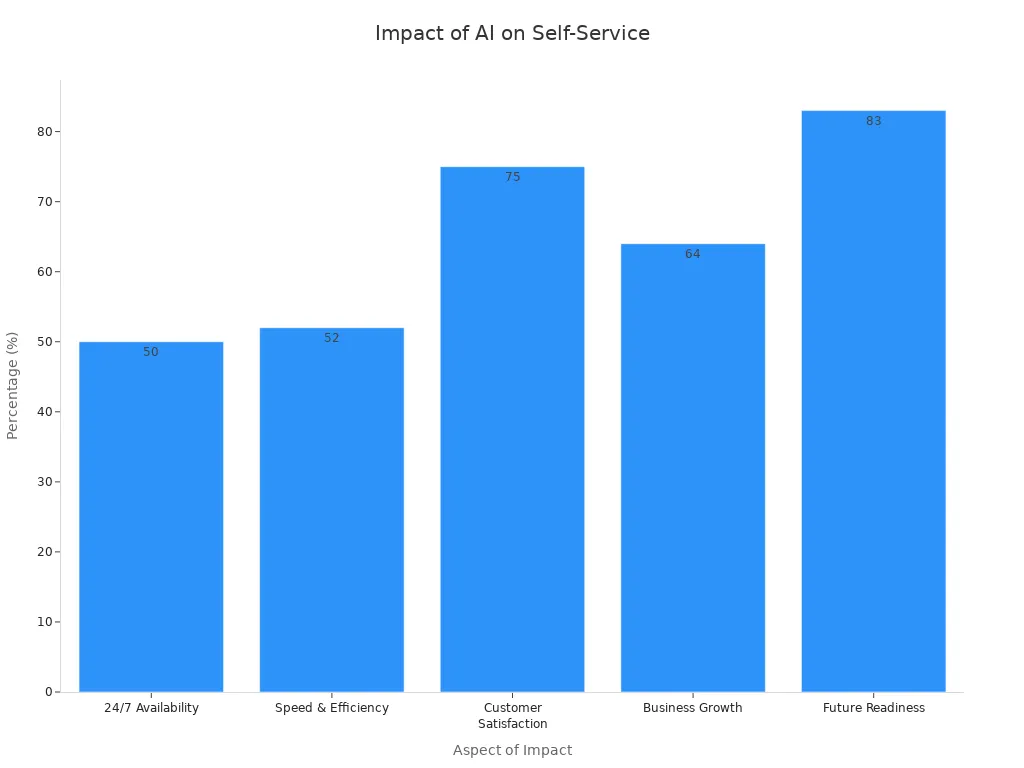
Your customers want answers now, not later. An AI chatbot offers 24/7 availability to handle high-volume, repetitive queries that clog your support queues. This customer service automation frees your team and gives customers immediate help.
An effective AI customer service strategy uses a chatbot to instantly resolve simple issues. This leads to shorter wait times and happier customers.
Think about your most common questions. An AI chatbot can handle them all, day or night.
- Order status updates ("Where's my order?")
- Password resets
- Return policy questions
- Basic account updates
By automating these tasks, the AI chatbot ensures customers get help without waiting for a human agent. This use of AI in customer service directly improves the customer experience. Virtual agents provide constant customer support, boosting satisfaction. This level of availability is a key reason why AI tools reduce wait times customer service so effectively.
Empower Human Agents to Work Faster
AI also acts as a powerful assistant for your customer support team. When a customer needs human help, AI ensures the process is fast and seamless. It empowers your agents by giving them the right information at the right time.
AI conversation summarization is a great example. The AI chatbot can summarize a customer's entire interaction history before transferring them to an agent. This saves agents from asking customers to repeat themselves. AI-suggested replies can also reduce handling time by about 9 percent, offering agents quick, accurate responses.
Furthermore, AI-assisted routing analyzes a customer's needs and sends them to the agent with the right skills. This intelligent routing eliminates unnecessary transfers and leads to faster response times. This type of customer service automation is essential for modern customer support. Ultimately, AI tools reduce wait times customer service by making your entire customer service operation smarter and more efficient. This is the future of AI customer service.
Your First Steps in AI Customer Service
Taking the first steps in implementing AI does not have to be complicated. You can start small with a single tool to make a big impact on your customer support. This simple AI implementation will transform your customer service. The key is to focus on foundational tools that deliver immediate value for your AI in customer service strategy.
Start with an AI Chatbot like Sobot
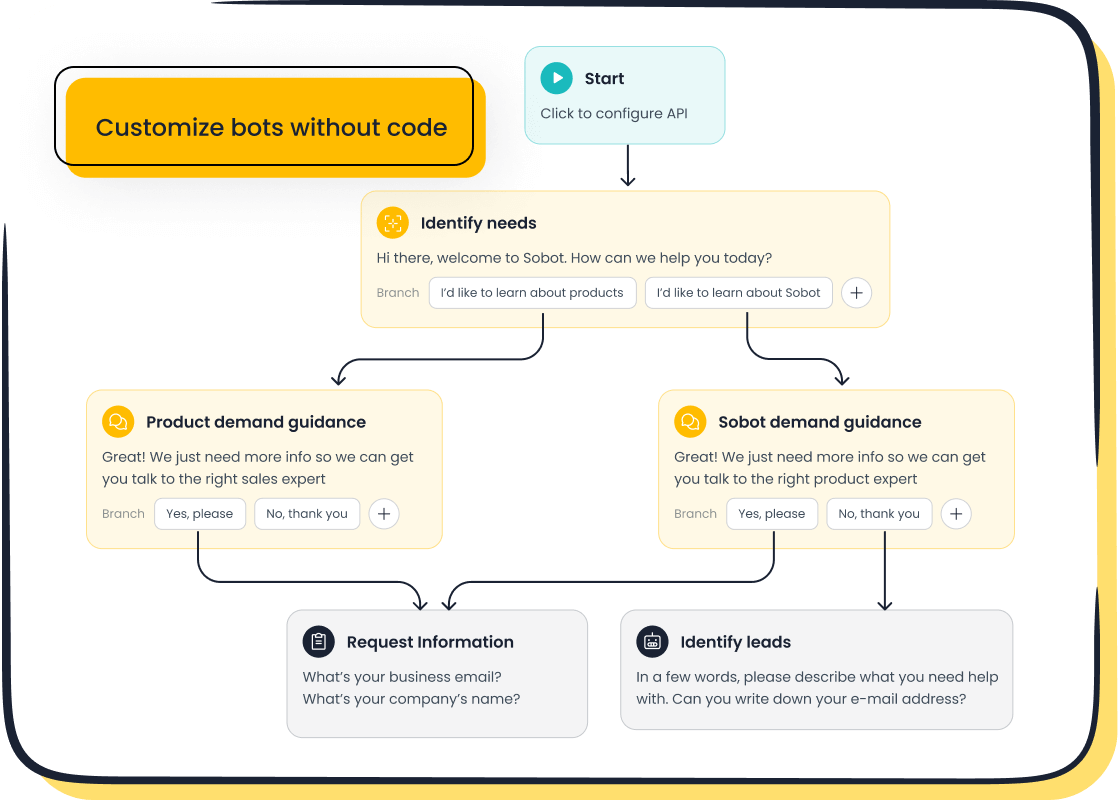
Your journey into AI customer service begins with a powerful yet simple tool: an AI chatbot. A chatbot is the easiest way to start your customer service automation. For beginners, a no-code tool like the Sobot Chatbot is the perfect choice. You can design and launch your chatbot using a simple point-and-click interface without writing any code. This makes your implementation straightforward.
A great chatbot provides immediate value. Sobot's AI chatbot is proven to improve productivity by 70%, cut agent costs by up to 50%, and boost conversions by 20%.
This chatbot also supports your business growth. It offers omnichannel and multilingual support. This allows you to serve a diverse customer base on their favorite platforms, like WhatsApp and SMS. Implementing chatbots is a core part of modern AI customer service.
Automate Workflows for Smart Routing
Once your chatbot is live, you can enhance your customer service automation. Use AI to automate workflows for smart routing. AI-assisted routing instantly sends customer questions to the right agent or department. This eliminates manual sorting and long delays. This implementation of AI is crucial for efficiency.
Automated routing uses simple rules to direct tickets:
- Skill-based routing sends technical questions to expert agents.
- Priority-based routing moves urgent issues to the front of the line.
- Keyword-based routing sends inquiries with words like "refund" to the billing team.
Businesses using this type of automation resolve tickets 52% faster. This part of your AI implementation ensures customers get the right help quickly, improving the entire customer experience.
Build an AI-Powered Knowledge Base
The brain behind your AI chatbot is its knowledge base. Unlike a static FAQ page, an AI-powered knowledge base understands what customers mean, not just the keywords they type. This AI technology allows your virtual agents to provide accurate, helpful answers for your customer support. This is a key step in implementing AI.
An AI knowledge base powers better self-service. AI can even suggest new articles to fill content gaps it discovers. This continuous improvement makes your AI customer support solutions smarter over time. With 92% of consumers willing to use a knowledge base, providing a great one is essential for automated customer service. The right AI-powered solutions make this possible.
This level of AI customer service helps you build a robust customer support system. The AI chatbots learn from every interaction, making your customer support more effective each day.
Your 4-Step Plan for Implementing AI

You are ready to reduce wait times and improve your customer support. This simple step-by-step guide makes implementing AI easy. You do not need a team of data scientists or a massive budget. Your AI implementation journey starts with one small, focused action. Follow these four steps to launch your first AI tool and see immediate results.
Step 1: Identify Your Biggest Bottlenecks
Before you choose any tool, you must find your biggest pain points. Where do your customers and agents get stuck? Identifying these bottlenecks is the most important part of your AI implementation plan. Fixing the right problem ensures your AI delivers real value.
Common customer support bottlenecks often include:
- Inefficient Ticket Triage: Agents spend too much time manually sorting and assigning customer questions. This leads to delays and errors.
- Overburdened Support Teams: Your team is overwhelmed with repetitive questions, causing burnout and longer resolution times for everyone.
- Manual Data Entry: Agents waste valuable time typing notes and updating customer records instead of solving problems. This manual work can have an error rate as high as 35%.
- Disconnected Tools: Your team switches between different apps for chat, email, and customer history. This creates confusion and forces customers to repeat themselves.
Tip: To find your bottlenecks, start by gathering data. You can use several simple methods to pinpoint exactly where your workflows are slowing down. 🕵️
You can analyze your customer support data to find clues.
- Track Key Metrics: Look at your Average Handle Time (AHT), First Contact Resolution (FCR), and ticket backlog volume. High numbers in these areas often point to a bottleneck.
- Map Your Processes: Create a simple flowchart of your customer support workflow. Visualizing each step helps you see where delays happen.
- Ask Your Agents: Your agents are on the front lines. They know what slows them down. Engage them in feedback loops to identify issues with technology or internal processes.
By finding your biggest bottleneck first, you can choose an AI tool that solves a specific, high-impact problem. This targeted approach is key to a successful AI implementation.
Step 2: Choose One Simple Tool to Start
Now that you know your biggest problem, you can choose your first AI tool. The goal is to start small. You do not need a complex platform for your first AI implementation. Choose one simple, high-impact tool that is easy to use. For most businesses, the best starting point is an AI chatbot.
When choosing your first tool, look for these characteristics:
- Solves a Real Problem: The tool should directly address the bottleneck you identified in Step 1. If your team is buried in password reset requests, choose a tool that automates that task.
- Easy to Use: Your team should be able to adopt the tool without extensive training. A no-code, point-and-click interface is ideal for a first-time implementation.
- Shows Clear Value: The tool should have clear success metrics. You want to see a quantifiable impact, like time saved or costs reduced.
- Protects Your Data: Always check the tool's privacy and security settings. Your customer data must be safe.
An AI chatbot is a perfect first tool for customer service automation. It is designed to handle high-volume, repetitive questions—a major bottleneck for many support teams. A chatbot provides tangible business value from day one.
Many simple AI tools can help your business. For example, tools like Grammarly help with writing, while Zoho CRM uses AI to manage customer relationships. However, for tackling wait times in customer support, a dedicated chatbot offers the most direct solution. It automates conversations, provides instant answers, and frees up your agents. This makes implementing chatbots a powerful first step in your AI customer service journey.
Step 3: Set Up and Run a Small Test
You have identified your bottleneck and chosen your tool. Now it is time for a small, controlled test. A pilot program is the best way to work out any issues before you go live to all your customers. This step is crucial for a smooth implementation and helps you prove the value of AI to your organization.
When setting up your test, remember to:
- Define Clear KPIs: Know what success looks like before you start. Key metrics could include chatbot resolution rate, reduction in agent-handled tickets, or customer satisfaction scores.
- Start Small and Scale: Deploy the chatbot to a limited audience first. This could be a small group of internal users or a segment of your customers on a single webpage. This minimizes risk.
- Gather Lots of Feedback: Ask your pilot audience for their thoughts. A diverse group of testers will give you more comprehensive feedback to help you improve the chatbot.
Setting up a modern AI chatbot is easier than you think. With a tool like the Sobot Chatbot, you do not need any coding experience. You build its knowledge base by simply feeding it information you already have.
You can train your chatbot by providing it with:
- Existing FAQ pages and help articles
- Product manuals and technical guides (PDFs, Word documents)
- Transcripts of past customer service chats
- Text snippets with company policies
The AI reads these documents and learns how to answer customer questions accurately. This process turns your existing content into a powerful engine for customer service automation. A successful pilot test will give you the data and confidence you need for a full launch. This careful approach to implementing AI ensures your customer support team is ready for success.
Step 4: Go Live with a Human Handoff
Your pilot test was a success, and your chatbot is ready. The final step is to go live while ensuring you always have a safety net. The most important feature of any AI customer service system is the human handoff. Customers must always have a clear path to a human agent if the AI cannot solve their problem.
Data shows that customers demand this option. In fact, 80% of people will only use a chatbot if they know a human option exists. Ignoring this can be costly, as 30% of consumers would switch to a competitor after just one bad chatbot experience.
A seamless human handoff is a core part of Sobot's customer-centric philosophy. The goal of AI is to help people, not replace them. A great chatbot knows its limits and escalates issues to an agent at the right moment.
Here are best practices for designing a great human handoff:
| Best Practice | Primary Benefit |
|---|---|
| Maintain Context | Stops customers from repeating themselves. |
| Define Smart Triggers | Ensures escalations happen at the right time. |
| Route to Specialists | Gets problems solved faster with AI-assisted routing. |
| Communicate Clearly | Manages customer expectations during the transfer. |
When the chatbot transfers a customer, the agent should receive the full conversation history. This allows the agent to pick up the conversation without asking the customer to repeat information. This smooth transition is the hallmark of excellent AI customer service. By providing a reliable human escape hatch, you build trust and ensure your customer support is both efficient and empathetic. This final step completes your initial AI implementation and sets you up for long-term success.
Measuring Success and Proving ROI
After implementing AI, you need to measure its impact. This proves the value of your investment and guides future improvements. Success isn't just a guess; it's something you can track with clear data. For example, by using Sobot’s AI solution, Agilent achieved a 6x increase in efficiency, a 25% cost reduction, and a 95% customer satisfaction score. Your business can see similar results by focusing on the right metrics. This is a critical part of your AI implementation.
Key Metrics to Track for Wait Times
To prove that AI tools reduce wait times customer service, you must track specific metrics. These numbers show the direct impact of your new AI on customer support efficiency and customer satisfaction.
Start with these three essential metrics:
- First Response Time (FRT): This measures how quickly a customer gets their first reply. AI chatbots make this nearly instant for many queries.
- Average Handle Time (AHT): This is the average time an agent spends on a ticket. AI assists agents with summaries and suggestions, lowering AHT.
- Ticket Resolution Rate: This shows the percentage of tickets your team resolves. A good rate is over 85%, while an excellent one is above 95%. You calculate it with this formula:
(Resolved Tickets / Total Tickets) × 100%.
Tip: Compare your FRT to industry benchmarks to see where you stand. Faster response times directly improve customer satisfaction. ⏱️
Channel Performance Tier Benchmark Top performers Under 1 hour Live chat Top performers Under 2 minutes Phone Average wait time 46 seconds
The Role of AI in Customer Service Workflows
AI improves your metrics by making your entire customer support workflow smarter. The right AI in customer service does more than just answer questions. It actively organizes and streamlines work for your human agents.
Here is how AI enhances your workflows:
- Intelligent Routing: AI analyzes incoming requests and automatically sends them to the right agent or department, reducing delays.
- Automated Ticket Classification: AI accurately categorizes tickets based on content, ensuring they are prioritized correctly without manual work.
- Self-Service Resolution: An AI chatbot resolves common questions on its own, which reduces the total number of tickets your team needs to handle.
This level of automation is key to a successful implementation of AI, freeing your team to focus on complex issues that require a human touch and boosting customer satisfaction.
Gathering Team and Customer Feedback
Numbers provide a great overview, but feedback from people tells the full story of your AI customer service. To truly understand the impact of your AI implementation, you need to listen to both your customers and your support team. This feedback is vital for improving the customer experience and achieving higher customer satisfaction scores.
For customers, you can automatically send a Customer Satisfaction (CSAT) survey after an AI interaction. This gives you immediate insight into their experience. For your team, hold regular check-ins. Ask them how the AI is helping and what could be better. This feedback loop is essential for optimizing your AI customer service and ensuring the technology supports your team effectively. A successful implementation makes work better for your employees and your customer support better for your customers.
You can transform your customer support and boost customer satisfaction. Start your AI implementation small with a single, powerful AI tool. An AI chatbot like the Sobot Chatbot is perfect for your customer service automation. This AI in customer service approach improves the customer experience. Remember to provide a human handoff and track your metrics. This AI customer service strategy ensures your customer support team and your AI chatbots work together for better customer satisfaction. This is how AI improves customer service.
Ready to embark on your contact journey? Identify your top 3 repetitive customer questions today—like order tracking or account resets—and see how a solution like Sobot can help your customer support automate them with AI. This customer service automation will improve customer satisfaction.
FAQ
How hard is it to set up an AI chatbot?
You can set up your first AI chatbot easily. Modern AI tools use no-code interfaces. You build the AI by feeding it existing documents. This simple AI setup means you can launch your AI solution quickly without needing a developer. This AI makes your start simple.
Will AI replace my human customer support agents?
No, AI enhances your team, it does not replace it. The best AI strategy uses AI to handle simple questions. This frees your human agents for complex problems. The AI acts as a copilot, making your customer support team more efficient. This AI partnership is key.
What is the main benefit of using AI for customer support?
The main benefit of AI is speed. AI provides instant, 24/7 answers to common questions. This AI capability dramatically reduces customer wait times. Your customers get help immediately, which improves their satisfaction. This AI-driven efficiency transforms your support operations.
Can AI handle questions in different languages?
Yes, many AI platforms offer multilingual support. A powerful AI chatbot can communicate with your global customers in their native language. This AI feature helps you expand your reach and provide excellent service to a diverse audience. This AI makes global communication easy.
See Also
AI Customer Service Software: Boosting Business Efficiency and Performance
Essential Guide: Implementing Artificial Intelligence in Your Call Center
Discovering the Top 10 AI Tools for Enterprise Contact Centers
An In-Depth Review of AI Solutions for Enterprise Call Centers
Your Comprehensive Guide to Selecting the Ideal Chatbot Software

