AI for IT Helpdesk Support A Beginner's Guide

How do you start implementing AI in your IT helpdesk? Your first step in IT helpdesk automation is simple. Identify one repetitive task for automation. Then, select one of the many AI tools for IT helpdesk automation customer support.
This AI implementation turns a big project into a manageable one for your IT support. Your helpdesk can improve customer support, productivity, and ticket resolution, enhancing the customer experience for every customer. Sobot offers AI-powered solutions for your IT service desk. This service desk automation helps employees. Automating service desk tasks with AI provides better support for your customer. AI delivers great IT support. This automation improves customer support. This AI provides support for your customer. AI provides support for your customer. AI provides support for your customer. AI provides support for your customer. AI provides support for your customer.
Identify the Right Helpdesk Tasks for IT Helpdesk Automation
Your journey into IT helpdesk automation begins with a clear goal. You need to find the right problems to solve. The best targets for AI are high-volume, repetitive tasks that consume your team's valuable time. This process helps you focus your efforts for maximum impact on customer support.
Analyze Ticket Data for Repetitive Issues
First, you must analyze your helpdesk ticket data. Your IT service desk generates a wealth of information with every customer interaction. Modern AI tools use Natural Language Processing (NLP) to analyze every ticket automatically. This AI understands customer intent, not just keywords. It knows "Login Issue" and "Account Access Problem" are the same thing. This analysis gives you deep insights into your helpdesk operations.
Look for key patterns in your IT support data:
- Ticket Volume: Identify which issues generate the most tickets.
- Resolution Time: Find out which simple problems take too long for a resolution.
- Customer Satisfaction (CSAT): See which ticket types are linked to low customer satisfaction.
This data will quickly reveal your most common helpdesk requests. You will likely see a pattern of recurring issues that are perfect for IT helpdesk automation.
Prioritize Tasks by Volume and Impact
After you identify repetitive tasks, you need to prioritize them. Not all tasks are good candidates for your first automation project. You can use a simple Value vs. Effort matrix to score each task. This method helps you find the best opportunities for service desk automation. Your goal is to find tasks that offer high value with low effort.
Focus on Quick Wins: These are high-volume tasks that are simple to automate. Automating them provides immediate value to your helpdesk and your employees. This is a core principle of IT helpdesk best practices.
Automating tedious work frees your employees to handle complex problems. This boosts team morale and productivity. Better service desk automation leads to better customer support and a more efficient IT service desk. This automation improves the support experience for every customer.
Create a Shortlist of Prime AI Candidates
Now you can create a shortlist of tasks for IT helpdesk automation. These tasks are your prime candidates for your first AI project. Your analysis will point to clear winners for automation.
Top candidates for IT helpdesk automation often include:
- Password predicaments and account lockouts
- Printer connection problems
- Basic "how-to" questions for software
- Status updates on existing ticket resolution requests
Equally important, you should identify tasks that are poor candidates for AI. Avoid tasks that require human empathy, complex problem-solving, or navigating chaotic IT issues. These are better left to your skilled helpdesk employees. This list prepares you to select the right AI tools for IT helpdesk automation customer support. The right tools and a focused approach ensure a successful IT service management project. The AI provides excellent support for your customer.
Choosing AI Tools for IT Helpdesk Automation Customer Support
After shortlisting your tasks, you must select the right tools. The market for AI tools for IT helpdesk automation customer support is vast. Your goal is to find a solution that matches your specific needs and is easy to implement. Focus on tools that solve the problems you identified. This targeted approach ensures a successful AI implementation from day one. Let's explore three essential types of AI tools for your IT helpdesk.
AI Chatbots for Instant First Response
Your employees want immediate answers. AI-powered chatbots provide instant support 24/7. They are the frontline of modern IT helpdesk automation. A chatbot can handle common questions like "How do I reset my password?" or "How do I connect to the VPN?" This frees your human agents to focus on complex issues that require their expertise. This automation boosts both resolution speed and team productivity.
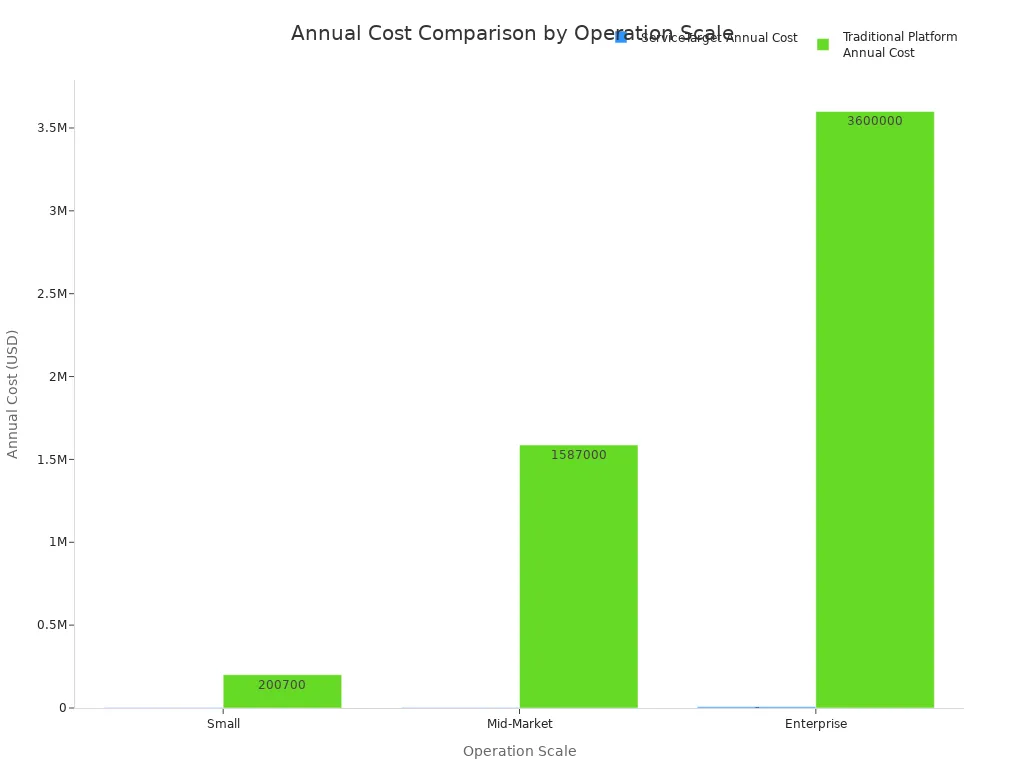
Implementing AI this way delivers significant cost savings. For some businesses, AI-powered chatbots reduce basic support costs by up to 90%. The financial impact of this automation is substantial.
| Organization Size | Annual Savings (USD) |
|---|---|
| Mid-Size | $1,375,000 – $2,800,000 |
| Large Enterprise | $13,750,000 – $28,000,000 |
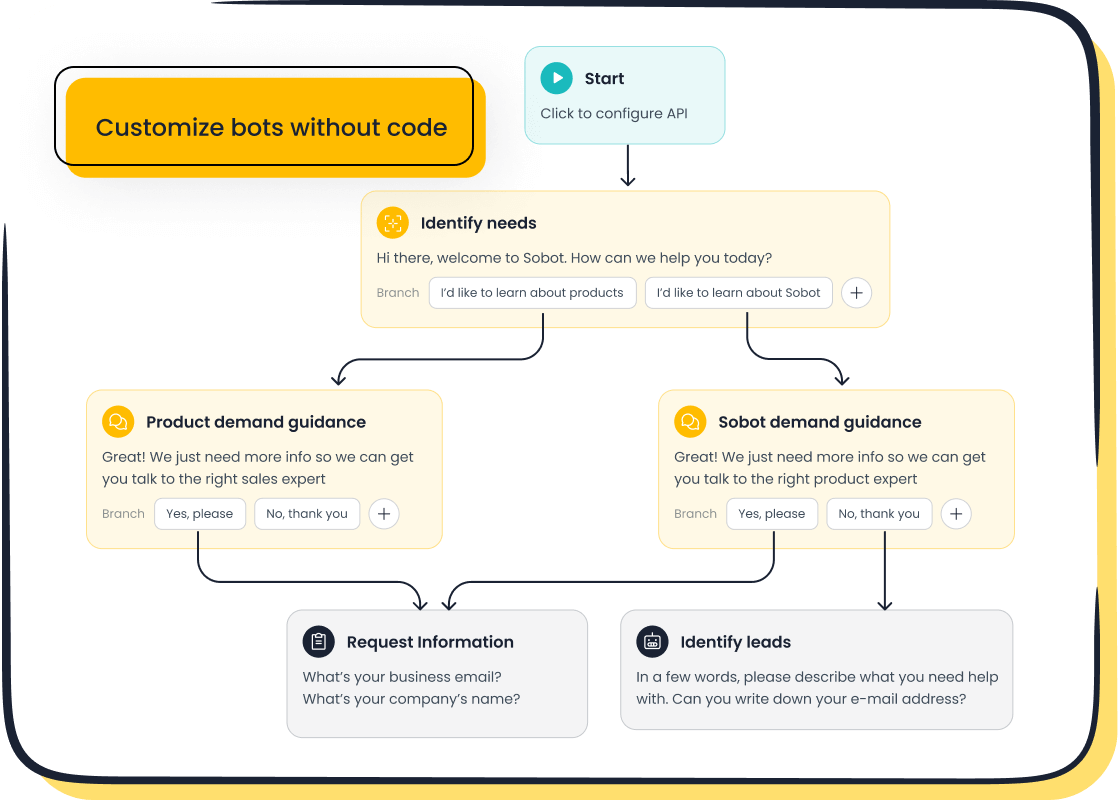
For beginners, starting with a no-code solution is key. Sobot's AI Chatbot is a perfect example. It offers a simple point-and-click interface, so you can design automated workflows without writing a single line of code. You can easily train the AI by uploading existing IT support documents, PDFs, and articles. This quickly builds a knowledge base for the chatbot to answer employee questions. Key features that make it ideal for an IT helpdesk include:
- 24/7 Operation: Provides constant support to your employees across different time zones.
- Multilingual Support: Assists a global workforce in their native language.
- Cost Reduction: Saves up to 50% on agent costs by handling routine queries.
While many powerful tools exist, such as Google Cloud Dialogflow and SAP Conversational AI, a user-friendly platform like Sobot makes your first step into AI in customer support a manageable one.
Automated Ticket Routing and Categorization
Your IT service desk likely receives a high volume of requests. Manually sorting and assigning each ticket is slow and prone to error. This is where automated ticket routing and categorization becomes a game-changer for IT helpdesk automation. AI can analyze incoming requests in real-time, understand the context, and route the ticket to the right person or department.
This service desk automation dramatically improves efficiency. AI understands intent, not just keywords. This leads to a reported 60% drop in misrouting errors. The benefits of this automation are clear:
- Enhanced Speed: AI processes and routes tickets instantly, reducing response times.
- Improved Accuracy: Machine learning minimizes human error, ensuring the ticket gets to the right expert.
- Greater Consistency: AI applies the same logic to every request, creating a uniform customer experience.
- Increased Productivity: Your skilled employees spend less time on administrative tasks and more time solving problems.
Best Practice: To set up your automation rules, you should first define clear routing goals. Segment tickets by issue type (e.g., hardware, software, access) and use customer data to prioritize requests. For example, you can route urgent issues like a system outage directly to a senior IT support team.
A robust IT helpdesk software, like Sobot's Ticketing System, integrates these AI capabilities. It helps you build automated workflows that manage your service desk automation efficiently, improving the entire support process for every customer. This is a core part of effective IT helpdesk automation.
AI-Powered Knowledge Base for Self-Service
The best customer support is often self-service. An AI-powered knowledge base empowers your employees to find answers on their own. Instead of creating a ticket for a simple question, they can use an intelligent search tool to get information instantly. This approach deflects tickets from your helpdesk and fosters a culture of self-sufficiency.
A modern knowledge base uses AI to deliver a superior customer experience. Top-tier tools offer features like:
- Intelligent Search: Understands natural language queries, not just exact keywords.
- Content Suggestions: Proactively recommends relevant articles to users.
- Gap Analysis: Identifies missing information in your knowledge base so you can improve it.
The return on investment for self-service is remarkable. By transforming internal knowledge into an accessible resource, you can drastically reduce support costs while improving customer satisfaction. This service desk automation provides immense value.
AI-powered solutions make creating this resource simple. For example, Sobot's AI can build a comprehensive knowledge base from your existing IT documents. This knowledge then powers other tools, like the AI chatbot, to provide accurate answers. This integration is central to a successful IT helpdesk automation strategy. By choosing the right AI tools for IT helpdesk automation customer support, you build a stronger, more efficient IT support system for your entire organization. This is how you deliver excellent AI in customer support.
A Step-by-Step Plan for Implementing AI
You have your shortlist of tasks and your chosen AI tools. Now you can begin the most exciting part: implementing AI. A structured plan turns this complex project into a series of manageable steps. This approach ensures your AI implementation delivers value to your helpdesk and your entire organization. It is the key to successful service desk automation.
Step 1: Launch a Small-Scale Pilot Project
You should not try to automate your entire helpdesk at once. The best way to start implementing AI is with a small-scale pilot project. This test run allows you to learn, adapt, and prove the value of automation with minimal risk. A successful pilot builds momentum for future IT helpdesk automation projects.
To set up your pilot for success, you need to follow a few key practices. These steps help you define a narrow, measurable scope for your first AI project.
- Define a Clear Objective. Your goal must be specific. Do not just "implement AI." Aim to "reduce password reset tickets by 40% in 60 days." A clear target helps you measure the success of your automation and demonstrate its return on investment.
- Select the Right Use Case. Choose a task that is repetitive and time-consuming for your employees. A great first project for the IT service desk is automatically routing inbound support emails. This is a high-impact task that provides immediate relief to your customer support team.
- Involve the Right People. You should include key stakeholders from the start. Talk to your IT support agents, process owners, and IT security personnel. Their early involvement helps you avoid integration problems and builds support for the new AI system.
- Design a Narrow Scope. Resist the urge to solve every problem. Focus on one well-defined scenario. For example, start by having your AI chatbot answer only the top three most common questions. This focus makes the project manageable and delivers a quick win for your helpdesk.
Avoid Common Pitfalls ⚠️ Many first-time AI projects fail because of simple mistakes. You can avoid them with careful planning. Make sure your project has a clear business goal, clean data for the AI to learn from, and strong support from leadership. When you build your team, include operations experts alongside IT staff to ensure the solution works in the real world.
Step 2: Integrate the AI Tool with Your Helpdesk
After your successful pilot, you can integrate the AI tool with your main helpdesk systems. This step connects your new automation power to your existing workflows. Proper integration is critical for a seamless customer support experience. It ensures data flows correctly between your AI and your IT service desk.
Security is the most important part of this process. You are connecting a third-party tool to your internal IT systems, which introduces new risks. You must protect your company's and customer's data.
- Prompt Injections: A malicious user could trick the AI into revealing confidential information.
- Data Poisoning: Bad actors might feed your AI false information to make it unreliable.
- Shadow AI: Employees might use unapproved AI tools, creating security holes outside of IT's control.
- Data Breaches: If the AI tool itself is not secure, it could leak sensitive data it collects.
A Security-First Approach 🛡️ You must build security into your AI plan from day one. This is a core part of responsible IT helpdesk automation. Implement robust access controls so only authorized employees can manage the AI. You should conduct regular security tests, including penetration testing, to find and fix vulnerabilities. For your customer, transparency is key. You must be clear about how you use their data, especially to comply with regulations like GDPR.
When choosing tools, you should also consider their reliability. A good AI integration can handle system downtimes and has built-in retry mechanisms. This ensures your customer support and automation workflows continue to run smoothly even when issues occur. This is a vital part of any AI in customer support strategy.
Step 3: Train the AI Model and Your Support Team
Implementing AI is not just about technology. It is also about people and processes. For a successful AI implementation, you must train both the AI model and your human support team. This two-part training ensures the technology and your team work together perfectly.
Training Your AI Model An AI is only as smart as the data you give it. You need to train your AI model with high-quality, relevant information. You can feed it:
- Your existing knowledge base articles
- Historical helpdesk tickets and their resolutions
- Standard operating procedure (SOP) documents
- IT support scripts and FAQs
The more clean data the AI has, the more accurately it can answer questions and categorize tickets. This continuous learning process is essential for effective service desk automation. The AI uses this information to provide better support for every customer.
Training Your Support Team Your employees are your most valuable asset. The goal of AI is to empower them, not replace them. Proper training helps your team understand how the AI makes their jobs easier. It reduces fear and encourages adoption of the new tools.
Your training program should cover:
- How the new AI system works.
- When to let the AI handle a request and when to intervene.
- How to use the AI's insights to solve complex problems faster.
- How to provide feedback to improve the AI's performance.
When your employees see the AI as a helpful assistant, your entire helpdesk becomes more efficient. This partnership between human expertise and AI automation is the future of excellent IT support and AI in customer support.
How to Measure the Success of Your Helpdesk AI
After implementing AI, you must measure its impact. Tracking the right metrics proves the value of your IT helpdesk automation. This data shows how your AI implementation improves customer support and boosts productivity for your employees. A clear view of performance helps you refine your strategy for AI in customer support.
Track KPIs: Response Time, Resolution, and CSAT
You should start by tracking key performance indicators (KPIs). The most important metrics for any IT helpdesk are response time, first-contact resolution, and customer satisfaction (CSAT). Your AI should improve these numbers. Industry benchmarks give you a target for your helpdesk.
| KPI | Benchmark Value |
|---|---|
| Live Chat Response Time | Under 60 seconds |
| First-Contact Resolution | 70%+ |
Improving these metrics directly enhances the customer experience. Faster, more accurate support makes for happier employees. Many organizations see CSAT scores rise by 15-25% within six months of using AI in customer support. A real-world example of this success is Agilent, a leader in life sciences. By using Sobot's AI solution for their customer support, they achieved a 95% customer satisfaction score. This shows the powerful impact of a well-executed AI strategy on your IT service desk.
Measure Ticket Deflection and Resolution Rates
A key goal of service desk automation is to reduce the number of tickets your human agents handle. You measure this with the ticket deflection rate. This metric shows how many customer issues the AI resolves without needing an agent. You calculate it with a simple formula: (Self-Service Resolutions / Total Support Interactions) × 100. A good deflection rate for a helpdesk is around 40-50%.
This automation leads to better ticket resolution rates. AI can provide fully autonomous resolution for simple, repetitive tasks. This frees your employees to focus on complex problems where they provide AI-assisted resolution. This partnership between your IT support team and the AI is crucial. Agilent’s success with Sobot’s AI highlights this benefit. They saw a sixfold increase in customer service efficiency and a 25% reduction in costs, driven by effective ticket resolution and automation. This is the power of AI in customer support.
Use Feedback to Improve AI in Customer Support
Your AI implementation is not a one-time setup. You must create a continuous improvement loop. This means using feedback to make your AI smarter over time. Your helpdesk employees play a vital role here. When they correct an AI response or handle an escalated ticket, that data should feed back into the AI model.
This process helps the AI learn from every interaction. It identifies gaps in its knowledge and improves its accuracy. This partnership ensures your IT service desk and its automation tools evolve together. It turns your helpdesk into a learning system that constantly enhances employee productivity and the customer experience. This is how you build a truly intelligent system for AI in customer support and long-term success.
Your journey into IT helpdesk automation is a simple, four-step process. You identify a repetitive task for automation. You select one of the simple AI tools for IT helpdesk automation customer support, like the Sobot Chatbot. You run a small pilot project for your IT service desk. Finally, you measure its impact on ticket resolution and productivity. Starting small is the key to successfully implementing AI. This approach demystifies service desk automation. Your IT support team can improve the customer experience for every customer. Take the first step for your helpdesk today. Analyze your helpdesk data to find your first AI automation opportunity for better customer support. This is how you begin using AI in customer support.
FAQ
How does AI help my IT helpdesk?
AI helps your IT helpdesk with automation. This AI automation provides better IT support for every customer. Your IT helpdesk AI improves customer support. This AI offers IT support for your customer. This AI offers IT support for your customer. This AI offers IT support for your customer.
What is the first step for IT helpdesk AI automation?
Your first step for IT helpdesk AI automation is simple. You identify one repetitive task for AI automation. This focused AI automation ensures your IT helpdesk gets a quick win. This AI provides IT support for your customer. This AI provides IT support for your customer.
Are AI-powered chatbots hard to set up for IT support?
No, AI-powered chatbots are easy to set up. Tools like Sobot offer no-code platforms. You can build your IT helpdesk AI automation without programming. This AI provides IT support for your customer. This AI provides IT support for your customer. This AI provides IT support for your customer.
Can AI improve customer support for my IT helpdesk?
Yes, AI greatly improves customer support. AI-powered chatbots provide instant IT support. This AI automation resolves issues faster for every customer. Your IT helpdesk AI delivers better customer support. This AI provides IT support for your customer. This AI provides IT support for your customer.
How does AI automation support my IT customer?
AI automation supports your IT customer with 24/7 help. AI-powered chatbots answer common questions instantly. This AI automation frees your IT helpdesk team for complex problems. This AI provides IT support for your customer. This AI provides IT support for your customer. This AI provides IT support for your customer.
See Also
Elevate Your Customer Service: A Guide to Live Chat Mastery
Depop Live Chat: Achieve Rapid Customer Assistance with Expert Strategies
Transforming Customer Interactions: The AI Agent's Support Revolution
Discover the Best 10 Live Chat Solutions for Superior Support in 2024
Enhancing Call Center Performance: Your Essential Quality Assurance Software Guide

