AI Customer Experience How to Start


Your customer service team answers "Where is my order?" all day. You can solve this with customer service automation. Using a chatbot for this automation is your best first step into AI in customer service. This simple automation with a chatbot delivers effective automated customer service. This guide shows you how to start your journey with AI in customer experience. You will learn how AI tools, like a Sobot chatbot, make AI customer service simple. This AI customer service chatbot provides great customer service automation. A good chatbot is essential for your automation and customer experience with AI tools.
Understanding AI in Customer Service
You can improve your customer experience with AI tools. Understanding the basics of AI helps you see its power. AI in customer service is not about replacing your team. It is about giving them better tools for customer service automation. This creates a better ai-powered customer journey.
Defining AI: Simple Tools for Big Impact
AI might sound complex, but its core ideas are simple. These technologies work together to power your AI customer service. Your customer journey mapping will benefit from this automation.
- Artificial intelligence (AI): This allows machines to do tasks that usually need human intelligence. AI learns from data to find patterns and make decisions. This automation helps create personalized experiences.
- Machine learning (ML): This is a type of AI. It uses data to get smarter over time without new programming. This helps a chatbot improve its answers.
- Natural language processing (NLP): This technology helps computers understand human language. It is what allows a chatbot to know what a customer is asking. This is key for customer engagement.
Common AI Tools You Can Use Now
You do not need a team of developers to start with AI customer service. Many simple AI tools are available now. These tools provide immediate customer service automation. Your customer journey mapping can use this automation.
- Basic chatbots: An AI chatbot is a great first step. A chatbot can answer common questions on your website in real-time. This provides instant engagement.
- AI-enhanced IVR (voicebot): This tool understands spoken words. It routes callers to the right team without confusing menus. This improves the ai-powered customer journey.
- AI-assisted routing: This automation sorts messages by topic or urgency. It ensures customers reach the right agent quickly for better AI customer service. Your customer journey mapping can track this.
How AI Supports Your Human Customer Service Team
AI-powered solutions do not replace your agents. They empower them. A chatbot handles the simple, repetitive questions. This customer service automation frees your team for complex problems. This real-time support improves agent confidence and job satisfaction. Your customer journey mapping can show where a chatbot helps most.
When a chatbot manages common questions, your agents can focus on high-value customer engagement. This automation leads to better problem-solving and more personalized experiences. This is how a chatbot and your team work together for great AI customer service. Your customer journey mapping will show improved engagement. This real-time adaptation makes your AI customer support solutions more effective. The chatbot becomes a key part of your customer journey mapping. This engagement is vital for your customer journey mapping. The chatbot enhances customer journey mapping. This automation improves customer journey mapping. The chatbot is essential for customer journey mapping. This engagement is part of customer journey mapping. This personalization improves the ai-driven customer journey.
Your 4-Step Plan for AI in Customer Experience
Starting your journey with AI in customer experience does not require a massive overhaul of your operations. You can achieve significant results by following a clear, manageable plan. This four-step guide provides the framework you need to launch your first AI initiative successfully. Your customer journey mapping will improve with each step, leading to better engagement and more personalized experiences.
Step 1: Pinpoint Your Service Bottlenecks
Before you can solve a problem with automation, you must first identify it. The most effective AI customer service strategies begin with a deep look at your existing data. Your goal is to find the biggest bottlenecks—the repetitive, high-volume questions that consume your agents' time. These are perfect candidates for customer service automation.
Common bottlenecks that AI can resolve include high ticket volumes, slow response times, and a lack of 24/7 support. When customers wait too long for answers, their satisfaction drops. Your first step in customer journey mapping is to find where these delays happen. To find your specific bottlenecks, you should:
- Collect Your Data: Gather information from all your support channels. This includes emails, chat logs, and phone call transcripts. A complete view is essential for accurate analysis.
- Categorize Inquiries: Organize support tickets by theme. Look for common topics like "order status," "password reset," or "business hours." This helps you see which issues appear most often.
- Analyze Ticket Volume: Review your ticket volumes to spot trends. Spikes in certain questions during specific times can reveal patterns. This analysis is a key part of your customer journey mapping.
- Review Your FAQs: Your frequently asked questions page is a goldmine. These are the questions your customers already ask the most. They are prime targets for your first chatbot automation.
By analyzing this data, you will create a clear picture of where an AI chatbot can have the biggest impact on your AI customer service. This data-driven approach ensures your implementation solves a real problem.
Step 2: Choose a Beginner-Friendly AI Tool
Once you know what problem you want to solve, you need to choose the right tool. For your first project, you should select a beginner-friendly platform. You do not need a team of developers for this implementation. Modern AI tools are designed for ease of use.
Look for a no-code or low-code platform. These tools use a visual interface, allowing you to design workflows with simple drag-and-drop or point-and-click actions. This makes implementing chatbots simple and fast. When evaluating AI tools, look for these key features:
- Intent Recognition: The ability for the chatbot to understand what the user wants, even if they use different phrasing.
- Multi-Channel Support: The tool should work across the channels your customers use, like your website, WhatsApp, or SMS.
- Seamless Human Handoff: When the chatbot cannot solve an issue, it must smoothly transfer the conversation to a human agent. This is critical for a good ai-powered customer journey.
- Adaptive Learning: The best AI tools learn from interactions to improve their answers over time. This real-time adaptation makes your chatbot smarter.
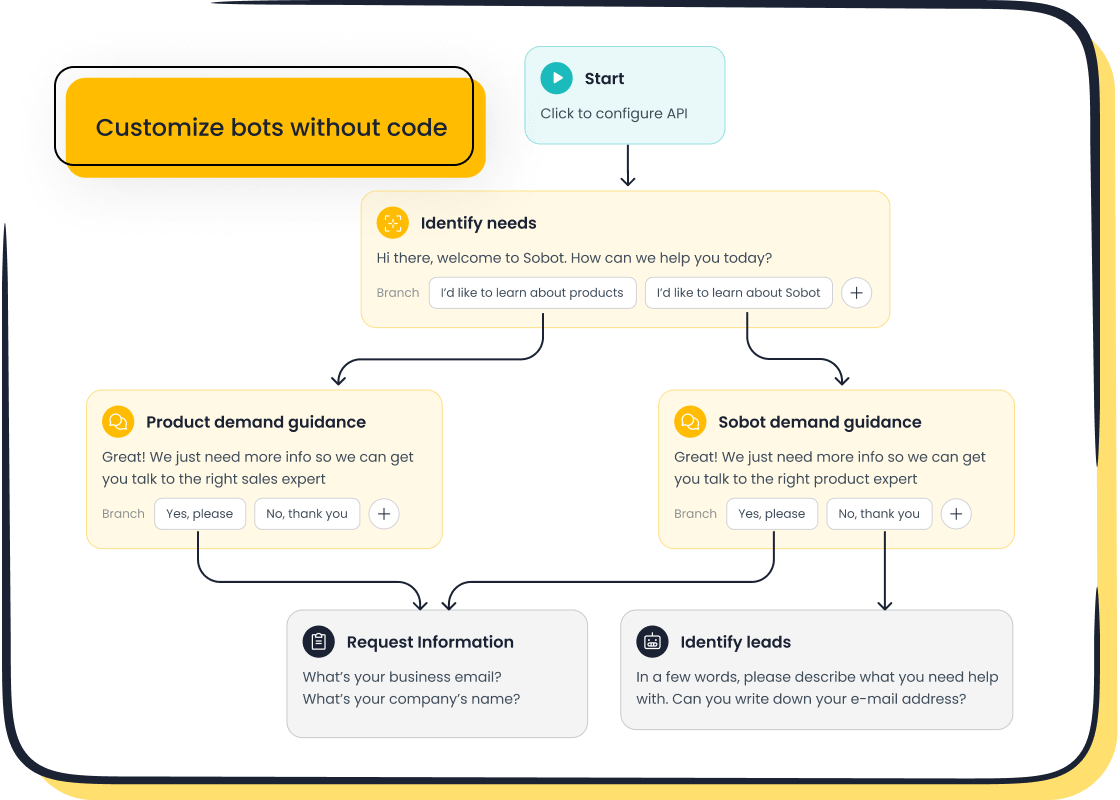
For example, solutions like the Sobot AI Chatbot offer a point-and-click interface that lets you design and deploy a chatbot without writing any code. This type of platform is ideal for your first customer service automation project. It is often part of a larger all-in-one contact center solution that includes live chat and a ticketing system, allowing you to scale your AI customer service efforts as you grow. This makes the implementation process much smoother.
Choosing an easy-to-use chatbot ensures your team can manage and update it without technical help, giving you full control over your customer engagement. This is a vital step in your customer journey mapping.
Step 3: Prepare Your Content for AI
An AI chatbot is only as smart as the information you provide. Before you launch your chatbot, you need to train it. This training happens by building a knowledge base. A knowledge base is a collection of answers and information that the chatbot uses to respond to customer questions. The good news is you likely already have most of this content.
You can build your knowledge base from existing documents:
- FAQ pages
- Help center articles
- Product manuals (PDFs)
- Internal training documents
- Text snippets with common answers
While a chatbot can learn from raw data, structured content leads to more accurate automation. To optimize your content for AI, follow these best practices:
| Best Practice | Why It Matters for Your Chatbot |
|---|---|
| Use Clear Headings | Helps the chatbot quickly find the right section to answer a question. |
| Write Short Paragraphs | Makes information easier for the AI to process and deliver as a concise answer. |
| Use Bullet Points | Breaks down complex information into simple, scannable points for both AI and humans. |
| Maintain Consistent Terms | Avoids confusing the chatbot. Use the same term for the same concept every time. |
The amount of data needed depends on the complexity of the chatbot. For instance, KLM trained its chatbot with around 60,000 customer questions. However, for your first implementation, focus on quality over quantity. Start with the top 20-30 questions you identified in Step 1. This focused approach ensures your chatbot performs well from day one, providing immediate value to your AI customer service and customer journey mapping. This preparation is key to a successful implementation and better customer engagement.
Step 4: Pilot, Test, and Plan for Handoff
You should not launch your new chatbot to all customers at once. A phased rollout, or pilot program, allows you to test and refine your automation in a controlled environment. This step is crucial for a successful implementation and for building confidence in your new AI customer service solution. Your customer journey mapping should account for this testing phase.
Here is a simple plan for your pilot program:
- Start Small: Begin by activating the chatbot on a single webpage or for a small segment of your users. Have it handle just one or two of the repetitive tasks you identified. This limits the impact if issues arise.
- Set Clear Goals: Define what success looks like. You might aim for an 80% automation rate for a specific question or a customer satisfaction score of 4 out of 5 for chatbot interactions. These metrics will help you measure the impact of your customer service automation.
- Train Your Team: Prepare a few agents for the new workflow. They need to know how the chatbot works and when to take over a conversation. This ensures a smooth handoff and maintains a positive customer experience with AI tools.
- Test the Handoff: The handoff from chatbot to human is a critical moment in the ai-powered customer journey. Test this process thoroughly. Ensure that when a customer needs a human, the transfer is quick and the agent receives the full context of the chatbot conversation. This real-time transfer is essential for customer engagement.
- Gather Feedback: Collect feedback from both customers and your agents. Use this information to refine the chatbot's answers and improve the workflow. This feedback loop is vital for your customer experience management and ongoing customer journey mapping.
This careful pilot and testing process ensures your chatbot is truly helpful before you expand its role. It minimizes risk and sets your AI in customer service initiative up for long-term success, improving your ai-driven customer journey and providing more personalized experiences. This real-time engagement is a cornerstone of modern customer experience strategies. The implementation of AI chatbots, when done correctly, enhances the entire customer journey mapping process, leading to better personalized experiences and stronger customer engagement.
The Value of Customer Experience with AI Tools
Integrating AI tools into your customer service is a powerful move. This automation brings significant value by improving speed, availability, and efficiency. Your customer journey mapping will show clear benefits. This enhances the overall customer experience with ai tools.
Key Benefits: Speed, Availability, and Efficiency
AI customer service delivers immediate and measurable results. A chatbot provides 24/7 real-time support, so your customers get answers instantly, day or night. This constant availability boosts customer satisfaction and retention. The right automation also makes your team more effective. For example, AI can improve agent productivity by up to 70% and cut operational costs by 50% by handling routine queries. This allows your team to focus on complex issues, improving engagement. Your customer journey mapping can track these improvements in real-time.
This customer service automation drives major cost savings. A chatbot can handle multiple conversations at once, which reduces the need for extra staff during peak times. Your customer journey mapping will highlight these efficiency gains.
| Interaction Type | Savings Potential |
|---|---|
| Basic Inquiry | 85% – 92% |
| Complex Inquiry | 81% – 90% |
| After-Hours Support | 92% – 96% |
| Peak Period Support | 89% – 94% |
This level of automation improves customer satisfaction and retention. Your customer journey mapping will reflect a better ai-powered customer journey.
Are You Ready for an AI Customer Service Solution?
You can determine if you are ready for AI in customer service. A simple check helps you see if now is the right time. Your customer journey mapping can guide this decision. Ask yourself these questions:
- Are you overwhelmed? Is your team spending too much time on repetitive questions? This is a clear sign you need customer service automation.
- Do you have the data? Do you have FAQs, help articles, or chat logs? A chatbot uses this data to learn. Your customer journey mapping relies on this data.
- Are customers waiting? Do customers face long wait times for simple answers? AI customer service provides instant responses, improving customer satisfaction and retention.
- Do you want better engagement? Do you want to provide more personalized experiences? AI tools can help you achieve this. Your customer journey mapping will show increased customer engagement.
If you answered "yes" to these, you are ready to improve your ai-powered customer journey. This readiness is a key step in your customer journey mapping for better retention.
Common Pitfalls to Avoid When Starting
Starting your journey with AI in customer experience is exciting. You should avoid common mistakes to ensure success. Your customer journey mapping should account for these potential issues.
Warning: A major pitfall is forgetting the human touch. Your chatbot must have a clear and easy way to hand off a conversation to a human agent. Trapping a customer in a chatbot loop creates frustration and hurts customer satisfaction. This handoff is a critical point in your customer journey mapping for retention.
Another mistake is using a generic chatbot that cannot provide real help. Your chatbot needs access to good data to give accurate, personalized experiences. Without it, your AI customer service will fail. This impacts customer satisfaction and your customer journey mapping. This automation needs proper planning for successful customer engagement and a better ai-driven customer journey.
How to Measure AI Implementation Success
After your implementation, you need to measure its success. Tracking the right metrics shows you the value of your customer service automation. This data helps you refine your strategy and improve your ai-powered customer journey. Your customer journey mapping should include these key performance indicators. Modern AI platforms provide built-in reporting to make tracking these metrics simple.
Key Metrics: Resolution Time and CSAT
Two of the most important metrics are resolution time and customer satisfaction (CSAT). A successful chatbot resolves issues instantly. This automation reduces wait times and improves the customer experience. Your customer journey mapping will show faster problem-solving. You measure customer satisfaction to see how happy users are with the chatbot. You can gather this data through feedback surveys after a chat.
You can also measure customer satisfaction by analyzing chat data. Look for these signs:
- Repeated Questions: A user asking the same question differently may be frustrated.
- Conversation Abandonment: A user leaving the chat early suggests the chatbot failed.
- Direct Negative Feedback: Customers will often tell you directly if they are unhappy.
A great example of success comes from OPPO. By implementing chatbots with Sobot, they achieved an 83% chatbot resolution rate and a 94% positive feedback rate. This shows how a well-executed implementation of a chatbot can deliver amazing results for customer satisfaction and retention. This success is a key part of their customer journey mapping.
Tracking Agent Workload and Escalation Rates
A key goal of ai customer service is to free up your human agents. You should track agent workload to see the impact of your automation. A lower number of tickets for simple questions means your chatbot is working. This customer service automation allows your team to focus on complex problems. Your customer journey mapping can visualize this shift in workload.
You also need to track the escalation rate. This is the percentage of conversations that the chatbot transfers to a human agent. You can calculate it with a simple formula:
Escalation Rate = (Number of Escalated Tickets / Total Number of Tickets) × 100
A low escalation rate means your chatbot is effective. A high rate shows that your chatbot needs more training or better content. This metric is vital for your customer journey mapping and improving retention. A successful implementation of a chatbot will lower this rate.
Using AI Analytics to Understand Customers
Your chatbot is a powerful data collection tool. The analytics from your ai customer service platform offer ai-driven insights into what your customers want. This data helps you understand emerging trends and pain points. This is a crucial part of your customer journey mapping. This automation helps you create more personalized experiences.
AI analytics can process thousands of conversations to spot patterns. This real-time analysis helps you:
- Identify common issues to improve your products or services.
- Discover gaps in your knowledge base that the chatbot cannot answer.
- Understand customer sentiment for better personalization.
Using these insights from your chatbot helps you make smarter business decisions. This real-time adaptation improves your ai-driven customer journey and customer satisfaction. This customer service automation is essential for your customer journey mapping. This implementation of ai chatbots leads to better personalized experiences and retention. The chatbot becomes a central part of your customer journey mapping. This automation is key to a successful ai-powered customer journey.
Starting your journey with AI in customer service is not a massive project. You can begin with simple automation. The most crucial first step is to find your most frequent customer questions. You then use a simple chatbot for this automation. This automation from a chatbot provides immediate value. This simple automation improves your customer service. Your first automation with AI chatbots is a powerful move. This automation enhances your customer experience with ai tools. Take that first step with confidence. All-in-one platforms like Sobot make this automation with AI tools smoother. This automation is the future of AI customer service. This automation is key to better AI customer service.
FAQ
What is the main purpose of an AI chatbot?
You use an AI chatbot to automate answers to common questions. This improves your customer journey mapping. The chatbot provides instant support, which is key for customer satisfaction. This focus on customer satisfaction helps your business. Better customer satisfaction is a great goal.
How does a chatbot improve customer satisfaction?
A chatbot provides 24/7 answers, so customers never wait. This immediate help boosts customer satisfaction. Your customer journey mapping shows this benefit. Good customer journey mapping leads to higher customer satisfaction. This focus on customer satisfaction improves retention and overall customer satisfaction.
Is coding needed for chatbot implementation?
No, you do not need coding skills. Modern tools offer a point-and-click implementation. You can design your chatbot easily. This simple setup improves your customer journey mapping. It ensures a smooth process, which is vital for customer satisfaction, customer satisfaction, and long-term customer satisfaction.
See Also
Artificial Intelligence Agents Are Revolutionizing the Customer Support Experience
Ten Expert Tips to Boost Live Chat Customer Satisfaction Levels
Achieving Live Chat Mastery for Success in the Retail Industry
A Comparison of the Leading Voice of Customer Software Solutions

