AI Chatbot Training Made Easy No Coding Needed

You can now create a chatbot for your business without writing a single line of code. User-friendly, no-code platforms like Sobot make AI chatbot training simple. This powerful chatbot turns your FAQs and business documents into a 24/7 automated customer service agent. The impact of this AI technology is significant for any business with a customer base.
- By 2025, 95% of customer interactions are projected to be AI-assisted.
- A well-designed chatbot can resolve up to 86% of questions without human help.
This training allows your chatbot to provide instant, helpful answers.
Why Build an AI Chatbot for Customer Service?
You might wonder if it is worth it to build an AI chatbot. The answer is a clear yes. Businesses are adopting this technology for three primary reasons: it drives efficiency, lowers costs, and increases sales. A well-trained chatbot becomes a valuable asset for your team and your customers.
Enhance Efficiency and Productivity
You can dramatically improve your team's productivity when you create a chatbot. An AI chatbot handles routine customer inquiries automatically. This frees your human agents to focus on complex problems that require their expertise. Platforms like Sobot help you build an AI chatbot that can improve team productivity by 70%. This enhanced customer support is possible because a single chatbot can do the work of hundreds of agents, resolving most questions without human help. This AI tool reduces the time agents spend on conversations, which boosts overall satisfaction and team performance.
Cut Operational Expenses
A customer-facing chatbot is a powerful tool for reducing costs. Your chatbot operates 24/7 without needing breaks or holidays. This constant availability eliminates overtime pay and the need to hire extra staff for peak hours. A customer care chatbot scales effortlessly to manage thousands of simultaneous interactions. This means you can save up to 50% on agent costs. By automating a large portion of your customer service, you lower overhead and create a leaner, more effective support model. This is a key reason many businesses are turning to ai-driven chatbots.
Boost Conversions and Lead Generation
An AI chatbot does more than answer questions. It actively helps you grow your business. Through smart engagement, your chatbot can boost conversions by 20%. It interacts with website visitors instantly, guiding them toward a purchase and preventing them from leaving your site.
A chatbot can qualify a new customer by asking key questions about their needs and budget. This process provides your sales team with high-quality leads, improving your sales funnel and overall customer satisfaction. This immediate engagement turns passing interest into real business opportunities.
Choosing a No-Code Platform
Selecting the right tool is your first step to success. You need a no-code platform that is powerful yet easy to use. No-code platforms like Sobot offer a complete solution for your customer service needs. They provide tools that go beyond a simple chatbot, including live chat, a ticketing system, and even a voice call center. This allows you to manage all customer interactions in one place.
Key Features to Look For
When you compare options, you should look for several key features. A great chatbot platform helps you connect with customers wherever they are.
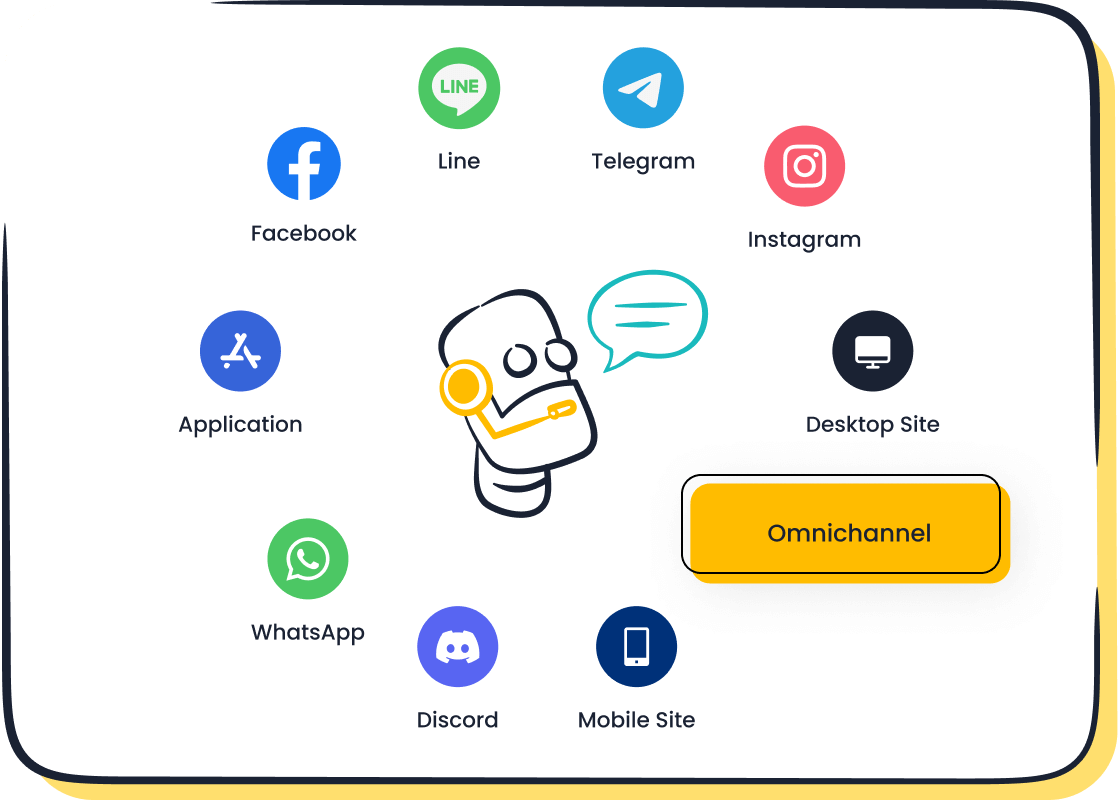
- Omnichannel Support: Your chatbot should work on channels your customers use, like WhatsApp and SMS. This creates a seamless experience.
- Multilingual Capabilities: You can serve a global audience when your chatbot speaks multiple languages.
- Easy Integrations: The platform must connect with other tools you use. This makes your workflow smooth.
- ChatGPT-Enabled Intelligence: Modern AI gives your chatbot the power to understand and provide human-like answers.
These features ensure your chatbot is a helpful and effective tool for your business.
The Sobot Point-and-Click Interface
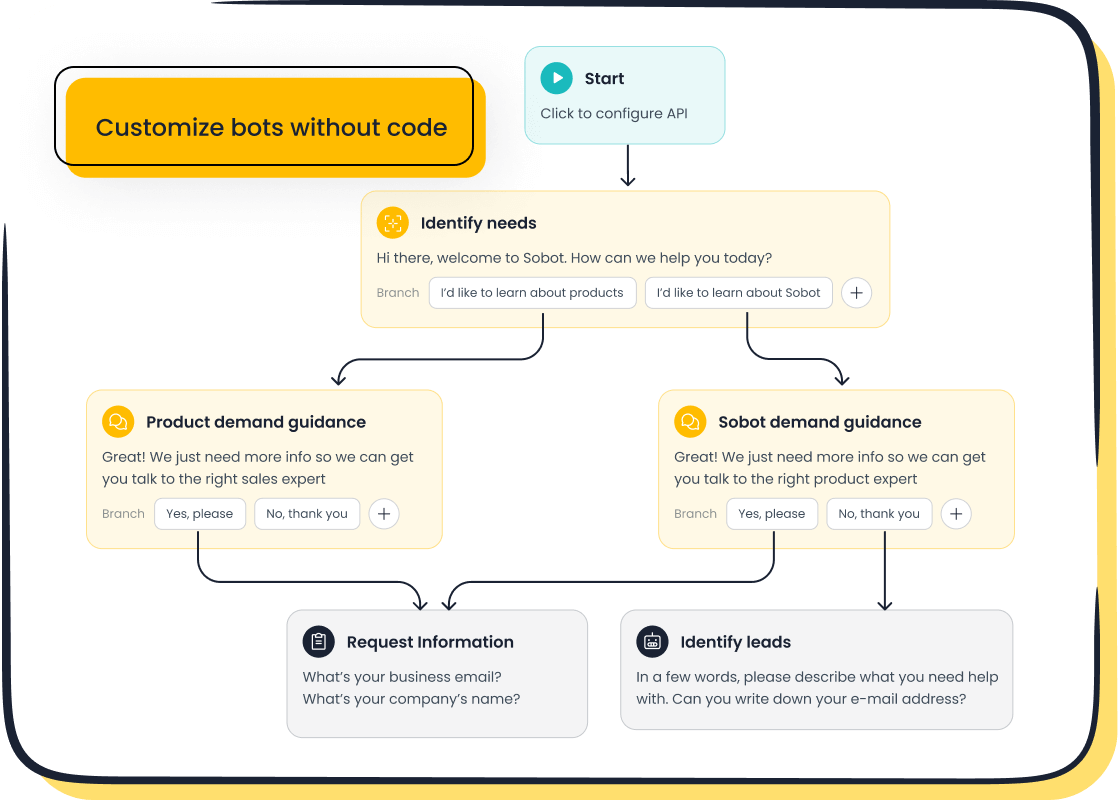
You do not need to be a programmer to create a chatbot. Sobot provides a point-and-click interface with straightforward building blocks. This visual approach lets you design the chatbot’s conversation flow without writing any code. You can use pre-built templates and drag-and-drop elements to build your chatbot quickly. This no code method makes advanced technology accessible to everyone on your team. You can design, test, and launch powerful ai-driven chatbots in hours, not weeks.
Understanding Pricing and Free Trials
Before you commit, you should understand the cost. Many platforms offer different pricing tiers. Look for a plan that fits your business size and goals. A free trial is a great way to test a chatbot. During a trial, you can explore the features and see how the chatbot works for you. Some trials may limit features like the number of users or advanced analytics. Use this time to build a basic chatbot and see if the platform is a good fit. This helps you make a confident choice.
How to Create a Chatbot in 5 Steps
You can create a chatbot that transforms your customer service. The process is straightforward with a no-code platform. You just need to follow five simple steps. This guide will walk you through how to create and train your chatbot from start to finish.
Step 1: Define Your Primary Goal
Before you build anything, you must decide what you want your chatbot to achieve. A clear goal gives your project direction. It helps you measure success and ensures your chatbot solves a real business problem. Your goal acts as a roadmap for the entire training process.
What is your main objective? Common goals for a customer service chatbot include:
- Reducing customer response times
- Providing 24/7 support
- Improving overall customer satisfaction
- Handling common and repetitive queries
- Offering customers more self-service options
Defining your goal helps you focus your efforts. If your goal is to qualify leads, your chatbot will ask different questions than a chatbot designed for technical support. A clear objective prevents you from wasting time and resources on low-impact issues.
Step 2: Gather Your Knowledge Base
Your chatbot is only as smart as the information you give it. You need to collect all the data that will form its brain. This is how you build your chatbot's knowledge base. You likely already have most of this information in your existing business documents.
Effective data sources include:
- Historical support chat logs: These show you real questions customers ask.
- Spreadsheet data: You can organize product details or troubleshooting steps in structured rows and columns.
- Frequently Asked Questions (FAQs): This is a perfect starting point for any customer service chatbot.
To make your chatbot effective, you must organize this information well. Group related questions together under a single topic, like "Returns & Refunds" or "Account & Login." This prevents your chatbot from giving duplicate or inconsistent answers. Avoid static, one-line replies. Instead, design conversational paths with follow-up questions to make the interaction feel natural.
Step 3: Upload Data for Instant Training
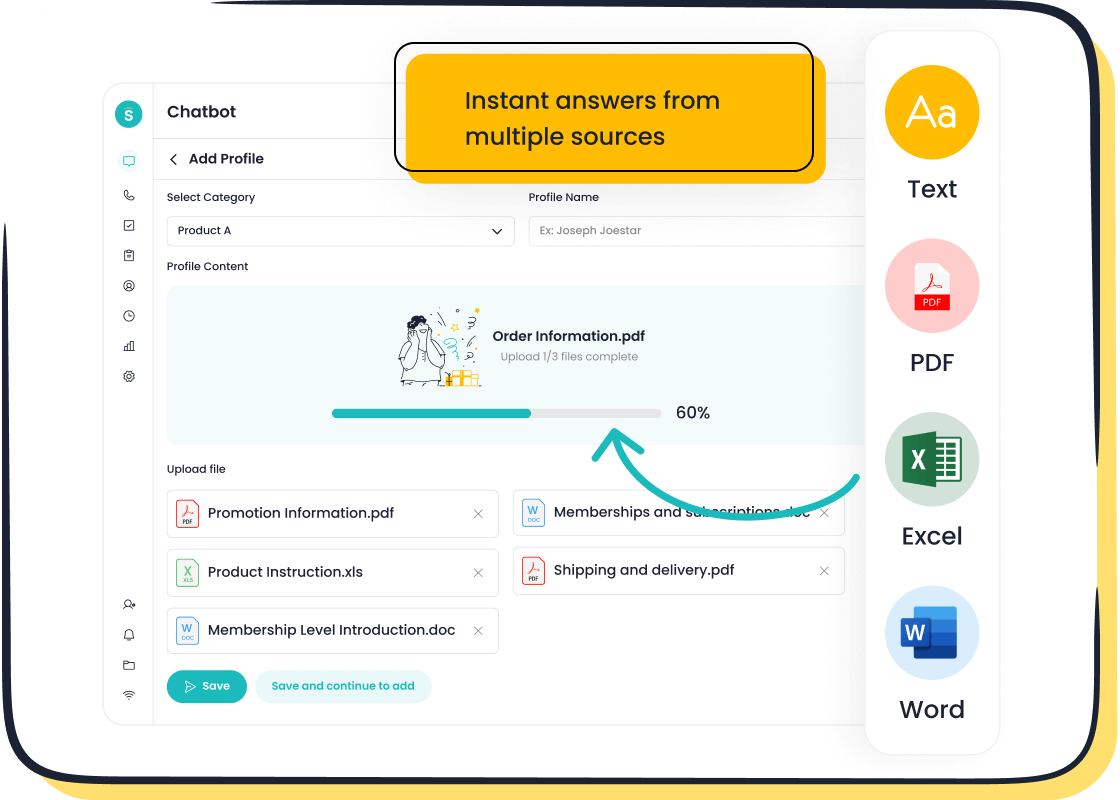
Once you have your data, it is time for the exciting part. You can now begin the ai chatbot training. With a no-code platform like Sobot, you do not need any technical skills. You simply upload your documents. The system does the heavy lifting for you.
Most modern platforms support a variety of file formats. This makes it easy to use the content you already have.
| File Type | Common Use Case |
|---|---|
| PDFs | Product manuals, whitepapers, service guides |
| Excels/CSVs | Product catalogs, structured Q&A lists |
| DOCs/TXTs | Articles, policy documents, text snippets |
You just upload these files, and the platform instantly uses them to train your chatbot. The AI reads and understands the content, turning it into a knowledge base that the chatbot can use to provide instant and accurate answers. This simple upload process is what makes it possible for anyone to create a chatbot.
Step 4: Customize Your Bot’s Personality
A chatbot should feel like a part of your team. You can customize its personality to match your brand's voice. Do you want your chatbot to be friendly and casual, or more formal and professional? Defining this tone makes the experience more consistent for your customers.
You can customize many elements to reflect your brand:
- Name and Avatar: Give your chatbot a name and upload your company logo or a friendly avatar.
- Welcome Message: Create a greeting that sets the right tone. A simple "Hello! How can I help you?" works, but you can also make it more personal.
- Color Scheme: Adjust the colors of the chat widget and buttons to match your website's design.
A warm and supportive tone can make customers feel understood, while a witty personality might fit a more playful brand. This customization makes your chatbot more engaging and builds trust with users.
Step 5: Test, Refine, and Deploy
Before you introduce your chatbot to the world, you need to make sure it works correctly. The testing phase is critical for a successful launch. You should test your chatbot to find any potential issues or gaps in its knowledge.
Pro Tip: Ask your team to interact with the chatbot. Have them ask questions in different ways, including using slang or typos. This helps you see how the chatbot handles unexpected inputs.
During this stage, you will validate the chatbot conversation flow and check for any dead ends. After you test your chatbot and feel confident in its abilities, you are ready for deployment. You can then deploy and embed on your site. But the work does not stop after deployment. You should regularly review chat logs to see what questions users are asking. This helps you find areas for improvement. Collecting user feedback, such as with a simple "Was this helpful?" poll, gives you direct insight to refine your chatbot over time. This cycle of testing, deployment, and refinement ensures your chatbot remains a valuable asset.
Best Practices for AI Chatbot Training
Effective AI chatbot training goes beyond the initial setup. You must continuously refine your chatbot to ensure it provides the best experience for your customers. These training tips will help you maintain a powerful and efficient AI assistant. Leading companies like OPPO use these practices to achieve outstanding results. By partnering with Sobot, OPPO achieved an 83% chatbot resolution rate and a 94% positive feedback rate, showing the power of great training.
Keep Your Knowledge Base Updated
Your business is always changing. Your chatbot’s knowledge must change with it. You should regularly update your knowledge base with new products, policies, and information. This keeps your chatbot’s answers accurate and helpful for every customer. A regular update schedule prevents your chatbot from giving outdated information.
Recommended Update Frequency | Content Type | Recommended Frequency | | :--- | :--- | | Dynamic content (e.g., product info) | Daily to Weekly | | Static content (e.g., core policies) | Monthly | | Fine-Tuning (improving model understanding) | Monthly to Quarterly |
Use a Mix of Data Sources
You can train your chatbot more effectively when you use diverse data. Relying only on FAQs limits your chatbot's abilities. You should combine multiple sources to build a comprehensive knowledge base.
- Help Articles: Teach your chatbot to provide clear, step-by-step instructions.
- Chat Logs: Give your AI insight into how real customers ask questions.
- Product Manuals: Provide detailed technical information for accurate answers.
Using a mix of data helps your chatbot handle a wider range of customer interactions and answer complex questions. This approach is key to successful AI chatbot training.
Review Chat Logs to Find Gaps
Your chatbot’s conversation logs are a goldmine of information. You should review these logs to see where your chatbot struggles. Look for unanswered questions or topics where customers seem confused. Tools can analyze these logs to automatically identify unresolved queries and suggest new FAQs. This process helps you find gaps in your chatbot's knowledge. You can then add the missing information to improve its performance and better serve your customers.
Set a Clear Path to a Human Agent
Even the best chatbot cannot solve every problem. You must create a seamless way for customers to reach a human agent. This builds trust and ensures every customer gets the help they need.
- Set a clear trigger. The chatbot should offer to connect the user to an agent if it cannot answer a question.
- Preserve the context. The full chat history should transfer to the human agent. This saves the customer from repeating themselves.
- Manage expectations. Inform the customer about the transfer and any potential wait times.
This human-machine cooperation, as seen with OPPO, is vital for handling complex interactions and keeping customers happy.
You no longer need technical skills for AI chatbot training. A no-code platform like Sobot makes it a simple business task. You can create a chatbot to improve your customer service by choosing a platform, uploading your data, and refining its performance. The market for this AI service is growing rapidly. Take the next step to enhance your customer support. Explore the Sobot Chatbot page to begin.
Embark on Your Contact Journey
FAQ
What is the main purpose of an AI chatbot?
You use an AI chatbot to automate customer conversations. It solves common questions on its own. This helps your support agents improve their productivity and focus on more difficult problems.
Do I need coding skills for AI chatbot training?
No, you do not need any coding experience. Platforms like Sobot offer a point-and-click interface. You can design and launch your chatbot using simple building blocks, making AI chatbot training accessible to everyone.
Can a chatbot interact in different languages?
Yes, it can. A modern AI chatbot is multilingual. You can set it up to communicate with your customers in their preferred language, helping you serve a global audience effectively.
How does a chatbot help reduce business costs?
A chatbot operates 24/7 without needing extra staff. It handles many customer questions at once. This automation can save your business up to 50% on agent costs while improving service.
By automating a large volume of simple inquiries, you reduce the need for a large support team and lower your operational expenses significantly.
See Also
Simple Steps to Deploy Effective Chatbot Solutions on Your Website
Effortless Guide: Building Your Own Website Chatbot Quickly and Simply
Integrating a Chatbot into Your Website: A Seamless Step-by-Step Process
Quickly Enhance Your Website by Adding an Intelligent Chatbot Today
Selecting Top Chatbot Software: An Essential Guide for Optimal Performance

