12 Affordable Alternatives to Intercom Right Now


You know Intercom is powerful, but its high cost is a major hurdle. A small team can easily face bills near $979 monthly. This article presents 12 affordable intercom alternatives to solve that problem. Find the perfect, affordable tool for your business right now. These options provide excellent live chat support without the high price tag.
Top Picks at a Glance
Here are our top affordable choices to get you started:
| Tool | Starting Price | Best For... |
|---|---|---|
| Sobot | Custom | All-in-one contact journey (Sobot AI, Sobot call center) |
| Tidio | $0/mo | A powerful free-tier and chatbots |
| HelpCrunch | $12/mo | All-in-one sales and support features |
These are some of the best alternatives to intercom available today.
Why Businesses Seek Affordable Intercom Alternatives
You may wonder why so many businesses are looking for alternatives to Intercom. While the platform is powerful, several key issues push growing companies to find more suitable solutions. Understanding these challenges helps you make a better choice for your own business.
High and Unpredictable Costs
Intercom's pricing is a major concern for many businesses. The costs can be high and often feel unpredictable. Your bill can increase quickly based on the number of contacts or product usage. This makes budgeting difficult, especially for startups and small businesses that need affordable and stable expenses. You need a tool that supports your growth, not one that penalizes it with rising fees.
Unnecessary Feature Complexity
Intercom offers a vast array of features. However, this complexity can be overwhelming. Your team may only need a few core functions, like live chat and a simple help desk. Paying for a complex suite of tools you don't use is not an efficient use of your budget. Many affordable intercom alternatives provide the essential features you need without the confusing and costly extras.
Customer Support Concerns
When you have a problem, you need fast and effective help. Unfortunately, many users report issues with Intercom's customer support. Slow response times from the customer support team can leave your business waiting for critical fixes.
Users often experience significant delays:
- First responses to tickets can take around 24 hours.
- Some developers have waited weeks for technical assistance.
- Bugs are sometimes reported with no clear timeline for a resolution.
This lack of reliable customer support can disrupt your operations and frustrate your team.
Better Value Elsewhere
Ultimately, many businesses find better value with other platforms. You can find powerful, affordable tools that deliver excellent results without the high price tag. These solutions often provide more focused features, better customer service, and more predictable pricing. Exploring these options ensures you get the best return on your investment.
1. Sobot: The All-in-One Contact Journey Platform
Summary
Sobot offers a complete solution to manage your entire customer journey. It is not just a chat tool but a comprehensive platform for customer communication management. You can unify sales, marketing, and customer support activities in one place. Sobot helps you improve customer satisfaction and operational efficiency with advanced AI and automation. It serves over 10,000 brands, including well-known companies like Samsung, Philips, and Michael Kors.
Key Features
Sobot provides a powerful suite of tools designed to handle every customer interaction. You get access to a robust system that integrates multiple channels seamlessly.
- AI-Powered Tools: Sobot uses an AI Agent for human-like service, an AI Copilot to assist your human agents, and AI Insight to provide deep performance analytics from a single dashboard.
- Omnichannel Solution: You can manage conversations from live chat, email, social media, and voice calls in one unified workspace.
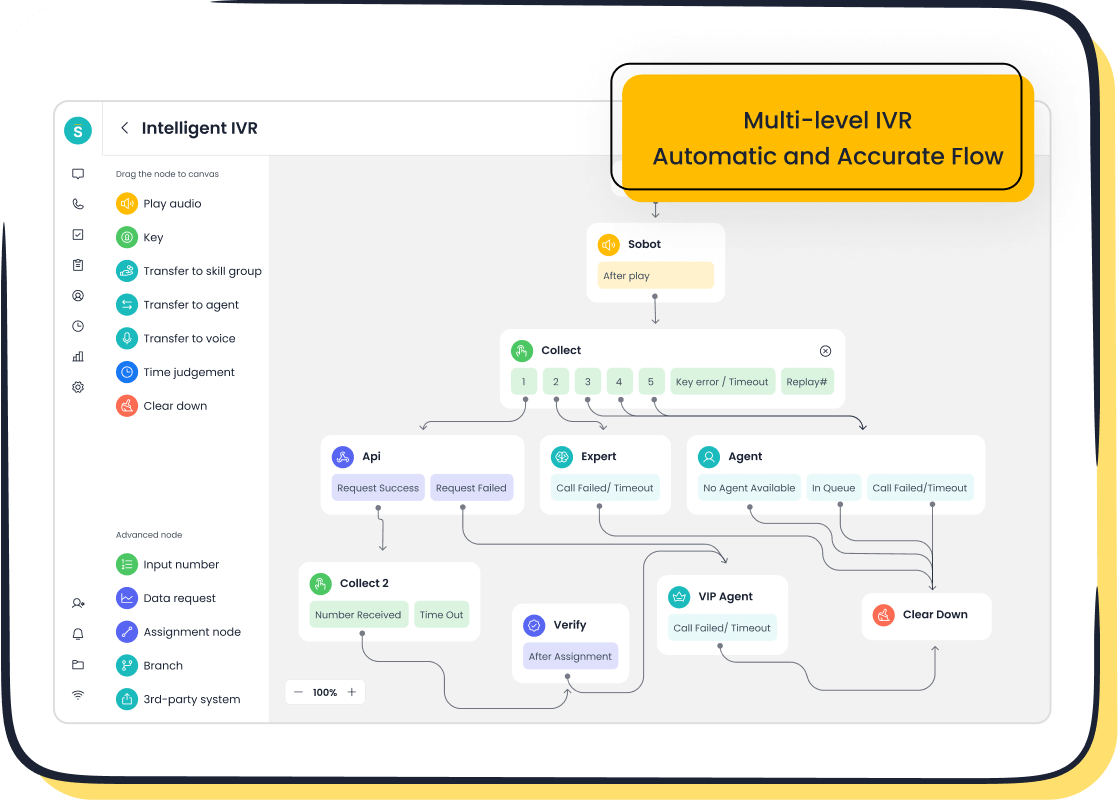
- Voice & Call Center: The platform includes a full-featured call center with intelligent IVR, smart call routing, and a voicebot for automated interactions.
- Official WhatsApp BSP: As an official WhatsApp Business Solution Provider, Sobot enables you to engage customers directly on their preferred messaging app.
What You'll Like
You will appreciate Sobot's focus on stability and efficiency. The platform is a reliable customer support platform that guarantees 99.99% system uptime, so you never have to worry about downtime disrupting your customer support. The unified agent workspace simplifies everything from ticket management to live conversations.
This all-in-one approach makes your team's workflow smoother. It also simplifies the user onboarding process, allowing your agents to become productive quickly. You can manage every touchpoint without switching between different applications.
Pricing
Sobot provides flexible and affordable pricing that scales with your business needs. You can choose from several models to find the best fit for your budget.
- Subscription Plans: These offer predictable monthly costs, perfect for small and medium businesses. Plans start as low as $30 per month.
- Usage-Based Plans: This pay-as-you-go model lets you pay based on interaction volume. It is ideal if your demand fluctuates.
- Hybrid Model: You can combine subscription and usage-based elements for a custom plan that matches your specific requirements.
This flexibility ensures you only pay for what you need, making it a cost-effective alternative.
2. HelpCrunch: The All-in-One Support & Sales Tool
Summary
HelpCrunch positions itself as a comprehensive platform for both customer support and sales teams. You can manage customer communications and drive sales from a single tool. It combines live chat, email marketing, and a help desk to create a unified experience. This makes it a strong choice if you want to align your support and sales efforts without juggling multiple subscriptions.
Key Features
HelpCrunch provides a balanced set of features for engagement and support. You get powerful tools to connect with customers and manage their needs efficiently.
- Shared Inbox: You can consolidate conversations from live chat, email, and social media like Facebook and Instagram into one central hub.
- Built-in Knowledge Base: It allows you to create a self-service help center, which helps customers find answers on their own.
- Lead Generation Tools: The platform includes pop-ups and automated chat messages to help you capture new leads based on visitor behavior.
- Email Marketing Campaigns: You can run email marketing campaigns directly within the platform to nurture leads and engage users.
- AI Features: An 'AI Editor' helps your agents write better replies, while 'AI Agents' can handle simple, common questions automatically.
What You'll Like
You will likely appreciate the platform's blend of sales and support tools. The user interface is clean, which simplifies the user onboarding process for your team. It provides a good balance of functionality without being overwhelming.
The combination of a shared inbox with email marketing and pop-ups gives you a powerful engine for growth. This integrated approach helps you convert visitors and support existing customers from one place.
What You May Not Like
While HelpCrunch is versatile, it may not be the perfect fit for everyone. The number of features could be more than what a team needing only simple live chat requires. Some users also report that the mobile app experience could be more polished for agents who need to provide support on the go. Its ticket management system is functional but may lack the advanced workflows of more specialized help desks.
Pricing
HelpCrunch offers an affordable and clear pricing structure based on team members. This makes it easy to predict your costs as your team grows.
| Plan | Monthly Cost (billed monthly) |
|---|---|
| Basic | $15/mo/team member |
| Pro | $25/mo/team member |
| Unlimited | $620/month |
3. Tidio: A Top Free and Affordable Option
Summary
Tidio is a popular choice if you are looking for a powerful free or low-cost live chat solution. It focuses on combining live chat, chatbots, and email marketing into one simple dashboard. You can engage website visitors in real-time and automate responses without an initial investment. This makes it an excellent and affordable starting point for small businesses and startups wanting to improve their customer support.
Key Features
Tidio's free plan gives you a surprising number of features to start with. You get access to essential tools to manage conversations and automate simple tasks.
- Generous Free Plan: You can have up to 10 operator seats and 50 live chat conversations per month. It also includes 50 Lyro AI conversations to help you get started.
- AI & Chatbots: The platform provides a visual chatbot editor and pre-built templates. You can automate answers to common questions 24/7.
- Unified Inbox: You can manage all your live chat conversations and visitor information from a single, shared inbox.
- Key Integrations: Tidio connects with popular apps like Shopify, WordPress, and Facebook Messenger, allowing you to centralize your communications.
What You'll Like
You will love how much value Tidio packs into its free plan. It gives you the core tools to offer live chat and basic automation without any cost. This allows you to test the waters of conversational support before committing to a paid plan.
The platform is known for its user-friendly interface. Your team can get set up and start chatting with customers in minutes, with no technical skills required.
What You May Not Like
While the free plan is a great entry point, Tidio's pricing can become costly as your needs grow. The paid plans are based on the number of unique visitors your chatbots interact with. This model can make your monthly bill less predictable if your website traffic fluctuates. Additionally, some features, like changing the AI bot's name from 'Lyro,' are only available on more expensive plans.
Pricing
Tidio offers a straightforward pricing structure that starts with a free forever plan. You can upgrade as your conversation volume increases.
| Plan | Monthly Cost (billed annually) |
|---|---|
| Free | $0/mo |
| Starter | $29/mo |
| Communicator | $29/mo/seat |
| Chatbots | $29/mo |
Note: The Communicator and Chatbots plans can be purchased separately or together. Tidio also offers a custom Lyro AI plan.
4. Crisp: The Versatile Startup Chat Tool
Summary
Crisp is a great choice if you want an all-in-one platform designed for startups. You get tools for sales, marketing, and support in one place. It unifies all your customer conversations into a shared inbox, which simplifies your team's workflow. This approach helps you manage customer relationships without needing multiple software subscriptions, making it a very versatile and affordable option.
Key Features
Crisp packs a wide range of features into its platform. You can handle everything from simple chats to complex automated campaigns.
- Shared Inbox: Manage conversations from live chat, email, WhatsApp, and Instagram Direct Messages in one unified view.
- Chatbots & Automation: Use a visual workflow builder to create automated responses. You can trigger these bots based on user behavior, like inactivity.
- Knowledge Base: Build a self-service help center so customers can find answers on their own, reducing the load on your team.
- Live Translate: Communicate with customers worldwide in their native language with an instant translation feature.
- Advanced Support Tools: You can use co-browsing or video chat to provide hands-on customer support directly from the chat widget.
What You'll Like
You will enjoy Crisp's simple and clean interface. It makes the platform easy to use from day one. The combination of many tools into one system creates a powerful and efficient experience for your team.
Having your CRM, knowledge base, and campaigns in the same place as your chat streamlines the entire user onboarding process. Your team can learn one system instead of many.
What You May Not Like
While Crisp is powerful, its free plan is quite basic. It only includes live chat and a team inbox for two seats. To access features like a knowledge base, canned responses, or key integrations, you must upgrade to a paid plan. The Unlimited plan contains many features, which might be more than a small team needs.
Pricing
Crisp offers transparent pricing based on a flat fee per workspace, not per agent. This makes your costs predictable as your team grows.
| Plan | Cost (per month per workspace) |
|---|---|
| Basic | Free |
| Pro | $25 |
| Unlimited | $95 |
The Pro plan adds CRM features and basic integrations, while the Unlimited plan unlocks the knowledge base, chatbot, and advanced automation.
5. LiveChat: The Dedicated Chat Specialist
Summary
LiveChat focuses on doing one thing exceptionally well: live chat. If you need a powerful, polished, and reliable tool specifically for real-time conversations, this is a top contender. It is designed for teams that want to provide excellent live chat support without the complexity of an all-in-one system. You get a dedicated platform built to improve agent efficiency and customer satisfaction through direct interaction.
Key Features
LiveChat offers a deep set of features that help you manage and optimize your chat operations. You can customize the tool to fit your team's specific workflow.
- Agent Grouping: You can route chats to the right team member based on their skills, ensuring customers get help from the most qualified person.
- Proactive Chat: The system allows you to start conversations with visitors automatically. You can set it to engage someone who stays on a product page for a long time.
- Powerful Integrations: It connects with over 200 popular tools, including Salesforce, Shopify, and WhatsApp, to keep your data in sync.
- Advanced Analytics: You get detailed reports on chat volume, agent response times, and customer satisfaction scores to track your performance.
What You'll Like
You will appreciate the platform's focus and polish. Since LiveChat specializes in chat, its features are robust and well-designed. The interface is clean and intuitive, making it easy for your customer support team to get started.
The detailed analytics are a major advantage. You can track key metrics to see how your team is performing and find areas for improvement. This data helps you make smart decisions to enhance your support quality.
What You May Not Like
LiveChat's specialization is also its main limitation. It does not include built-in tools for email marketing, a knowledge base, or a full CRM. If you need those features, you will have to integrate other software, which can add complexity and cost. The pricing is per agent, so it can become expensive for larger teams, making it a less affordable option as you scale.
Pricing
LiveChat's pricing is based on the number of agents on your team. You can save money by choosing to pay annually.
| Plan | Price (billed annually) | Chat History |
|---|---|---|
| Starter | $20/agent/mo | 60 days |
| Team | $41/agent/mo | Unlimited |
| Business | $59/agent/mo | Unlimited |
An Enterprise plan with custom pricing is also available for large organizations.
6. Freshdesk Messaging: The User-Friendly Help Desk

Summary
Freshdesk Messaging comes from the well-known Freshworks family of business software. You get a tool that excels at combining modern messaging with a traditional, powerful help desk. It is designed for teams that want a user-friendly way to manage conversations from multiple channels. If your main goal is to organize and resolve customer issues efficiently, this platform is a strong contender.
Key Features
You get a feature set focused on organizing conversations and automating workflows. The platform gives your team the tools to provide structured and efficient customer support.
- Omnichannel Messaging: You can engage with customers across your website, mobile app, WhatsApp, and Facebook Messenger from a single dashboard.
- Advanced Automation and Bots: The platform lets you deploy chatbots for lead qualification and auto-responses using a visual flow builder.
- Context-Driven Conversations: Your agents can access customer history, site activity, and CRM data right in the chat window for more personal responses.
- Intelligent Routing: You can automatically send chats to the right team or agent based on the topic, customer profile, or agent availability.
- In-Depth Analytics: The system allows you to track metrics like response time, agent workload, and satisfaction scores to improve your workflow.
What You'll Like
You will appreciate how Freshdesk Messaging integrates chat with a robust ticketing system. This makes it easy to track complex issues that cannot be solved in a single conversation. The interface is clean and designed for agent productivity.
The platform's strength is its ability to turn any conversation into a trackable ticket. This focus on ticket management ensures that no customer request gets lost, providing a reliable structure for your customer support team.
What You May Not Like
The platform's power can also be a drawback if you only need simple live chat. The free plan is very limited, which means you will likely need to upgrade to a paid plan to access essential automation and reporting features. The per-agent pricing model can also become costly as your team grows, similar to other platforms in this space.
Pricing
Freshdesk offers a clear, per-agent pricing structure that starts with a free plan. This affordable customer support platform allows you to scale as your needs increase.
| Plan Name | Price (per agent/month) |
|---|---|
| Free Plan | $0 |
| Growth Plan | $15 |
| Pro Plan | $49 |
| Enterprise Plan | $79 |
Paid plans start at $15 per agent per month, with more advanced features like skill-based routing available on higher-tier plans.
7. Chaport: The Simple Chat Solution
Summary
Chaport offers a straightforward and simple messaging platform for your business. You get an all-in-one solution that combines live chat, chatbots, and a knowledge base. It is designed for teams that want an easy way to talk with customers without complex features. If you need a clean and efficient tool for customer communication, Chaport is a solid choice.
Key Features
Chaport provides the essential tools you need for effective customer support. You can manage conversations from several places in one app.
- Multi-channel Support: You can talk to customers on your website, Facebook, Viber, and Telegram from a single dashboard.
- AI-Powered Chatbot: The platform uses a chatbot to answer common questions, collect lead information, and connect visitors to your knowledge base. It can also transfer chats to a live agent if needed.
- Typing Insights: Your agents can see what visitors are typing in real-time. This helps them prepare answers faster.
- Customization: You can change the chat widget's color and style to match your brand's look and feel.
What You'll Like
You will appreciate Chaport's simplicity and its generous free plan. The free version includes unlimited chats, chat history, and registered operators, making it a very affordable way to get started. It gives you core features without an initial investment.
The platform is very user-friendly. Your team can quickly learn how to use it. The ability to see what a customer is typing before they send the message helps your agents respond more quickly and accurately.
What You May Not Like
Chaport's focus on simplicity means it lacks some advanced features. You will not find deep marketing automation or complex CRM functionalities. The chatbot relies on scripted responses and set rules, which may not be powerful enough for teams needing more advanced AI capabilities. If you need a tool with more robust automation, you might find it limited.
Pricing
Chaport offers a simple pricing model with a powerful free option. The paid plans add more advanced features.
| Plan | Price (per operator/month) |
|---|---|
| Free | $0 |
| Pro | $29 |
| Business | $59 |
| Enterprise | Custom |
The Pro plan unlocks features like the chatbot, detailed visitor info, and key integrations.
8. Zendesk Suite: The Scalable Service Powerhouse
Summary
Zendesk Suite is a well-known customer support platform built for scalability. You get a powerful set of tools designed to handle everything from simple tickets to complex enterprise workflows. It is a good option if your business is growing quickly and you need a system that can grow with you. Zendesk centralizes all your customer service operations into one place.
Key Features
Zendesk provides a deep feature set focused on efficiency and organization. You can customize workflows and manage a high volume of customer interactions.
- Unified Help Desk: You can manage requests from email, chat, social media, and phone as tickets in a single system.
- AI and Automation: The platform uses an Answer Bot to resolve common questions. You can also create automated workflows and macros to handle repetitive tasks.
- Advanced Routing: It offers skills-based routing to send tickets to the agent with the right expertise, improving resolution times.
- Powerful Integrations: You can connect Zendesk with hundreds of apps like Salesforce, Slack, and Shopify to keep your business data in sync.
What You'll Like
You will appreciate the platform's robust ticket management capabilities. It is designed to bring order to complex customer support environments. The system provides deep analytics and reporting, which helps you track team performance and customer satisfaction. The user onboarding process is supported by extensive documentation and a large community forum.
Zendesk's strength lies in its ability to scale. You can start with the basics and add more advanced features as your team and needs expand.
What You May Not Like
Zendesk's power comes with a higher price tag. The per-agent pricing model can become expensive for larger teams, making it a less affordable option compared to others on this list. The vast number of features can also be overwhelming if you only need a simple chat and ticketing tool. Some advanced AI features require purchasing separate add-ons.
Pricing
| Plan | Price (Billed Annually) |
|---|---|
| Suite Team | $55/agent/month |
| Suite Growth | $89/agent/month |
| Suite Professional | $115/agent/month |
| Suite Enterprise | $169/agent/month |
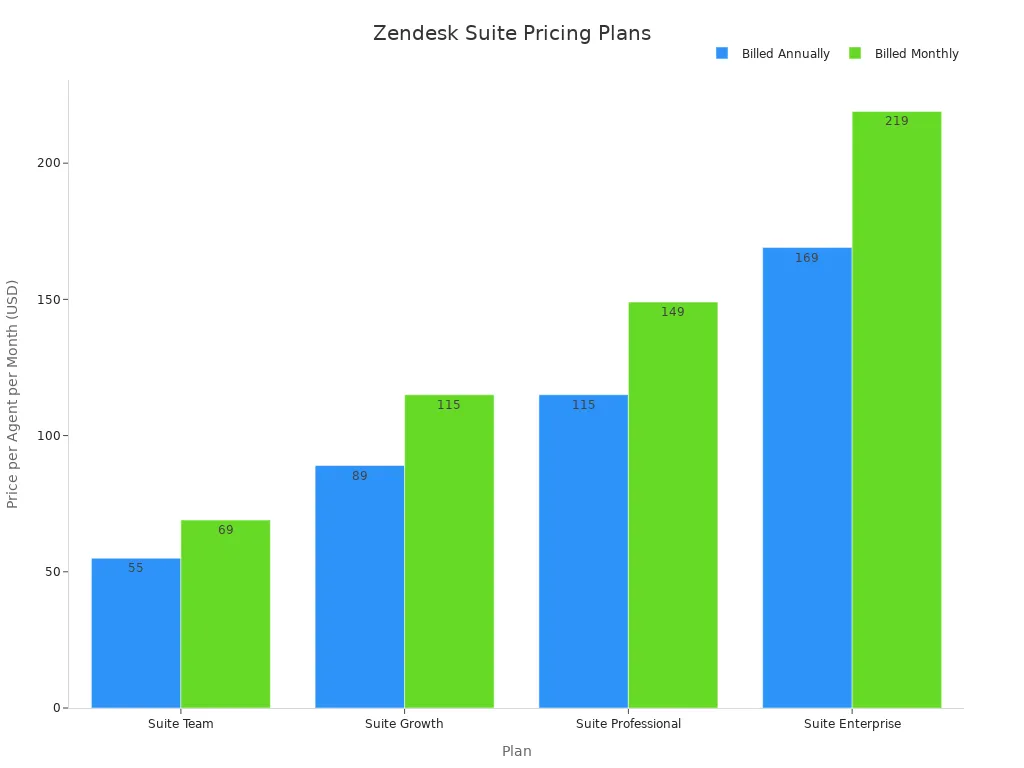
You can save around 20% by choosing an annual plan. Each tier unlocks more advanced features like SLAs, multilingual support, and skills-based routing.
9. Gist: The Marketing-Focused Alternative
Summary
Gist is a strong choice if your main goal is to combine customer communication with powerful marketing tools. You get a platform that helps you capture, nurture, and convert leads. It brings together live chat, email marketing, and automation, making it an all-in-one solution for growth-focused teams. This approach allows you to manage the entire customer lifecycle from a single dashboard.
Key Features
Gist provides a suite of tools designed to boost your marketing efforts. You can create and manage campaigns with a high degree of control.
- Email Marketing Suite: You get access to a responsive email builder with over 200 pre-made templates. Paid plans include a drag-and-drop editor to simplify campaign creation.
- Marketing Automation: A visual workflow builder lets you create complex automation sequences. You can use triggers based on user behavior to send personalized messages.
- Campaign Tracking: The platform offers a real-time dashboard to monitor key metrics. You can track views, click-through rates, and ROI to measure your success.
- Chat and Forms: You can use live chat and custom forms to engage website visitors and capture lead information directly.
What You'll Like
You will appreciate how Gist centralizes your marketing and sales activities. Having your email campaigns, automation, and chat in one place streamlines your workflow. This integration simplifies the user onboarding process for your team, as they only need to learn one system.
The visual automation builder is a standout feature. It gives you the power to create sophisticated, multi-channel campaigns without needing to write any code.
What You May Not Like
Gist's focus on marketing means its dedicated customer support features may feel less developed than other platforms. The pricing structure can also be confusing. You have to choose between a marketing-focused plan, a support-focused plan, or an all-in-one bundle, which can make it hard to predict costs if your needs change.
Pricing
Gist offers a flexible and affordable pricing model that lets you choose the features you need. You can start with a generous free plan.
- Free: Includes live chat and email marketing for up to 500 contacts for two users.
- Growth Plan: Starts at $24.99/month and adds marketing automation and advanced email features.
- Support Plan: Costs $9/month per user and adds a knowledge base and chatbots.
- All-in-One Plan: Combines both plans, with pricing based on users and contacts.
10. HubSpot Service Hub: The Integrated CRM Platform
Summary
HubSpot Service Hub is a powerful customer service platform built on top of HubSpot's well-known CRM. You get a solution that deeply integrates your customer support efforts with your sales and marketing data. It is designed for businesses that want a single source of truth for all customer interactions. This makes it a strong choice if you already use other HubSpot products or plan to build your operations around a unified CRM.
Key Features
HubSpot Service Hub provides a wide range of tools that scale with your business needs. You can start with the basics and add more advanced capabilities as you grow.
- Unified Help Desk: You can track and organize all customer issues with a robust ticket management system.
- Self-Service Options: The platform allows you to build a knowledge base and customer portals, empowering customers to find answers on their own.
- Automation: You can use automated ticket routing and workflows to handle repetitive tasks and improve team efficiency.
- Omnichannel Support: Engage customers through live chat, email, and internet calling, all from within the HubSpot platform.
What You'll Like
You will appreciate the seamless integration with the HubSpot CRM. This gives your customer support team a complete view of every customer's history, from marketing emails to sales deals. This context helps your agents provide more personalized and effective service.
The platform also simplifies the user onboarding process for teams already familiar with the HubSpot ecosystem. Everything feels connected, creating a smooth workflow.
What You May Not Like
HubSpot's strength is also its main limitation. If you are not invested in the HubSpot ecosystem, the platform can feel restrictive. The most powerful features, like advanced automation and SLAs, are locked behind the more expensive Professional and Enterprise plans. These higher-tier plans also require a significant one-time onboarding fee, making it a less affordable option for some businesses.
Pricing
HubSpot offers a range of plans, starting with a free tier. The pricing is based on a per-seat model, and you can save by paying annually.
| Plan | Price (Billed Annually) |
|---|---|
| Free Tools | $0 |
| Starter | Starts at $9/seat/month |
| Professional | Starts at $90/seat/month |
| Enterprise | Starts at $150/seat/month |
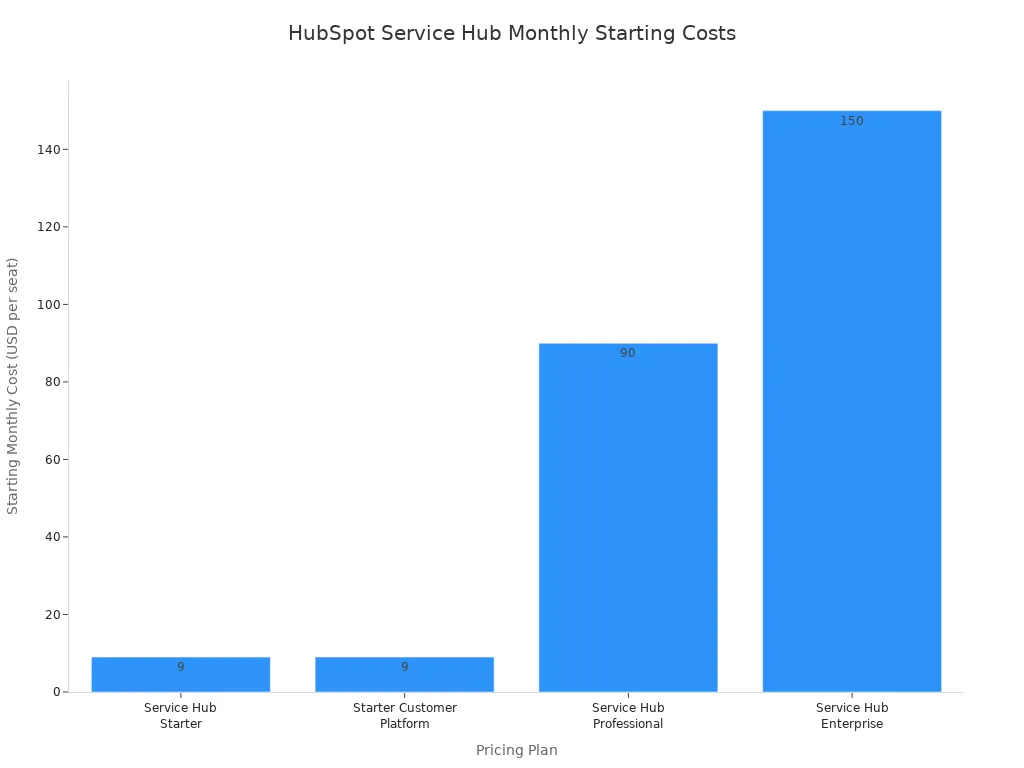
Note: The Professional and Enterprise plans require a one-time onboarding fee of $1,500 and $3,500, respectively.
11. Olark: The Easy-to-Use Startup Option
Summary
Olark is a great choice if you need a simple and easy-to-use live chat tool. You get a platform designed to help you connect with customers without needing technical skills. It focuses on making live chat accessible for startups and small teams. You can improve your customer support and increase sales by talking directly to website visitors in real-time.
Key Features
Olark provides a solid set of features to manage your live chat operations. You can customize the tool to fit your team's needs and workflow.
- Chat Automation: You can use chatbots to provide 24/7 support and answer common questions, which reduces customer wait times.
- Searchable Transcripts: The platform saves all chat conversations. You can search them later to find important customer details or for training purposes.
- Custom Forms: You can collect visitor information like names and emails before a chat starts.
- Powerful Integrations: Olark connects with many popular tools, including HubSpot, Salesforce, Slack, and Shopify.
What You'll Like
You will appreciate Olark's simplicity and focus on core chat functions. The interface is clean and intuitive, making it easy for your team to get started. The searchable transcripts are a powerful feature for reviewing past conversations and improving service quality.
The platform's integration capabilities are a major plus. You can easily connect Olark to your existing CRM or marketing software to keep all your data in one place.
What You May Not Like
Olark's simplicity can also be a limitation. The free plan is very restrictive, offering only 20 chats per month. To get useful features, you must upgrade to a paid plan. Many advanced functions, like co-browsing and live chat translation, are only available as expensive add-ons called "PowerUps." This can make the total cost less predictable and less affordable.
Pricing
Olark offers a straightforward pricing plan with the option to add more features. You can choose a monthly or yearly subscription to save money.
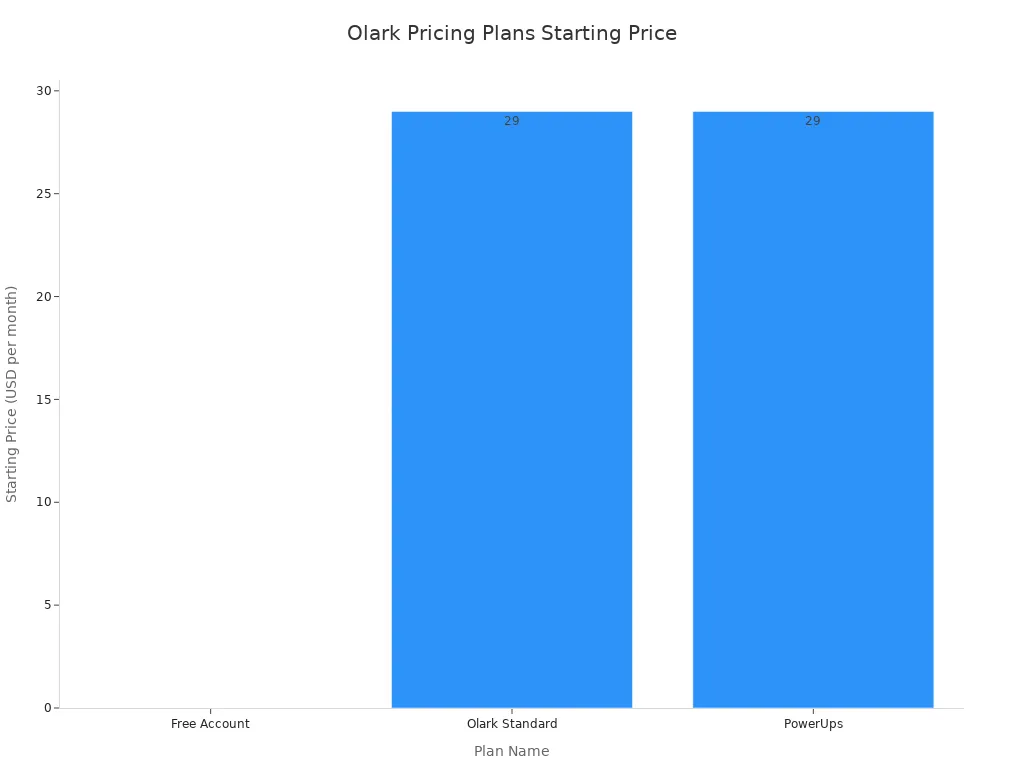
| Plan | Price (per agent/month) |
|---|---|
| Standard | $29 |
| Pro | Custom |
The Standard plan includes all core features, while the Pro plan adds a custom-built chatbot and a dedicated account manager. PowerUps cost between $29 and $99 per month each.
12. Chatabird: The Premium-Feel Alternative
Summary
Chatabird gives you a live chat solution with a premium feel, designed for simplicity. You get a tool that focuses on easy integration, especially for WordPress websites. It is a great choice if you want a clean, professional-looking chat widget without a complicated setup process. This platform helps you connect with visitors directly from your site.
Key Features
Chatabird provides a focused set of features to get your chat up and running quickly. You can add a professional chat experience to your website with minimal effort.
- Easy WordPress Integration: You can add the chat widget to your site with a simple plugin.
- Simple Configuration: The setup process happens directly through your WordPress admin dashboard.
- Customizable Identity: You can use a custom app ID and identity validation for added security.
- Lightweight Design: The tool is built to be lightweight, so it will not slow down your website's performance.
What You'll Like
You will appreciate how simple Chatabird is to install and manage. The direct integration with WordPress means you do not need any technical skills to get started. Your team can begin offering customer support in just a few minutes.
The clean and modern design of the chat widget gives your website a professional look. It provides a great user experience for your visitors without a high price tag.
What You May Not Like
Chatabird's simplicity is also its main limitation. It lacks advanced features like chatbots, a built-in knowledge base, or deep marketing automation tools. Its strong focus on WordPress makes it less ideal if your website is built on a different platform. If you need a more comprehensive, all-in-one solution, you may find it too basic for your needs.
Pricing
Chatabird offers a simple and affordable pricing structure based on the number of agents.
| Plan | Price (per agent/month) |
|---|---|
| Starter | $19 |
| Pro | $39 |
| Business | $79 |
The Starter plan provides core chat features for one agent, making it a good entry point for solo entrepreneurs or very small teams.
How to Choose Between Alternatives to Intercom

Choosing the right platform can feel overwhelming. You have many options, so it is important to find the best fit for your business. Use these steps to select the right affordable alternatives to intercom for your team.
Assess Your Core Needs
First, you should look at what your business truly needs. Do you require simple live chat support, or do you need more? Make a list of your essential features. You might need a shared inbox, a knowledge base, or a system for ticket management. Understanding your core needs helps you avoid paying for features you will never use. This step ensures you find the right customer support tools for your specific goals.
Compare Pricing vs. Features
Next, you need to compare the price against the features offered. Many affordable platforms provide excellent value. Look at the pricing models. Is it per agent, per contact, or a flat fee? Make sure the cost is predictable and fits your budget. Your goal is to find a tool that gives you the power you need without a high price tag.
Check for Key Integrations
You must check if the platform connects with your other tools. Good integrations make your team more efficient. Connecting your chat tool to your CRM or e-commerce platform like Shopify can streamline your workflow.
For example, integrating with tools like Slack and Shopify allows your team to:
- Get instant notifications for new sales or stock changes.
- Automate order management and inventory tracking.
- Share sales reports easily for quick team discussions.
- Reduce response times for customer issues.
These connections save time and help you provide better service.
Consider Ease of Use
Finally, think about how easy the tool is to use. A complicated platform can slow your team down. Look for a clean interface and a simple user onboarding process. Your team should be able to learn the new system quickly. A user-friendly tool improves adoption and makes your ticket management more effective. The best alternatives to intercom are powerful yet simple to navigate.
You do not need Intercom's high price to deliver great customer service. This list provides many affordable alternatives to intercom, from simple chat tools to all-in-one platforms like Sobot. You can find a powerful and affordable solution that fits your specific needs.
Take the next step today. Review the list, pick a tool for a free trial, and make the switch to a platform that helps your business grow.
FAQ
### Do any of these platforms offer a free plan?
Yes, many do. You can start with free plans from Tidio, Crisp, and HubSpot. These options give you essential features like live chat without any initial cost. They are great for testing a platform before you decide to upgrade to a paid plan.
### How hard is it to switch from Intercom?
Switching is usually straightforward. Most platforms offer simple setup processes and data import tools. You can often export your contacts and conversation history from Intercom. Many of these affordable alternatives to Intercom also provide guides to help you migrate smoothly.
### Should I choose an all-in-one tool or a specialized one?
Your choice depends on your needs. You should pick an all-in-one platform like Sobot or Gist if you want to manage support, sales, and marketing in one place. You can choose a specialized tool like LiveChat for powerful, dedicated chat features.
### Can these alternatives grow with my business?
Absolutely. Most of these tools offer scalable plans. You can start with a basic or free plan and upgrade as your team grows or your needs change. Platforms like Zendesk and HubSpot are well-known for supporting businesses from startup to enterprise level.
See Also
Leading Voice Over IP Solutions: Essential Software Picks for 2024
Comparing Premier Interactive Voice Response Software: A Comprehensive Guide
Automated Voice Calling Software: In-Depth Reviews of Top Systems for 2024
The 10 Best VoIP Software Solutions for Small Business Success
Discover the Top 10 IVR Interactive Voice Response Systems of 2024

