Add Social Media Chat to Your Website Fast (10 Best Tools)


You can add social media chat to website functionality to quickly boost your sales and support efforts. A well-placed chat widget on your website can increase conversions by as much as 20%. To help you get started, here are our top recommendations.
- Best for Omnichannel: Sobot (seamlessly integrates with Sobot AI and the Sobot call center)
- Best Free Option: Tawk.to
- Best for Multiple Channels: Chaty
This type of live chat plugin allows you to connect with customers instantly. Since 79% of users prefer chat for its quick replies, adding a chat widget to your site builds trust and enhances your customer service.
Why Add Social Media Chat to Your Website?

You might wonder if it is worth the effort to add social media chat to website pages. The answer is a clear yes. Integrating a chat feature offers powerful benefits that can transform your customer relationships and boost your bottom line, especially for a WordPress site.
Boost Customer Engagement
A social media chat widget helps you build stronger customer relationships. It allows you to have real, meaningful conversations on platforms your customers already use. This humanizes your brand. When customers feel heard and valued, their loyalty increases. For example, research shows that 62% of millennials are more likely to buy from a brand that actively engages with them on social media. Many WordPress plugins make this level of engagement simple to achieve.
You can also use AI-powered tools to enhance these interactions.
- AI chatbots provide 24/7 assistance for your WordPress site.
- They offer personalized recommendations based on customer preferences.
- They create a seamless experience that boosts engagement.
This strategy helps you build a loyal community around your brand on your WordPress platform.
Improve Support Speed
Customers expect fast answers. Social media chat delivers instant support right when they need it. When you provide prompt and efficient help, you build trust and confidence in your brand. This quick assistance improves a customer's perception of your business. A good chat widget on your WordPress site can answer questions immediately. This leads to greater customer loyalty and more repeat purchases. You can proactively address concerns and show you are committed to customer satisfaction.
Increase Sales and Conversions
A chat feature is a powerful tool for lead generation. Instead of using static forms, you can use conversational chat to capture leads. This method feels more natural and interactive. For example, a chatbot can:
- Ask qualifying questions to identify serious buyers.
- Deliver lead magnets like ebooks directly in the chat.
- Integrate with calendars to book appointments automatically.
This interactive approach keeps users engaged. It can significantly lower your cost per lead. By adding this functionality to your WordPress site, you turn more visitors into qualified leads and paying customers.
Comparing the Best WordPress Chat Plugins

Choosing the right tool is key to success. You need a solution that fits your budget, supports your favorite channels, and works well with WordPress. Here is a comparison of the best WordPress chat plugins to help you decide.
1. Sobot: An Omnichannel Live Chat Plugin
Sobot offers an all-in-one contact center solution to unify your customer communications. It is a powerful live chat plugin designed for businesses that need a complete and scalable system.
- Best For: Businesses seeking a comprehensive, AI-powered omnichannel solution to manage sales, marketing, and support across all customer touchpoints.
- Key Features:
- Official WhatsApp BSP: As a Meta Business Solution Provider, Sobot provides a certified WhatsApp Business API for reliable, scalable customer engagement.
- Omnichannel Live Chat: You can centralize all support channels and customer conversations into one platform.
- Unified Workspace: This feature integrates every customer channel, including voice, email, and social media, into a single service dashboard for your agents.
- Omnichannel AI: Sobot integrates AI across every touchpoint, from chatbots to agent assistance, improving efficiency and providing 24/7 support.
- Pricing: Sobot provides custom pricing tailored to your business needs. You can book a demo to get a detailed quote.
- Pros:
- Integrates seamlessly with its own AI chatbot, ticketing system, and call center solutions.
- Provides a true omnichannel experience for consistent customer service.
- Offers robust data analytics for deep insights into performance and customer behavior.
- Highly scalable to support growing businesses of any size.
2. Chaty
Chaty is a popular live chat plugin that lets you display multiple social media channels in a single widget. It helps you connect with visitors on their preferred platforms.
- Best For: Website owners who want to offer a wide variety of chat channels without a complicated setup.
- Key Features:
- Supports over 25 social channels, including WhatsApp, Messenger, and Telegram.
- Allows you to add multiple agents to a single channel.
- Offers page targeting and traffic source targeting rules.
- Includes a contact form feature to capture leads.
- Pricing: Chaty offers annual plans.
- Basic: $49/year
- Plus: $109/year
- Agency: $179/year
- Pros:
- Extensive customization options for your chat widget.
- You can create preset messages for WhatsApp.
- The support team is responsive and helpful.
- Cons:
- The free version has limited features.
- It might be too complex if you only need a single chat channel.
3. Tidio
Tidio combines live chat, chatbots, and email marketing into one tool for your WordPress site. It is designed to help you generate leads and improve customer service.
- Best For: Small to medium-sized businesses looking for an affordable, all-in-one solution with strong chatbot capabilities.
- Key Features:
- Visual chatbot editor with templates.
- Live visitor list to see who is on your site.
- Integrates with many third-party apps.
- Provides desktop and mobile apps for agents.
- Pricing: Tidio has a free plan and several paid tiers.
| Plan | Cost (Billed Annually) | Key Features |
|---|---|---|
| Free | $0/month | 50 live chat conversations, 100 chatbot triggers |
| Starter | $29/month | 100 conversations, basic analytics, 50 AI conversations |
| Growth | $59/month | 250 conversations, advanced analytics, removes Tidio branding |
| Plus | Starts at $749/month | Custom limits, premium support, multisite support |

- Pros:
- Generous free plan for new businesses.
- Easy-to-use interface.
- Powerful and intuitive chatbot builder.
- Cons:
- Pricing can become expensive as you add more features or agents.
- The free plan has strict limits on conversations and chatbot triggers.
4. Tawk.to
Tawk.to is a completely free live chat plugin that offers impressive live chat functionality. It allows you to monitor and chat with visitors on your WordPress website in real time.
- Best For: Startups and small businesses that need a robust and free live chat solution.
- Key Features:
- Unlimited agents, chats, and websites.
- Built-in ticketing system and knowledge base.
- Supports over 27 languages.
- Real-time visitor monitoring.
- Pricing: The core software is free. You can pay for add-ons.
- Remove Branding: $19/month
- AI Assist: Starts at $29/month
- Hired Agents: Starts at $1/hour
- Pros:
- The most feature-rich free live chat plugin available.
- Easy to install and configure on WordPress.
- Offers 24/7 live support to its users.
- Cons:
- The interface can feel a bit dated.
- The free version includes Tawk.to branding.
5. WP Social Chat
WP Social Chat is a dedicated WordPress chat plugin for WhatsApp. It lets your customers open a conversation with you directly from your website to their WhatsApp account.
- Best For: Businesses that primarily use WhatsApp for customer communication.
- Key Features:
- Adds a WhatsApp button to your site.
- You can customize the button and chatbox colors.
- Set preset messages for different pages.
- Display a chatbox with a customized header and footer.
- Pricing: There is a free version and a Pro version starting at $49/year for a single site.
- Pros:
- Simple and focused on WhatsApp.
- Easy to set up and use.
- Lightweight and does not slow down your WordPress site.
- Cons:
- Only supports WhatsApp.
- Lacks advanced features like chatbots or analytics.
6. Elfsight Social Media Chat
Elfsight offers a versatile live chat plugin that supports a wide range of social messengers. You can add social media chat to website pages to stay connected with your audience.
- Best For: Website owners who want a highly customizable chat widget with support for multiple social channels.
- Key Features:
- Supports 15+ popular messengers.
- Customizable chat triggers and welcome messages.
- Flexible layout and design options.
- No coding required for installation.
- Pricing: Plans start with a free Lite version and paid plans begin at $5/month.
- Pros:
- Modern and clean user interface.
- You can show the chat on specific pages or to certain audiences.
- Easy to embed on any WordPress website.
- Cons:
- The free plan is very limited.
- Can get pricey if you need multiple widgets or have high traffic.
7. HubSpot
HubSpot offers a free WordPress chat plugin as part of its all-in-one marketing, sales, and service platform. It provides live chat, chatbots, and a universal inbox connected to a free CRM.
- Best For: Businesses already using or planning to use the HubSpot ecosystem for their marketing and sales.
- Key Features:
- Free CRM to store all contact information.
- Chatbot builder to automate conversations.
- Universal inbox for team email and chat.
- Integrates with HubSpot's marketing and sales tools.
- Pricing: The live chat and chatbot tools are free. More advanced features are available in paid HubSpot plans, which start at $20/month.
- Pros:
- Seamless integration with a powerful CRM.
- The chatbot builder is easy to use.
- Part of a larger suite of free business tools.
- Cons:
- Can be overwhelming if you only need a simple chat tool.
- Advanced features require an expensive subscription.
8. 3CX Live Chat
3CX Live Chat is one of the WordPress chat plugins that goes beyond text. It integrates live chat, voice, and video calls directly into your WordPress site.
- Best For: Teams that need a complete communication solution, including phone and video, not just real-time chat.
- Key Features:
- Switch from chat to a voice or video call in one click.
- Integrates with Facebook and SMS.
- Free for up to 10 users.
- No 3CX branding on the chat bubble.
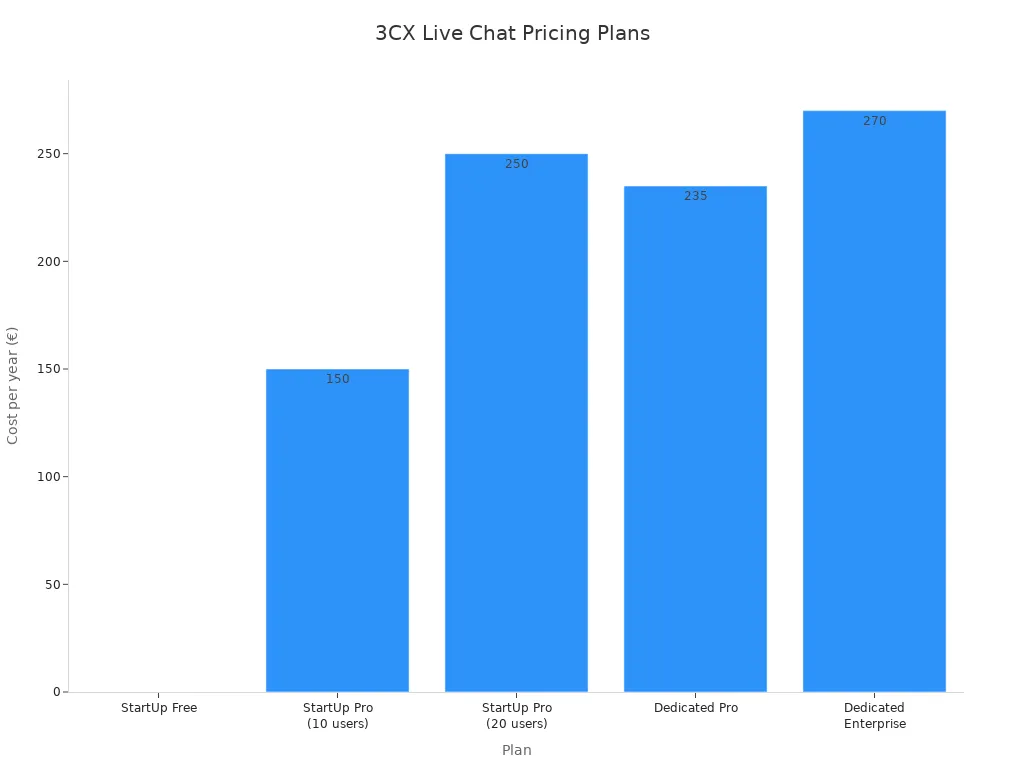
- Pricing: 3CX offers a free plan and paid tiers for more users and features.
| Plan | Users | Cost (per year) |
|---|---|---|
| StartUp Free | Up to 10 | €0 |
| StartUp Pro | Up to 20 | €250 |
| Dedicated Pro | N/A | €235 |
- Pros:
- Offers a comprehensive communication package for free.
- Allows for easy escalation from chat to call.
- The live chat functionality is fully customizable.
- Cons:
- Setup can be more complex than other WordPress chat plugins.
- Primarily a business phone system, so chat is not the main focus.
9. Brevo
Brevo, formerly Sendinblue, provides a live chat plugin as part of its larger marketing platform. It helps you capture leads and support customers directly from your WordPress dashboard.
- Best For: Marketers looking for a chat tool that integrates with email marketing, SMS, and automation workflows.
- Key Features:
- Part of an all-in-one marketing platform.
- Saves chat conversations in the Brevo CRM.
- Assign conversations to different agents.
- Customize the chat window to match your brand.
- Pricing: Brevo offers a free plan with chat for one user. Paid plans with more features start at $25/month.
- Pros:
- Excellent integration with other marketing tools.
- The free plan is a good starting point.
- Clean and modern interface.
- Cons:
- The chat feature is less advanced than dedicated solutions.
- The free plan is limited to a single user.
10. LiveChat
LiveChat is a premium live chat plugin known for its beautiful design and powerful features. It helps you provide excellent real-time chat support and increase sales.
- Best For: Businesses that need a professional, feature-rich live chat solution with excellent reporting and team management tools.
- Key Features:
- Proactive chat invitations and triggers.
- Detailed reports and analytics.
- Chat routing and agent groups.
- Integrates with over 200 tools, including Messenger and WhatsApp.
- Pricing: Plans start at $20/month per agent (billed annually). A 14-day free trial is available.
- Pros:
- User-friendly apps for desktop and mobile.
- Extensive customization options.
- Excellent for managing support teams.
- Cons:
- No free plan is available.
- Can be expensive for larger teams due to the per-agent pricing.
Success Story: How Opay Boosted CSAT with Social Chat
Theory is great, but seeing results in action is better. Let's look at Opay, a major financial services platform. Their story shows how a unified chat solution can transform a business. This is a powerful example for any company, including those running a wordpress site.
The Challenge: Disconnected Customer Service
Opay serves tens of millions of users. Customers reached out through social media, email, and phone calls. This created a big problem. The support channels were not connected. Agents had to switch between different systems. This led to slow responses and frustrated customers. You might see similar issues with your own wordpress business if your support tools are not integrated. Managing a high volume of inquiries on a popular wordpress site requires a streamlined system. Opay needed one platform to manage everything efficiently. This is a common need for a growing wordpress brand.
The Solution: Sobot's Omnichannel Platform
Opay implemented Sobot's omnichannel solution. This platform brought all customer conversations into a single dashboard. Agents could now handle social media, email, and voice calls without switching screens. This is the kind of efficiency you want for your wordpress support team.
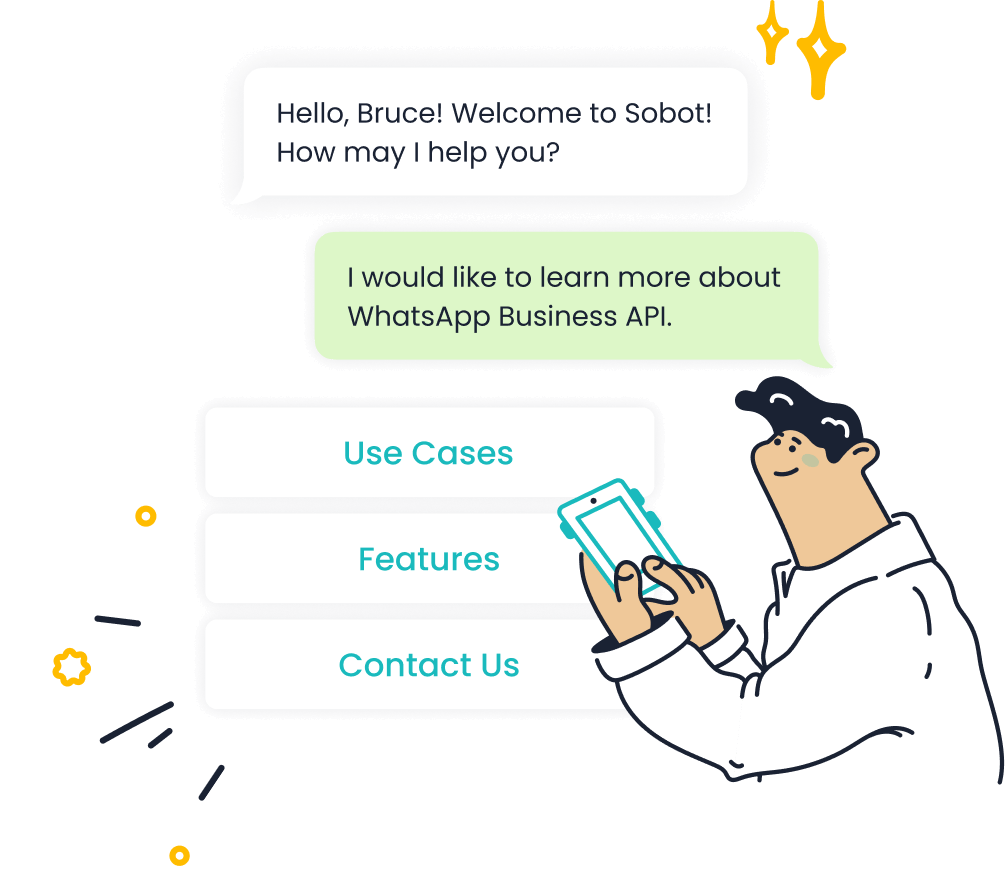
A key part of the solution was integrating the WhatsApp Business API. This allowed Opay to use WhatsApp for both customer support and marketing. You can achieve similar success on your wordpress site by connecting with customers on their favorite apps. A good wordpress setup makes this integration simple.
The Results: A 90% Satisfaction Rate
The results were impressive. By unifying its support, Opay saw massive improvements across the board. The new system made customers happier and the business more efficient. You can read the full story on the Sobot blog.
Here is a quick look at the change in customer satisfaction (CSAT):
| Metric | Before Sobot | After Sobot |
|---|---|---|
| CSAT | 60% | 90% ↑ |
Beyond that, Opay achieved:
- A 20% reduction in overall operational costs.
- A 17% increase in conversion rates.
- An 85% message read rate for WhatsApp marketing campaigns.
These results show the power of an integrated system. It proves that the right tools can make a huge difference for any business, including your wordpress e-commerce store or service site. A smart wordpress strategy includes powerful customer communication tools.
How to Choose Your Chat Tool
Selecting the right tool is crucial for your success. You need a solution that aligns with your goals, budget, and technical setup. Consider these factors to make an informed decision for your WordPress website.
Key Features to Consider
You should look for features that make your team more efficient. A unified inbox is a great starting point. It lets you manage all messages from one place. Real-time chat is also essential for quick replies. The best tools offer powerful integrations.
- CRM Integration: Connects to your customer data for personalized support.
- Help Desk Sync: Aligns chat history with support tickets.
- Team Collaboration: Allows you to assign conversations to different agents.
These features streamline your workflow on your WordPress site.
Supported Social Channels
You need to meet customers where they are. Your chosen tool should support the platforms your audience uses most. A large user base makes these channels important for business communication.
Popular channels include WhatsApp, Facebook Messenger, Instagram, and Telegram. Supporting these helps you connect with a wider audience. Your WordPress site can become a central hub for these interactions.
Customization and Branding
Your chat widget should feel like a natural part of your WordPress website. Look for tools that offer strong customization options. You should be able to change colors, fonts, and welcome messages. This helps you maintain a consistent brand identity. A well-designed chat widget builds trust with visitors on your WordPress pages.
Compatibility with WordPress
A good plugin must work perfectly with WordPress. Check for compatibility with your current WordPress version and other plugins. The tool should function smoothly on mobile devices for both visitors and agents. It is important that your WordPress setup supports automated responses and media file sharing. This ensures a seamless experience when you add social media chat to website pages. Your WordPress performance should not suffer.
Pricing and Your Budget
Your budget plays a big role. Many tools offer free plans, but they often have limitations. Paid plans unlock advanced features and remove branding. Compare the costs against the features you need. Think about your long-term growth. A scalable solution will support your WordPress business as it expands.
You can see that installing a social media chat plugin is a simple task. It offers a high return on investment. The Opay success story with Sobot shows this clearly. You improve the customer experience when you meet them on their favorite channels with a helpful chat widget. This simple addition turns visitors into loyal customers. It is easy to add social media chat to website pages.
Ready to connect with your customers? Explore a powerful solution like Sobot or another tool from our list. Install your new chat widget today! 🚀
FAQ
Will a chat widget slow down my website?
Most modern chat plugins are lightweight. They are designed to have a minimal impact on your site's speed. You should choose a well-coded tool. A quality plugin ensures your WordPress site remains fast and responsive for all visitors.
Can I use these tools without WordPress?
Yes, many of these tools work on other platforms. Solutions like Sobot, Tidio, and LiveChat offer code snippets. You can easily embed these snippets on websites built with Shopify, Wix, or custom HTML. Always check the tool's compatibility first.
How many social channels should I offer? 🤔
You should focus on quality over quantity. Start with 2-3 channels where your customers are most active, like WhatsApp or Facebook Messenger. This makes it easier for your team to manage conversations and provide excellent support without feeling overwhelmed.
What is the difference between live chat and a chatbot?
Live chat connects your visitors with a human agent for real-time conversations. A chatbot is an AI program that automates answers to common questions 24/7. Many tools, including Sobot, combine both to provide efficient, round-the-clock support.
See Also
Essential Platforms for Integrating Social Media Chat on Your Website
The Ten Leading Chatbot Solutions for Websites This Year
Effortlessly Integrate a Chatbot onto Your Website: A Simple Guide
Discover Ten Key Advantages of Incorporating a Chatbot on Your Site
Leading Ten Websites Effectively Utilizing Chatbot Technology This Year

