Add Chat to Website and Boost Engagement Instantly


You can add chat to website in just a few minutes using Sobot. A live chat widget lets you connect with visitors right away, making your website more interactive and helpful. Many businesses see a 20% increase in website conversions after adding a chat function. Some people worry about missed chats, setup confusion, or branding issues. Sobot AI and Sobot call center tools solve these problems with easy setup and full customization.
- Common concerns include:
- Missed chats or notifications
- Complexity in managing chat flows
- Limits on free plans
- Confusing pricing
With Sobot, you get a simple, effective way to engage your customers instantly.
Why Add Chat to Website
Boost Engagement
When you add chat to website, you give your visitors a way to connect with you right away. A live chat widget helps you engage visitors instantly, making your website feel more welcoming. Studies show that 42% of customers prefer a live chat feature over other contact methods. When you use a live chat widget, you can answer questions in real time. This keeps people on your website longer and encourages them to explore more pages.
A single chat reply can boost your conversion chances by 50%. If you send two replies, you can double that chance. Six or more messages can increase the likelihood of conversion by 250%.
Sobot’s live chat widget stands out because it unifies all your channels, so you never miss a chance to engage visitors instantly. Sobot’s system handles over 6 million online chats daily, showing its reliability and scale.
Improve Support
A live chat feature improves customer support by giving instant answers. Unlike email or phone, live chat lets agents help several customers at once.
| Metric | Live Chat | Email/Phone |
|---|---|---|
| Response Time | Instant | Delayed |
| Customer Interaction | High | Low |
| Resolution Speed | Fast | Slow |
Live chat support has a 73% satisfaction rate, much higher than phone or email. Sobot’s live chat widget uses AI to help agents respond faster and more accurately. OPPO, a global smartphone brand, used Sobot’s live chat feature to reach an 83% chatbot resolution rate and a 94% positive feedback rate. This led to a 57% increase in repurchase rate.
Ecommerce Benefits
If you run an online store, a live chat function can drive increased conversions and lead generation. About 79% of ecommerce businesses report higher sales and customer loyalty after adding a live chat widget. Real-time support helps shoppers make decisions, which means fewer abandoned carts and more completed purchases.
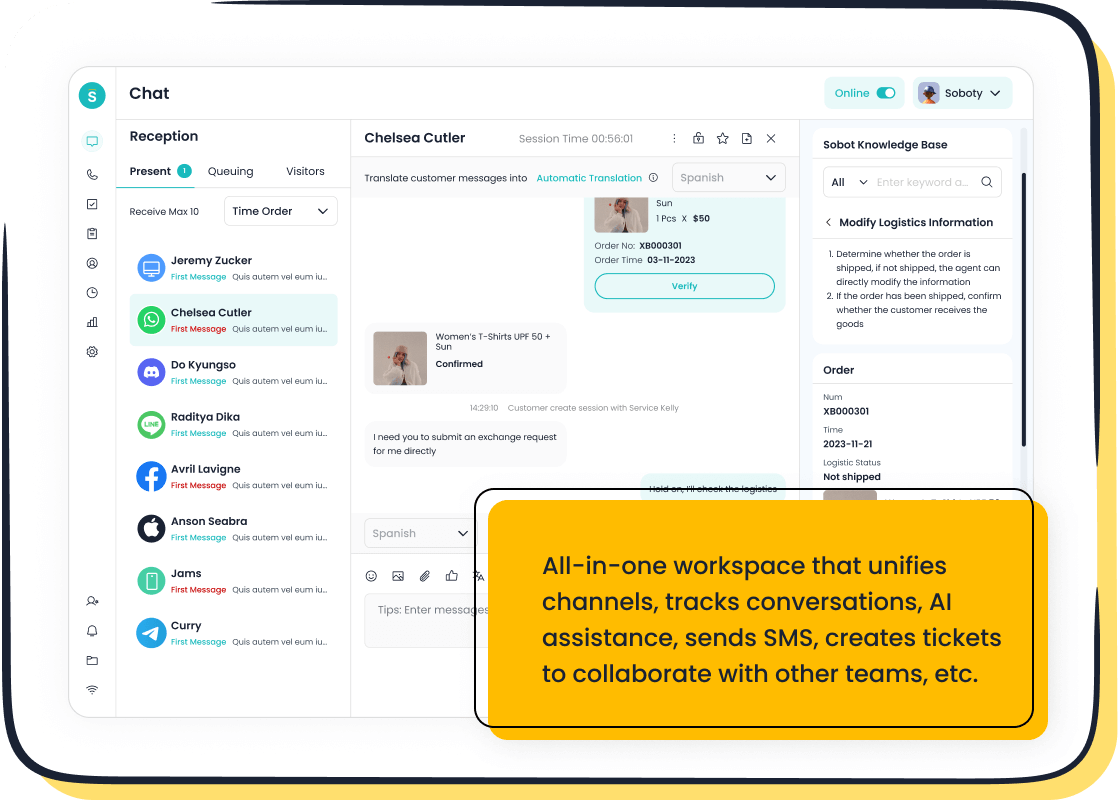
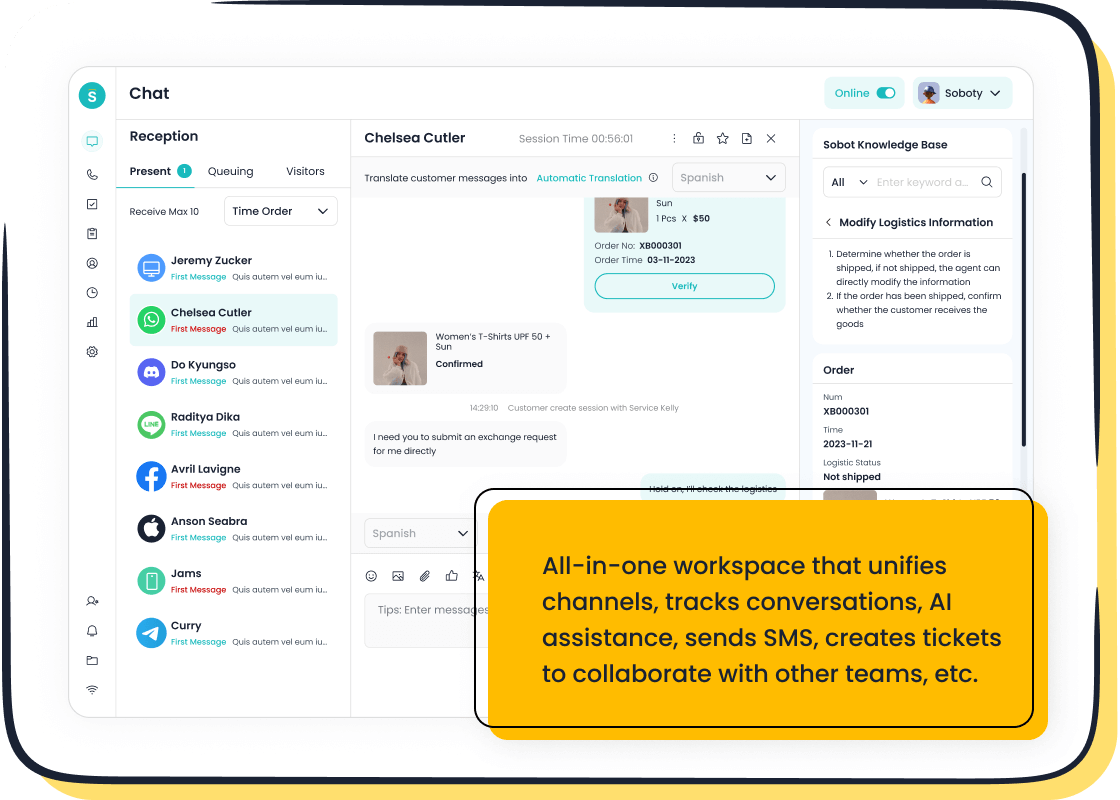
Live chat features keep all conversations in one place, making it easy to track customer needs and follow up.
Sobot’s live chat widget supports omnichannel engagement, so you can engage visitors instantly on your website, social media, or app. This seamless experience helps you build long-term relationships and boost your business growth.
Choose a Live Chat Widget
Sobot Live Chat Features
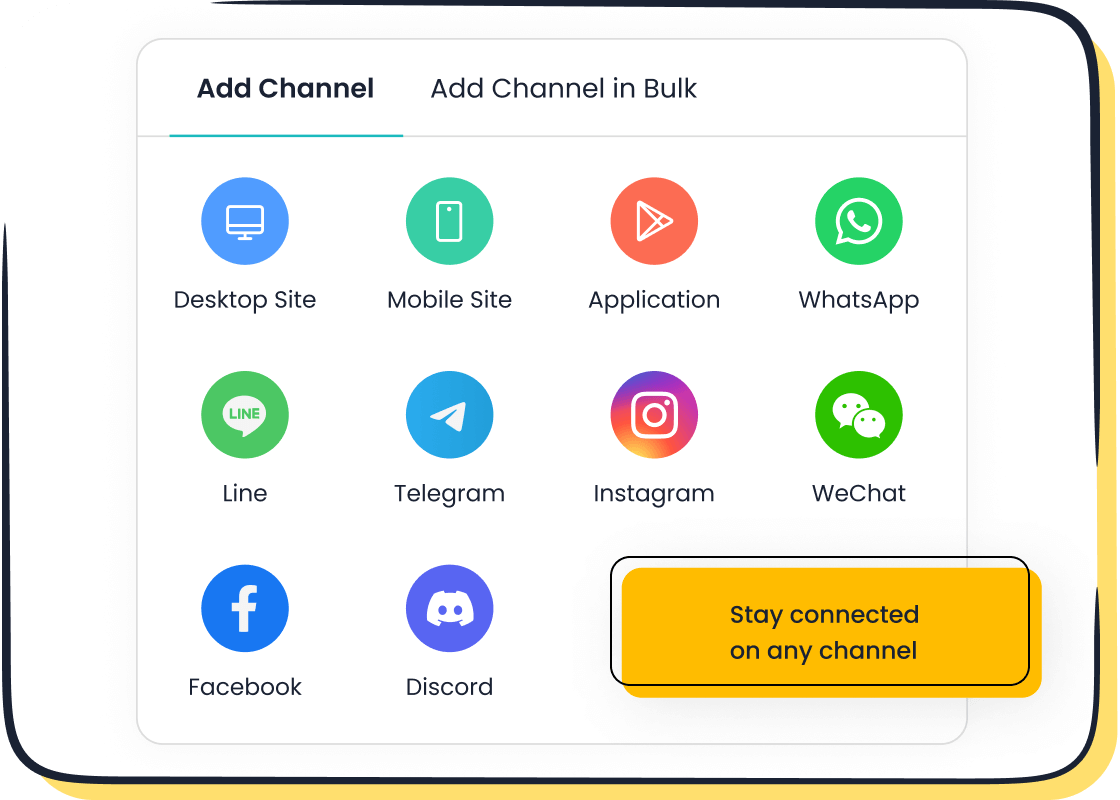
When you choose a live chat widget for your website, you want tools that make customer communication easy and effective. Sobot Live Chat gives you a wide range of features that help you connect with visitors in real time. You can customize the widget to match your brand by adjusting colors, chat button placement, and agent statuses. The platform lets you set up automated greetings and canned responses, so you can answer common questions quickly. Sobot Live Chat also supports a hybrid approach, allowing you to switch between live agents and chatbots for 24/7 support. The simple interface makes it easy to manage all your customer interactions in one place. You can access detailed analytics, including over 300 types of reports, to track chat volume, response times, and customer satisfaction. Sobot offers a free trial, so you can test the live chat widget before making a commitment.
Tip: Look for a live chat widget that is easy to install and works well on both desktop and mobile devices. Sobot Live Chat provides a no-code setup, so you can get started in minutes.
Omnichannel Support
Sobot Live Chat stands out with its strong omnichannel support. This means you can connect with customers across your website, mobile app, and social media platforms like WhatsApp, Facebook, and Instagram. Omnichannel support helps you give a consistent brand experience and makes it easy for customers to reach you on their favorite channels. When you use a live chat widget with omnichannel features, you improve customer satisfaction and loyalty. Agents can see past conversations, which helps them solve problems faster and provide more personal support.
| Benefit | Description |
|---|---|
| Increased customer satisfaction and loyalty | Customers can switch channels without repeating themselves, leading to loyalty. |
| Improved efficiency and agent productivity | Integrated systems allow agents to resolve issues faster. |
| Consistent brand experience | Standardized messaging builds trust and maintains service quality. |
| Better data collection for personalization | Integrated systems capture insights for personalized support. |
Integration Options
You want your live chat widget to work smoothly with your existing tools. Sobot Live Chat offers many integration options. You can connect it with platforms like Shopify, making it easy for agents to manage messages and customer data in one place. Sobot also supports custom solutions, so you can tailor the integration to fit your business needs. After setup, you get ongoing support to keep your live chat running smoothly as your business grows. The dynamic live chat feature ensures you never miss a message, no matter where your customers reach out.
| Integration Option | Description |
|---|---|
| Shopify | Seamless integration with unified inbox for agents. |
| Custom Solutions | Tailored installation for unique store needs. |
| Continuous Support | Ongoing help post-integration. |
Add Chat to Website: Step-by-Step
Adding a live chat widget to your website can seem challenging, but you can do it in just a few steps. Sobot Live Chat makes it easy for you to embed chat in your website, whether you use code, plugins, or an iframe. This guide will help you add chat to website quickly and follow best practices for a smooth experience.
Embed Code Snippet
You can embed the live chat widget directly into your website using a simple code snippet. This method gives you full control over placement and appearance. Here’s how you can do it with Sobot Live Chat:
- Log in to your Sobot admin dashboard.
- Go to the Channels section and select Chat.
- Choose the chat widget you want to add or create a new one.
- In the Chat Widget tab, find the code snippet provided for your widget.
- Copy the embed code.
- Paste the embed code into the HTML of your website, right before the closing
</body>tag. This ensures the widget loads on every page. - Save your changes and refresh your website to see the live chat widget appear.
Tip: Always test the widget on different browsers and devices to make sure it displays correctly. Google recommends checking your site’s mobile and desktop versions after you embed the live chat widget. This helps you catch any display or compatibility issues early.
If you want to customize the chat experience for mobile users, refer to Sobot’s documentation for code samples that enable mobile rendering. You can also set the widget to "embedded" mode for a seamless look.
Common Technical Challenges and Solutions
| Technical Challenge | Solution |
|---|---|
| Embedding the chat widget | Make sure you paste the embed code in the correct place in your website’s HTML. |
| Managing high chat volumes | Use Sobot’s queue management features to handle busy times. |
| Ensuring functionality across browsers | Test the widget on Chrome, Firefox, Safari, and Edge to ensure compatibility. |
Use Plugins or Apps
If you use a website builder like Shopify, WordPress, or Wix, you can add widget functionality using plugins or apps. This method is fast and does not require you to edit your website’s code directly.
- Search for the Sobot Live Chat plugin or app in your platform’s marketplace.
- Install the plugin and follow the setup instructions.
- Log in with your Sobot account to connect your website to your Sobot workspace.
- Configure the chat widget settings, such as color, position, and automated greetings.
- Activate the plugin to display the live chat widget on your website.
Best Practices:
- Place the live chat widget in a visible spot, like the bottom right corner, so visitors can find it easily.
- Set up notifications for your agents to respond quickly.
- Make your live chat hours clear to manage customer expectations.
- Personalize your chat greetings to make visitors feel welcome.
- Optimize the chat for mobile users, since many people browse on their phones.
You should also set up routing and escalation rules to make sure every chat reaches the right agent. Always end conversations politely to leave a good impression.
Iframe Integration
You can also embed the live chat widget using an iframe. This method is simple and works well if you want to keep your website code clean.
- In your Sobot admin panel, set the chat widget to "embedded" mode.
- Copy the iframe HTML code provided by Sobot.
- Paste the iframe code into the section of your website where you want the chat widget to appear.
Example iframe code:
<iframe src="https://your-sobot-widget-url" width="350" height="500" frameborder="0"></iframe>
Note:
- Iframe integration makes it easy to add chat to website, but it can affect page load times if the external content loads slowly.
- Make sure the iframe is SSL-compliant for security.
- Some websites may not allow framing, so check your platform’s policies.
- Test the iframe on different devices to ensure it is responsive. You may need extra CSS to make it look good on mobile.
Iframe integration requires minimal setup and is easy to maintain. It allows you to embed the live chat widget without changing much of your website’s code.
Testing and Optimization
After you embed the live chat widget, always test it on your website. Open your site in different browsers and on mobile devices. Make sure the chat window loads, messages send correctly, and the design matches your brand. Google recommends regular testing to catch any issues early and keep your chat running smoothly.
If you notice any problems, check your embed code for errors. You can also reach out to Sobot’s support team for help. Regularly review your chat analytics to see how visitors use the widget and make improvements as needed.
Pro Tip:
To integrate a live chat feature successfully, keep your chat widget updated and monitor its performance. This helps you provide the best experience for your visitors and ensures you never miss a chance to engage.
By following these steps, you can add chat to website with confidence. Sobot Live Chat gives you flexible options to embed, customize, and optimize your live chat widget for any website. Whether you use code, plugins, or iframes, you can integrate a live chat feature that boosts engagement and supports your business goals.
Widget Customization and Branding
Design Options
You want your live chat widget to look and feel like part of your website. Sobot Live Chat gives you many widget customization choices, so your chat tool matches your brand image. You can select colors that fit your brand palette, change fonts, and add your logo for instant recognition. You also control where the widget appears on your website, making sure visitors see it easily. Responsive design ensures your chat widget looks great on both desktop and mobile devices.
| Customization Aspect | Description |
|---|---|
| Color Schemes | Match your brand’s colors for a seamless look. |
| Font Style | Choose fonts that reflect your brand’s personality. |
| Logo Integration | Add your logo for brand consistency. |
| Widget Positioning | Place the widget for best visibility and access. |
| Responsive Design | Ensure the widget works well on all devices. |
Advanced customization lets you fully integrate the chat widget into your design. You can enhance and customize every detail, so your website visitors get a consistent experience.
Customization Settings
Sobot Live Chat makes it easy to customize chat widgets. You can adjust the launcher button, change text to match your brand’s voice, and set the chat window background. Advanced customization features let you personalize primary and secondary colors, text colors, and font styles. You can also choose the widget’s position on your website for optimal user experience. These customization settings help you create a chat tool that feels fully integrated into your design.
- Theme customization including colors and fonts
- Logo and launcher button integration
- Positioning of the chat widget on the website
- Responsive design for mobile and desktop
You can customize every aspect of your live chat widget, so it matches your website perfectly.
Automated Greetings
Automated greetings help you welcome visitors and start conversations. Sobot Live Chat lets you set up custom greetings based on visitor behavior or time of day. You can write friendly messages that match your brand’s tone. You can also set your availability, so visitors know when agents are online. Automated greetings make your website feel more interactive and help you engage visitors right away.
Tip: Use personalized greetings to make visitors feel valued. Set clear availability hours, so customers know when to expect a response.
With Sobot Live Chat, you can customize greetings and availability settings to improve customer engagement. These features help you create a welcoming and professional website experience.
Optimize Chat Experience
Proactive Triggers
You can boost engagement on your website by setting up proactive triggers in your live chat widget. Most visitors appreciate when you reach out first. In fact, 87% of US adults prefer companies to contact them proactively. When you use proactive triggers, you increase the chance that visitors will interact with your chat experience and get real-time assistance. Here are some effective triggers and example messages:
| Trigger Type | Example Message |
|---|---|
| Personalized Greeting for New Visitors | “Hi, my name is Alex, how can I help you today?” |
| Personalized Greeting for Returning Customers | “Welcome back Sarah, what can we do for you today?” |
| Offering Discounts or Promotions | “Hi, for your first order, we would like to offer you a 20% discount. Would you like to avail this offer?” |
| Product Recommendations | “Hello Sarah, we have some new collection of shoes for the Summer season. Would you like to have a look?” |
| Trigger on Pricing Page | “Hello, would you like some guidance on which plan works best for you? Let me know if you need any assistance.” |
| Trigger on Product Page | “Hi there! If you have any questions about this product, I’m here to help.” |
| Trigger Based on Time Spent on Page | “Hi there! If you have any questions about this product, I’m here to help.” |
Using these triggers can increase conversion rates by 40% and boost average order value by 10%. You can set up these triggers in Sobot to create a tailored live chat experience for every visitor.
AI Tools
Sobot’s AI-powered tools help you deliver a smarter chat experience on your website. AI can guide agents in real time, automate replies, and analyze conversations. With these tools, agents save time and handle more chats. In fact, 60% of customer service agents report time savings from AI. Live agents using AI can answer 14% more inquiries per hour. You also see faster responses and quicker resolutions. Sobot’s AI features let you create a tailored live chat experience that feels personal and efficient.
Tip: Use Sobot’s AI to suggest answers, summarize chats, and automate common questions. This helps you provide real-time support and keep your website visitors happy.
Performance Analytics
You can improve your chat experience by tracking key metrics in your live chat widget. Sobot gives you built-in analytics so you can monitor and enhance engagement. Important metrics include:
| Metric | Description |
|---|---|
| Response Time | How quickly your team replies to users. Lower times mean better service. |
| Customer Satisfaction (CSAT) | How happy customers feel after chatting. Higher scores show great support. |
| First Contact Resolution (FCR) | How often you solve issues in the first chat. High rates mean efficient help. |
| Chat Abandonment Rate | How many users leave before getting help. Lower rates mean fewer frustrated visitors. |
You can use these insights to spot trends and make changes. For example, if you see high abandonment rates, you can adjust your triggers or improve response times. Sobot’s analytics help you predict customer needs and refine your website’s chat experience for better results.
You can add chat to website with Sobot Live Chat in just minutes. The live chat widget gives you instant ways to connect with visitors and boost results. Many businesses see:
- AI chatbots engage customers 24/7, leading to up to 67% more sales and 40% more qualified leads.
- Personalization increases conversion rates by 20–40%.
- Customer satisfaction ratings rise by 25% after adding live chat.
Try Sobot’s free trial to explore all customization options. Start your contact journey today at Sobot’s website.
FAQ
How do I add a live chat widget to my website?
You can add a live chat widget by copying the embed code from your Sobot dashboard and pasting it into your website’s HTML. This process takes just a few minutes and does not require advanced technical skills.
Can I customize the live chat to match my brand?
You can change colors, fonts, and add your logo. Sobot lets you adjust the chat window’s position and style. Customization helps your live chat look like a natural part of your website.
Is live chat available on mobile devices?
Yes, your visitors can use live chat on smartphones and tablets. Sobot’s chat widget works well on all devices, so you can connect with customers wherever they visit your website.
Will I get notifications when someone starts a chat?
You receive instant notifications when a visitor starts a chat. Sobot’s system helps you respond quickly, so you never miss a chance to help someone on your website.
Can I see reports about my live chat performance?
You can view analytics in your Sobot dashboard. These reports show chat volume, response times, and customer satisfaction. Tracking these numbers helps you improve your website’s support.
See Also
The Impact of WhatsApp Chat on Website Interaction
Best Tools for Integrating Social Media Chat Features
Simple Steps to Integrate a Chatbot on Your Site

