Help Desk Software – The Digital Nerve Center of Modern Customer Service
Nowadays, despite the increasingly fragmented customer touchpoints, customers’ expectations on services are constantly rising. Traditional tools like email inboxes, instant messaging groups, and spreadsheets can no longer support professional and efficient customer service.
According to Forrester Research, 73% of consumers say that getting a convenient service experience is a key factor in their loyalty to a brand. In this context, help desk software (or service desk software) has become indispensable for businesses looking to enhance customer satisfaction and optimize service efficiency.
Definition, Value, and Core Functions of Help Desk Software
What is Help Desk Software?
Help desk software is a centralized, process-driven, and intelligent platform for managing and responding to customer requests. It is far more than just an advanced email system. It is an integrated center that unifies multi-channel communication, team collaboration, knowledge management, workflow automation, and in-depth data analytics.
It has 3 core values
- Enhanced Customer Experience: Delivers consistent, fast, and professional service across all channels.
- Operational Efficiency Leap: Reduces repetitive tasks through automation and standardized processes.
- Data-Driven Decision Making: Transforms service data into business insights that guide product and service optimization.
6 Core Functional Pillars of Modern Help Desk Software
To help you establish a clear evaluation framework, we have outlined the six core functions that capable help desk software should possess:
1. Unified Omnichannel Ticket Management
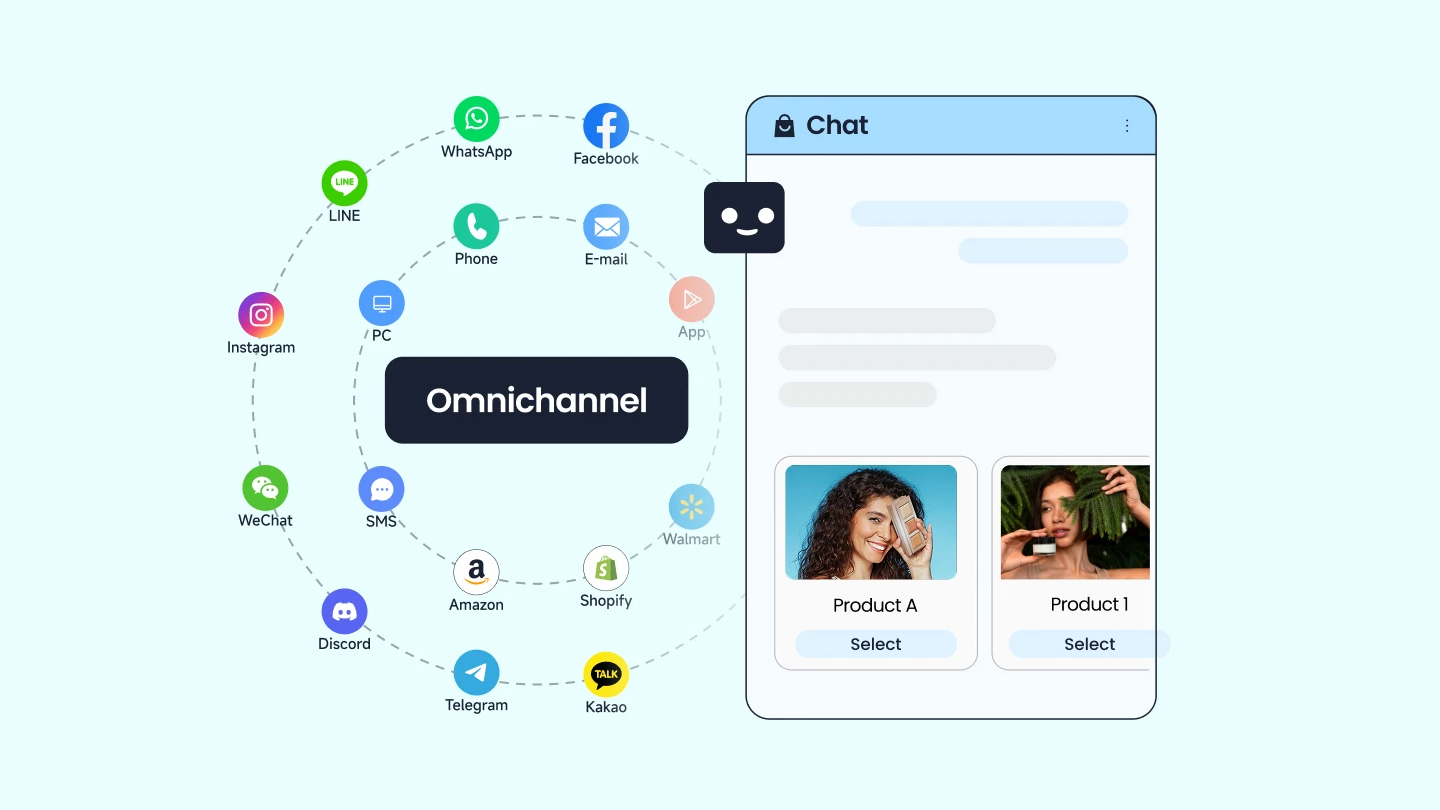
Automatically converts customer requests from various channels—email, web forms, live chat, social media, phone, API interfaces—into standardized, trackable tickets. This enables “single-point access, global management.”
2. Automation & Intelligent Workflow Engine
Supports rule-based ticket auto-assignment, priority tagging, SLA (Service Level Agreement) management, and intelligent escalation. This significantly reduces manual work and ensures consistent and timely service responses.
3. Dual-Purpose Knowledge Base
Internally, it empowers support agents to quickly find solutions. Externally, it builds a customer self-service portal (help center), allowing customers to solve problems independently and reducing the load on human agents.
4. Seamless Team Collaboration & Internal Communication
Features like internal ticket comments, @mentions for colleagues, cross-department transfers, and ticket linking ensure service information flows seamlessly within teams, preventing information silos.
5. 360-Degree Customer Relationship View
Integrates with or connects to CRM systems to display a customer’s historical interaction records, purchase information, and preference data directly within the agent interface, enabling truly contextual and personalized service.
6. Deep Reporting & Actionable Analytics
Provides multi-dimensional dashboards covering key metrics like team workload, response and resolution times, customer satisfaction (CSAT), and service costs. This supports data-driven service optimization.
7 Key Evaluation Criteria for Choosing Help Desk Software
Before diving into specific product evaluations, businesses should first clarify their priority needs. The following seven dimensions will help you build a systematic assessment framework:
1. Capability of Channel Integration
Does it genuinely support all the channels your business needs (especially regional ones like WeChat, WhatsApp)? Is the integration a simple message forward, or does it maintain conversational context?
2. Maturity of Automation & AI Capabilities
Does it only support simple rule-based automation, or does it possess AI capabilities like intelligent routing, semantic understanding, and auto-summarization? Are AI features standalone modules or deeply embedded into the daily ticket-handling workflow?
3. Scalability and Customization Flexibility
Can it meet personalized business needs through APIs, webhooks, or a rich app marketplace? Does it support on-premise deployment to meet specific industry data compliance requirements?
4. Team Collaboration Experience & Learning Curve
Is the agent workspace designed for efficient collaboration? Is the interface intuitive and user-friendly? How long does it take for a new agent to become proficient with core features?
5. Completeness of the Self-Service Ecosystem
Is the help center easy to create, manage, and does it support multiple languages? Is the chatbot intelligent enough to effectively deflect simple inquiries?
6. Data Analysis & Business Insight Capabilities
Are the reports intuitive, customizable, and exportable for deeper analysis? Can you identify product issues or sales opportunities from service data?
7. Total Cost of Ownership (TCO) & Return on Investment
Beyond the software subscription fee, are there additional costs for implementation, training, or integration? Is the pricing model transparent and predictable (avoiding models like “per contacted user” that can lead to budget overruns)?
Analysis of 15 Help Desk Software Solutions
Based on the framework above, we have conducted a comprehensive evaluation of 15 mainstream help desk software solutions on the market. The following analysis synthesizes official product information, third-party reviews, and genuine user feedback, striving for objectivity and completeness.
| Characteristics | Archetypes | |
| 1 | Modern, All-in-One Platforms | Sobot, Zendesk, Freshdesk, HubSpot Service Hub |
| 2 | Collaboration & Conversational Platforms | Intercom, Front, Help Scout |
| 3 | IT Service Management (ITSM) Experts | Jira Service Management, ServiceNow |
| 4 | Vertical & Specialized Tools | Gorgias, LiveAgent |
| 5 | Open Source & High-Value Choices | Zoho Desk, Zammad, SolarWinds Service Desk, osTicket |
Category 1 Modern, All-in-One Platforms – Pursuing Integrated Efficiency & Intelligence
This category emphasizes out-of-the-box usability, high functional integration, and actively incorporates AI capabilities into core workflows, aiming to provide a unified solution for efficiency gains.
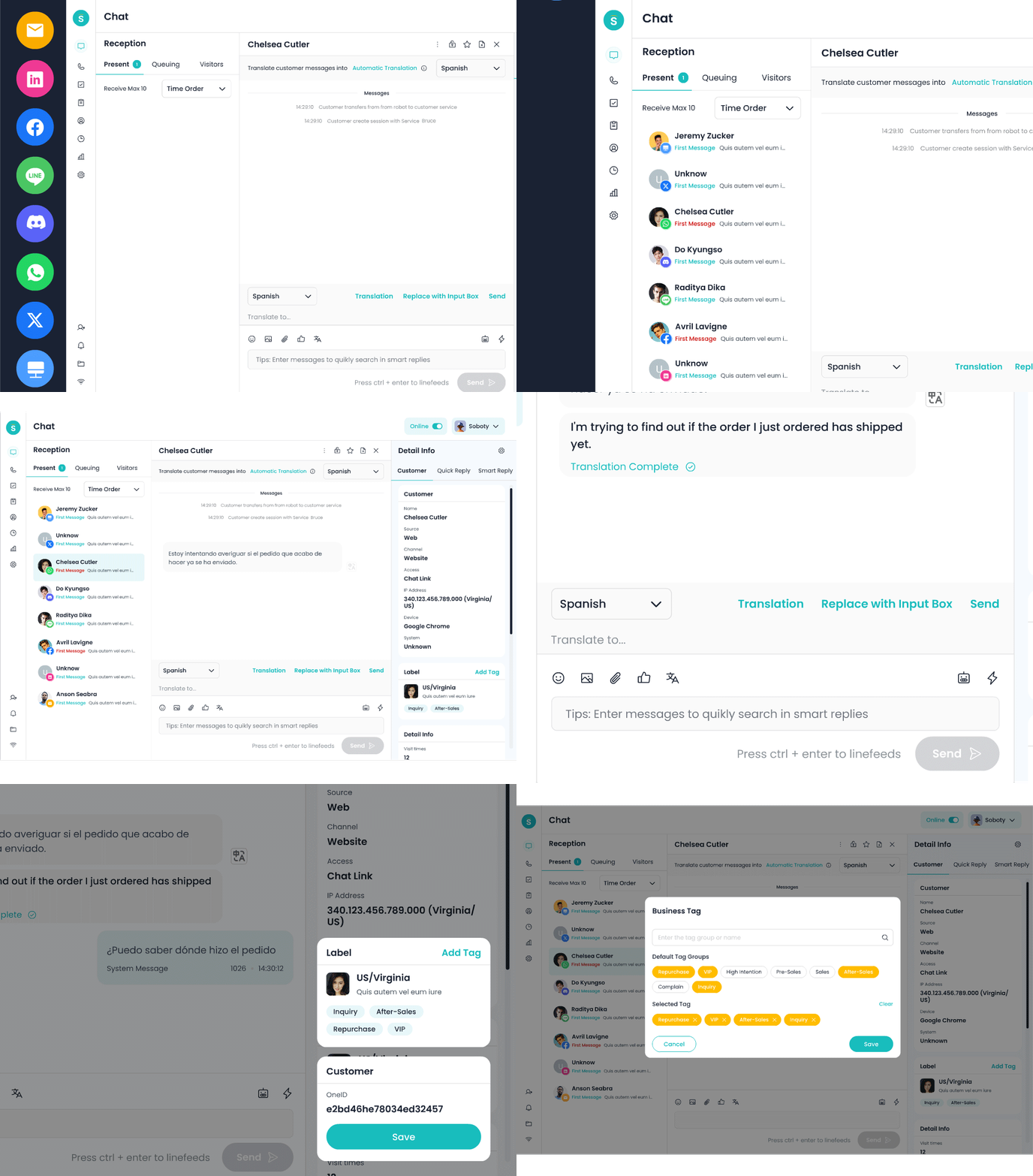
❶ Sobot: The Integrated, AI-Powered Customer Service Platform
Positioning & Philosophy
Positioned as an “out-of-the-box, AI-deeply-integrated omnichannel customer service platform,” it primarily serves mid-sized companies and growth-oriented teams seeking high cost-effectiveness and rapid deployment. Its core design philosophy is to lower the technical barrier and total cost of building a complete customer service system through pre-integrated functional modules.
Key Features
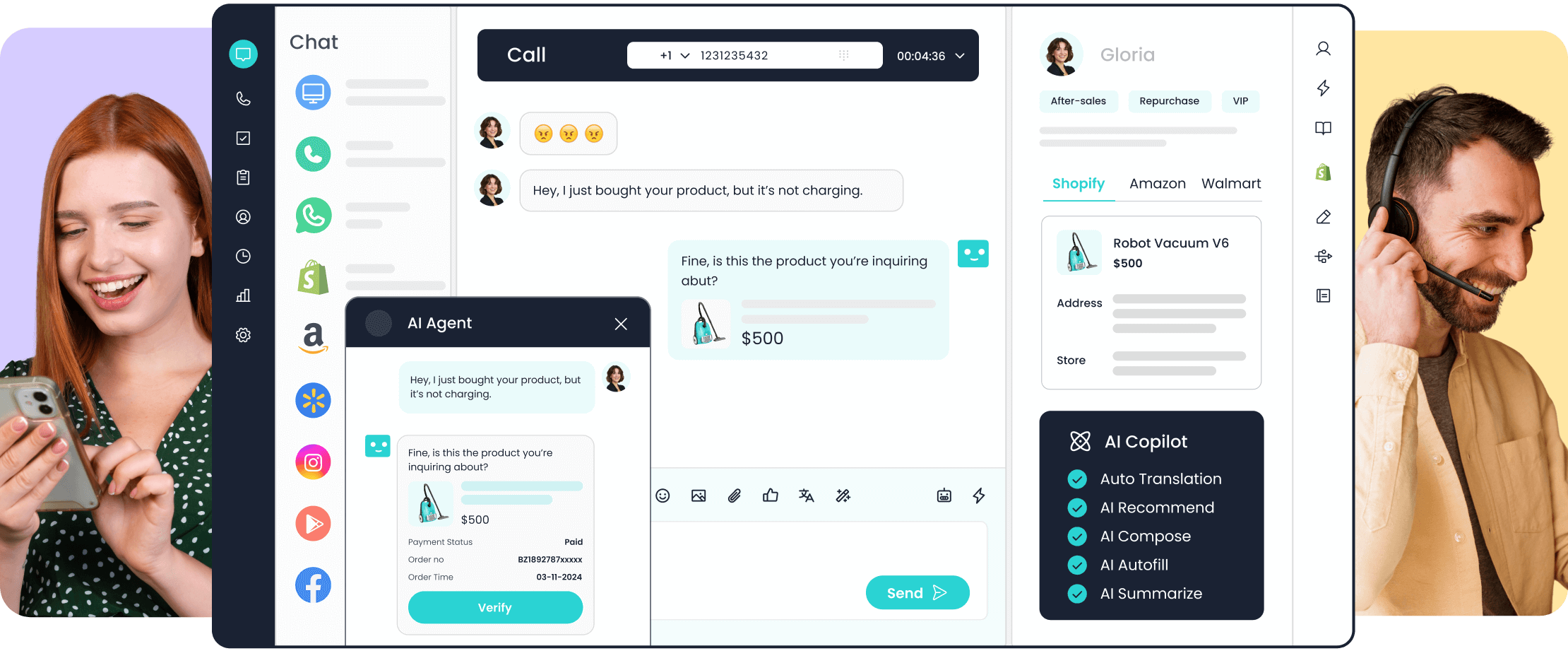
🔆 Unified Functional Architecture: Natively integrates online chat, ticketing system, intelligent bots, call center, and help center, preventing businesses from switching between disparate systems and dealing with data fragmentation.
🔆 AI-Driven Efficiency Tools: Intelligent routing based on customer intent and history; AI-assisted replies for real-time answer suggestions; automated conversation summaries to reduce manual note-taking time.
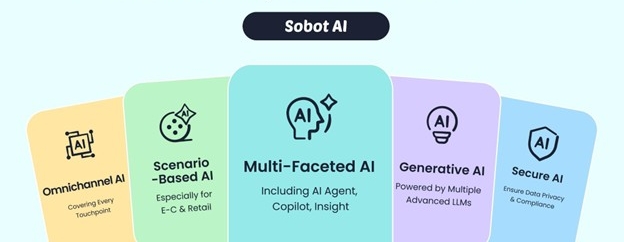
🔆 Omnichannel Unified Management: Supports channels like web, WeChat, mobile apps, and email, converting all interactions into a unified ticket stream.
🔆 Visual Workflow Designer: Configure automation rules and service processes via drag-and-drop, requiring no coding skills.
Distinct Advantages
✅ Rapid Deployment, Low Barrier to Entry: The pre-integrated all-in-one solution can reduce deployment time by over 50% compared to piecing together multiple standalone products, making it especially suitable for teams with limited technical resources.
✅ Democratized AI Features: Offers capabilities like intelligent routing, intent recognition, and auto-summarization as standard features, not as premium add-ons, lowering the barrier to adopting AI.
✅ Excellent Mobile Experience: The agent workspace is highly optimized for mobile devices, supporting ticket handling and live chat on the go.
Key Considerations
⭕ Global Brand Recognition: As a brand that started in the Chinese market and is actively expanding internationally, its brand recognition in mature markets like North America and Europe is still developing.
⭕ Ecosystem Breadth: Compared to established players like Zendesk, the number of third-party app integrations is relatively limited, with deep integrations focused mainly on mainstream business applications.
Representative User Feedback
“We previously used separate chat and ticketing tools, leading to disconnected data and management headaches. After switching to Sobot, one system handles our entire customer service workflow, and our team’s average handling time decreased by 35%.”
– Service Director, E-commerce Company.
“The AI-assisted reply feature is especially friendly to new hires, significantly improving reply quality and consistency. We hope the knowledge base’s intelligent search could be more precise.”
– Customer Service Manager, SaaS Company.
The Bottom Line / Decision Point
Best suited for mid-sized businesses and fast-growing teams looking to quickly establish an omnichannel support system with a strong focus on AI ROI. May be less suitable for very large enterprises requiring deep, code-level integrations with a wide array of niche, specific third-party tools.
❷ Zendesk: The Industry Benchmark & Comprehensive Suite
Positioning & Philosophy
As a pioneer and market leader in help desk software, Zendesk positions itself as a full-spectrum “customer experience platform,” serving businesses of all sizes from startups to Fortune 500 companies.
Key Features
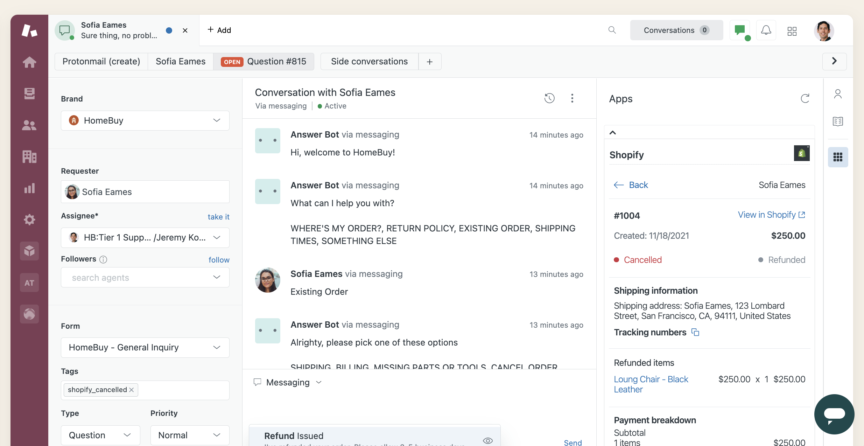
🔆 Complete Product Suite: Flexible combination of modules including Support (ticketing), Chat (live chat), Talk (call center), Guide (knowledge base), and Explore (analytics).
🔆 Powerful Ecosystem: Boasts over 1,000 pre-built integrations across CRM, e-commerce, collaboration tools, and other business software categories.
🔆 High Customizability: Supports deep interface customization, workflow configuration, and API development to meet complex business process needs.
🔆 Enterprise-Grade Security & Compliance: Offers comprehensive certifications like SOC2, GDPR, and HIPAA.
Advantages
✅ Unmatched Maturity: Over a decade of development has resulted in an extremely stable and reliable product with industry-leading functional depth and breadth.
✅ Exceptional Scalability: Can smoothly support scaling from 10 to 1,000 agents or expanding from a single channel to full omnichannel.
✅ Rich Learning Resources: Offers the most comprehensive documentation, training courses, and certification system, reducing long-term operational costs.
✅ Strong Brand Effect: Choosing Zendesk offers a “safe choice” benefit for hiring, partnerships, and fundraising.
Drawbacks & Considerations
⭕ Complex Cost Structure: Modular pricing can lead to rapidly escalating total costs, with enterprise-level plans often exceeding $1,000 per agent per year.
⭕ High Configuration Complexity: The flip side of powerful features is complexity; it typically requires a dedicated system administrator.
⭕ Interface Modernity: While continually updated, parts of the interface retain a more traditional design, resulting in a steeper learning curve.
Representative User Feedback
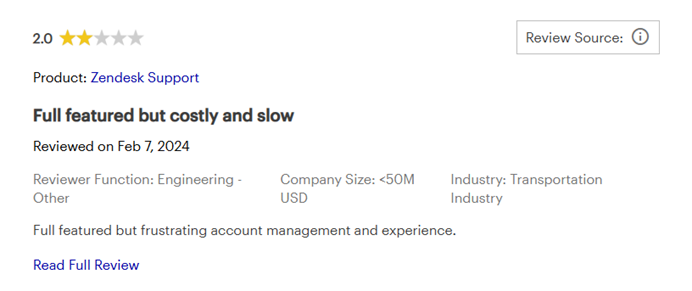
A user wrote, “Full featured but costly and slow, frustrating account management and experience.”
“Zendesk can do almost any customer service function we need, but it’s like a Swiss Army knife—powerful but sometimes feels heavy to use. We scrutinize the ROI carefully at each annual renewal.”
– VP of Customer Service, Tech Company
“The ecosystem is its strongest advantage. By integrating Slack, Salesforce, and internal systems, we’ve built a completely customized service workflow.”
– IT Director, Fintech Company
Pricing Reference
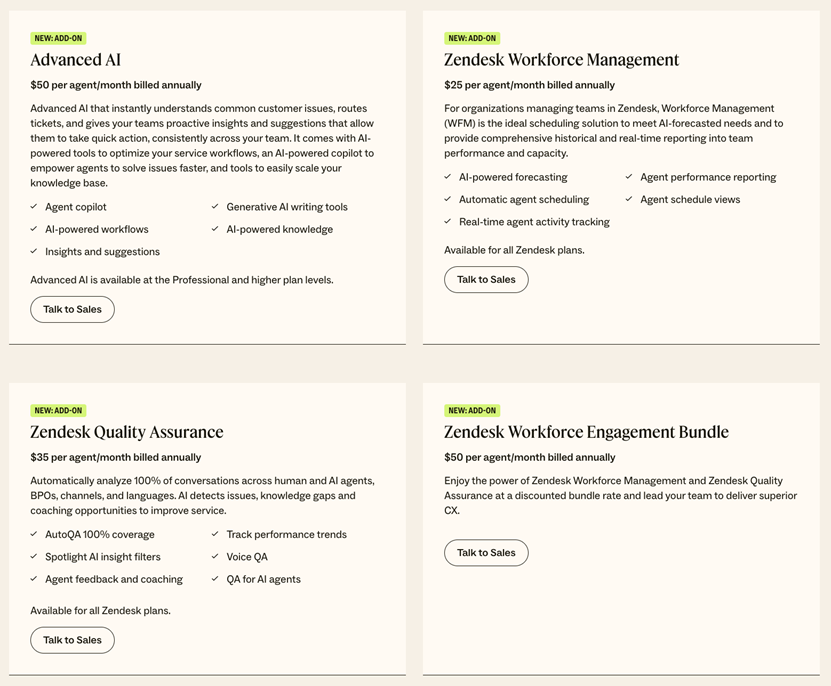
Suite Team starts at $69/agent/month (paid annually). Full-featured enterprise solutions typically start at $150+/agent/month and require annual contracts.
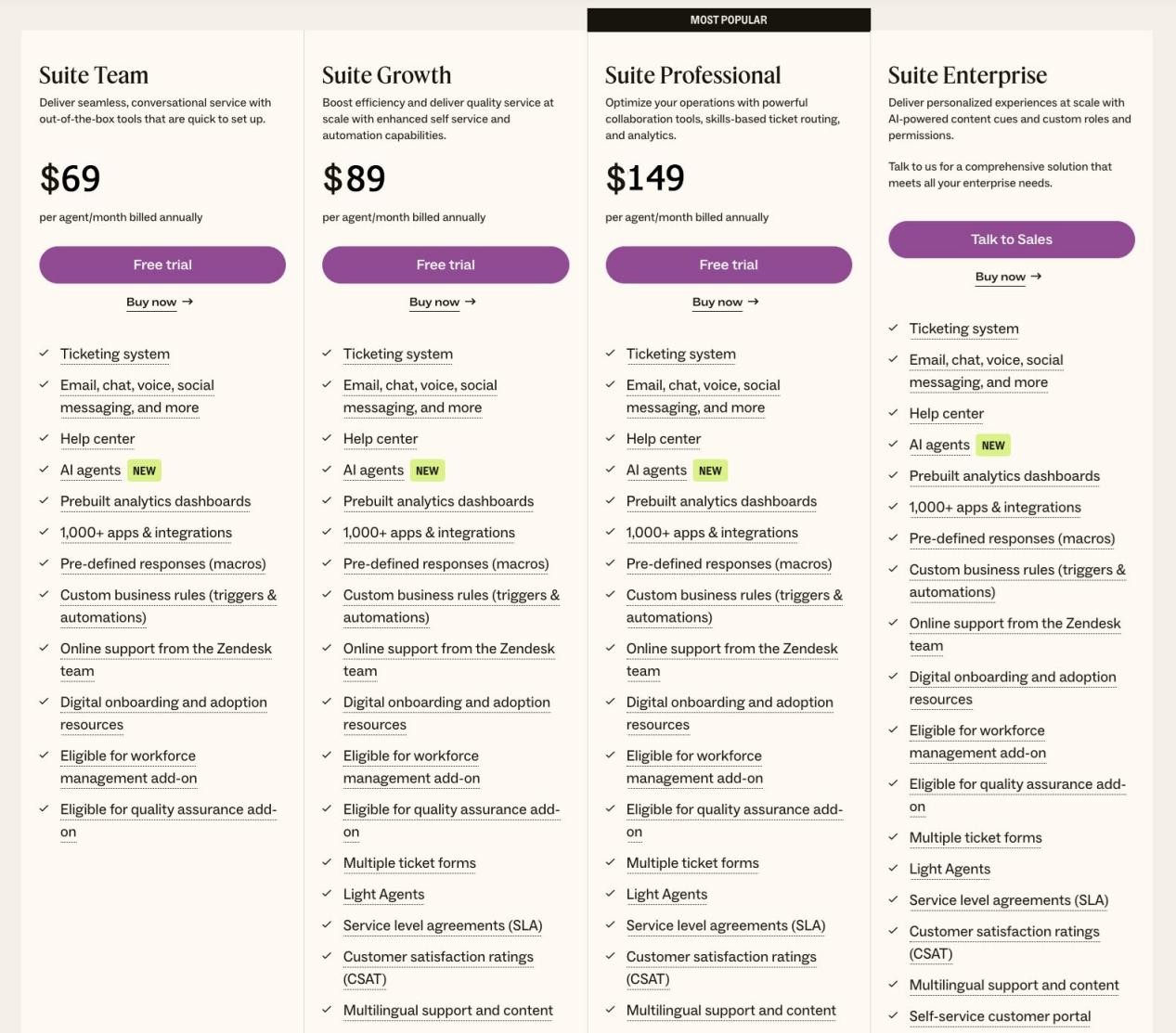
Add-on services (advanced AI, workforce management, data privacy tools) come with extra fees.
The Bottom Line / Decision Point
Best suited for large enterprises with ample budgets, complex operations, and needs for extreme scalability and compliance. Be aware that its modular pricing can lead to costs rising quickly with feature demands.
❸ Freshdesk: The High-Value, Cloud-Based Contender
Positioning & Philosophy
A Freshworks product, its core selling points are “user-friendly, feature-complete, and transparent pricing.” It is particularly well-suited for SMBs and startups with limited budgets that still want modern functionality.
Key Features
🔆 Intuitive Ticketing System: Offers multiple views (new, pending, resolved), supports SLA management and automation rules.
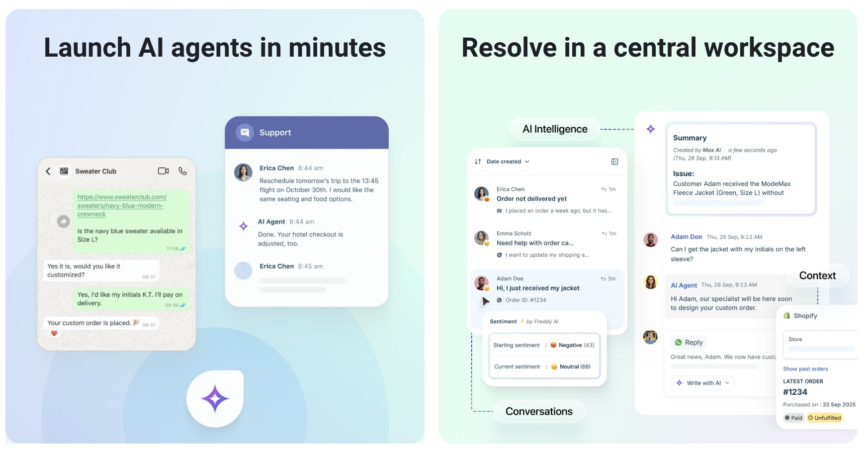
🔆 Built-in AI Bot (Freddy AI): Handles common queries and learns from historical conversations to improve.
🔆 Multi-Channel Support: Integrates email, phone, chat, social media, and web portal.
🔆 Collaboration Features: Supports internal ticket discussions, team presence indicators, and ticket transfers.
Advantages
✅ Excellent User Experience: Modern, intuitive interface design allows new users to grasp core operations within hours.
✅ Highly Competitive Pricing: Offers a genuinely usable free plan (up to 3 agents), with paid plans starting at just $15/agent/month.
✅ Rapid Iteration & Innovation: High update frequency allows quick response to new market demands.
✅ Strong Mobile App: Agents can efficiently handle tickets and chats via the mobile application.
Drawbacks & Considerations
⭕ Functional Depth Limits: Weaker than specialized products in areas like complex ITIL process support and advanced reporting.
⭕ Ecosystem Scale: The number and quality of integrations in its marketplace still trail behind Zendesk’s.
⭕ Large-Scale Deployment Track Record: Fewer public case studies of deployments at very large scale (e.g., 1000+ agents).
Representative User Feedback
“After migrating from Zendesk to Freshdesk, our support team’s training time dropped by 60%, and our satisfaction scores actually improved. The value for money is unbeatable for a fast-growing startup like ours.” – Head of Customer Support, DTC Brand
“The free plan was sufficient for our 5-person team in the early days—a real lifesaver. But when we needed more complex automation, we found we had to upgrade to a more expensive tier.” – Founder, Early-Stage SaaS Company
Pricing Reference
Permanent free plan (limited features); Growth plan at $15/agent/month; Pro plan at $49/agent/month; Enterprise at $79/agent/month. Discounts for annual billing.
The Bottom Line / Decision Point
Best suited for SMBs and startups with tight budgets who are unwilling to compromise on core functionality. Its limitations surface when dealing with extremely complex, cross-departmental service processes.
❹ HubSpot Service Hub: The CRM-Native Service Expert
Positioning & Philosophy
As part of the HubSpot Customer Platform (CRM, Marketing, Sales, Service, CMS), Service Hub is positioned as a “customer service platform deeply synergistic with sales and marketing.” It’s ideal for companies already using or planning to adopt the HubSpot ecosystem.
Key Features
🔆 Deep CRM Integration: Service tickets are automatically linked to contact records, deal stages, and interaction history.
🔆 Conversational Inbox: Manages all customer conversations through a shared inbox with internal collaboration comments.
🔆 Knowledge Base & Feedback Tools: Create help articles, collect CSAT and NPS scores.
🔆 Service Automation: Workflows based on customer properties or behaviors.
Advantages
✅ Unmatched Ecosystem Synergy: If your sales and marketing teams use HubSpot, your service team gains a complete view of the customer journey.
✅ Generous Free Tier: The free plan includes a shared inbox, ticketing, email templates, and basic reporting—enough for a small team to start.
✅ Unified Customer Data: Eliminates the hassle and errors of syncing data between multiple systems.
✅ Strong Inbound Service Philosophy: Aligns with HubSpot’s “inbound” ethos, emphasizing deflecting tickets via knowledge bases and self-service.
Drawbacks & Considerations
⭕ Depth as a Standalone Help Desk: Its ticketing functionality can feel basic compared to specialized products if deep HubSpot integration isn’t a priority.
⭕ Cost of Advanced Features: Accessing full functionality requires upgrading to higher-priced Professional or Enterprise suites.
⭕ Channel Support Limitations: Channels like phone support require additional integrations or third-party tools.
Representative User Feedback
“Our marketing and sales teams were already on HubSpot, so Service Hub was the natural choice. Seeing the customer’s journey from first website visit to purchase to support is incredible.” – Director of Customer Success, B2B Software Company
“Purely as a ticketing system, it’s not as feature-rich as Freshdesk. But we value the unified data and processes more.” – Operations Lead, EdTech Company
Pricing
Free plan (feature-rich); Starter bundle at $20/month (includes 2 users); Professional bundle at $100/month (includes 5 users); Enterprise bundle at $120/month (includes 10 users). Pricing is bundle-based, not strictly per-agent, which can be cost-effective for small teams.
The Bottom Line / Decision Point
Best suited for** companies deeply invested in HubSpot CRM or planning a full inbound marketing adoption. If you only need a standalone help desk, its functional depth may be less than specialized products.
Category 2 Collaboration & Conversational Platforms – Redefining Communication Experiences
These products excel by focusing on specific interaction scenarios (like shared inboxes or live chat), optimizing either team collaboration or customer dialogue to an exceptional degree within their domain.
❺ Intercom: The Conversation-First Customer Interaction Platform
Positioning & Philosophy
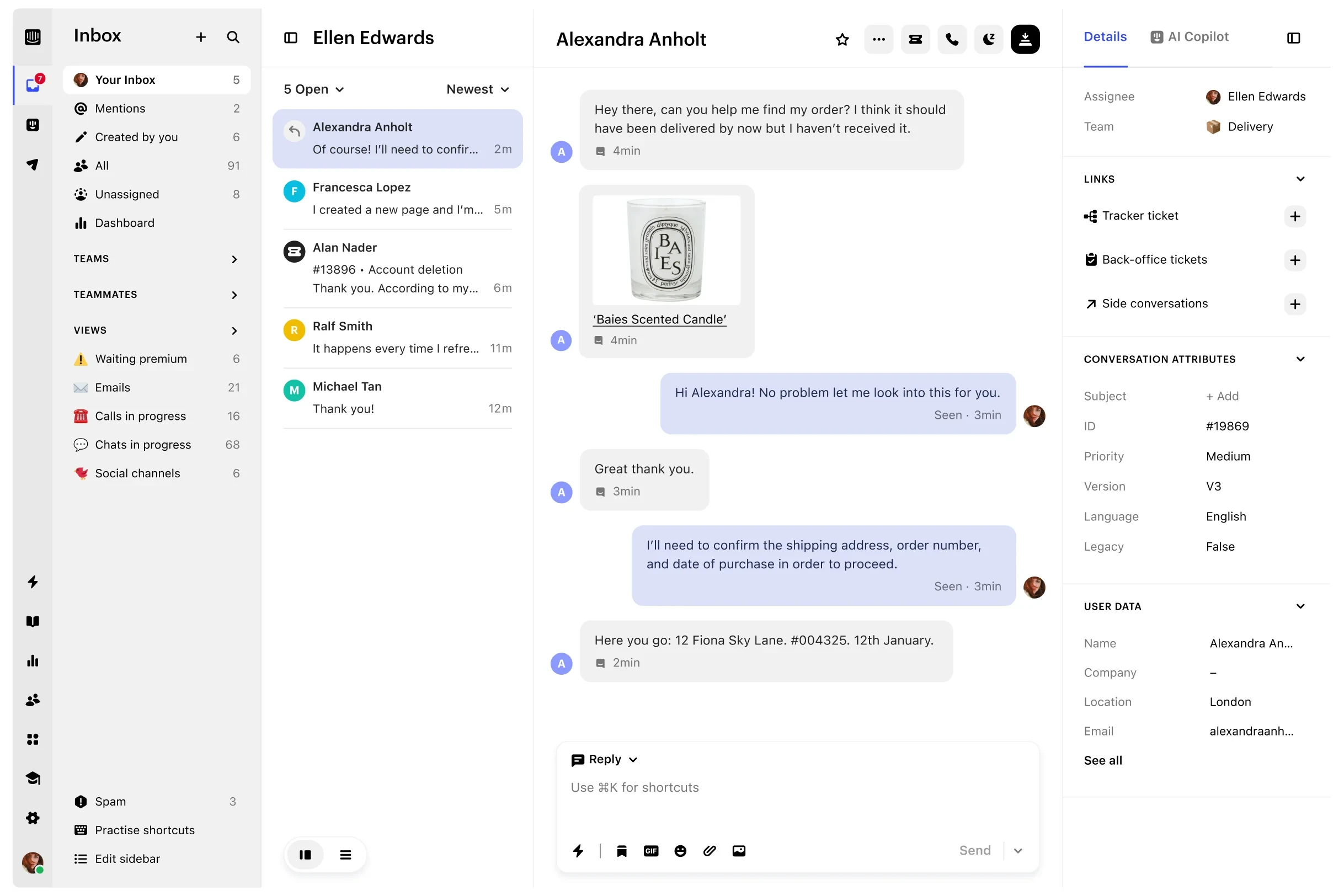
Believes modern customer interaction should be proactive, conversational, and cross-functional, blending support, marketing, and engagement.
Advantages
✅ Flagship Chat Widget: Offers industry-leading conversation starters, proactive messaging, and user experience, serving as the front door for many SaaS companies.
✅ Product-Led Growth (PLG) Engine: Used not just for support but also for guiding users, driving feature adoption, and conversion through targeted messages.
Drawbacks & Considerations
⭕ Pricing Complexity: Its “per contacted person” pricing model can be less cost-effective for businesses with large user bases but low interaction rates (e.g., some B2C apps).
⭕ Ticketing Mindset: Its “inbox” model may require adjustment for teams accustomed to traditional, pipeline-style ticket management handling high volumes of procedural requests.
User Feedback
Pricing
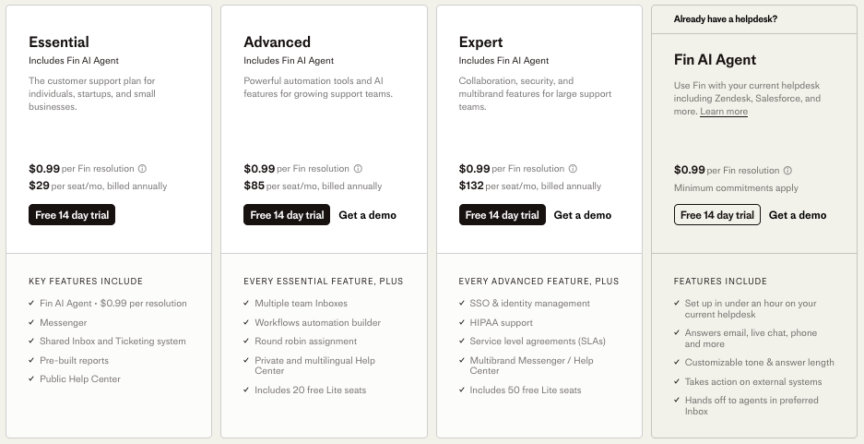
Starter plans from $29/agent/month, with tiered charges based on the number of contacted people. Annual costs for fast-growing companies can reach tens of thousands.
The Bottom Line / Decision Point
Best suited for product-led growth (PLG) tech companies, SaaS businesses, and any team where real-time conversation is a core service channel. Less ideal for traditional businesses primarily reliant on email for standardized requests or those needing strict, linear budget predictability.
❻ Front: The Reinvented Team Collaboration Inbox
Positioning & Philosophy
Transforms chaotic shared inboxes (like support@) into clear, collaborative workflows. Its core is boosting internal collaboration efficiency.
Advantages
✅ Unparalleled Collaboration Experience: Features like internal comments, @mentions, and assignment rules are excellently designed, solving the problem of messy email threads.
✅ Lightweight & Easy Adoption: The interface resembles a familiar email client, allowing team members to start with almost no training.
Drawbacks & Considerations
⭕ Functional Boundaries: As noted in competitive analyses (like those from Kustomer), Front is fundamentally an excellent collaboration inbox, not a full-fledged help desk. It lacks robust knowledge base capabilities, complex automation workflows, and deep analytics. Businesses often need to pair it with other tools.
⭕ Scope of Application: Excels at managing team email aliases and sales lead distribution but lacks the capability for processes requiring strict SLAs, multi-level approvals, or complex IT service desk workflows.
User Feedback
Pricing
Starts at $19/agent/month, with a Pro version at $59/agent/month.
The Bottom Line / Decision Point
Best suited for teams needing to efficiently manage one or more shared email addresses (e.g., support, sales, operations). If you need a full-featured help desk with a knowledge base, bots, and complex reporting, consider other options or use Front as a front-end interface integrated with other systems.
❼ Help Scout: The Elegant, Human-Centric Customer Service Specialist
Positioning & Philosophy
Focuses on delivering friendly, humanized customer service experiences while keeping team internal operations orderly.
Advantages
✅ “No-Disturb” Service Philosophy: Customers don’t see internal ticket routing or discussions, only cohesive, professional replies, maintaining the purity of the communication.
✅ Excellent Docs (Knowledge Base) Experience: Its help site builder is intuitive and aesthetically pleasing, aiding in the creation of high-quality self-service portals.
Drawbacks & Considerations
⭕ Channel Coverage: Natively focused on email and help center; live chat requires an add-on, and phone support is weak.
⭕ Scalability Ceiling: For very large, process-heavy support teams, its relatively streamlined feature set can become a limitation.
User Feedback
Pricing
Standard plan at $25/agent/month; Pro plan at $50/agent/month.
The Bottom Line / Decision Point
Best suited for companies that value service quality and customer communication experience, have mid-sized teams (especially remote), and where primary service requests come via email (e.g., many B2B software, professional services firms).
Category 3 IT Service Management (ITSM) Experts – The Power of Process & Integration
These products originate from or specialize in the IT Service Management domain, offering strong process control, asset management, and integration capabilities with development tools.
❽ Jira Service Management (JSM): The DevOps-Era ITSM Tool
Positioning & Philosophy
Seamlessly connects IT service management with software development workflows, supporting DevOps and agile IT teams.
Advantages
✅ Development Loop Closure: Developers can see customer feedback or bug reports from JSM directly in Jira Software, enabling end-to-end tracking from issue to code fix.
✅ Powerful Automation Rules: Leverages Jira Automation to configure highly complex and flexible workflows with a high degree of automation.
User Feedback
Pricing
Cloud version starts around $21/agent/month. Data Center version involves a perpetual license fee + annual maintenance.
The Bottom Line / Decision Point
Best suited for tech companies, IT departments, and any team wanting to break down walls between support and development. Likely overkill** for pure business/customer support teams without IT needs.
❾ ServiceNow: The Enterprise Service Management Behemoth
Positioning & Philosophy
Goes beyond ITSM to serve as the core digitalization and automation platform for all enterprise service processes (HR, Legal, Facilities, etc.).
Advantages
✅ Unmatched Depth & Breadth: Functional modules cover almost every aspect of enterprise operations with an extremely high degree of customizability.
✅ Workflow Automation Engine: Capable of modeling and automating highly complex business processes.
User Feedback
Pricing
Enterprise-level pricing, typically starting in the hundreds of thousands to millions of dollars, customized based on modules and user counts.
The Bottom Line / Decision Point
Virtually designed exclusively for large or very large enterprises as a strategic investment in digital transformation. Its cost, complexity, and implementation timeline are prohibitive for SMBs.
Category 4 Vertical & Specialized Tools – Mastering a Specific Niche
These products excel by going extremely deep on a specific industry or functional point, catering to precise, domain-specific needs.
❿ Gorgias: The E-commerce Efficiency Specialist
Positioning & Philosophy
Deeply understands e-commerce workflows, seamlessly connecting agent actions with backend order management.
Advantages
✅ Deep E-commerce Integrations: Perform actions like viewing orders, processing returns, or issuing discounts directly within the chat interface—no backend switching.
✅ Rich E-commerce Automation Templates: Pre-sets automations for scenarios like cart abandonment, shipping inquiries, and post-purchase follow-ups.
User Feedback
Pricing
Starts at $60/agent/month, with advanced plans like $900/month for 15 agents.
The Bottom Line / Decision Point
A “must-have tool” for e-commerce sellers, especially on Shopify. Its core value is almost non-existent for non-ecommerce businesses.
⓫ LiveAgent: The Feature-Packed All-in-One Bundle
Positioning & Philosophy
Aims to provide functionality for all major customer service channels through one platform, reducing integration hassles.
Advantages
✅ Built-in Call Center: Natively integrated phone support is a key differentiator from products focused primarily on digital channels.
✅ Wide Feature Coverage: Offers ticketing, chat, phone, knowledge base, etc., under one subscription, creating a strong perception of value.
User Feedback
Pricing
Starts at $15/agent/month, with an all-inclusive plan at $39/agent/month.
The Bottom Line / Decision Point
Best suited for SMBs wanting one product to quickly solve multi-channel support needs, especially if phone support is a must-have. Teams seeking best-in-class depth in any single function may find it lacking.
Category 5 Open Source & High-Value Choices – Flexibility & Control
This category offers businesses greater data control, customization freedom, and cost-control options.
⓬ Zoho Desk: The Context-Aware, Intelligent Assistant
Positioning & Philosophy
Provides an AI-aware, cost-effective customer service tool within the Zoho ecosystem.
Advantages
✅ AI Assistant “Zia”: Offers sentiment analysis, automated reply suggestions, workload prediction, and other intelligent features.
✅ Excellent Value for Money: Its pricing is highly competitive among products offering omnichannel and AI capabilities.
Drawbacks & Considerations
⭕ Ecosystem Lock-in: While integration with the Zoho suite is perfect, its richness as a standalone product integrating with external systems doesn’t match Zendesk’s.
⭕ Global Brand Strength: In mature markets like North America, its brand influence is primarily within the price-sensitive SMB segment.
User Feedback
Pricing
Standard edition at $14/agent/month; Professional at $23/agent/month.
The Bottom Line / Decision Point
Best suited for businesses already using Zoho CRM or other Zoho apps, or SMBs with limited budgets wanting to experiment with AI features.
⓭ Zammad: The Modern, Open Source Quality Choice
Positioning & Philosophy
Delivers a modern user experience while adhering to open-source principles and self-hosting, ensuring data sovereignty.
Advantages
✅ Data Autonomy & Control: Can be fully deployed on your own servers, meeting strict privacy regulations like GDPR.
✅ Active Community: The open-source model fosters a lively developer community, helpful for troubleshooting and obtaining free extensions.
User Feedback
Pricing
Community edition is free; Cloud-hosted from €7/agent/month; Enterprise from €49/agent/month.
The Bottom Line / Decision Point
Best suited for organizations with technical capabilities and extremely high requirements for data privacy and security (e.g., governments, financial institutions, European companies).
⓮ SolarWinds Service Desk: The Practical ITSM Player
Positioning & Philosophy
Provides an ITIL-aligned, feature-complete, and easy-to-implement IT service management solution.
Advantages
✅ ITIL Process Ready: Out-of-the-box support for core ITIL processes like Incident, Problem, Change, and Asset management.
✅ Integration with Infrastructure Monitoring: As part of the SolarWinds ecosystem, it can connect with server/network monitoring tools for proactive issue discovery.
The Bottom Line / Decision Point
Best suited for mid-sized IT teams already using SolarWinds monitoring products, or businesses seeking a full-featured, straightforward-to-implement ITSM tool.
⓯ osTicket: The Classic, Stable Open Source Foundation
Positioning & Philosophy
Provides a stable, reliable, completely free, and open-source ticketing system foundation.
Advantages
✅ Zero Software Cost: Completely free, a crucial starting point for teams on a very tight budget.
✅ Long-Lasting Community: Has a longstanding, stable user and developer community; basic questions can usually be answered.
User Feedback
Pricing
Completely free and open-source. Requires bearing server and maintenance costs yourself.
The Bottom Line / Decision Point
Best suited for technically capable, budget-constrained small teams or startups needing only core ticketing workflow functionality. Should not expect modern UI or advanced features.
Summary & Actionable Guide
Help Desk Software Quick Selection Table
| Your Core Need | Top Picks | Key Reason |
| Limited Budget, Quick Start | Freshdesk (Free), osTicket, Zoho Desk | Low/no cost, complete basic features |
| SMB, Pursuing Value | Sobot, Freshdesk, Help Scout | Well-rounded features, transparent pricing, fast deployment |
| E-commerce, Efficiency First | Gorgias, Sobot, Kustomer | Deep industry integration, pre-set automation templates |
| SaaS/Tech Company, Interaction-Heavy | Intercom, Zendesk, Sobot | Excellent live chat experience, deep product integrations |
| Mid/Large Enterprise, Omnichannel Needs | Zendesk, Kustomer, ServiceNow | Comprehensive features, strong scalability, enterprise support |
| IT Dept / Internal Service Management | Jira Service Management, ServiceNow | ITIL-compatible, integrates with dev workflows |
| Data Sovereignty & Privacy First | Zammad, osTicket (self-hosted) | Open source, self-hosted, complete data control |
| Existing HubSpot Ecosystem | HubSpot Service Hub | Seamless data flow, ecosystem synergy |
Final Pre-Implementation Checklist
1. Organize Pilot Tests
Select 2-3 finalist products and arrange 2-4 week free trials for your actual support team to test in real work scenarios.
2. Evaluate Integration Needs
List existing systems that must be integrated (CRM, e-commerce platform, internal tools). Confirm the candidate products’ integration methods and support levels.
3. Calculate Total Cost of Ownership (TCO)
Beyond subscription fees, consider implementation, training, and potential customization costs.
4. Verify Data Migration Path
If migrating from an existing system, understand the feasibility and effort of data export/import.
5. Check Service Level Agreements (SLAs)
Ensure the vendor’s SLAs (uptime, support response times) meet your business requirements.
Industry Trend Observations
With the proliferation of AI technology, help desk software in 2024 shows three clear trends:
1. AI Transitions from Add-on to Core Architecture
Intelligent assistance is moving from “nice-to-have” to “indispensable,” deeply embedded in ticket routing, content generation, quality assurance, and more.
2. Evolution from Multi-Channel to Omni-Journey
Leading platforms are no longer satisfied with simply aggregating multiple channels; they now pursue contextual coherence across channels and unified customer journey management.
3. Convergence of Service Data & Business Intelligence
Service desk data is no longer confined to the support department but is deeply integrated with product improvement, sales opportunities, and market insights, becoming a critical enterprise data asset.
Final Recommendations
Choosing help desk software is fundamentally about choosing your team’s working style and customer experience standard for the coming years. There is no single “best” product, only the “most suitable” solution for you. We recommend businesses:
🧠 Avoid Over-purchasing Features: Buy for your needs in the next 1-2 years, not for a hypothetical future 5 years out.
🧠 Prioritize User Experience: The tool your agents use for 8 hours a day—small efficiency gains compound into significant productivity differences.
🧠 Consider Vendor Longevity: In a rapidly changing tech market, choose a vendor with a clear product roadmap and healthy financial standing.
Regardless of the final product choice, continuously optimizing service processes, investing in team training, and paying attention to customer feedback will ultimately determine the quality of your customer service more than the tool itself. Tools empower teams, but teams create experiences—this is the eternal truth of customer service.
FAQs
❶ What is help desk software, and how is it different from a regular support email?
Help desk software is much more than a “supercharged inbox.” It’s a centralized, intelligent command center that unifies customer requests from email, chat, phone, and other channels into standardized tickets. It integrates a knowledge base, automated workflows, team collaboration, and in-depth analytics to systematically improve service efficiency and customer experience.
❷ Does my business really need to invest in a dedicated help desk system?
If you struggle with managing scattered requests, inefficient team collaboration, lack of service data visibility, or stagnant customer satisfaction metrics, the answer is likely yes. A professional help desk automates repetitive tasks, standardizes processes, and provides actionable insights for measurable improvement.
❸ What are the most critical features to look for in a help desk solution in 2026?
Focus on six core pillars: Unified Omnichannel Ticket Management, Automation & Intelligent Workflows, Internal/External Knowledge Base, Seamless Team Collaboration, 360-Degree Customer View, and Deep Reporting & Analytics. These form the foundation of modern, efficient customer service operations.
❹ With so many platforms and price ranges, how do I start narrowing down my options?
The key is to first define your core needs rather than comparing feature lists blindly. Ask yourself: Are you serving external customers or internal employees? Is your business e-commerce, SaaS, or traditional? What’s your budget? The article’s 4-Step Evaluation Framework will guide you through narrowing options based on your scenario, integrations, costs, and hands-on testing.
❺ What’s the main difference between well-known platforms like Zendesk and Freshdesk compared to emerging platforms like Sobot?
The primary difference lies in product philosophy and architecture. Established giants offer comprehensive features and vast ecosystems but can be complex and costly.
Emerging platforms like Sobot emphasize out-of-the-box, all-in-one usability, deeply integrated AI capabilities, and straightforward value—making them particularly suitable for growth-oriented businesses seeking agile deployment and quick ROI.
Author

Sue
With over 10 years as a solutions expert and product marketing manager in the contact center space, Sue champions a hands-on approach to evaluating SaaS and AI technologies.