Choosing a CRM Pros and Cons


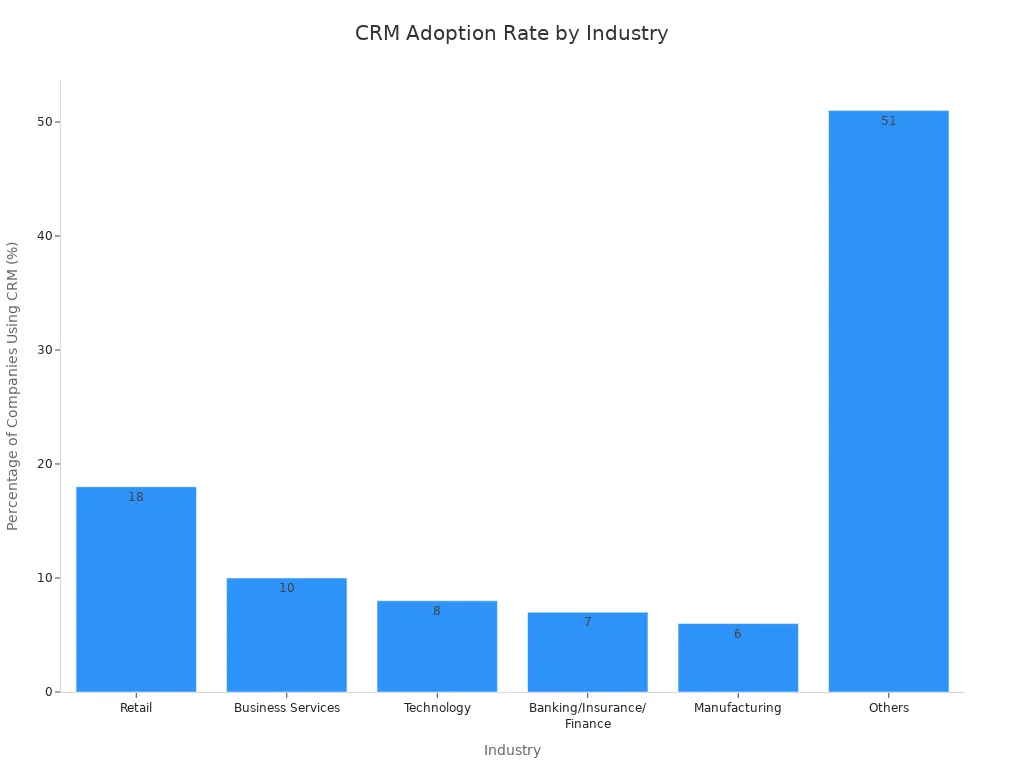
You are likely wondering if an all-in-one ecommerce CRM is worth the investment. You are not alone. The retail industry leads in CRM adoption, with 18% of companies using it to track customer interactions.
An integrated CRM offers clear benefits like a single customer view and unified data. However, you must also consider the high costs and potential for unused features. This guide helps you weigh these factors to determine what is the best customer service software for ecommerce businesses, exploring solutions like Sobot to improve your customer support.
The Pros of an All-in-One CRM for Ecommerce
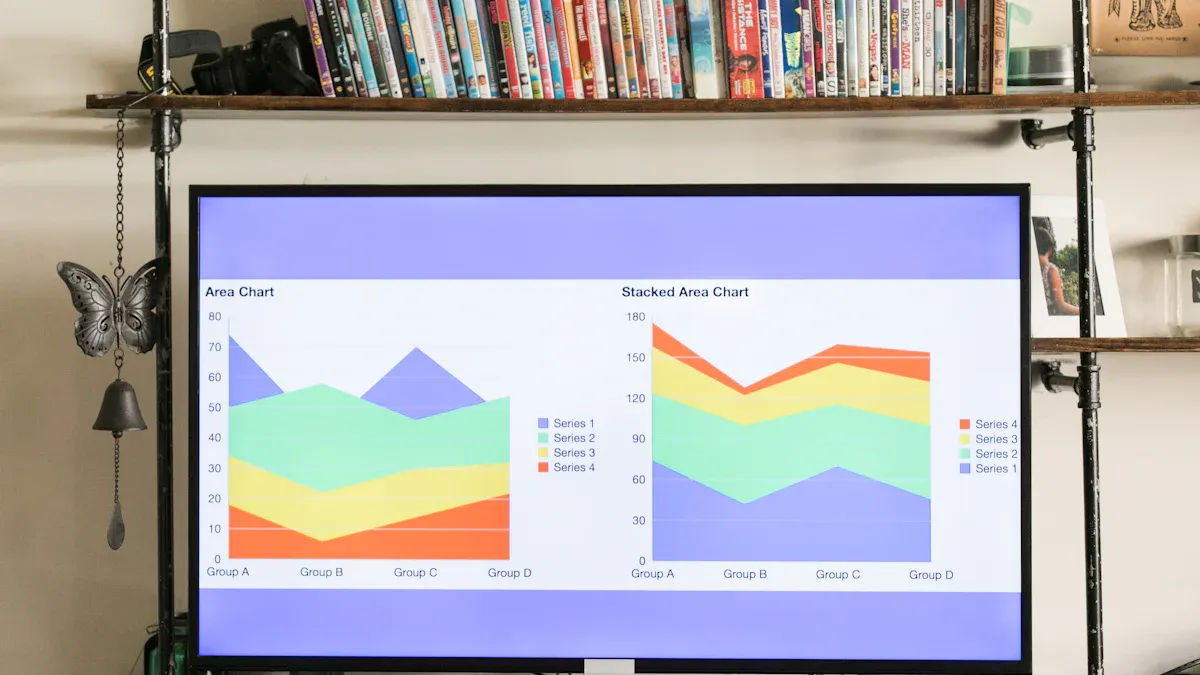
An all-in-one ecommerce CRM platform can transform how you connect with customers. It centralizes your operations, turning scattered data into actionable insights. Let's explore the key advantages this software integration offers your business.
Unifying Data with an Ecommerce CRM
A powerful ecommerce CRM gives you a single source of truth for all customer interactions. Imagine seeing every touchpoint in one place. This includes a customer's first visit, their purchase history, and any support tickets. For example, one business grew its revenue by 10% monthly by using its CRM to unify all customer data. This complete view of the customer journey allows you to make smarter decisions. This integration of data provides clear reports on revenue and what your customers are buying.
Streamlining Support and Sales Workflows
You can significantly improve team efficiency with a CRM. The software connects your sales and service data, creating a smoother experience for everyone. Automated workflows handle simple tasks, which lets your agents focus on high-value customer problems. AI-powered tools can even suggest responses to common questions. This same data helps your marketing team spot upsell opportunities, which can increase your average order value with minimal effort. This CRM integration makes your entire operation more effective.
Enhancing Personalization and Marketing
Unified data is the key to powerful marketing. A CRM allows for deep customer segmentation. You can create highly targeted marketing campaigns that speak directly to specific groups.
Did You Know? Personalized email marketing campaigns can deliver six times higher transaction rates. By tailoring your marketing, you guide each customer along a unique customer journey.
This level of personalization in your marketing efforts can reduce cart abandonment by over 15% and boost sales. It turns a general marketing message into a personal conversation, building a stronger customer experience.
Improving Customer Retention with Sobot Live Chat
Retaining customers costs less than acquiring new ones. A CRM helps you build loyalty through better service. Live chat is a fantastic tool for this, as 60% of customers are more likely to make repeat purchases from a website that offers it.
This is where a solution like Sobot Live Chat shines. It helps you create the personalized interactions that build trust. For instance, by implementing Sobot's software, the global brand OPPO achieved:
- An 83% chatbot resolution rate.
- A 94% positive feedback rate.
- A 57% increase in their repurchase rate.
This shows how the right platform and CRM integration can turn one-time buyers into loyal customers.
The Cons and Challenges of a CRM System
While a CRM offers many benefits, you must also understand the potential drawbacks. An ecommerce CRM is a major investment of time and money. Knowing the challenges ahead helps you make a better choice for your business and your customers.
Implementation and Total Ownership Costs
The initial price of a CRM is only part of the story. The total cost of ownership can be much higher. You need to budget for several hidden expenses. These costs often surprise businesses that are new to customer relationship management software.
Note: Hidden costs can significantly increase your budget. Plan for them early.
Common extra fees can include:
- Training and Support: Your team will need training to use the new software effectively. You may also need to pay for premium customer support.
- Customization and Integration: Making the CRM fit your exact needs often requires customization. A proper CRM integration with your other tools can also add to the cost.
- Data Migration: Moving your existing customer data into the new system is a complex and often expensive task.
Adoption Challenges in Customer Relationship Management
A new CRM is only useful if your team actually uses it. Low user adoption is a major risk. Sometimes, the software is too complex for daily tasks. Your team may feel they are entering useless data instead of helping customers. If the CRM does not help your team collaborate, they may avoid it. This is a common challenge in customer relationship management. A cloud-based CRM can sometimes simplify access, but the core software must be user-friendly.
Risk of Over-Complexity and Unused Features
Many CRM platforms come packed with features. You might pay for advanced tools that your team never uses. This over-complexity can overwhelm your employees. They may struggle to find the functions they need for their daily work. A simpler, more focused software might be a better fit. You should carefully evaluate which features are essential for your customer service goals. A cloud-based CRM with tiered pricing can help, but you must choose the right tier.
Data Migration and Integration Hurdles
Moving your information to a new CRM presents technical challenges. Your existing customer data might be messy, with duplicates or incomplete records. This "dirty data" can cause problems in the new system. Your old software might also make it difficult to export information. A new CRM integration can also fail if the data structures do not match. These integration issues can break connections to your other essential business systems and disrupt service for your customers.
What is the Best Customer Service Software for Ecommerce Businesses?
Finding the right software is not about picking one "best" product. The ecommerce industry is too diverse for a single solution. Instead, the search for what is the best customer service software for ecommerce businesses begins with a close look at your own company. You must find the platform that fits your unique challenges, goals, and customer base. This process involves four key steps. Following them will help you identify the best crm for ecommerce and your specific needs.
Assess Your Core Ecommerce Support Needs
Before you look at any software, you must first understand your own pain points. A clear audit of your current operations will reveal exactly what you need a new CRM to fix. This is the most important step in figuring out what is the best customer service software for ecommerce businesses.
Start by reviewing your customer service interactions. Go beyond basic metrics.
- How easy is it for customers to get help?
- Are your agents solving problems on the first contact?
- Where do communication breakdowns happen between your tools?
- Do manual tasks slow down your support team?
Answering these questions helps you map out friction in the customer journey. For example, you might find that your current systems do not communicate well. This can lead to embarrassing mistakes, like sending abandoned cart emails for items a customer has already purchased. Identifying these gaps shows you what a new CRM must solve.
Evaluate Key Integration Capabilities
A modern ecommerce business uses many tools. Your CRM must act as the central hub that connects them all. A powerful CRM integration automates the flow of critical information. This includes orders, customer details, and inventory levels. Without strong integration, you are just creating another data silo.
For many online stores, this means seamless connection with major platforms like Shopify and Amazon. The right CRM software should pull data from these marketplaces automatically. This creates a single, cohesive engine that drives efficiency. Solutions like Sobot, for instance, integrate directly with these ecommerce giants. This allows you to unify customer interactions from your website, app, and social media channels like WhatsApp into one place.
Different tools offer different levels of CRM integration. Your choice depends on your technical needs.
| Tool Type | Key Focus | Best For |
|---|---|---|
| Direct Connectors | Native-like synchronization | Businesses wanting a simple, bi-directional sync between their store and CRM. |
| Automation Platforms | Custom workflow flexibility | Teams needing to connect many different apps with custom-triggered actions. |
| Enterprise Platforms | Robust, high-volume data management | Large businesses with complex or custom integration and error-handling needs. |
Evaluating these options is key to finding the best crm for ecommerce, as the right integration saves time and prevents errors.
Analyze Scalability for Future Growth
The software you choose today must support your business tomorrow. A common mistake is picking a CRM that only solves current problems. As your business grows, your needs will change. You will handle more customer data, add new products, and possibly expand into new markets. A scalable CRM grows with you.
Look for a platform with features designed for growth:
- Modular Design: Can you add new features as you need them? A modular CRM lets you start simple and add complexity later, aligning costs with your actual needs.
- Data Handling: The software must securely manage a growing volume of customer data without slowing down.
- Customization: You should be able to adjust workflows and fields as your business processes evolve.
- Mobile and Cloud Access: A cloud-based CRM with mobile access allows your team to get customer information anytime, anywhere. This is vital for remote teams.
Choosing a scalable platform is a smart long-term investment. It prevents the high cost and disruption of switching systems every few years. This foresight helps define what is the best customer service software for ecommerce businesses in the long run.
Compare User-Friendliness and Accessibility
A powerful CRM is useless if your team finds it too difficult to use. Low user adoption is a primary reason why CRM implementations fail. If the software feels like a burden, your team will avoid it. This is why user experience is just as important as features. The best crm for ecommerce is one your team will actually embrace.
Tip: Look for a clean and intuitive interface. The goal is to make your agents' jobs easier, not harder.
A unified workspace is a great example of a user-friendly design. Instead of switching between different tabs for email, chat, and social media messages, agents can handle everything from a single dashboard.
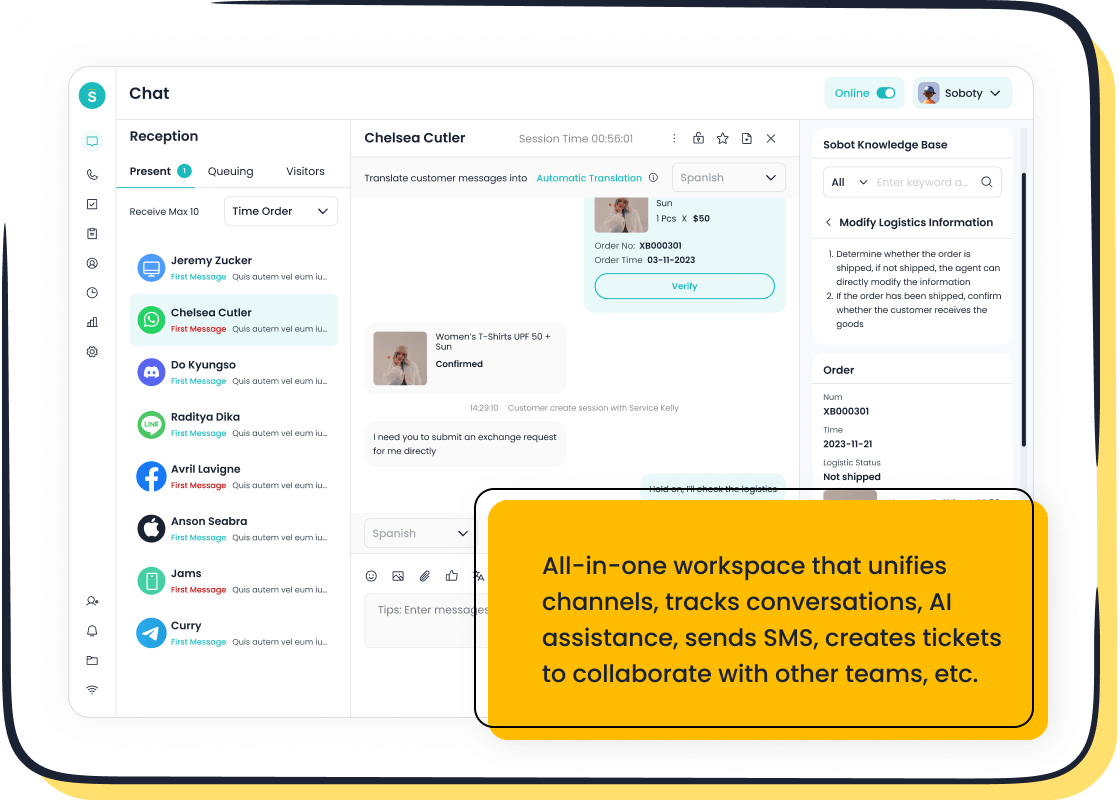
- Sobot's Live Chat offers a unified workspace that brings all customer conversations into one view.
- This consolidation of channels and data into one platform dramatically simplifies agent tasks.
- It provides a complete view of the customer journey, which helps agents provide faster, more personalized support.
Platforms with this design can lead to a 94% increase in agent productivity. By reducing complexity, you lower training time and empower your team to help customers more effectively. This is the final piece of the puzzle in determining what is the best customer service software for ecommerce businesses.
How to Maximize Your Ecommerce CRM's ROI

Choosing a CRM is just the first step. The real value comes from how you use it. A successful ecommerce CRM implementation requires a clear strategy. You can turn your software investment into a powerful engine for growth. This involves careful planning, team support, and a focus on results.
Develop a Phased Implementation Plan
You should not try to launch every CRM feature at once. A phased approach prevents your team from feeling overwhelmed. It also delivers value at each stage.
You can structure your plan in three phases:
- Core Foundation (Months 1-2): Start with the basics. Focus on contact management and tracking your sales pipeline. Get your team comfortable with the new software.
- Process Automation (Months 3-4): Introduce features that save time. Implement email templates and task automation. This helps your team work more efficiently.
- Advanced Features (Months 5-6): Roll out custom workflows and advanced integrations. Use performance analytics to refine your strategy.
This step-by-step process ensures your new ecommerce CRM is adopted smoothly.
Secure Leadership Buy-In and Support
Your leadership team must fully support the new CRM. Their buy-in is critical for success. You need to show them how the software aligns with business goals.
Create a compelling story. Explain how a better customer experience drives growth. Use visual dashboards to show the impact of your CRM on key business metrics.
When leaders see a clear plan with measurable goals, they are more likely to provide the resources you need. This support is essential for a smooth transition to the new customer management software.
Provide Comprehensive Team Training
Your team will only use a CRM if they understand its benefits. Training should be ongoing, not a one-time event. Show your agents how the software makes their jobs easier.
Identify "champions" within your team. These are enthusiastic users who can help their peers. You can also use gamification with badges and leaderboards to make learning fun. When your team sees the CRM as a tool for success, adoption rates will soar.
Define and Measure Key Success Metrics
You must define what success looks like for your ecommerce business. Track key metrics to measure the impact of your CRM. This shows you the return on your investment.
For example, the global brand OPPO used Sobot to improve its customer service. They focused on human-machine cooperation, using chatbots for simple questions and agents for complex issues. This strategy produced amazing results:
- An 83% chatbot resolution rate.
- A 94% positive customer feedback rate.
- A 57% increase in the customer repurchase rate.
These numbers prove the power of the right CRM software. By measuring your own metrics, you can see how your new system improves customer satisfaction and boosts your bottom line.
Choosing an ecommerce CRM involves a key trade-off. You gain powerful unified data and efficiency with a CRM. However, you face challenges like cost and complexity with any new CRM. The best CRM platform is not a one-size-fits-all solution.
Your Next Step: Before you evaluate any software, start with a clear audit of your current support pain points and business goals. Then, explore a flexible CRM platform like Sobot with a free trial to see how it can help you.
FAQ
What is the first step in choosing an ecommerce CRM?
You should first audit your current support needs. Identify your biggest pain points and business goals. This process helps you understand exactly what problems the new software must solve for your team and customers.
How can I manage the total cost of a CRM?
You can choose a scalable platform with a phased implementation plan. Start with the essential features to control initial costs. You can add more advanced tools later as your business grows and proves the return on investment.
What does omnichannel support mean for my business?
Omnichannel support unifies all your customer conversations. You can manage interactions from your website, social media like WhatsApp, and email in one single platform. This creates a seamless experience for your customers and agents.
How do I ensure my team will use the new CRM?
Tip: Choose a user-friendly system with a unified workspace, like the one offered by Sobot.
Provide comprehensive training for your team. You must show them how the software makes their jobs easier. This simple step boosts user adoption and maximizes your investment.
See Also
Essential Capabilities of Leading CRM Solutions for Call Centers
Evaluating the Benefits and Drawbacks of Remote Call Center Operations
Discovering the Best Free CRM Software for Call Centers This Year
Selecting Social Media Customer Service Software: Ten Key Considerations
A Comprehensive Guide to Omnichannel Solutions for Call Centers

