What Is a Unified Inbox for Customer Service?


A unified inbox customer service platform centralizes all your customer communications. It organizes these communications from channels like email and social media into a single dashboard. This unified inbox is vital for providing excellent customer support, as 63% of customers expect a seamless experience across all communication channels. A unified inbox helps you deliver the consistent support that turns visitors into loyal clients, a goal Sobot helps businesses achieve.
Why a Unified Inbox Is Essential for Customer Support

A unified inbox does more than just organize messages. It transforms your entire customer support operation into a more efficient, consistent, and collaborative system. When you equip your team with the right tools, you empower them to deliver exceptional service that builds lasting customer relationships. Let's explore the essential benefits a unified inbox provides.
Boost Agent Efficiency
Your agents want to help customers quickly. However, they lose valuable time switching between different applications for email, social media, and live chat. This constant multitasking is a major drain on productivity. Research shows that only about 2% of people can effectively handle more than one task at a time. For everyone else, multitasking leads to more errors and mental exhaustion.
A unified inbox eliminates this problem. It brings all customer communications into a single, organized view.
- Agents can access past conversations and tickets without switching screens.
- They get the full context of a customer's issue instantly.
- This consolidation accelerates problem resolution and reduces agent stress.
Real-World Impact: Samsung's Success with Sobot Global technology leader Samsung needed to streamline its vast customer service operations. By implementing Sobot's all-in-one contact center solution, they unified their communication channels. The result was a remarkable 30% increase in agent efficiency, allowing their team to handle inquiries faster and more effectively.
Deliver a Consistent Omnichannel Experience
Customers today interact with your brand across many channels. They might send a DM on Facebook, follow up with an email, and then start a live chat on your website. They expect a single, continuous conversation. In fact, 72% of customers report that having to explain their problem to multiple people is a major service failure.
A unified inbox is the key to providing a seamless omnichannel experience. It stitches together every interaction from every channel into one thread. This means:
- Your customer never has to repeat themselves.
- Your agent has the full story and can provide a consistent response.
- You build trust and show customers you value their time.
This consistency has a powerful effect on loyalty. Businesses that deliver a strong omnichannel experience retain an average of 89% of their customers. A unified inbox makes this level of service possible.
Centralize Customer Data for Better Service
Great customer service is personal. To deliver it, your agents need a complete picture of who they are talking to. A unified inbox acts as a central hub for all customer data, pulling together interaction history, purchase records, and user preferences. This 360-degree view allows your team to move beyond reactive support and offer proactive, personalized solutions.
When agents have all the information they need in one place, they can:
- Anticipate customer needs based on past behavior.
- Resolve issues on the first contact by understanding the full history.
- Offer tailored recommendations that add value to the conversation.
This level of personalization is what sets great brands apart. For example, Samsung used Sobot's platform to achieve a 97% customer satisfaction rate. By connecting data from their internal systems, their agents could provide intelligent, customized support that made customers feel understood and valued.
Improve Team Collaboration
Customer support is a team sport. Complex issues often require input from multiple agents or departments. Without a central platform, collaboration becomes chaotic. Messages get lost, agents duplicate efforts, and handoffs between support tiers become slow and inefficient.
A unified inbox customer service platform is built for teamwork. It provides features that break down silos and help your team work together seamlessly.
| Feature | How It Improves Collaboration |
|---|---|
| Internal Notes | Agents can leave private comments on a conversation for colleagues. This shares context without cluttering the customer-facing thread. |
| Smart Assignments | You can automatically route conversations to the agent or team with the right expertise, ensuring the best person handles the issue. |
| Shared Drafts | Team members can work together on a response to ensure it is accurate, consistent, and maintains your brand's tone of voice. |
These tools prevent fragmented communications and ensure that every customer issue is handled by the right person at the right time. This leads to faster resolutions and a more cohesive support team.
Key Features of a Unified Inbox Platform
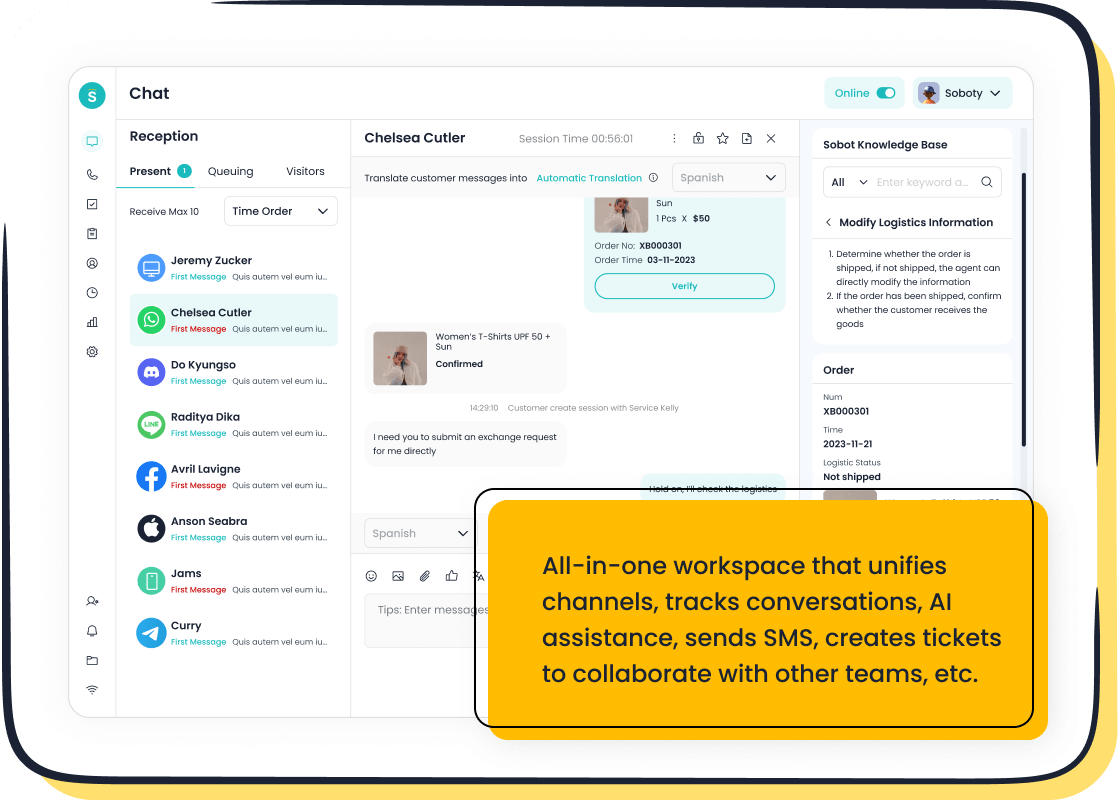
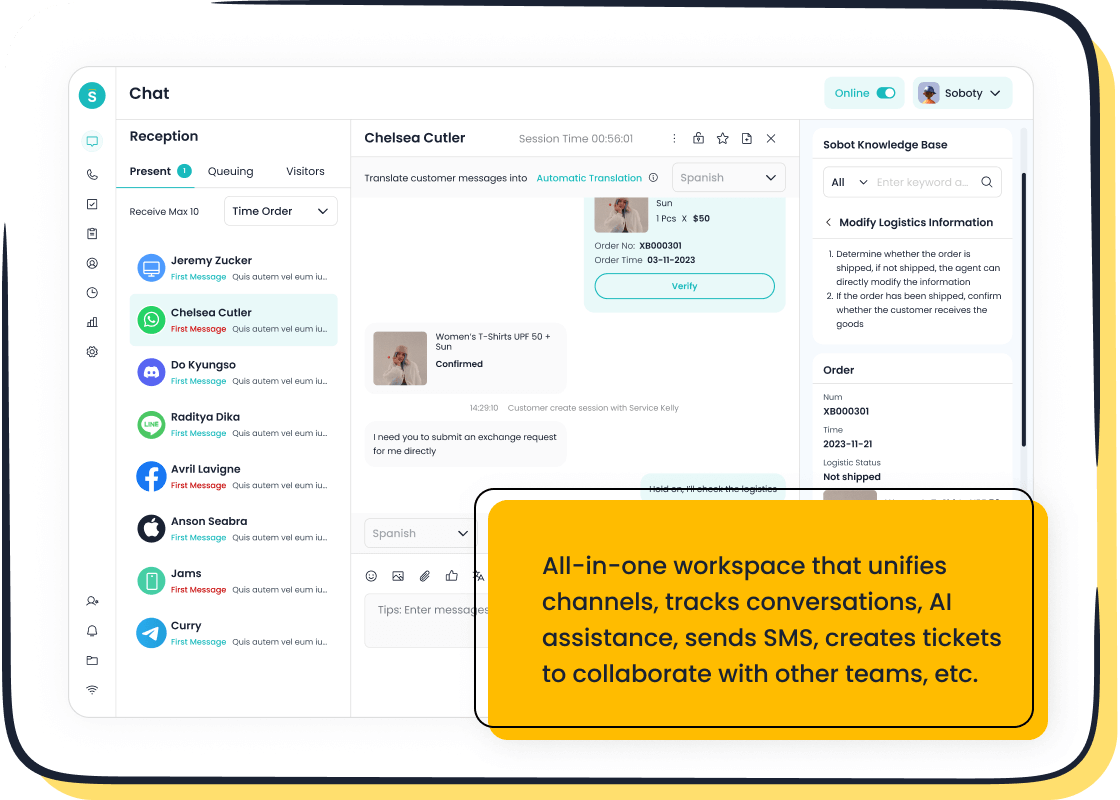
Not all unified inbox platforms are created equal. While the basic concept is to centralize communications, the best solutions offer a comprehensive set of tools that transform your customer service. Platforms like Sobot's Live Chat go beyond simple message aggregation. They provide the features you need to boost efficiency, automate tasks, and make data-driven decisions. Let's explore the key features that make a unified inbox an indispensable asset.
Omnichannel Integrations
A powerful unified inbox lets you connect all your communication channels into one seamless view. This means your team can manage conversations from any platform without switching tabs. The goal is to meet customers where they are, creating a convenient and frictionless experience.
Modern communication platforms must support a wide range of channels. Your unified inbox should integrate with:
- Website and Mobile Apps: Engage visitors directly through live chat and in-app communications.
- Email: Manage traditional support requests alongside modern channels.
- Social Media: Connect with customers on platforms like Facebook, Instagram, and Telegram.
- Messaging Apps: Offer support through popular apps like WhatsApp, which has over 2 billion users globally.
Integrating these channels offers huge benefits. For customers, it is more convenient and flexible. They can get fast responses in the apps they already use daily. For your business, it makes your team happier by reducing stress. It also allows conversations to feel more personal, building a stronger connection with your audience.
AI and Automation Capabilities
The most advanced unified inbox solutions use artificial intelligence to automate repetitive tasks and provide instant support. This frees up your agents to focus on complex issues that require a human touch. AI turns your inbox into a proactive and intelligent system.
🤖 24/7 Support with AI Chatbots An AI-powered chatbot, like the one offered by Sobot, can provide 24/7 self-service. It uses natural language processing (NLP) to understand customer questions and provide instant answers. This means your customers get help anytime, even outside of business hours. A chatbot can handle thousands of inquiries at once, ensuring no customer has to wait.
Automation also streamlines your internal workflows. You can set up rules to manage incoming communications automatically. For example, you can create workflows that:
- Route by Issue: Automatically send all billing questions to the finance team.
- Trigger by Sentiment: Flag conversations with frustrated customers and escalate them to a senior agent.
- Handle by Request: Immediately transfer a conversation to a live agent when a customer types "speak to a person."
These automated processes ensure every message gets to the right place quickly, improving resolution times and customer satisfaction.
Team Collaboration and Assignments
A unified inbox is designed for teamwork. It provides the tools your agents need to work together efficiently and resolve customer issues faster. Smart assignment features ensure that every conversation is handled by the most qualified person.
You can set up assignment rules based on different factors.
| Assignment Strategy | How It Works |
|---|---|
| Team Function | Route sales leads to the sales team and technical questions to the support team. This ensures experts handle relevant inquiries. |
| Agent Workload | Distribute conversations evenly among available agents (round-robin) to prevent burnout and maintain productivity. |
| Customer Status | Assign high-value customers to a dedicated agent to provide a personalized, high-touch experience. |
These intelligent routing capabilities eliminate manual triage. They reduce the time it takes to get a customer to the right agent. This improves first-response times and makes your entire support operation more effective. A unified inbox customer service platform with these features helps your team collaborate on in-app communications and other messages without confusion.
Analytics and Performance Reporting
You cannot improve what you do not measure. A key feature of a top-tier unified inbox is built-in analytics and reporting. This centralized message interface gives you a clear view of your team's performance and your customers' satisfaction levels.
Your analytics dashboard should track key performance indicators (KPIs) that give you actionable insights. Important metrics include:
- Message Volume: Tracks the number of incoming conversations to help you manage staffing.
- First Response Time: Measures how quickly your team responds to a new message.
- Average Handle Time: Shows how long it takes an agent to resolve an issue.
- Customer Satisfaction (CSAT) Scores: Gathers direct feedback from customers about their experience.
- Net Promoter Score (NPS): Measures customer loyalty and their likelihood to recommend your brand.
By regularly reviewing these metrics, managers can spot trends and identify areas for improvement. For example, if average resolution times are high for a specific topic, it may signal a need for more training in that area. This data-driven approach helps you continuously optimize your support strategy and deliver better service.
How to Set Up Your Unified Inbox
Setting up a unified inbox transforms your customer service from chaotic to controlled. You can implement this powerful tool in five clear steps. This process helps you organize your communications and empower your team to deliver outstanding support.
Step 1: Audit Your Communication Channels
First, you need to know where your customers contact you. Make a list of all your current communication channels. Do customers email you, send messages on Facebook, or use a chat widget on your website? Understanding every touchpoint is the foundation for building an effective unified inbox.
Step 2: Select the Right Software
Next, choose a platform that fits your needs. Look for a unified inbox customer service solution that connects to all the channels you identified. The right software should be easy for your team to learn and use. It should also offer the features you need to grow, like AI and automation.
Step 3: Configure and Automate Workflows
Now you can set up rules to manage incoming messages automatically. A well-configured unified inbox routes conversations to the right person without manual work. You can create workflows to:
- Escalate VIP Issues: Automatically send messages from high-value customers to a senior agent.
- Route by Topic: Send all billing questions directly to the finance team.
- Manage by Urgency: Use sentiment analysis to flag frustrated customers and prioritize their tickets.
Step 4: Train Your Team on the Unified Inbox Customer Service Platform
Your team needs proper training to use the new system effectively. Show them how the unified inbox makes their job easier.
💡 Training Tip: Focus on practical skills. Teach agents how to use internal notes for collaboration, assign conversations to prevent duplicate work, and tag issues by topic like "Orders" or "Returns." Regular training sessions ensure everyone uses the platform correctly.
Step 5: Monitor Performance and Optimize
Finally, you must track your results to see what is working. Use the platform’s analytics to monitor key metrics. Keep an eye on your team's average response times and first-contact resolution rates. You should also track customer satisfaction scores. This data shows you where to make improvements and helps you optimize your support strategy over time.
The Impact of a Unified Inbox on Service Metrics
Adopting a unified inbox customer service platform directly improves your most important support metrics. You can track these changes to see a clear return on your investment. This tool helps your team work faster and smarter, which leads to happier customers.
Reduce First Response Time
Customers hate waiting. A unified inbox dramatically cuts down how long they wait for a reply. Your agents see all new messages in one place, so nothing gets missed. This leads to much faster first responses.
| Communication Channel | Before Unified Inbox | After Unified Inbox |
|---|---|---|
| Email inquiries | 4.2 hours | 47 minutes |
| Social Media DMs | 2.8 hours | 23 minutes |
| SMS/WhatsApp | 52 minutes | 12 minutes |
| Website chat | 8 minutes | 90 seconds |
Improve Customer Satisfaction Scores
Faster responses make customers happier. When you answer quickly, customers feel valued and respected. This positive feeling directly boosts your Customer Satisfaction (CSAT) scores. For example, the brand Michael Kors reduced its response time and saw its customer satisfaction rate climb to 95%. A quick response is one of the biggest factors in great customer support.
Increase Agent Productivity
A unified inbox helps your agents get more done. They no longer waste time switching between different apps. All customer information and conversation history are on one screen. This streamlined workflow reduces mental strain and helps agents focus on solving problems. Businesses that adopt unified systems have seen agent productivity improve by as much as 52%.
Lower Average Handle Time
Average Handle Time (AHT) is the total time an agent spends on a customer issue. A unified inbox lowers this metric. Agents get the full context of a customer's problem right away. They do not need to ask the customer to repeat information. This access to history allows agents to find solutions faster, reducing the time spent on each conversation and improving the overall efficiency of your support team.
A unified inbox transforms your customer communications from chaotic to controlled. It creates a single source for streamlined communication. You can boost agent productivity and deliver a superior, streamlined experience for your customers. This tool also provides the data you need to make smarter decisions. Ready to elevate your customer support?
Explore Sobot Live Chat and start your free trial today. Embark on Your Contact Journey.
FAQ
💡 What is the main purpose of a unified inbox?
A unified inbox brings all your customer messages into one place. You can manage emails, social media messages, and live chats from a single dashboard. This helps your team respond faster and stay organized.
⚙️ Can I connect all my business accounts to one inbox?
Yes. A good unified inbox lets you connect multiple communication channels. You can integrate your website chat, email accounts, and social media pages. This creates a single, organized view for your support team.
📈 How does a unified inbox help my business grow?
It improves your customer service, which builds loyalty. Faster responses and better organization lead to happier customers. Happy customers are more likely to stay with your brand and recommend you to others, driving growth.
See Also
Elevate Your Customer Support With Expert Live Chat Strategies
How AI Customer Service Agents Are Transforming Support Experiences
Exploring The Best Cloud Contact Center Services: 2024 Reviews
Discover The 10 Leading Customer Service Software Solutions For 2024
Your Essential Guide To Omnichannel Call Center Software Solutions

