A Buyer's Guide to Omnichannel Software


Choosing the right omnichannel software is a critical decision. Today's customer expects consistent service. In fact, 76% of customers anticipate the same experience no matter how they contact you. This buyer guide simplifies your selection process for better customer service management. We present a clear, three-step framework in this guide. You will learn to assess your needs, identify what features should a customer service software have, and evaluate vendors. This guide will help you select a platform like Sobot to unify your omnichannel support, improve customer experience, and grow your business.
Step 1: Assess Your Core Business Needs

Before you look at any software, you must first understand your own needs. A clear assessment is the foundation of a good decision. This part of the buyer guide helps you define your goals, map your channels, and understand your team's challenges. A solid plan for your customer service management starts here.
Define Your Strategic Service Goals
First, you need to set clear goals. What does success look like for your customer service? Your goals should be measurable. You can aim to improve key metrics. This buyer guide suggests focusing on goals like raising your Customer Satisfaction (CSAT) score or your Net Promoter Score (NPS). Another key goal is improving first-contact resolution (FCR). Resolving a customer issue on the first try has a huge impact on retention.
Improving FCR is crucial for customer retention. A high FCR rate leads to more secure customers and reduces the number of customers at risk of leaving. This directly improves your customer experience.
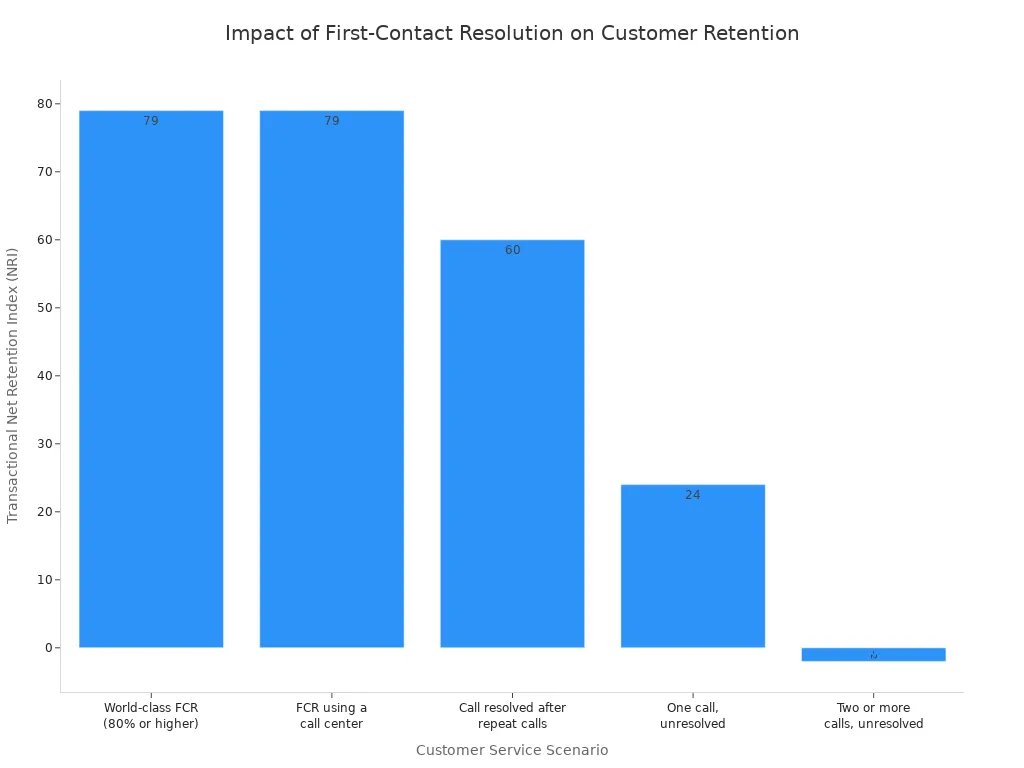
Setting these goals helps you find a customer service software that meets your specific needs.
Map Your Customer Communication Channels
Next, you should list every channel your customer uses to contact you. Your omnichannel support strategy must meet your customer where they are. This includes traditional and modern channels.
- Phone Calls
- Live Chat
- Social Media (Facebook, Instagram)
- Messaging Apps (WhatsApp)
Younger customers prefer newer channels. For example, 56% of Gen Z and 42% of Millennials use social platforms for customer service. Your new software must support these channels.
Evaluate Your Team's Workflow and Pain Points
Look at your team's daily work. What problems do they face? Disconnected systems often cause major issues for customer service management.
- Lost Context: Agents ask the same questions because they cannot see past customer interactions.
- Slow Responses: Teams get overwhelmed, leading to delays and unhappy customers.
- Repetitive Tasks: Agents waste time on manual work instead of solving complex problems.
Understanding these pain points is a key part of this guide. It helps you find customer service solutions that fix your real-world problems.
Determine Your Budget and Scalability Needs
Finally, you must consider your budget and future growth. Your budget should cover the software subscription and any setup fees. Think about your long-term needs. Will your team grow? Your chosen software must scale with your business. A platform like Sobot is designed to grow with you. It serves teams of all sizes across industries like retail, gaming, and finance. Planning your budget and scalability needs ensures your investment provides value for years to come.
Step 2: Identify Key Features in Customer Service Software

After you assess your needs, the next step is to identify the right features. The best customer service software gives your team the tools to succeed. This part of the buyer guide will walk you through the essential features. Knowing what features should a customer service software have helps you compare platforms effectively. Let's explore the key features for your customer service management.
Unified Customer View & Ticketing
Your agents need context to provide great service. A unified customer view is a critical feature. It brings all customer interactions into one place. This means your agent can see every email, chat, and phone call from a single customer on one screen. This complete history helps your team provide personalized support.
A unified view prevents customers from repeating themselves. When agents have a full history, they can anticipate customer needs and solve problems faster. This improves the overall service experience.
Sobot's Unified Workspace is a great example of this. It consolidates every interaction into a single dashboard. This gives your agents the full context they need for every customer. A strong ticketing system is the backbone of this process. The ticketing system organizes each customer request as a "ticket." This ensures no query gets lost. Good ticketing features allow you to track, manage, and resolve every customer issue efficiently. The ticketing system works with the unified view to streamline your support.
Intelligent Routing and Automation
Automation helps your team work smarter, not harder. Intelligent routing automatically sends customer inquiries to the right agent or department. This saves time for both your team and your customer. For example:
- E-commerce businesses can route high-value transaction questions to specialized agents.
- Financial services can route inquiries based on security needs or product type.
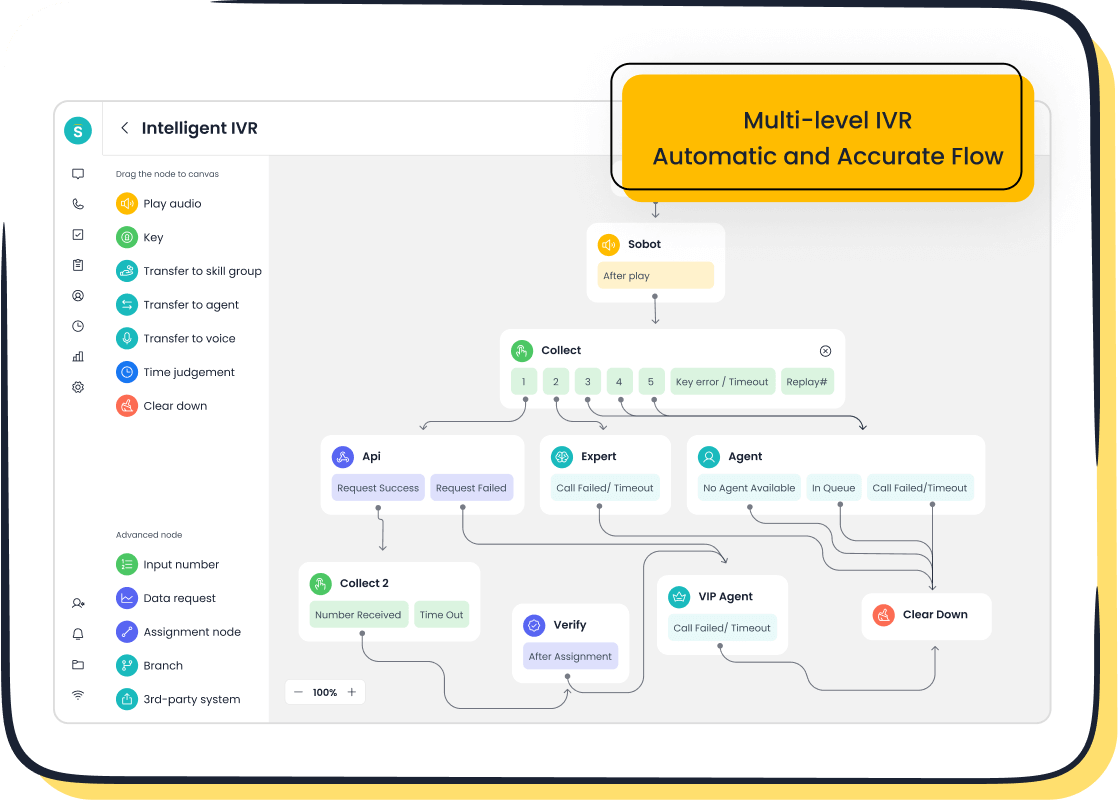
Automation tools also handle simple, repetitive tasks. This frees up your agents to focus on complex problems that require a human touch. Modern AI tools can resolve up to 80% of routine customer questions. Sobot’s AI-powered Chatbot and Intelligent IVR (Interactive Voice Response) are customer service solutions that work 24/7. They can answer common questions, track orders, or route calls without any human help. This improves your customer service management efficiency.
What Features Should a Customer Service Software Have?
When you evaluate different platforms, you need a checklist of essential features. This helps you make an informed decision. Here is a guide to what features should a customer service software have:
- Case Management: This is your ticketing system. It should allow you to track every customer issue from start to finish. This ensures accountability and quick resolution.
- Multi-Channel Support: The software must support all the channels your customers use, from email and phone to social media and WhatsApp.
- Self-Service Portal: A knowledge base or FAQ section lets customers find answers on their own. This empowers your customer and reduces your team's workload.
- Reporting and Analytics: You need data to measure performance. The software should provide clear reports on key metrics.
- AI-Powered Assistance: Advanced features like sentiment analysis help your agents understand a customer's emotional state. This allows for more empathetic and effective service.
Thinking about what features should a customer service software have helps you focus on tools that solve your specific problems. These customer service management tools are the foundation of a great support system.
Seamless Integrations with Existing Tools
Your customer service software should not exist in a silo. It must connect with the other tools you use every day. Seamless integration capabilities are vital for a complete view of your customer. Key software integrations include:
- CRM (Customer Relationship Management): Connecting to your CRM, like Salesforce, gives your agents access to a customer's full history and preferences.
- E-commerce Platforms: An integration with platforms like Shopify allows agents to see order details, shipping status, and purchase history directly within the ticketing system.
These key software integrations create a single source of truth for all customer data. Sobot offers powerful integration capabilities, connecting easily with popular platforms like Salesforce and Shopify. Additionally, Sobot is an official WhatsApp Business Solution Provider (BSP). This status ensures reliable and compliant communication on one of the world's most popular messaging apps, simplifying your omnichannel support strategy.
Reporting and Analytics for Performance
You cannot improve what you do not measure. Robust reporting and analytics features are essential for effective customer service management. Your software should help you track key performance indicators (KPIs) to understand how your team is doing.
This buyer guide suggests you focus on these essential reports:
| Metric | What It Measures | Why It's Important |
|---|---|---|
| Customer Satisfaction (CSAT) | Customer happiness with a specific interaction. | Directly shows the quality of your service. |
| First Contact Resolution (FCR) | The percentage of issues solved on the first try. | High FCR rates lead to happier customers and lower costs. |
| Average Handle Time (AHT) | The average time an agent spends on a ticket. | Helps you measure agent efficiency and plan staffing. |
Good reporting tools allow you to spot trends, identify customer pain points, and find coaching opportunities for your agents. Using data from your customer service software helps you make smart decisions to improve your entire support operation.
Self-Service Options like Chatbots
Many customers prefer to find answers on their own. In fact, 69% of consumers try to solve their issues independently before contacting a support agent. Providing excellent self-service capabilities is no longer optional. Self-service options like knowledge bases and chatbots empower your customers and reduce your agents' workload.
AI-powered chatbots can handle a high volume of routine questions instantly, 24/7. This frees your human agents to focus on complex or high-value interactions. This human-machine cooperation is a powerful strategy. For example, the global tech company OPPO used Sobot's chatbot to improve its service efficiency.
By implementing Sobot's chatbot and ticketing system, OPPO achieved an 83% chatbot resolution rate. This allowed their human agents to dedicate their time to more complex customer needs, boosting overall customer satisfaction.
This shows how effective self-service can be. When you ask what features should a customer service software have, make sure powerful self-service and chatbot features are on your list. A good ticketing system will also integrate with your self-service tools, allowing a customer to create a ticket if they cannot find an answer. This creates a seamless journey from self-service to agent support.
Step 3: Evaluate Vendors with This Buyer Guide
You have defined your needs and identified key features. Now it is time to choose a vendor. This final step in the buyer guide helps you compare your options and make a confident choice. Proper evaluation ensures your new customer service software will truly support your team and your customer. This guide will help you with your customer service management.
Use a Vendor Evaluation Checklist
A checklist helps you compare vendors fairly. It keeps your evaluation focused on what matters most for your business needs. This buyer guide suggests you look at these key areas:
- Scalability: Can the software grow with your business? A quality platform should support global operations. For example, Sobot offers a 99.99% uptime Service Level Agreement (SLA), ensuring reliable service as you expand.
- Security: How does the vendor protect your customer data? Look for certifications like SOC 2 or ISO 27001. These show a vendor's commitment to high security standards.
- Vendor Support: What is the quality of the vendor's own customer service? The support they provide you reflects their expertise. A vendor with excellent support will be a better partner.
Shortlist Vendors and Schedule Demos
After your initial research, create a shortlist of two or three vendors. Then, schedule a live demo with each one. A demo is your chance to see the software in action.
During the demo, ask the vendor to show you how the software handles your specific use cases. Do not settle for a generic presentation. Ask questions like, "Can you show me how to integrate this with our CRM?" or "How does the platform handle our most common customer questions?"
This approach helps you see if the customer service software can meet your team's real-world needs.
Involve Your Team in Free Trials
Your agents will use this software every day. Involving them in the decision is crucial for success. Most vendors offer a free trial. Let your team test the software and provide feedback.
Your agents can tell you if the software is easy to use and if it helps them do their job better. This hands-on experience provides valuable insights into the quality of the service and support tools. Listening to your team ensures you choose a solution they will actually use, which is key for effective customer service management.
Assess the Total Cost of Ownership (TCO)
The price tag is not the full story. You must assess the Total Cost of Ownership (TCO). This includes all costs over the software's lifetime. This buyer guide recommends you consider:
- Implementation Fees: Costs for setup and data migration.
- Training Costs: The time and resources needed to train your team.
- Integration Costs: Expenses for connecting the software to your other tools.
Understanding the TCO helps you avoid surprise expenses. It gives you a clear picture of your investment in your customer service management and ensures the solution fits your budget long-term.
This guide gives you a clear path for your customer experience management. You learned to assess your business needs, identify essential software features, and evaluate vendors. The right omnichannel customer service software is a strategic investment. A platform like Sobot improves the customer experience and boosts your service efficiency. This software directly helps your business grow by meeting your customer needs.
Embark on Your Contact Journey. Use this guide to make your selection and contact Sobot for a demo to see these features in action.
FAQ
What is the main benefit of omnichannel software?
Omnichannel software unifies all your customer conversations into one view. This gives your agents full context. It helps you provide a consistent and personalized experience across every channel, from email to social media.
How long does it take to implement a new system?
Implementation time varies. A cloud-based solution like Sobot allows for fast deployment. Your team can be up and running quickly. The process includes setup, data migration, and training to meet your business goals.
Can omnichannel software improve team productivity?
Yes. It automates repetitive tasks and provides powerful self-service options. The software's ticketing features organize agent workloads. This frees up your team to focus on solving complex customer problems, which boosts overall efficiency.
How do I measure the success of my new software?
You can track key performance indicators (KPIs). Measure metrics like Customer Satisfaction (CSAT) and First Contact Resolution (FCR). Good software provides analytics to help you monitor these goals and see your return on investment.
See Also
Your Comprehensive Guide to Modern Omnichannel Call Center Software Solutions
Mastering Omnichannel: A 10-Step Blueprint for Contact Center Implementation
Elevate Your Ecommerce: Best Live Chat Software Picks for 2024
Comparing the Top 10 Live Chat Tools: Shopify and Its Rivals
Unlocking Shopify Success: Explore 12 Essential Live Chat Applications

